Leaderboard




Popular Content
Showing content with the highest reputation on 02/12/24 in all areas
-
I found that mostly nothing will change their perception of their world... not if it hit them in the face with a freight train... lol4 points
-
Thanks for the offer @soderlund91, I should have a version out in a day or two... Just trying to find the time4 points
-
I fully agree to two of the proposed extensions: - add an option to search only in active (or user selected) libraries - start searching (optionally) only when pressing enter in the search button For people with several big libraries, the search is mostly unusable at the moment. I have >20.000 movies and >120.000 albums with several million songs and the search does only work if I completely paste the search term from the clipboard and even then takes several minutes.3 points
-
I really wanted to like Jellyfin, but the client support is horrible and the SyncPlay feature is extremely broken. Jellyfin developers have said over and over again that the original developer of SyncPlay just disappeared without documenting any of it- and nobody wants to take ownership of the code. There are no plans over at Jellyfin to fix it and if it doesn't work then you're just SOL. I love what Jellyfin stands for, but they refuse to take money for anything but infrastructure costs- which means it's basically a project run by volunteers in their free time. When developers have asked about the direction of Jellyfin and how they can help, they basically said that they don't have any roadmap or vision, and that they're all just working to make Jellyfin better. It just feels very disorganized without a clear vision. SwiftFin (tvOS) app is a prime example. Most of my users are not technical. They have no idea that they gotta search "SwiftFin" for the Jellyfin app on tvOS. I'm not sure if you have checked the Jellyfin release notes, but progress is EXTREMELY slow. Sure, they do good work such as better HDR tonemapping, etc but at an incredibly slow pace. I and many of the people I know would rather pay developers to make a better product. Plex sold out to investors and has been going downhill for a long time now, and is only going to get worse. Most of my rant probably deserves it's own thread- but the point I am trying to get here is Jellyfin is in a rough spot right now and Plex is going downhill fast. I recently finally caved and said enough is enough, I'll give Emby a try. It's honestly the best investment that I have made in a long time. The ONLY thing missing for me and my users is a Watch Together type feature. Emby developers, if you are listening, I and many others would PAY to have this designed and developed.2 points
-
I'm sure Emby devs have usage statistics and take it into consideration when setting up priorities, but I, personally, am always surprised by the amount of attention Live TV gets. No one that I know watches any live television, and it has been the case for the last 10+ years. The only exceptions are sports fans, but even they prefer official streaming services of Formula 1, NBA, etc. Of course, it can be a regional/generational thing, but it all is very strange to me nevertheless2 points
-
I think you have some very good suggestions and overall feedback, but I disagree with item 1 above. Top songs that are played most frequently should be listed prior to albums, as is the case in Tidal, Roon, YouTube Music and others. I understand that there are a number of album-centric users, but may of us are much more playlist-centric or and have many artists in our collection with only a handful of songs, or albums where we want quick access to only a few songs from an album without clicking all the way through to each individual album. I would argue that there are better ways to sort and present the tracks that are in the artist view, but I absolutely believe the hierarchy of top tracks followed by albums is the best layout for both artists and album artists and should not be changed. That said, I would be happy for more configurable options but I would rather see that work put into other areas first.2 points
-
I've updated my machine again, I'll get this working shortly.2 points
-
@wordlover Yes, I totally agree that Albums should be above Songs, especially in the Album Artist page view. The Album Artist view is likely one of the major pages used by many when browsing a large music library. One observation with the Emby music pages is that the Album Artist / Artist / Composer pages ALL give the exact same view, so all they are is essentially a top level filter, rather than a selection to view you music library in various different ways. If I select an Album Artist (who happens to also be tagged in metadata as a Composer) then I get the exact same page for all three options. Perhaps one way for Emby to give more flexibility for different user preferences would be to have a different order for the different pages? E.g: Album Artist pages - Albums above Songs Artist pages - Songs above Albums Composer pages - something to suit Classical? (not my area of expertise) The most flexible approach would be to allow for a user customisable order across all apps. If you just use the web app, you can swap Songs and Albums yourself with customised CSS, as follows: div.details-additionalContent { display: flex; flex-direction: column; } div.artistSongsSection { order: 2; } div.artistAlbumsSection { order: 1; } div.moreFromArtistSection { order: 3; } div.appearsOnListsSection { order: 4; } div.peopleItems { order: 5; } div.similarSection { order: 6; } div.aboutSection { order: 7; } I have also just posted more detail about this in the Web App CSS forum: Comments and feedback most welcome!2 points
-
Watched a mix of content since installing the beta @ebr sent a link to this morning and all seems OK so far. - Mix of MP4, MKV, HEVC content (including files that I saw a problems on.) - Mix of frame rates - 24 and 30 FPS I had a movie I started watching the other day that had some issues but I had not watched it since I ripped it. I am playing it right now and it has no issues at all.2 points
-
I'd really like to have 2 Factor Authentication added to the login screen. It's just this (optional) extra layer of security to help secure the server (which, especially if people use camera uploads) contains pretty private data. There are for every type of programming language quite a few libraries available, so implementation on a server shouldn't be too hard to realise1 point
-
Ok so my request is to be able to search each library separate as it stands when you search it searches everything, and if like me you have 30k music tracks 10k books/comics 10k episodes and 10k+ movies, searching is slow so is it possible to have a search section for each library individually1 point
-
Love the new radiance blue theme Can we get the option to set the default user theme globally in the admin dashboard?1 point
-
1. In individual Artist/Album Artist screens below name/image/bio, display Albums before Songs (i.e. move Albums list up); list of all Albums is almost always what users want to see and browse through, not individual songs. 2. At top of "Edit Metadata" popup screen for individual Albums, display source directory in the same way it's shown in "Edit Metadata" popup for individual Songs.1 point
-
Can we get the option to lock external IDs, just like you can lock other items under metadata? There are times when the show you are adding isn't in your main metadata provider, but it is in the 2nd or 3rd option. However, Emby overrides the lower options to find the most similar one in your main provider. It would be great to add the ID from a 2nd tier provider and then lock it so Emby won't search another provider for that particular title.1 point
-
I think I have made a new friend.
 1 point
 -
Thanks, I've downloaded it and will do that. I had tried to join them with VLC, and it didn't work very well. Appreciate the advice!1 point
-
@Lukefound my issue as having multiple audio books (music) and music libraries with different setting does not work properly as configs for one affect all. So adjusting all libraries corrected my issue with no Discogs calls. But not sure why some Discogs Artist images work and others do not, but the majority do now.1 point
-
Klingt hart, aber laufen lassen. Falls du mehrere Verzeichnisse in einer Bibliothek hast, wird der Status noch mehrmals "hängen". Falls du die "Videovorschau-Miniaturansichten" aktiviert hast, stelle sie auf "Geplante Aufgabe". Die Vorschau für einen Film kann auch eine Minute oder länger dauern, das summiert sich und hält den Scan auf. Der Task lief bei mir über viele Tage jeweils 4 h (Geplante Aufgaben). Zusätzlich kannst du noch in der Bibliothek unter "Erweitert" "Bilder vorab herunterladen" deaktivieren, falls es an ist. Da deine Medienquelle anscheinend extern ist, würde ich noch die Option "Kopie der Bilder im Metadaten-Verzeichnis zwischenspeichern" wählen, damit beim Surfen nicht ständig die Platte rotiert/mit tausenden 30-150 KB-Dateien belastet wird. Eine SSD für die Metadaten ist perfekt. Ich hoffe es läuft bei dir jetzt etwas runder, aber das waren so die Dinge, die bei mir hakten.1 point
-
Thanks ) waiting for updates!! soon I will support emby and buy a lifetime key. problems with payment1 point
-
I am sorry. I haven’t play the video before sending the log file. I’ll send you the new one.1 point
-
Thank You , That answers the original question and works just fine, very helpful - thank you var mAlbum = libraryManager.GetItemById(info.Id); string AlbumMediaFolder = mAlbum.GetMediaContainingFolderPath(libraryOptions); . 12.Feb.2024 - 05.06.24 [NewDetection] ---------------------------------------------- 12.Feb.2024 - 05.06.24 [info.Name(Album)] NOW Glam Pop 70s 12.Feb.2024 - 05.06.24 [info.Id(TrackID)] 3214185 12.Feb.2024 - 05.06.24 [AlbumMediaFolder] \\Music\Now Music\VA - NOW Glam Pop 70s (4CD) (2021) metadata provider - it works just fine there too. public Task<MetadataResult<MusicAlbum>> GetMetadata(ItemInfo info, LibraryOptions libraryOptions, IDirectoryService directoryService, CancellationToken cancellationToken) { var thisAlbum = libraryManager.GetItemById(info.Id); string AlbumMediaFolder = thisAlbum.GetMediaContainingFolderPath(libraryOptions); var result = new MetadataResult<MusicAlbum>(); result.HasMetadata = false; result.Item = new MusicAlbum(); // rest of code // // if metadata or images found set the HasMetadata to true return Task.FromResult(result); } Thank You1 point
-
I tried awhile ago: it was clowad immediately with no updates on it.1 point
-
No I can't get any discogs queries at all but will look at building a new portable later to see if I get different results as both image should be the same on returned images but are not as beta does not show the discogs image for Artist. per images above.1 point
-
Aha! Works - thanks. View settings definitely needs work, since DATE is not an option. to display below each episode, and the truncated titles aren't very user friendly.1 point
-
Hi, there is no podcast directory that you need to mess with. You simply install the Podcasts plugin, then use the plugin configuration to point it to your rss feeds. And yes, that appears to be valid podcast rss.1 point
-
HI, we'll take a look at it. Thanks for reporting.1 point
-
OK if you are converting then you don't need original, right?1 point
-
Спасибо за ответ! Буду надеяться что у Вас получится обновить клиент для web OS 3.51 point
-
Ah, gotcha. I always have "all" selected and when there is an instant end of retrieval, with no images found, makes it seem like no request was actually sent. Still need Discogs to actually download images, and adding AllMusic would be very useful.1 point
-
When you click search, isn’t there a dropdown allowing you to pick the source? That’s all of them right there.1 point
-
Hi, the browser controls the location that the browse button opens to.1 point
-
But the thing Channels DVR just works were emby does not. Tv guide has been broken since I can remember. It’s a lottery will the channel start or not, picture quality is not as good as Channels DVR. If people don’t believe me I can make a recording on my phone . Everyone is different I have been using it for over 2 days and it’s a joy to use it as everything works so far. I have to test it thoroughly to see are there issues so far did about 40 recordings no issue live tv is joy to use again. Edit: I have tried both the stable and beta Android TV and Android Client and both have same issue some live tv channels work some don't. Whereas in Channels DVR I haven't experienced any of that. Windows Theater the picture is really good and not once has it failed to tune to a channel it's slow but it tunes. The interface of Channels could be better but once you get used to it I have no complaints.1 point
-
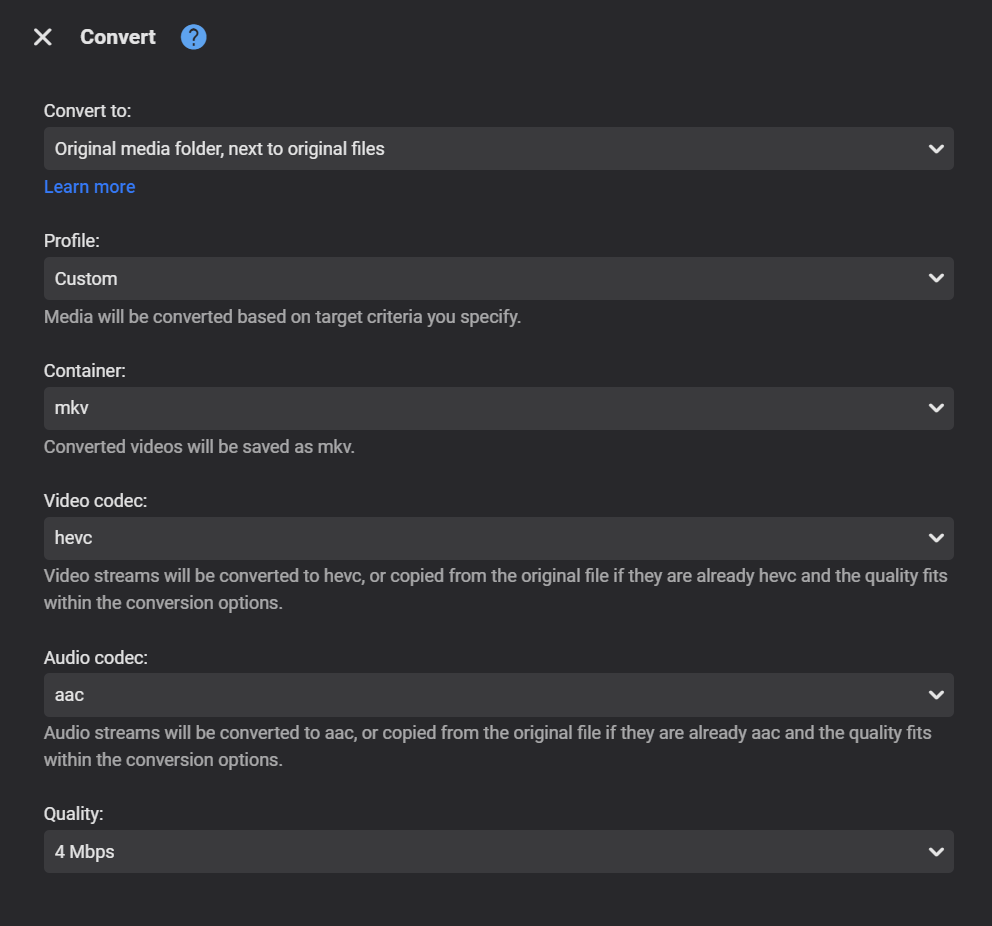
Same here, 4.8.1 looks normal. Is that web app? Could it be browser or browser cache? I don't think there is an "Original" profile.1 point
-
No change here. What version of server are you running?
 1 point
 -
Pretty sure this has been brought up before as this is a discog api issue as you can see there are no images even though their web site shows them. api.discogs.com/artists/299482 api.discogs.com/artists/775225 Where @Luke should probably disable this for Artist images.1 point
-
But the Devs have already told you it is a Roku issue but if you want Remux transcoding to alway happen for a Direct play issue you will need to manually click to correct playback or change playback quality to for transcoding. As the Roku does not like your specific media. Always easier for users to fix their improperly provided media in my opinion. In the end Roku is a weak platform that if it does not like your media it will not work the way you want it to. But sounds like you need to open a ticket with Roku to have them fix their multi default language flag detection.1 point
-
My mistake. The scan was at 97%. I didn't wait for it to finish. It's ok now.1 point
-
I have the newest Fire Stick 4K Max. Yes, the problem still exists.1 point
-
Every once in a while you find a new friend like that....... Some people just can't ignore things they don't like or changes to their perception of their world.....1 point
-
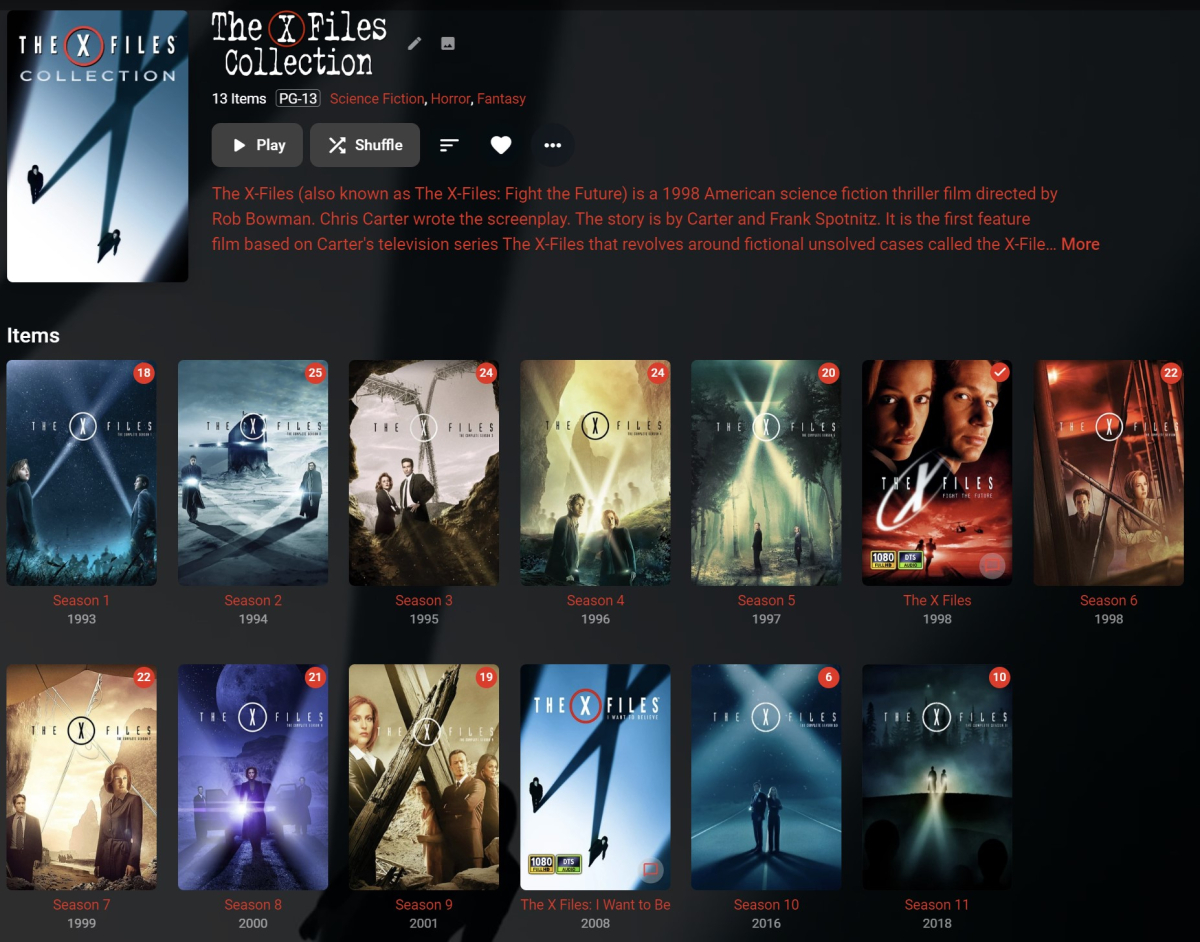
Ich benutze in solchen Fällen Collections. Tipp dazu, nicht die Serie zur Collection hinzufügen, sondern die Staffeln. Dann hat man eine nette Reihenfolge wie diese hier:
 1 point
 -
In my case, I deleted the tags in the "edit metadata" option and deleted them easily enough. I was just pointing out that in my backups (/metadata/tags), the tags are still in there even though I deleted them and Emby no longer shows them... In @Painkiller8818case, I think the issue is that the tags have been removed from the files, and now they can't be removed from the Emby interface anymore. I assume "rescan library files" has been tried in their case? Edit library, three dots, rescan? That should tell Emby to look for changed files... And a metadata refresh? Thanks...1 point
-
Though never ever loudly enough to get a reply from Luke1 point
-
Hi, there's already an open request for this or something functionally equivalent. Please join in and contribute to the existing discussion at:1 point
-
Let keep testing here:1 point
-
Even a basic Raspberry Pi or equivalent will be a lot more secure than running it directly on the router. As for the IPv4 vs IPv6, easiest would be to configure the Wireguard Server to listen on both the IPv4 & IPv6 addresses and continue using IPv4 for the actual device address.1 point
-
Commenting here for easier tracking. I'm also having the same issue with MPV. Using the native player works but then none of my 4K movies play.1 point
-
Hi, we are looking into this. Thanks.1 point
-
Could we do away with page numbers when viewing the full list of movies and TV series and instead use something like an infinity scroll where more keep loading the further you scroll down? It would be good to keep the letters tab on the right hand side so a user can easily jump to an area they are looking for. I feel like this would make it seem like a more seamless experience1 point
-
Just wanted to chime in here. This is my number 1 frustration with the app right now. In general it works great. But, I can't get it to reconnect after a network change. My scenario typically goes like this: 1. Get in the car and pick music to listen to (still connected to wifi) 2. Drive away and loose wifi 3. Phone switches to cellular data and emby app stops playing (it will never reconnect in my experience) 4. Close emby app, reopen, and select music while trying not to die1 point
-
Hey @@Luke, have you guys had anymore development into improving the re-connection time of the android (and I'd assume ios) app when changing networks? A scenario I run into constantly: Im connected to wifi, but external to my home network. The android app is open and connected to my server via the wan address, not actively playing but maybe looking at the details page of some bit of media or the server dash (whether the app is in the background or foreground doesn't seem to matter). I then lose wifi connection and automatically switch to mobile data. (I can also reconnect to the same wifi after the disconnect, the following results are the same) From there the next response from the server (changing pages or trying to start playback for example) takes a minimum of 30sec. I assume this is the app first trying the lan address, waiting 30sec for it to timeout, then trying the wan address. When I know the network has changed it is almost always faster to close the app and start fresh. If possible could this maybe be improved by trying both the lan and wan addresses simultaneously when a network change has been detected, using whichever one responds first, then if the lan address does endup responding after the wan address have it take priority? Or possibly a way to have the apps use the external address exclusively (server-side setting). With my particular setup, the wan address always reaches my server whether the client is lan/wan. Using/waiting for the lan address is unnecessary. (in my case at least) Just trying to throw out an idea or two. It's really annoying to deal with when you are regularly moving in/out of wifi range and frequently using the emby app while on wan access.1 point