
Leaderboard




Popular Content
Showing content with the highest reputation on 01/17/24 in all areas
-
Hi, in light of the removed functionality to show missing episodes in the episode list in 4.8, I would like to request a feature that helps to prevent the user from accidentally skipping over missing episodes. Example: I have a series where episode 5 is missing and I just watched episode 4. At the moment, when playing the next episode, emby will silently skip over episode 5 and play episode 6 instead. I would like to be warned and asked to continue (with input required) when that happens. The warning should be shown not only if the next episode is started automatically after the last one but also if I start playing it manually, later. I think this would be very helpful to avoid confusion and it would probably be sufficient to compare the number of the current episode to the last played one and if it is not n_last + 1, ask the user to confirm.6 points
-
If people are so concerned about the length of time that a new Stable release is made available, why not install the latest beta and help test it and have access to the new features. I have run either dev or beta server for the last 11 years. Yes there is the odd occasion where things break, but that's just part of being in the beta team. If you don't want to use the beta server for your daily use, then at least set up a test environment and install the beta to try and see if there are any issues you can find that others can't. This will make the release more "stable" when available, rather than having to wait for a fix. Stop whinging, and either wait for the release, or get off your backsides and help test the new changes. Thanks.3 points
-
almost 2 of those 11 years have been the last beta2 points
-
Okay yall can ignore this thread figured I it out... one of my mesh wifi hubs were acting up (never had this issue before and ive had them for a couple of years) figured out all the devices that were having issues were connected to the same wifi hub. Rebooted that hub and all is working again. With wifi 7 around the corner maybe time to look into an upgrade lol.2 points
-
@kjhedgesthe virtualTV plugin sends a playlist to the TV. The Emby client uses that playlist to fetch and play media from the Emby libraries. Luke plays the media through the standard Emby channels. @Lukeis very busy and we will have to wait till he has free bandwidth to complete the TV tuner platform. He has agreed to do the work, but he is only one person. @kjhedgesYour ideas and suggestions have been very helpful and have improved PseudoTV. Thanks, Vic2 points
-
Just FYI the Android TV app has this already but I agree all the other apps should as well.2 points
-
Same thing, picture freezes with audio playing or the channel will just freeze solid after a couple of hours and I will need to back out of the channel and restart it again.2 points
-
Once again, very nice work. The only thing lacking now, is the play from current time schedule rather than start of media. @Lukethere is alot of interest in this and it would be a shame if this wasnt implimented. It is more a playlist creator than a TV Tuner until this part is done. @VicMooreIm not sure how different both PseudoTV and VirtualTV are in the code side, but @pünktchenhas this implemented in their Plugin2 points
-
Is this doable by some sort of plugin ? Maybe add your imdb credentials and then be able to rate movies here and have them on imdb as well (not talking about sorting here, just rating stuff)1 point
-
It would be a great feature to allow an option for how many days back for the tv guide to go for providers that offer catchup services. You can then go back in he guide and play whatever you want like a PVR always.1 point
-
The default sort order is set to 'Folders'. I would prefer to have all libraries I select to default to release date. I know I can manually set it, but I have to do that for every folder in the library. I would like to see the ability to have it automatically set the default sort order for all new folders I create.1 point
-
I recently found a need to look up additional information on a director. I was hoping to look at the director's profile and see not only the movies I had in my collection but also a list of other movies that they have directed. This would be displayed below the library's current movies. ex: My movies: Movie 1, Movie 2 Other movies by this person: Movie 3, Movie4 ================ This could help one expand their library and to discover a missing gem.1 point
-
Also, It would be cool if we have various m3u lists and have the option to choose/assign each m3u list for each user.. Example. In user settings we can choose which library to give them for VOD so this shouldnt be hard enough to do it for live tv too no? USER 1 - Playlist 1 - Playlist 2 - Playlist 3 USER 2 - Playlist 3 USER 3 - Playlist 1 - Playlist 3 Etc etc.... *** Delete this message from another topic I opened because I posted it by accident there1 point
-
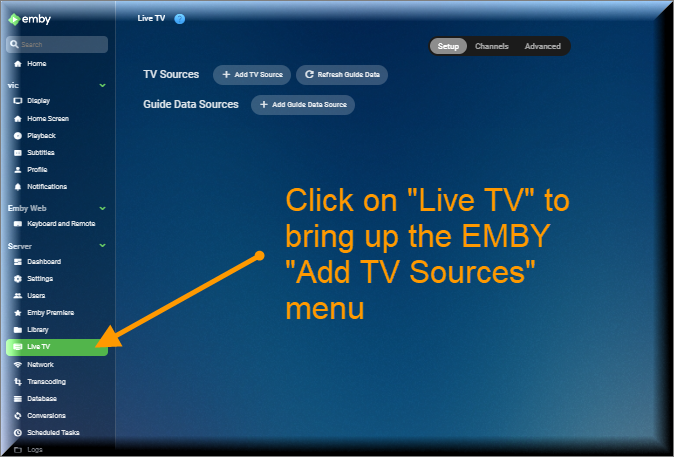
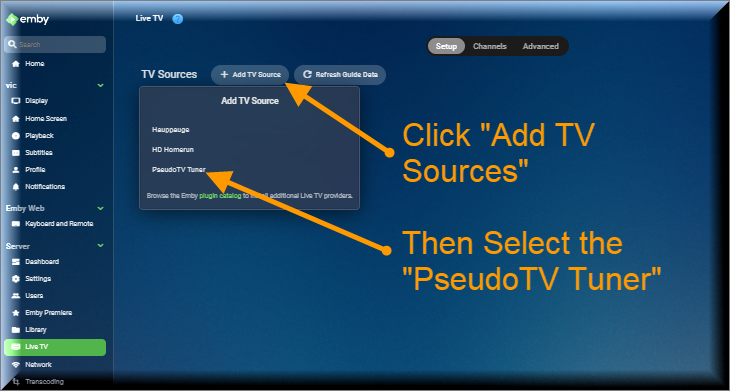
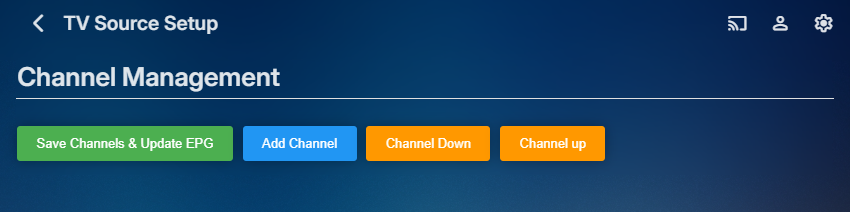
The Pseudo TV plugin is composed of two parts. The first part is based on a TV Tuner Platform created by @Luke. He called the plugin "VirtualTvExample." The second part is a Javascript program that provides a simple GUI for creating and adding channels to the TV Tuner. The code for both parts is attached below. I created the javascript code and several C# additions to the tuner. @TZTZorocomposed the CSS code. PseudoTV is open source and free for everyone to use. PseudoTv is tested on Chrome and Edge. Other browsers may work. I just don't know. To install PseudoTV, copy the plugin dll below to the EMBY plugin directory and RESTART EMBY. Follow the instructions below to bring up PseudoTV. Next add the TV Source for PseudoTV. If you have an Old PseudoTV Tuner installed, you must delete the old tuner before installing a new one. Select the PseudoTV Tuner to bring up the Channel Management menu. Use this menu to Add channels to the Emby EPG (Electronic Programming Guide). Click the Add Channel button to add a new channel. The two videos below, explain basic channel building. Querry-1.m4v The next video is also about channel building, but instead of using an Emby query, media is selected directly from the Emby libraries. File-1.m4v The remaining videos introduce the PseudoTV tool. The first is called the Library Explorer. With it you can navigate across your Emby libraries and view their contents. Libraryexplorer-1.m4v This video explains the Metadata Editor. Metadataeditor-1.m4v Another useful tool is the Playlist Editor. Playlisteditor1-1.m4v The description of the Playlist Editor is continued below. Playlisteditor2-1.m4v The latest plugin (dll) and the source code (zip file) are attached below: PseudoTV.dll PseudoTV.zip
 1 point
 -
A new Build of the WMC UI is available: https://github.com/EmbySupport/Emby.WMC.UI/releases/tag/0.110.0. Changelog:0.120.0 Maintenance only 0.109.0 New "Snow" Screensaver Needs to be selected under Settings > Display Screensaver Timeout is temporarily set to 30s 0.108.0 Extend Android beta expiration to 30 days1 point
-
Thank you!1 point
-
Bro there's obviously an issue with live tv so why not just create a way to export all of emby to other sources until it gets resolved. Example is export emby so tivimate can play live tv from a link that emby outputs and same as the guide have emby export it. You guys really don't seem to care that live tv is clearly screwed up on emby clearly... We should not be stuck with looking for ways to resolve live tv issues after we paid for it that is your job. At the least make emby export everything so we can watch it in something that does work. Not trying to be rude but you ignore live tv issues and seems like you could care less if it works or not. All you ever say is can i see an example I would love to watch emby on my tivimate app. Do you even know how to resolve it? if not just say so, at least we will know! If you have no idea how to make live tv load channels faster and play without having to back out and restart it all the time can you let us watch this on tivimate? do you know how to do this?1 point
-
@softworkzDo you have a status of the Remote Control issues?1 point
-
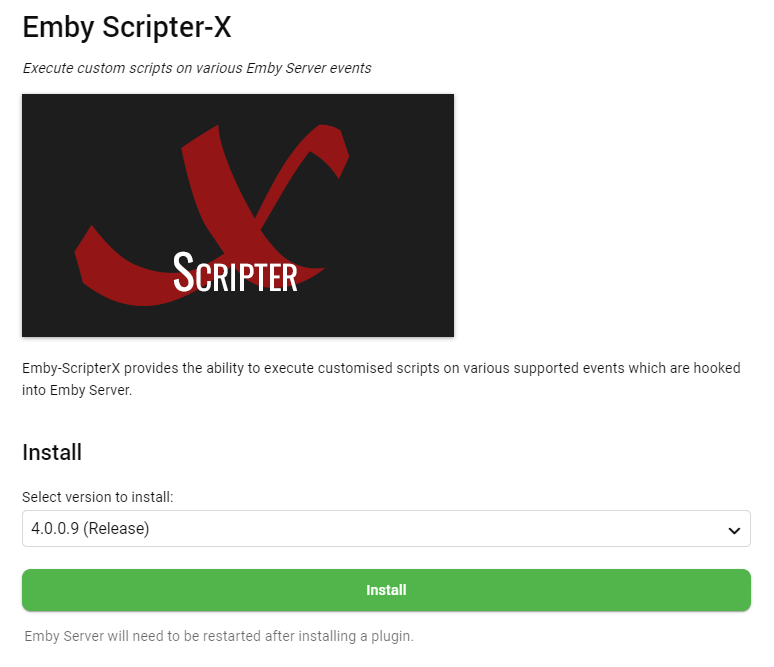
I've just confirmed on my non-beta server that the latest offered now is 4.0.0.9 - but that means that servers that have automatically updated to 5.0.0.3 may need to manually downgrade to 4.0.0.9 - but that will resolve the issue. Sorry again guys, it's just because there is significant changes and improvements to the Emby Core that required significant core modifications (which will only work in the Beta server, not the Release server), which is why any 5.* version of Scripter-X won't work with Release server anymore. If you have any issues please let me know and I'll get them sorted
 1 point
 -
Hi guys, My apologies, this was my fault. When I added the newest version 5.0.0.3 to the Catalog, I set it as 'release' rather than 'beta' - which I have now fixed, so you should be right to downgrade back to the latest release version - v4.0.0.8 - and it shouldn't auto update again Sorry about that guys!1 point
-
Hi Luke, Ok found. It. on NAS DSM. Thanks!1 point
-
1 point
-
@softworkzand i discussed on github. he has the images of the WMC implementation1 point
-
Thanks. I had scrolled through that thread but didn't dive into the links. The Jellyfin issue on GitHub there are examples of folks calling what I am seeing "wrapping", saying either either wraps or is blank so this seems to be the same issue. I found the answer on how Plex fixed this. Basically they strip out the meta data for the HDR profile your TV does not support. https://forums.plex.tv/t/files-with-both-hdr10-dovi-profile-8-1-metadata-show-blank-black-screen/831617/126 It seems that would be a viable solution for Emby server as well because it seems pretty clear Amazon isn't going to fix it.1 point
-
Hi. The TV app generally avoids clickable headers because that will literally double the number of clicks required to traverse the screen vertically. You can go to your movies library and filter quickly by favorites, though. There is a dedicated favorite filter button on that screen.1 point
-
Can you try without . in your season folders For.All.Mankind/season.1/For.All.Mankind.S01E08.720p.x265-ZMNT.mkv1 point
-
d'oh!!! Yes of course I had my email there not my username. Changed it to username and bam it works. Thanks man!!1 point
-
What brought you to Emby? Did you leave Plex or Jellyfin or was Emby your first media server? My first media server was SlimServer (now Logitech Media Server) for music. Not looking through hundreds of disks for a song and 7-10 hour playlists for parties (where no one could mess with the music) led me to want the same for other media. So plex as it was really good at the time. I left plex. What really broke that relationship? Metadata. Because one of their execs had a problem and then a very public peeing contest that really was childish with TheTVDB. So they tried to work around using them. In doing that, my very large Looney Tunes collection, for which the only keeper of good meta is TheTVDB, was forever misidentified. And fixing required a new workaround every release because they tried to block using Thetvdb meta. The end came when they went to a super closed "just push the button and it works" meta solution - that again broke my ability to get the correct meta. So the last time was the last time and I started looking for another media server. Tried Jellyfin - good but, in the end not what I was looking for. Then emby - whose name I saw a lot on plex forums. What about Emby do you like or dislike? Like? Everything and everything. Meta is easy to work with. It plays everything, has apps for everything, allows custom meta via NFO files (fantastic for personal media), and it just works. The only real problem I had was a hardware issue with playback - and I got the information I needed to get it fixed from Emby forums when nobody else at other server providors knew what the real problem was. That problem fixed, it all just works. From the Google TV app, to the Android app, to Roku, remote streaming - everything. Have you tried the alternatives out there and if so what is your feedback compared to Emby? Plex is good but reminds me of the Dilbert cartoon where they try to sell a computer with one button - that they press before it leaves the factory. Install and use it as is and that's it.... Jellyfin - good project but I have a severe anxiety disorder and the ADHD symptoms that go with it and it took a few days to install and get running. Nothing wrong there, but I was concerned that if things went wrong I would never get them fixed. I also have cognition problems and found their support system impossible to use. What OS are you running your server on? What clients do you use on a daily basis? Its an Intel i5 6500T quad core powered "refurbished" HP EliteDesk with 32 gig memory, Intel 530 integrated video, running Ubuntu 22.04 with a couple big drives. I use the Android app, Google TV app, Roku app, and access via browser. Any other general comments about Emby and your experience are always welcomed. Love Emby. It's easily configurable, simple to use, lets you make it look like you want it to. It's also hugely reliable and gives you lots of info about whats going on. It runs perfectly and has never crashed. It was simple to migrate from plex (actually ran both in parallel until I had Emby set up) and when I upgraded hardware it was even easier, using the built in backups and help from the devs on the forums I also very much appreciate the help I have been given in the forums by the users, staff, and devs. I have pretty severe cognition problems at times that make communicating and understanding difficult and everyone has always taken time and showed patience when fixing any issues I have.1 point
-
@grimevilThank you! Response is in your inbox. Much appreciated!1 point
-
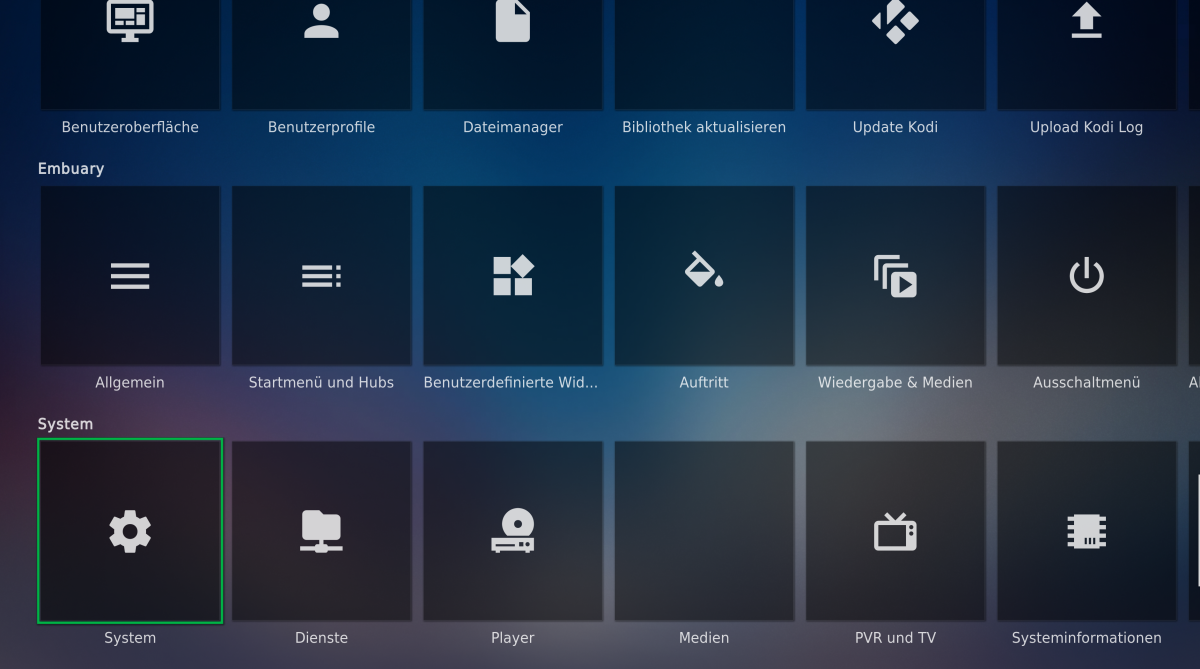
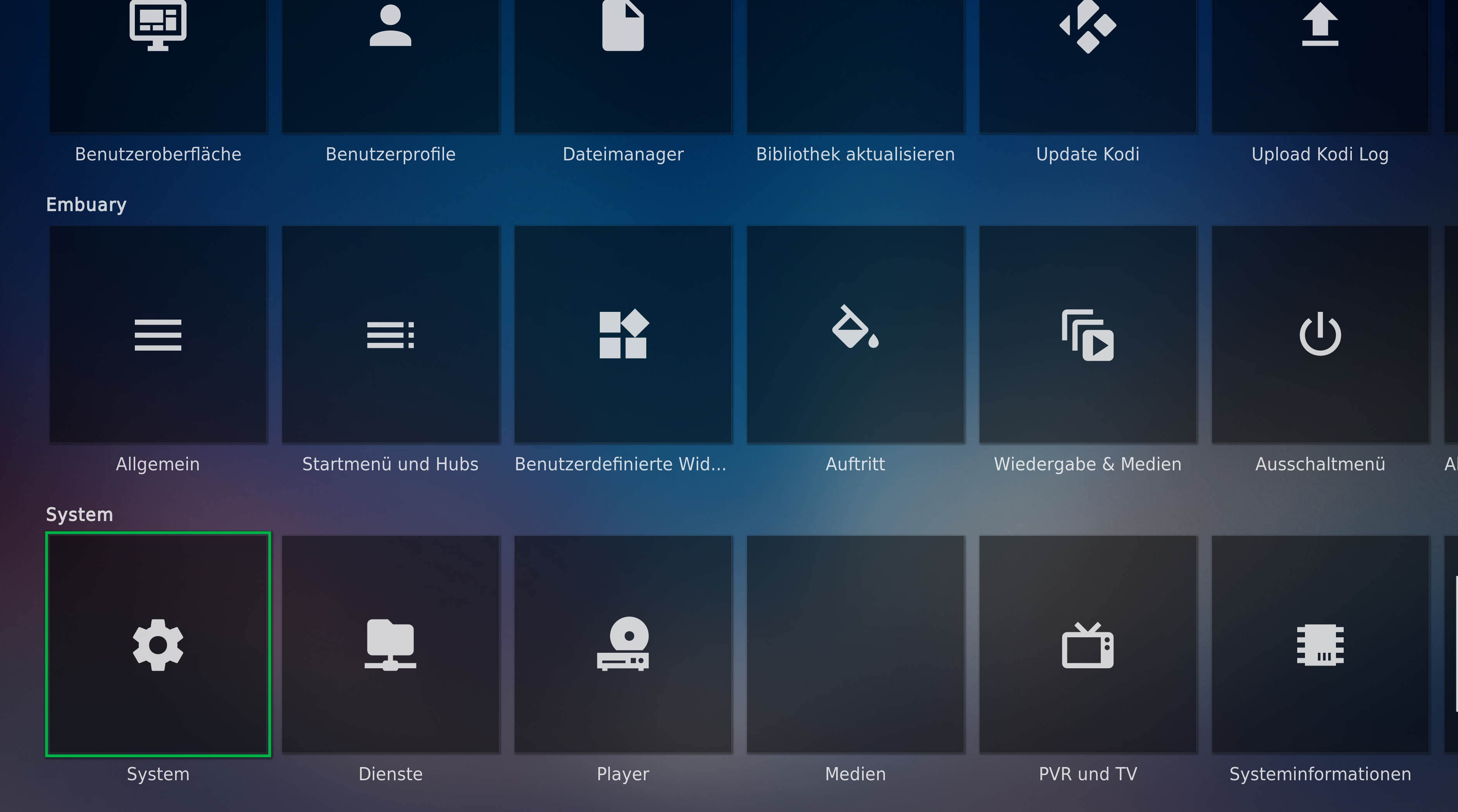
@all I had reported problems under Windows: The settings menu there had completely disappeared. I have made quite a bit of progress. With help and a lot of reading, I found the culprit. In the Windows folder addons\skin.embuary-matrix\fonts contains the file materialdesignicons-webfont.ttf which obviously no longer draws the old icons, but only hieroglyphs. Then at some point I ended up with version: v2.8.94 from 2018: https://github.com/Templarian/MaterialDesign-Webfont/commits/master?after=57b567a448bd579892174cd47c47f9e187ea56c6+34&branch=master&path[]=fonts&qualified_name=refs%2Fheads%2Fmaster#:~:text=Sep 21%2C 2018-,v2.8.94,-Templarian If you now replace this file with the existing one, you will get almost all the icons back: So for all Windows users: simply copy the file in the attachment into the folder mentioned above. Sollte noch jemand eine Idee haben wie ich die anderen Symbole wieder herstellen kann, gern her damit. Since all Android/Libre users have reported that their icons still work, I would of course be pleased if you could perhaps provide me with the file, maybe your file is a different one. There is also a licence file in the folder, maybe this one too. Thank you all! Thank you and best regards Seger materialdesignicons-webfont.ttf
 1 point
 -
Logging details from the active Emby sessions can help track server load, identify stability issues and let you better manage your server. The following instructions can help set up session logging and display in a Grafana dashboard. https://github.com/faush01/EmbySessionLogging Short Description: The logging script (python) logs the active sessions inclusing transcoding info once every 60 seconds into a SQlite file DB that can then be used as a data source in a Grafana Dashboard.1 point
-
This is an example, in our kitchen we have a flat screen tv with a firestick running tivimate that always is on 24 hours a day and on that tv in the kitchen the only channel we watch is cnn. That cnn channel has been playing without any issue for over 2 weeks straight, on emby we would need to restart the channel every couple hours.1 point
-
@TZTZoroI have tried all of my magic, and I still cannot get the "Test the Rules" button to display the underlying table correctly. What CSS should I use to make the image occupy only the space that it needs? The latest code is below. I added td img { max-width: 20em; } This had no effect. I assume something is overriding this directive, but it's avoiding my detection. Vic Success - I figured it out !!!!!1 point
-
Any updates on this ? This will be a killer feature. Alongside the ability to have a "Watchlist" or something, like IMDB does, so we can save titles that we want to watch in the future.1 point
-
Great stuff, you're a legend. Thanks v much. I'll be looking out for the next update!1 point
-
embyserver3.txtSo I've been trying to get this error to happen again, and it finally did. It occurred around the 04:27:30 mark. As you can see on this log file: 2024-01-16 04:27:34.770 Info SessionManager: Playback stopped reported by app Emby for Windows 1.1.530.0 playing Real Crime. Stopped at 789811 ms This episode was 43 minutes long, and stopped at around the 13-minute mark, only to continue playing the next episode. I of course didn't give the app any indications to do this, so it shouldn't have happened.1 point
-
While it's not the very latest, the app on the TV finally updated on its own to a newer one that includes some of the features that have been missing. It's a 1.6.x version that's on there now. The USB install works but hitting that 30 days at the most inconvenient time (in bed ready to watch a movie/show) sucks lol.1 point
-
we had the same comments at the end of 4.7. history suggests not1 point
-
I've worked in IT for over 35 years. Getting it right is far more important than release dates. I've seen really bad releases. One major filesystem/ networking company, No I won't say who I don't want their lawyers after me, released a patch that disabled networking security. If you got the password wrong on login you still got in. It was out an hour before they pulled it and sent a new "critical" update out. Or another manufacturer that sent an update out that expired legitimate licenses after a few weeks. So I'd rather wait for the new release to be "right" and not hassle the developers. They want it right too. Don't get stressed, enjoy life, you only have one.1 point
-
We’re working hard on it. It’s getting closer.1 point
-
It's almost like Luke the team have more important things to do than calm down whining little brats. I'd like to see people try this on the Plex forums where devs don't comment and problem reports are closed due to inactivity without the issues being resolved at all. How much freaking hand holding do you all need? If you could all just shut up and let the devs do what their good at instead of criticizing them, bad mouthing them, etc, they would be more appreciative. The comments in here are why projects die, as the devs feel the community is toxic and not worth their hard work and effort. I've seen in many times in the decades I've been online where the community's negativity has caused good projects to die because the devs have had it with their users being such a burden. That's the problem with social media these days. Morons think they know more than the experts, and they flaunt their ignorance and think it makes them powerful.1 point
-
Version 7.2.0 Notes: Please do not forget to leave a textual review on Play Store. Your feedback plays a crucial role in determining the app’s ranking, ensuring a longer future for the application. Added: Added a new setting page for Android Auto: - Configurable tabs. - Configurable home rows. - Option genre to artist navigation. - Configurable display style for albums, artists and genres lists. Add favourite playlist node to Android Auto. Added album mood and label to song smart filters. Added a new Random (Stable) sort order for smart playlists. (Random is stable until you update the seed by pressing the asc/dec arrow to generate a new one) Added Library and Search as possible Home shortcuts. Added Search as possible Library shortcut. Added support for OpenSubsonic getLyricsBySongId. Added Extend Deca as possible font. Changed: Android Auto voice commands without media type now also search in playlists. Ton of tweaks to Android Auto for better design. Complete rewrite of some Android Auto internal for major speed gain. (Please report any issues). Rewrite of the search page engine to handle multiple tokens in any order and in multiple fields. Also expose the now playing queue when connected to bluetooth compatible devices. Try to better handle some edge cases of low network connectivity to reduce playback issues with playback cache enabled. Fixed: Items counts (when enabled) are properly shown in search page. Fix possible timeout of the webserver when casting long low bitrate files. Fix horizontal progress bar with dynamic background issue in compact player. Fix shuffling some content always starting with the same artists order. Fix wrong change user rating menu entry for album smart playlists. Fix album sort order possibly stuck after selecting Display artist, Year. Fix genre filtering per library with Symfonium custom tag parser. (You need to sync your provider again) Fix OneDrive provider limits to 200 items per folder. Fix missing genre and playlists thumbnail in Android Auto. Fix favorite playlist overview row not taking in account hidden providers. Fix possible IME issue (Japanese,…) in quick list filtering. Fix missing codec, bitrate and channel count data for smart filters for Plex provider. (You need to sync again) https://support.symfonium.app/t/version-7-2-0-released/32221 point
-
Shamelessly bumping this to get more attention. I'm shocked this doesn't have more votes..1 point
-
I've been having an issue with shows I'm watching failing to persist in Continue Watching for a while, but could never figure out what might be causing it. These shows would appear in CW while a particular episode was being watched/resumable, but the next episode would never stay in the list like other shows. I finally noticed that the thing these shows have in common is that they're my 'DVR' shows, that is, shows I'm recording and deleting episodes as I watch. I've found that if I keep at least one watched episode around for a given 'DVR' show, then the next unwatched episode will persist in CW as expected. I've been on the 4.8 beta for a very long time, so I'm not sure how long this behavior has been going on. I consider this a defect, that Emby should be able to distinguish between shows that have no watched episodes because I've deleted the watched episodes and shows that have no watched episodes because I haven't watched any episodes yet...but maybe it will turn out to be a feature request. Either way, I'd like the shows that I've started watching to be in continue watching, regardless of whether I've deleted the watched episodes preceding the next unwatched episode.1 point
-
I hadn't touched a Raspberry Pi in years. And forgot many of the tools and techniques to do thing. I was reminded by a HiFiBerry how-to page. The answer to my question is here: https://www.hifiberry.com/docs/software/configuring-linux-3-18-x/ There is a lot in there that isn't pertinent in this case. Here is a summary of the [very] few things I had to do. *** No shell or ssh access to the Emby Theater turn-key OS necessary, as I was trying to do yesterday. a) Put the mSD card on which you installed Emby Theater for RPi into another computer. b) In the 'boot' FAT partition edit config.txt c) Comment or remove dtparam=audio=on d) Add a 'dtoverlay' statement under the line you just commented (or removed) for your HAT DAC (*** the corresponding file needs to be found in the root /overlays directory). In my case I added dtoverlay=hifiberry-dacplus e) Close the file. Removed the mSD card cleanly from the computer. Put the card back into the RPi 4. Boot. And you're golden. At least that was the case for me. Nothing else on that page was necessary. And again, in "e)", whatever HAT DAC you have and name in the dtoverlay statement needs to have a corresponding overlay driver file located within the /overlays directory.1 point
-
Rather than debate the pros and cons of a rating system in Emby I think it's something that is missing from Emby that is included/addable in all others. If it can't be done it can't be done. It's been... many years so I guess it can't be done. We have redirects to this thread to contribute to the discussion which seems pretty dead in the water. It is a shame, especially with the music library, as it can be hard to remember the name of that random song you would have given a 9 had you been given the chance. It could also help with library maintenance. My memory ain't what it used to be.1 point
-
i seem to be doing something wrong... is there any tutorial on to give emby the permissions to access any drive? ntfs or otherwise?1 point
-
Hey, I think it would be great, that after playing a movie you can give the movie your own rating. I know there is already favorite and like/dislike, but a distinct rating from 1 - 10 would be much clearer. I have a big movie collection and sorting after my own rating would be a great addition, because sometimes i forget how much i liked the movies i watched and if i rewatch them i have at least a little orientation. What do you guys think, is this possible?1 point
-
I wonder if op, has opened port/ports in its router.0 points
-
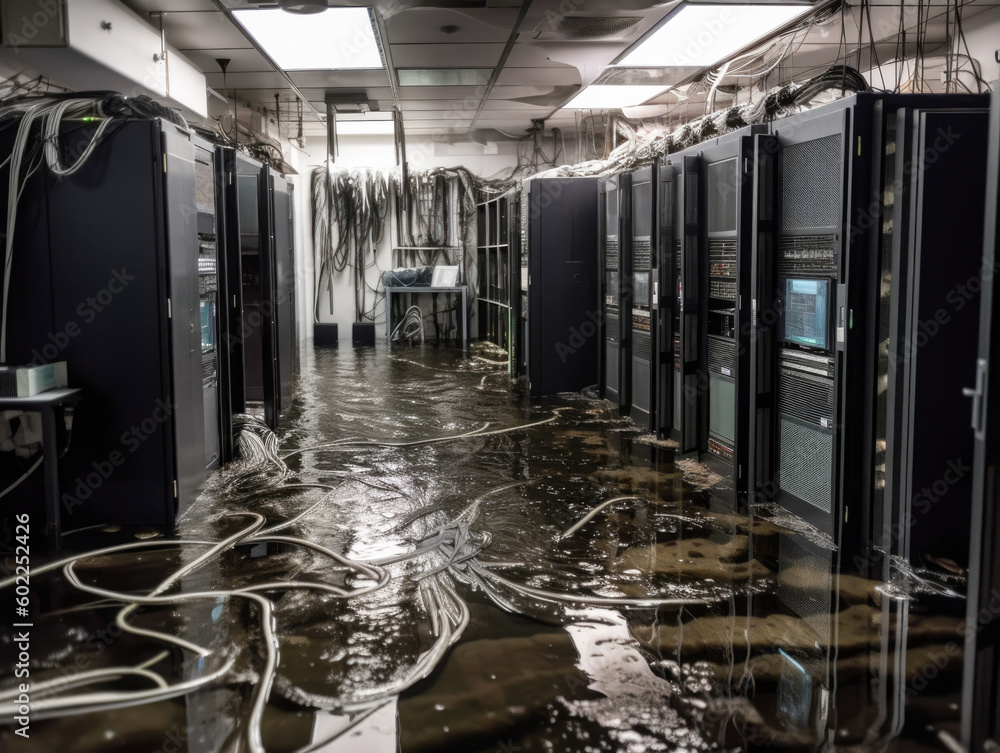
The admin could unplug it, and carry it out of the basement, so it does not get wet, or get a power surge.
 0 points


















.thumb.png.225edb9636a79b10cd220c27f59990f3.png)


