Leaderboard




Popular Content
Showing content with the highest reputation on 01/06/24 in all areas
-
For everyone still waiting for a sync-play feature in Emby to appear. My solution meanwhile was hosting an program called n.eko. It's basically a virtual browser running in a docker container multiple people can access in real time. You just open your Emby website, login and thats it. Everyone logged in can see the Video playing. It works incredibly well and simple. AND the video quality is really good. (i had so many quality issues with Discord, Jitsi etc.) https://github.com/m1k1o/neko https://neko.m1k1o.net/ I hope this helps somebody. Cheers.3 points
-
Yes they are one feature of many included with Premiere. Our source for high quality trailers was removed last year and we are doing our best to find the best way to replace it. However, it isn't the highest priority thing we are working right now. We apologize for the disruption.2 points
-
Version 1.0.0.3 - add support for none, allows mapping of items with no classification - add support for locked fields2 points
-
After opening and initializing the tuner (always) and receiving the signal from the tuner (+0-1 s), Emby needs to probe the TV stream first. This is done externally by running ffprobe (+1-2 s). Based on the result and the client capabilities, Emby configures ffmpeg accordingly (+0.x s) When ffmpeg runs, it probes the video stream again (+x s), it needs to wait for a video key frame (+0-1s), then it starts transcoding and writes HLS segments to disk, each of which covers 3 seconds (+3s). After the first segment is created and written to disk and Emby has detected that is is available (+0.x s), it is transmitting the first segment to the client (+0-1s). Only then, it's a matter of how fast the client player will show the first picture. TVnext can re-use an existing tuner stream (if same mux). All streams go through the server and are processed and parsed there, so no external probing is needed. The parsing (probing) may take 50-200ms, but TVnext doesn't wait for this. It stores and uses the probe result from a previous playback and sets up things immediately as if that information would be correct. It does that setup at 0T, even before it has received anything from the tuner. Only when it would turn out to be wrong (after the probing results are available), it would abandon the preliminary setup and re-create it (nothing has been sent out to the client within those max 200ms). It does not use ffmpeg for creating segments, it does that in memory instead and it sends out the first segment to the client immediately without waiting for the first 3 second segment to be complete. Then it depends on the client player and how long it will wait (building up a small buffer) until it starts playing. That's roughly why it takes > 8s with current Emby but only 500-1200ms with TVnext (without transcoding, which adds about 1s)2 points
-
I'm a plex life time member, but I have been using Emby for over six years continuously, but there is a feature which I have always thought is missing in Emby which I would like and encourage the developer to consider including especially in this dispensation where families can social or commingle due to COVID 19. Today, I received a notification from Plex about it new feature titled Watch together you can read about it here https://support.plex.tv/articles/watch-together/ The feature allows friends and families at distance to watch same movies together instantly, you simply invite all your buddy, once they signed to the system which can be seeing in the server then play and pause as needed, this I think is cool feature should be added to emby. Let's here your though if Emby developer should consider adding this feature to our beloved Emby Media https://www.bing.com/news/search?q=Plex+Watch+Together&qpvt=plex+watch+together&FORM=EWRE1 point
-
Hey Everyone, My journey from Plex to Emby has been pretty smooth with the exception of setting up SSL encryption. There are lots of great posts on this forum and elsewhere on how to do this, and I consider myself pretty computer literate. But I'll be honest, this was a bit overwhelming for me as I have no experience at all in hosting web servers, DNS, or encryption certificates. After many hours, I've got it all working, so I thought I'd share what I've learned. I'm going to try to write this for the newbie, so don't be offended if it seems like I'm explaining lots of simple stuff. That's really what I needed a week ago, so maybe it'll help someone else in my shoes. Also, this is for Windows, although most of it applies to any OS. There's lots of text, but it's really very easy. Let me also say, I understand that a reverse proxy gives you lots of benefits and flexibility for securing your server. But that was a step too far for me. If you want a reverse proxy this post is not for you, but there are many posts in this forum to help you. If you want to access your Emby server from outside your home network you will want to require secure connection mode for all remote connections (see "Network" tab in Emby server configuration). To do this you need an SSL certificate. To get an SSL certificate you must have your own registered domain name. Here's a step-by-step. Domain Name Registration A domain name is the readable text part of a web address. So emby.media, or google.com, or media.yourdomain.net. Most home users don't have one, but you need one to get an encryption certificate. While (Edit:)There are many options for purchasing a domain (godaddy.com being very popular), I chose to buy my domain from domains.google. It cost me $12/year, and this is the only cost to getting your Emby server working with encryption. Go to https://domains.google, pick a domain, pay your money, and you're ready to go. For the rest of this discussion let's say you registered the domain name yourdomain.net. Now you need to associate your new domain with your home IP address. Most home users get their IP address assigned to them by their internet provider and it is "dynamic," meaning it can change. So you need to be able to tell your domain provider what your address is and update it when it changes. This can be done automatically, and is called dynamic DNS (DDNS). (Edit:) Before obtaining a domain, ensure the provider supports Dynamic DNS. Google domains supports this easily, here is the help page explaining how to set it up. Fortunately, my ASUS router has this capability built in so it was easy, but it's easy even if your router doesn't (follow google's directions). (Edit:) In case you have a static IP (obtained from your ISP), DDNS support is not mandatory. That's it for domain name registration. Now yourdomain.net points to your home network IP address. SSL Certificate Now you need to get an SSL certificate. This has the encryption keys you need, and must be issued by a recognized certificate authority or it gets blocked by your browser. Lets Encrypt will give you a free SSL certificate but it has to be renewed every 90 days. This was the part I was most confused by, but it's actually really easy. The part to understand is that Lets Encrypt must have some way of proving you own your domain name before they can issue you a certificate. There are two options, 1) they give you a little text file to place on your web server in a certain location. I don't have a web server so this is a no-go. 2) They give you a text string to add to your DNS registration in what is called a "TXT Record." You do this with google domains, it's very easy. To get a certificate you need an ACME client program that knows how to talk to the lets encrypt server. They recommend certbot, but it doesn't work in windows. Dig enough and you'll find ZeroSSL, they have a nice downloadable program that does it all and is really easy. Download here. Make a directory on your computer (I used c:\ZeroSSL). Put the le64 (or 32) exe in this directory. A single command will create your certificate. I think the easiest way to do this is create a text file in the same folder as the program, call it "get_cert.bat" and put the following three lines of text in the file. Edit the second line to have your actual domain name (instead of "yourdomain.net"), and to have your actual password for your PFX file (whatever you want it to be, just replace "yourpasswordhere" in the code below. @[member="Echo"] off le64 --key account.key --csr domain.csr --csr-key domain.key --crt certificate.csr --domains "yourdomain.net" --generate-missing --handle-as dns --export-pfx “yourpasswordhere” --live pause Save the text file as get_cert.BAT and then double click it to run. This runs the le64 program, creates the public/private key pair, asks lets encrypt to generate a certificate, saves that certificate, and converts it to a PFX file format that Emby requires. All in one command! When you run this, a command window will appear and you can see what it's doing. After a few seconds it'll pause and ask you to place the TXT record in your domain. It gives you a name and value, the name will be something like _acme-challenge.yourdomain.net, and the value will be a bunch of random letters and numbers. The program pauses here for you to put this into your domain. So now you just log in to your google domain again, go to "DNS" on the left menu, scroll all the way down and enter a "Custom Resource Record." The type is TXT, the name and value are what le64 gave you. Put them in, wait a few minutes for the change to take effect (took just a couple of minutes for me). Then go back to the command window where le64 is running and press enter to continue. It'll then verify your TXT record is there and issue your certificate. You'll find a file certificate.pfx in the le64 directory, that's it! Emby Setup Now log in to your Emby server setup. Go to "Network," in the field "External Domain" you put your domain name, so yourdomain.net or whatever you chose. For "Custom SSL certificate path," browse to the .pfx file that was created by the le64 program. In the "Certificate Password" field put whatever password you used in the .BAT file above when you created your certificate. Then for "Secure Connection Mode" I recommend you choose "Required for all remote connections." You also have to log in to your home router and forward port 8920 to the computer running your Emby server. I'm not going to give directions on how to do this, it depends on your router, but it's super easy. That's it. You need to restart your Emby Server, and then you're done! You can now access your server remotely and securely at https://yourdomain.net:8920. Certificate Renewal Now, I mentioned before that the Lets Encrypt certificates are only good for 90 days. So every 90 days you have to renew the certificate. Take that "get_cert.bat" file you made earlier and make a copy of it called renew_cert.bat. At the end of the second line, just add the text "--renew 20" (without the double quotes). When you are within 20 days of your expiration date run this file, it'll renew your certificate. I believe it'll ask you to place a new TXT record in your domain, so certificate renewal cannot be made fully automatic. You'll have to run it manually and add this TXT record into your google domain just like when you created the certificate in the first place. But it takes just a few minutes and then your certificate is renewed. You'll have to restart your Emby server for it to take. The file locations all stay the same, so you don't have to update anything in the Emby setup, just restart Emby. That's it! Well, I hope this helps someone. Sorry for the long post. I would have benefited from this level of detail a week ago, so maybe it'll be good for someone. If anyone sees something wrong here, feel free to correct me.1 point
-
Hi everyone! I have added my own custom library icons with the names of the different libraries. Therefore, the default title for each of the libraries seems unnecessary and looks redundant. Is there a way to optionally hide these titles from the library categories? If this is not possible, I would like that as a feature request.1 point
-
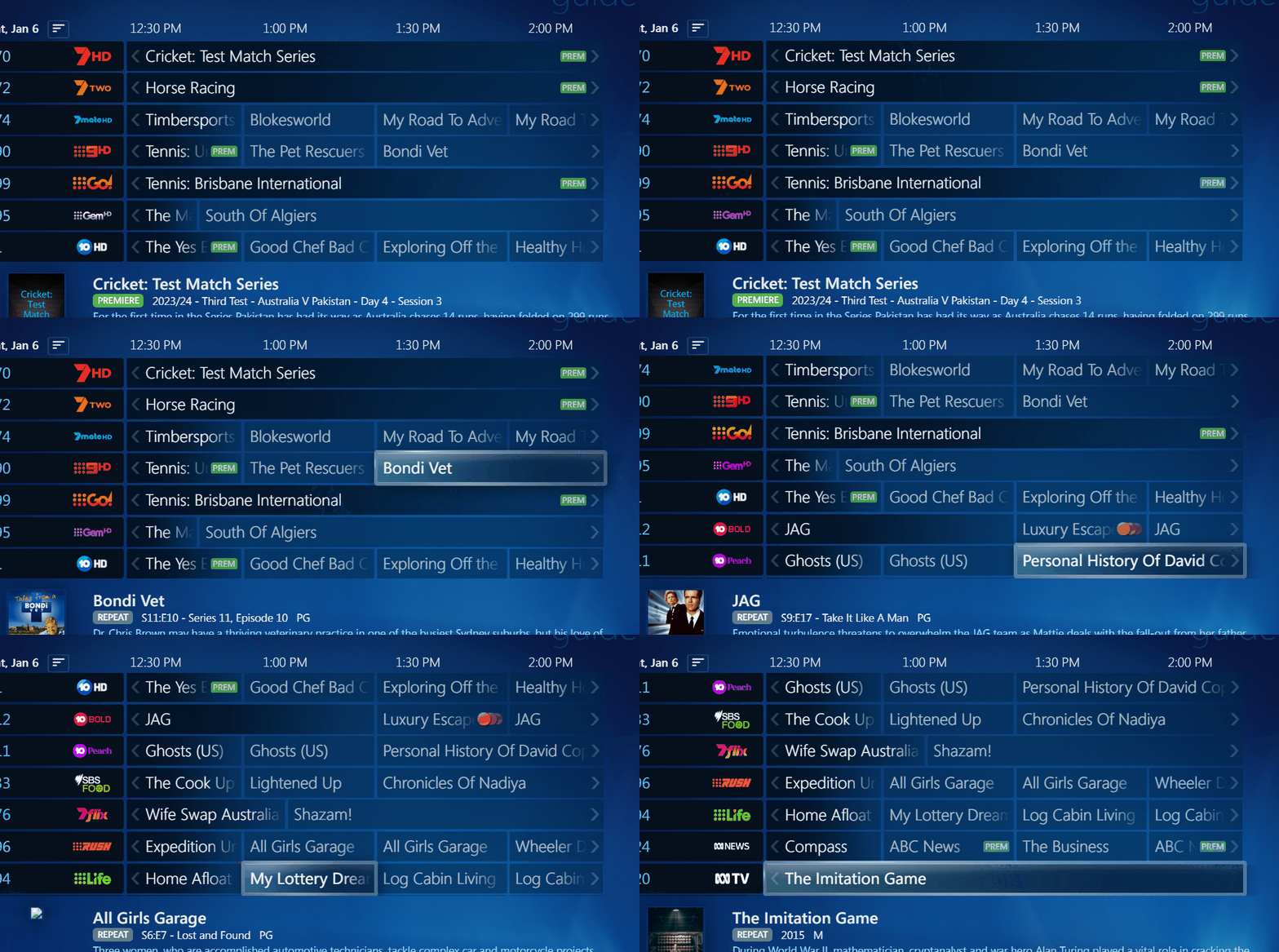
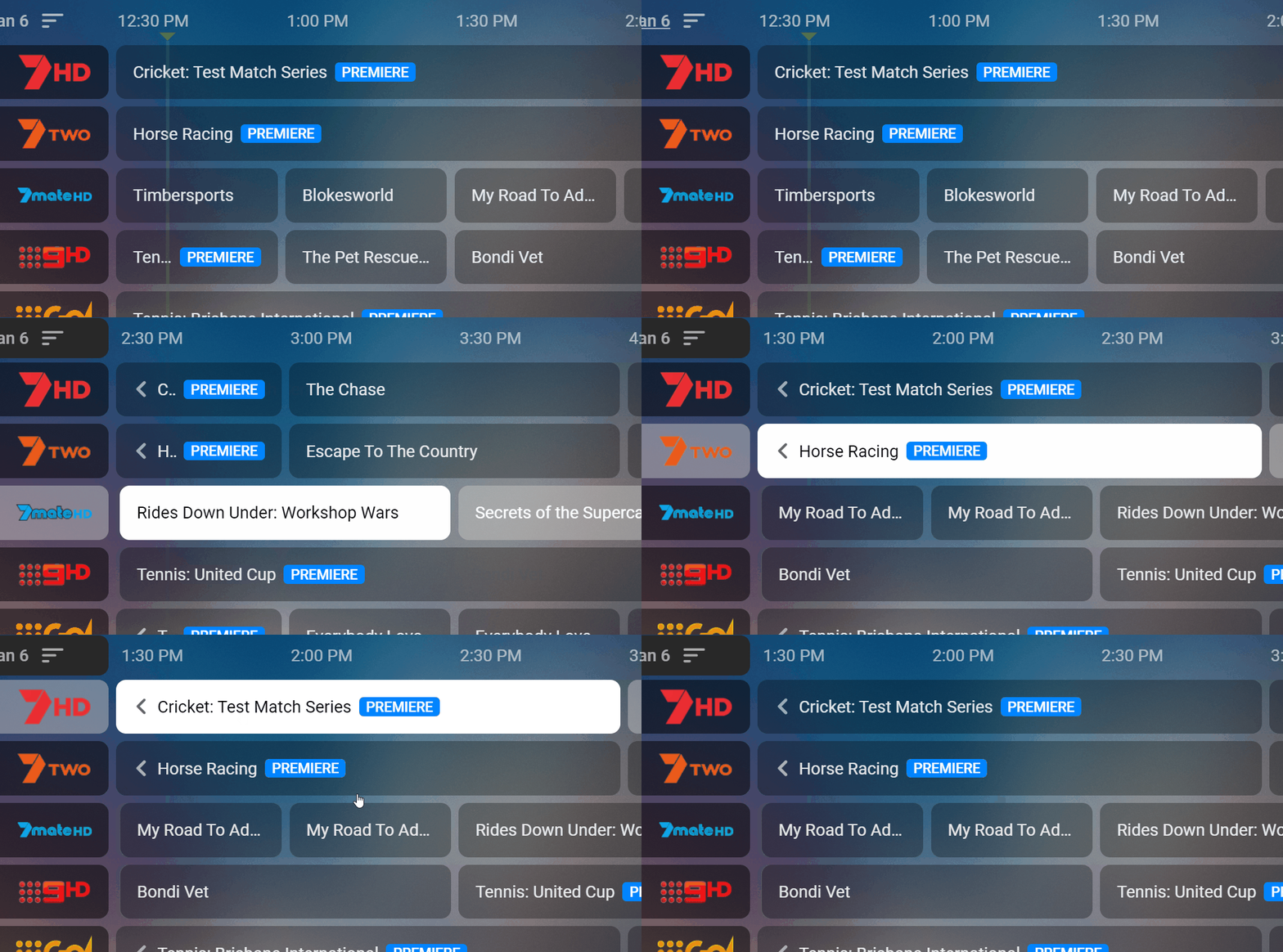
Guide seems to have issues when there are programs that are long running in Emby WMC Gui it is exactly the same as in WMC. I started before 12 and then when it got to channel 7mate the time has changed to 2.30pm. Another annoying issue if it is now 1pm and you go to 5pm and go to another screen and come back it is at 5pm it should revert to what it is now. Also noticed couple of time where the channel logos are that the guide text also appears like 7hd it showed cricket but can't find how to reproduce it again.
 1 point
 -
Dear developers, currently there is no possibility to filter or mark movies or tv shows on the overivew regarding multiple versions (e.g. Director's Cut, Cinema Cut available) or extras (e.g. Making Of, Deleted Scenes, the "extra" folder). Sometimes I'd like to look for these movies specifically. Some kind of additional feature, like badges or filter possibilities would be very useful. Thanks kindly, Dan1 point
-
Hello, I'm a premiere user and I just want to say thank you for the effort of contributors that always try to improve and update Emby over time... happy new year to all of you guys!!!1 point
-
I still think it's absolutely insane that as an owner/operator of a server, it is not possible to stop users from uploading files to my server if they chose to (or even do so accidentally). Your only option is to convince that user to disable the option again, or disable the users access entirely. I'm glad to see it being fixed for 4.8, but that's been an extremely slow rollout with no release date in sight. This request is almost 7 years old now...1 point
-
1 point
-
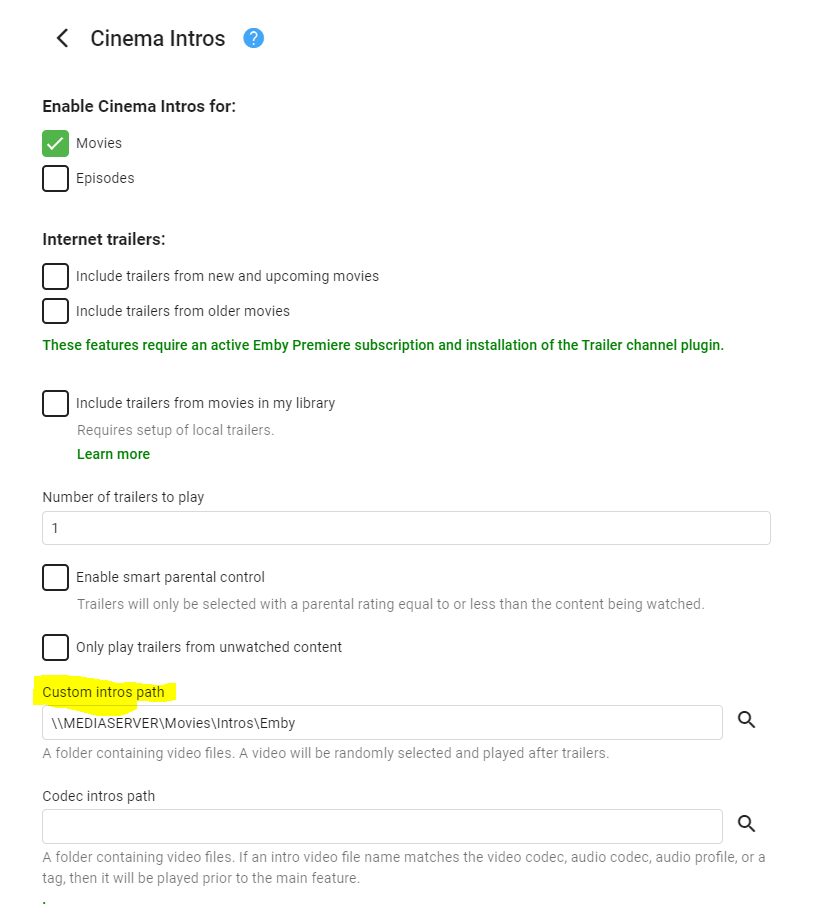
Hi. Our Cinema Intros feature already has this ability.1 point
-
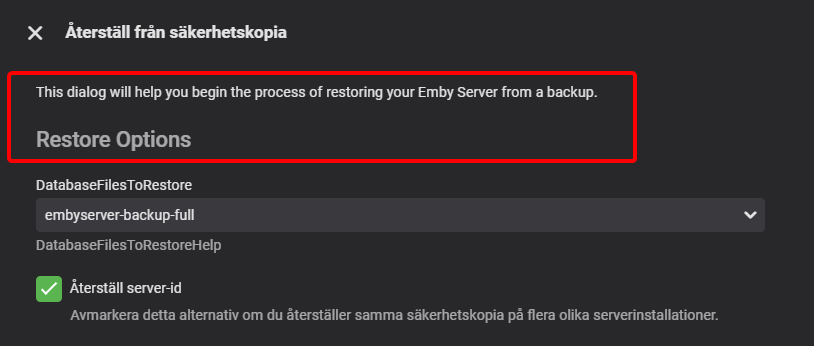
I can't find these strings for the restore dialog. I can see DatabaseFilesToRestore and DatabaseFilesToRestoreHelp but not "This dialog will..." or "Restore Options". Also, the name of the plugin in then menu needs a string for "Backup & Restore".
 1 point
 -
Sorry, I did disable this in October, but it looks like it was still trying to DirectPlay flac on some newer models. I've made sure it will definitely be disabled for the next release.1 point
-
That is a good method of dealing with "specials" that have been "inserted" in season order that you would prefer as stand alone specials. I did that for Futurama, as they had some specials that are listed as movies that aired between Season 5 and 6. They can be named as movies, or as TV episode "specials", or named as you did. I went half and half and added nfo files and edited them so they would show as specials (named S00Exx) but I took out the episode data from the meta and locked the meta. So now the meta is all there and they do not play after season 5 like the meta originally said they should, and re-scans won't change the data.1 point
-
I've been using Vantage Point and loving it, but the trailer quality is abysmal and there are too many Spanish movies. I do have a suggestion I hope the devs can implement. Years ago, I used a program inside of Kodi, I think its name was Cinema Experience, which is very similar to Vantage Point. The main difference is that I had a specific folder designated for Trailers. I used a program to download new and upcoming trailers in whatever quality (usually 1080p) I wanted from HD-Trailers.net so I just got the trailers, no channel info whatsoever before or after. This was fully automated, I never knew what trailers were added, so I'd always see new trailers before watching my movies. Would it be possible to add this feature into Emby? The ability to set one specific folder to pull trailers from before movies? At least as an option? If anyone is interested, the software I used to download from HDTrailers is HD-Trailers.net Downloader 2.1 Edit. It seems HD-Trailers.net isn't being updated anymore, since Apple shut down Apple Trailers. I'll look for an alternative and report back1 point
-
Will be onto this soon guys, fairly confident I can fix it quickly1 point
-
I just got it to work, I added chapters to the files, replaced metadata and ran the task and it worked. Thank you for all your help1 point
-
I had similar issues with "Alder Lake" i915 on Docker. "Message": "Failed to initialize VA /dev/dri/renderD128. Error -1" I eventually resolved the issue by switching to the beta: I modified my docker-compose.yml: image: emby/embyserver:beta This along with setting the GIDLIST to: - GIDLIST=44,104 Which corresponds to the card0 and renderD128 devices: >ls -n /dev/dri total 0 drwxr-xr-x 2 0 0 80 Jan 6 01:48 by-path crw-rw---- 1 0 44 226, 0 Jan 6 01:48 card0 crw-rw---- 1 0 104 226, 128 Jan 6 01:48 renderD128 Finally, the devices: devices: - /dev/dri:/dev/dri # VAAPI/NVDEC/NVENC render nodes1 point
-
I had manually changed some fields to the wrong value (AU-MA15+ etc.) and the act of manually changing it will lock it. So I was glad it ignored that to start with. I can see why some would like control over this though.1 point
-
Also one of the last questions is what about locked items/fields? ATM it just ignores if the field is locked and updates it anyway, this is probably not the best way, probably going to need at least some settings arround this to allow uses more control over what happens when a locked item/field is encountered.1 point
-
I deleted the movie, then refresh metadata, scan media library and scan metadata. Then I added the movie again and ran thumbnail image extraction. It turned out I was just too impatient, for whatever reason it took 15 minutes to generate the thumbnails for this single movie. I don't know why, the movie was created with makemkv as usual and nothing else was edited. Normally it takes about 30 seconds for a movie of this size to create the thumbnails. Anyway, it worked, thank you very much for your help!1 point
-
I'd add, usually the devs say "there's an update coming" but it never addresses the switch. I switched to infuse.1 point
-
Depends on one's preference. I prefer to have dedicated app that does one thing well rather than a single app that does everying half backed. AudioBookshelf for AudioBooks beats Plex, Emby or anything else.1 point
-
Obrigado! Deu tudo certo. Valeu!1 point
-
hi apparently this problem exists and i have the same problem i use the latest beta version and having this problem but my other server on Windows running the stable emby server and the collection folder is automatically created on my media section on the home page1 point
-
Hi. That is showing what your display supports - regardless of the current media. The limited means that only certain profiles of DolbyVision are supported (probably just 5 which is the streaming protocol).1 point
-
hey @Lukei know you guys are working on a lot of improvements and new features and was wondering if it would be possible to have a page in the forum under the "general" section a Upcoming Updates & Features page from the devs so users can see what's being worked on. this might save them posting certain requests if they no it is in development or being worked on.1 point
-
Sorry for the delay. Here are the log files. Let me know if you have trouble accessing them. These are from the past 2 days. Logs.7z1 point
-
@Luke So I actually removed the option to automatically adapt the frame rate to the source in the appletv settings in fact without this option there is no longer any sound/video delay but it's a shame because this option is very useful for juggling between European TV apps, streaming and films on emby because there are frequency differences between the sources and without this option we have problems on certain frequencies so the lag problem seems to come from the processing of the frequency by the appletv (the sound is always ahead of the image). But why no delay in netflix and other streaming app ! @Luke is it not possible to add an option in emby player to adjust the delay? (like infuse?)1 point
-
What's the issue with your connecting? Are you trying to access by your WAN address?1 point
-
Even if Emby had 300 people, I'm fairly sure TVNext still wouldn't have been integrated1 point
-
OK we'll look at getting the Roku app caught up. Thanks.1 point
-
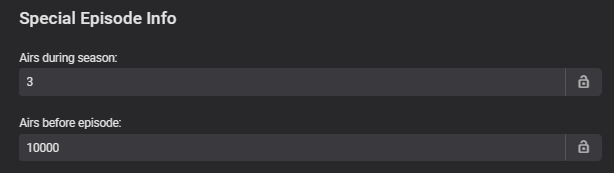
Do the specials maybe have 'Specials Episode' metadata - that is telling them which Season to show in ? If it does, I'm not sure how it would have got there - as there are no 'specials' with numbers this high - there are 187 'specials' on tvdb for example .. ?
 1 point
 -
This is primarily a bug fix release. Here are the changes: Web app compatibility updates for iOS 17 Compatibility updates for FreeBSD, TrueNAS and Arch Linux Improve playback of transcoded video in the Emby web app View the full article1 point
-
Recently youtube (and other video streaming apps) introduced a feature when double tap on the left or right side of app will do 10 seconds forward/backward rewinding. I'd suggest to consider this for emby iOS client and all other OSes as well. Thx1 point
-
Same problem as the OP.0 points
-
Same thing as the OP described here.. 4.7.x server.0 points





.thumb.jpg.1ea4e6b27fd5921ad22171468034b3f4.jpg)