Leaderboard




Popular Content
Showing content with the highest reputation on 12/30/23 in all areas
-
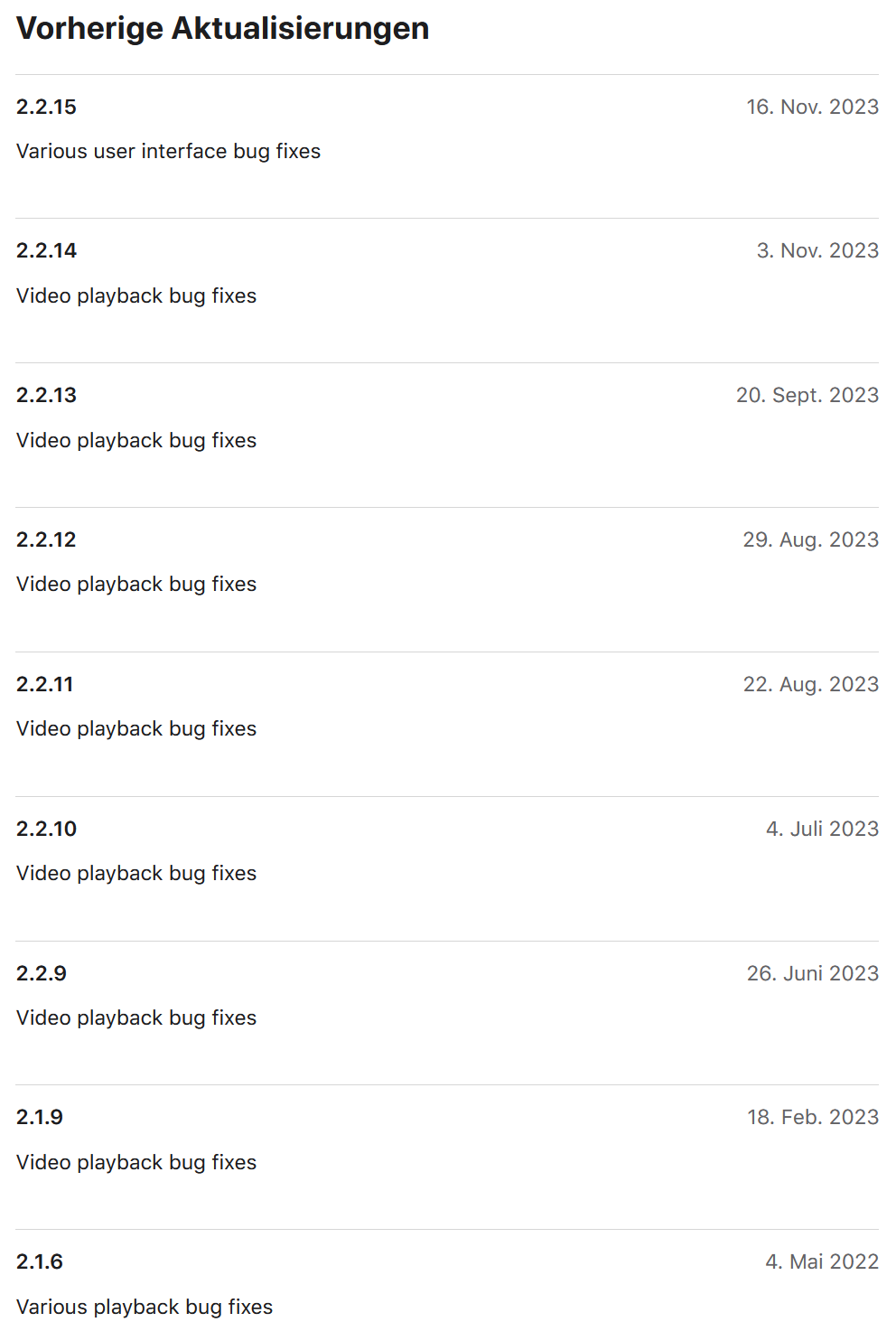
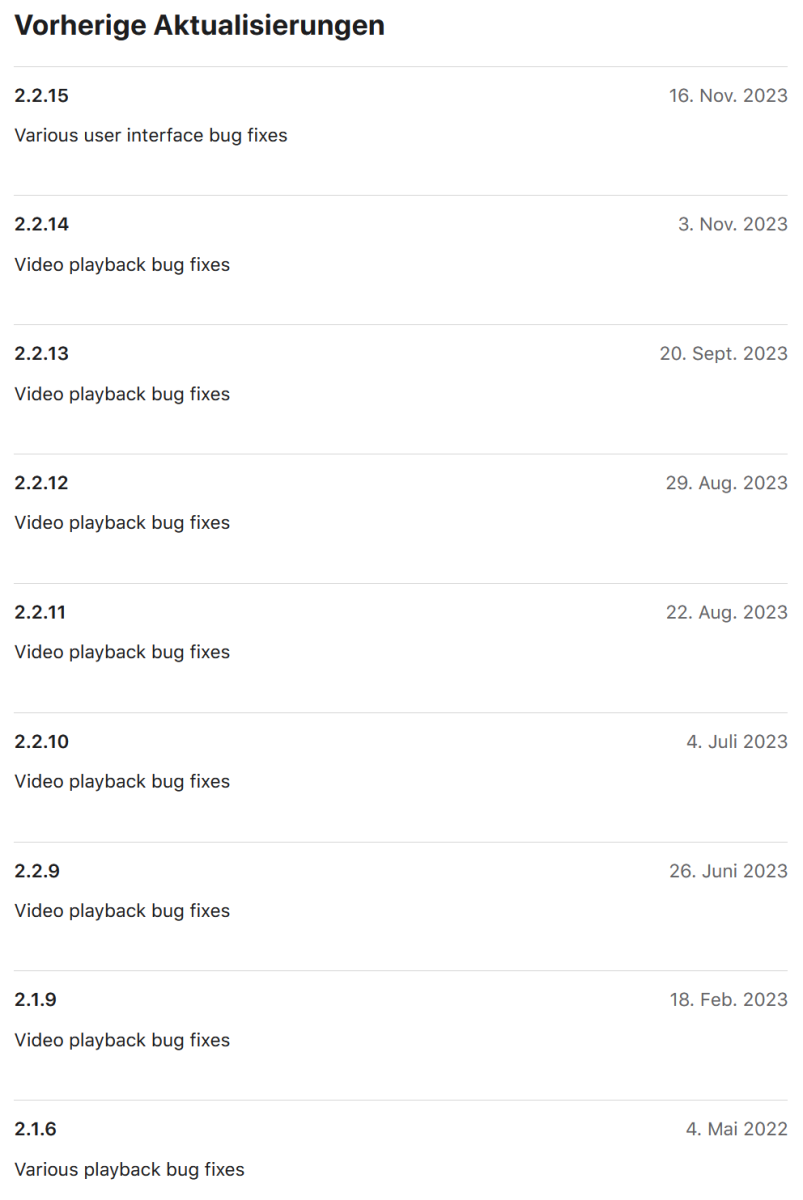
Hello, I love Emby since a long time and I'm happy every time a update comes out! What I don't understand though is how the dev team handles Changelog descriptions. Many threads are opened in this forum to ask for specific versions what was changed. In my point of view this wouldn't happen when release notes would be more transparent. For an example look up the latest iOS release notes: These release notes tell nothing to be honest and dev replies in the forum are far more in detail, but we receive them only per request. I'm sure it's a bit more work for the team, but maybe it would be possible to go on with detailed changelog descriptions in future. This would also help users to understand if specific bugs reported before were fixed. Kind regards
 3 points
 -
I hope this is OK to post here but if not please delete it. I was having an issue with my Samsung tv and files with a large number of embedded subtitles. I know this isn't an Emby issue so I put together a script that runs through my mkv files and remuxes them removing all subs (I'm happy to let Emby grab the subs for me). You need the mkvmerge executable in a folder (sample path below) and it replaces the original files with the modified ones from the temp directory. Save the following as a .bat file and run it in the directory where the media is stored. It should skip any files without subtitles. @echo off set "mkvmerge_path=C:\mkv\mkvmerge.exe" powershell -Command "& { mkdir 'temp' -Force; Get-ChildItem -Filter *.mkv | ForEach-Object { $subtitles = & '%mkvmerge_path%' -i $_.FullName | Select-String 'subtitles'; if ($subtitles) { & '%mkvmerge_path%' -o ('temp\' + $_.Name) --no-subtitles $_.FullName }} }" move /y "temp\*" . rmdir /s /q "temp"2 points
-
@ebr I would also like to upgrade my existing Lifetime license to 45 devices to further support Emby. Customer since 2019 here and I might not need this upgrade but don't want to miss out (FOMO). What I would not like to do is to purchase a second Lifetime license, this makes it complicated to handle for me personally. I think the change was not communicated well since the purchase option was removed silently, so people didn't have the chance to upgrade in time. Could you probably offer the upgrade option again at least for a specific time range that is communicated well?2 points
-
2 points
-
I like the ones that gradually get faster the longer you hold the button down. Starts off slow for dialing into a spot if you're close, but if you hold the button down it skips faster and faster if you got a long way to go. Sort of like the old VCR players.2 points
-
Really would love this feature, so i can create a list of unseen movies. Strange this isnt added yet, and the request is open for soi long time now. Hopefully soon....2 points
-
@LukeThe new way that you've developed for playing library items from VirtualTV as a live tv source is really great, but it's missing some features: The playback should auto advance to the next program in every available Emby app. There should be a way to start the current program from its live position instead of from the beginning. Ideally, the decision whether the program playback starts from the live position or from the beginning should not be a "static" channel setting in the plugin. Instead also the program itself should behave like a normal library item. That means that the program info dialog that we get from the EPG before playback and also the context menu should display a "Resume" and "Play From Beginning" button. Where "Resume" would start the program/library item from the live position and "Play From Beginning" from the start of course.1 point
-
I moved from Plex to Emby and even though I think Emby is superior in its flexibility there are some things I like better with Plex, especially in terms of its looks. This theme is trying to fix that by making it a bit more similar to Plex but with some, in my opinion, improvements. The CSS is attached to this post for anyone interested and below are some screens to show it off Good to know I only use Chrome so I can't guarantee this CSS works as expected in other browsers. If you want the sidebar menu to look like in the screens, make sure to pin the sidebar. Watched badge/banderoll is inverted which means that the badge will not be shown if media have been watched, like in Plex. For desired look, please use the "Dark" theme for both Theme & Settings theme in the display settings. Emby-Stable-style-v3.6.txt





 1 point
 -
This seems to work, I no longer get that error in any of the logs. TV in the living room works flawlessly now. TV in my room is having troubles but I think that's my TV and not Emby. Odd that this happened like this, wonder what broke it. Thanks
 1 point
 -
I am not running the Beta version. Still on 4.7.14.0 I will let you know once a new version comes out.1 point
-
Success! Thank you very much. I finally managed to access port 8096 externally by binding 8096 to the Nighthawk router IP address on the Arris gateway and then binding port 8096 to the PC's IP on the Nighthawk router.1 point
-
One of my colleagues lend me his laptop with core i5 -1135G7 8G of ram and I was pretty amazed with the transcoding capabilities of this CPU with Xr graphics. It managed successfully to transcode 2 4K 65Mbit streams to 1080p 6Mbit and from DAtmos to AC3. This is pretty much what I need so I'm focusing now to buy a NUC with this CPU or even i7-1165G7 witch is having the same GPU but 96 Cuda rather than 80 of i5.1 point
-
HI, yes we can look at improving this. Thanks for the feedback.1 point
-
thank you i found it. i was looking at the dashboard that had a checkmark that i couldn't change. it was under settings.1 point
-
Hi everyone just an update. I found out the problem and it was network related. I had the kids tvs logged into the guest wifi on my router as it can have a time set to turn it off but I didn't realise that with guest wifi it doesn't allow devices to talk to other devices hence my problem with emby not finding my server. Thanks for everyone's help much appreciated you giving me your time. Thank you1 point
-
This is about missing episodes, not specials positioning... Paul1 point
-
this was removed recently - can't find the posts on it but i'm sure someone will link you up1 point
-
I think because we're used to seeing streaming services like netflix and youtube do a good job of setting automatic quality in real time, we're under the impression that it's easy. What you're saying is that it's actually a very difficult task, I get it. thanks1 point
-
ok - so yes, this is an original TS container - with the dual layer video tracks. To get it to work with DV (on any player, not just emby) - you need to combine the HDR10 and DV tracks into a single track. The easiest way to do this, is to just run the .TS/M2TS file through makemkv (a free app). Then you will have an MKV file that contains just a single video track - but it will have both HDR10 and DV7. Your shield will play this (as DV, assuming you have a DV capable TV..) without any issues, other non DV devices will play it as HDR10 - or transcode it to SDR via tonemapping if not 4K etc It's also worth noting there are two emby apps for the shield - one is for Android TV (the one you get from the store) and another just for Android (non-TV) that currently needs to be sideloaded. The Android TV one 100% works with all flavours of DV as I've used it myself for years - the other one (the 'new' one which Luke is pushing hard) I cannot vouch for as I have not used it beyond a few isolated tests. For maximum compatibility - it is probably best to convert the DV7/HDR10 to DV8/HDR10 - but that's for another thread ... I hope that helps.1 point
-
I want to report that the actors are back on all 4 different clients! I made an manual lib update and now they are also in the seasons and not only in the show overview. very strange. I never had to do that before. I'm still missing the skip forward in the lg TV app clients but I will manage...1 point
-
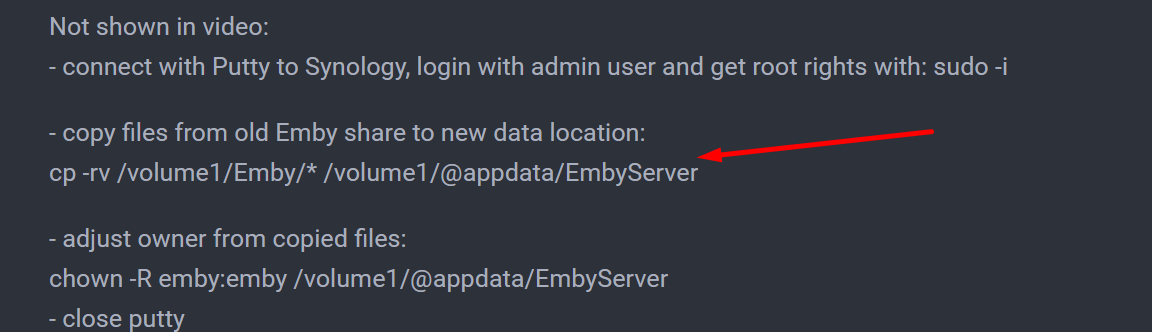
Da steht es doch - wie genau brauchst Du es denn noch?
 1 point
 -
So wie ich das sehe, war das für das DSM 7 BETA - soweit ich es in Erinnerung hatte, habe ich damals das Update der NAS gemacht, ohne wirklich auf Emby zu achten. Weiß nicht, ob ich Emby damals de- und neuinstalliert habe, aber ich habe definitiv keine Ordner kopiert, verschoben, was auch immer. Hatte in der Vergangenheit nämlich mal das Problem, dass ich bei einer vermurksten Beta-Version vom Emby-Server ein "Downgrade" auf die offizielle Version machen musste. Hat Emby damals nicht zugelassen. Musste erst alle Ordner mit dem MC (Midnight Commander) löschen, bevor ich neu installieren konnte. Damals war natürlich alles weg, und ich musste komplett neu einlesen. Aber bei dem Wechsel von DSM 7 zu DSM 7.2 war das kein Ding. Lediglich das Plugin MediaInfo hat Probleme gemacht, was aber nicht an Emby lag, sondern an DSM, weil das Grundprogramm MediaInfo selbst kein Update bekommen hat.1 point
-
Ok so you are having 2 routers in play here ? Wan -> Arris -> Nighthawk - > Server I believe this is called double Nat and can be tricky to setup. What is double NAT and why is it bad? - NETGEAR Support How is the cables connected. Wan -> Arris wan port -> Arris lan port -> Nighthawk wan port -> Nighthawk lan port -> Server. On the Arris you would probably need to forward ports to your Nighthawk wan ip. Nighthawk port forward to server ip. You could maybe set the Arris into bridge mode and it will act like its just a dumb switch. What Is Double NAT and How to Fix It on a Network (helpdeskgeek.com) Connectivity Edit. 8090-8930: local and external You should only forward 8096 AND 8920 What you are doing now is forwarding ports 8090, 8091, 8092, etc to 8930. Thats bad.1 point
-
Thanks everyone for the responses. Having reviewed the log, I'm not comfortable sharing that level of personal detail in a public forum so won't supply it. I did try disabling ipv6, but this was not successful. Instead I'll look at renaming via hardlink into another format that Emby will accept.1 point
-
Well, I'm either a damned liar or blind as a bat. Just found it right where you said it was. Thank you Luke!
 1 point
 -
That's all! Thank you! Seasonal greeting and happy new year!1 point
-
Nichts kopieren. Einfach Update von der NAS machen, Emby stoppen, und danach einfach das Installationsfile von Emby drüber installieren. Dann sollte alles da sein.1 point
-
I am running an Android server. The issue was also present in web interface. But just now, I updated the Android server to Beta version 4.8.0.64 and the issue is gone from both Android App and Web Interface. btw, thanks for your time. But I have another post ready for you on Samsung TV Emby app where I desire a "fast sliding seek bar to fast forward/Rewind" while holding down the Right Button on remote just like YouTube app, Plex and Jellyfin etc. Thanks1 point
-
Test playback devices for this file are an nvidia shield running the emby app (which is what the log is from) and a Sony x800m2 via dlna which plays the file without transcoding with emby serving. I'm new to all of this, so I'm not 100% confident on the naming scheme of layers, tracks, and streams in the various containers but I believe this is a dual layer MPEG-TS container. And yes, the x800m2 gives me a way to play this file without issue, I'm just currently exploring the tradeoffs of various containers, players, servers, apps etc. to see what does what and what ends up being the best compromise. Video #1 ID : 4113 (0x1011) Menu ID : 1 (0x1) Format : HEVC Format/Info : High Efficiency Video Coding Format profile : Main 10@L5.1@High HDR format : SMPTE ST 2086, HDR10 compatible Codec ID : 36 Duration : 1 h 54 min Width : 3 840 pixels Height : 2 160 pixels Display aspect ratio : 16:9 Frame rate : 23.976 (24000/1001) FPS Color space : YUV Chroma subsampling : 4:2:0 (Type 2) Bit depth : 10 bits Color range : Limited Color primaries : BT.2020 Transfer characteristics : PQ Matrix coefficients : BT.2020 non-constant Mastering display color primaries : Display P3 Mastering display luminance : min: 0.0050 cd/m2, max: 1000 cd/m2 Maximum Content Light Level : 600 cd/m2 Maximum Frame-Average Light Level : 487 cd/m2 Video #2 ID : 4117 (0x1015) Menu ID : 1 (0x1) Format : HEVC Format/Info : High Efficiency Video Coding Format profile : Main 10@L5.1@High HDR format : Dolby Vision, Version 1.0, dvhe.07.06 , EL+RPU, Blu-ray compatible / SMPTE ST 2086, HDR10 compatible Codec ID : 6 Duration : 1 h 54 min Width : 1 920 pixels Height : 1 080 pixels Display aspect ratio : 16:9 Frame rate : 23.976 (24000/1001) FPS Color space : YUV Chroma subsampling : 4:2:0 (Type 2) Bit depth : 10 bits Color range : Limited Color primaries : BT.2020 Transfer characteristics : PQ Matrix coefficients : BT.2020 non-constant Mastering display color primaries : Display P3 Mastering display luminance : min: 0.0050 cd/m2, max: 1000 cd/m21 point
-
Well that could be done with any other sync tool out there. Why involve Emby in that.1 point
-
I'm not sure what the singular cause was. I picked up a Wiim so that I could personally test with it, and made a few adjustments based on that. Thanks !1 point
-
New version 2.0.0.0 in the plugin catalogue: General: Redesign of the settings web page Channels: Unlimited number of channels Added an option to cache program data until the guide data runs empty As an alternativ to Channel Rules, you can now also choose between Collections and Playlists Playback: More granular control over playback progress reporting Improvements to "Continuous" playback with Roku devices New playback method "Native (Archive)" This new playback method was created by the Emby Devs. Similar to Playlist playback it will play the real library videos, but with the big difference that playback is purely initiated by the client app, without any remote command execution. This is why it also works for Roku devices on a WAN network. And although the real videos are played, the whole thing is treated like live TV. This means that channel zapping is possible and no dialogs for playing the next episode are displayed. Unfortunately, the new playback method does not yet support all features. As the name "Archive" suggests, it will currently always start all videos from the beginning. In addition, only very few Emby apps automatically advance to the next video. If you want it to be improved even further, each of you should raise your voice in this thread. Export API: New security concept that should simplify some things while making the API endpoints more secure. Because of all the changes, I expect there will be bugs. That's why it will only be available for Emby 4.8.x.x installations. Regardless of that, before you install the new version from the catalogue, it's important that you delete the previous VirtualTV.dll and also the VirtualTV.xml config file! As usual, you should also clear your browser cache.1 point
-
@MerlinM Jetzt hetze die Leute doch nicht so. Ist doch erst seit über einem Jahr unbrauchbar.1 point
-
Jeez people, it hasn't even been a decade yet, whats the rush...1 point
-
Keep in mind a true Multi-Cast is only good for the network it's broadcast on short of having L2/L3 routers or multi-cast proxies. So I'd doubt "Multicast" in the true sense of the word would be used to create a watch together type feature as we would want it to work with existing clients remote or local. Personally, I'd envision this working probably different then many of you. I'd envision a web chat type program with private channels and a lobby. You could have random anytime watch together where someone is in the lobby and another person drops by and decides to watch something with you. You of course could also schedule a watch together event for the future and send out invitations to others using your private room. In that room you're the moderator with control over playing the video, stop, pause, etc but could delegate or grant access to any others or everyone. The video would play taking up most of the screen with a side panel for ongoing chat. Ideally you could cast to an Emby client or Chromecast as normal. That would allow you to watch on any device you want while still being connected to the watch party chat. Done this way none of the normal Emby clients would need to be "watch together" aware as all the control is web based which is far better suited for chat. When I say chat it could be just text based or audio or full blown audio and video. That would be up to the moderator to control assuming the admin has the feature available to use. What would be cool as well would be queuing up little videos that play before the main event. Like the 5 minutes to movie time. 2 minutes, grab your popcorn. Maybe have another for 2 or 3 minutes breaks that might be needed were you click the 2, 3, 4, 5 button after pausing which queues up the intermission video but starts immediately after resume where you were. Would something like that work? Of the different existing watch together type utils others have what you're favorite or what you would consider the gold standard?1 point
-
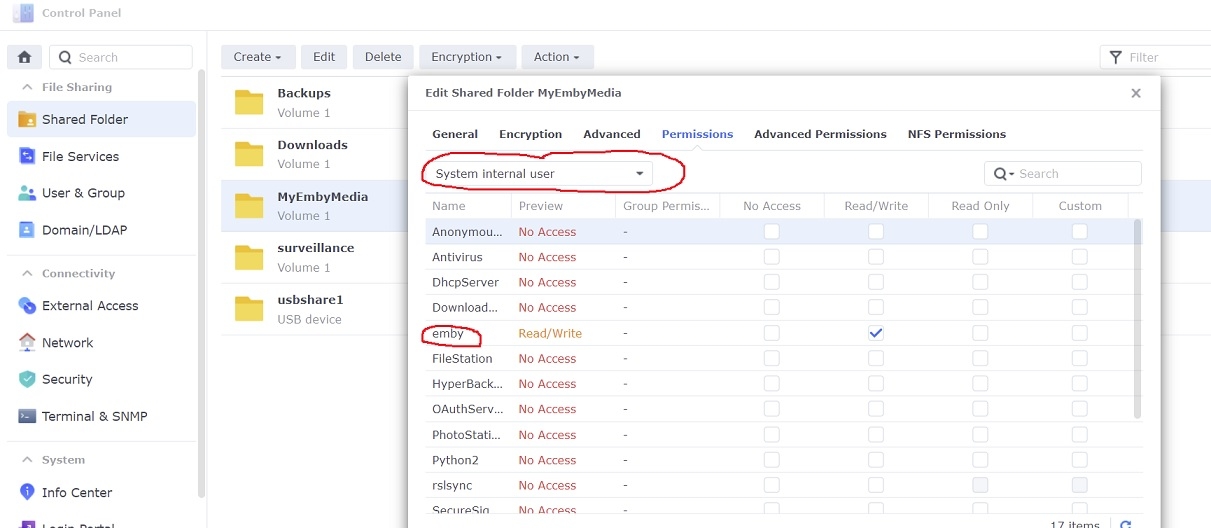
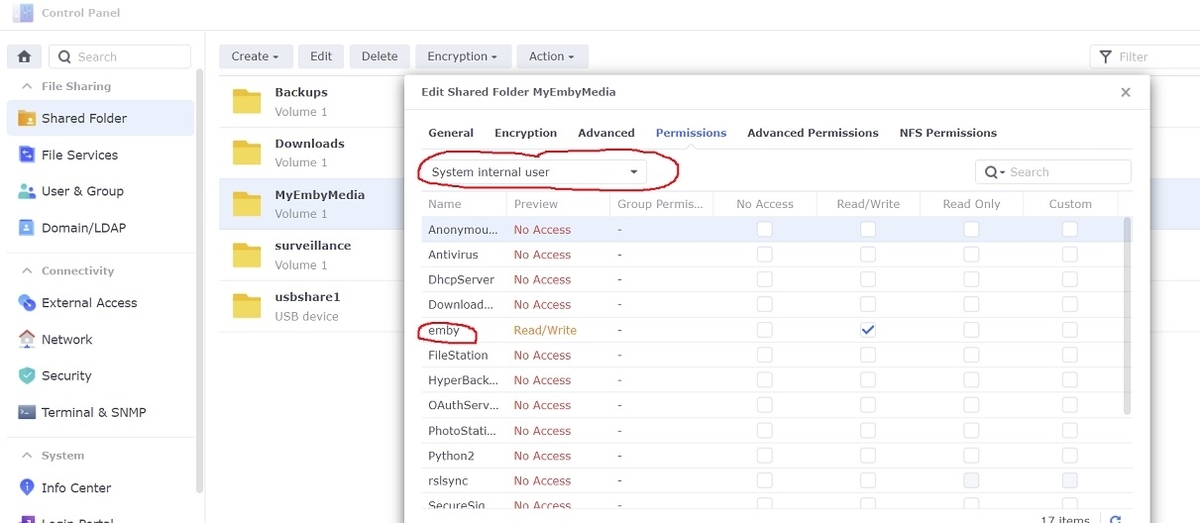
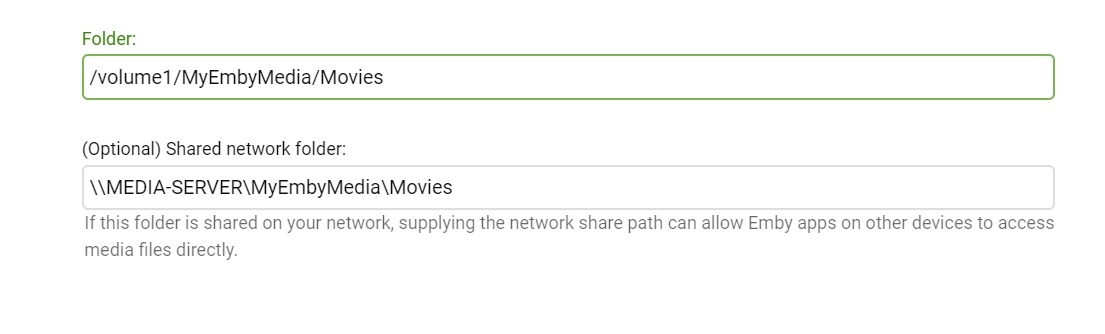
Adding libraries to Emby server is a little different under DSM 7 in that setting permissions for the shared folders has changed some. If you've ever tried to add a library to Emby and it wouldn't accept, then the permissions might be wrong 1. Give emby read/write permissions to the shared folder Open Control Panel...Shared Folder in DSM on your NAS Select your shared folder...Edit... and then under the Permissions tab select the dropdown box and change it to "System internal user" Check Read/Write next to the user 'emby' and then click Save 2. Add libraries in Emby server Settings...Library...New Library Select the library type and enter library folder information Example:
 1 point
 -
Curious if it is possible to increase buffer size so that latency issues are overcome. Example: in-laws have 20mb/s connection but get their internet through satellite, so latency is close to 800 ms. When they play a video, it will pause fairly regularly (say every 2 minutes for 15 second straight or so). Is it possible to increase buffer so that the latency issues won't be a problem? They can play Netflix videos without the pausing, and yes, I know an emby server isn't Netflix, but hey, a guy can ask. This is direct play, no transcoding, at 10 mb/s1 point
-
@Luke: what's the best way to implement this feature (assuming I hire a developer)? Allow Emby users to filter out (mute) common profanity words, e.g f--k, s--t, etc. The workflow looks like this: User goes to the server settings page, goes to a config page (a plugin?), chooses the words they don't want to hear, and hits Save. Emby compares the word list to the subtitle file of each video. When there are matches, Emby mutes the audio at the appropriate time during playback (between the start and stop time of each line in the sub file where there is a match). Thanks!0 points