Leaderboard




Popular Content
Showing content with the highest reputation on 12/29/23 in all areas
-
Hi. So you would need to install an Emby Server at each remote location and then replicate them? That sounds neat but not really necessary for a home server...3 points
-
This is a simple plugin that adds a Scheduled Task to Emby that will prob/extract media metadata from STRM file targets. Why do you need this? By default, when you use STRM files in Emby it will not prob the target file that is pointed to by the STRM, this is mainly for library scan performance reasons but does leave holes in your library media metadata like durations, stream info etc. This plugin will try to plug the holes by prompting Emby to do a deep remote prob on the strm target files. This is going to be slow if you have a lot of Strm files in your system, and even slower if the streams are remote. The scan only needs to happen once for each strm file so if you run this daily then you should be ok as it will only process new strm files with no media metadata. To use it install the plugin from the catalogue and look in the Schedule Tasks, there should be a new one. Source Code https://github.com/faush01/StrmExtract
 2 points
 -
When transcoding or direct streaming it currently throttles but it doesn't cleanup during playback so you can have a situation where your using lots of space. Can we have a custom setting to remove the transcoded parts minus 5 minutes of current playback? This would help it large libraries where there are multiple transcodes going on.2 points
-
wow!! looks like its working! I tested it on one movie and it worked just fine. I will report if I will see any problems. Luke and muller_md, thank you very much! nice xmas gift))2 points
-
You can always just pkg lock openssl for the time being.2 points
-
Yeah you were absolutely right. I should've double checked the connection through the IP address. I've been able to fix the issue with the domain name by installing a reverse proxy on my server which points the domain name to the internal IP/port of the Emby server. Now everything is instant again when starting the app or when starting playback. I guess without this, the domain name doesn't properly resolve for Android based devices. If anyone else ever experiences this problem while using a custom domain name running Emby server in a docker container on unRAID OS, then you could give this guide a try to install a reverse proxy: Big thanks to rbjtech, ebr and Luke for the help!2 points
-
No need for any such complication. Just run two copies in different folders using different ports. Paul2 points
-
New version 2.0.0.0 in the plugin catalogue: General: Redesign of the settings web page Channels: Unlimited number of channels Added an option to cache program data until the guide data runs empty As an alternativ to Channel Rules, you can now also choose between Collections and Playlists Playback: More granular control over playback progress reporting Improvements to "Continuous" playback with Roku devices New playback method "Native (Archive)" This new playback method was created by the Emby Devs. Similar to Playlist playback it will play the real library videos, but with the big difference that playback is purely initiated by the client app, without any remote command execution. This is why it also works for Roku devices on a WAN network. And although the real videos are played, the whole thing is treated like live TV. This means that channel zapping is possible and no dialogs for playing the next episode are displayed. Unfortunately, the new playback method does not yet support all features. As the name "Archive" suggests, it will currently always start all videos from the beginning. In addition, only very few Emby apps automatically advance to the next video. If you want it to be improved even further, each of you should raise your voice in this thread. Export API: New security concept that should simplify some things while making the API endpoints more secure. Because of all the changes, I expect there will be bugs. That's why it will only be available for Emby 4.8.x.x installations. Regardless of that, before you install the new version from the catalogue, it's important that you delete the previous VirtualTV.dll and also the VirtualTV.xml config file! As usual, you should also clear your browser cache.2 points
-
@LukeThe new way that you've developed for playing library items from VirtualTV as a live tv source is really great, but it's missing some features: The playback should auto advance to the next program in every available Emby app. There should be a way to start the current program from its live position instead of from the beginning. Ideally, the decision whether the program playback starts from the live position or from the beginning should not be a "static" channel setting in the plugin. Instead also the program itself should behave like a normal library item. That means that the program info dialog that we get from the EPG before playback and also the context menu should display a "Resume" and "Play From Beginning" button. Where "Resume" would start the program/library item from the live position and "Play From Beginning" from the start of course.1 point
-
It takes you a year to forget ? lucky. Think I'm more towards the 10 minute end of the spectrum...1 point
-
I had given up... Now with this new info I will give it another shot!! Thanks1 point
-
Right, maybe Caddy calls them procedures. Here's an example. #log file procedure (logging) { log { output file "C:\caddy\logs\{args[0]}.log" roll_size 5MiB # Set max size 5 MB roll_keep 2 # Keep at most 2 log files roll_keep_for 96h # Keep log files for 4 days } } #emby server emby.mydomain.com { import logging emby_access reverse_proxy :8096 }1 point
-
All sorted thanks gents nice one1 point
-
Keep it Simple.... port 80 and 443 forward to server... Caddy runs a service in win 7 x64 - caddy service = c:\caddy\caddy.exe -run Caddy file below: { email myemail@gmail.com } emby.mydomain.com { log { output file C:\caddy\logs\emby_access.log { roll_size 5MiB # Set max size 5 MB roll_keep 2 # Keep at most 2 log files roll_keep_for 96h # Keep log files for 4 days } } reverse_proxy http://localhost:8096 } webmin.mydomain.com { log { output file C:\caddy\logs\webmin_access.log { roll_size 5MiB # Set max size 5 MB roll_keep 2 # Keep at most 2 log files roll_keep_for 96h # Keep log files for 4 days } } reverse_proxy http://192.168.1.3:10000 #Disable SSL in Webmin } nextpvr.mydomain.com { log { output file C:\caddy\logs\nextpvr_access.log { roll_size 5MiB # Set max size 5 MB roll_keep 2 # Keep at most 2 log files roll_keep_for 96h # Keep log files for 4 days } } reverse_proxy http://localhost:8866 } hw.mydomain.com { log { output file C:\caddy\logs\openhardwaremonitor_access.log { roll_size 5MiB # Set max size 5 MB roll_keep 2 # Keep at most 2 log files roll_keep_for 96h # Keep log files for 4 days } } reverse_proxy http://192.168.1.241:8085 } garage.mydomain.com { log { output file C:\caddy\logs\garage_access.log { roll_size 5MiB # Set max size 5 MB roll_keep 2 # Keep at most 2 log files roll_keep_for 96h # Keep log files for 4 days } } reverse_proxy http://192.168.1.243:8080 } nextcloud.mydomain.com { log { output file C:\caddy\logs\nextcloud_access.log { roll_size 5MiB # Set max size 5 MB roll_keep 2 # Keep at most 2 log files roll_keep_for 96h # Keep log files for 4 days } } redir /.well-known/carddav /remote.php/dav 301 redir /.well-known/caldav /remote.php/dav 301 redir /.well-known/webfinger /index.php/.well-known/webfinger redir /.well-known/nodeinfo /index.php/.well-known/nodeinfo reverse_proxy http://192.168.1.3 }1 point
-
You can run as many servers with a Premiere licence as you like - but note that the count of clients using a licence is aggregated. Paul1 point
-
So I started fresh with Nexus 20.2, everything installed fine as expected. Official repo stated embyforkodi version 8.2.14 so imagine that is to be expected. Everyhing works fine with playstates, play marker. Thank you for good work. Still gonna hold out for Omega so I can get DV playback.1 point
-
I installed and it works like a charm. Thank you quickmic. Good job!1 point
-
Right okay nah I ain't, I'll message him see what he says He just keeps saying I need to register with Emby but got to this stage and seem stuck1 point
-
Yes, sir.1 point
-
Pretty much any web application can be put in a subdomain (subdomain.example.com), but to put an application in a subfolder (example.com/subfolder/) that application must explicitly support this behaviour, usually by specifying an 'external path'/'base url' or similar in their settings. Otherwise every url they generate for the client to follow is wrong, missing your added subfolder. Emby server does not support this.1 point
-
@Lukefyi - got another android emby update today but it didn't fix the issue.1 point
-
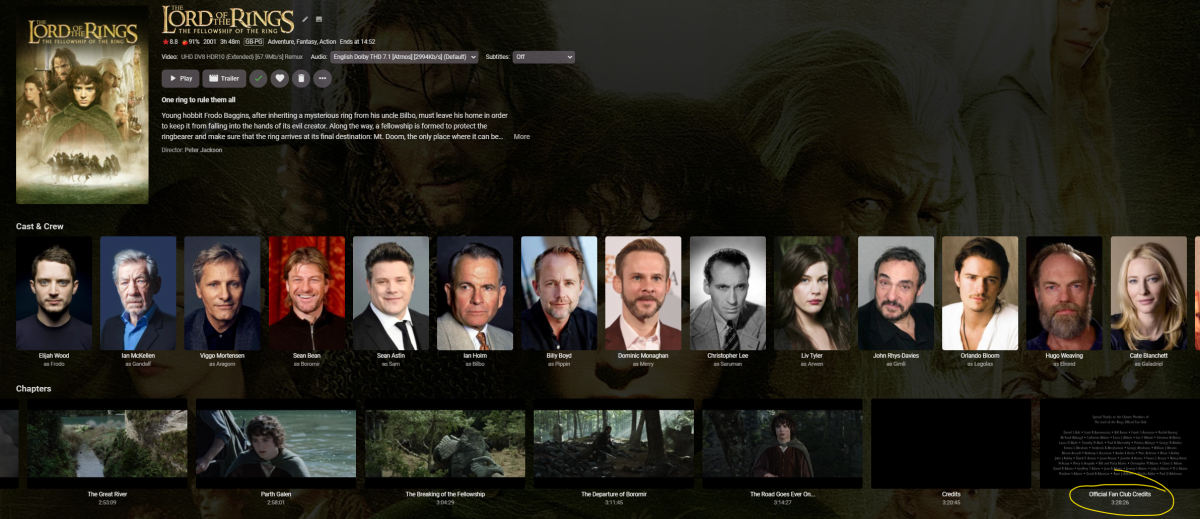
Have you thought about using mkvtoolnix (assuming it's an MKV) to append the multiple parts together - it will even re-do all the chapter points etc for you ... ;
 1 point
 -
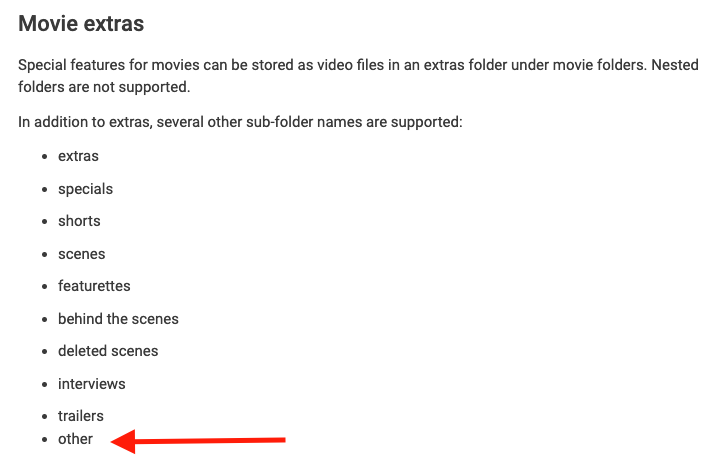
Just wanted to say thanks for adding this. I still have a lot of content from back when I used to run a Plex server and used an "Other" folder to store extras. I figured I would have to rename them all, as the Emby documentation still doesn't mention you can now also use an 'Other" folder. If you simply add "other" to the list here it should cover the changes I think
 1 point
 -
Yes, can confirm that on this way the Extras popped up. Thanks1 point
-
I have read about that resolution but this would mean too much hassle for me. I would stay with the docker solution then. Just thought there would have been a solution to this error as the last post in this threat thread was over a year old.1 point
-
Emby doesn't change the quality dynamically. The auto setting enables it to assess the network before starting, but no more than that. Paul1 point
-
That makes sense. Thanks again for sorting this for me.1 point
-
thanks, it worked. there wasn't much of a local setting so all good.1 point
-
Yep, have Paul's post bookmarked.1 point
-
Thank you!!1 point
-
*Deleted*1 point
-
*Deleted*1 point
-
Also, in reference to the interruption of other recordings, I’m wondering if it would be possible to just run multiple servers on one device on different ports? One server could be for live tv users and other servers could be dedicated to recordings. Just a thought1 point
-
Really appreciate all your work on this. Does this fix re-start recordings for the “seek to start failed” error?1 point
-
You can serve multiple http(s) sites on the same port so long as they have different names. The reverse proxy can separate them and proxy them to different servers. Obviously only one reverse proxy can be used on one port, but just adding Emby to the list of proxied websites is not a complication. In the early days of SSL this could not be done for secure sites (so very out-of-date web pages about it might say this), but later developments made it possible and indeed routine. Of course, if you try to connect 443 to Emby (running HTTPS itself) directly, without a proxy, you will block any other usage of it on the same machine - this might be the meaning of what you read. Paul1 point
-
Thanks for this. I'll try it. Do the .exe files have to be in a certain folder?1 point
-
This is enough. I'll move it to feature requests. Thanks.1 point
-
Well we need .net standard 2.0, not 2.1, so I still need to rip that apart that quite a bit to get it to work. But it is at least closer than the other one. So here you go, completely untested: BlurayMounter.zip Let me know how it goes. Thanks.1 point
-
Yup - I've seen it before - hence my original reply to try the IP. Maybe worth trying your emby domain in an Android browser (on the Shield) and see if it instantly resolves the FQDN via DNS.1 point
-
@Luke So I actually removed the option to automatically adapt the frame rate to the source in the appletv settings in fact without this option there is no longer any sound/video delay but it's a shame because this option is very useful for juggling between European TV apps, streaming and films on emby because there are frequency differences between the sources and without this option we have problems on certain frequencies so the lag problem seems to come from the processing of the frequency by the appletv (the sound is always ahead of the image). But why no delay in netflix and other streaming app ! @Luke is it not possible to add an option in emby player to adjust the delay? (like infuse?)1 point
-
My first and primary one (as it would fix many without other options or UI changes) would be able to just have a default 'screensaver' folder that if pictures are placed it then Emby pulls from it alone but if there are none then it follows the current behavior. The UI and customizations you ask for above are great ideas but at this point I'd like a simple change that could happen sooner!1 point
-
As much as I'd like to put my own branding on the server, I can see why the Emby team would want to keep their own logo to. @AlanQdoes have a good idea with the Powered By Emby branding option which I'd be happy to have, I know other software also has this, i.e., if you use a custom logo on Portainer, it shows Powered By Portainer underneath it. I think it should be a Premiere only option to. Just a quick logo here as an example of what custom branding could look like;
 1 point
 -
Kind of a nitpick but I'd also like to brand my family server with a logo that appears on apps and whatnot. Maybe the Emby brand could appear as a "powered by Emby" or something? To be honest my family couldn't care less about the tech I'm using, but that is very clear in other ways than having a brand and overall look and feel imposed by the app. At the same time I'd like more customization, I'm also grateful the development team seems to prioritize things right so in terms of functionally and overall quality Emby is impressive. The resources are definitely being spend on stuff that matters the most. Maybe a good compromise that wouldn't take too much effort is just allowing branding and background images to be replaced by server-hosted ones, and picking a color an perhaps even some fonts, that are applied across the board. Just my two cents... I'm coming from Kodi btw, but wanted something that works on more platforms. So far really enjoying Emby, but will miss our family branding and backgrounds1 point
-
Thanks for the filter @Luke- not sure why you didn't call it 'Video Dynamic Range' rather than 'Video Type' ? The Plugin still provides much more detail on the DV Profile, HDR10+ Support and full HD Audio object based detection - so the Core has a way to go yet ..1 point
-
Added in beta 4.5.0.13 @Happy2Play Support other folder as alias to extras1 point
-
Other support will be added for the next release. Thanks for the feedback !1 point
-
This is great stuff - thanks guys. If you're running caddy on the same machine as Emby Server, then you could also just use localhost:8096, correct?1 point
-
I don't need it anymore. Just putting the information out there for anyone else that might.1 point
-
I think that's what's being asked for, so that Emby can function like Plex using a much smaller dedicated transcode path and never worry about running out of space.1 point