Leaderboard




Popular Content
Showing content with the highest reputation on 12/14/23 in all areas
-
That's a big "family" for this "family server" to cater for... Paul4 points
-
Hello, what happens to the lifetime upgrade? I wanted to buy it. This kind of behaviour will push the users to Jellyfin or back to Plex. I feel bad that the only solution is a monthly subscription. It doesn't look to be a fix for the price structure, it looks like a fix to get more money using a dark pattern. I'm really disappointed in the team choice. At least, you should have let the lifetime available and increase the price if you felt that i was not high enough.3 points
-
i believe the the reason excuse upthread is "user were getting confused by the options" which honestly makes no sense but hey apparently that is why the option has been removed. I am staunchly anti subscription for any software ever so if i hit the limit (which should be users not devices imho) thats it i'm going to jellyfin even if its worse overall not "i guess i'll pay for more devices"2 points
-
The latest beta has a build for Mac, thanks Luke!2 points
-
I just noticed that when i click the watch trailer button on a movie, it plays a nice 1080p video, but the videos in cinema intros are all terrible quality. unwatchable. not to mention the languages are all over the place. would be nice to implement a way to filter these trailer selections somewhere. language and exclude any 480p or x quality trailers.1 point
-
I have been having a problem with the Emby program only playinh thr first 2 songs of any album that I have chosen to play through the Wiim network streamer to my sterio system. But when I take the Wiim component out of the system Emby will play the entire album on which ever device I am using. Let me describe my set up. I have a Snyologie DS418 Play server running DSM 7.2-64570 Update 1, I am using Emby Server 4.7.14.0 and have the Wiim Pro Plus music Network streamer ( 3x I have 3 system that I stream to). Each Streamer is running the lates firmwear. The Wiim apted on my Iphone and I pad is running the lates softwear 2.6.6 The app in the Home Music Share see's my servier, in fact it see it twice. The first is the standard Music , Photo, and video folders that are on the NAS were media is held. T secong listing appears to be the Emby folder, for it displays the same images that I see when Iop[en Emby and it shows me the "My Medis" folder. And when i open itr up it shows all the Emby album cover art that Emby shows but a lot smaller. Discrption of what happens. 1- When I use the Wiim app to stream music from the NAS through the Pro 2 to my sterio system, all plays as it should with no issues. 2- When I have Emby play the music through the Pro 2 to my sterio system, it only plays the first 2 songs and the stops playing. 3- When I have Emby play the music and I tell emby to send the music to what ever divice I am playing it on ( Iphonr, Ipad, Computer) it plays the entire album with no issues as it shouuld be. I have removed and reinstall all the softwear to see if their was an issue and the problem continues I really like the Emby application and would rather use it to manage my music than the Wiim app the is very basic in its ussage. Anyome have any idea on the issue. Has anyone seen this befor. All Help greatly appreashated, I am over my head with the technical side og the softwear. Thank you Jon Tripp. embyserver.txt ffmpeg-transcode-b1381052-1007-4248-ad9b-603af90122b6_1.txt1 point
-
For MP4, i use MP4Box (which is available for Windows) I run a small batch script on my .mp4 files without a language set on the audio stream: for /R %%f in (*.mp4) do mp4box.exe -lang 2=eng "%%f" echo completed pause For MKV, i use mkvtoolnix and use the included mkvpropedit tool for the same result: for /R %%f in (*.mkv) do "mkvpropedit" "%%f" --edit track:a1 --set name="" --set flag-default=1 --set language=en echo completed pause FYI you'll need to add the tools location to your $PATH env variable, otherwise you'll need to specify full executable path in your script1 point
-
Roku can be both one of the most intrusive companies as well as one of the most responsive companies to customer's requests/complaints. I noticed they have redesigned the home screen once again and I now have the ability to turn off the "new" stuff on the home screen. Under home screen settings all of the crap can now be toggled off. This kind of delayed but good response to changes and customer requests is why I generally stay with Roku for my streaming needs (I do have several other streamers that I can use if needed.) They do, from time to time, really make stupid moves but, generally, they also react favorably if they see enough negative reactions to changes. Their betas use to iron out most of the really stupid moves but they drove most of the better testers out of the program and now the betas only resolve operational flaws and stupid design choices get reserved for the general releases. That is their entire user base is their beta testers for bad general design choices. Roku is still, for me, the best streamer available. While it has some periodic flaws generally, when the release is thoroughly tested by the user base, it becomes both stable and quite useable. Of course my use case is very specific for me and it might be unsuited for others. That is why there are so many choices in streaming devices. The only place Roku really falls short is that their interface is somewhat hard to program for and a few, important to me, systems have no Roku interface at all. One example is CH-DVR. I keep at least two additional streamers available so I am covered for all my needs. (BTW: I am convinced that CH_DVR is lying in that there is NOTHING in their system that truly cannot be made to work on the Roku. They just do not have programmers that can program well in the Roku environment.) I can, although I usually don't bother, even use Emby as my CH-DVR interface by simply setting up Emby to use an M3U link to allow CH-DVR to act as a tuner. In this case my Roku now looks and behaves exactly as it did before the new crap got added. There is just some new entries in settings that have to be turned off.1 point
-
Ah OK, so I am totally confused. Thanks for not saying so. LOL I appreciate your help Luke!1 point
-
What i currently did, was setting the metadata to english. So the title and plot is in english, too. Maybe i will do this as workaround. Also added1 point
-
I was a DrivePool (& formerly DriveBender) man for years. Great software. As my HDD's age, though, I started to feel anxious about failures. I had an off-site backup, and did incremental backups to an exernal HDD (even tried SnapRAID for a while,) but I love the real-time Parity you get with UnRAID. There has certainly been a learning curve involved with switching to Unraid/Linux, but I think the added safety was worth the move.1 point
-
Hi, yes this is something we can add. Thanks.1 point
-
1 point
-
I've been doing this for a while using Stablebit DrivePool as it has the capability out the box (with a little config) - it too uses a SSD 'landing zone' and using that in combination with File Placement rules (where the non-video files stay on the SSD) - all my non video-file activity (excl MKV etc) stay exclusively on the SSD even though they 'appear' to be on the HDD mount. Emby cache is already on the nvme anyway and temp/transcoding files go to a RAM drive. tbh I don't use it to power down the HDD's - I use it for performance reasons.1 point
-
Latest iOS and Emby update I can start to see music again!1 point
-
Thanks Luke. This troubleshooting approach helped me identify another docker network that I guess was missed or added during the upgrade. Adding it to the "LAN networks" allowed me to deny remote again. Appreciate your support and Happy Holidays.1 point
-
The answer to this is specific to your environment. But to track it you’ll need to allow it , then start playing something and in the server now playing section you’ll be able to see the client ip address. that should help you determine how to reconfigure the options.1 point
-
BTW....I was correct. Fixing the source file and re-encoding fixed the seeking lag.1 point
-
If you have to ask...1 point
-
OH! so, just the first half of the postcode! it worked for mine with XX9 format. Might be worth adding a tip stating it only needs the first half. (The first half of the UK postcode is the larger area. The second half narrows it down to specific sections of a street, so it makes sense the guide only needs the general location info)1 point
-
Hi Luke, Thank you for your suggestion. I will try it within this weekend and report back to you.1 point
-
this is not simpler, this is limiting user choice and options. I am also very disappointed to see the option gone and I didn't even know it existed until today otherwise i would have purchased it long before now on top of the lifetime subscription just for peace of mind. 25 cuts it close for my family 45 is way more then enough. now i learn i missed it by days and that is honestly very irritating. at the very least you should have warned people before removing it so anyone who wanted it could have gotten it, cashed in from lifetime users who are not paying anything atm, and then removed it instead of now you have upset a lot of people as it simply seems like a cash grab by pushing people towards subscriptions instead. emby/plex are not the only only game in town anymore and jellyfin gets better by the day, is free, and has no device or user limit its 25 used within some unspecified time frame and which you have no way of seeing which count towards it. apparently within a week that "used a premier feature" - I personally have at least 5 devices that I use emby on: appletv, andriodtv, mac studio, mac book, iphone, ipad.1 point
-
Actually, I think it is the first half. First pinned topic in this forum:1 point
-
Woooooo it's in the new update that just dropped today, huge thanks @Luke!!!1 point
-
My apologies. I just found the setting on my Roku TV Emby app. Weird, seems like it wasn't there last time I checked. Anyhow, all good now.1 point
-
Testing on the 4.8 beta channel they're showing up for me, so I think that's a good sign for the next release.1 point
-
I set a static IP for the NAS in the router and rebooted router and NAS. It all connects now. I'll have a look at other options for host and client naming, but if I can't even get it to see a new IP address, maybe this is my best option. Thanks for your help.1 point
-
I've been a bit short on time lately to do any substantial updates, but today's version has nice new gimmick, just in time for winter: SnowScreenSaver.mp4 It comes as a screensaver. You need to activate it under User Settings >> Display It starts after 30s of inactivity - but only when the window remains focused. Get the latest version here: https://github.com/EmbySupport/Emby.WMC.UI/releases1 point
-
That's really cool!!1 point
-
Sorry. Still unable to fast forward1 point
-
It’s a mix between the two, but the majority are in the all apps set.1 point
-
Hi, as per Luke's previous comment, they have likely been covered by the All Apps translations See here: https://oshotim.oneskyapp.com/collaboration/project?id=678881 point
-
Hmm - that should be exactly right. (BTW, I asked about the library type because in mixed media libraries the directory structure is how Emby distinguishes shows and movies, so there's less flexibility.) If you remove one season, rescan the library, then readd the season, wait for a bit then download the server log and post it here (complete, as an attachment), that might show Luke what he wants to know. Paul1 point
-
I think that might be what I needed to know. I think it coincidentally did work because I have a different IPTV provider now and it's the first time since switching that I put any values in the padding settings (since it never worked before I got out of the habit of using them). If I'm wrong about that I'll get the log and whatnot to get to the bottom of it. Thank you!1 point
-
Sure, if you translate that from Greek for me. OK, I did nothing since last night and now it plays again.....except the audio is way out of sync if you use the mouse and pick a spot in the middle and advance there. Even coming back over an hour later audio still out of sync if I resume playing. File works fine on my Sony Google TV.1 point
-
Sorry you can delete this thread. Its working now after reinstalling the app.1 point
-
Perfect, it worked; thanks again!1 point
-
Support for opensubtitles.com has been added on the 4.8 beta channel:1 point
-
Support for opensubtitles.com has been added on the 4.8 beta channel:1 point
-
As long as we are in ßeta phase, understanding the reason now, I don't see it as a huge issue and I'll accept it, although fixing it would mean that we also ßeta-test the keeping all settings function during an upgrade.... Keep up the GOOD work ! Grtz, Peter Nent1 point
-
Hi, yes there is a new version up.1 point
-
Hi, we are looking into improving them. Thanks for the feedback.1 point
-
Hi, yes we are working on a new windows app so stay tuned.1 point
-
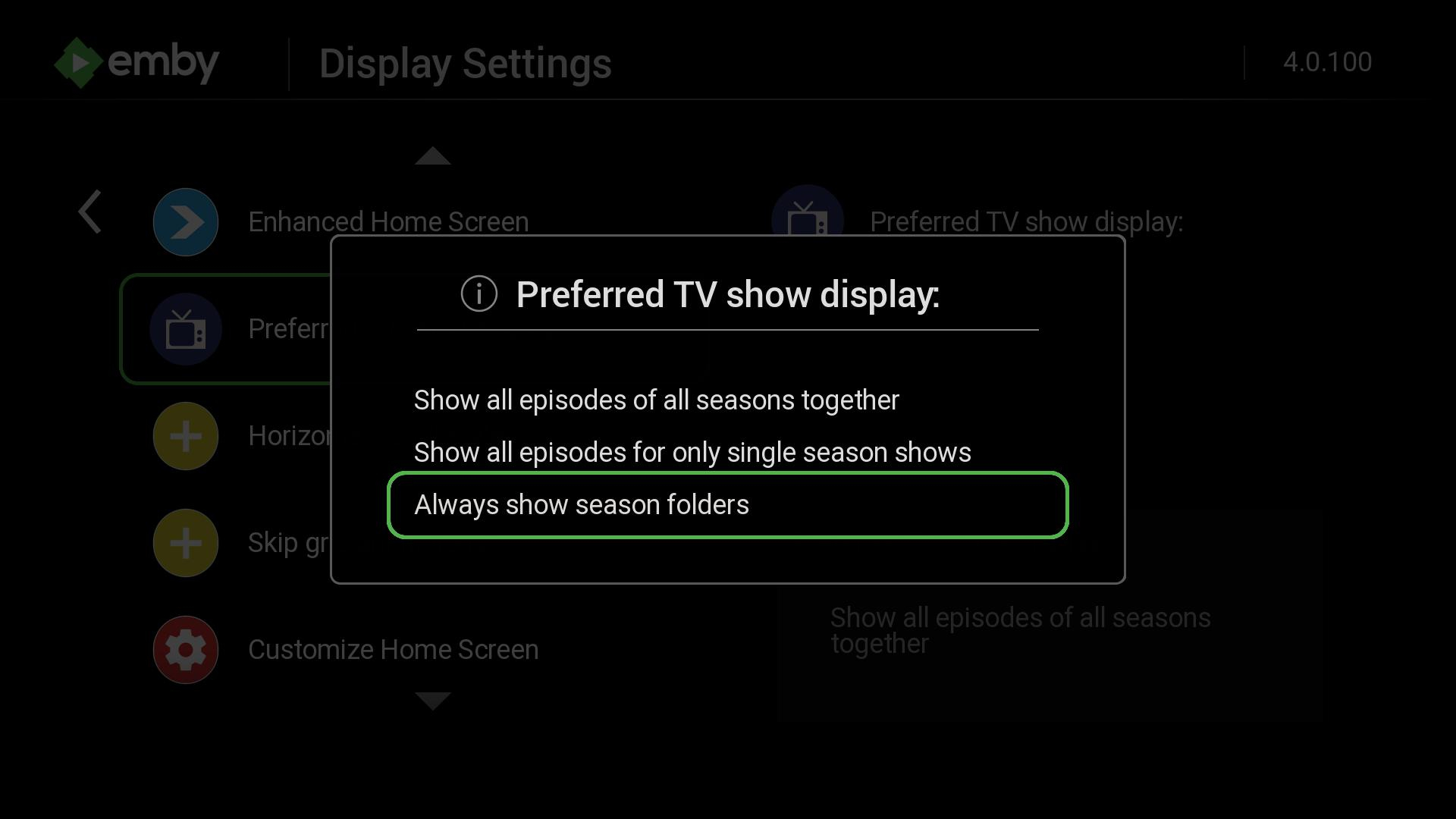
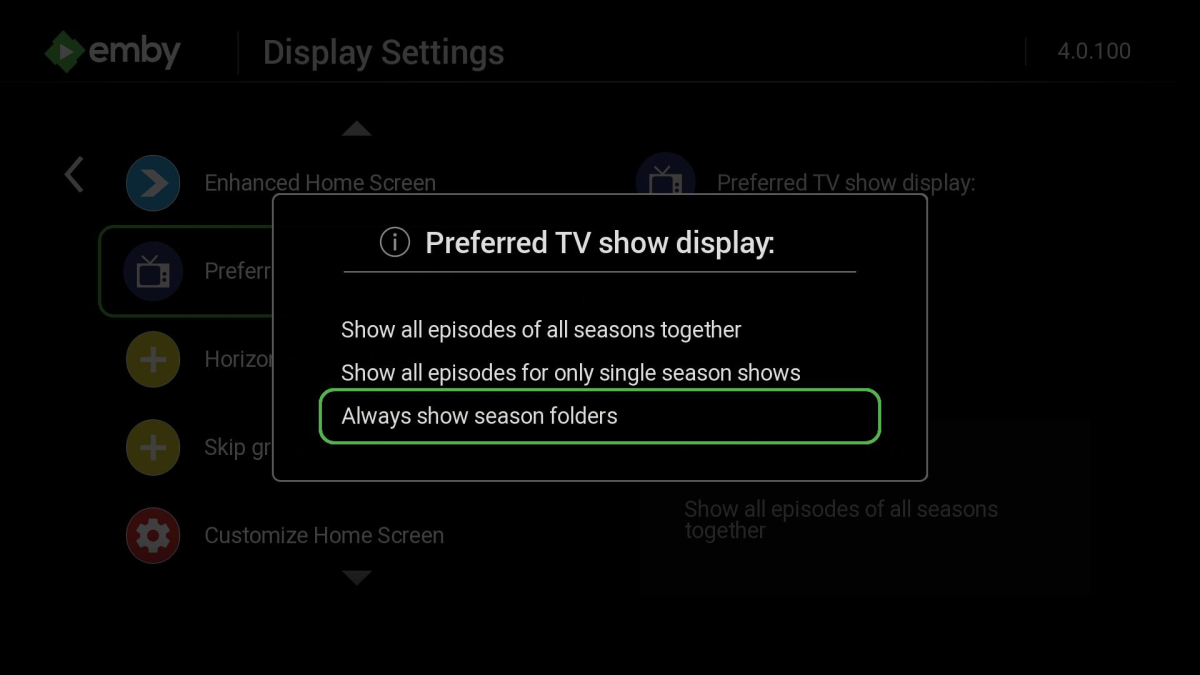
The new method is a way to combine the "next up episode" and "more in season" rows together. It provides better navigation to get to episodes without the need to load a new screen every time. You can get to all episodes from the single detail screen. The episode row will move your focus to the next up episode when it first gains focus. After it does this try moving focus onto the season tabs instead of the episode row. You can also give focus to the season tabs instead of the episode row. When the season tabs has focus you can manually change the season and it will reflect onto the episode row below. You can also then press OK on the focused season tab. After you press OK on a season tab it will load that season up into a new screen with the old vertical display format. You can also use the option suggested in the post above to change this entirely back to the old way which will have a row with season folders. In the display section of the settings.
 1 point
 -
From a posting yesterday with more info. Share Report Malicious Posted Saturday at 03:06 PM Have an intresting play back issue. My set up. Synology 418play DSM 7.2.1-69057 Emby server Bata 4.8.0.59 Streaming to a Wimm Pro Plus Firmware 4.8.535-454 DLNA set to "Enable DLNA Pay to" and "Enable DLNA Servver" The issue is when I tell Enby to play to the streaming device that it see, it plays the first 2 songs on the album with no issues, but it stops befor it plays the 3ed song. I can manually go to the album in Emby and click on thh next song and it will pay it but stops after the song is played and you need to pick the next song. But if I go into the Wimm app and pick the streaming location to play to ( I have 3 Wimm Pro Plus in diffrent locations in the house) the entire album will play with no issues. This issue seams to happan no mater which device I try streaming to or controling from. I have attached the logs for review. Jon Tripp1 point
-
When I click on the arrow to play the entire album it will stop after the second song. If i click on the 3ed song it will play the song but not go on any futher. Just stops, like it is waiting for me to give it its next command to play,1 point
-
We'll hopefully be switching to the .com soon. We have a nice agreement setup with them so that Emby Premiere users won't need to enter open subtitles credentials anymore.1 point
-
Hi, we’ll take a look at those. Thanks for reporting.1 point
-
Hi, there is currently no option to do this, but this question has come up before and is possible for future updates. Thanks.1 point
-
@CragglesI have to admit that I really fancy how do your badges look inside my libraries giving them a touch of flair, smooth job, really well done. That said, I hope CoverArt plugin will get some lovin' in the indicators department, both to include missing common stuff (SD reses, other Aspect ratios...) and to keep up with the times (DV, HDR, HDR10...) as it feels a bit left behind. Or that's just my impression.1 point