Leaderboard




Popular Content
Showing content with the highest reputation on 12/12/23 in all areas
-
I've been a bit short on time lately to do any substantial updates, but today's version has nice new gimmick, just in time for winter: SnowScreenSaver.mp4 It comes as a screensaver. You need to activate it under User Settings >> Display It starts after 30s of inactivity - but only when the window remains focused. Get the latest version here: https://github.com/EmbySupport/Emby.WMC.UI/releases3 points
-
Hey Everyone, My journey from Plex to Emby has been pretty smooth with the exception of setting up SSL encryption. There are lots of great posts on this forum and elsewhere on how to do this, and I consider myself pretty computer literate. But I'll be honest, this was a bit overwhelming for me as I have no experience at all in hosting web servers, DNS, or encryption certificates. After many hours, I've got it all working, so I thought I'd share what I've learned. I'm going to try to write this for the newbie, so don't be offended if it seems like I'm explaining lots of simple stuff. That's really what I needed a week ago, so maybe it'll help someone else in my shoes. Also, this is for Windows, although most of it applies to any OS. There's lots of text, but it's really very easy. Let me also say, I understand that a reverse proxy gives you lots of benefits and flexibility for securing your server. But that was a step too far for me. If you want a reverse proxy this post is not for you, but there are many posts in this forum to help you. If you want to access your Emby server from outside your home network you will want to require secure connection mode for all remote connections (see "Network" tab in Emby server configuration). To do this you need an SSL certificate. To get an SSL certificate you must have your own registered domain name. Here's a step-by-step. Domain Name Registration A domain name is the readable text part of a web address. So emby.media, or google.com, or media.yourdomain.net. Most home users don't have one, but you need one to get an encryption certificate. While (Edit:)There are many options for purchasing a domain (godaddy.com being very popular), I chose to buy my domain from domains.google. It cost me $12/year, and this is the only cost to getting your Emby server working with encryption. Go to https://domains.google, pick a domain, pay your money, and you're ready to go. For the rest of this discussion let's say you registered the domain name yourdomain.net. Now you need to associate your new domain with your home IP address. Most home users get their IP address assigned to them by their internet provider and it is "dynamic," meaning it can change. So you need to be able to tell your domain provider what your address is and update it when it changes. This can be done automatically, and is called dynamic DNS (DDNS). (Edit:) Before obtaining a domain, ensure the provider supports Dynamic DNS. Google domains supports this easily, here is the help page explaining how to set it up. Fortunately, my ASUS router has this capability built in so it was easy, but it's easy even if your router doesn't (follow google's directions). (Edit:) In case you have a static IP (obtained from your ISP), DDNS support is not mandatory. That's it for domain name registration. Now yourdomain.net points to your home network IP address. SSL Certificate Now you need to get an SSL certificate. This has the encryption keys you need, and must be issued by a recognized certificate authority or it gets blocked by your browser. Lets Encrypt will give you a free SSL certificate but it has to be renewed every 90 days. This was the part I was most confused by, but it's actually really easy. The part to understand is that Lets Encrypt must have some way of proving you own your domain name before they can issue you a certificate. There are two options, 1) they give you a little text file to place on your web server in a certain location. I don't have a web server so this is a no-go. 2) They give you a text string to add to your DNS registration in what is called a "TXT Record." You do this with google domains, it's very easy. To get a certificate you need an ACME client program that knows how to talk to the lets encrypt server. They recommend certbot, but it doesn't work in windows. Dig enough and you'll find ZeroSSL, they have a nice downloadable program that does it all and is really easy. Download here. Make a directory on your computer (I used c:\ZeroSSL). Put the le64 (or 32) exe in this directory. A single command will create your certificate. I think the easiest way to do this is create a text file in the same folder as the program, call it "get_cert.bat" and put the following three lines of text in the file. Edit the second line to have your actual domain name (instead of "yourdomain.net"), and to have your actual password for your PFX file (whatever you want it to be, just replace "yourpasswordhere" in the code below. @[member="Echo"] off le64 --key account.key --csr domain.csr --csr-key domain.key --crt certificate.csr --domains "yourdomain.net" --generate-missing --handle-as dns --export-pfx “yourpasswordhere” --live pause Save the text file as get_cert.BAT and then double click it to run. This runs the le64 program, creates the public/private key pair, asks lets encrypt to generate a certificate, saves that certificate, and converts it to a PFX file format that Emby requires. All in one command! When you run this, a command window will appear and you can see what it's doing. After a few seconds it'll pause and ask you to place the TXT record in your domain. It gives you a name and value, the name will be something like _acme-challenge.yourdomain.net, and the value will be a bunch of random letters and numbers. The program pauses here for you to put this into your domain. So now you just log in to your google domain again, go to "DNS" on the left menu, scroll all the way down and enter a "Custom Resource Record." The type is TXT, the name and value are what le64 gave you. Put them in, wait a few minutes for the change to take effect (took just a couple of minutes for me). Then go back to the command window where le64 is running and press enter to continue. It'll then verify your TXT record is there and issue your certificate. You'll find a file certificate.pfx in the le64 directory, that's it! Emby Setup Now log in to your Emby server setup. Go to "Network," in the field "External Domain" you put your domain name, so yourdomain.net or whatever you chose. For "Custom SSL certificate path," browse to the .pfx file that was created by the le64 program. In the "Certificate Password" field put whatever password you used in the .BAT file above when you created your certificate. Then for "Secure Connection Mode" I recommend you choose "Required for all remote connections." You also have to log in to your home router and forward port 8920 to the computer running your Emby server. I'm not going to give directions on how to do this, it depends on your router, but it's super easy. That's it. You need to restart your Emby Server, and then you're done! You can now access your server remotely and securely at https://yourdomain.net:8920. Certificate Renewal Now, I mentioned before that the Lets Encrypt certificates are only good for 90 days. So every 90 days you have to renew the certificate. Take that "get_cert.bat" file you made earlier and make a copy of it called renew_cert.bat. At the end of the second line, just add the text "--renew 20" (without the double quotes). When you are within 20 days of your expiration date run this file, it'll renew your certificate. I believe it'll ask you to place a new TXT record in your domain, so certificate renewal cannot be made fully automatic. You'll have to run it manually and add this TXT record into your google domain just like when you created the certificate in the first place. But it takes just a few minutes and then your certificate is renewed. You'll have to restart your Emby server for it to take. The file locations all stay the same, so you don't have to update anything in the Emby setup, just restart Emby. That's it! Well, I hope this helps someone. Sorry for the long post. I would have benefited from this level of detail a week ago, so maybe it'll be good for someone. If anyone sees something wrong here, feel free to correct me.1 point
-
Hi, Thank you for the great product. It is a pleasure to use it. I have seen some posts but they are years ago regarding my request. Is there a plan to have notification (when adding movies, shows, live tv etc.) from the emby app ? This means to get a push message on my android phone, iphone, windows app, etc. With 3rd party software its not so cool. Thank you.1 point
-
I'm a big fan of services such as Rifftrax, and I hate having to manually mux files every time I purchase another release. Much in the same way that external subtitle file support was added, it would be nice to have external audio track support for TV and movies added as well. I wouldn't expect Emby to handle the offset calculations needed to sync the audio. It's not too difficult for me to modify that now.1 point
-
Built in Push Notifications through the app and not 3rd party applications? Is that a foreseen addition or what? Right now I added push bullet and well you have to download the app to just get the notifications. Seems counterproductive honestly at least in my eyes? I'd like to see if maybe the android app could get native notifications, I know Roku would be probably difficult and PC would be easy. Xbox probably the same but may be annoying in the sense while viewing or playing games. At least with the Android (iOS too I'm assuming) we could be notified right from our phones and be like "sweet" turning on Emby and watching a movie now.1 point
-
Hello, I'm making the move over from using PLEX for years to Emby. Plex has seemed to work well for me over the years but stopped dead trying to get it to work well on my Boat. The issue is that we do not have internet connection on the boat. Hence why wanting a media server. Unfortunately Plex needs to "Phone Home" every so often so it just breaks the whole system. The worst part is it just says some random error or won't load, when in fact it just needs to be logged back in, which needs internet. A friend told me that Emby does not need internet connection. I purchased an Emby premiere license and waiting for the activation code to arrive. Just wanted to reach out on here to find out if anyone else is using Emby in an OFFLINE only style and what I may need to do or watch out for. A couple of questions: 1. Can emby in Fact run 100% offline 2. Is there anything I need to do to get it ready for offline use 3. Will I ever get a stupid login error if offline 4. I understand I will need internet for downloading media art etc, but is it possible to have this data downloaded on a home machine that has internet and move the hard drive or something over to the "offline" server on my boat so will never have to have the boat server ever touch the web. Thanks and hope emby works for me!1 point
-
So, my workcenter is manned 24/7/365, but we do have dull periods of time, like weekends, holidays, midnight hours, etc. For this reason, I created a shared account for us to watch movies and TV shows so that we can keep our sanity. However, people have been using the login on their TVs at home as well, and have even been sharing the credentials with their families. I want to prevent that from happening. What I imagine is in the User Setting settings page for an account, there are two fields called "Remote IP Address Filter" and "Remote IP Address Filter Mode", which work exactly like the two fields that already exist in the server settings page, except that these apply only to the specific user. This way you can set up basically kiosk-type accounts that can only be used on specific networks.1 point
-
OK just tested and it's working.1 point
-
Emby uses a customised version of ffmpeg. It usually appears to be a version behind, but the devs add in changes from the next version which they think are necessary, so not all is as it seems. Paul1 point
-
Ok, I was able to follow password recovery thread and got back in. I will attempt password set up on other accounts and test remote logins again.1 point
-
Thank you. It works1 point
-
Its only a 2.1 soundbar so it will make no noticeable difference whether it is receiving PCM or Dolby.1 point
-
Thank You very much. Works great now. Regards.1 point
-
Doubt it'll do anything as DS2411+ sports a Pineview Atom (no iGPU) and is generally seriously underpowered for intended use - I reckon OP should forget any kind of transcoding/stick to stricly direct playing/serving content (even on-the-fly subs extraction might be a challenge for 2010 entry-level CPU) and IMHO would be much better running Emby server out of a used 100-200 USD laptop or some 4x4 while using NAS exclusively for storage.1 point
-
Hi, maybe this will help:1 point
-
Next, I will try the swap file suggestion, and will report back. That will take a while though.1 point
-
@LukeYes I can. It appears that Remote Access does work as expected, conditionally. By that I mean the cell signal strength was barely one bar when the problem occurred but once I moved to a stronger area the media loaded without issue. The difference was immediate. I have several TB of media so I'm going to assume it was simply too much to load on such a weak signal. On top of which T-Mobile had temporarily dropped my speed from 5G to 4G so I'm going to assume those factors combined were the cause of the problem. I've had no issues since. Well, except when I'm in a weak signal area.1 point
-
I just got it! Thank you for the quick reply! It works so well!1 point
-
Thank you sir! Looks nice!1 point
-
Sounds like you've got some awesome help! I'm not a programmer either by any means. Unfortunately my Windows skills are very lacking. It was a challenge just to make that work lol. I hope you all are able to come up with something, gotta try to keep the wives/girlfriends happy!1 point
-
Getting "something somewhat" is always easy. The remaining 99% is hard work..1 point
-
@softworkzThanks for explaining. All I have found is a couple of the main screen/menu like the one I have posted already. If I happen to come across any more detailed images of other underlying pages/menus I will let you know, but I haven't had much success so far...1 point
-
Delivered: https://emby.media/community/index.php?/topic/123913-latest-version-with-new-snow-screensaver/1 point
-
Like this...? SnowScreenSaver.mp41 point
-
I think we should clear-up the difference between ‘Nextgen TV’ and ‘TVnext’. Nextgen TV (AKA ATSC 3.0): Is a much enhanced OTA broadcasting format currently being tested in the USA and a few other counties. It (potentially) greatly increases the A/V & signal quality over the current ATSC 1.0 that is in use. But unfortunately is being made useless by many broadcasters by implementing DRM. This doesn’t apply to most other countries that are using DVB-xxx (or other?) nor people that are using IPTV/M3U sources. Emby has no control over how any of this is done. TVnext: (See: Tvnext Spreadsheet} Promises a feature rich Implementation and speedy channel tuning for emby to play/record Live TV, including all of the above and more (non-DRM at this point). That has been (mostly?) developed by @softworkz. This for me should be the very next emby public beta. (i’d even be willing for a private beta!)1 point
-
I'm hoping for a new and improved OTA television performance experience. As it is now, it simply takes too long to switch channels or do anything with timeshifting while watching anything, especially sports. Still on 4.7.x, to be fair I haven't tested it for 8–10 months but when I do, I am always disappointed in how it runs compared to Channels DVR.1 point
-
We are working on getting it into the store for TV devices, so this won't be an issue for too much longer. We are trying to consolidate what is currently a duplicated effort on android, having two separate apps.1 point
-
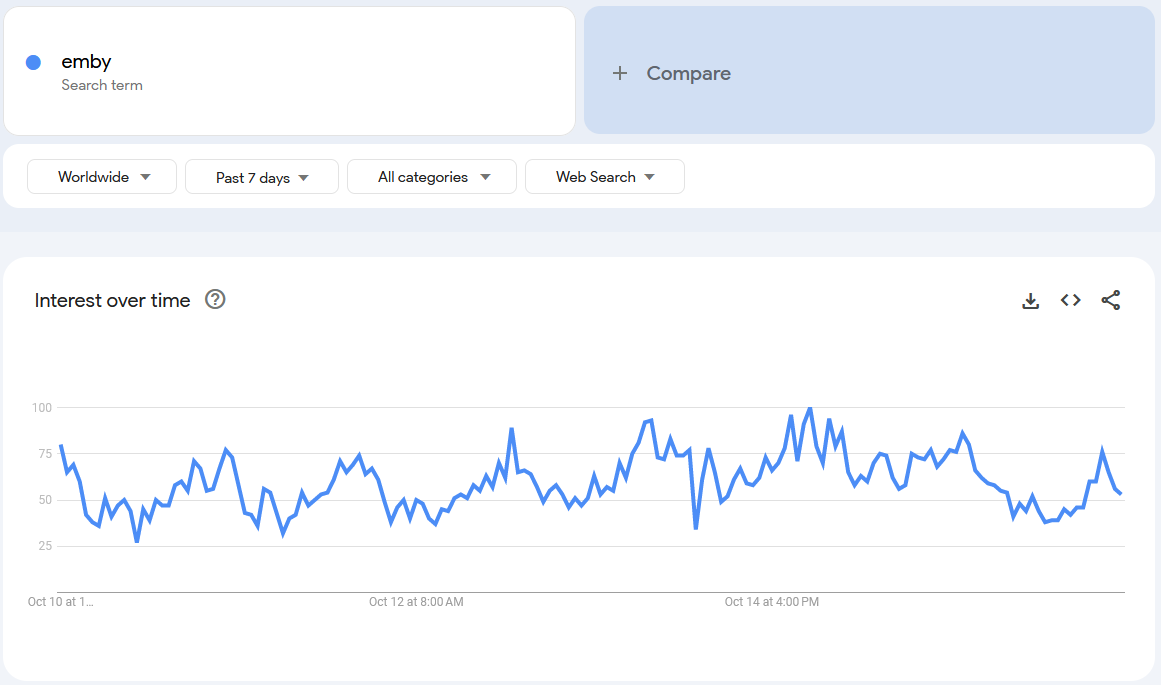
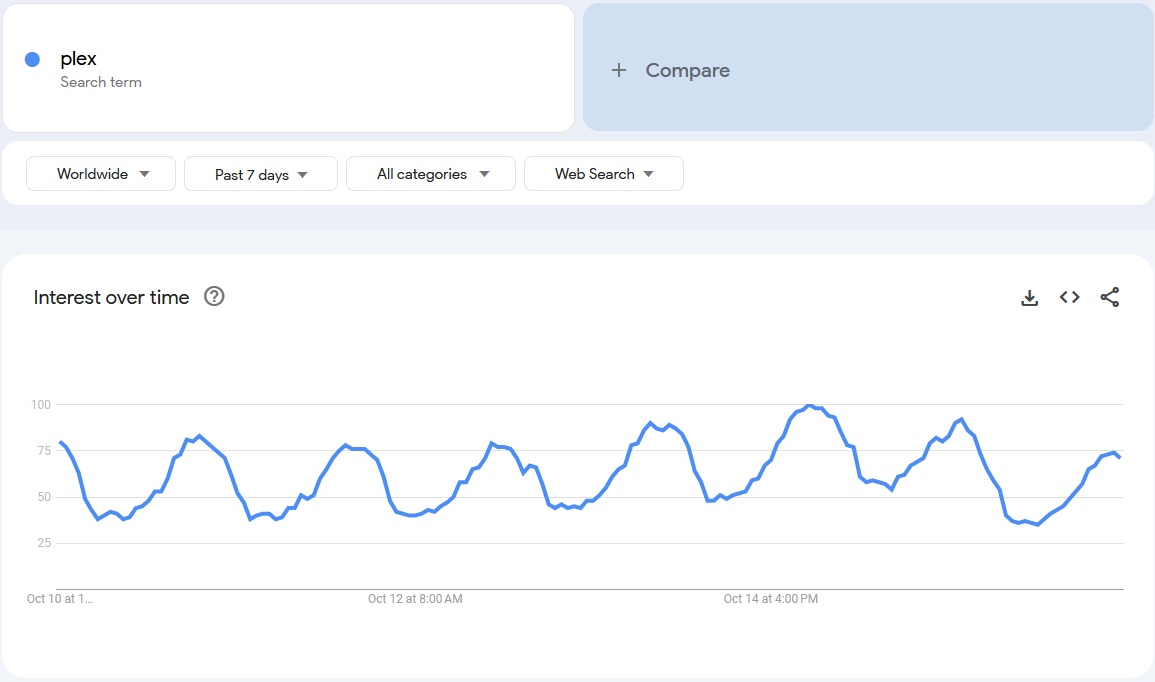
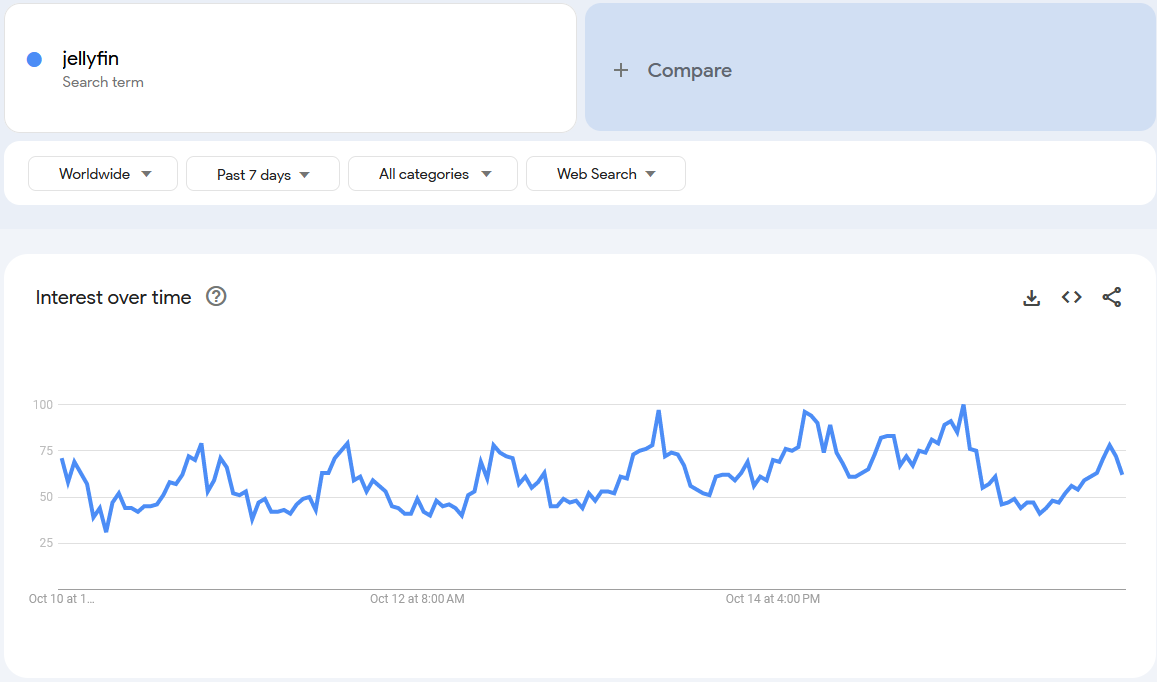
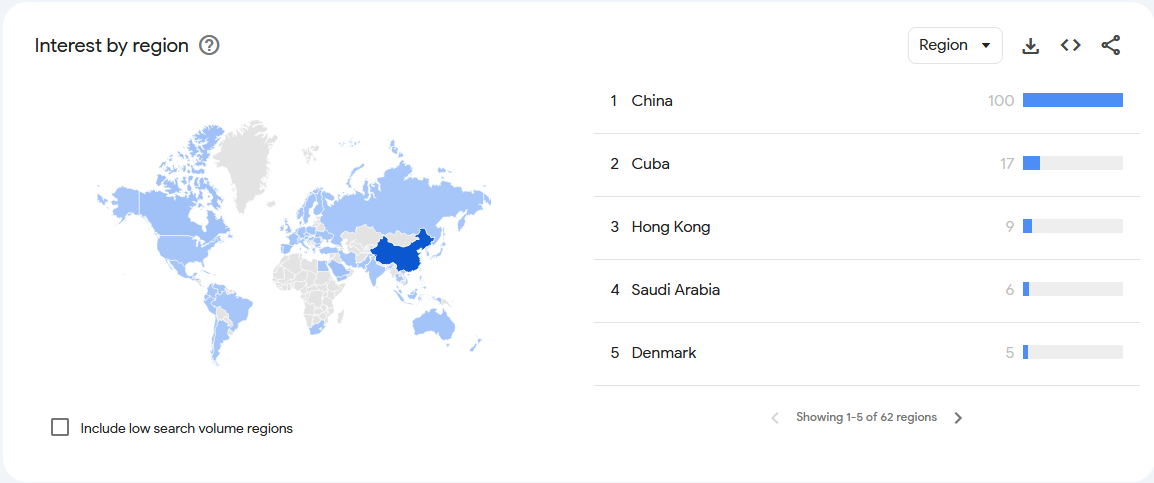
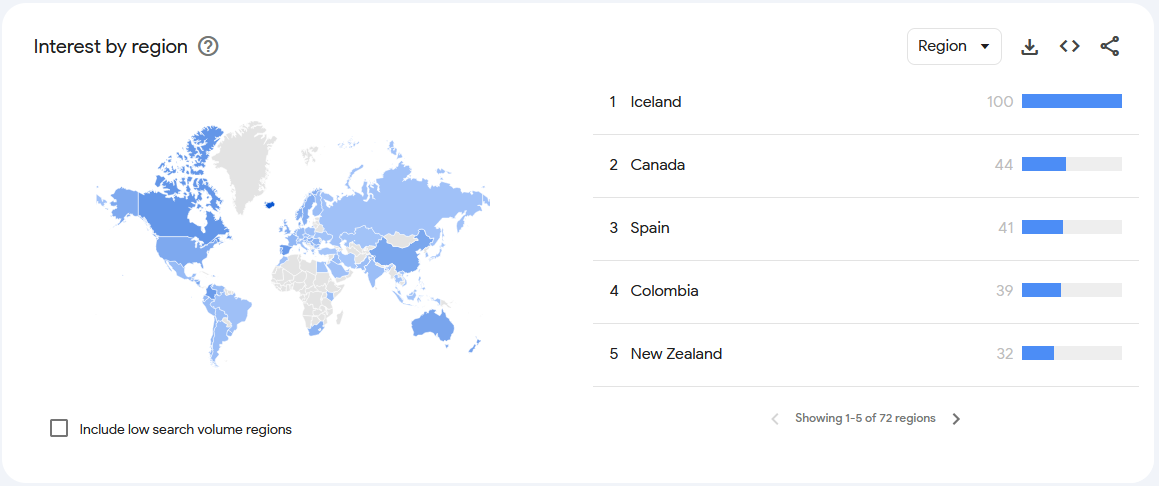
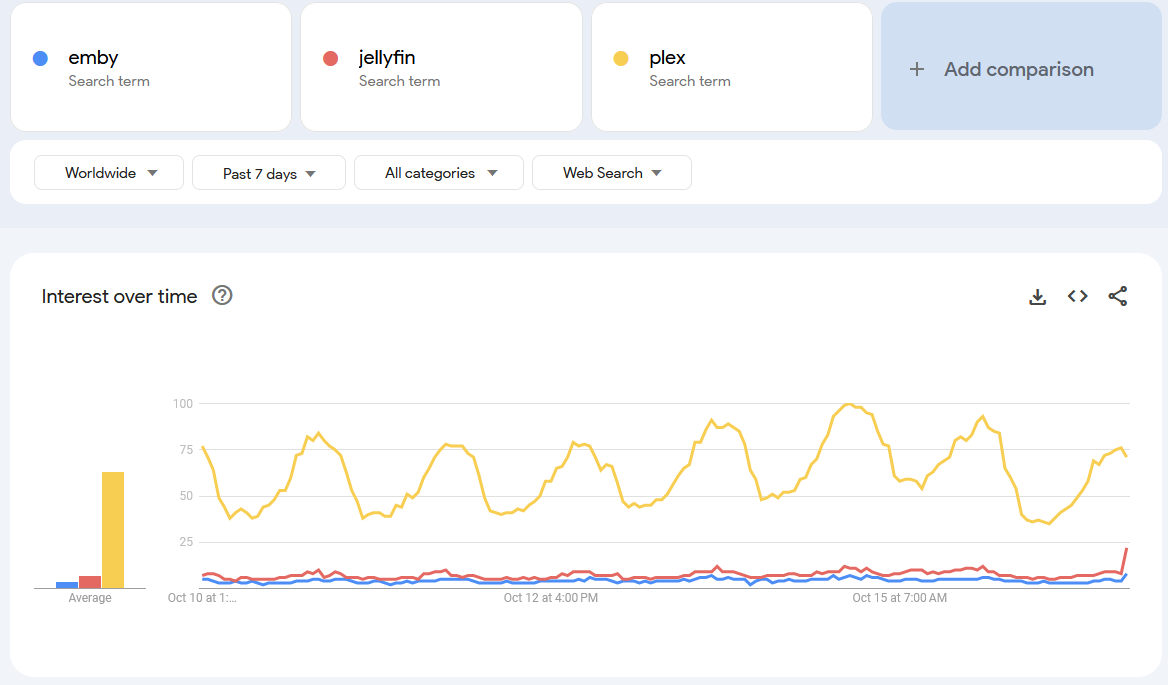
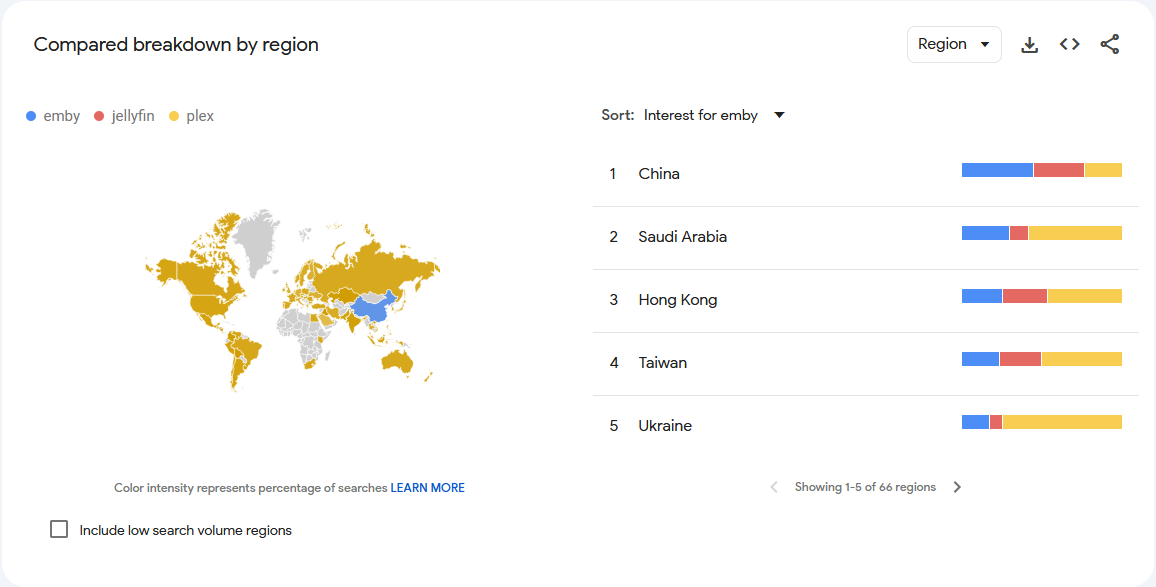
https://trends.google.com/trends/explore?date=now 7-d&q=emby&hl=en https://trends.google.com/trends/explore?date=now 7-d&q=jellyfin&hl=en https://trends.google.com/trends/explore?date=now 7-d&q=plex&hl=en Only showing a week to show up to the minute. You can use the Google Trends to align these bursts to when people start to get awareness of each. As you move back beyond a week the results for everything drops which is why I have shown it only as of this week. As people research more on Google it will influence this graph. Just because you do not see Emby mentioned as often does not mean users do not find it exists. The Google Experimental Bard where the AI helps you with your search will even suggest using Emby when searching the other two options. Next you might ask, which countries are mostly searching for Emby? Well the Trends graph can even show you that. Then you might ask where are the most people who look for Plex coming from? An entirely different demographic. Emby has a huge community within China where we cannot see what they post. They are censored beyond belief with their Great Firewall leaving no question why they seek Emby in China. Plex for them would be useless in China since all the web based things inside Plex are blocked. Chinese cannot get enough of Emby.
 1 point
 -
Not everything has to have a point, just look at D. Trump or B. Johnson...1 point
-
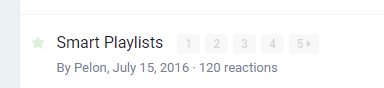
raised as an FR in July 15 2016 - ~7 Years ago ... .. how long do you wait ... ?
 1 point
 -
I don't use beta's but form what you posted looks disappointing. It just saves you one click from selecting the playlist media icon.. I bet it still links to the shitty music playlist too? What does the "Recently Released Movies" look like out of interest? This was what I was thinking it should look like, create a playlist and display it as above (same as Kodi/XBMC does it). Alas.. I guess that's still too hard! I guess it's still down to a plugin @rbjtech I would love you to fill this sad gap in the core software.1 point
-
Agree - would love to be able to add to the context menu. I think it's 'possible' via a Plugin, but it's not openly being shared as I've asked before.1 point
-
Ok now I get it then we need more Home Screen Sections to fill 7 sections is not enough.1 point
-
Not really - my previous 'watchlist' attempt (from maybe 18 months ago..) worked pretty well - just using Playlists for each user as watchlists - the downside, as you rightly point out, was that anybody could add/delete to anybodys watchlist. Not necessarily a bad thing (I watch a good film I think would be suitable for user x, so I add it to their watchlist..) but agree this could very easily be abused. The public/private playlist provides the absolute bare bones upgrade on the old 'public' playlist but we were all expecting actual permissions per playlist.. promised but as of yet, has not made the Beta release .. Agree - just displaying playlists on the home screen (and then displaying as a playlist - exactly the same as just using it from the Media row) is not a step forward at all. My Plugin will hopefully take a 'Playlist' and display it's contents as a channel ( ie row on the Home menu) - that way, you can display your own 'Watchlist' - and add/delete from it via the existing Playlist mechanisms. If you want a 2nd channel/row of 'Global Recommendations/Spotlight/Top Picks' (whatever you want to call them) - then you simply display the 'Global Watchlist' instead - which has 'Public' rights so anybody can add/delete from it.1 point
-
If I don't see anything by the end of this month, then I'm going to do it myself via a Plugin as I am fed up waiting for this BASIC functionality - As everyone says, it's essential for a Media App to be able to display the media that users want to view - without it, frankly it's a massive fail. In my mock up Plugin, I can create a channel (which is displayed as a 'row' in the Home Screen - permissioned using the existing Channel permissions), I can read a users Playlist - so I just need to combine them and you simply add a title to a Private Playlist which is called 'My Playlist' ... Maybe I'm missing something obvious here - but I'm really not sure why this has not been done in the Core - it seems an obvious quick win. Yes a full 'Smart Playlist' would be nice, but having 'nothing' to display a filtered row is just infuriating ...1 point
-
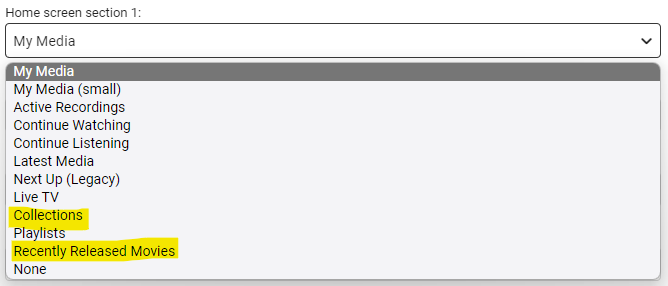
I agree and from the latest beta release notes there is some positive movement it that direction... 4.8.0.46-beta - Add new configurable home screen sections - Playlists, Collections, and Recently Released Movies1 point
-
The Plugin simply creates a new emby 'channel' based off a filtered list from all available Movies or TV Shows/Episodes. It really is nothing special but I'm bemused why it has taken emby years to include this basic functionality. People do not want to see a huge block of 100's/1000's of possible watch options listed alphabetically - they want it pre-filtered to give them 'latest releases', 'by genre' etc. All the other Apps have done this for years ... The option should be extended to show 'Playlists' in this 'channel' view - if allowed, you now have a very neat way to add to a 'watchlist' - simply add the movie/tv show to a personal playlist called 'My Watchlist' and it will appear as a row on your emby screen ... Some of these have finally made it into the latest Beta (see below) but @Luke has advised that they are short term additions until the proper 'smart' channels will become available. All I want to see (and what my plugin attempts to do) is add personal 'channels' into the Home screen - you can then set the filter as you see fit (A user wants to see all 80's movies for example) and that channel is then available in the list below so they can put it where they like on the opening screen. Limit it to say 5 channels per person as the channels need to be dynamically generated each time. Smartplaylists have been a thing for a while - but it's a 3rd party plugin (with constant compatibility issues) and displays as a playlist designed for music, not movies. We need the functionality of the Smartplaylist, but configured and displayed as an Emby Channel.
 1 point
 -
Easier would be for Emby to renew its cached validation at least daily, meaning that the cache is always fresh at the point that connectivity is lost. Maybe that's how it already is meant to be - but the number of times people have a problem suggests otherwise. Paul1 point
-
Something like this /* OSD Now Playing Bar & Now Playing Page */ div.emby-slider-background-lower {background: #6CCF65; } div.emby-slider-thumb {background: #6CCF65;}1 point
-
a way maybe can solve the problem edit /emby-server/system/dashboard-iu/modules/htmlvideoplayer/basehtmlplayer.js add the code maxBufferLength:6 after emeEnabled:!1 var hlsOptions={manifestLoadingTimeOut:2e4,debug:!1,testBandwidth:!1,emeEnabled:!1,maxBufferLength:6};1 point
-
We are entertaining the request. We entertain all requests. It's just that we usually choose based on what gets the largest support from the largest number of users.1 point