Leaderboard




Popular Content
Showing content with the highest reputation on 11/26/23 in all areas
-
Finally I found a way to trigger this issue on demand and I was able to debug it: 2023-08-16 22:18:23.552 T:10914 error <general>: CCurlFile::Stat - <http://127.0.0.1:57342/tvshows/66a438e62d904399a48d79b97e67648c/35204/35275/746373/e-746373-c07dad36b2d00399d67dac22b96e6b08-2847-3925-0-1-0-107-0-1-h264-2746108-ac3-192000--Dragon_Ball___06x20_Il_monte_dei_cinque_elementi__1080p.h264.ita.jap_.mkv> Failed: Timeout was reached(28) Kodi tries to query file information for a http source (obviously a bug). I cannot prevent Kodi doing that. However, I found a way to set the timeouts to one second without breaking the video multiselection. Currently I'm checking side effects if timeout is set to one second. If my tests are successful, I'll add the workaround in 9.X version.2 points
-
You've grown up with watching live tv but on television only runs garbage? You have a big library but don't know what to watch next? Then this for you: "VirtualTV" - my new live tv plugin that allows you to create custom channels based on conditions of your Emby library content. What's missing: Maybe codec conditions Known problems: Needs Emby Premier to work (Playback) Emby's live tv and playback api is very limited, so i've had to make some detours to get things working. The plugin has two general playback modes: "continous" and "playlist" playback. With "continous" mode you can also choose between "live", which bahaves like real live tv or "archive", which plays the videos from the start. In "Continuous" mode multiple videos are queued and concatenated to one big file with the help of ffmpeg. To make this happen every video in the queue has to have some common features (video and audio codec). That's why it often happens that the video also has to be transcoded by ffmpeg. For transcoding the plugin relies on Emby's internal transcoding engine. If there's a problem, not uncommon with hardware acceleration enabled, the plugin also has a problem. Nothing i can do about it. The availability of subtitle tracks is mostly dependant of the Emby user playback settings. In continous playback mode only one (the default) subtitle track can be used and this one has to be burnded into the video (transcoding takes place). In "Playlist" playback mode the videos are pushed as a playlist to the Emby clients. It's like you would play your videos directly from your libraries. This way you get all the features you are used to. Audio and subtitle selection, pause, skipping around and similar things. "Native" playback method was created by the Emby Devs. Similar to Playlist playback it will play the real library videos, but with the big difference that playback is purely initiated by the client app, without any remote command execution. This is why it also works for Roku devices on a WAN network. And although the real videos are played, the whole thing is treated like live TV. This means that channel zapping is possible and no dialogs for playing the next episode are displayed. Unfortunately, the new playback method does not yet support all features. As the name "Archive" suggests, it will currently always start all videos from the beginning. In addition, only very few Emby apps automatically advance to the next video. If you want it to be improved even further, each of you should raise your voice in this thread. To get things started install the plugin via Emby's plugin catalog and restart Emby. Setup your channels with a name and number and choose your playback mode. In the channel conditions you'll have to select an Emby account. This account is used to get library access, respect parental rating, reading watched states and selecting the stream language. At least one textual input field of the conditions has to be filled to get some program data. Fields with an asterisk are either evaluated with an "AND" or "OR" condition among each other. Finally, if you've chosen "Continous Playback" for one of you channels, take a look at the transcoding settings. Save your channel line up and manually trigger a "Guide Refresh". Now have fun! Version History: After a plugin update, always clear your browser cache. If your settings still don't load in the config screen, you have to move the "VirtualTV.xml" out of ...\plugins\configurations and restart Emby. Start from scratch. 2.0.0.0 Unlimited number of channels; New playback method "Native (Archive)"; New security concept for the Export API 2.0.2.0 Performance improvements to Guide Refresh; Preview for Add/Edit Channels; Option to disable Program indicators 2.0.3.0 Fixed missing Playlist sort order for some Content Types; Added support for Seasons with Content Source Collections 2.1.0.0 Selectively enable channels for specific users; Create copies of existing channels; Ordered unwatched episode playback 2.1.5.0 Added option to (auto)enable channels on a specific date range; Bug fixing1 point
-
The issue relates to the way whatbox has packaged embyserver. They'll need to collaborate with us to find a better way.1 point
-
Fingers crossed for that. For what its worth it went to "just peachy" to "rut rho" overnight.1 point
-
Hi Luke, are you still on target for before the holidays? Any chance of beta testing if not?1 point
-
Hi, they can. Some IPS's only allow use of certain ports. Some none at all if they use a CGNat.1 point
-
If you go to the Setting option in Thumbs view (the three dots one) you can untick items from Show Fields, if that's what you're talking about.1 point
-
Ill give this a shot thank you1 point
-
Yes, but then it acts like an extra and you have to navigate down, find the trailer and click on it. How it should work is if you have a LOCAL stored "real" trailer, not YouTube garbage, then hitting the trailer button should play the local trailer and avoid YouTube altogether. So basically locally stored trailers are useless and YouTube trailers are useless. So for now, at least for me, trailers in emby are not worth messing with. I have a bunch stored offline hoping someday they'll be usable. How locally trailers SHOULD work is like Netflix....when you select a movie and go to it's info page if there is a locally stored trailer it should play in the background.....now that would be slick and it could be optional too.1 point
-
ok.. I was hoping it had an automated tool like musicians, that searches and updates automatically. I have close to 22k songs that I want to to update. Thanks1 point
-
It's just one of those little things that got thrown in. We do our best with the release notes but inevitably there will always be some really small things that are part of it that don't get mentioned.1 point
-
I solved it. Apparently I’m dumb. It didn’t save the HDD hibernation on the Storage server. So the amount of waiting was because it was starting the disks. sorry for the bother Luke. In return I bought a life time license.1 point
-
@rbjtech @jaycedk @Ahole and @fraenhawk may have some Sonarr/Radarr tips.1 point
-
Bingo. A speed test indicated the TV was receiving 76mb WiFi and while 5gz WiFi could get over 100mb, I ran a cat-6 cable and now the shuttering is gone! I will experiment with the CC per your recommendations. Thank you!1 point
-
OK... I will need to defer to someone else running as a container or the developers. I am assuming you presented the folder to the Docker image, and I know there are flags to set the rights. Here is another post that was having issues....1 point
-
The upcoming season is Season 14 of Dr Who (2005), not an entirely new series. The special "The Star Beast" is S00E162 Not sure who created that seprate series listing, but it will likely be deleted soon once the moderators catch wind. /edit looking closer, the moviedb listing for Dr Who is waayy off... I stick with The TvDB for shows: https://thetvdb.com/series/doctor-who-2005/seasons/official/01 point
-
Yes, it's been officially confirmed by the BBC1 point
-
while I agree with the "should" I also understand the most 'lifetime" subscriptions lose the issuing company money. The very thing that makes lifetime subs good for consumers makes them bad for companies, with the exception where the company need quick cash over sustainable income. The loss through "churn" is much less than the loss from not having a large number of subs. I have a lifetime sub and I have had it for years. At this point I am pretty sure Emby is not making money from me and I don't begrudge others wanting the same but it is, probably, not sustainable for a company to give away their service after a few years. The break even for Emby is not more, I think, than 1 or 2 years. At $4.99/month the full lifetime is covered in 2 years so every day after 2 years is a loss for Emby. I hope they don't but I would understand if Emby dropped lifetime altogether or doubled the price putting break even at 4 years. But whatever Emby does it is their product and they may, and do, listen to their users but they can choose whatever pricing model they want and we, as consumers, just have to make our choices based on that.1 point
-
Doctor Who (2005) is correct.1 point
-
Like the title explains, i wish we could create categories/subfolders (not a real path) under the mediafolders in the library manager. Why? To have a clean and simple starting view (overview). I know there is a folder view, but that is not the same. Also there are no items for recently added, genre, last played... With categories/virtual subfolders you could create something like this: Movies ----------------------------------------------------------------------------------------------> All latest added movies - Kids Movies ------------------> Latest added movies by subcategory -> Genre of All movies - Classic Movies -> Genre by subcategory -> People of All movies - Hitchcock Movies -> People by subcategory -> ... - Adult Movies -> ... - Modern Movies Series - TV Shows - Documentarys - Anime Audio - Music (Artists/Bands) - Soundtracks - Audiobooks1 point
-
Your playback device does not support PGS type subtitles - and thus emby is needing to transcode the 4K video. Even with hardware acceleration, it appears to not have the power to do this in realtime (being a NAS) and thus this results in unwatchable playback. I would suggest you aquire the text (SRT) based subtitles for the file instead (using emby/other means) and then use those to playback. Also note that being a Samsung TV - it will not support Dolby Vision - but 'should' fallback to HDR10 as this file has HDR10 fallback. I'd also suggest using the 'Compability Track' - which is Dolby Digital 5.1 Finally, for high bitrate 4K Remux's (such as this file) - your client needs either a very good wireless signal (modern wifi) - a 100Mbit Ethernet wired connection 'may' be causing issues as it may not have sufficient peak bandwidth. 1000Mbit (from a Shield Pro etc) is perfectly fine. You want both the Video and Audio to be 'Direct' where possible - use 'Stats for nerds' to check for this when you play the file back. Look for this in the client settings. In summary, you are asking emby to playback the most demanding of files - but you don't have the optimal equipment to play it back, nor convert it.1 point
-
I am waiting for this too eagerly. I hope to see it in next release . I am so excited for the new UI changes made to the web client with different functionality. Thanks.1 point
-
Uggh total user error... I did not remember having 2 accounts but apparently I did and was using the wrong account (not linked). Apologies for wasting your time on this one!1 point
-
Thanks mate, appreciate it.1 point
-
Correct, I don't believe there is currently a way to unlock the standard app installed outside of the Play Store. Emby team is working hard to get it into the app store though. That's entirely up to you. Unification of the apps have been in talks for a couple of years now. For me personally, the Android TV is absolutely worth an app unlock as it is.1 point
-
It might be difficult for this hypothetical Emby server to recognize the difference between no Internet access and strategically denied Internet access.1 point
-
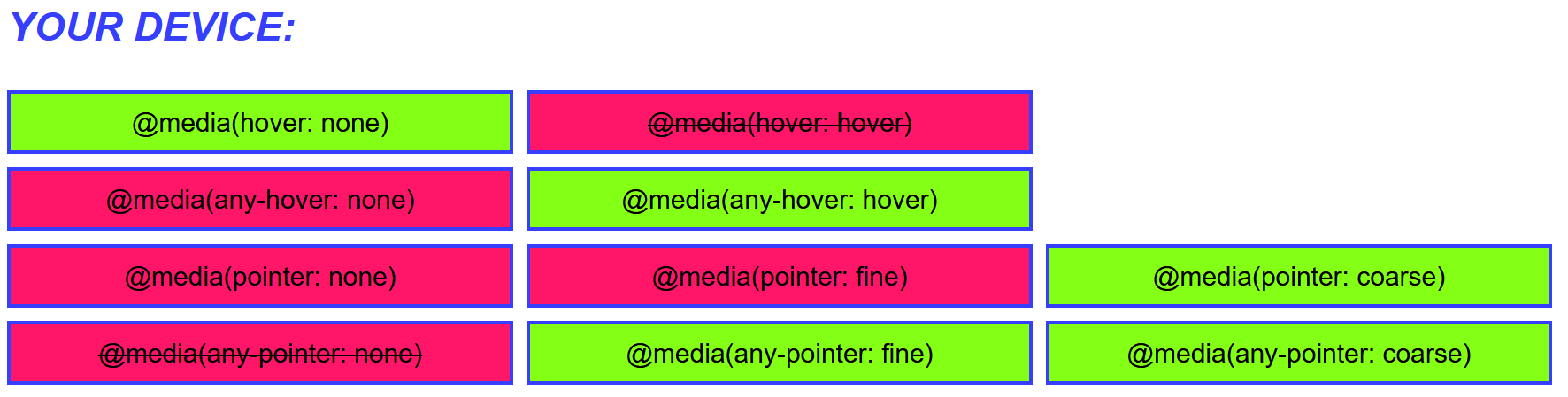
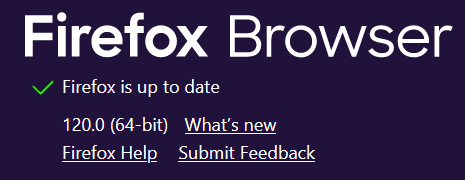
I am seeing https://patrickhlauke.github.io/touch/pointer-hover-any-pointer-any-hover/ is showing the same hover: hover = false pointer: fine = false So its a firefox thing, just need to work out why.
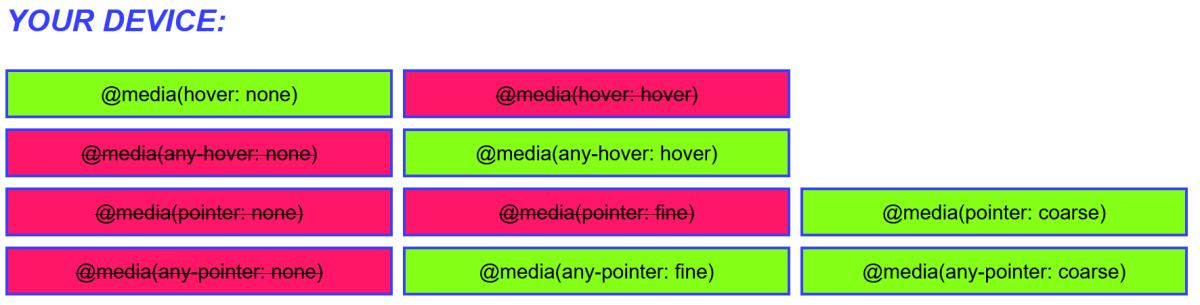
 1 point
 -
This is a tough one when the app crashed on itself unexpectedly. I want to help find out why this particular media will crash the Tizen app. Any info you need please don't hesitate to ask:-)1 point
-
Which may be less of an issue than you think, because while the server is off the Internet there's no significant possibility of large numbers of new clients connecting to it. The scope for misuse is miniscule. Paul1 point
-
Roger, well hopefully @SamES will find something. Either way it preferably wouldn't crash even if it struggled converting.1 point
-
Hi when the movie starts, the OSD controls do not work anymore. It is always the same place in the movie. Once it starts, I am like waiting for it to crash And I cannot go back to where it crashes, the movie will start from the beginning. @FrostByteit's not possible to choose another audio track because HD MA is the only audio track available with the movie unfortunately... ;-(1 point
-
Also, did you try an alternate audio track which is compatible like SamES mentioned earlier? Would help if it has something to do with the conversion process of DTS-HD.1 point
-
windows 11 rtx 3070 gpu-p emby inside a windows vm with 16gb ram and a hand full of cores (the only reason i use windows). works flawlessly since... ever the same gpu is also assigned to a few other vms. check my comment here. im super happy with the setup and how it works without a single issue1 point
-
@LukeI started fresh with a new copy of virtualTVExample. And everything worked as expected. Once I save I end up in the "Live TV" tab. So I removed //appRouter.show(appRouter.getRouteUrl('LiveTVSetup', { // SavedTunerHostId: (result || {}).Id || info.Id, // IsNew: params.id == null //})); Now after the save, I return to my GUI. I don't know yet if this change destroys what you were trying to do. I will continue testing. Thanks so much for this help. Sometimes I am a bit slow to catch on. Vic1 point
-
Not really affecting me but an announcement on such changes are always nice. It will be "uncovered" sooner or later and the frustration of the users are garantueed.1 point
-
Luke, I did the work. Using the code pattern you suggested It writes once to the tuner, and that works as expected. Next, as you explained, the code redirects back to the "Live TV" tab. This does work because it denies the possibility to write to the tuner a second time. I need to update the tuner to add channels and programs. Vic.1 point
-
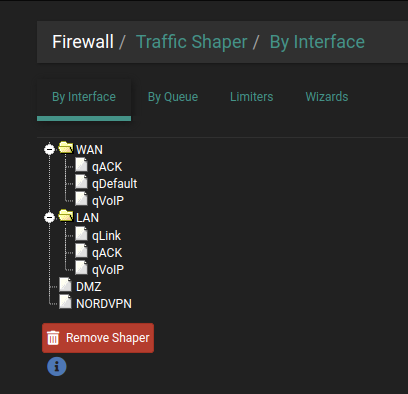
Turns out my pfSense had a "Traffic Shaper" on as the culprit. All sorted now.
 1 point
 -
Emby isn't the issue here - DV5 works perfectly well on every device I have used with Emby - as it's just passing through the raw data - it's the end devices that does the DV processing. Remember DV5 is a different colour space vs DV7 and DV8 (that have an HDR10 fallback layer - DV5 does not) - so there is a possibility, your projector does not support DV5 (but tbh, I'd be very surprised if it did not)..1 point
-
To set this in relation, I've created a short clip demonstrating the seek and skip capabilities of the WMC UI. In order for you to see what I'm doing, I 'm using a mouse to operate. It's a movie of almost three hours. Now see, how quickly and easily you can get from one end to the other: WmcUi_SkipAndSeek.mp4 So, I would say that before you have even figured out, which duration you want to enter for seeking, I'm already there (I mean: "you can already be there")1 point
-
OK... This time I removed my original library, and created new as "Home videos and photos". Working now. Trying to remember what was not working when I switched from "Home videos and photos"... Maybe that the other family members could not get to them. Hmmm... Well... I will keep it this way again. Thanks.1 point
-
You can expect to have the 4.8 stable release this holiday season.1 point
-
Just a FWIW, spent the day tracking down this issue. (Uninstalling plugins/full reinstall/etc...) If you have a .strm file while also having a video file of the same episode & have "Automatically merge series that are spread across multiple folders" enabled, trying to play/view/view metadata, the episode will cause the server to proceed to rapidly gobble up all the available memory on your system. (32GB within 5 minutes, in my case ) My Specs: Operating system: Windows 11 Pro (22H2) OS.Build: 22621.2070 Emby Server: 4.7.13.0 It's fairly easy to replicate. Add 2x folders to merge, one containing a .strm, the other containing a video. (.mp4/.mkv/.mov/etc) - Create a new Library - Select "TV shows" as the content type - Add folder "TV Stream" & "TV Video" - Enable "Automatically merge series that are spread across multiple folders" \TV Stream \Seinfeld (1989) Seinfeld S01E01 - 720p.strm \TV Video \Seinfeld (1989) Seinfeld S01E01 - 1080p.mkv Once merged, if you try to interact with the episode(s) in any way, (play/view episode details/view metadata), the server will do nothing & start eating up all the system memory. Nothing shows in the logs either, even with debugging on, hence why it took 6hrs of trial & error to track down what was causing the leak. (I can still send logs if requested but figured it's fairly easy to replicate.) I also know it's kind of a super "edge case" scenario, but figured I'd post anyways because any memory leak = bad...1 point
-
Depends on the DV profile - if DV5 - then unless the TV is doing colour space mapping - then you'll get the purple/green mess - but if DV7 or DV8 - then it will fallback to the HDR10 layer as you've said above. I've not seen it, but DV8 may even allow it to fallback to HDR10+ - but I'm not 100% on this as I've never seen it myself.1 point
-
Hello, French translation is complete. will there be a release planned soon of emby on alexa FR? Thanks1 point
-
Thanks for the feedback.1 point
-
Solved. After taking a look at that Luke, well, it was a little over my head. I couldn't get past the fact the drive seemed fine. It was EmbyServer that was having trouble accessing the files. I did some digging and found the answer. This setting was not checked: System Preferences > Security and Privacy > Full Disk Access > EmbyServer. I checked it, opened EmbyServer, and Boom! Success. Thank you Luke and Happy2Play for responding so quickly. Emby is fantastic!1 point
-
Have you taken a look at this?1 point










(1).thumb.jpg.83ab0d0f21861b51e3e86e5077ce3d3d.jpg)