
Leaderboard




Popular Content
Showing content with the highest reputation on 10/25/23 in all areas
-
I've spent months evolving my Emby setup to a state where it is able to reliably play live TV streams from an IPTV provider. Sharing my findings here to help the community and gather feedback in case I can make things even better in the future. Up until I added hls-proxy to the mix I was attempting to use Threadfin as a buffer. It helped stabilize things slightly but issues were still present. Emby clients would randomly seem to drop their channel streams and fall back to the previous screen in the app, it was more prevalent with remote clients than with local, but all clients (web/android/roku) experienced the issues. Clients have no playback issues with local, or remote episode/movie media files. The IPTV service provider I use allows 5 concurrent connections to their service. However, I have noticed that I cannot rely on Emby to enforce this limit. If I set "simultaneous stream limit" to 5 in Emby it will eventually end up in a state where no channels can be played even though there are no active streams (verified by looking at the status page of hls-proxy). I don't know why this happens and I can't seem to correlate it to anything specific. After adding hls-proxy to my setup, I will sometimes see Emby make a secondary connection to the same stream even though a second user has not tuned to that channel, but I'm not sure if that has anything to do with the problem. The workaround I've put in place for this is to set the "maxStreamsPerClientDefault" in hls-proxy to 5, and set "simultaneous stream limit" on the TV source in Emby to 0. I've also configured a cron job to restart my Emby server early each morning to clear out any stuck tuners that might exist. When I set up hls-proxy I noticed a couple things. My provider publishes 5 .ts files in the m3u playlist for a channel. If Emby is able to see a list of 5 .ts files, it will read them but start playback in the client at what I believe is the 3rd or 4th file in the list. This means that Emby is only leaving a 1 or 2 file buffer between the playback position in the client and the stream coming from the provider. If the provider experiences a delay in publishing the latest .ts files for the stream to their servers/CDN, the client will overrun the buffer and this may be why the client stops playback at seemingly random times. I was able to configure hls-proxy to show Emby only 2 of the 5 files at the start of playback which seems to start the client playback at file 1 when starting a stream. When it requests the playlist a 2nd time from hls-proxy the first 2, and next 3 pieces are in the playlist for Emby to fetch. At this point hls-proxy already has another 2-3 .ts files in the buffer that haven't been advertised to Emby yet, so not only does the client have a bit of a buffer to work with inside the Emby server, the Emby server has a 2-3 segment buffer in hls-proxy that it can draw from in the event that hls-proxy needs to retry fetching the stream due to a publishing delay or a temporary error on the server side. The only time a stream drops now if if hls-proxy encounters a provider side error that it can't overcome in a reasonable amount of time. Since Emby is still communicating with hls-proxy when this happens, the stream will freeze, and can recover if hls-proxy is able to retry the connection and fetch files before the retry limits or timeouts are consumed. Some notes on how I'm using these apps. I've tested hls-proxy both in front of, and behind Threadfin with the same result on Linux and Windows. Threadfin - used currently with the buffer disabled so the m3u URLs from the provider are passed to the client. I use it strictly to groom/curate the incoming M3U/XMLTV links from the provider. hls-proxy - Used as a debugging platform and a buffer in-between Emby and the provider. This allows me to get a peek at what is happening between the provider and the Emby server. If there are any errors from the provider side I can see it in the logs. You can view streams directly in their web interface. It also has options available to aggregate provider accounts based on the syntax of the URLs they use to serve content. If you have many single line accounts with the same provider hls-proxy can aggregate them into a pooled resource.2 points
-
Which holiday season are you talking about? Halloween? Thanksgiving? Christmas? National Gorilla Suit Day? Vernal equinox? Easter? National Do A Grouch a Favor Day? That is the problem of offering a date/time without being specific. It is like saying "It will be ready Friday" without specifying which Friday.2 points
-
Ah, that does indeed appear to be the case. My apologies, I didn't realize I'd clicked on the incorrect app when installing, I guess the excitement of a new tablet got the better of me. Thanks a lot for the quick response.2 points
-
This message is to inform the community that the problem has been SOLVED !!! Internet provider's fault. In the last days I found other two apps with same issues as Emby for Android TV: the app to monitor the photovoltaic panels and SkyGo (the app to watch to Sky programs from Internet). I installed TCPDump on the access point and captured the traffic and I looked into it with WireShark and found strange things. I called the internet provider ( Vodafone ) thay told me such behaviour heppened 1 month and half ago, updating the firmware remotely of the routers, to fix some security issues. Unfortunately such fixes introduced side effects (they told) that have been fixed on the very last generation of routers, but not the old ones, so... this morning a technician was here and replaced the old router with a new one. NO MORE ISSUES... now Emby connects in seconds and also all the other apps work perfectly.2 points
-
As many may know connecting Emby to QNAP SSL Let's Encrypt certificate require some coding and this as been discussed many times here.. I wanted to do a collection of what I've found and best solution form me. I will give a manual mode that require to be repeated every three months and an automatic mode that uses crontab REQUIREMENTS: - Let's encrypt certificate on your QNAP, working and autoupdating - Ability to SSH to your QNAP - root access (sudo) or anyway an user that can use command with elevated privileges -----------------MANUAL MODE---------------------------- SSH to your NAS then: 1 - reach cert path (99% should be the same for all): cd /etc/config/QcloudSSLCertificate/cert 2 - create a p12 cert version openssl pkcs12 -export -out emby.p12 -inkey key -in cert -passout pass: note1: if you are not root/admin user you'll need to put sudo before the command (given your account have privileges to do so) note2: if you leave pass: you'll have no password set, otherwise you can write pass:mypwd where 'mypwd' is whatever you prefer 3 - on Emby settings > network in custom cert field /etc/config/QcloudSSLCertificate/cert/emby.p12 4 - put certificate password (if not empty at point 2) 5 - Save and restart Emby server Note!!: you will need to do this every 3 months, because let's encrypt certificates are updated automatically by QNAP this way. So put a warning in your calendar for not forgetting. -----------------AUTOMATIC MODE---------------------------- this is by using visual interface but you can do all this using VI editor (preinstalled in QNAP) or nano or using also SFTP to access files on qnap A - whereever on the nas with file station or from windwos ora else.. create a folder and call it as you prefer (I used CustomScripts as from sources) To obtain the 'real PATHTOSCRIPTFOLDER' needed for script you need to add /share/ to the path you see in file manager, for example: if you created folder in Archive/myfiles/CustomScripts then your pathtoscriptfolder is /share/Archive/myfiles/CustomScripts B - with text editor (e.g. notepad on windows) create a .sh file named as you prefer (used CertRenewPKSC12.sh as from source... filename for reference..) and copy inside this code now="$(date)" cd /etc/config/QcloudSSLCertificate/cert [[ -z `find cert -mmin -60` ]] if [ $? -eq 0 ] then echo "Certificate key has not changed - $now" > pathtoscriptfolder/check-pfx.log else /etc/config/QcloudSSLCertificate/cert openssl pkcs12 -export -out emby.p12 -inkey key -in cert -passout pass: echo "Created new certificate.pfx at $now" > pathtoscriptfolder/check-pfx.log fi note1: change pathtoscriptfolder with your full path to folder (see point A) note2: on line 8 if you leave pass: you'll have no password set, otherwise you can write pass:mypwd where 'mypwd' is whatever you prefer C - open the folder (in file station and drag and drop the .sh file created at point A (you can anyway modify it after using for example tex editor app directly from qnap web interface) D - SSH to your NAS 1) Run for giving correct permission to script chmod +x pathtoscriptfolder/filename (for example: chmod +x /share/Archive/CustomScripts/CertRenewPKSC12.sh 2) Run for not having issues with unix/dos file ending dos2unix pathtoscriptfolder/filename 3) test your script (go in the script folder to see if a log is generated) /bin/sh pathtoscriptfolder/filename 4) set your timing for script execution via crontab (go to https://crontab.guru/ for help in understanding timing) your code can be something like: 0 19 * * * /bin/sh pathtoscriptfolder/filename meaning: execute CertRenewPKSC12.sh every day at 19.00 5) Write your crontab in your general QNAP crontab list echo "0 19 * * * /bin/sh pathtoscriptfolder/filename" >> /etc/config/crontab 6) restart your crontab crontab /etc/config/crontab && /etc/init.d/crond.sh restart 7) verify crontab is in (should be the last) crontab -l for any detail about crontab in qnap look at https://wiki.qnap.com/wiki/Add_items_to_crontab All cudos goes to all the people who found those solution. I only collected them all Main source: https://emby.media/community/index.php?/topic/67479-how-to-connect-emby-through-qnap-letsencrypt-certificate/ Feel free to report me any error/suggestion Have fun1 point
-
There are a number of shows that I frequently "Shuffle" with... since I've seen all the episodes, don't intend to acquire more (or if I do I don't care about highlighting them beyond the latest added section), and episodes stand alone well enough to not want/need to watch it in order. Just want to watch a random episode during dinner or something. When I start doing this too much, the Next Up gets very cluttered. If shuffle randomly gives me S04 E05 for a show, I'm not terribly concerned about making sure I watch S04 E06 next. I've tried setting the entire series to Played, as I was hoping if all the "next episodes" were already Played it'd keep it off of Next Up, but no such luck. Would it be possible to disable Next Up for individual shows upfront so they stop showing altogether? By User possibly? Or maybe if I Shuffle specifically, it won't show but playing an episode normally does? Sorry if this is a duplicate, I searched a bit but the closest I could find was "forgetting" a series... which didn't really apply since I never want these shows to come back no matter how much I watch of it.1 point
-
In my house, I would like to see a User Profile selection similar to Netflix. Using my single logon, I would like my family to choose between who is watching. That way each of us can watch shows without marking it watched for someone else. In this scenario, I would have a 4 users in a Family Group using the same username/password.1 point
-
That was much easier! Thanks guys!1 point
-
I'll give that ago.1 point
-
OK I finally got it sideloaded and tried it out and it works flawlessly it also looks a whole lot better than the default play store one. Thank you for the suggestion and link have a great night1 point
-
1 point
-
1 point
-
Thrilling...I found the setting for HDR on the TV. It is only available when a movie is running with HDR. And it works correctly. When I disable it the movie is really washed out. Now I know the difference. So either I have bad HDR material on the bluray's, or the HDR implementation on the TV is bad. So everything works correctly. Well in a way. I'll look into this further and give feedback.1 point
-
FIXED. Damn. It was the double quotes.1 point
-
That command works, greatly appreciate it FrogMaster!!1 point
-
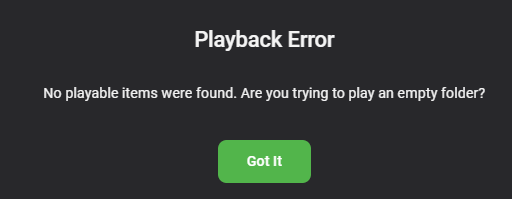
Sure. My m3u files (first 10-15 lines) looks like this: #EXTM3U "/media/Music/Anthrax/Persistence Of Time/08 Got The Time.mp3" "/media/Music/Volbeat/Guitar Gangsters and Cadillac/08 Still Counting.mp3" "/media/Music/Guns N' Roses/Use Your Illusion II/12 You Could Be Mine.mp3" "/media/Music/AC+DC/Back in Black (1980)/AC+DC - Back in Black - 06 - Back in Black.flac" "/media/Music/Avenged Sevenfold/City Of Evil/04 Bat Country.mp3" "/media/Music/Candlebox/Candlebox/03 You.mp3" "/media/Music/Corrosion of Conformity/Deliverance/02 Albatross.mp3" "/media/Music/The Dead Milkmen/Big Lizard in My Backyard/18 Dean's Dream.mp3" "/media/Music/Faith No More/Sol Invictus/05 Cone of Shame.mp3" "/media/Music/Falling in Reverse/Coming Home (2017)/Falling in Reverse - Coming Home - 04 - Fuck You and All Your Friends.mp3" "/media/Music/Gorillaz/Gorillaz/05 Clint Eastwood.mp3" "/media/Music/Halestorm/The Strange Case Of… (2012)/Halestorm - The Strange Case Of… - 12 - Here's to Us.flac" "/media/Music/Highly Suspect/The Boy Who Died Wolf/01 My Name Is Human.mp3" "/media/Music/Incubus/S_C_I_E_N_C_E_/02 Vitamin.mp3" "/media/Music/Jane's Addiction/Ritual De Lo Habitual/05 Been Caught Stealing.mp3" "/media/Music/Linkin Park/Hybrid Theory/08 In the End.mp3" "/media/Music/Live/Throwing Copper/10 10 Unknown Artist Track 10.mp3" "/media/Music/Megadeth/Countdown To Extinction (Re-Ma/01 Skin O' My Teeth.mp3" "/media/Music/Metallica/St_ Anger Disc 1/02 St_ Anger.mp3" "/media/Music/Nine Inch Nails/Broken/02 Wish.mp3" All those files exist exactly where it says they do. Emby:
 1 point
 -
No, that request is different as it is for multiple people all watching on the same device, not across different devices.1 point
-
Found the issue and got it working...1 point
-
And ideally, Emby would be able to both read the <namedseason> tag from a tvshow.nfo, and be able to write it to a tvshow.nfo when you change a season’s name in Emby server.1 point
-
That is not used only in flat folder structure but season subfoldered one (see same Kodi wiki).1 point
-
Understood, will try through WAN as I am not local right now. I'll get back with you throughout the day. Thanks1 point
-
Just click onto your LAN (or WAN) address in your Dashboard or type into address bar of your browser your server IP (or domain name) and port (default is 8096), for example something like 192.168.0.10:8096 if connecting locally.1 point
-
https://www.opensubtitles.com/en/users/import You can use the same account on both - see above - but I think you need the other way around (.com > .org) - I would send them a message. https://www.opensubtitles.org/en/contact1 point
-
Make sure the username/password are for .org which is the site used by the OpenSubtitles plug-in.1 point
-
It's fixed now. Thank you!1 point
-
Thanks, I'll try it out.1 point
-
Welcommme : )1 point
-
Kindly understand that this is your opinion, but the PIN is a separate idea. I am puzzled as to why we are discussing it within this request, which is specifically for a profile feature. The profile feature is primarily intended for family use, which is why many members have been requesting it. This is also why services like Netflix and Disney utilize it. Others, including myself, have previously explained the scenario for why we need it.1 point
-
Unfortunately, the PIN is a different feature/idea and does not achieving the profile feature.1 point
-
I think the PIN feature that has been implemented during 4.8 beta is already a good step into the right direction and achieving this. Is it one to one the same? No, it's not. Does it achieve similar, e.g. quick jumping between accounts while keeping kids out of restricted stuff (PIN)? Yes, I think so.1 point
-
You should be able to rename your new jail with the following command iocage rename emby-server_1 emby-test I'm glad to hear you were able to get it to work though.1 point
-
That UI appears as AndroidTV client app - you should install standard Emby for Android app and you'll have same casting options.1 point
-
But it reappears in Continue Watching the next time that show plays again. *It would be nice to have an option to not show played shows in the Continue Watching.1 point
-
Ok, I've played with the settings on hls-proxy, I have it set to fast-start with 2 chunks, but to send 5 to the client (emby server). When I start playback on an emby client now, it'll start playback on those 1st two chunks, after some time it refreshes and grabs the next 3. This keeps client playback farther behind current which allows hls-proxy to stay ahead by 2 or 3 chunks on average.1 point
-
Sorry I forgot to mention that I fixed it. It was the users database and some user folders that was the issue. I just removed them and setup Emby and it's fine now.1 point
-
Jeez people, it hasn't even been a decade yet, whats the rush...1 point
-
Hi Thanks for trying, its mystery... i reset the internet connection on the TV a couple of times. Turned off the PC firewall and still nothing. Strange how i installed the app on the phone and typed in same host and port details and it worked but the Hisense tv wont have it. And i have use the Emby app on the Hisense tv before on there just not for a while. I will try and solve it another day !1 point
-
I used Plex for a couple of years before switching to Emby. Everything in Emby seems easier to me. Messing with metadata for my movies. Matching movies to their proper title with the "identify" feature. Changing cover art. Navigating the list is faster on my clients and just seems to be more the way I would have done it. Plex works, but it feels weird. It's measurably slower on my system too. Emby is a little bit better looking from a picture perspective on Nvidia Shield. It is slightly sharper than Plex and slightly more deeply saturated. It just looks better playing content. Play, pause, seek, and information display on the client are better for me. Choosing the audio track and the subtitles is better. Collections with the auto collection feature are awesome. Plex has collections. But you have to do it all manually. The Emby auto collection feature is not perfect. It got most of mine right. The ones that were not right, I fixed using the web interface. It was easy to do so. I created a bunch of my own collections too. That was very satisfying. If you want more of my gushing about how much better Emby is, read my forum post in this forum called "Love Letter To Emby". That's probably bit too enthusiastic, but it really is an enormous difference for me having come from Plex and from Kodi before that. Brian.1 point
-
Ok, let's unpack some things. First, Semantic Versioning doesn't have its own format. It added semantic meaning to an existing and very popular versioning format. In other word, just because you see xx.yy.zz or xx.yy.zz.bb, doesn't mean its authors' are being semantic. Second, SemVer isn't really intended for end user releases, in general. It's specifically about releases of apis and libraries that are intended to be used by other programs. It's a way of signalling to other developers that they should or shouldn't expect to have to change *their* code if they switch to a new version of someone else's api or library. Don't expect a packaged end user product to be semantically versioned, even if it contains semantically versioned components under the hood. Third, SemVer says absolutely nothing about downgrading after an upgrade. Fourth, never install a beta of anything onto something you care about without having an explicit and tested backup and recovery process in place. Betas are an attempt to find problems before release, so expect to find problems.1 point
-
Hi if there have been any recent developments regarding the profile feature? I know you are working on the PIN feature, but I'm specifically interested in the profile feature, which is the topic of this discussion. Thanks1 point
-
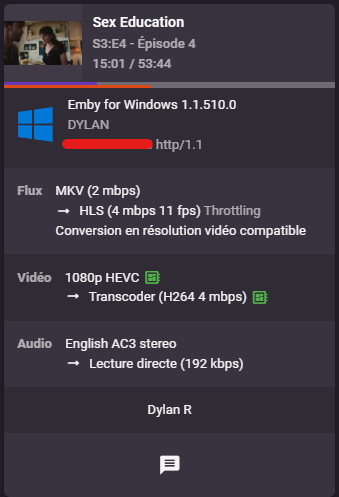
@Luke The user has only one simultaneous stream. He has just closed his computer and is watching on his TV (so he has 2 streams) and transcoding continues. I have resent you the logs via private message
 1 point
 -
You can expect to have the 4.8 stable release this holiday season.1 point
-
Well the beta is up to Version 4.8.0.55 and there has been several recent releases in rapid succession. It seems bugs are being fixed/encountered fairly often. I do not really know exactly what is happening as these betas could be just little fixes before the main release or it could be that these are new bugs and the betas will have to run for some time to be sure that the found ones are fixed and that there are no newly introduced bugs that are bad enough to be show stoppers. I am trying to be patient but my health is deteriorating and, before it becomes too hard, I would like to install the release version so I am less likely to run into unexpected bugs. I can always wipe out my existing beta and install the release but, even though I store support files along side my media it would take a fair amount of time and something might happen that would require a lot of effort to correct and I am not sure I can concentrate long enough to fix a major problem if it should happen. But, for now at least, the beta is running fine so my anxiety level is pretty low but I really want to run the release version as soon as possible.1 point
-
i wouldnt expect it before the end of the year. still seems to be plenty to be done on the new login method alone. could even make it to a 2 year cycle1 point
-
Any update here?1 point
-
Almost a year later but wanted to bump this. The seasonal themes are still missing for Emby for Windows, Emby Web, and Emby for Android. I have them on my Google TV, but that's about it. I guess a workaround for now would be to find something to use with the Stylus extension for Windows at least or try to find some extensive custom CSS for Settings -> Custom CSS. It would be nice to have the seasonal themes back natively though. Any idea on when these might make it back @Luke?1 point
-
Yes, 3 hrs upon posting for Regular user group.1 point
-
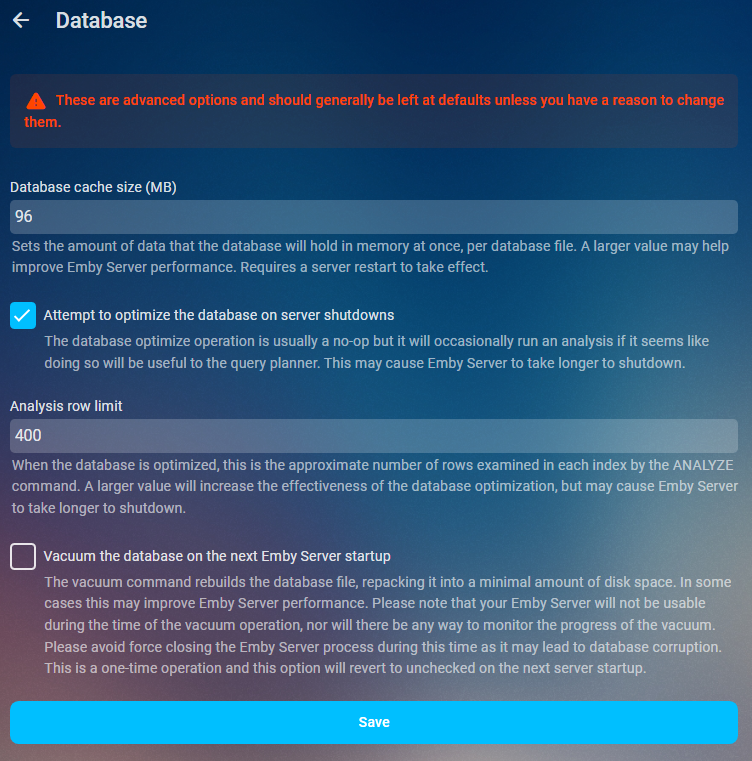
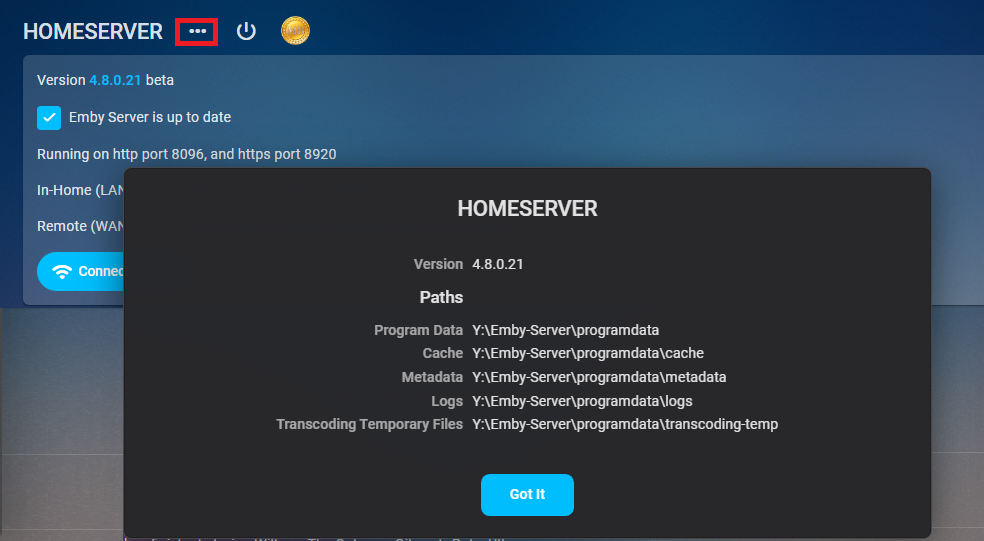
As of 4.9 multiple db connections were added so increasing this value to much could have negative effects on Ram usage. As it could be 5x your value or in some cases from a beta standpoint 20x your value. Will try to update when more info is available. Performace tweaks Database cache size Sets the amount of data that the database will hold in memory at once, per database file. A larger value may help improve Emby Server performance. Requires a server restart to take effect. If you have the available RAM you should set the database cache size to 1.5 to 2 times your library.db size. Navigate to your platform Emby programdata folder and look in the data folder to see its size. You can find your server info on the dashboard three dot menu. App Settings- Database
 1 point
 -
Season name(s) are not read from tvshow.nfos, you need season.nfo with <title> tag in each season folder. Edit: Although, looking at Kodi wiki is an official tag that maybe should be added to NFO plugin, @Luke?1 point
-
To gauge interest... What if you had the ability to "Forget" a series for the purposes of Next Up display. That is, it would no longer show in Next Up - unless you watched another episode. Sometimes you maybe watch a series for a while and, even though there is more of it or more is made later, maybe it isn't as good as the earlier seasons or maybe you just don't have time for it anymore. So you'd like it to quit showing up in your Next Up list so it is less cluttered and you can focus on the series you are actually watching now. If you start watching it again, the "forget" would be forgotten and it would start to show up in Next Up again.1 point





























.thumb.png.225edb9636a79b10cd220c27f59990f3.png)
