Leaderboard




Popular Content
Showing content with the highest reputation on 10/16/23 in all areas
-
As more and more ISP's are implementing the dreaded CGNAT due to IPv4 availability, there are more and more support requests in the forums on why their emby 'remote access' is not working. Would it be an idea to test for CGNAT when the 'Remote Access' button is selected in emby ? It's a simple test and then the user can simply be warned that emby will not be able to provide a remote access service on this ISP connection. Maybe provide a link to a 3rd party tunnel solution, but advising this is not supported by emby blah blah. For those that are unaware what CGNAT is (Carrier Grade Network Address Translation) - this is the ISP's own 'private' network in front of the 'Public' internet. It effectively 'shares' public IP addresses with all the IP's on their private network. Subsequently you cannot use it for 'incoming' connections - because that public IP is not exclusive or available to you, it's shared with many others behind a 'private' IP address. There are solutions around it - but they involve a network 'tunnel' - and will be beyond a lot of the users networking knowledge and capabilities.4 points
-
Not yet. I'll release a new version later today or tomorrow.3 points
-
I have created a feature request for this now: https://github.com/EmbySupport/Emby.WMC.UI/issues/202 points
-
To anyone finding this thread in the future, I created a repo that contains a Python script for bulk disabling unmapped live TV channels: https://github.com/coulterpeterson/emby-bulk-actions2 points
-
Correct. Samsung stops accepting app updates in the store when the TV is more than 5 years old. The USB Beta version will give you the most recent updates, but you will need to manually download and install the latest version every 30 days. It will have the visual slider features that you seek...2 points
-
Hey Everyone, My journey from Plex to Emby has been pretty smooth with the exception of setting up SSL encryption. There are lots of great posts on this forum and elsewhere on how to do this, and I consider myself pretty computer literate. But I'll be honest, this was a bit overwhelming for me as I have no experience at all in hosting web servers, DNS, or encryption certificates. After many hours, I've got it all working, so I thought I'd share what I've learned. I'm going to try to write this for the newbie, so don't be offended if it seems like I'm explaining lots of simple stuff. That's really what I needed a week ago, so maybe it'll help someone else in my shoes. Also, this is for Windows, although most of it applies to any OS. There's lots of text, but it's really very easy. Let me also say, I understand that a reverse proxy gives you lots of benefits and flexibility for securing your server. But that was a step too far for me. If you want a reverse proxy this post is not for you, but there are many posts in this forum to help you. If you want to access your Emby server from outside your home network you will want to require secure connection mode for all remote connections (see "Network" tab in Emby server configuration). To do this you need an SSL certificate. To get an SSL certificate you must have your own registered domain name. Here's a step-by-step. Domain Name Registration A domain name is the readable text part of a web address. So emby.media, or google.com, or media.yourdomain.net. Most home users don't have one, but you need one to get an encryption certificate. While (Edit:)There are many options for purchasing a domain (godaddy.com being very popular), I chose to buy my domain from domains.google. It cost me $12/year, and this is the only cost to getting your Emby server working with encryption. Go to https://domains.google, pick a domain, pay your money, and you're ready to go. For the rest of this discussion let's say you registered the domain name yourdomain.net. Now you need to associate your new domain with your home IP address. Most home users get their IP address assigned to them by their internet provider and it is "dynamic," meaning it can change. So you need to be able to tell your domain provider what your address is and update it when it changes. This can be done automatically, and is called dynamic DNS (DDNS). (Edit:) Before obtaining a domain, ensure the provider supports Dynamic DNS. Google domains supports this easily, here is the help page explaining how to set it up. Fortunately, my ASUS router has this capability built in so it was easy, but it's easy even if your router doesn't (follow google's directions). (Edit:) In case you have a static IP (obtained from your ISP), DDNS support is not mandatory. That's it for domain name registration. Now yourdomain.net points to your home network IP address. SSL Certificate Now you need to get an SSL certificate. This has the encryption keys you need, and must be issued by a recognized certificate authority or it gets blocked by your browser. Lets Encrypt will give you a free SSL certificate but it has to be renewed every 90 days. This was the part I was most confused by, but it's actually really easy. The part to understand is that Lets Encrypt must have some way of proving you own your domain name before they can issue you a certificate. There are two options, 1) they give you a little text file to place on your web server in a certain location. I don't have a web server so this is a no-go. 2) They give you a text string to add to your DNS registration in what is called a "TXT Record." You do this with google domains, it's very easy. To get a certificate you need an ACME client program that knows how to talk to the lets encrypt server. They recommend certbot, but it doesn't work in windows. Dig enough and you'll find ZeroSSL, they have a nice downloadable program that does it all and is really easy. Download here. Make a directory on your computer (I used c:\ZeroSSL). Put the le64 (or 32) exe in this directory. A single command will create your certificate. I think the easiest way to do this is create a text file in the same folder as the program, call it "get_cert.bat" and put the following three lines of text in the file. Edit the second line to have your actual domain name (instead of "yourdomain.net"), and to have your actual password for your PFX file (whatever you want it to be, just replace "yourpasswordhere" in the code below. @[member="Echo"] off le64 --key account.key --csr domain.csr --csr-key domain.key --crt certificate.csr --domains "yourdomain.net" --generate-missing --handle-as dns --export-pfx “yourpasswordhere” --live pause Save the text file as get_cert.BAT and then double click it to run. This runs the le64 program, creates the public/private key pair, asks lets encrypt to generate a certificate, saves that certificate, and converts it to a PFX file format that Emby requires. All in one command! When you run this, a command window will appear and you can see what it's doing. After a few seconds it'll pause and ask you to place the TXT record in your domain. It gives you a name and value, the name will be something like _acme-challenge.yourdomain.net, and the value will be a bunch of random letters and numbers. The program pauses here for you to put this into your domain. So now you just log in to your google domain again, go to "DNS" on the left menu, scroll all the way down and enter a "Custom Resource Record." The type is TXT, the name and value are what le64 gave you. Put them in, wait a few minutes for the change to take effect (took just a couple of minutes for me). Then go back to the command window where le64 is running and press enter to continue. It'll then verify your TXT record is there and issue your certificate. You'll find a file certificate.pfx in the le64 directory, that's it! Emby Setup Now log in to your Emby server setup. Go to "Network," in the field "External Domain" you put your domain name, so yourdomain.net or whatever you chose. For "Custom SSL certificate path," browse to the .pfx file that was created by the le64 program. In the "Certificate Password" field put whatever password you used in the .BAT file above when you created your certificate. Then for "Secure Connection Mode" I recommend you choose "Required for all remote connections." You also have to log in to your home router and forward port 8920 to the computer running your Emby server. I'm not going to give directions on how to do this, it depends on your router, but it's super easy. That's it. You need to restart your Emby Server, and then you're done! You can now access your server remotely and securely at https://yourdomain.net:8920. Certificate Renewal Now, I mentioned before that the Lets Encrypt certificates are only good for 90 days. So every 90 days you have to renew the certificate. Take that "get_cert.bat" file you made earlier and make a copy of it called renew_cert.bat. At the end of the second line, just add the text "--renew 20" (without the double quotes). When you are within 20 days of your expiration date run this file, it'll renew your certificate. I believe it'll ask you to place a new TXT record in your domain, so certificate renewal cannot be made fully automatic. You'll have to run it manually and add this TXT record into your google domain just like when you created the certificate in the first place. But it takes just a few minutes and then your certificate is renewed. You'll have to restart your Emby server for it to take. The file locations all stay the same, so you don't have to update anything in the Emby setup, just restart Emby. That's it! Well, I hope this helps someone. Sorry for the long post. I would have benefited from this level of detail a week ago, so maybe it'll be good for someone. If anyone sees something wrong here, feel free to correct me.1 point
-
Issue Emby Theater is running, but no longer visible. Clicking the Window in the Taskbar does not restore the window. How-To Resolve 1. Close Emby Theater 2. Delete the windowstate.json file in the following (default) location on Windows: %APPDATA%\Roaming\Emby-Theater\data\electron 3. Restart Emby Theater1 point
-
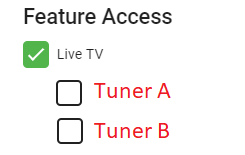
Feature Request: Ability to assign users to tuners in the User administration screen. Benefit: Prevents a user from using too many tuner connections without limiting their total streams.
 1 point
 -
Ok, I guess I have to wait. My only suggestion would be to make this timeout parameter accessible from UI with a default value of 50 or 60 seconds. Thanks!1 point
-
Not everything has to have a point, just look at D. Trump or B. Johnson...1 point
-
1 point
-
Not sure if I (or somebody else) already mentioned it before but here's another program to put in your tool belt for removing profanity: link I was in the process of cleaning up Stranger Things but noticed in season 4, episode 1, right after the 16 minute mark, one of the characters says "bullsh*t". For whatever reason, this word is not in the sub-title text. I'll probably delete the entire scene since it does nothing to add to the story.1 point
-
I'm having the same issue as Multiverse. Running the official docker beta version on Unraid. Here is part of my log if it helps... 2023-10-16 13:27:41.898 Error App: Error creating Emby.DataExplorer.DataExplorerPlugin *** Error Report *** Version: 4.8.0.53 Command line: /system/EmbyServer.dll -programdata /config -ffdetect /bin/ffdetect -ffmpeg /bin/ffmpeg -ffprobe /bin/ffprobe -restartexitcode 3 Operating system: Linux version 5.19.17-Unraid (root@Develop) (gcc (GCC) 12.2.0, GNU ld version 2.39-slack151) #2 SMP PREEMPT_DYNAMIC Wed Nov 2 11:54:15 PDT 2022 Framework: .NET 6.0.20 OS/Process: x64/x64 Runtime: system/System.Private.CoreLib.dll Processor count: 32 Data path: /config Application path: /system SimpleInjector.ActivationException: SimpleInjector.ActivationException: No registration for type DataExplorerPlugin could be found and an implicit registration could not be made. Unable to modify itemcontextmenu.js (2) ---> System.InvalidOperationException: Unable to modify itemcontextmenu.js (2) at Emby.DataExplorer.Api.ContextMenuHelper.ModifyContextMenu(IServerConfigurationManager configurationManager) at Emby.DataExplorer.Api.ContextMenuHelper.InstallFiles(IServerConfigurationManager configurationManager) at Emby.DataExplorer.DataExplorerPlugin..ctor(IApplicationHost applicationHost) at lambda_method87(Closure ) at SimpleInjector.InstanceProducer.BuildAndReplaceInstanceCreatorAndCreateFirstInstance() at SimpleInjector.InstanceProducer.GetInstance() --- End of inner exception stack trace --- at SimpleInjector.InstanceProducer.GetInstance() at SimpleInjector.Container.GetInstanceFromProducer(InstanceProducer instanceProducer, Type serviceType) at SimpleInjector.Container.GetInstanceForRootType(Type serviceType) at SimpleInjector.Container.GetInstance(Type serviceType) at Emby.Server.Implementations.ApplicationHost.CreateInstanceSafe(Tuple`2 typeInfo) Source: SimpleInjector TargetSite: System.Object GetInstance() InnerException: System.InvalidOperationException: Unable to modify itemcontextmenu.js (2) Source: Emby.DataExplorer TargetSite: Void ModifyContextMenu(MediaBrowser.Controller.Configuration.IServerConfigurationManager) at Emby.DataExplorer.Api.ContextMenuHelper.ModifyContextMenu(IServerConfigurationManager configurationManager) at Emby.DataExplorer.Api.ContextMenuHelper.InstallFiles(IServerConfigurationManager configurationManager) at Emby.DataExplorer.DataExplorerPlugin..ctor(IApplicationHost applicationHost) at lambda_method87(Closure ) at SimpleInjector.InstanceProducer.BuildAndReplaceInstanceCreatorAndCreateFirstInstance() at SimpleInjector.InstanceProducer.GetInstance()1 point
-
Glaub er meint die: https://emby.media/emby-for-android.html hab die auch beim firetv stick sideloaded! Geht besser als die Android-TV version! lg1 point
-
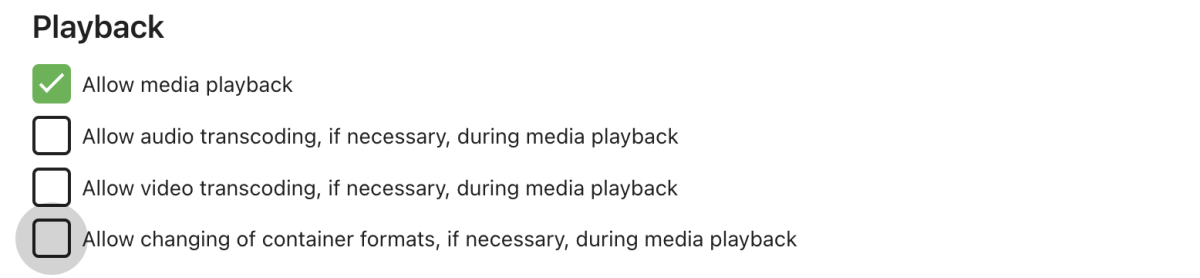
DeanoDublin, I have a G3 and what I do is go into the manage server/user settings and temporarily turn off transcoding for my user. The server attempts to direct play the media which works for me. I just have to remember to turn it back on after I am done with that video since I use other devices that I want to be able to transcode for that user.
 1 point
 -
Didn't say anything against it. For me personally, it would be useless to have multiple files for different resolutions. I just store it once in the highest quality I want, and any lower resolution can be easily transcoded. But that's just me^^ Editions on the other hand are a good reason for multiple files. I don't do that either, but I can see, why people are wanting that. And that is something you cannot solve with transcoding Yeah, was hoping too, that PMM would support Emby at one point. But to be honest, I don't think this is something that is going to happen in the near future, if ever. That's why I did my own version, tailored it to my use case and added some things too, PMM didn't even have, like showing Oscar wins/nominations or the actual IMDb rank instead of a general Top 250 Banner.1 point
-
I have run a test on my Echo Show 15 by using the Live App Testing flow. I confirm that your last beta version works correctly. I will wait for the new official release.1 point
-
This is a very serious problem, I hope the official attention, trapped for too long, we hope to automatically horizontal screen1 point
-
Thanks Luke. I have rebuidl everything, removing and creating again the affected libraries, and assigning correctly the content type at the begining from Emby server. The best thing is that all the information about the played and unplayed content was preserved (I assume because the paths were the same), and I have not had to mark the movies again. Everything has been exactly as I wanted and only the libraries have been scanned again, without having to do anything else. Thanks for everything.1 point
-
4.8 beta has many improvements and changes - but comes with the normal warning about beta versions not being guaranteed to work perfectly. Note in particular that installing the beta makes changes to your database, such that returning to the release version is only possible with complete reinstallation. I use the beta version exclusively, and have minimal problems. Paul1 point
-
OK, thanks - I'll definitely look out for that workaround. Unfortunately though, I had a look at a couple of the 'problem' files that had DTS and it is the only audio track. Just for FYI - I use a dedicated NUC as my Emby server that doesn't do anything else. It's an i3 with an SSD drive. Any idea when the app update will be released?1 point
-
after delete that shows .. webhooks have not sent message to receiver . embyserver (2).txt1 point
-
Thanks for the info and rhe files1 point
-
Hi Luke Thanks for reply. Version: 1.6.2 After your reply, I revised the version in https://emby.media/community/index.php?/topic/31461-emby-for-samsung-smarttv-release-notes-tizen-orsay/ and viewed: Yesterday tried reinstall the app from "samsung store", but install the same version. I will try install manually this new version from USB Thanks Luke!!!!1 point
-
HI, if you use the filter dialog on the channel management screen, you'll notice there are filters for this. Try using those and then if you want to script it with the api, then just monitor the requests that are being sent using the browser debugger.1 point
-
That's nothing to worry about.1 point
-
Just wanted to clear up some disinformation out there based on my own testing and the latest update. With the latest Kodi nightly bitstreaming all HD audio formats on the Gen 3 cube works great. Sadly the same is not true outside of Kodi, I've tested various players that use forks of exoplayer like emby and DTS is completely broken. Often it will either only play the core or it will try to play HD and the audio and video will freeze up. In some cases libvlc will work with DTS, DTS: X works fine but DTS-HD has a huge delay. The implementation of TrueHD is also hit or miss outside Kodi unless you use a player with libvlc, not including VLC itself ironically. A lot of players are converting True HD to multi channel PCM. But in Kodi everything is perfect, all DTS and Dolby Formats work including HD Atmos. This completely dismisses the various comments online mentioning the Cube Gen 3 only supports the core DTS track. Certainly there's some work to do by app developers still using libvlc and especially exoplayer but at least there's a working method now.1 point
-
Got it, thank you!!1 point
-
Awesome Luke, took a long time but this is a feature i am very very happy to see.1 point
-
Thanks Luke. It seems somewhat deceiving and implies deletion of the actual tagets rather than the metadata. Kev.1 point
-
There is absolutely no point to it. You can have 130votes and it never gets implemented, you can have 6 votes for something else and it does get implemented, because it’s actually easy or just a bug. the vote system sucks, the answer is always ”possible in future updates” Some of these requests stem back to 2015 and the duplicate sticker just highlights how long these requests have been in the system for. move to a transparent way of communication as to what is being worked on and hopefully reasons behind it. for example… ditching guid calls to improve library performance… required for WMC but not anymore you can maybe take on important stuff from the community that will enhance something that is already in the workflow. 2 pence worth from the idiot on the hill
 1 point
 -
Sorry, no. We want to build the features that we feel will benefit the product and the user base the best not just the ones a small group of people may be willing to pay for.1 point
-
What year/model TV do you have? You can always download the latest version and install from USB.1 point
-
Hi Luke, just found this post, yes iOS was adding the port, once i added another entry for the front end to include the port in the address it's working now Thank You1 point
-
If I'd be the one singing in your general vicinity, you'd need everything made of glass replaced too... Thanks though!1 point
-
HI, yes, hopefully soon.1 point
-
You're honestly better off to get an offlease micro PC than a Pi at this point. The Pi 5 needs a 27 watt power supply, and a T series Intel or GE series AMD only use 35 watts, and will wipe the floor with the Pi 5, especially the Intel with quicksync.1 point
-
Separate playlists per users is in the upcoming 4.8 server release.1 point
-
You know how it works - please post bug reports in the GitHub repo (with screenshots or good and understandable explanation). Or when it's a question, please create a new topic. (I expect a bit more from you than from the others... )1 point
-
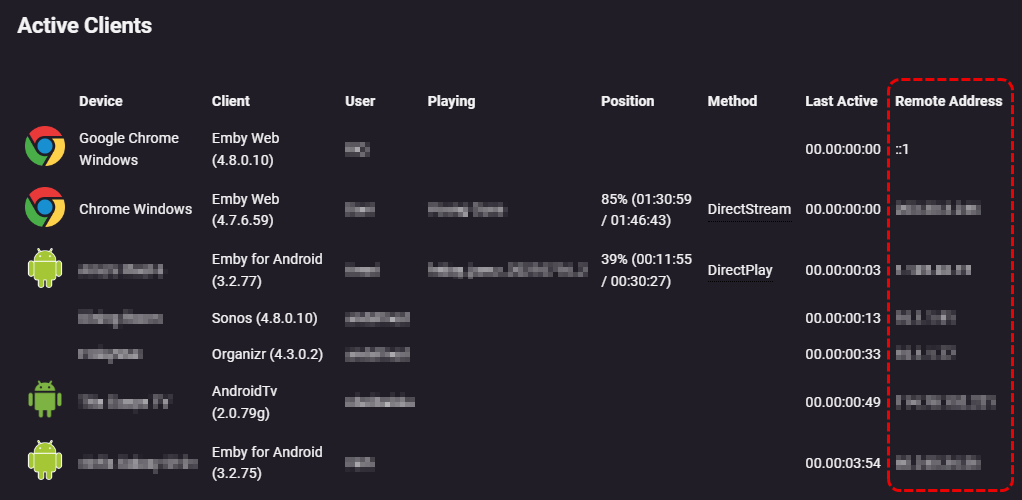
'Playback Reporting' plugin is probably your best bet via the GUI, you can get up to 2 days worth of recent devices with 'Remote Address' information
 1 point
 -
Since the idea is to get the best possible audio quality when transcoding is in place, I suggest the following, provided the "Convert to Dolby Digital" option is turned ON in settings: Scenario 1: When the device is connected to a TV with ONLY PCM 2.0 support by HDMI: - PCM 2.0 is decoded directly, while multichannel PCM is downmixed to stereo (as it currently does) - Dolby Digital is decoded and/or downmixed to stereo (as it currently does) - Dolby Digital Plus is decoded and/or downmixed to stereo (as it currently does) - Dolby Atmos inside Dolby Digital Plus is decoded and/or downmixed to stereo (as it currently does) - Dolby TrueHD is decoded and/or downmixed to stereo (as it currently does) - Dolby Atmos inside TrueHD is decoded and/or downmixed to stereo (as it currently does) - Legacy DTS is decoded and/or downmixed to stereo (as it currently does) - DTS-HD High Resolution Audio is decoded and/or downmixed to stereo (as it currently does) - DTS-HD Master Audio is decoded and/or downmixed to stereo (as it currently does) - DTS:X is decoded and/or downmixed to stereo (as it currently does) Scenario 2: When the device is connected to a TV and/or AV receiver with Dolby Digital and PCM 2.0 support by HDMI: - PCM 2.0 is decoded directly, while multichannel PCM is downmixed to stereo (as it currently does). - Dolby Digital passes through directly. - Dolby Digital Plus 5.1 is transcoded to Dolby Digital 5.1. - Dolby Digital Plus 6.1 and 7.1 SHOULD BE transcoded to Dolby Digital EX (a matrixed mono surround back channel is created by downmixing the discrete surround channels information, that is, the discrete mono surround back channel from 6.1 sources and the discrete stereo surround channels from 7.1 sources get downmixed to the afformentioned matrixed mono surround back channel for backwards compatibility with 6.1 and 7.1 speaker layouts [on 7.1 speaker layouts the mono channel is distributed to both surround back channels]). - Dolby TrueHD 5.1 is transcoded to Dolby Digital 5.1. - Dolby TrueHD 6.1 and 7.1 SHOULD BE transcoded to Dolby Digital EX (same as explained above). - Legacy DTS is transcoded to Dolby Digital 5.1. - Legacy DTS-ES Matrix and DTS-ES Discrete SHOULD BE transcoded to Dolby Digital EX (same as explained above). - DTS-HD High Resolution Audio 5.1 is transcoded to Dolby Digital 5.1. - DTS-HD High Resolution Audio 6.1 and 7.1 SHOULD BE transcoded to Dolby Digital EX (same as explained above). - DTS-HD Master Audio 5.1 is transcoded to Dolby Digital 5.1. - DTS-HD Master Audio 6.1 and 7.1 SHOULD BE transcoded to Dolby Digital EX (same as explained above). It's important to clarify that Dolby Atmos is NOT an audio codec but metadata inside the already existing Dolby Digital Plus and Dolby TrueHD, so transcoding is the same as explained above. The same goes for DTS:X, where the metadata is inside the DTS-HD Master Audio codec. Scenario 3: When the device is connected to a TV and/or AV receiver with Dolby Digital, DTS and PCM 2.0 support by HDMI: - PCM 2.0 is decoded directly, while multichannel PCM is downmixed to stereo (as it currently does). - Dolby Digital passes through directly. - Dolby Digital Plus 5.1 is transcoded to Dolby Digital 5.1. - Dolby Digital Plus 6.1 and 7.1 SHOULD BE transcoded to Dolby Digital EX (as explained in scenario 2). - Dolby TrueHD 5.1 is transcoded to Dolby Digital 5.1. - Dolby TrueHD 6.1 and 7.1 SHOULD BE transcoded to Dolby Digital EX (as explained in scenario 2). - Legacy DTS passes through directly. - Legacy DTS-ES Matrix and DTS-ES Discrete passes through directly. - DTS-HD High Resolution Audio 5.1 is transcoded to Dolby Digital 5.1. - DTS-HD High Resolution Audio 6.1 and 7.1 SHOULD BE transcoded to Dolby Digital EX (as explained in scenario 2). - DTS-HD Master Audio 5.1 is transcoded to Dolby Digital 5.1. - DTS-HD Master Audio 6.1 and 7.1 SHOULD BE transcoded to Dolby Digital EX (as explained in scenario 2). Scenario 4: When the device is connected to a TV and/or AV receiver with Dolby Digital, Dolby Digital Plus, DTS and PCM 2.0 support: - PCM 2.0 is decoded directly, while multichannel PCM is downmixed to stereo (as it currently does). - Dolby Digital passes through directly. - Dolby Digital Plus passes through directly. - Dolby TrueHD 5.1 SHOULD BE transcoded to Dolby Digital Plus 5.1. - Dolby TrueHD 6.1 and 7.1 SHOULD BE transcoded to Dolby Digital Plus 6.1 or 7.1. - Legacy DTS passes through directly. - Legacy DTS-ES Matrix and DTS-ES Discrete pass through directly. - DTS-HD High Resolution Audio 5.1 SHOULD passthrough DTS core, otherwise it should be transcoded to Dolby Digital Plus 5.1. - DTS-HD High Resolution Audio 6.1 and 7.1 SHOULD passthrough DTS core, otherwise it should be transcoded to Dolby Digital Plus 6.1 and 7.1. - DTS-HD Master Audio 5.1 SHOULD passthrough DTS core, otherwise it should be transcoded to Dolby Digital Plus 5.1. - DTS-HD Master Audio 6.1 and 7.1 SHOULD passthrough DTS core, otherwise it should be transcoded to Dolby Digital Plus 6.1 and 7.1. Scenario 5: When the device is connected to a TV with eARC (Extended Audio Return Channel) support and/or an AV receiver with support for all the codecs: - PCM 2.0 and multichannel pass through directly. - Dolby Digital passes through directly. - Dolby Digital Plus passes through directly. - Dolby TrueHD passes through directly. - Legacy DTS passes through directly. - Legacy DTS-ES Matrix and DTS-ES Discrete pass through directly. - DTS-HD High Resolution Audio pases through directly. - DTS-HD Master Audio passes through directly. Scenario 6: When using Emby installed directly on a smart TV with legacy ARC, eARC and SPDIF connections: As far as I know, eARC support for apps installed on smart TVs is limited to legacy ARC, others don't passthrough legacy DTS, some TVs allow to choose what audio port to use (whether ARC only, SPDIF only or both) but I may be wrong about all this, please someone correct me if that's the case: When using eARC/ARC: - PCM 2.0 is passes through directly, while multichannel PCM is downmixed to PCM 2.0. - Dolby Digital passes through directly. - Dolby Digital Plus passes through directly. - Dolby TrueHD 5.1 SHOULD BE transcoded to Dolby Digital Plus 5.1. - Dolby TrueHD 6.1 and 7.1 SHOULD BE transcoded to Dolby Digital Plus 6.1 or 7.1. - Legacy DTS passes through directly (please someone confirm this). - Legacy DTS-ES Matrix and DTS-ES Discrete pass through directly (please someone confirm this). - DTS-HD High Resolution Audio 5.1 SHOULD passthrough DTS core (please someone confirm this), otherwise it should be transcoded to Dolby Digital Plus 5.1. - DTS-HD High Resolution Audio 6.1 and 7.1 SHOULD passthrough DTS core (please someone confirm this), otherwise it should be transcoded to Dolby Digital Plus 6.1 and 7.1. - DTS-HD Master Audio 5.1 SHOULD passthrough DTS core (please someone confirm this), otherwise it should be transcoded to Dolby Digital Plus 5.1. - DTS-HD Master Audio 6.1 and 7.1 SHOULD passthrough DTS core (please someone confirm this), otherwise it should be transcoded to Dolby Digital Plus 6.1 and 7.1. When using the SPDIF port: - PCM 2.0 passes through directly, while multichannel PCM is downmixed to PCM 2.0. - Dolby Digital passes through directly. - Dolby Digital Plus 5.1 is transcoded to Dolby Digital 5.1. - Dolby Digital Plus 6.1 and 7.1 SHOULD BE transcoded to Dolby Digital EX (as explained in scenario 2). - Dolby TrueHD 5.1 SHOULD BE transcoded to Dolby Digital EX (as explained in scenario 2). - Dolby TrueHD 6.1 and 7.1 SHOULD BE transcoded to Dolby Digital EX (as explained in scenario 2). - Legacy DTS passes through directly (please someone confirm this). - Legacy DTS-ES Matrix and DTS-ES Discrete pass through directly (please someone confirm this). - DTS-HD High Resolution Audio 5.1 SHOULD passthrough DTS core (please someone confirm this), otherwise it should be transcoded to Dolby Digital 5.1. - DTS-HD High Resolution Audio 6.1 and 7.1 SHOULD passthrough DTS core (please someone confirm this), otherwise it should be transcoded to Dolby Digital EX (as explained in scenario 2). - DTS-HD Master Audio 5.1 SHOULD passthrough DTS core (please someone confirm this), otherwise it should be transcoded to Dolby Digital 5.1. - DTS-HD Master Audio 6.1 and 7.1 SHOULD passthrough DTS core (please someone confirm this), otherwise it should be transcoded to Dolby Digital EX (as explained in scenario 2). With all scenarios, ARC passthrough whether using the TV directly or when using an external device depends on the brand and model so results may vary, please share your experiences with it.1 point
-
Hi. Do you have an active Premiere subscription? 2023-10-11 00:58:37.533 Info LiveTvMediaSourceProvider: Live TV requires an active Emby Premiere subscription.0 points