Leaderboard




Popular Content
Showing content with the highest reputation on 10/04/23 in all areas
-
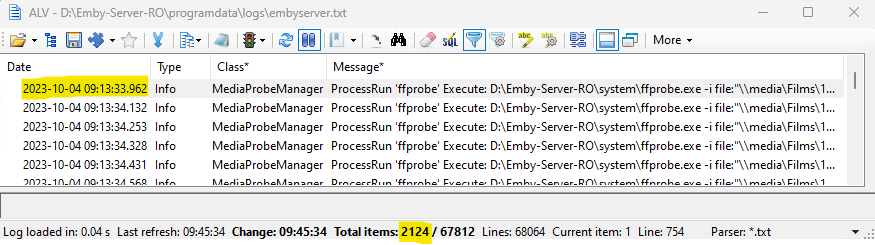
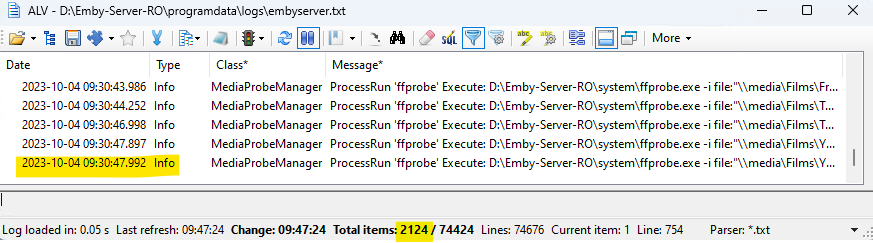
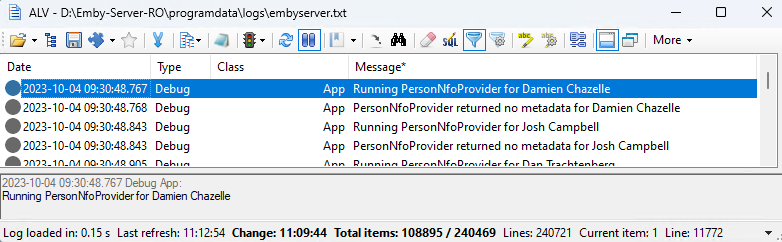
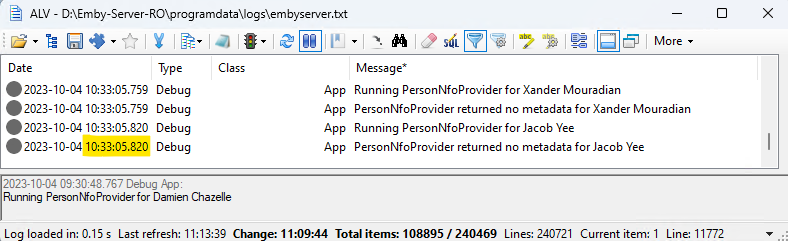
The reply from @GrimReaperis spot on. As an interesting exercise - It's actually pretty easy to see how long a scan with the optimal settings takes by using a decent log viewer where you just filter by MediaProbeManager. On a test brand new emby spinup - with a single movie library of 1760 Movies (some with extras) - pointing to my main emby library (local HDD storage) with only NFO Reader enabled and nothing else - it took my system from 09:13 to 09:31 to do the main ffprobe and build the library - that's 18 minutes ... Start ... End ... This will get you a full populated library - and you use from this point. However - The 'Scan' is still going - as 'People' are still being populated - creating NFO files locally. I'll update this thread with those timings when that finishes and the scan media library task is 100% complete... edit/update ok - so it looks like it's the People Providers that are slowing it down. Remembering that there are no Providers selected - so no 'People' metedata nor images are being downloaded here - it still took from 09:30 to 10:33 - for 54,448 People. (!) (note, 2 lines per query in the log) Start ... End .. As expected - when viewing a Movie, the Cast/Crew is empty. So in summary - Task Duration Item build using ffprobe 18 mins People provider (no metadata collected as it's turned off) 62 mins Total 81 mins or 1Hr 20 mins This corrolates with the task time in the main Scheduler. Conclusion Scanning the existing items with NFO, Images, BIF(thumbs) data held locally is not the long task, the long task is building the 'People' part of the database and populating the local metadata cache, because people are not held with the media. Remember that even with the People metadata NOT being fetched - it still took over an hour to scan through them. Next Steps I'd like to repeat this when I have time, and turn ON the providers - to see what the duration differences are. For the ffprobe, I would hope there is not much difference, as all the metadata is already with the media, there is no need to download anything. But for the People metadata, then it's going to need to download all NEW metadata/images - as they do not exist. This is likely going to be highly dependent on the speed of your internet connection and any throttling done by the providers. Also would like to see how BIF's are processed. Questions - Why is People metadata attempting to be retrieved if there are no providers selected ? The scan would be 'complete' in 18 mins if you added this logic. Is there any benefit in keeping the 'people' data with the Media - rather than saved locally ? @ebr @Luke
 4 points
 -
Its a start -
 2 points
 -
Hey All, Firstly, excellent work! secondly, I noticed that this has stopped working in Emby 4.6.4.0, I have forked the repo and fixed if anyone is interested. (Have PR out for main repo) https://github.com/ShanePe/Emby.SmartPlaylist.Plugin/ Sorry also, I have made an update, if the playlist has NOT yet been generated, it will generate it, regardless of the playlist schedule trigger. So one no longer need to 'manually' run first to initialize the playlist if it falls outside of playlist generation schedule. (Make sense !?!?!?!) Version 2.4.0.3 Feature Create a copy of a playlist. (Duplicate) Decluttered UI by adding a pop up menu to playlists New Criteria: Added Audio Stream Codec Criteria (Stream: Audio Codec) Added Audio Stream Language Criteria (Stream: Audio Language) Added Audio Stream Display title Criteria (Stream: Audio Display Title) Added Subtitle Stream Language Criteria (Stream: Subtitle Language) Added Video Stream Codec Criteria (Stream: Video Codec) Added Video Stream Display title Criteria (Stream: Video Display Title) Updated Criteria: Parental Rating: Now uses official rating under the hood Resolution Height: Now uses video streams to determine the available video heights rather than the metadata. Resolution Width: Now uses video streams to determine the available video widths rather than the metadata. Added Monitor Mode to shuffle playlist type. Meaning that the playlist will be destroyed and recreated on a schedule, but between scheduled executions, media item changes will be batched and monitored for inclusion/exclusion. (So .... combination of live and shuffle modes but could have a perf hit on larger playlists, experimental) Collapsible sections in the playlist editor that keeps state, for more UI real estate. Added the ability to add notes to a playlist (limited to 256 chars). If there are notes assigned a pop up is displayed when hovering over a playlist (2 second delay). Order all selection lists on criteria with dropdowns alphabetically. ------------------------------------------------------- Releases Here -> (See change logs in this thread .... way down) Plugin for Emby Server 4.8: SmartPlaylist-2.5.0.4810.zip1 point
-
Guys I have resolved the IP issue. Not sure if Chromecasting is fixed yet or not but it was my firewall at fault rather than Nginx in the end. I had a loopback NAT rule above the normal Nginx rule so that my domain names worked internally. This has source address set to masq. If i dropped this below the main rule then IP addresses are being correctly logged by Emby.1 point
-
Got it sorted I did some digging and by default the hetzner servers have a conf for blacklisting the igpu kernel module loading so I removed that and now the igpu is being detected1 point
-
This is mainly a case of me wanting to know more. Recently I have had a need to setup a new server. The library is actually stored on a network share and another server, much older, points at it. I have that server set up to store all data with the media so much, if not nearly all, data is already downloaded and available. On my second server i set up a library pointing to that same location and configured it exactly the same as on the first server. However the scan is taking every bit as long as the original scans on the first server so it seems there is no advantage to storing data alongside the media as it seems to save no time. 1. Am I misunderstanding what storing the data alongside the media does? 2. What actually is the advantage of storing the data alongside the media? 3. What do I need to do to remove the local data and store the data the original way, should I choose to do so? Thanks1 point
-
This is something I noticed when doing testing of a new install recently. Supporting for reading person nfo's and saving them is on by default and can't be turned off. When it's one person here or there, it is mostly neglible, but on a new install it could be thousands of people and the cost of that is just too high. Because of this, it's going to have to be turned off by default and require opting into it - even reading existing nfo files because it's just a lot of checking for file existence, timestamps for changes, etc. I'm pretty sure this all got turned on by default for the power audience here in this forum, but it's something that the vast majority will never care about.1 point
-
Yes, working now.1 point
-
I'll create another post since I think this has been marked as fixed.1 point
-
Lol had no idea that was a thing. Especially as I always can play it via VLC/Media Player Classic. But I bought the HEVC App on the store for like a dollar and Emby Theater is all working now :D, Guessing its a HEVC Microsoft licensing thing then an Emby technical one. Thanks bro. Helped a lot.1 point
-
Have you installed the hevc extension from the microsoft store?1 point
-
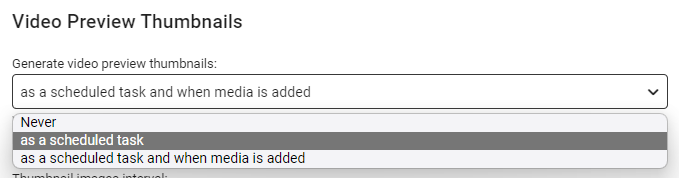
I tried your suggestion and after renaming the file back to .mkv the thumbnails generated were complete. Looks like you identified the problem. Thank you. I like your 4th solution the best, even if it is not going to happen!! I'm going to try running thumbnail creation only as a scheduled task and see how that goes. I hope this gets resolved in a future release. Thanks again.1 point
-
Hi there, Sorry for late reply. I don't use QuTS but as far as I know is always based on linux kernel with changes to filesystem and else. so in my opinion if the code works on normal QTS it should work also on QuTS. May be there have been changes in folder structure but this must be checked when customizing script. The code anyway could give some problem so I changed it a bit. Please remember that the cronjob timing should be LOWER than the last modified time check in the script. For example in my script I check if the file has been changed in the last one day [ -mtime -1 ] and my cronjob runs every 22 hours. Remember to change pathtoscriptfolder with the full path to your script. Alll other instructions are stll the same now="$(date)" cd /etc/config/QcloudSSLCertificate/cert [[ -z `find cert -mtime -1` ]] if [ $? -eq 0 ] then echo "Certificate key has not changed - $now" > pathtoscriptfolder/check-pfx.log else cd /etc/config/QcloudSSLCertificate/cert openssl pkcs12 -export -out emby.p12 -inkey key -in cert -passout pass: echo "Created new certificate.pfx at $now" > pathtoscriptfolder/check-pfx.log fi1 point
-
Ok, thank you for helping me!1 point
-
Correct. And depending from which client app and from which platform you're connecting to it - you'll have different capabilities/options. Majority of those oprions will be same, though some client apps might have slight differences, as you've discovered yourself.1 point
-
So I have seen this before - with real time monitoring, emby may be picking up the file before the file has actually finished copying. Thus when emby creates the thumbnails, the actual file is not there to finish the process. This may not be a proper solution for you, but try this - rename the file to .tmp before you copy it - then when it's copied, rename it back to .mkv etc or whatever it's original container was. If this solves the problem - then I suspect this is what is happening. The solutions are as follow - only create the BIF files on a schedule - do not do it when media is added (RTM) - see below create some sort of script to rename the files at source and then rename the destination file once copied (this is what I do) increase the duration of the RTM scan - defaults to 60 seconds I believe get a faster machine and network to copy the files quicker I hope this helps ...
 1 point
 -
It'ok. Thank you very much.
 1 point
 -
For anyone that has used emby for a length of time, it is known that the mechanism to determine 'bandwidth' has some (lets be kind) 'improvement areas'. Passing data over a WAN introduces all sorts of unknows - latency, jitter, packet loss - and unless the client can handle these - then it's going to likely think bandwidth is poor and transcode. The OP above has clearly stated, that by simply turning off the ability to transcode, it now direct plays and works perfectly. So from that fact alone, I take it 'bandwidth' is not actually a problem - but some other unknown 'factor' is. Without knowing the details behind the emby 'bandwidth detection' code and a packet analysis from the client to the server - frankly, we are all but guessing on what it might be ..1 point
-
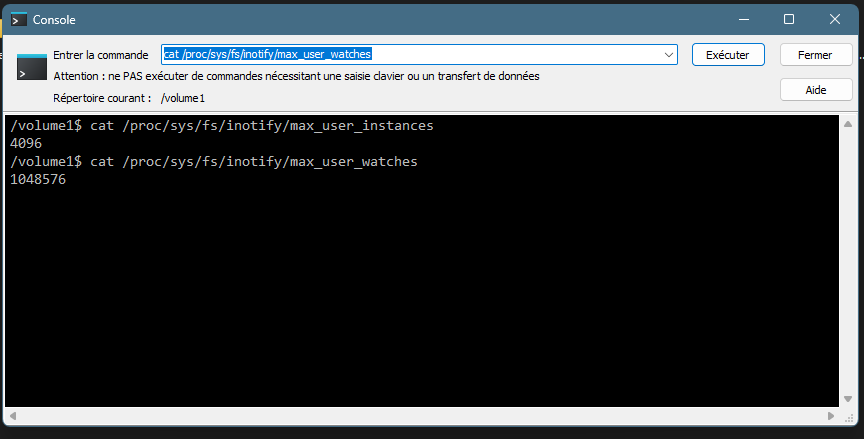
You have reach limit on inotify instances, see:1 point
-
My guess would be Ended, Returning, Cancelled, Airing in that order.1 point
-
No issues so far, this issue is resolved for me. -Thanks1 point
-
Danke schön.1 point
-
Deleted /Users/Mark/.config/emby-server Ran the setup, bare minimum - one library folder /VOLUMES/8TB-2/[TEMP] All okay. Installed the backup & restore plugin Restarted Restored from last night, did each part individually and restarted between each to check it was okay, then backed up and continued. So far it is all okay. Not sure what the problem was.1 point
-
Lassen wir uns überraschen @Teddyknuddel. Bin ehrlich gesagt auch enttäuscht. Ich habe mir Emby auch wegen des Alexa Support gekauft. Nun wird man seit 2 Jahren hingehalten. Ich bin sehr gespannt, ob der Support kommt und wann vor allem.1 point
-
Of course there is - just click it again.1 point
-
Looking at the docs for the plexapi python library we can get whether plex has generated intro markers but it doesn't return what those markers are so I don't think it is possible at this time.1 point
-
sounds good. thx for looking into1 point
-
I don't have a problem with making the data available for plugins but right now I think I like the way we currently present it. For example: 2014-Present or 2014-2017 If it is not continuing, do most people care about the reason it ended? It's nice to have the info somewhere so that you can find out, but if we start putting it everywhere it seems more like clutter to me.1 point
-
HI, in terms of Emby clients, there's nothing we really need to do as we don't handle the low level networking ourselves. That sort of improvement will generally come for free when the device/browser/operating system supports it. There are some exceptions where we embed our own player. For instance on android we use exoplayer, so that would need to support it. On iOS and Windows we use mpv, so it depends on whether that supports it or not. In terms of the server, we're currently running .net 6 and http3 is marked as experimental with it. We haven't enabled it though. When we move to .net 7, we'll reevaluate that.1 point
-
Off thread someone said they have config, data, logs, metadata, plugins and root so I moved those into embyserver/. He also had a sync and a transcoding directory but I don't perhaps those are from his premium subscription. I also moved the cache directory which looked like it had emby stuff in it. Anyway, this is what I have now. Seems to be working ok. root@xxxxx:/mnt/user/appdata/embyserver# ls -halF total 4.0K drwxrwxrwx 1 daemon daemon 76 Oct 3 15:01 ./ drwxrwxrwx 1 daemon daemon 454 Oct 3 15:01 ../ drwxr-xr-x 1 daemon daemon 164 Oct 2 11:51 cache/ drwxr-xr-x 1 daemon daemon 30 Oct 1 20:19 config/ drwxr-xr-x 1 daemon daemon 592 Oct 1 21:20 data/ drwxr-xr-x 1 daemon daemon 560 Oct 3 15:01 logs/ drwxr-xr-x 1 daemon daemon 24 Oct 2 11:06 metadata/ drwxr-xr-x 1 daemon daemon 530 Oct 1 20:19 plugins/ drwxr-xr-x 1 daemon daemon 14 Oct 1 20:19 root/1 point
-
Hi Luke, I may have been too hasty in my reply. I can now watch the content on my Mac and Emby loads fine on my local host in the web browser. But I can’t for the life of me now connect to my Samsung TV! That was working before… I have put in my LAN access IP and PORT but it doesn’t want to connect… i have changed at the Emby server is running as it’s in my activity monitor. I can load up local host fine on my mac. But it doesn’t work on my mobile phone or TV that are connected to the same Wi-Fi connection.1 point
-
Yes. While on the guide I can select any number of programs to record, regardless of how many actual tuners I have. It only records whatever the first two to get selected are.1 point
-
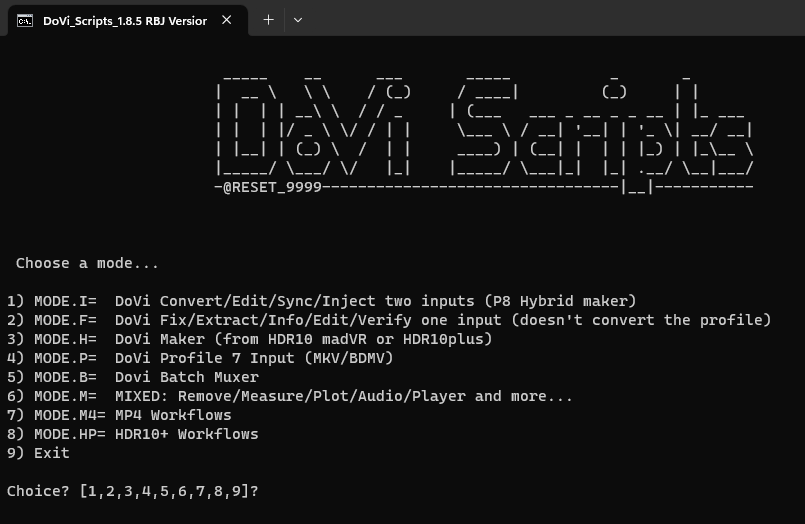
Yep - DV8 and HDR10+ is a problem on the FireTV 4K max - it's a known issue already with Amazon and Google. btw - you can automate removing the HDR10+ with a script found online (search for @reset_9999) - I added #8 below - you drag and drop the the file onto the Window and it does it all for you - resulting in a DV8 + HDR10 file - which works perfectly on the Fire TV 4K max..
 1 point
 -
It applies to everything as long as the actual traffic is passing through CF, that may be through a proxied domain, tunnels, workers etc. If you are just using them for DNS, that's not a problem.1 point
-
OK well there's not much documentation around this, so we may just have to wait on this until we update to .net 7 when it will be disabled out of the box.1 point
-
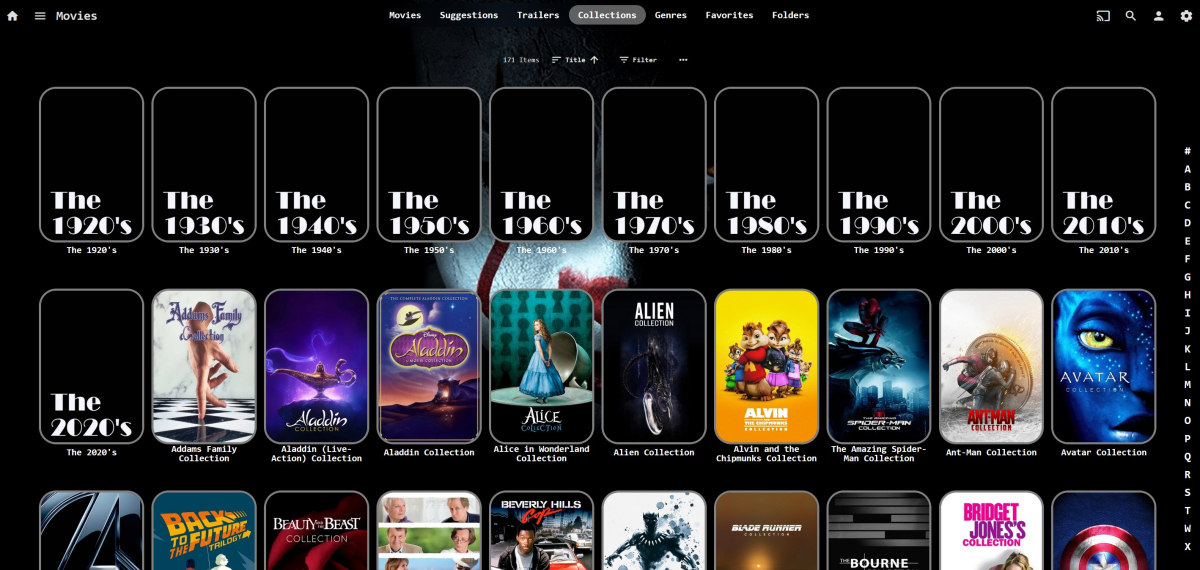
I'm just having a go at adding them to collections one by one - filter by 1930, 1931, 1932...1939. Select all the movies it shows, add to an appropriately named new collection. Rinse, repeat. Worth a try. Probably something that has been suggested before but I was too dumb to understand. Can't enable Group Items Into Collections though. Might work for albums as well ?1 point
-
1 point
-
I don't use Music at all, so I honestly wouldn't know. If it follows same/similar logic as TV shows, you might wanna experiment with Type:Collection and EpiMode:Series or Season and properties "Album contains" and "Year is in the range", see what kind of results you'll get.1 point
-
Well no it's important that users test and report issues, so that if there's known changes we can adapt and in this case if there's unwanted changes we can report to Emby so they fix. And in this case I'd like to know if this is fixed on Emby side1 point
-
Not really. It requires additional steps outside of the plugin like running comskip, plus I cannot guarantee prompt support. I made it open source.1 point
-
An update went out to our Alexa support a few days ago. Next step is adding more languages.1 point
-
I only discovered yesterday that my carefully tagged album (using Mp3tag) which had an album being split up unexpectedly had a difference which Mp3Tag wasn't showing me: The tracks had both "Album Artist" and "AlbumArtist" tags, and only one (the first) is shown in the normal editing pane - and once I discovered where it shows the other can only be edited track by track... So I had happily made "Album Artist" the same, but Emby was also seeing that "AlbumArtist" was varying. I don't know what field might be causing you trouble, but I do know that changing to using TagScanner made it much easier to see and fix my problem (I know lots of people swear by Picard, but for some reason I find it completely incomprehensible!). If none of this applies to you, sorry - it's the best I can think of. Paul1 point