Leaderboard




Popular Content
Showing content with the highest reputation on 08/21/23 in all areas
-
Here is the latest list of versions for Emby software across the server and clients. Emby Server Stable: v4.9.5.0 (2026/05/18) Release Notes Beta: v4.10.0.14 (2026/06/04) Release Notes For other platforms, please refer to the download page. Emby for Android TV Google Devices Stable: v2.1.23 (2025/12/27) Beta: v2.1.46 (2026/04/15) Amazon Devices Stable: v2.1.23 (2025/12/27) Beta: v2.1.46 (2026/04/15) Stable Release Notes Beta Release Notes Universal Android app Stable: v3.5.16 (2026/01/26) Beta: v3.5.36 (2026/05/10) Release Notes Download the latest Beta here. Emby for Kodi See here for the latest information. Emby for Roku Stable: v4.1.63 (2026/05/04) Release Notes Beta: v4.1.64 (2026/05/13) Release Notes Emby for Windows (Windows Store for PC & Xbox One) Stable Release Notes Beta release notes Emby for Linux Beta Release Notes Emby for Samsung Smart TV (Orsay) E-series to H-series TVs only Release Notes Emby Theatre for Samsung Smart TV (Tizen) Release Notes Emby Theatre for LG Smart TV Stable: 1.0.50 (2026/01/19) Emby for iOS Stable: v2.2.53 (2026/05/16) Stable Release Notes Beta: v2.2.52 (2025/04/11) Beta Release Notes Emby for Apple TV Stable: v2.0.3 (2025/12/26) Announcement Beta: v2.0.6 (2026/04/11) Release Notes Emby for tvOS (Apple TV) Stable: 2.1.6 (2022/12/23) Release Notes - TBA Beta: 1.5.1 (10) (2021/03/02) Beta Release Notes Emby For MacOS Stable: 2.1.6 (2022/05/09) Details here. I will keep this post up-to-date as much as possible, but please send me a PM about anything I haven't updated, or is missing. Special thanks to @Borskfor supplying a lot of the updated information. Thanks.1 point
-
Similar to this old post, I'm suggesting a tab that would be titled Watchlist and could be placed in between Suggestions and Favorites. The functionality would pretty much be a copy of Favorites, just with a + symbol added next to the heart and other symbols that let you favorite a movie etc. The previous post had mentioned extra functionality such as automatically removing a movie from Watchlist after it has been watched. This would be nice, but is unnecessary because after watching a movie you can simply click the + symbol a second time to remove it from Watchlist. I would imagine this would be very easy to implement as a rebranded copy of Favorites. Adding other features could come later. Edit: added link to old post1 point
-
Having just lost all of my previous Introskip data from the old Plugin due to a corrupt db, needing me to create a new TV library (subsequently needing hours/days worth of re-detection using the Core Introskip) - would it be possible to include the Introskip 'hidden' chapter markers in the standard metadata/nfo emby processes ? ie 1. Save the Introskip MarkerType=IntroStart,EndEnd and CreditStart in the episode NFO file. 2. On a episode/show/library import - just read the NFO as you do now, and if the data is present, then use that in the Chapter Table instead of re-detecting it. 3. Ideally allow us to see/edit that data in the standard metadata editor for that episode, but the main concern is the ability to recreate it without the need for the emby db/chapter table / ItemId dependency. Thanks.1 point
-
Thank you, GrimReaper: The funny thing is that I actually checked the link you suggest when I first set up the serve some weeks before posting this topic and I thought the naming of my files was just right because I got the three seasons and their episodes showing correctly in the app. And, when I whatch them manually, the next episode function has been working as expected. I never thought that the naming could affect the behaviour of the "Continue Watching" feature. Using the wonderful renamer included in the Powertoys by Microsoft I have just renamed all the episodes like this "Family Guy - SxxExx.mp4" and now everything is working like a charm. Thank you for the tip! And just in case it can be useful for others in my situation, https://www.advancedrenamer.com is an even more powerful free renamer tool than Powertoys. I hope this helps. Regards,1 point
-
It is Created, Modified or Deleted. But it can also be omitted and the server will figure it out.1 point
-
Right, /library/media/updated is the way to go because then you're just passing in the actual file paths of what was updated.1 point
-
Hi, yes that makes sense. Thanks for the feedback.1 point
-
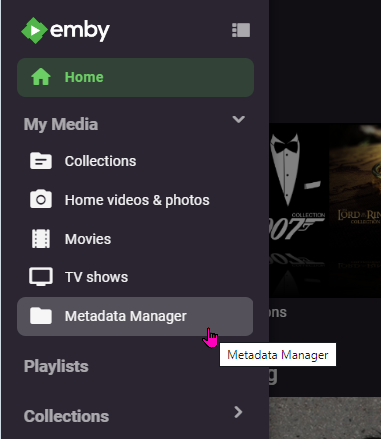
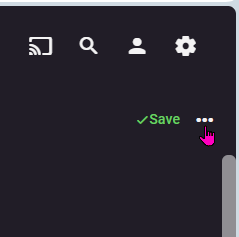
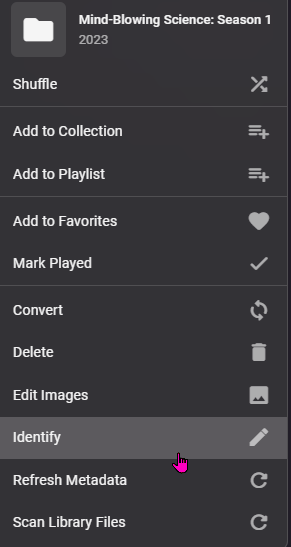
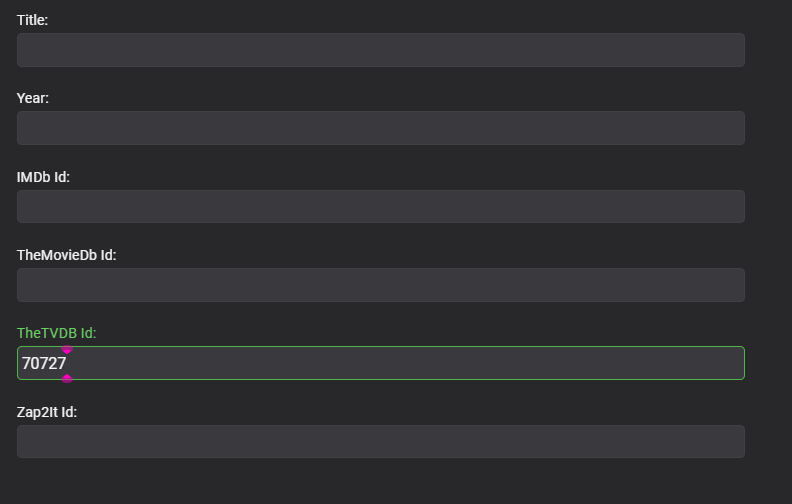
I wanted to add-on to this , as I had the same problems as @RexKwondo. The series in question is "Homicide: Life On The Street (1993)", and it kept pulling metadata from some other series ( ?The Falajweruslka Murders?, something like that), and I couldn't figure it out, and I finally settled on this. 1. I followed the folder structure instructions (Top Level: Homicide Life On The Street (1993) [tvdbid=70727]), and then the subfolders were "Season 1", "Season 2", etc. 2. Then, this is what did it (after all the metadata refreshes kept pulling up the wrong info): Go to metadata manager: Left click on the INCORRECTLY identified series : Go to the upper right of the screen and click on the 3 lateral dots: Choose "Identify": On this screen is where you want to put the (for instance) TVDBID code: for Homicide Life on The Streets its 70727: hit Search (If it doesn't pull the right info, you put in the wrong code) Click on the picture to select the info: Click the box to replace all images if you want, then "OK" at the bottom, then the big info screen pops up: Scroll down to the bottom and, if everything is correct, I'd recommend clicking the "Lock this item to prevent future changes" check box, then "Save" I hope this will help someone in the future!

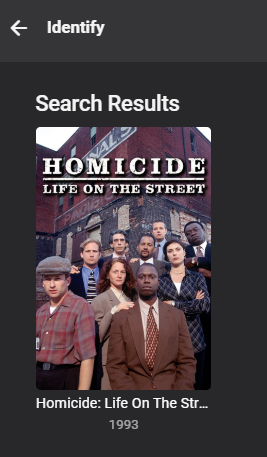
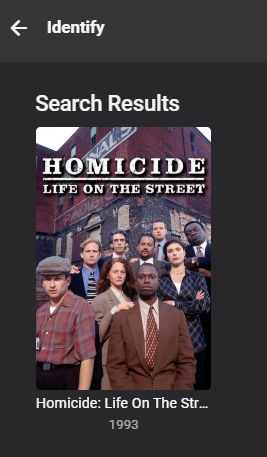
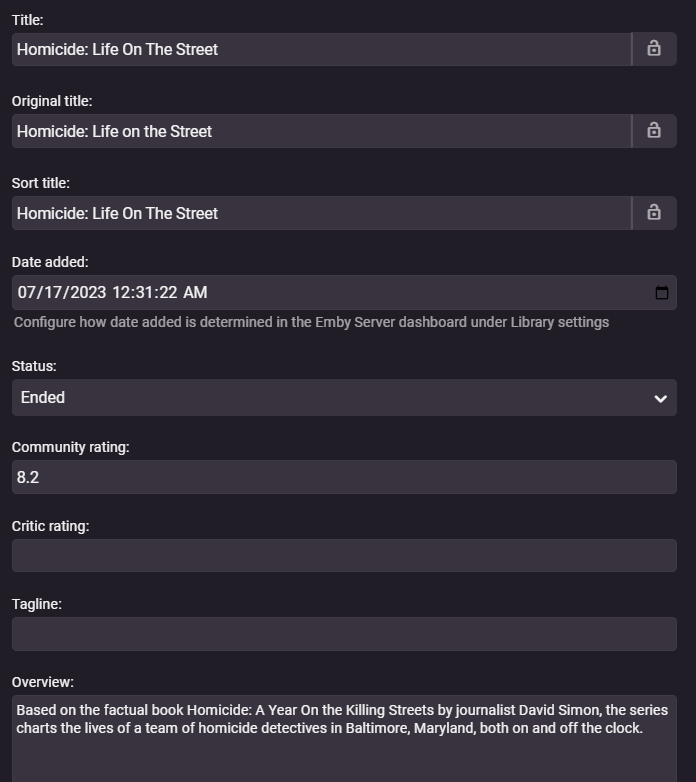 1 point
 -
nevermind, i got the proper command now. ```curl -X POST http://localhost:8096/emby/System/Shutdown -H "X-Emby-Token: YOUR_AUTH_TOKEN"```1 point
-
So it was a misunderstanding by me. TY and yes that does make sense. Some in my regular TV Series library is a mixture as older seasons were pre HD.1 point
-
There's no bug, TV series is a collection of items (episodes which can be of various resolutions, even within same season, let alone across multiple ones), hence it cannot be detected as any resolution, either 4K or 720p/1080p or SD or any other (only episodes can) and subsequently, cannot get cover treatment same as movies (single item) do.1 point
-
So, I still think there is some sort of bug or misunderstanding by me. I have 4 libraries... Movies, 4K Movies, TV Series and 4K TV Series, all spanned over many drives. The default coverart profile handles all movies just fine. no matter the folder or library... UHD shows 4K case, 720/1080 shows the BR case and SD shows a DVD case just fine. You would expect the TV Series to behave the same way but as you pointed out @Grumpy1 it does not "detect" UHD for TV Series so you have create another profile and point it to the 4K TV folder and then set all series to be UHD like this:
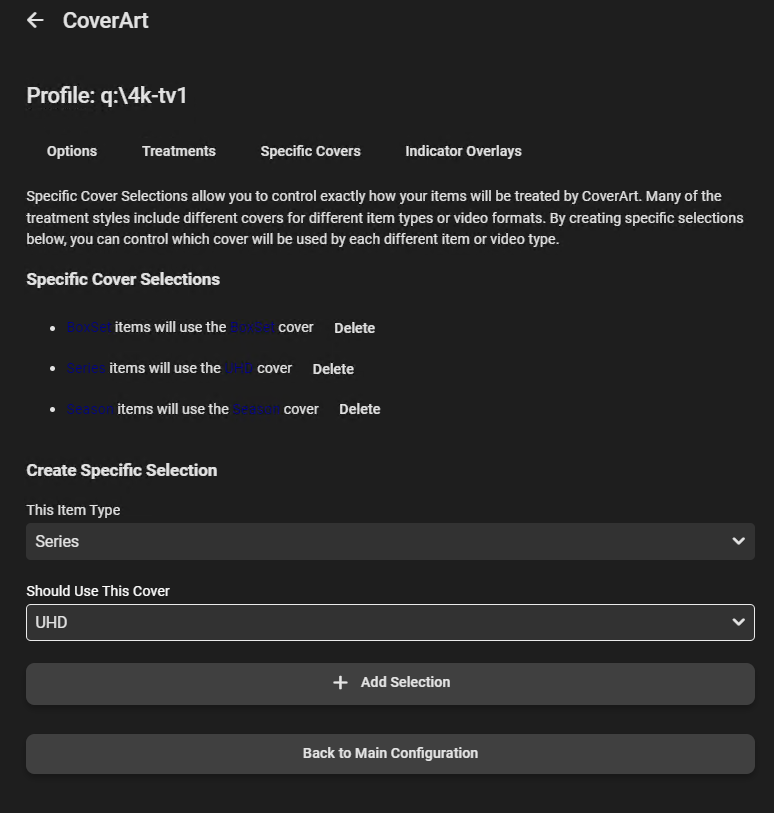 1 point
 -
The Library/Series/Updated endpoint has been deprecated for a few years now due to exactly this issue (https://github.com/Sonarr/Sonarr/issues/2662#issuecomment-404996917). The Library/Media/Updated is the recommended way for for notifying Emby of any new or updated media.1 point
-
Thanks. I'll take another whack at it this week.1 point
-
Hi. That is because that option has been removed from the beta server. Try updating to the beta app.1 point
-
Sorry, no. You could hack it but this would be a pain to maintain.1 point
-
Hi, I have updated again and now it does seem to work. After all issue seemed to be that for some reason for this some films it did want to start scaling down video quality. This data is coming from home server and for Emby I do not have dedicated GPU. GPU is for my data storage I use to prepare my old Blueray / DVD collections for Emby. I did try to quess good settings for ffmpeg, so I should be able to use direct-play from Emby. I first noticed that video is a bit lagging and had a look admin panel and it said Emby was scalong down video content. I do convert videos to 576p H264 and Apple TV max quality you can select is 480p - 4Mbps. Automatic seems to be using direct play. So like I thought, it was not a bug, but something I just did not understand correctly. Thanks for you replies and sorry it took so long to reply. It has not been really urgent. Unfortuantely there has not been that much time for movies..1 point
-
So you have what is (imo) the best playback device - but playback of UHD Remux Rips are dependent on a) The other equipment being capable of playing the raw Video and Audio stream. b) The construction of the original RIP and how it was done. (makemkv etc) c) The construction of the container and codecs d) Reliable high bandwidth capable of up to 140Mbit between the client and server - ideally wired (shield is 1Gig) or 'strong' wifi signal. e) Decisions made on subtitles (internal/external and subtitle type - PGS being problematic on some equipment) I note for example, on the few ffmpeg logs I read, it was transcoding the AUDIO from True-HD to AC3. This suggests that you are not meeting the criteria for (a) above - ie does your TV playback True-HD ? How is it connected to the Shield - it would need to be EARC for starters. In summary, to sucessfully play HD Audio (be it THD or DTS-HD) the Shield normally needs to be directly connected to an AVR - removing any necessity for ARC or EARC. Video (only) is then passed to the TV. Option 2 on this wiki example - https://emby.media/support/articles/LG-Why-not-Atmos.html?q=true-hd Dolby Vision has also unfortunately thrown a lot of confusion into the mix - if you are not interested in DV, then that is fine - and ripping 'just' the HDR (Base Layer), should be ok. But ripping to a DV profile 7 (DV + HDR10) should also work just as well as the DV 'layer' will simply get ignored. Better yet, convert to DV profile 8 (still DV + HDR10) - which is much more compatible with other hardware players. You may regret the decision to not include it - as much as you don't use it today - it's not going away and your next device may use it.. Playback of UHD Rips can be 100% successful on emby - but the key thing is you need it to Direct Play 100% (Audio and Video).1 point
-
All good now! Thanks again!1 point
-
Hey @quickmicyou were right, it was a network issue. Albeit, not a proxy/firewall one. Built a vm, win10, same issues. Upgraded to the 4.8.0.42 beta, same issues. Tore thru everything I could think of, pulled an old ddwrt router, flashed it to clean, same issues. Finally found it on the unifi network AP logs, must be a freak conflict but the RSSI on the firestick is ~75-80 and it apparently bounces/roams between two different APs and in that brief moment the websocket connection times out. This probably doesn't happen to many other people and I'll order an hdmi extender to reposition the stick but it would be awesome if there were configuration options to either ignore the error since good buffering apparently means I never notice it or change the timeout/repeat error threshold. Thanks again. Awesome product! (not the firestick. Just the emby server and kodi add-on)1 point
-
I know @quickmichas it working pretty well in Emby Kodi Next Gen. Here is hoping it eventually gets added to the apps across the board. I mean I can open up Emby For Kodi Next Gen and start a watch party for anyone using any app but it would be nice to have it included without having to use Emby For Kodi. I tested Plex Watch Together and it worked flawlessly but of course I been with Emby for 3 years and have no intent on changing Mook1 point
-
I believe yours may be a different issue, since you are on Beta server, but still on stable Android TV app See here for recent updates the Beta release of Android TV app that better handles logins now since changes in the server 4.8.0.411 point
-
That’s the update out now.1 point
-
See a recent comment on how you can achieve this by using the 'Played' tab in the 'Playback Reporting' plugin:1 point
-
There's no point in doing so. When transcoding, Emby serves video via HLS segments. The transcoding is done in a way that each segment starts with an IDR frame, which makes decoding independent from data in previous segments. The segments are 3 seconds of video. Creating additional IDR frames inside those segments won't improve loading time. The clients wait until they have received two or three segments. There can be various reasons for long loading times, we would need to look at a specific case including log files. Please see how to report a media playback issue. Emby doesn't work with configuration files. But there are configuration options for encoding. You need to click on the gear icon next to the encoder on the transcoding settings page (only in the latest beta versions). We do not allow this, because it's the worst possible thing you could do. It is usually better to do decoding in CPU than to do only the decoding on a GPU. The reason is that memory transfer often plays a larger role than the CPU processing for decoding. You need to consider that after decoding, video frames are uncompressed. A single uncompressed 4k video frame is 100-120MB in size. At 30 fps, this can make 3.5 GB to transfer per second of video (from GPU to system memory) and when you want to encode with a different GPU, you need to copy the frames again - from system memory to the other GPU's memory - makes 7 GB/s. And you want transcoding to be faster than video playback time - at least 2x or 3x, so we get 14 or 21 GB/s to transfer. The best and most efficient approach is when the video frame data stays in GPU memory after decoding. Then it can be processed (downscaling, deinterlacing, subtitle burn-in, color format changes, tone mapping) and finally encoded. This way, you have just compressed video going in and compressed video coming out again.1 point
-
Thanks for your help.1 point
-
Ok thanks for reporting. We’ll take a look.1 point
-
Hi, there is currently no way to do this, although it’s not a bad idea. Thanks.1 point
-
On both android and iOS, with device orientation set to automatic, both the youtube and apple tv apps auto-rotate video nowadays. Netflix still always locks you to landscape, and we did that for years as well, but we never had an answer for those who wanted to keep it portrait and still play video. Now I find the automatic method much better because you essentially get to decide based on how you're holding the device. Now I realize that some may like the always lock to landscape behavior, so we'll make that an option to go back to that way.1 point
-
Yes, I already got that. However, does Emby also have the option to serve/broadcast its own m3u-link (so it can be used by external applications like Tivimate or IPTV Smarters)? If not, I guess I'd have to go for the Xteve option, as @RobDenny suggested.1 point
-
1 point
-
Awesome! These are awesome! You are my best friend today!1 point
-
What a nice surprise when woke up just now, to see all the completed icons, and with different images to choose from to boot. These will definitely add colour to my Emby home page. You obviously live on the other side of the world to have done all this work while I slept. Theres just the last one to do - Phone Uploads. (sorry to be so demanding) Thanks you so much and I hope others will use these as well.1 point