Leaderboard




Popular Content
Showing content with the highest reputation on 07/19/23 in all areas
-
I am positive I'm not the only one who thinks this, but for a product that has a paid subscription the communication to end users is severely lacking. Beta Updates, Road Maps, Lack of Community Managers, More in depth responses to feature requests to name a few areas that honestly, are very average or non-existent. The fact that community members that make plugins have better engagement and responses to updates/requests/planned changes is pretty average tbh. When it comes to beta updates, it seems we get this string of updates then shit breaks and we get no communication on what's being done to fix it. How hard would it be to have a dedicated thread that communicates what's being worked on for the next update, an eta, issues that are known and what's being focused on, and what's currently a struggle to diagnose and fix? I think the same goes for literally any feature request. The token "Yes we can look into this in the future" response is a joke tbh. It literally reminds me of my mum saying Maybe to me as a kid. Don't get me wrong I love Emby as a product, I just think it's about time the communication gets an over hall.3 points
-
I would love to see a screensaver like WMC has with the photowall. My wife loves this in WMC and when MBTcomes out and switch everything over from WMC this is a much needed feature.2 points
-
-On Emby for Android (Shield TV) there is no option for the screensaver. It would be nice to have a screensaver that shows photos from my photo collection with tag/label or optional other info (like date taken, location) displayed in them. So +1 for me.2 points
-
I saw a very old thread requesting this and feel it needs a revisit. It would be great if, when playing music, you could set a duration for song crossfading,1 point
-
Without looking at a specific example it's hard to comment, but we also support multiple movies together in single folders, not to mention multiple parts, and multiple versions. The only way to make all of these things work together is by having naming conventions. You follow the naming conventions for extras, you get extras. Anything else and it's hard to automatically guess and come up with the right answer for everyone and so that's why it gets treated as a separate movie.1 point
-
Up vote, 10 days later1 point
-
That's fine, and understand where you're coming from. If it could be done in a way to display it correctly and it wasn't too complicated, I'd appreciate it, but understand if that's not possible. I can keep using strm files. It's not elegant, but it's less involved than splitting.1 point
-
I never said you can't have an opinion, that's the exact opposite of what I said and you know it. Your argument went overboard. That was my point. You don't want to use the feature? Fine, state you wouldn't use the feature. But was it necessary to continue crapping all over the idea after stating you wouldn't use it? I say no, because it adds nothing useful and it really rubs people the wrong way. Do I have thin skin? Maybe. Or maybe I just had a bad day. Either way I would've appreciated a less aggressive response to a a simple suggestion.1 point
-
Maybe just move the request/thread as an FR - because that's what it is.1 point
-
I created this simple open source console application that shifts the times in a SRT file by a given number of milliseconds, Feel free to have a look.1 point
-
I just reread through this thread and I really see no important problem. I have some cartoons where the aired order does not matter and for most early TV shows it does not matter either. For the most part early TV did not build on earlier episodes so the order they air in does not matter and neither does the order viewed. I read that there are objections to users splitting these combined shows but it seems to me that inconveniencing the developers for options that adversely impact what appears a very tiny subset of users. I wold almost bet that the number of users that even have such files is less that 0.001% of Emby's user base. I have a few "desires" that I believe I "need" but, for what those "desires" will do the effort to make them work is greatly disproportional to the number of people it would help. In an ideal world software can be setup so as everyone that uses it finds all desired options fulfilled but this world is somewhat short of ideal and I, for one, see no good reason for Emby to waste any time on implementing a solution for what is a problems to very very very few people. There are lots of thing Emby needs to look at or change but wasting time on this causes more harm than good and, if implemented, would cause many potential problems. In other words: If there were a valid voting system I would vote NO!!!!1 point
-
Thank you so much!!1 point
-
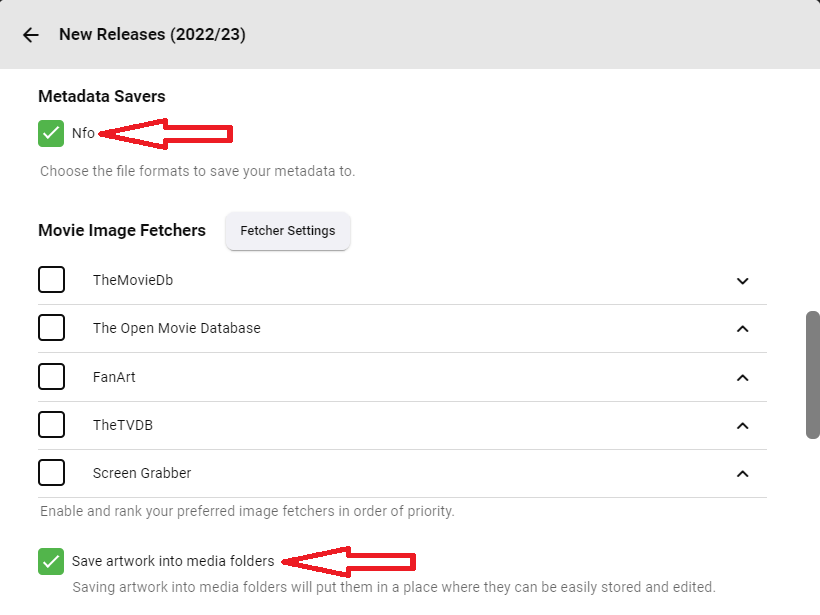
Yes, as stated in KB article: Configuration Backup | Emby Documentation You need to save artwork/NFOs with your media (enable same in your per-library settings):
 1 point
 -
I never let any of my spinners go to sleep, number of tools available online, here's the one I use: GitHub - stsrki/KeepAliveHD: Prevent hard-drives from going into sleep mode. Give it a spin (), see how does that compare.1 point
-
Hello Last week I installed emby and was happy with the "watch trailer" option of the selected movie and it played in Spanish language. This week I bought Emby premiere and the trailer plugin does not work in Spanish, and the "cinema intros" plugin is useless without the trailers in Spanish. I join the request to be able to search for the trailers in the language of each user. Thank you!1 point
-
But if there are other options like in the TMDB, why not use it. For many people also the streaming order gets more important which is also not always the same like the airdate. TVDB and TMDB support that, so Emby should do. But as the scrapers seem not to be open source the Emby Devs have to deal with it, and havent done in the past three years. Oh, wait i have to correct myself, that feature was already requested in 2018.1 point
-
Hello, I noticed, that the lastPlayedDate seems to get messed up when running the latest beta release (currently 4.8.0.39 beta). I am not sure with which beta this was introduced, it does not happen with the latest stable build. The first response is one received running the Emby beta build. The second one is a response received running the Emby release build. The important parts have been highlighted, I hope this helps and it can be resolved before the next stable release. (body: [ (Name: Grandmaster), (ServerId: c6b7709567ff4b6c9d41ceecc1fbd899), (Id: 65), (DateCreated: 2023-05-23T19:11:24.0000000Z), (PremiereDate: 2014-04-30T00:00:00.0000000Z), (Path: /data/drive/media/anime/No Game, No Life/Season 1/No Game, No Life - S01E04 - Grandmaster Bluray-1080p [Lulu].mkv), (RunTimeTicks: 14416310000), (ProductionYear: 2014), (IndexNumber: 4), (ParentIndexNumber: 1), (ProviderIds: [ (Tvdb: 4845979) ]), (IsFolder: false), (Type: Episode), (UserData: [ (PlaybackPositionTicks: 0), (PlayCount: 0), (IsFavorite: false), (Played: true) ]), (SeriesName: No Game, No Life), (SeriesId: 8), (SeasonId: 61), (SeriesPrimaryImageTag: e4addc367f43018cfca5d0af59aaed21), (SeasonName: Season 1), (MediaType: Video) ]) } (edited) (body: [ (Name: Reconnected Feelings), (ServerId: 22a3d533da5744e2b2bf760b8a88bbdd), (Id: 271699), (DateCreated: 2020-11-27T06:11:26.0000000Z), (PremiereDate: 2020-09-04T21:00:00.0000000Z), (Path: /storage/media/anime/Major 2nd (2018)/Season 02/Major 2nd (2018) - S02E16 - [041] Reconnected Feelings [WEBDL-1080p] [JA] [x264 AAC 8bit].mkv), (RunTimeTicks: 14700780000), (ProductionYear: 2020), (IndexNumber: 16), (ParentIndexNumber: 2), (ProviderIds: [ (Tvdb: 7901572) ]), (IsFolder: false), (Type: Episode), (UserData: [ (PlaybackPositionTicks: 0), (PlayCount: 1), (IsFavorite: false), (LastPlayedDate: 2022-02-28T18:14:42.0000000Z), (Played: true) ]), (SeriesName: Major 2nd), (SeriesId: 259045), (SeasonId: 271655), (SeriesPrimaryImageTag: 395f07cc2f7e249f20c70d640f9bde16), (SeasonName: Season 2), (MediaType: Video) ]) } Thank you!1 point
-
Try adding UserDataPlayCount and UserDataLastPlayedDate to your requested fields.1 point
-
In this case it makes perfectly sense, ne repeats etc. It is just another way to sort it. So it should be supported. There are enough people voting for it since 2020. Kodis scraper has that feature for nearly 5 years1 point
-
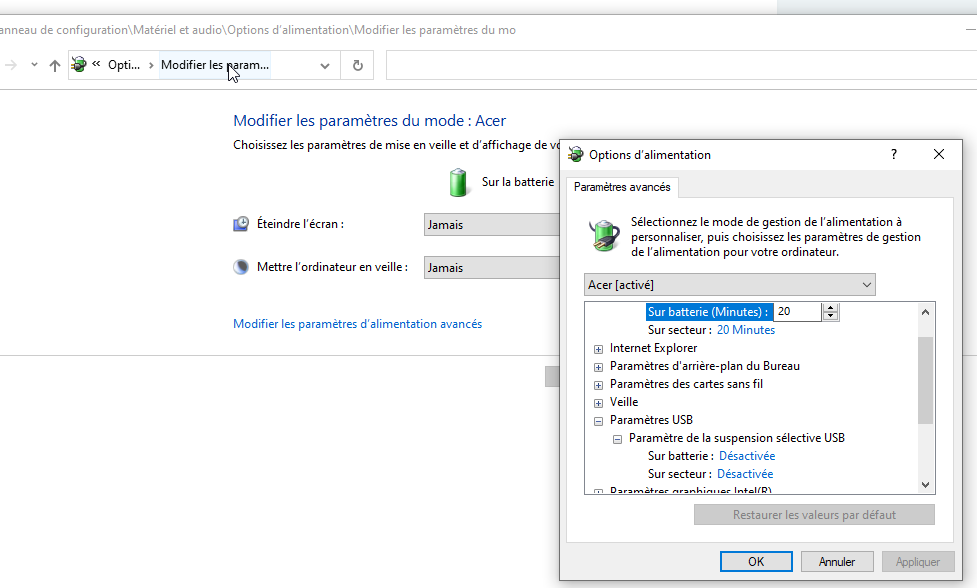
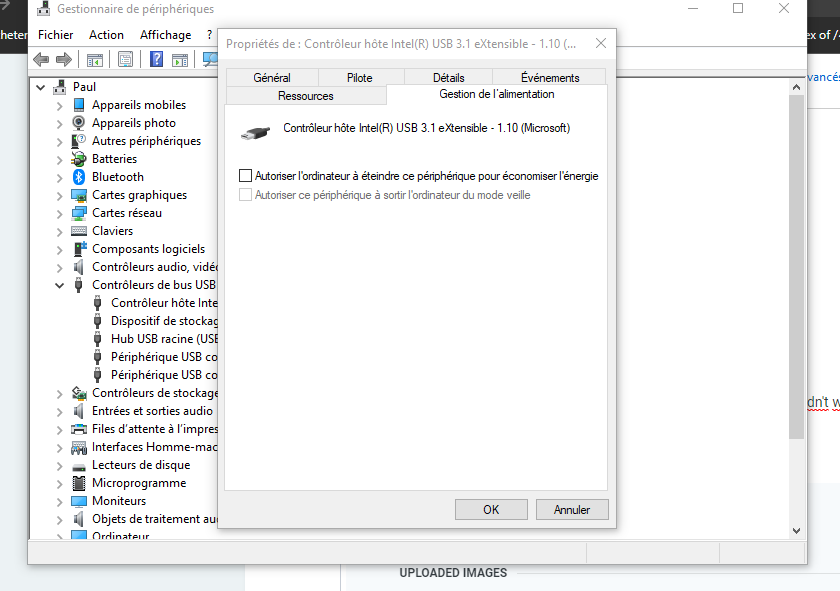
So basically i changed multiple parameters for usb and it worked in battery parameters you deactivate this And in peripheral managers (not sure if this one is useful but alone it didn't work) untick this for every usb
 1 point
 -
Maybe I'm misreading your comment but I've run the commands manually to experiment with parameters. Running them exactly as they are in the log gets the same poor performance. That did it, thanks. Attached. If the measurement fps=0.3 is analogous to transcoding speed that seems very bad. quick-extract-imageseries-6e4503e0-4901-4b6e-b884-a8d575b6def3_1.txt.zip1 point
-
Just remember once it gets to your country and your TV becomes 5 years old it won't matter. You can either stick with the last version Samsung approved for your year model before the 5-year point (which I'm sure some won't mind), or you need to go back to using USB if you want the current version of the app. I'm having to do that myself now that Samsung no longer supports 2018 models and I'm in the US. Or, keep buying a new TV every 5 years1 point
-
Hi. Note that option is in each app individually. Setting it on the web app, just turns it on for web playback.1 point
-
I thinks it's annoying if everyone ask for an ETA for his or her country. I'm really happy that there is some progress even if it's not in my country. Hopefully it gets easier for them which each country, since the argument "we are already in x countries" could help.1 point
-
Hi. This is why we have the option to save metadata alongside the media - it makes that media very portable. If you don't have that option already set, note that setting it now is not going to automatically migrate all your info. You would need to refresh metadata on everything to cause it to be re-saved in the new location. That could be a good path for you to get where you want though. Turn on the option, then refresh the library in question. Then confirm the NFO and image files are with the media and make your move. Also note that there are separate options for things like thumbnails so be sure to enable those and re-build if necessary.1 point
-
Seems similar to this:1 point
-
Using the Tizen app you can't. Have you looked at the chart in your user's manual which specifies the codecs your TV supports? Those are the only codecs you can use when running an app from your TV. All HD audio except PCM 2.0 will get transcoded into something like AC3 which your TV supports. Your soundbar supports TrueHD because it's designed for use with a UHD player, not for apps running on your TV. Streaming apps don't use TrueHD or DTS-HD so there is no need for Samsung to add the required decoder on their TVs to support those. Short answer. Your soundbar supports TrueHD and your TV doesn't. Buy something with a TrueHD or DTS-HD decoder such as a Shield, Cube, Roku, etc and plug it into your soundbar if you want to squeeze the best audio out of your new Atmos soundbar.1 point
-
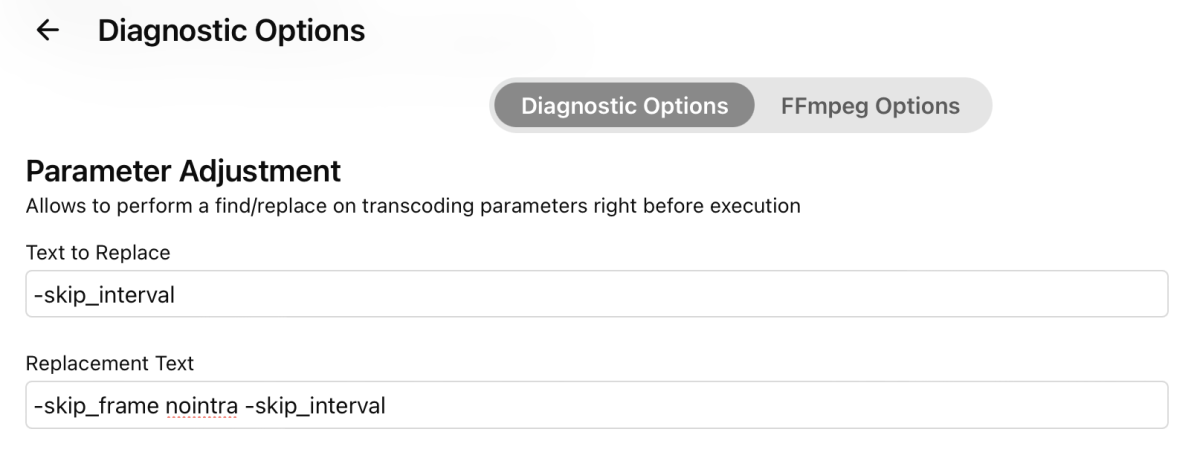
Either I've done something wrong or it doesn't apply to thumbnail-generation: Resultant command (no "skip_frame") 2023-07-19 07:48:25.340 Info App: ProcessRun 'quick-extract-imageseries' Execute: /bin/ffmpeg -f mp4 -threads 1 -skip_interval 10 -copyts -i file:"/media/Movies/Default/Movie.mp4" -an -sn -vf "select='eq(pict_type,PICT_TYPE_I)',scale=w=320:h=180" -vsync cfr -r 0.1 -f image2 "/config/cache/temp/a8a64408e49d4e2da992f967c7231ee0/img_%05d.jpg" Aside from entries like the one above I don't see anything thumbnail-related in the logs. Are they in another log? Do I have to increase the log level? I've played around some and it looks like the slowness is video-specific. HEVCs I've encoded myself (8 bit) seem fine. The common element with the problem files is yuv420p10le Video: hevc (Main 10) (hev1 / 0x31766568), yuv420p10le(tv, bt709, progressive) But I'll test more to confirm.
 1 point
 -
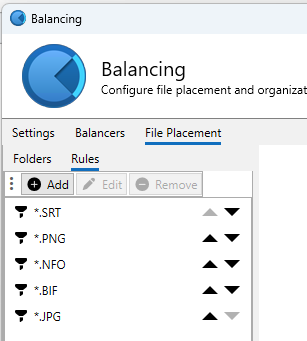
Yep - there is a post somewhere with this exact issue that I raised. My solution was the same as yours - just offload all the files excl the media itself to the SSD - so not only faster, but the disk access is removed from the physical disk.
 1 point
 -
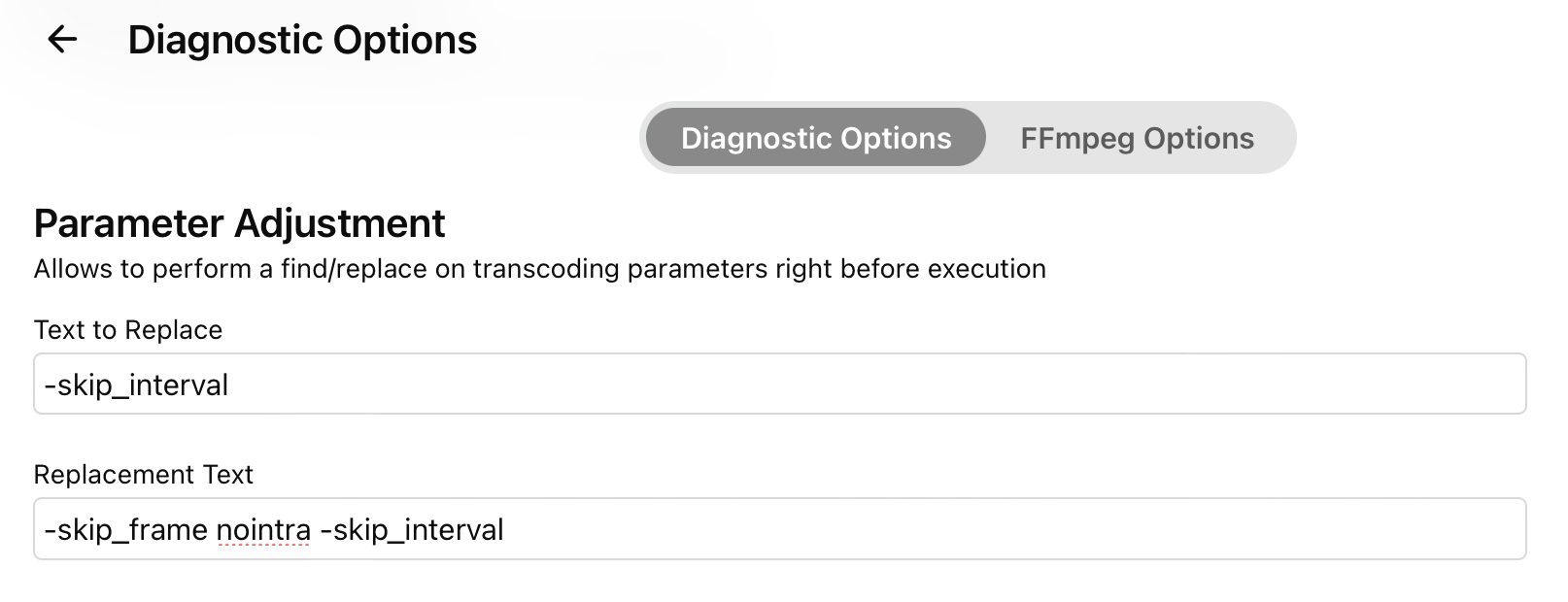
Yes - install the 'Emby Diagnostics' plugin - and then use the 'Parameter Adjustment' to 'search and replace' the syntax you want to try. This works for any ffmpeg command. But ideally - try and provide the logs to get it fixed. I have not noticed any performance issues with HEVC files.1 point
-
Yes but there is no real benefit in doing that. A DV7 and DV8 will fallback to HDR10 anyway (use the Base Layer - BL) the DV track will just be ignored. For DV5 - this needs full colour mapping to get back to HDR10 - better to just use the HDR source to start with. DV5 or DV7 can be combined with HDR10 source to get a DV8 profile. Look for 'Dovi_scripts + Tools' on the makemkv forums.1 point
-
Right - with you. Only the current Beta recognises Dolby Vision and updates the database accordingly (items need a metadata refresh). However, while the DV 'profile' is stored (DV5, DV7 or DV8) the clients currently only display 'Dolby Vision'. This may only be Beta versions as well - not 100% sure for anything Apple - I only use Android Platforms. I have requested they display the full info - ie 'DV + HDR10' (in the case of DV7/8) or 'DV Only' (in the case of DV5) as just displaying 'Dolby Vision' is potentially confusing for the user.1 point
-
Also waiting for the lyrics function in Android Tv app1 point
-
Thanks1 point
-
Hi, can you please attach a log file example? thanks.1 point
-
1 point
-
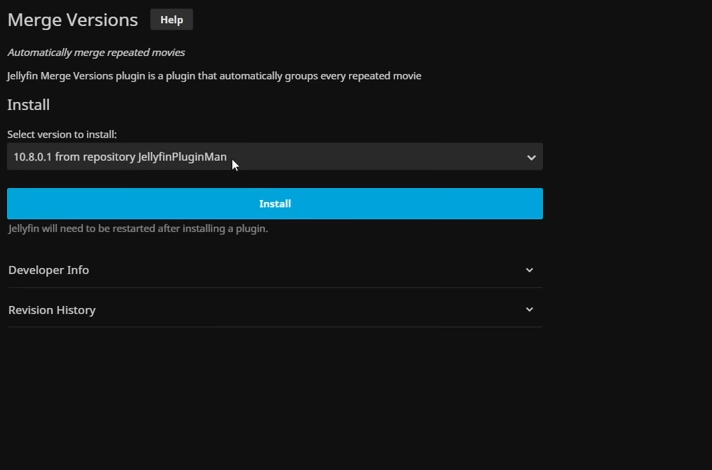
I have uninstalled the plugin for now. I have started checking out JellyFin as an alternative. They have a plugin to do this that does not need to be manually installed so I think I will start checking out this as it's similar to emby but many people say it's faster and better - plus the FireTV and Nvidia Shield versions of the client don't tell you it's going to expire and limit play time. I can find posts on here that ask for this as a standard emby feature as far back as 2015 so I doubt it will be done based on what I am reading here. This third party plugin isn't supported.
 1 point
 -
Not yet but it’s possible for future updates. Thanks.1 point
-
Sorry hijacking again! For anyone who spotted my post in here and having a similar issue as what I described. A very specific channel would not "play" or "record" in Emby but it was working fine in the native TV Tuner app WinTV 8.5. Resolution: WinTV 8.5 app -> Settings -> Devices -> Tuner Setup I re-ran the channel scan for this device using the option for internet assisted scan. I checked the channel locally and it was playing (same as before.) Restarted my Emby server. Now when I play the channel in Live TV its doing proper playback. Note: I did not have to remap channels or anything. Not in WinTV and not in Emby.1 point
-
Hi, without nfo files it will essentially be a fresh start, although you may see some favorites and watch data still preserved.1 point
-
This will be added to all of our next app releases as a user option. Thanks.1 point
-
Since I store all support files alongside my media I cannot say for sure but I believe, if no scan happens while Emby cannot see the files involved, then Emby retains all support data. However, should a scan happen after the files(s) have been removed and before they are back where Emby can see them, that would cause Emby to remove all data related to the file. One more thing, if you store the support files alongside the media and you remove the media but leave the support files Emby will not delete those support files. I do not know what happens if you delete a file through Emby and that file has locally stored support files. I suspect that only the media file gets deleted. One more disclaimer I do NOT use individual folders for movies but I do use Emby recomended structure for TV shows. I believe that if I delete a media file through Emby then Emby should delete all support files but that does not seem to happen and there may well be a good reason for that behavior that I simply do not run into.1 point
-
Hi. It becomes impossible to track interest in feature requests that pile several different things into them so we ask that you create individual requests for individual features. However, some of your requests also already exist so you can contribute to those:1 point
-
Hi. There is always room for improvement and we continually strive to do better. We are a small team but that is actually what makes us much more responsive than a lot of larger ones IMO. At times I feel we are kinda between a rock and a hard place here...because we grew out of the open-source environment we have a very strong sense of "community" with this product. That is a good thing but it also seems to set an expectation with our users that they should have detailed insights into our internal operations. There are a lot of reasons why this isn't practical with us no longer being such a project. You don't have these types of insights into any major product from a large company - and you don't have direct contact with the actual people behind the scenes with those companies either. The last two server beta cycles have been very long - way too long - and that has exacerbated things. That is not how we planned them but stuff happens and here we are. One of our primary goals for the future will be to get back to much shorter release cycles of the server. So, thanks for the feedback and we will strive to do the best we can on the communication front but do realize that our internal operations are not intended to be public. We want to keep the sense of community we have built and Luke and I are still committed to direct communications with our users instead of building layers of isolation that would only obfuscate things further. In the end, what we really want to do is build, deliver and support the best damned personal media server there is and that will continue to be our top priority. Thanks.1 point
-
There's absolutely no reason they can't expand the team, from a purely community engaging point of view. Plugin developers are the definition of "passion projects" yet as above, communicate far better with the user base of a free service vs a service provider that has an income flow from their users.1 point
-
Already covered earlier in this topic. But just to refresh everyone's memory, to release worldwide you have to have the status of being a Samsung partner, and that requires a monetization strategy that is profitable for Samsung. It's not like the other app stores where you just submit once and check off a list of what countries you want. If you're a free app you and you're large enough that they feel they need to have you, then you can get through. Everyone else has to pay them sufficiently that they feel it's worth it for them.1 point
-
We are working on getting this into the store for tv devices so that you won't have to do this. Thanks.1 point
-
Hi. More than likely it is bitstreaming audio. My Pioneer receiver always muted itself (with an audible click) whenever the audio stream was interrupted like it will be for a pause or seek operation. You could look in your DTV box settings and see if there is something labeled something like "HDMI comfort noise" for an option.1 point
-
Emby runs perfectly on my Pixel phone with GrapheneOS, I've been using it for around six months. Previously I used CalyxOS+microG, which also works great with the Emby app. If you're looking to protect the privacy of your personal information, I suggest you check into using a de-googled Android OS.1 point
-
For users with Samsung Tizen SmartTVs (2015 - Present) who want to test the latest version of the Emby client app before it's submitted to Samsung for release in their app store. These installs should be considered beta until approved by Samsung, however they are the same ones submitted to Samsung monthly for inclusion in the Samsung store. Samsung's policy is that the only official way to distribute apps is through the Samsung store and that usb installs should be used for testing purposes only. Because of this policy Samsung has mandated that usb distributed apps must expire within 30 days of compiling. To help with testing you will be remined to update to the latest beta release as the app expires to ensure you are using the latest version when reporting issues. This install will also work for those who don't have access to the official client app in the Samsung app store. However, the same rules must be followed as indicated above. Release notes and version number For the latest release notes and version number click on this post https://emby.media/community/index.php?/topic/31461-emby-for-samsung-smarttv-release-notes-tizen-orsay/ Installation instructions Download this zip file: https://github.com/MediaBrowser/Emby.Releases/raw/master/tizen/tizen.zip Format a USB 2.0 stick using FAT16 (some larger USB 3.0 hard drives have been found to not work) (newer models may support other formats, check your users manual) Copy the tizen.zip file to the root of your USB stick Extract the contents of the tizen.zip file to the root. (This should create the folder 'userwidget' in the root of the USB stick and the folder should contain the two files needed) Turn on the TV Make sure your TV is connected to the Internet Plug the USB stick into the TV's USB port. Installation should start automatically. (There will be 3 quick messages in the upper right corner of the TV) Click 'OK' once the installation is complete. Optional, add the Emby app as a shortcut to Home Start the app from the Smart Hub or installed apps section of your TV. Troubleshooting If the installation does not start automatically, then please ensure your TV firmware is up to date and try again. If you get an installation error, try the process again with the USB stick formatted ass FAT32. We've received reports from users that installing from USB 3.0 hard-drive devices does not work, so please make sure to use a USB 2.0 thumb-drive device. Also, make sure the thumb-drive is unlocked/writable before plugging it in. The TV will need to write to your thumb-drive. Users with 2015 Samsung SmartTVs may experience an issue where the USB version of the app deletes itself upon restart of their TV. This is a security measure implemented by Samsung in which we have no control. If this is the case you may have to leave the thumb-drive in the TV and reinstall upon reboot, or install the latest release version of the client found in the Samsung app center. Updating from a previous USB install The app will notify you when an update is available. To update a previous USB install just repeat the instructions above. Notes: Certain Samsung SmartTVs have an issue where the app won't upgrade from USB drive if there is already a USB version installed. If this is the case you'll simply delete the old version before inserting the USB and then repeat the same installation process to install the new version. Also, try power cycling your TV after deleting the previous version if you have problems.1 point