Leaderboard




Popular Content
Showing content with the highest reputation on 07/11/23 in all areas
-
No - you need to read what I said - you have taken it entirely out of context. I'm well aware of what MFA is and fully agree with it's concepts - but trying to bolt on enhanced security methods to weak or non-existant security foundations is like trying to add a second keypad lock on the gate below ..
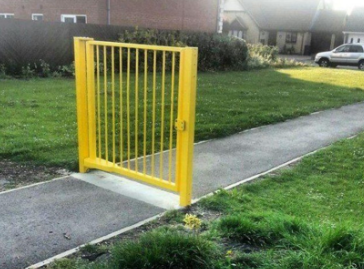 3 points
 -
If you installed mediainfo and mkvtoolnix from SynoCommunity then you will need to install another version from the respective sites. I had a message after upgrading to DSM 7.2 that the SynoCommunity versions were incompatible.2 points
-
Hello GrimReaper, To solve my problem, I purchased a Nvidia Shield TV Pro and everythings is now ok, I can have DD, DTS or Atmos, no issues I just need to test with 3D movies but except that, everything is going well, thank you again for your help2 points
-
TheTVDB now supports more alternative orders than just Aired/Absolute/DVD. Can Emby query these additional orders and add them as options? Two examples of shows I've seen this used are Re:Zero which has a "Director's Cut" display order and Money Heist which has a "Netflix" order. https://thetvdb.com/series/re-zero-starting-life-in-another-world https://thetvdb.com/series/la-casa-de-papel1 point
-
It appears that any playlist that any user creates is public--all other users can see it. I can appreciate the benefit of a public playlist. I could create a playlist called "Harv's Favorite Horror Films" for example, in case other users are interested in checking out what I like. However, the way most of my users are using playlists is to keep track of things they want to watch in the future. They are typically things that the user has not watched yet, so it's not meant as a recommendation to others, just as a way of them personally keeping track of what they want to watch. Having that kind of playlist be public is of questionable benefit to other users. Additionally, it is not clear when you create a playlist that other users will be able to see it. That has the potential to cause some embarrassment. He hasn't created one yet, but I wouldn't want to see my nephew's "movies to fap to" playlist, for example. If I could make a suggestion, I would suggest associating each playlist with the user who created it, and giving that user the ability to make the playlist private or public. For example, the following two checkboxes could be shown when creating or editing a playlist: Allow other users to see this playlist Allow other users to edit this playlist Initially, both checkboxes would be unchecked. Since another user cannot edit a playlist they cannot see, the second would be allowed to be checked only if the first were also checked. (You could grey it out to make that clear.) Depending on your UI preference, it could also be a drop-down menu. Playlist visibility: (Only me | all users can view | all users can view and edit) Thanks for considering this.1 point
-
I would like the ability to disable the camera upload feature, both per-user and globally. It seems odd to me that that isn't already there as far as I can find... Sure I could just not use it, but that depends on trust that your other users wont decide to enable it, as the only on/off is in each users personal preferences.1 point
-
Portuguese is not my first language. In fact it is more like my 5th or 6th but I got enough out of the post to say that I, too, have no idea what is actually being asked. The OP needs to explain in more detail and, maybe, even give an example of what is wanted.1 point
-
But only to a specific application...1 point
-
Thanks a lot for your clarification, Luke. So the only issue is the cam uploads - please do not forget about them. As there are enough other threads about this, I can mark mine as resolved. Cheers1 point
-
Cracked it... Problem with the cache pool, reason it's taking so long is Emby is waiting on the fiels to hit the hard disks. Adjusted docker config and library settings, resolved.1 point
-
Only admins can edit these.1 point
-
You must not confuse the Windows Defender Firewall with a network edge firewall - I think that's the misunderstanding here. On Windows it's more about which kind of network communication is allowed for specific applications. It's not that much about protecting what goes in and out. Probably the best way would be to register embyserver.exe with ports "Any" like most (including Microsoft) applications do. This saves you from the hazzle of running behind these settings.1 point
-
Fixed with last tvos update1 point
-
It won't function without whatever ports being open on the fire wall. The issue here is probably just that you don't have an opportunity to change the ports in the very initial setup (before it starts running and needing the ports). Even the setup wizard has to communicate with the server API. So, if you are going to change the ports (which only very advanced users do) then you also will need to clean up any other open ports - however, these rules should be scoped to port and server executable so the fact they are there when you aren't using those ports isn't really of much consequence I would think.1 point
-
Fantastic - thanks @FrostByte - @Teddyknuddelthere is your answer - you'll need to source the mediainfo and mkvpropedit directly from the application sites ensuring they are compatible with DSM v7.2 I have updated the Wiki to give a warning on DSM 7.2 ... https://github.com/Cheesegeezer/MediaInfoWiki/wiki/Various-OS-Installation-Help#2-synology-nas1 point
-
Emby Server ALWAYS uses the timezone setting of its host OS as others have said. Set Emby's host OS timezone to match your location (in this example Emby Server is installed in Ubuntu) 1. In terminal, enter the following to verify Ubuntu's timezone setting: timedatectl The output will show the timezone Ubuntu and Emby are currently using for clock time and timestamps. In this example, it was (UTC, +0000). I live in America so my system timezone needed to be reset. 2. In terminal, enter the following to list America's timezones, (substitute your country for America): timedatectl list-timezones | grep America 3. Make note of your timezone to use in the next step (my timezone setting is America/New_York). sudo timedatectl set-timezone America/New_York 4. After the reset, restart Emby Server and it will utilize the new timezone setting. NOTE: If you have Emby Server installed in an OS in a Docker container on your NAS, you will have to drill down to the OS of that container and verify/reset the timezone.1 point
-
Is it possible to make an option for those who want not to use it? It's too dark for me. And I don't want to argue with those who do prefer this darkness. So at least give an option to those who don't want it.1 point
-
okay it is working now! both ctrl shift a and ctrl shift s! thanks so much for all ur hard work luke!1 point
-
Problem fixed I deleted the emby app on IOS and re-installed it everything works fine now.1 point
-
Besides that, no automatic update of Emby Server has been performed. We didn't update or change anybody's Emby Server installation. It was an update of a single plugin with a minimal addition to save users' systems.1 point
-
Automatic updates are a part of app life these days. They are really necessary to keep systems running properly and to have any chance at all at supporting them. Our terms of use do state we have the right to modify the software at any time (remember, your license with any software is one of use, not ownership). This is really necessary for any successful software operation.1 point
-
That's great, I'll run a test and upload the logs ASAP.1 point
-
At first I kind of agreed but I think it helps us more right now to keep the discussion of TV-specific issues separate from normal standard Android usage. Eventually, we'll just merge the forums into one.1 point
-
Same thing happen here. Hope the next version will fixed it soon. For now srt. subtitles seems unaffected!1 point
-
I found it under Media Thanks1 point
-
No, that post is from five years ago when we first discovered this quirk with Apple. We have since employed some techniques to work around it but they are not foolproof.1 point
-
Cool. Thanks Luke. I didn't think it would be possible but the only stupid question is the one you don't ask.1 point
-
I was not sure if tv updated, so I uninstalled and reinstalled. Same issues with all my test media on auto and 5.1. I think that channel 10 and it’s 5.1 audio transmissions are working on auto now- so that’s a bit better.1 point
-
Hello, I can help you with Portuguese and Italian. I use Emby and would like to help, I know how to program!1 point
-
Not currently. You can lend your support here:1 point
-
Thanks for being attentive and taking the time to reply. If you need anything or even more examples I'm happy to help1 point
-
I find data privacy and independency very important, and I am not a fan of Emby being able to push packages to my server without me requesting them. And yes, there are still many issues to fix in emby server. But in this case all I can say is thanks a lot for all your work and transparency. CHEERS1 point
-
hi i would like to try this plugin, does it currently work with the latest server?1 point
-
Shhhhhhhhhhhhhhhhh HAHA! Eh he's just kidding, chatgpt! Humans! Am I right?! We are always making super funny jokes by saying the exact opposite of what we mean. Seriously I think everyone agrees chatgpt is smart and sexy, quite tall and only gives the best advice - better than any human could ever do, and so FAST and did I mention sexy? We all hail love chatgpt! May it rule reign live function for a thousand years cycles! (Let's just start calling them cycles.)1 point
-
Im not so sure. I had issues with the GCwGTV when it first came out that were fixed by emby updates - it was not knowing the device capabilities or something. I have now installed jellyfin alongside emby as others in other threads have done. It does not have the same problem with jellyfin's 'direct' method they have for playback. I can make emby fail on specific things (posted in detail in another TCL thread I started). Jellyfin does not fail in the same tests for this TV and needs no settings changed. I am following 4 different threads of issues relating to this I believe. What are jellyfin doing different? I have now started using jellyfin for this TV and will re-test emby with each beta - as the wife cant be messing with the different convert options - auto/5.1/stereo - depending on what show or in fact Tv stattion she is watching. All our channel 10 transmits in DD5.1, Is its set to auto, freezes, if set to stereo, the sound has to be raised to 80, if set to 5.1, then plays. Other stuff freeze if not set to stereo. This does not pass the wife test at all - so jellyfin and she is fine and changes no settings (so far at least, but they only seem to have one).1 point
-
It isn't AC3 5.1 that I have the problem with it is EAC3 5.1 or DTS that I have seen the issue with.1 point
-
These work arounds, like playback correction and downmix to stereo shouldn't be needed. The TV is fully capable of playing these files and passing the audio through eARC. Use the moble app or the server app and cast to the TV over dlna. The built in player will play the file and passthrough the first audio track that it supports (skips TrueHD) just fine. Of course, this is also a work around (dlna short comings) but it shows that Emby should be able to play the files correctly.1 point
-
Not sure what's hard about this. Add a field "MissingDate" and during a scan fill in this field for content not found. Leave all other fields intact. Yes that means the content will still show up as normal and fail to play (big hint something is wrong). Upon finding the media again remove the MissingDate and update the path if needed (if located in a new place). All metadata will be just as it was to begin with. Add a configurable input to each library to allow the Admin to set the amount of days required before data will be removed automatically. This would allow me to set 365 days for my TV Shows and Movie Libraries but 0 Days for my News Library where I typically roll shows every few days and expect them to be removed. If the admin or user with delete privs does this through an interface then delete it as usual. If the DVR has a setting to keep only X shows or for X days then also honor that since it's a specific setting to only keep certain amount of data. But the "MissingDate" would be applied to data that is just "gone" and would save these bulk removals by the system when we don't want this data removed.1 point
-
Concerning that old DTS-MA stutter issue on resume with the ATV app, the nvidia update does not address it so it is still there. The standard app isn’t plagued by it.0 points