
Leaderboard




Popular Content
Showing content with the highest reputation on 07/05/23 in all areas
-
I have checked one AVI file where playback correction did indeed correct the freezing/stuttering video, and the other AVI I converted to MKV with Handbrake and it similarly did not freeze or stutter. Thank you for the suggestion, I'm probably going to convert any remaining AVI files to MKV to prevent this being an issue. I'm very glad I should be able to dump Plex even as a fallback again.2 points
-
The first 9.1.1+ Hotfix will deploy soon as 33.2.0.201 with the following changes: First HotFix (33.2.0.201 deployed 7/xx/2023) : Resolves issue with choppy video playback after FFWD/RWD operations Resolves issue where remote stops respondiung for 60 seconds after wake from sleep Resolves issue with SHIELD waking from lock screen without a button press Resolves issue with large file transfer to NAS (Operation not permitted error) Resolves issue with Google signin flow stuck in a loop Resolves issue with stutters in Bose/Sony headsets while connected to 2.4Ghz WiFi. Resolves crashes in Apple TV app when ads play. Resolves audio stutter in apt-x supported headsets Resolves AV sync issues when Dolby Processing is enabled Resolves crash on volume change Resolves issue with Apple Music corruption during casting Resolves Spotify empty playback when Match Audio Content resolution is enabled with Stereo Upmix Resolves issue with Google Assitant not starting after Google GMS update Resolves full screen SHIELD Rewards notifcation issue Resolves issue with WiFi log filling up storage Add support for Match audio content resolution feature when using a USB DAC https://www.nvidia.com/en-us/geforce/forums/shield-tv/9/522242/shield-experience-upgrade-911-hotfix-image/2 points
-
Currently if you're part way through a multi version movie, and go back to it, the default version is whatever the default version would normally be. It ought to default to the version that's in progress.1 point
-
I have been using nginx-proxy-manager to manage my reverse proxy needs and it was going fine: it has a super nice GUI and it's super beginner friendly. I've since learnt, however, that it is managed by just one dev and there's a TON of unattended CVEs and unpatched security holes https://youtu.be/uaixCKTaqY0 First of all, while most tutorials were unhelpful on their own, this one was kind of ok as a reference (but not enough), but it might help if you are confused: https://www.youtube.com/watch?v=wLrmmh1eI94 I'll explain things along the way, but I'll try to cover these topics: 1) Set up traefik on docker 2) Reverse proxy your docker services/apps 3) Add SSL and redirect http to https 4) Whitelist your LAN IPs so as to block external IPs from accesing the service via the hostname 5) Reverse proxy your non docker services/apps So, this will work for Emby but will also work for every other service/app you got going there. I'M ASSUMING YOU HAVE SOME MINIMUM KNOWLEDGE ABOUT DOCKER AND DOCKER-COMPOSE Also, I will not go deep into how this works but rather how to basically set it up and you can go down into the rabbit hole of services, providers, routers and middleware yourself if you need to know more. So, let's start by setting up traefik on docker. One thing you need to know that will save you a ton of headaches is that there's multiple ways of configuring traefik but they are all mutually exclusive. What I mean by this is, you can configure it using your docker-compose file or your docker commands OR you could use a configuration file for example, but you can't use both. One will work but it will ignore the other one. Also, there's dynamic and static configuration. Static configuration is everything that relates to Traefik itself and it's stored in the traefik.yml file. Dynamic is everything that is related to things you can change on the fly for different services. This sounds like a lot but let's get started and you'll figure it out. The following is a docker-compose file with just traefik set on it, we will add services to it as we get things going. version: '3.6' services: traefik: container_name: traefik image: traefik:latest ports: - "80:80" - "443:443" # Left side is host side, right side container side. You HAVE to have 80 and 443 port forwarded to this ip for this to work. You can also modify the left side to whatever you want as long as you port forward 80 and 443 to that IP and whatever ports you choose to put there - "8080:8080" #GUI and Debug only, you can comment it once you have everything working volumes: # So that Traefik can listen to the Docker events - /var/run/docker.sock:/var/run/docker.sock - ${DOCKERCONFIG}/traefik:/etc/traefik labels: - "traefik.enable=true" networks: - traefik_network networks: traefik_network: driver: bridge This is all you need to have traefik running in docker-compose, replace ${DOCKERCONFIG} with whatever directory you want for the traefik files. Also notice that I created a network, this is IMPORTANT, you need to add every container to this network so traefik is able to see them. Now, let's create a traefik.yml that we will store in ${DOCKERCONFIG}/traefik/ global: checkNewVersion: true sendAnonymousUsage: false #above options are self explanatory and you can delete them if you want to # log: # level: DEBUG # filePath: /etc/traefik/logs/traefik.log #you can uncomment the DEBUG logs if needed, same with the accessLogs accessLog: filePath: /etc/traefik/logs/traefik-access.log fields: names: StartUTC: drop api: dashboard: true insecure: true #above options activate the dashboard which will be accesible at localhost:8080 or IP:8080, useful for debugging purposes at first, strongly recommend disabling it once everything is working entryPoints: web: address: ":80" http: redirections: entryPoint: to: websecure scheme: https websecure: address: ":443" providers: docker: exposedByDefault: false file: # watch for dynamic configuration changes directory: /etc/traefik watch: true certificatesResolvers: letsencrypt: acme: email: [YOUR EMAIL] storage: /etc/traefik/letsencrypt/acme.json tlschallenge: true Ok, so there's a lot to unpack here. First few things are basic setup for optional things you can safely ignore but overall are pretty much self explanatory. After that it starts getting weird, so let's dig in. entrypoints are basically what we want to listen to as an entry to our homelab/server/etc. In this case, we are saying everything that comes to port 80 or 443 and giving each one of them a name, web and websecure respectively. for web(port 80) we are also configuring a redirection to port 443, so that everything that comes on http will be redirected to https (where we will have our signed certificates). This is optional and you can comment the following if you don't want redirection, but I would strongly recommend you keep it. http: redirections: entryPoint: to: websecure scheme: https After entrypoints, we have providers. providers are basically the sources of our "routers" (I'll explain it later) and "services". Basically means, "where do I find my config info". In this case, I've added docker as a source for services and routers and added a config line that will not add every container by default, so you'll have to enable the ones you want in the docker-compose file. I've also added "file" as a different provider of configurations. This means I can create files with configs and it will read from them as long as those are in the traefik directory. This will be useful at the end when we want to add services that are not hosted using docker. Finally (for now) for our traefik.yml we have certificateresolvers, in this case, let's encrypt. This is the basic config so you can auto generate certificates for your services that will auto renew. You only need to do two things. Complete with your e-mail AND create the folder letsencrypt inside your traefik config folder. At this point, you can run traefik and if everything is right you should be able to log into the dashboard at localhost:8080 or IP:8080. If that happens, traefik is working and we can now start adding our services and routers. For our first service, I'll use something not emby, for example, let's say radarr. Add the following to your services now in docker-compose.yml: radarr: # privileged: true container_name: radarr environment: - PUID=${PUID} - PGID=${PGID} - TZ=${TZ} ports: - '7878:7878' #not needed anymore, left there for legacy reasons labels: - "traefik.enable=true" - "traefik.http.routers.radarr.tls=true" - "traefik.http.routers.radarr.rule=Host(`radarr.myhostname.net`)" - "traefik.http.routers.radarr.entrypoints=web,websecure" - "traefik.http.routers.radarr.tls.certresolver=letsencrypt" volumes: - '${DOCKERCONFIG}/radarr:/config' - '${MEDIA}:/media' networks: - traefik_network restart: unless-stopped image: 'linuxserver/radarr:latest' Ok, so there's two things added to the basic radarr config: the labels and the network. Network I already explained: you need that so it shares a network with Traefik and it can access it. Regarding the labels. Remember we set docker as a "provider"? That means traefik will read those labels and autoconfig the reverse proxy for radarr. So, from top to bottom: 1)traefik.enable -> enables the reverse proxy for this container 2)traefik.http.routers.radarr.tls=true -> enables the let's encrypt signed certificates 3)traefik.http.routers.radarr.rule=Host(`radarr.myhostname.net`) -> basically sets the hostname it will use so that when you go to https://radarr.myhostname.net it will go to radarr 4)traefik.http.routers.radarr.entrypoints=web,websecure -> this are the entrypoints we defined, we are basically saying: "Please listen to port 80 and 443" 5)traefik.http.routers.radarr.tls.certresolver=letsencrypt ->use let's encrypt (which we defined earlier as a certificate resolver) Now, if you do docker-compose up -d radarr you can go to radarr.myhostname.net and it will work! You will notice we never specified neither ip nor port to traefik: this is not needed, traefik will get it from the container itself. You can even remove the port definition and it will still work! This works for 90% of the containers, some (like Emby though) need to have their ports explicitly assigned so let's do a really simple barebones emby install: emby: container_name: emby networks: - traefik_network environment: PUID: ${PUID} PGID: ${PGID} GIDLIST: 0 TZ: ${TZ} volumes: - ${DOCKERCONFIG}/emby:/config - ${MEDIA}:/media ports: - '8096:8096' # HTTP port - '8920:8920' # HTTPS port - '7359:7359' - '1900:1900' labels: - "traefik.enable=true" - "traefik.http.routers.emby.tls=true" - "traefik.http.routers.emby.rule=Host(`myhostname.net`,`emby.myhostname.net`,`www.myhostname.net`)" - "traefik.http.routers.emby.entrypoints=web,websecure" - "traefik.http.routers.emby.tls.certresolver=letsencrypt" - "traefik.http.services.emby.loadbalancer.server.port=8096" restart: unless-stopped image: emby Ok, so you'll notice two things have changed. I've added more than one hostname (three, myhostname.net, emby.myhostname.net and www.myhostname.net) and all of this will redirect to emby. Also, the last label manually assigns port 8096. Don't worry, Traefik will handle the https. Now that we have two services running with reverse proxy, let's add a whitelist to radarr, only allow access to local IPs. To do this we need to create a "middleware": this is something that goes between the external connection and the service. In this case, it filters request by IP. So we open the traefik.yml file and we add this: global: checkNewVersion: true sendAnonymousUsage: false #above options are self explanatory and you can delete them if you want to # log: # level: DEBUG # filePath: /etc/traefik/logs/traefik.log #you can uncomment the DEBUG logs if needed, same with the accessLogs accessLog: filePath: /etc/traefik/logs/traefik-access.log fields: names: StartUTC: drop api: dashboard: true insecure: true #above options activate the dashboard which will be accesible at localhost:8080 or IP:8080, useful for debugging purposes at first, strongly recommend disabling it once everything is working entryPoints: web: address: ":80" http: redirections: entryPoint: to: websecure scheme: https websecure: address: ":443" providers: docker: exposedByDefault: false http: middlewares: lanwhitelist: ipWhitelist: sourceRange: 127.0.0.1/32, 192.168.0.0/16, 172.16.0.0/12, 10.0.0.0/8 certificatesResolvers: letsencrypt: acme: email: [YOUR EMAIL] storage: /etc/traefik/letsencrypt/acme.json tlschallenge: true We added this small section which will create an ip whitelist called lan whitelist. I've set a few ranges in there but you can customize these of course: http: middlewares: lanwhitelist: ipWhitelist: sourceRange: 127.0.0.1/32, 192.168.0.0/16, 172.16.0.0/12, 10.0.0.0/8 Now we need to tell radarr to use that middleware, so we add the following label to the list: - "traefik.http.routers.bazarr.middlewares=lanwhitelist@file" This basically says: use the middleware called "lanwhitelist" that is stored in the config files. If you now run radarr again, you'll see that you can access it via LAN but not WAN, which is cool! Finally, suppose you have ANOTHER server on another IP or something that is running on the same server but not on docker, or something that is running on docker but using network_mode: host. Basically any other server you know the IP:PORT. This involves a few more things but it is definitely not hard. Remember we added "file" as a provider? Let's suppose we have a service (called "myservice")at YOURIP:YOURPORT. Create inside the config folder a config.yml file and add the following: http: routers: myservice: entryPoints: - web - websecure rule: Host(`myservice.myhostname.net`) tls: certResolver: letsencrypt middlewares: - lanwhitelist@file service: myservice services: myservice: loadbalancer: servers: - url: http://YOURIP:YOURPORT I won't go to deep into what's going on here but you can see the syntax is actually the same as in the labels. What we've done here (and what we also did, unknowingly, when setting up the docker containers) is create a router and a service both named "myservice". The router basically defines how traefik should handle stuff that is incoming from WAN. So that would mean defining the entrypoints (we are using the same ones we created before, web and websecure for 80 and 443 respectively) what hostname it should listen to, if it should generate and use a certificate, the middleware (in this case, the optional ip whitelist) and to which service should it point (in this case, myservice). After that, we define the services myservice and inside that we basically just added the url for that particular service. That's IT! now you have traefik configured, with http redirect to https, with SSL enabled, with valid certificates and with an optional IP whitelist for both docker services AND other stuff you might have on your network. I know this is a LOT but if you need any help just let me know and I'll do what I can. If you have no idea what docker is or some of the super basic concepts, I'm not going to teach you everything from scratch but if you get the basic gist and you can't get it to work for some reason, I'm not an expert but I'm open to trying to help. Hope this is useful! PS: Luke or any other mod/admin that might read this, it would be great for guides and docker-compose files if there's by any chance a plugin for the forum that adds syntax highlighting for yaml code that is used in docker-compose and several other apps. I'm guessing it exists but I obviously have no idea if it actually does and how easy it might be to add, but hey, never hurts to ask.1 point
-
I'll try to pick up Sunday's log.1 point
-
You've reached inotify limit. Have a read here:1 point
-
Yes IOS version 2.2.10 fixed my issue too concerning live tv, thanks to the emby team for all there hard work on resolving this issue.1 point
-
None of those are accessing your server. Yes. Thanks.1 point
-
Yeah, I don't understand where these AVI files of recent content are coming from. That container should have died a decade ago...1 point
-
To the best of my knowledge, this plugin no longer works. Carlo1 point
-
Ok yes we’ll continue to look at improving it. Thanks.1 point
-
My wife finally read the prompt and noticed the question “Do you want to continue seeing these messages?”. She answered no and the prompts haven’t returned. Chalk it up to user error.1 point
-
Hi, this should be resolved in the upcoming 4.8 server release. Thanks.1 point
-
after i have now watched several series, it has become better, but after a certain time the entire picture jerks. if you then pause and continue again, then it first runs again stable for a short time and then starts again1 point
-
not only apps, even on the ios browsers see the same issue.1 point
-
Same issue with me on IOS 17 beta 21 point
-
2 of the most recent files with issues were indeed AVI files. I will to the "playback correction" this afternoon on one of them and see if this corrects the issue. Thank you for the suggestion. -D1 point
-
Hi. Is this an AVI file by any chance? If you use the "Playback Correction" option in the app to force a transcode before that 35 minute mark, does it play past it properly?1 point
-
Thanks everyone, I figured out the issues (in emby at least). REC (2007) was being named as Total Recall (1990) on the dashboard and REC 2 was being called 2 in the dashboard. I remapped them to the correct movie and all is good there. GrimReaper thanks for the tip in TMM1 point
-
Thanks @MBSkithe copy system folder method worked great for me. Your help is very much appreciated.1 point
-
Many thanks for the info @rbjtech. I just tried the in-app method of upgrade, stopping service..., and doing the upgrade via the app. All seemed to go well with upgrade completed and date/time of files in system directory all updated to todays date. However EmbyServer wouldnt run after that, either as an app or as a service. No error messages on screen, seemingly started to run and then closed down after a second. Not sure if this is because the upgrade was skipping a few versions? Anyway then tried the copy portable install system files across and that worked fine, Emby up and running. Fingerst crossed the normal install process doesnt do anything clever apart from copying the files. Thanks again for your help. Hopefully the install/upgrade process gets the overhaul you mentioned.1 point
-
ok i was blind. i found the file DataExplorer and deleted it. everything working again. thank you seanbuff1 point
-
Nice one, Thanks for the info.1 point
-
Hi, no I was not suggesting you were infected by the helper.dll malware. But good on you for checking. However you do indeed have the Data Explorer plugin (which is currently not supported in latest beta versions): Uninstall this plugin and restart your server, you should then be good to go1 point
-
@Luketodo perfecto, TV funcionando en dispositivos IOS. Muchas gracias por todo perfect, TV working on IOS devices. Many thanks for everything1 point
-
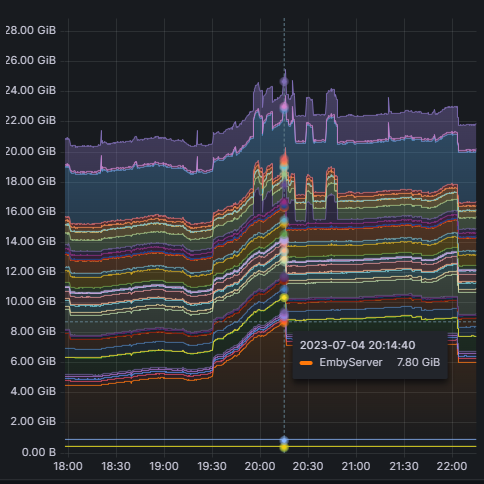
Ok I think I had an realization of what is going on. Here is the memory usage from all my dockers. Here we see the 2 ppl streaming. During the same time span, I see this when looking at the server wide mem usage. This leads me to believe that, when streaming, the file touched is being pulled into RAM Cache. If we look at RAM Used server wide its siting nicely at around 19GB, but looking at all dockers usage it's well above 24GB at times. And I see an increase in RAM cached. So in short user starts a stream. Video file loaded into RAM cached. I think, I see combined RAM Used + RAM Cached, in my docker graf, after the kernel was updated with the Unraid update. I think, I only saw RAM Used before this update. Tbh I have not seen oom_kill at any time. I was just confused by what I could see.

 1 point
 -
Thanks for the fix1 point
-
ios emby app is working perfectly again, I tested in LAN --tuner playback and recording playback no issues. --I tested again with wifi off, openvpn connected to my router tested tuner playback and Recording playback no issues. overall cpu usage is similar as app version 2.2.7 --a max of 4% of overall cpu for ATSC 1.0 channel playback (original either 720p or 1080i), --a max of 6% of overall cpu for ATSC 3.0 (hevc) channel playback, for now no DRM in my area yet. Thanks1 point
-
thanks beta 4.8 solved the issue (normal release no quicksync) . I installed the driver only with "apt install vainfo" and installed latest kernel. But im against beta because the many trouble that can be done. Im waiting for final release i hope its get quickly released.The problem on the beta is i cant switch between beta and normal release (docker) they give me errors when i switch i must put the backup in. Thank you so much for the help1 point
-
Unfortunately, AppleTV views are restricted to a maximum 7 items on the menubar so this also limits our options.1 point
-
If the monitor config changes, then it's possible the app isn't handling that well and is opening in a place where you can't see it. We are working on a new windows app that uses more standardized window management and won't have this issue anymore.1 point
-
Have a read here:1 point
-
HI, we'll take a look at this. Thanks for reporting.1 point
-
HI, what exactly is wrong?1 point
-
HI, support for this is planned for future updates. Thanks.1 point
-
I believe Emby are working on a complete Windows install overhaul (and about time!) - so hopefully this muddle of upgrading as a service will be resolved. I do it slightly differently - I stop the service - and then start the app on the desktop (as an admin), then emby updates itself. I then restart it and then shut it down. I then restart the service again. I believe the two methods probably achieve the same thing - but if there are any 'upgrade' steps during the 'auto' upgrade, then just copying the files may not do this. I'm not 100% sure - I think you are likely safe with both methods. @softworkzFYI - Until the new install process is released, what method do you recommend - zip portable overwrite or let the app do the upgrade and then resort back to a service ? Thanks !1 point
-
Best way to upgrade is stop the service, rename the system folder in the Emby-Servee folder to syatem.old, download the Emby portable, then just copy the system folder in the portable install zip file to the Emby-Server folder, then restart the service. Once you reconnect you'll see you're on version 4.7.13.1 point
-
It's now in testing:1 point
-
Please stop adding ANY new features, without an option to completely disable them! My current problem is "trailers" I have been using emby for 10 or more years, and recently the trailer button has showed up, give me a setting to stop this. Every time you update emby something shows up that is useless, or downright unwanted, and we are stuck with it! I have had to reinstall older versions of emby just to keep things working right! I've been in electronics for 50+ years, the first 2 rules I learned were THIMK! (spelled wrong on purpose), and IF IT AIN'T BROKE DON'T FIX IT! Emby was the best server, now it is becoming unusable due to the extra crap you keep adding, and I am afraid will soon have to be replaced, if I cant find a usable version, without FLUFF!0 points

















