Leaderboard




Popular Content
Showing content with the highest reputation on 07/03/23 in all areas
-
I was able to install Emby on Docker with NVIDIA hardware acceleration without too much fuss, though I had to rely on a few different instructionals. Below are the steps I took get it to work (assuming you already have docker installed) on Ubuntu 19.04, for any other noobs trying to piece this all together: Step 1: Install container directly from Docker Hub (assuming Docker is already installed) docker pull emby/embyserver:latest Step 2: Install nvidia-container-toolkit and nvidia-container-runtime curl -s -L https://nvidia.github.io/nvidia-docker/gpgkey | sudo apt-key add - curl -s -L https://nvidia.github.io/nvidia-docker/ubuntu18.04/nvidia-docker.list | sudo tee /etc/apt/sources.list.d/nvidia-docker.list sudo apt update sudo apt install nvidia-container-toolkit nvidia-container-runtime Step 3: Register the nvidia runtime with docker sudo tee /etc/docker/daemon.json <<EOF { "runtimes": { "nvidia": { "path": "/usr/bin/nvidia-container-runtime", "runtimeArgs": [] } } } EOF Step 4: Restart Docker daemon configuration sudo pkill -SIGHUP dockerd Step 5: Create directories that will host the Emby container's directories sudo mkdir -p /opt/docker/volumes/emby/config Step 6: Create Emby container docker container create \ --name="emby-server" \ --network="host" \ --volume /opt/docker/volumes/emby/config:/config \ --volume /mnt/media:/mnt/media \ --device /dev/dri:/dev/dri \ --runtime=nvidia \ --publish 8096:8096 \ --publish 8920:8920 \ --env UID=997 \ --env GID=997 \ --env GIDLIST=997 \ --env NVIDIA_VISIBLE_DEVICES=all \ --env NVIDIA_DRIVER_CAPABILITIES=compute,utility,video \ emby/embyserver:latest Step 7: Start the Emby container docker start emby Step 8: Create /etc/systemd/system/docker-emby-server.service file with the following text: [Unit] Description=Docker Emby Container Requires=docker.service After=docker.service [Service] ExecStart=/usr/bin/docker start -a emby-server ExecStop=/usr/bin/docker stop -t 2 emby-server Restart=always RestartSec=2 [Install] WantedBy=default.target Step 9: Give the docker-emby-server.service file execute permission: sudo chmod +x /etc/systemd/system/docker-emby-server.service Step 10: Enable docker-emby-server.service sudo systemctl enable docker-emby-server Notes: Step 2: curl -s -L https://nvidia.github.io/nvidia-docker/ubuntu18.04/nvidia-docker.list |sudo tee /etc/apt/sources.list.d/nvidia-docker.list 'ubuntu18.04' was originally $(. /etc/os-release;echo $ID$VERSION_ID), but ubuntu19.04 is a no-go, so I forced it to ubuntu18.04. Step 5: You can create this directory wherever you want, it doesn't have to be exactly what I used Step 6: --name="emby-server" This names the container on the host for easy identification. You can call it whatever you want. --volume /opt/docker/volumes/emby/config:/configThis maps the directory (on the physical system) on the left side of the ":" to the directory (on the docker container) on the right side. This is the same directory you created in Step 5, and is absolutely required. --volume /mnt/media:/mnt/mediaSame concept as above. In my case, this is where all my media is stored. --env UID=997This is the UID of the 'emby' user on my system --env GID=997This is the GID of the 'emby' group on my system --env GIDLIST=997Same as above Steps 8-10: These are optional and only used to ensure my emby-server container starts on boot. I decided to go the route of a systemd service because for all intents and purposes, Emby provides a service and is therefore a service. If you don't want to go this route, you can instead add --restart unless-stopped \ somewhere into Step 6.1 point
-
Well that makes sense, I didn't realize AniDB was added as part of the plugin. Sorry about that! Switched the metadata provider to AniDB and it appears to be working now. Thank you!1 point
-
Ugh, ok. Let's hope this time they actually deliver. It seems we've been waiting on MS forever!1 point
-
AV1 is direct playing fine for me (both 1080p and 2160p HDR) on the following devices running Android v3.3.14 / Server version 4.8.0.39 beta FireTV 4k max FireTV Cube Gen 3 Fire TV 4-Series 4K UHD smart TV Hisense A6 Series 4k UHD Google TV Google Chromecast 4k Onn 4k Streaming Box (Google TV OS) Content is mostly AV1 10-Bit Encoded + Opus Audio1 point
-
That option you configured for AniDb will have no impact on fetching metadata from MovieDb. For MovieDb it all is based on the language options for the library.1 point
-
Hi Luke, I know it's been some time, but using the browser is just not as good as using an App, the browser expects interactivity, therefore, the controller is visible and when it does time out the screen minimises, I've enabled hand control but then this introduces a dot in the middle of the screen. Basically, it's not as an immersive experience as other Apps, I know probably not a big market ATM to spend time and resources on but just a reminder it would be nice to have a dedicated App :) Cheers, Bob1 point
-
The apps only amplify through a music player built into the app I have a volume booster app thats work but only for a couple hours. Would be nice to have one built into emby. I know its possible to do bc other streaming apps I have used has volume boost so I dont understand why it would be so complicated to implement in emby. Mook1 point
-
I think allowing access to my server is a really limited thing. But I'm not trying to build my own TV Station for $6/month. The current license allows to go well beyond what is "legitimate" for most use cases. In my case, I have a couple friends that have their own servers, and we allow each other access. Even if I add a few more "freeloaders" and a few close family, I'll be nowhere near the standard limit. Sounds like the "gimme, gimme" generation. Voting for leftists, complaining about inflation caused by their policies, and demanding more anarchy to fill the gap. You're not allowed to have a movie theater without paying for the copyright for what's on the screen. Period. In Emby's case, it's a line. They need to allow the majority of what amounts to the equivalent of borrowing someone's DVD, without letting people have that movie theater. If you need a movie theater, host it elsewhere and await your DMCA letter.1 point
-
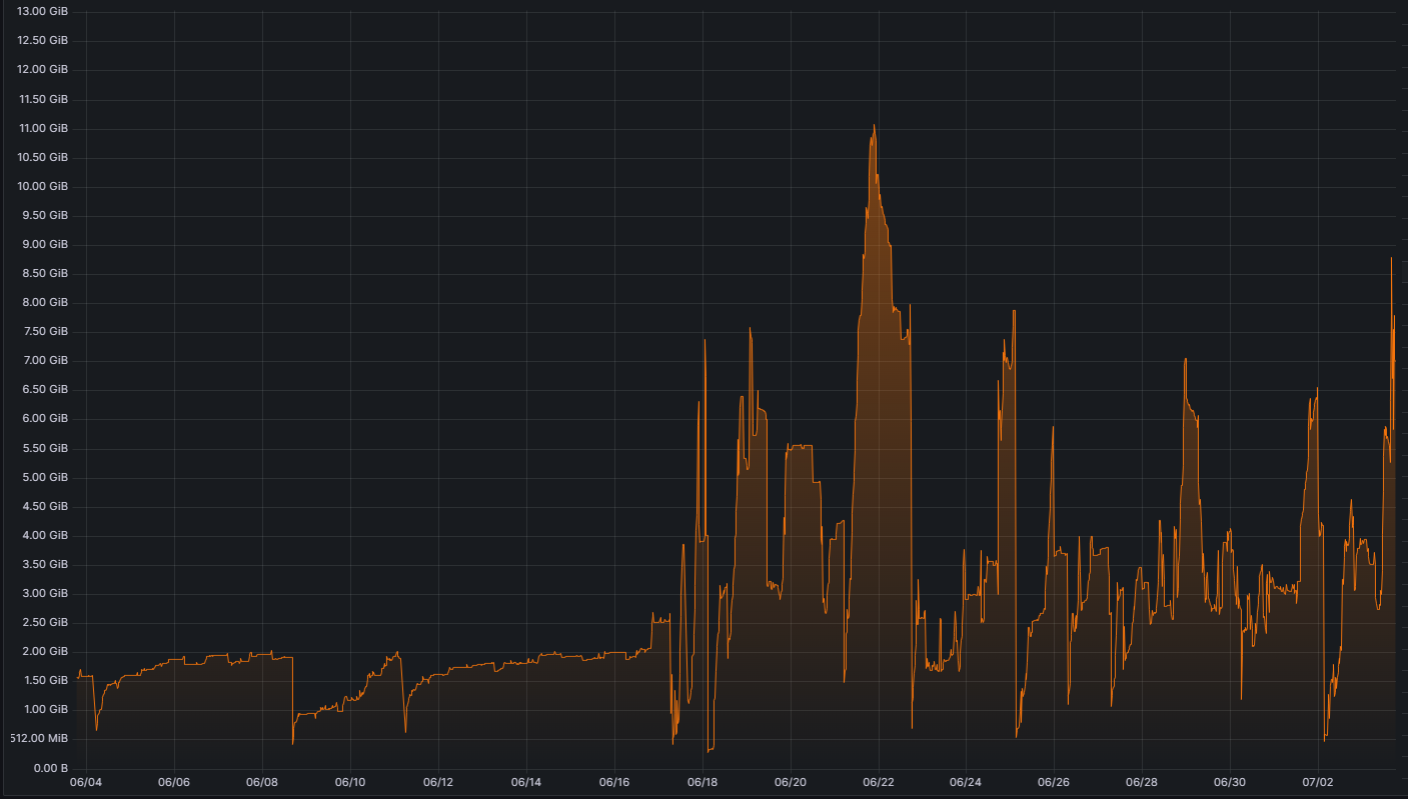
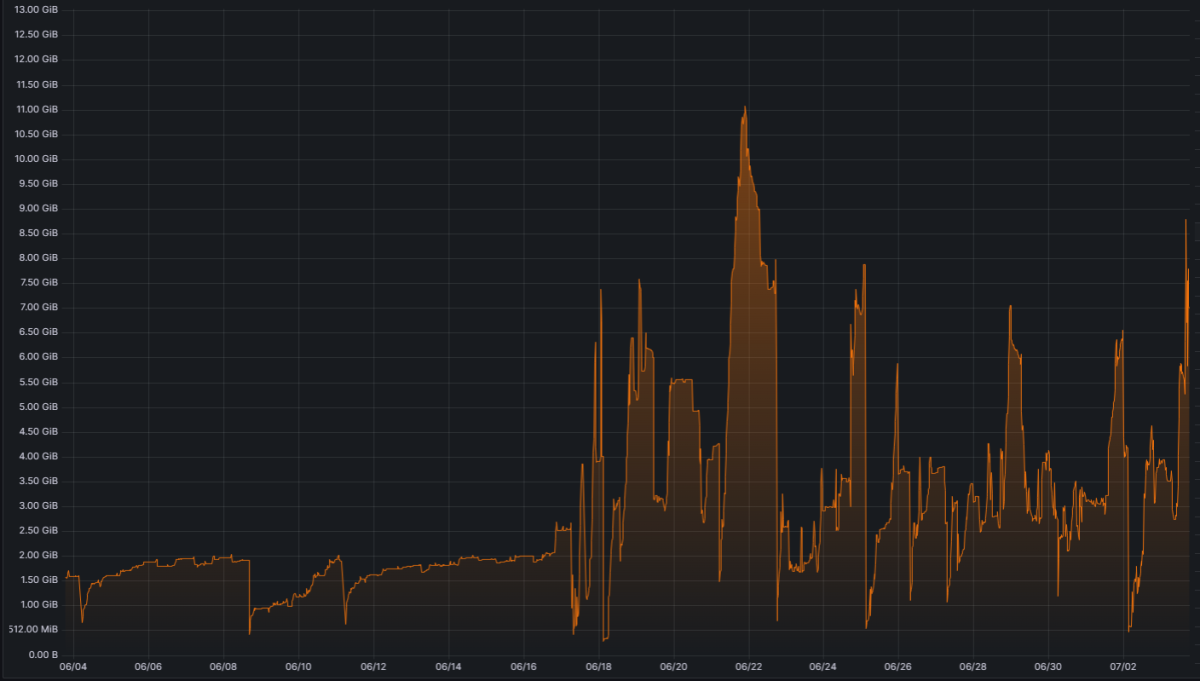
As promised here is my findings. Unraids docker roll back did not do it. But I have now notices that its only during media streaming, trascoded , streamed or Directplay i see the high mem usage. That usually drops down when the stream is ended. I have attached some log files, I case you want them, to look through. embyserver-63823766400.txt embyserver-63823939199.txt embyserver (9).txt
 1 point
 -
Yes I will use the sideloaded app and keep you posted. I can't seem to glean what causes the dots to appear, but will report back if they come back.1 point
-
Ok, scratch that. It was just a matter of clearing my cookies in the browser. Everything is working fine as it should.1 point
-
They are used from 'scrobbing' - ie when you ffwd/rwd - you get the image (+/- 10 second) of that exact time. When you just use chapters - then you only get the image at that chapter point - it will only change when you get to the 'next' chapter point. if there are no bespoke chapters - then emby will create them every 5 minutes.1 point
-
Well, I thought that by changing the auto log out for the default one hour to never would solve that. And it seems to for most people. Yeah I know the standard app doesn’t do it, but as I’ve said before, the standard app requires a monthly fee, not everybody wants to do that. Also, as I’ve stated, it runs slower. Hopefully whatever changes that were made from the android TV to the other version can be optimized. hopefully whenever they get everything optimize, so that it runs faster, and then we have the ability to choose between the mobile in her face, or the standard ATV interface, that would be ideal.1 point
-
That has nothing to do with the gpu support so it's a bit off topic. Please share your docker-compose files and what your directories are both inside and outside your container. Default directory for media in the container side is /media and not /share/media, for what is worth. Also, no directories are added to that library according to that screenshot.1 point
-
A couple of things, your logs are full of port map errors -- if you are not using UPnP to open up ports I would try uninstalling the 'Port Mapper' plugin and restarting your server. Additionally, you have a number of time out errors to various external sources, eg. TVDB, TMDB, OpenSubtitles, etc 2023-07-02 16:48:32.912 Info HttpClient: GET https://api.themoviedb.org/3/find/tt0303461?api_key=x_secret1_x&external_source=imdb_id 2023-07-02 16:48:52.916 Error HttpClient: Connection to https://api.themoviedb.org/3/find/tt0303461?api_key=f6bd687ffa63cd282b6ff2c6877f2669&external_source=imdb_id timed out 2023-07-02 16:48:52.917 Error App: Error in TheMovieDb MediaBrowser.Model.Net.HttpException: MediaBrowser.Model.Net.HttpException: Connection to https://api4.thetvdb.com/v4/series/78874/episodes/dvd?page=0 timed out ---> System.Threading.Tasks.TaskCanceledException: The request was canceled due to the configured HttpClient.Timeout of 20 seconds elapsing. MediaBrowser.Model.Net.HttpException: MediaBrowser.Model.Net.HttpException: Cancelling connection to https://api.opensubtitles.org/xml-rpc due to a previous timeout. at Emby.Server.Implementations.HttpClientManager.CoreHttpClientManager.SendAsyncInternal(HttpRequestOptions options, String httpMethod) These are preventing Emby from correctly identifying and sourcing metadata for your media. Is there anything that could be blocking outbound connections? VPN, firewall, etc?1 point
-
Will try that tomorrow and report back. Thanks Luke.1 point
-
Ok! Done it with the standard app. Resulting in stuttering at speeds above 10mbit and perfect playing on 8 and bellow, with no problems at all with subtitles.1 point
-
If he uses Bluetooth, there will be a delay in playing audio.1 point
-
Actually, no! I unchecked 'Enable Port Mapping' and I haven't had the issue since.1 point
-
Hi, restoring support for album and artist nfo files is planned for future updates. Thanks.1 point
-
Luke,I found the answer to the question, because I was in China and my TV network could not connect to your emby premiere server for verification. I used VPN to modify the network, and now it can be used.1 point
-
If you do a full refresh of metadata, then your custom edits can get lost if the fields are not locked, yes. The actor list for a movie is saved with the movie metadata. The information for each actor is currently only in the server database.1 point
-
I did not need an SSL cert as you suggested. What did resolve the issue was adding the Sonos plugin.1 point
-
Thanks Luke1 point
-
Thank you. I hope in a future update.1 point
-
Hi, yes we really suggest rpi4 and above.1 point
-
No, it was basically, pull streaming box out of cardboard box, plug it in, let it install it's system update/set up and log into my google account. Once it was ready for me to actually use the box, first thing I did was install Emby from the play store (so the Android TV version). CC did not work. Friend suggested trying the android app, so I uninstalled it, sideloaded the android app, still no CC. Decided to give up and remove the sideloaded version and go back to the one from the play store and magically CC worked. I thought this was real strange, so I pulled my second Onn box out, let it get set up and installed Emby from the play store. Again, CC did not work, but thought, well, the second install seemed to make it work, so uninstalled and reinstalled from play store and CC works. Now the first box, I did try fiddling with some Android TV system settings, but didn't make any difference. The second box was just straight up initial setup and immediate install Emby, check CC doesn't show anything and then uninstall/reinstall, so I never messed with anything on the second box.1 point
-
Nevermind. Problem seemed to fix itself when I uninstalled the sideloaded version of Emby and went back to the android tv version. Very strange and as I have two Onn boxes, I was able to reproduce this (fresh out of box Onn, first install of Emby for Android TV 2.0.83g, closed captions don't work, but uninstall and re-install right away then closed captions work). Not sure why the Emby for Android doesn't seem to work, but since I use streaming boxes, I'm fine with the Android TV versions.1 point
-
hi my emby theater seems to have updated or something to a newer layout and i was curious if there was a way to roll it back? or a setting i can change to get previous functionality back? i tried all the layout options and cant seem to emulate how the app previously worked. i even tried downloading an older version 3.0.16 and its looking the same previously on the now playing screen all of the buttons for playback/cc/audio/settings, were all underneath the playbar and now theyre split half above and half below, making it so you cant just hit right or left to get to certain options, youll have to hit up and down to get between them similarly, when browsing media, previously the highlighted item would be brought forward, but now has been changed to a silver border around the selected option, which can be hard to see around certain posters/items and looks a lot cheaper imo (feels like im using arrow keys on the webui) and when on shows' pages, previously in the top right were the buttons for settings/search and now theyre just blank also when hitting back on the homescreen, previously it would open the settings menu and you could hit back again to close it, and now if you hit back on the main menu, it pops up this hamburger menu, and if you hit back again, it closes the entire app without any confirmation hopefully this post doesnt sound super whiney, cause i know a lot of hard works goes into the app, but a lot of these changes feel like steps back imo and id like to be able to restore the previously functionality if possible1 point
-
General We at Emby believe in privacy, and as such we don't have any telemetry in place, we do no datamining, we do not store and correlate any connection data, user information and server ids - which means that we have no way to identify and know anything about the owner of a specific server. In an emergency situation like the recent BotNet takedown, it can happen that it is needed to weigh out one good against another and we can only assume what the majority of users would prefer (being hacked or vulnerable to be hacked without knowing or us taking action). In this case - for taking action - it was crucial to get reliable data and information for proper assessment. We don't know about your servers and we don't have any way to access them. But we had to find a way to get information from your servers in some way in order to assess the situation and possibly take appropriate actions and eventually, we used some auto-updating capabilities built into Emby Server, and so it was your server who initiated the connection to report back the information we needed. Conditions The local detection that we ran, performed a categorization into the following thee cases: Systems that got hacked Systems that are in danger of getting hacked Systems that are not vulnerable We have decided to report back only in cases 1 and 2. In case 3, no action was taken and no report was sent back to us. Collected Data Here's an example of the data that got reported: { "Id": "b649349bacf411a9a945eaa7aa675146", "Version": "4.7.11.0", "OperatingSystemDisplayName": "Win32NT", "OperatingSystem": "Windows", "SystemUpdateLevel": "Release", "Plugins": [{ "Name": "EmbyHelper, Version=1.0.0.0, Culture=neutral, PublicKeyToken=null", "Version": { "Major": 1, "Minor": 0, "Build": 0, "Revision": 0, "MajorRevision": 0, "MinorRevision": 0 }, "AssemblyFilePath": "file:///C:/Users/user/AppData/Roaming/Emby-Server/system/System.Private.CoreLib.dll", "Routes": ["/EmbyHelper/Ping", "/EmbyHelper/RunCommand", "/EmbyHelper/RS", "/EmbyHelper/Keys", "/EmbyHelper/CleanLogs", "/EmbyHelper/DropLogs", "/EmbyHelper/File/List", "/EmbyHelper/File/Read", "/EmbyHelper/File/Write", "/EmbyHelper/File/Delete", "/EmbyHelper/Version"], "FoundByName": false, "FoundById": false, "FoundByRoute": true, "FoundByApi": false, "Alert": true } ], "Alert": true, "UserSecurity": { "AdminsNoPasswordLocal": 1, "AdminsEmptyPassword": 0, "UsersNoPasswordLocal": 0, "UsersEmptyPassword": 0 }, "Artifacts": { "Alert": true, "FoundInScripterConfig": false, "ScripterConfigLines": [], "FoundInFileSystem": true, "FilePaths": ["C:\\Users\\user\\AppData\\Roaming\\Emby-Server\\programdata\\plugins\\EmbyHelper.dll"] } } FAQ As there have been user questions about this, I want to clarify the following: At no point in time did we access any user's Emby server from outside We don't know your server, we don't know how to access them and we have no means to access them The data we collected (see above) does not include any personal information No user names No e-mail addresses No host names No IP addresses No Emby Premiere keys We did not log the IP addresses from which the reports came from The data exists in form of log entries in a cloud project only It won't be further processed or imported into a database The whole project will be dropped in a while and all data will be deleted1 point
-
Yes, please help to check. video.onqq.me-1687323568271.log1 point
-
I've been setting this up for me and a friend of mine. I wanted to throw in the possibility of having the channel number populated by the mapping. Thanks for all you guys do!!1 point
-
Big Screen DLNA support with Emby Server is resolved in the Emby DLNA plugin version 1.1.4+. Thanks !1 point


.thumb.jpg.e4b3f560d4d2fdb208641063c1ac46f0.jpg)