Leaderboard




Popular Content
Showing content with the highest reputation on 07/01/23 in all areas
-
Thanks for taking the time to answer, I had a file with several versions of the same language, it's the first time that it's happened so I did not know how to proceede with it.1 point
-
I seem to have it working with the following: L/The Lord of the Rings - Fellowship of the Ring ├── extras │ ├── The Lord of the Rings - Fellowship of the Ring - Extras - extended edition 1.mkv │ └── The Lord of the Rings - Fellowship of the Ring - Extras - extended edition 2.mkv ├── The Lord of the Rings - Fellowship of the Ring - extended edition-disc1.mkv └── The Lord of the Rings - Fellowship of the Ring - extended edition-disc2.mkv1 point
-
Hi, we are looking into this. Thanks.1 point
-
Ok I get it now. apologies. just unsure how to resolve the issue. Emby is running fine for all other devices.1 point
-
no, unfortunately i cannot recreate the issue. it is some weird combination of things that has to happen, and i have never figured out exactly what steps creates the bug. it doesnt happen often. but when it does, it is very noticeable since i dont use the Continue Watching category. i tried for the last 15 minutes to re create the problem but could not. when it does happen, the Continue Watching category appears between My Media (1 row) and the first Latest Media row (5 rows).1 point
-
sample.mkv think i did it properly1 point
-
Upgrading to 4.8.0.39 beta version solved the problem.1 point
-
This change is a temporary fix to a massive security vulnerability that was leveraged by hackers in May. The emby team is in the process of reworking embys security/network handling. This won't stay as it is now. Patience.1 point
-
What is your download location (internal, external, external SD Card?) I have this problem, intermittently, when I use either of the external options. I've never found a fix. There are several threads with the same problem, but none that have concrete resolutions. IOS, too. Some people proposed turning off 'download only on wifi' or removing/reinstalling the app. YMMV.1 point
-
Update: so instead of installing this to volume 3 I went ahead and installed it on volume 2 which is an m.2 storage. For whatever reason this worked and emby is up and running. I don't know why but I am going to leave it as is for now.1 point
-
Yea just the two PC's, FireTV, and Roku all in the same household.1 point
-
the jerks seem to be gone, in my first tests I could no longer detect jerks, thanks for the help1 point
-
ah, it's an old version I'll update, good to know that it's there! thank you1 point
-
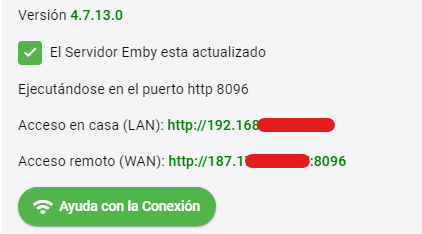
Con la novedad que aqui les va la solucion. Después de analizar los comentarios y ninguno era certero resulta que no se si sea el modem o el windows con el que tengo el servidor y que de esta dirección ipv6 resulta que solo hay que desactivar en las propiedades de red la misma para que no sea asignada una dirección de esas y asi quedara una dirección en la cual si se puede acceder


 1 point
 -
Bingo! Thanks for the help. FYI = right-click/Open didn't work but the system preferences route did.1 point
-
One of the big differences between emby and plex is that emby servers are entirely self hosted right down to the authentication/user management. Each emby server is self contained with it's own set of users. Emby connect is just a way of reaching/logging in to those servers without having to know the ip/port or owning and setting up a domain. Plex takes that authentication to their own public servers which your individual servers are also communicating with. Because the users are handled externally, it's easier to link multiple servers together, but a lot less private. (and more dependant on internet access) Emby is built more for your own private media hosting, not turning your servers into some distributed cloud service combined with theirs.1 point
-
nonsense analogy1 point
-
Hi. There is no limit on users only devices but 50 users on your server is a bit out of the scope of our design as a personal media server for just your immediate family and close friends. If you are distributing content to that many users it is almost certain that you are violating the terms of distribution of the content and that is the situation we are trying to avoid with the device limits. We could charge money for higher limits but this will open our software up to much easier use as an illegal streaming platform. Such use only ends up hurting us because, eventually, one of those is discovered by content owners and then our name is associated with it and we get accused of running illegal pirating sites. The net result would eventually be that we would be put out of business and no one would have Emby. So, we choose to remain designed as a personal media server. You could convince one or two of these friends of yours to install their own server to serve their families and then this would alleviate the number of users and devices you are directly supporting. Thanks.1 point