Leaderboard




Popular Content
Showing content with the highest reputation on 06/07/23 in all areas
-
Hi, I have a request. Is it possible to support all kind of lists from TMDB and not only movie sets? Now, let's say I make a collection in Emby and add the TheMovieDb Id of it. For example I add 8091, the Alien Collection, then Emby adds the link in the interface https://www.themoviedb.org/collection/8091 Any chance to include support for all kind TMDB Lists too? Basically support not only tmdbcolid, but something like tmdblistid too? For example if I set the TheMovieDb List Id as 10, the Top 50 Grossing Films of All Time, then Emby would add this link in the interface https://www.themoviedb.org/list/10 Now it opens the link below and it is not what I would like to be opened. https://www.themoviedb.org/collection/10 TMDB lists are very powerful and a good asset for my own custom Emby collections. Thank you in advance.2 points
-
If for Windows, then a large batch file from a user called 'RESET_9999' will do the job - Google is your friend .. the scripts/supporting apps are in the associated google docs page.2 points
-
Since music is highly tag driven now, especially with musicbrainz tags, can we please fully use those tags to keep libraries better organized? Some artists credit themselves with multiple names over their career. for example, Fela Kuti: https://musicbrainz.org/artist/6514cffa-fbe0-4965-ad88-e998ead8a82a all the variations have the same mbz artist tag. So naturally, mbz lists them all together on the same artist page. But emby separates every spelling difference into its own unique artist page. matching mbz tags should pool together under one page, with the unique name changes listed underneath the albums.
 1 point
 -
Ok so my request is to be able to search each library separate as it stands when you search it searches everything, and if like me you have 30k music tracks 10k books/comics 10k episodes and 10k+ movies, searching is slow so is it possible to have a search section for each library individually1 point
-
I would like to allow users to reset their passwords via a time-limited reset link sent to their email, similar to how Ombi does this. Each user can have an email address linked, and the server has SMTP details set; users can then press 'reset password' and enter an email to have a link sent to said email (assuming they entered a valid one and its linked a user) which takes them to a password reset page where they can enter and confirm a new password. Only if any of this isn't setup correctly does it request you contact the admin instead. I've had a few users somewhat frequently forgetting their passwords, especially when they don't use emby regularly. It would be nice to have a way for them to resolve this themselves. Currently the 'reset password' link on Emby just tells you to contact the admin (presumably it's more functional with connect users? Don't know, I don't use connect) and it involves manually resetting their password for them to something fairly complex, sending that password to them via text/email (neither of which I'm comfortable with, I just just don't have better options most of the time), then hoping/pestering them to change it to something only they know. It's far more of a hassle than it needs to be and rather insecure.1 point
-
Since we can now detect end credits, or manually add them in other cases, it would be nice to see this, rather than an automatic percentage/time remaining, trigger the "next episode" popup and decide whether an episode is resumable or not. Even better if it could expand to movies for the latter point.1 point
-
Dear friends, I see there is a new Emby version, for DSM 7.2+. At the moment, I'm still on DSM 7.1 and Emby beta 4.8.0.38. Will I have to do something special after the update to DSM 7.2? Thanks a lot!1 point
-
I wasn't sure if I should post this here or in the general Feature Request area, so please move if I chose the wrong area. Can we have an undo option alongside the trash can and folder icon in the activity section for Auto Organize? On occasion, the plug-in misidentifies a season or entire series, and not only moves the entire file, it renames each episode to the misidentified show/episode. Then one must use the auto organize activity page to manually go back and rename each file to the correct show/season episode. This can get quite onerous and frustrating with an entire series. Thank you!
 1 point
 -
You might want to read the security alert at the top of the forum. Emby Server does not start - Security advisory 2023-05-25 | Emby Documentation Before you delete the file, try and send them to the developers of Emby as instructed at the bottom of the article.1 point
-
Not anymore. We've fully walked this way already and have a completely new TV implementation (code name 'TVnext') which is using BDA natively on Windows and LinuxTV APIs on Linux (and much much more).1 point
-
Ok we’ll take another look at it. Thanks for the update.1 point
-
Hi guys, great idea with ProcessMonitor! Mark Russinovich to the rescue. I'll have to try it out tomorrow (it's midnight here in Europe) but one thing is for sure by now. You guys rock! Thanks! BTW, I was also suspecting there would be some other process involved since my instance of DVBGuide.exe talks to my tuner without any machine-level permissions. DVBGuide apparently touches directly the BDA drivers, not that proxy process. I realize this might be a long way to go to rework the architecture in the future. Therefore, if you think I might be of any value if I get involved, just let me know.1 point
-
Can you PM a link to me so that I can download this media file for testing? Thanks1 point
-
I don't know for certain, and Samsung provide very little information on this topic, but from user reports over the years these three contexts make sense and align with how I treat these user issues. This is about as much information as they provide! Security Q&A | Samsung Developers1 point
-
Many Thanks Luke ! @pwhodges : I’m on 2.2.8 version of Emby app and 16.0.2 version of iOS on my iPhone.1 point
-
A reasonable assumption and a potentially useful test. Though, there might be three different security contexts involved: Tizen app Tizen browser Tizen player I don't know how these correlate to each other and whether two of them might be identical or all three are different. Also it's not for granted that playback in the browser context would be the same the Tizen player used from an app... That's rather something for @SamESto find out - he knows much more about Tizen than I do.1 point
-
There is a new Synology DSM 7.2+ link to download server after upgrading. Download Emby - Emby1 point
-
Thanks a lot, very easy. I asked because from 6 to 7 we had to migrate; this is not the case, fortunately.1 point
-
AFAIK there's no other plugin to download trailers locally. Sorry, wouldn't know, TMM is my tool of choice (I have 10,000+ local trailers attached to my media), some other fellow user would have to jump in.1 point
-
Well, just for the heck of it I tried using Port 587 and it works. I guess my provider uses both. Thanks again rbjtech!1 point
-
Only on non-browsers...1 point
-
I have this setup using port 587 (tick use TLS/SSL) and don't have any issues sending a secure email notification. I have not tested (nor plan to) port 25 - SMTP - but would not recommend that anyway as it's not encrypted, some email services may even reject the request. Port 465 is not supported. System Logging could definately be improved though - as all you get (on a debug log) is a GET log from the 'Server' log class with the term 'Notifications' in it - a seperate 'Notification' Log Class should be made for all Notifications imo. @softworkz1 point
-
Hi Carlo, thanks a million, it works like a charm. Removed the old password and reset my password successfully without any drama this time. Thank you again and have a great great day.1 point
-
So I believe the TLS root certs for the built in Samsung TV browser are different to those used by other TV functions (and I guess the samsung player may fall into that category). If you try and load emby via the Samsung browser (on the TV), does that load ok ? Do you see a proper TLS connection and Auth in the Emby Logs / Activity log on the dashboard ? I'm not sure if the browser will play media - I suspect not, but it might ?... (not that this would be useable, just expanding on a theory here ..) @softworkzFYI - as it's security related.1 point
-
Agreed, they are not advising much - maybe @softworkzcould advise the best route here - but I suspect, as you do, that the issue probably lies with the Hauppauage stack needing Admin permissions to create the streams.1 point
-
No, you won't see any output in a browser, but if you use VLC and put that url in the "Open Network Stream" box, it should show all of your cameras. Once you see that, you should be able to create that library in Emby.1 point
-
I've got tons of tags as well. Between Movies, TV Shows, Sports going back 10 years as well as Home Video & Photos, I've got over 1 million media objects. Now imagine typing "casino royal" where it starts searching after 2 letters and takes 6 seconds then takes some more, then maybe if lucky searches the whole thing. 15 seconds on a good day and 30 seconds if the system is a bit busy. Meanwhile anyone trying to view/scroll movies or TV Shows is "locked" because the database is 100% busy. I need two changes. First I need to be able to turn off the searching until "ok/search" is hit OR the user selects a type of content to search. The first part would reduce the queries to a single search. The second part would focus the content allowing yet faster content to appear that is focused on the type of media they are looking for. On a multi-threaded, multi-user database this wouldn't be as much of an issue as you can stop a previous query running and replace it. A normalized database scema would help alot as the queries could by much simpler/faster as well. The default search is quite cool on small systems but doesn't scale to larger systems. This is one that really needs to be adjustable by the admin as it can kill performance on an otherwise well running system. Carlo1 point
-
Sorry... When I tried this a couple of days ago, it went back to the main screen the first time, so all appears good now.. Thanks1 point
-
A self-signed certificate is not going to be in any device's trust store unless you manually add either your root or the certificate itself. If you can't add a cert to the LG TV trust store/CA bundle then it's not going to work.1 point
-
Refer to this page and the specific note at the bottom https://webostv.developer.lge.com/develop/specifications/tls1 point
-
Sure - I was just answering the question from @cptloresabout how a formal change system has many advantages over a forum - but I know you know this.. as all the embysupport stuff is on Git ..1 point
-
@Luke This is the user that is experiencing the issue on my server1 point
-
New PUBLIC TESTING version available 8.2.7: Delta changelog 8.2.6 -> 8.2.7 even more fixes for livetv streamclose issue (for single tuner devices) improve channel sorting Comment: Not tested under Kodi 19 (iptvsimple < 20) For Kodi 20 (iptvsimple >= 20) 1. LiveTV sync is now under "sync" -> Manage Libraries (Additionally you need to remvoe the old iptvsimple tuner settings:) 2. Open simpleiptv config menu 3. Remove add-on configuration 4. Select "Emby for Kodi next gen"1 point
-
Yes thanks. Was the first time it told me an upgrade was available that wasn't yet available on docker.1 point
-
@LukeNo sorry, can't reproduce. Just got confused with which post I was replying to..1 point
-
Yep good advices... i set "Clint Eastwood" in title for order and now the order in my collection is fine Thank Hispa
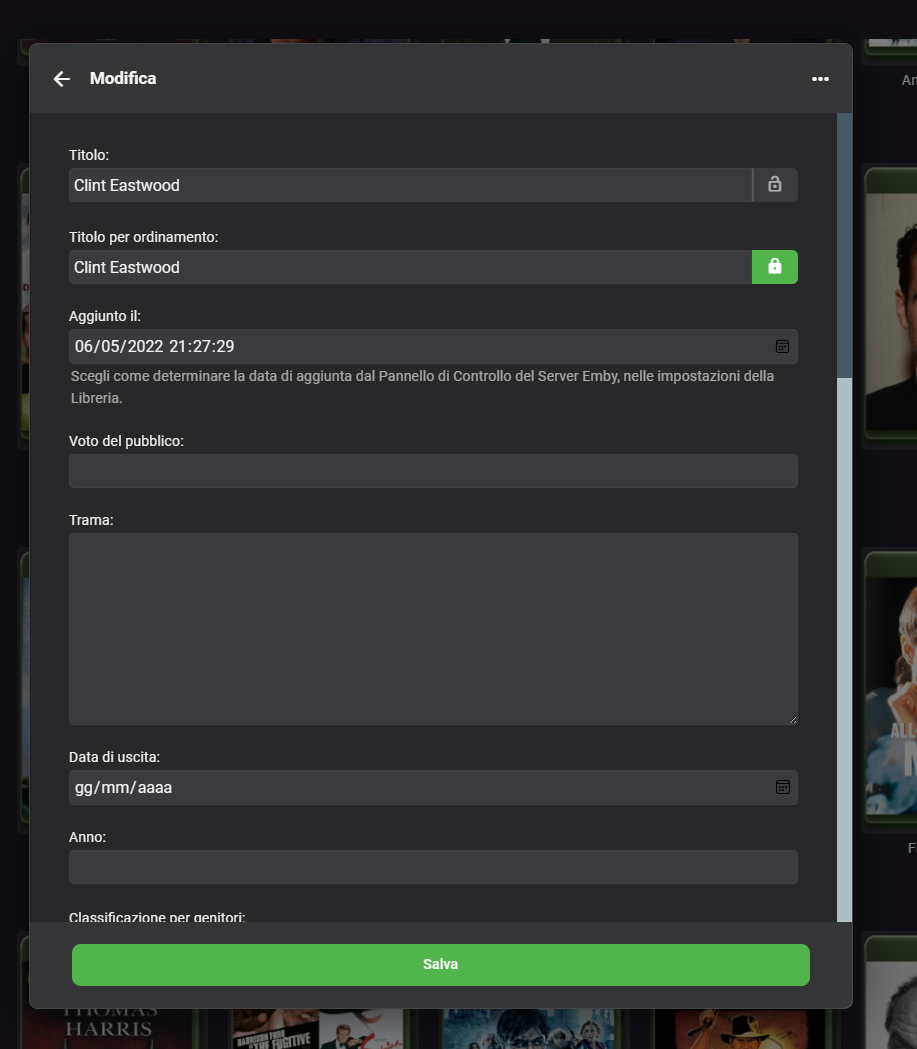 1 point
 -
Thank you for the update. Now I even have the version 4.7.13. So life is fun.1 point
-
Thank you1 point
-
That is correct.1 point
-
Apparently my request did not come across correctly. When will version 4.7.12 be available via Flathub? I had to wait 5 months for version 4.7.11. I hope for a positive answer.1 point
-
ask the user?1 point
-
Emby for Apple TV 1.7.3 - Multi-Color Logos, Sorting Playlists and Collections Emby for Apple TV 1.7.3 adds many new features that improve the user experience in powerful to subtle ways. Support Multi-Color Logos based on Theme in Use Emby for Apple TV now supports both light and dark sets of logos. The app will automatically choose which logos to use based on the theme in use. Here are a couple screen shots, showing this: Dark Theme Guide with Light Logo Light Theme Guide with Dark Logo Emby's built in guide service for Live TV already provides both sets of logos for most channels. If using a different guide source, the logos can optionally be manually changed to take advantage of this new feature in our Apple TV client app. Support for Sorting Playlists and Collections Emby for Apple TV now supports sorting both Playlists and Collections. For music, you can sort by popular categories such as: Artist, Album, Son & Year. Here's a couple screen shots showing this: Support for Dynamic Data Driven Tabs Navigational Tabs displayed at the top of different media screens are now dynamically created based on the data itself. For example, if the media isn't associated with any tags, genre, playlists or collections, the navigational tab would not include those items. Support for Server Wake on LAN Emby for Apple TV now supports the Wake on LAN feature of the Emby Server. You can now go green by allowing your server to sleep when not in use, knowing you can wake it up from the same local network using Emby for Apple TV. Here's a screen shot of this in action: Various Video Playback Improvements Emby for Apple TV also includes improvements to video playback. View the full article1 point
-
Hi. Try setting the audio output option in the app to mix down to stereo to see if that makes a difference.1 point
-
I though as much previously, but each library has a playlist tab that only shows playlists that only contain items from that library. Browsing the playlist tab in a music library only shows playlists with music (which is great when dealing with music vs. music videos). So it may be a filter by library rather than a filter by type, but to the user that would be just semantics. The point would be to make the playlist library more useful. For example, I currently resort to giving all of my playlists a prefix such as (music) or (music videos) or (TV). I do that so I can identify what it refers to when picking out of a list, which as the OP suggests, can get very long. To me personally, the larger problem is filtering/navigation when trying to add tracks to a playlist. If you select a song/video and click "Add To Playlist" you are presented with a screen that contains all playlists with the primary image, and only a small amount text all sorted alphabetically. This selection screen is often frustrating and would be more useful if you could filter by content/library and present the data in list form so that all text is visible. This selection screen should always present all playlists as it does now, so that is correct. Like you say, the user may want mixed content. However more filter and navigation options for large lists would be super helpful. An alpha picker and filter/sort options seen elsewhere for instance. I hope that's helpful.1 point
-
I suggest that the best solution would be to add "media type" to the filter view for the playlist library. If you could just filter for TV/Movie/Music/Music Video/Audibook, etc, it would become much more usable.1 point
-
@Carlocan you confirm? I was having the same issue as above, but everything I've read says those two files should be located in the "EmbyServer/config" folder vs. the "EmbyServer/plugins/configurations" folder. Also, thank you for the great write up on this.1 point
-
I just bought an Amazon Echo today and also paid for the Emby subscription.. obviously hoping to be able to use it, and now I just found out that this is not possible! (call me naive) I couldn't care less about German or Spanish or Swajilli or whatever exotic random language, I just want to install the Emby skill IN ENGLISH in an Echo that is linked to the Amazon Germany shop. Why do we need to wait years for this?1 point
-
@devil202 @Jinhjy Try changing your caching level from standard to "No query string", wait a minute or so and then see if the issue is gone. It worked for me.
 1 point
 -
Just FYI, in Android TV, Fire TV and Roku, if you search from within a library, the results are limited to that library.1 point








.thumb.png.8905bfdc913136588f53e0a1624a1cf7.png)