Leaderboard




Popular Content
Showing content with the highest reputation on 06/05/23 in all areas
-
I recently found a need to look up additional information on a director. I was hoping to look at the director's profile and see not only the movies I had in my collection but also a list of other movies that they have directed. This would be displayed below the library's current movies. ex: My movies: Movie 1, Movie 2 Other movies by this person: Movie 3, Movie4 ================ This could help one expand their library and to discover a missing gem.3 points
-
If I watch a 4K HDR media in the LG app it switches to HDR mode.3 points
-
I'll definitely second that thought. If you didn't have to open ports and setup remote access yourself, you can be pretty sure you're actually accessing it via a third party/man-in-the-middle that you don't see/control. In other words; If I didn't open the door, but people are still getting in, somebody else must be letting them in (and in turn gets to see all the traffic as it comes/goes). I'm not at all comfortable with that.3 points
-
Having collections gets very confusing for some of my users because if they have their library set to sort by "date added" in order to show the newest movies first, they will not see some of the latest movies because they were added to an existing collection. Sorting by "date added" just sorts by the date the collection was created. Would it be possible to sort collections by "Date of last addition" or something similar? I like the collections feature, but when the newest movies "disappear" into a collection down the list somewhere it makes it confusing for many users.1 point
-
I would like to allow users to reset their passwords via a time-limited reset link sent to their email, similar to how Ombi does this. Each user can have an email address linked, and the server has SMTP details set; users can then press 'reset password' and enter an email to have a link sent to said email (assuming they entered a valid one and its linked a user) which takes them to a password reset page where they can enter and confirm a new password. Only if any of this isn't setup correctly does it request you contact the admin instead. I've had a few users somewhat frequently forgetting their passwords, especially when they don't use emby regularly. It would be nice to have a way for them to resolve this themselves. Currently the 'reset password' link on Emby just tells you to contact the admin (presumably it's more functional with connect users? Don't know, I don't use connect) and it involves manually resetting their password for them to something fairly complex, sending that password to them via text/email (neither of which I'm comfortable with, I just just don't have better options most of the time), then hoping/pestering them to change it to something only they know. It's far more of a hassle than it needs to be and rather insecure.1 point
-
Thank you! (The disto was xubunutu, btw. My bad for not including it.) It'd be really great if info like this could be added somewhere in the knowledge base for those of us near the beginning of our Linux journies. (If it's already there and I missed it, apologies.)1 point
-
Yea, I get it, but I'd rather you didn't add features until you were ready to at least make them usable. The public/private playlists are useless if it's only for new playlists and if you can't change who can edit them.1 point
-
Any chance this can be added to the Emby plugin's catalog?1 point
-
You really don't have to do anything except follow the instructions in the PDF. It covers everything.1 point
-
That should be fine so long as the expected drives are available as before. Just running the Emby exe file in the system directory should be fine without any other installation - otherwise simply copy a new system directory from a portable download over that present one. (It's never a bad idea to back up as well, in this case simply by making a copy of those directories and their contents). Paul1 point
-
It’s possible for future updates, but first I would try out the new changes.1 point
-
Thanks for the update. Much appreciated. Emby now works as it did on my “ancient hardware”… with no messing about converting and needing alternative media players. Funny that. I’m sure it was all Emby Devs hard work Amazing how Apple app management can be overcome.1 point
-
GoNoToCurrent includes the necessary characters (I made a version of the subs which requested it explicitly, and they were all there, but less good-looking). But @Lukeare there circumstances in which a request for a specific other font which is absent (DFKai-SB in this case) will fall back to a font other than GoNoToCurrent? Paul1 point
-
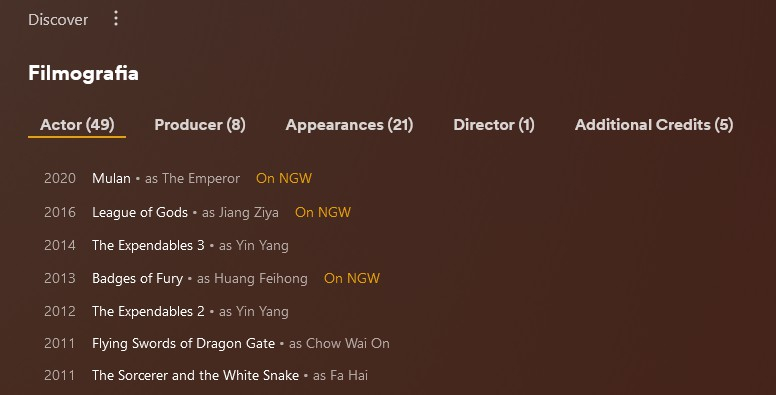
Yes, it's a nice feature ! Will be perfect with a link near title to show the corrispective url to IMDB too for example to quick open it and\or a checkbox to put them in a sot of Watchlist Wannabe to keep track of what missing on a collection. Chooo
 1 point
 -
The fonts required for those subs are: DFKai-SB (for the Japanese karaoke), Monotype Corsiva (for the romaji/English karaoke), Vesta (for the main subs); they are not provided as attachments in the video (at least, the supplied sample), which is bad practice. I have attached a zip file with these three fonts in. The fonts need to be on the machine where the ASS subs are rendered - i.e. the client if direct playing or the server if burning in. If the fonts are not found, I don't know how Emby decides what alternatives to try. Playing the sample directly (not through Emby) on my Windows machine without those fonts, I get all the characters, but ill-proportioned (like the English in your example above, but including the Japanese characters). Monotype Corsiva and Vesta are widely available. DFKai-SB is provided on Windows 10/11 in the Traditional Chinese font pack (it is used here because it is somewhat cursive and so matches the italic MT Corsiva font nicely). If you choose to install the fonts I've provided on your server, be sure to install for all users, if you are running the server with its own user. (Sorry for the delay - I've been away for a long weekend). Paul ReqFonts.zip1 point
-
Well, the plugin doesn't sort anything. Playlist order depends how Emby server reports the channels to the plugin. I wrote a workaround for channel numbers, maybe I can improve something with the Emby queries but cannot promise.1 point
-
I think we have a winner! The channel change is a little slow (feels slower than previous versions) but I can live with that. Thank you! On another note: I don't know if this has anything to do with the plugin but the channel sorting is not working, the channels are only displayed alphabetically, even if I change the sorting. Is it possible that I have not set something up correctly?1 point
-
Hi, yes this question has come up before and is likely for future updates. Thanks.1 point
-
@Tester The page behind the orange-colored banner has a special section called 'Actions To Take'.1 point
-
New PUBLIC TESTING version available 8.2.6: Delta changelog 8.2.5 -> 8.2.6 additional fixes for livetv streamclose issue1 point
-
The risk and fix are the same for Docker, host installed and portable versions of the Emby server. Plugins are maintained in the config location (programdata), not with the server software. Even those plugins included with the base software have their updates saved in the "programdata" path.1 point
-
There is more than one way to skin this cat but, yes: Secure Your Server1 point
-
For now my options are.. 1. Use mixdown to stereo to avoid stuttering and manually switch surround modes on Denon AVR when using default Emby player directly on the tv 2. Set audio back to auto and use external player when using app directly on tv and the Denon AVR will auto switch the surround modes 3. Use Formuler Z8 Android box and not have to change anything All of these options work1 point
-
(added another bullet: "Risk Assessment" to my post above)1 point
-
I am still having the same issue. I was running an older version and just upgraded to Emby Server 4.7.13 this morning. I will let you know after I have tried it a few times if there is improvement - THANKS!1 point
-
This is already possible, just enable the playback cache option, it cache what you play and pre cache the playlist to fix network issues too.1 point
-
FeedBack Further feedback as my family approaches 6 months of dedicated use. I am so glad we made this move. I cannot port the kids over yet due to the aforementioned pain that is "Google Family in app purchases" but the adults are using Symfonium intuitively and daily. I have had almost no family IT support requests after making this move which is a VERY big deal to me. I can confidently now say I would gladly and unreservedly recommend Symfonium to anyone using any alternate solution . As with any self-hoster I have tried many combinations and Emby-Symfonium is definitely the most polished and robust of them. Features we lost I had planned to finish this feedback post by making two comments on features we had lost and that burt when moving to Symfonium but with the release of Version 5.4.0 and the “Online First” playlist feature, it has dropped to only one. Amazing timing. I have done some reading and there are many posts discussing track caching. They make in depth technical distinctions between a cached item and a streamed item along with suggestions about using smart playlists and other powerful features. Whilst these are reasonable solutions, in my use case at least, they are far to complex for my userbase . Using DSUB my users automagically cached everything on the fly which resulted in a significant increase in the feeling of reliability with spotty internet since they subconsciously unknowingly choose the same music often. All technical arguments aside we need a default option that behind the scenes caches frequently played tracks inexpensively and transparently. This cant require clever user tricks because most users simply do not understand any of this.1 point
-
Also available In the Channels Emby Plugin catalogue :
 1 point
 -
Oh yes its fixed! Big thanks! best regards1 point
-
I think I know what's to the problem (in your case). I'll try to fix it in next version. DO you use some sort of "special" setup? External player etc? The log reports something of "player 1" / "player 2" 2023-06-04 08:46:36.824 T:32204 debug <general>: AddOnLog: peripheral.joystick: Loaded device "X-Arcade Tankstick (Player 1)" with 1 controller profiles and 14 total features 2023-06-04 08:46:36.824 T:32204 debug <general>: AddOnLog: peripheral.joystick: Loaded device "X-Arcade Tankstick (Player 2)" with 1 controller profiles and 14 total features 2023-06-04 08:48:03.895 T:32554 info <general>: Closing stream player 1 2023-06-04 08:47:53.309 T:32554 info <general>: Closing stream player 21 point
-
Hi @podrae, Are you trying to stream individual cameras or the output from Agent DVR? The easiest is to stream the full output from Agent DVR by creating a streamlink and use that as a library. I have Agent DVR and this is what I did with my 7 cameras. To do this I created a text file in Notepad (I'm a Windows user) with this one line in it; http://xxx.xxx.xxx.xxx:8090/video.mp4?oids=1,2,3,4,5,6,7&maintainAR=true&size=1920x1080 This is assuming you are using the standard port of 8090 for Agent DVR (you need to add your ip address of the Agent server). The numbers after "oids=" are your camera numbers in Agent. Save the file with a .strm extension (remove the .txt extension) in a separate folder ( I named my file AgentDVR.strm and saved it in C:\AgentDVR which was a new folder). Now make a new library in Emby with the content being "Movies", then point it to the folder you saved the streamlink file in. Give the library a name you will recognize, click OK, and you should be able to see the cameras you listed in the .strm file you created. Note: This will only show the View output from Agent DVR, you will not be able to select individual cameras. Let me know how this works for you.1 point
-
@Soldizecan you please try again with the latest update to Emby for iOS? Thanks !1 point
-
Update showed up today. Looks like it's indeed resolved. Thank you and your team for getting this fixed for us. Now I can keep these devices from retirement and the landfill1 point
-
That should be enough.1 point
-
Ah, great, thanks for the reminder! Host header checking is something I wanted to put on our list a few days ago and then it slipped out of attention..1 point
-
Changing the default port for a directly exposed to the internet port is better than nothing, but only just. If your server is responding to requests from the internet at literally on any IP:Port scheme at all by presenting an Emby login screen, it's not hidden within the masses of other web servers. Bad guys are scanning every IPv4:Port combination on the internet constantly. If you want to really hide your Emby server you can setup a VPN server, remote users would need to connect to that, and once connected they can access your Emby server through a secure VPN tunnel. If you want to marginally hide your Emby server from bulk internet scans while still making it available on the public internet, you can setup a reverse proxy. Someone hitting your IP:Port would hit your reverse proxy, but the reverse proxy won't forward that request to your Emby server unless they are accessing it via the domain name. I would recommend not using something common like emby.domain.tld, as domains can be indexed by bots as well. Both a reverse proxy and VPN servers are going to be more secure in general than exposing Emby directly to the internet, they simply have a lot more dev/security focus on the dangers associated with being exposed directly to the internet. In any case, VPN, reverse proxy, or Emby directly to the internet you need to keep the application and settings up to date and secure. Finally a small extra thing you can do is geoblocking countries you don't have users in. A lot of the probes used to find and index servers and services come from China, Russia, and a few others. You can block these countries IPs in a few different ways. This won't fully stop scans, they still use compromised machines in other countries as well as VPN services themselves. Even with geoblocking and a reverse proxy I still would not consider an Emby Server "hidden", be careful out there folks!1 point
-
Hi, there's already an open request for this or something functionally equivalent. Please join in and contribute to the existing discussion at:1 point
-
Thank you, Really appreciate it1 point
-
While 4.7.12 fixes the proxy header vulnerability, the other vulnerability would also benefit from the special "local network" treatment and there might be other - yet unknown - ways to leverage this. That's why the "local network" distinction will be removed, alongside the "Do not require password in local network" option. Also, empty passwords for regular users will at least be strongly discouraged. Compensation with regards to user convenience, will be provided by new client features, for storing credentials for multiple users. That's the rough direction, same as laid out in previous posts already. Of course it will take some time to deliver all this and it won't come all at once. Meanwhile - for improved safety, you might find the following considerations and recommendations useful: Update to the latest stable or latest beta I would start moving away from using 'Do not require a password in the local network' Make sure all users (admin and non-admin) have passwords assigned As a temporary alternative, you could use the "easy password" (PIN) option - even though it is bound to the "local network" distinction as well, Generally, having any password, even the most trivial one, even when it would be just very few letters, is increasing safety by a magnitude Why? Because an attacker doesn't know about your password length. It could be one or ten chars long and it rarely makes sense to start brute-forcing which could take a massive amount of time (while you are actually seeking for getting access easily via passwordless accoutns). This will soon become even much more unattractive with the introduction of rate limiting authentication attempts. If you want it simple, you can use the same password for all (non-admin) accounts. This doesn't provide significant benefit to a hacker, not even if he knew that you're doing so Use the new Notifications feature and configure it in a way that you get notifications for "User Authentication Failed" Have them sent to your phone or via e-mail or whichever way you prefer - but make sure you'll notice these notifications - it doesn't help when these would land in some folder which your are just watching occasionally Don't use the default ports 8096 and 8920! This is how they can find your server most easily. Better: Use ports 80 and 443: Will "hide" your server within the masses of other web servers Use arbitrary ports at the upper end of the allowed range (1-65535) Your server may still be found in various ways, but doing so, moves you out of the group of the most-easy-to-find servers Risk Assessment When setting up your server, take a moment and think about the worst case: some hacker gains control over your server What would be the worst thing that can happen? How much would it hurt you? If it's just a server with media content and there's no private data of any kind accessible to the hacker, then it might be an annoyance but not the end of the world. It's much different when you have a multi-purpose server which is also used to story private data, documents, passwords, etc. So, isolation of concerns is another reasonable measure you can take. It doesn't reduce the risk of an incident to happen, but it reduces the impact in case it would happen1 point
-
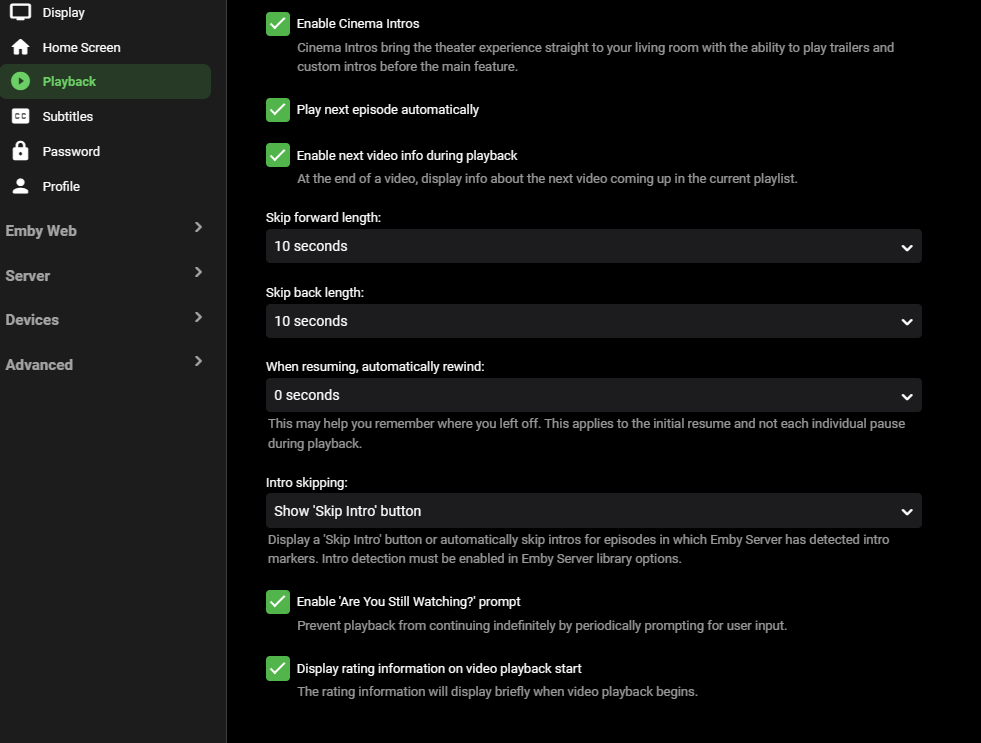
@grnmchIt should be in you users playback settings. The second to last check box.
 1 point
 -
Version 5.4.0 Notes: Please remember that crashes, issues, and feature requests cannot be addressed or resolved through Play Store comments. Added: Added the highly requested “Online First” playlist type for imported playlists. Those playlists are automatically refreshed from the server when needed, and edits are instantly pushed. In this mode, the playlist cannot be edited when offline! Note: You need to import your playlists again to change the mode. Added a new Favorites tab to Android Auto for quick access to favorite albums, artists, and songs. Added FFmpeg tag extractor fallback for the local provider. If you still have some media not recognized by Symfonium as usual, please contact me with details. Added new experimental option to leverage transcoding engine for replay gain. Fix the small delay that can sometimes occur between tracks and enable replay gain when casting to Chromecast! Added menu entries to remove cached images of albums, artists, and songs, and force a refresh from the provider after app restart. Added support for .AU files. Changed: Try other seek modes in UPnP, even if not advertised by the devices, to workaround some bugged devices. Updated UPnP seek code to increase compatibility with more broken devices. When using file mode, properly filter known non-playable files. Read-only playlists are now automatically synced more frequently when needed, not only during provider syncs. To support more use cases, FFmpeg is now compiled with HTTPS support. This slightly increases the app size but opens the doors to many new features. Transcoding engine is promoted to beta status. Plex offline cache is now done in opus to workaround some bugs with Plex mp3 encoder. Fixed: Fixed invalid renderer status after app restart and the option “Remember last renderer” is enabled. Fixed a possible deadlock of the local provider tag extraction due to permission issues. Fixed a rare issue where data could be lost if a sync was started at a specific timing during network loss. Fixed possible download issues with Emby/Jellyfin when transcoding to 256 or 320Kbps. Ignore invalid lyrics tags that could override valid ones. Fix volume handling when casting and not inside the app sometimes in the wrong state. https://support.symfonium.app/t/version-5-4-0-released/20801 point
-
Emby for Apple TV 1.7.3 - Multi-Color Logos, Sorting Playlists and Collections Emby for Apple TV 1.7.3 adds many new features that improve the user experience in powerful to subtle ways. Support Multi-Color Logos based on Theme in Use Emby for Apple TV now supports both light and dark sets of logos. The app will automatically choose which logos to use based on the theme in use. Here are a couple screen shots, showing this: Dark Theme Guide with Light Logo Light Theme Guide with Dark Logo Emby's built in guide service for Live TV already provides both sets of logos for most channels. If using a different guide source, the logos can optionally be manually changed to take advantage of this new feature in our Apple TV client app. Support for Sorting Playlists and Collections Emby for Apple TV now supports sorting both Playlists and Collections. For music, you can sort by popular categories such as: Artist, Album, Son & Year. Here's a couple screen shots showing this: Support for Dynamic Data Driven Tabs Navigational Tabs displayed at the top of different media screens are now dynamically created based on the data itself. For example, if the media isn't associated with any tags, genre, playlists or collections, the navigational tab would not include those items. Support for Server Wake on LAN Emby for Apple TV now supports the Wake on LAN feature of the Emby Server. You can now go green by allowing your server to sleep when not in use, knowing you can wake it up from the same local network using Emby for Apple TV. Here's a screen shot of this in action: Various Video Playback Improvements Emby for Apple TV also includes improvements to video playback. View the full article1 point
-
This is primarily a bug fix release. Here are the changes: Improve artist splitting for artists that have a / in their title Handle invalid data when parsing video rotation information Fix error with conversion feature and videos that have audio streams with 0 channels Various intro detection bug fixes Fix errors with SMB access on Linux when non-default server port is used Various transcoding related fixes Increase default server database cache size for new installs View the full article1 point
-
Hi, what Emby app are you trying to download from? Can you please provide an example? Thanks.1 point
-
@chefBefore making any modifications - you may wanna catch up with the Luke et el - as they may have something like this on the radar given the recent security news.1 point
-
Nothing against the principle of MFA, but what's ultimately annoying is that the big players are pretending to be concerned about your security, but the sole reason why they are asking for your phone numbers is for making you and your data more identifiable and relatable...1 point
-
I have a built DLL. When I return home from work I'll send it. EDIT: hey look at that... It is already sitting in my emby community resource file list... So yeah! There it is: MessageUsers.zip1 point
-
What you consider a theft is what Open Source Software is all about. You can fork it an modify it by your needs. If you take a little twist you could also blame the Emby Devs as thiefs because they took an Open Source product which volunteers contributed to and transfered it into a Close Source commercial product. Also what they did was not illegal. So who to blame. At least there is a free of cost Version of Emby left. I dont like the closed source Character of Emby. There are problems in the Server and the Client persisting for years (eg Wake on Lan on the Android Client, LiveTV cant handle multiple resolution m3u) or feature request which are caught in the "friend zone" forever (customizing new Media Notification, New Media Webhook). Things that could be done by the community with the source code and a bit of documentation. I stick with Emby because i got a Lifetime License time ago. Am I happy with the product? -> Yeah most of the times Am I happy how Emby progresses and how the community is involved? Absolutely not.1 point
-
They stole nothing - its part of the license emby was distributed under at the time allowed anybody to fork it and use it you need to educate yourself and stop pushing rubbish1 point
-
Tell me Emby has something like this in the works! I can dream... https://uncrate.com/plex-arcade-gaming-service/1 point