Leaderboard




Popular Content
Showing content with the highest reputation on 05/29/23 in all areas
-
Nothing against the principle of MFA, but what's ultimately annoying is that the big players are pretending to be concerned about your security, but the sole reason why they are asking for your phone numbers is for making you and your data more identifiable and relatable...5 points
-
This is sure to cause temporary problems but it's for the best. Going forward, all api routes that you add will require authentication, unless you explicitly add this attribute: [Unauthenticated] If your plugin is creating a custom api, and if you're feeding that url to something external, then you'll need to make a decision on whether to make it unauthenticated or require the caller to provide authentication. Please let me know if you have questions. Thanks. @chef @roaku @Cheesegeezer @MikePlanet @ShaneP @mickle026 @rechigo @TeamB @pünktchen3 points
-
I understand the sentiment but the vulnerability was disclosed by @psein open forum over 3 years ago. Not meant to be a defense of the attack, but this isn't a case of the company not simply being given time. They have also repeatedly acknowledged their fault in it. I think his statement was about hackers in general not about the events preceding this incident. Also I can recognize a wide-spread misconception here: We cannot take it for granted that this incident would have been prevented by fixing that vulnerability. It might have been just the easiest way. This is in no way meant to be an excuse, though. I'm rather heading into the opposite direction: It would be wrong to assume that this is the one and only big hole and after closing it, it would be all good again. There's more work to do for us in terms of tightening security.3 points
-
This is a security release which all Emby Server users are recommended to update to. Here are the changes: Fix 172.X addresses always being considered private Don't allow local network addresses to be specified in x-forwarded-for and x-real-ip Adjust web app html tags to avoid false detection from Chrome as impersonating the Emby domain View the full article3 points
-
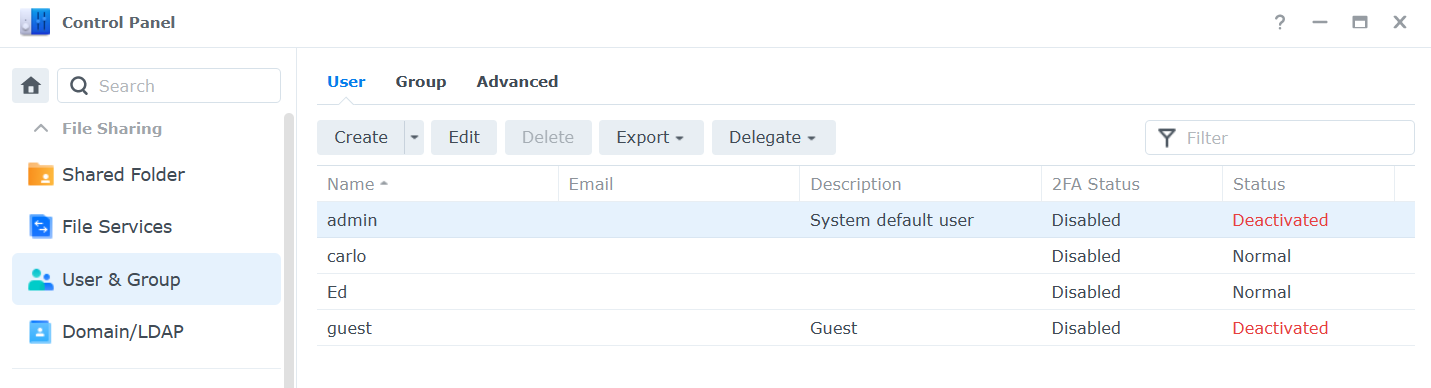
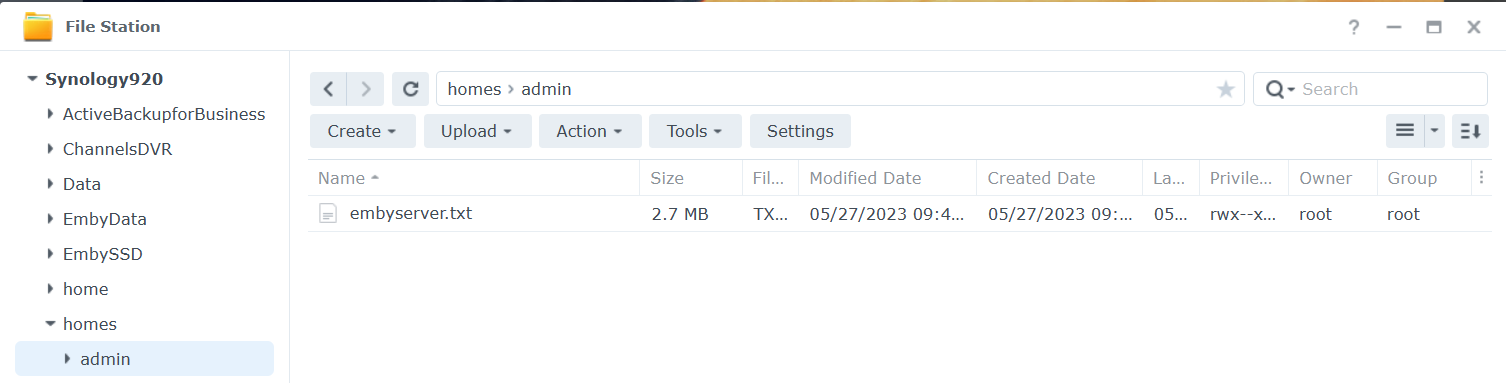
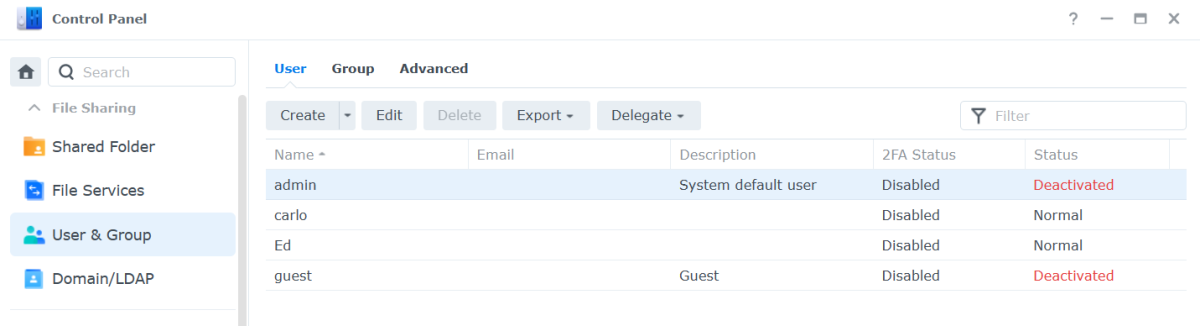
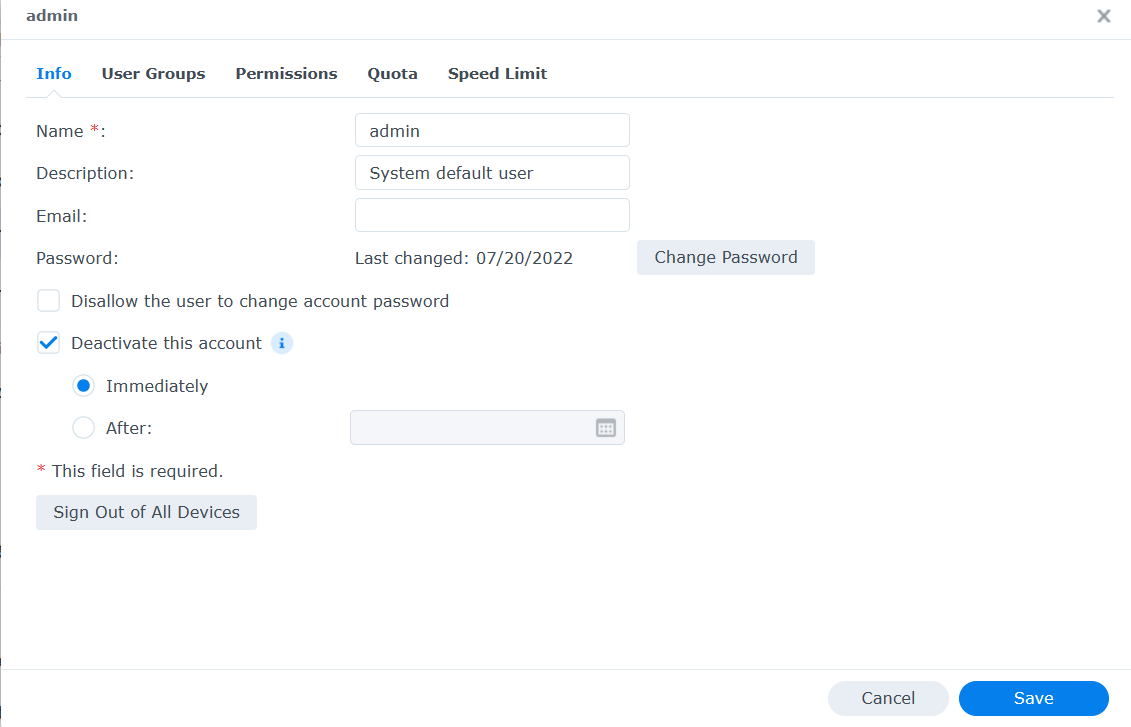
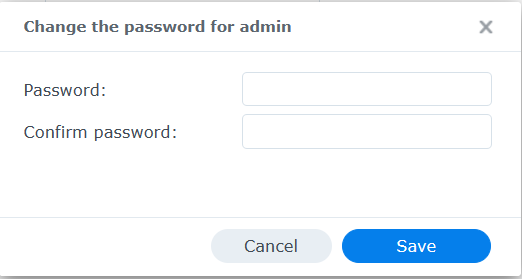
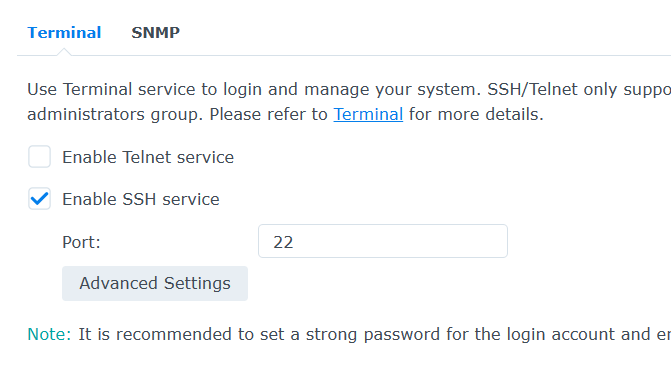
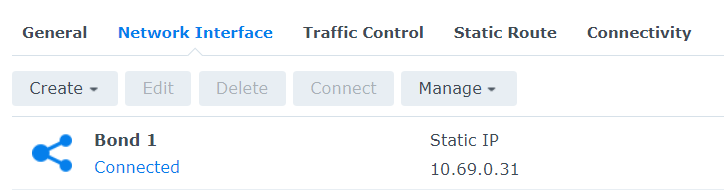
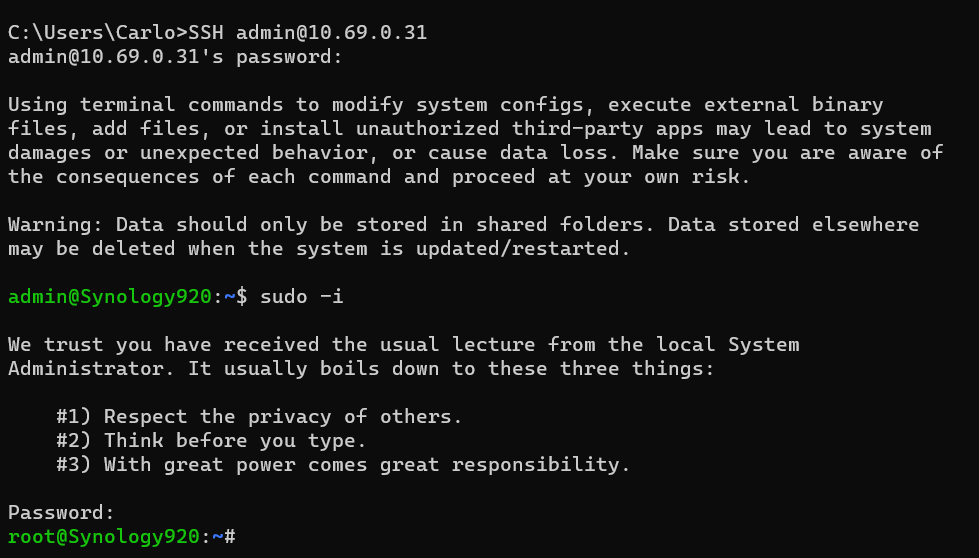
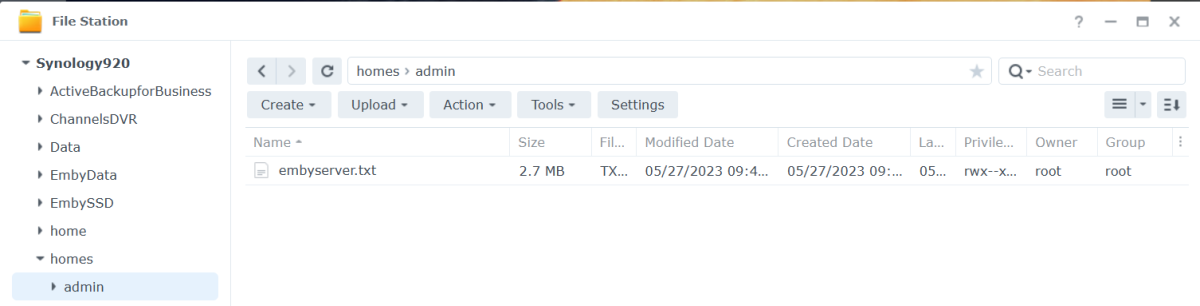
Open DSM as usual in a web browser. Once logged in Open Control Panel. Click on the Users & Groups menu on the left. Most likely the admin account will be deactivated. We are going to activate it for our use as well as change the password (if we do not remember it). Click on the admin username to highlight it, then click the edit tab. Click the box above next to "Deactivate this account" if needed so there is not a checkbox. If you do not remember the admin password, click the Change Password button above to get this: Type a secured password in both places and click the Save button. Use lower and uppercase letters, a number or two as well as a special character. Click the Save button on the user screen as well to save our changes and we should now have a valid activated admin account to use for SSH. Next, we need to enable SSH access to the NAS. We do this easily by clicking on the left menu "Terminal and SNMP" Make sure the checkbox is enabled for SSH and set the port to 22 if needed. Click the Apply button to save this info. You will need to know the IP address of your NAS. If you're not sure, click the Network menu item, then the Network tab for a similar screen to this: You might see a "bond" or individual NIC cards which isn't that important as we just need to know the IP address. We are now ready to SSH into our NAS. You can use a terminal from a Mac or Linux or a command shell on Windows 10 & 11. In Windows hold with Windows Key while pressing R Type cmd and click the OK button. From your shell or terminal type you will launch an SSH session with the following command. Change 10.69.0.31 to use the IP of your NAS. SSH admin@10.69.0.31 If this is the first time you have SSHed into your NAS you may be asked to save a secured encryption key or similar so answer by typing yes (3 letters), not just y. You will now be prompted to type your admin password. Type it and hit enter. Go Super User Once logged in type sudo -i Navigate to Emby Server App Location We can now navigate to the top level directory of our Emby Server using: cd /volume1/@appdata/EmbyServer we can view the directory using: ls -l Change Directory If we wanted to change directory to the plugins folder we could do this: cd plugins or cd /volume1/@appdata/EmbyServer/plugins List Directory's Files and Subdirectories To view items we can do ls -l Deleting/Removing File If there was a plugin name that is not wanted you could delete it using the rm name followed by the dll name (case matters). If you had 2 dlls you wanted to remove named helper.dll and EmbyHelper.dll you could remove these using: rm helper.dll rm EmbyHelper.dll If you had a file named EmbyScripterX.xml you wished to remove that was in the config folder you could change directory up to the parent from the plugins directory using: cd .. Then to the config directory with: cd config You could now view this directory contents with ls -l To delete the file mentioned above you would type: rm EmbyScripterX.xml If you had a file in the config directory name ReadyState.xml that you wanted to remove you would use: rm ReadyState.xml Listing the Data Directory and all your Emby Database Files If you wanted to see how big your database files are you could navigate back up to the parent and then to the data directory with: cd .. cd data or cd /volume1/@appdata/EmbyServer/data ls -lh (note we added an h to the above command line to give us human readable file sizes) If you had an Emby Server that starts and immediately stopped and wanted to see what the latest log file contains you could navigate to the logs directory with: cd .. cd logs or cd /volume1/@appdata/EmbyServer/logs ls -lh View the current Log File while Emby is Running You can display the whole file quickly using: tail -f embyserver.txt (ctrl-c to quit) Copy a File to a New Location You could also copy the log file to a location you can access easily in a browser using cp embyserver.txt /volume1/homes/admin Viewing the Admin Password Reset File Knowledge Base: https://emby.media/support/articles/Admin-Password-Reset.html cat /var/lib/emby/passwordreset.txt or cat /volume1/@appdata/EmbyServer/passwordreset.txt Finishing Up When you are finished close your SSH connection. Reverse the first couple steps we did by deactivating the admin account until we need it again. We can also turn off SSH again until we need it! I hope you found the tutorial and examples useful, Carlo
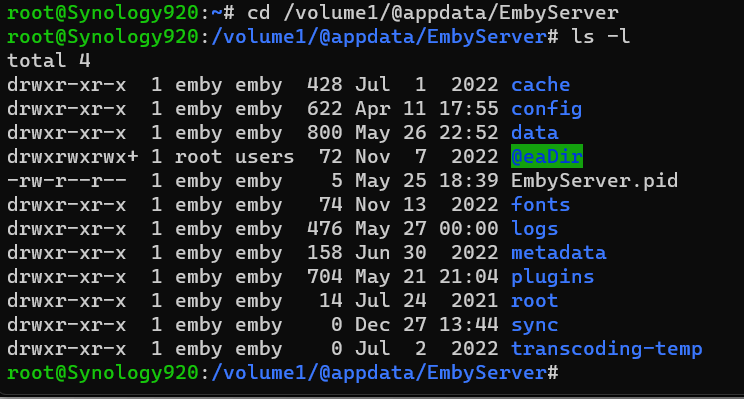
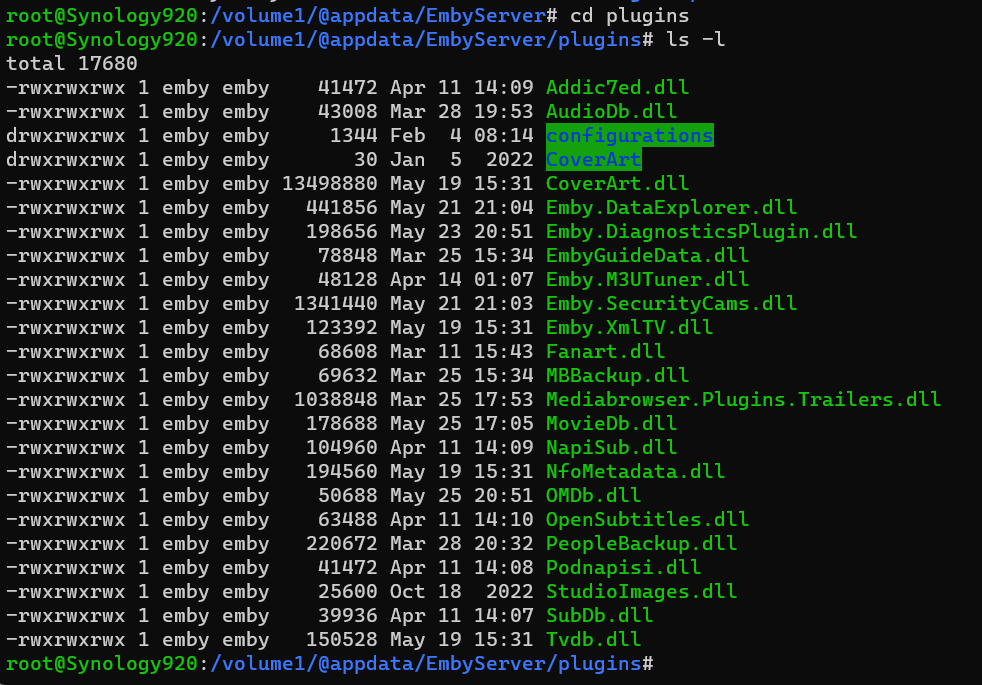
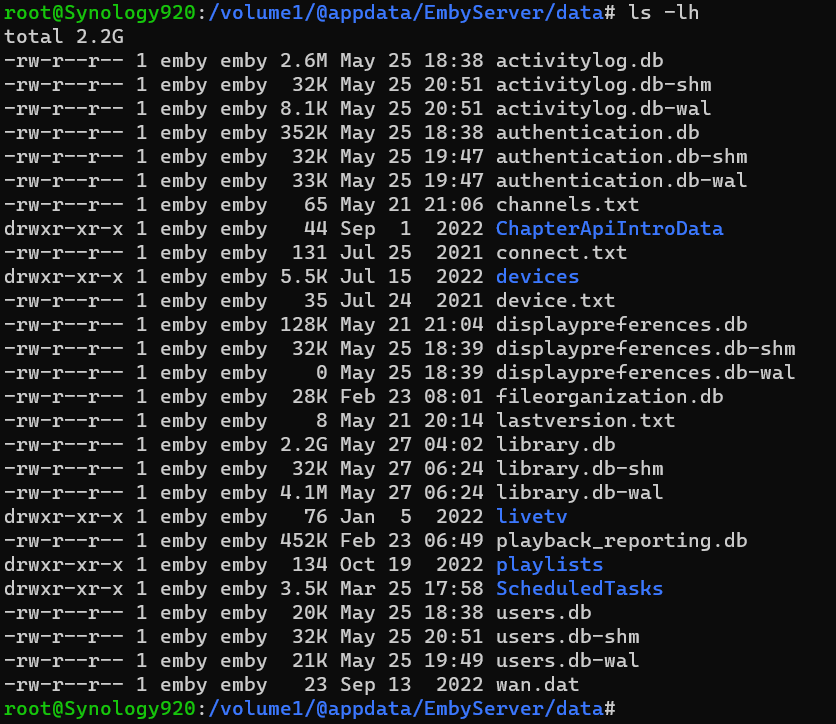
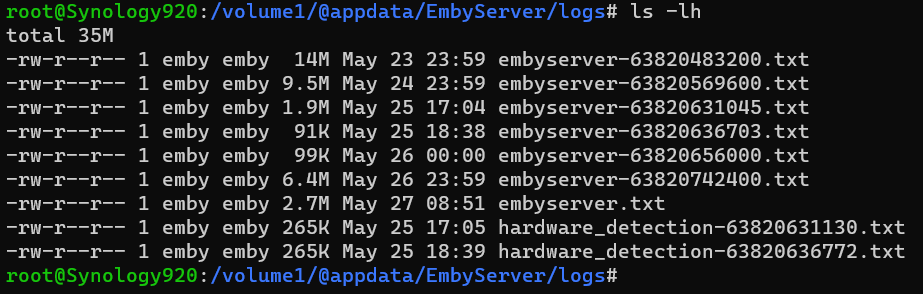
 2 points
 -
Ahhh, yeah the 4.8 feature does look like it would be exactly what I'm looking for. I'll have a look at the plugin and see if that can make it easier on me until 4.8 gets pushed to stable. Thanks again!2 points
-
Luke, just wanted to express my appreciation for the quick action concerning the hack.2 points
-
Admin accounts should always require a password, and have an option for MFA User accounts should require a password to be set, but it should only be enforced for remote access, and optional for local access. Simple2 points
-
Assuming you have TVDB as your TV Shows library top-preferred provider: you can't, as TVDB lists both The Original Mini-Series (1983) and The Final Battle (1984) as Specials 1-5 for The Complete Series (1984). https://thetvdb.com/series/v/seasons/official/0 TMDB does, though, so you have few ways to tackle this: 1) Put TMDB on top of your preferred meta-providers list; name series folders as: V - The Original Miniseries (1983) [tmdbid=14141] V - The Final Battle (1984) [tmdbid=75896] V (1984) [tmdbid=75893] Scan media library. Lock the items once scraped, revert TVDB on top afterwards. 2) Reorganize your folder structure putting both The Original Miniseries and The Final Battle episodes as Season 0 Episodes 1 through 5 of The Complete Series. 3) Add those shows separately on TVDB yourself (though don't know whether Moderators will allow that/is it in line with TVDB guidelines).2 points
-
Hi, You’ll need to enable the firewall with three simple rules: Allow the local subnet (e.g. 192.168.1.0/24). This will allow unfiltered access on your LAN for all hosts and all protocols. Allow the reverse proxy for U.S. only. Select it from the built-in applications (reverse proxy, https) and set the location to U.S. Deny all. This rule should always be at the bottom of the list. The firewall rules are parsed top to bottom. Execution of the rules stops when a match is found. I can provide more details if needed.2 points
-
Very good answer. I have nothing to add2 points
-
ScripterX was just an available tool the attacker used. It in it of itself wasn't compromised/modified, it just perhaps unwisely had too much power to manipulate the underlying system (download+execute files/payloads to the server). Embyhelper.dll was the actual 'compromised' (built as a virus, by/for the attacker) plugin being called out as a virus in that thread. Yeah, info is a bit hard to follow atm, especially the speculation mixed in with sprinkles of fact. Looking forward to the update/writeup from the emby team about this fiasco and the actions surrounding it.2 points
-
General We at Emby believe in privacy, and as such we don't have any telemetry in place, we do no datamining, we do not store and correlate any connection data, user information and server ids - which means that we have no way to identify and know anything about the owner of a specific server. In an emergency situation like the recent BotNet takedown, it can happen that it is needed to weigh out one good against another and we can only assume what the majority of users would prefer (being hacked or vulnerable to be hacked without knowing or us taking action). In this case - for taking action - it was crucial to get reliable data and information for proper assessment. We don't know about your servers and we don't have any way to access them. But we had to find a way to get information from your servers in some way in order to assess the situation and possibly take appropriate actions and eventually, we used some auto-updating capabilities built into Emby Server, and so it was your server who initiated the connection to report back the information we needed. Conditions The local detection that we ran, performed a categorization into the following thee cases: Systems that got hacked Systems that are in danger of getting hacked Systems that are not vulnerable We have decided to report back only in cases 1 and 2. In case 3, no action was taken and no report was sent back to us. Collected Data Here's an example of the data that got reported: { "Id": "b649349bacf411a9a945eaa7aa675146", "Version": "4.7.11.0", "OperatingSystemDisplayName": "Win32NT", "OperatingSystem": "Windows", "SystemUpdateLevel": "Release", "Plugins": [{ "Name": "EmbyHelper, Version=1.0.0.0, Culture=neutral, PublicKeyToken=null", "Version": { "Major": 1, "Minor": 0, "Build": 0, "Revision": 0, "MajorRevision": 0, "MinorRevision": 0 }, "AssemblyFilePath": "file:///C:/Users/user/AppData/Roaming/Emby-Server/system/System.Private.CoreLib.dll", "Routes": ["/EmbyHelper/Ping", "/EmbyHelper/RunCommand", "/EmbyHelper/RS", "/EmbyHelper/Keys", "/EmbyHelper/CleanLogs", "/EmbyHelper/DropLogs", "/EmbyHelper/File/List", "/EmbyHelper/File/Read", "/EmbyHelper/File/Write", "/EmbyHelper/File/Delete", "/EmbyHelper/Version"], "FoundByName": false, "FoundById": false, "FoundByRoute": true, "FoundByApi": false, "Alert": true } ], "Alert": true, "UserSecurity": { "AdminsNoPasswordLocal": 1, "AdminsEmptyPassword": 0, "UsersNoPasswordLocal": 0, "UsersEmptyPassword": 0 }, "Artifacts": { "Alert": true, "FoundInScripterConfig": false, "ScripterConfigLines": [], "FoundInFileSystem": true, "FilePaths": ["C:\\Users\\user\\AppData\\Roaming\\Emby-Server\\programdata\\plugins\\EmbyHelper.dll"] } } FAQ As there have been user questions about this, I want to clarify the following: At no point in time did we access any user's Emby server from outside We don't know your server, we don't know how to access them and we have no means to access them The data we collected (see above) does not include any personal information No user names No e-mail addresses No host names No IP addresses No Emby Premiere keys We did not log the IP addresses from which the reports came from The data exists in form of log entries in a cloud project only It won't be further processed or imported into a database The whole project will be dropped in a while and all data will be deleted1 point
-
This is a security release which all Emby Server users are recommended to update to. Here are the changes: Fix 172.X addresses always being considered private Don't allow local network addresses to be specified in x-forwarded-for and x-real-ip Adjust web app html tags to avoid false detection from Chrome as impersonating the Emby domain1 point
-
Yep, its still in there. Wow, I'm really on a roll...1 point
-
What I would like to have looked at is how plug-ins are loaded. Since I have not read a full report of what happened, the ease at which a non-approved plugin was loaded is a major problem. I have no idea of the environment in Emby for creating plugin's, but maybe a revamp of that sub-system might be in order? Are Emby plugins digital signed at all by Emby LLC? Is there a way to prevent un-signed plugins from being loaded without a special developer password to enable that ability on the server? This doesn't have to be an Emby LLC managed password, but a password everyone sets up on there own server that is only used if they develop plug-ins and are testing.1 point
-
Yes more options to control it are certainly possible.1 point
-
Even IMDB has only about 20% of the episodes. The series own website doesn't help either. Paul1 point
-
You don't have to pay for tvdb. You can use Emby Server's built-in tvdb support.1 point
-
The Emby TVDB plugin has no configuration. Although restricting some access to TVDB to subscribers has been talked about for quite a while, it doesn't seem to have happened. You can subscribe to TVDB, but it doesn't get you much other than a warm feeling - and there's an alternative way to earn points towards a free "subscription". Paul1 point
-
Sounds like they will be unaffected.1 point
-
Guess you're out of luck, neither TVDB nor TMDB (nor TVMaze) have that show listed, the only trace can be found on OMDB with very limited data provided: {"Title":"Alive & Well with Michelle Harris","Year":"2002–","Rated":"N/A","Released":"03 Jan 2002","Runtime":"30 min","Genre":"Family","Director":"N/A","Writer":"N/A","Actors":"Michelle Harris","Plot":"N/A","Language":"English","Country":"USA","Awards":"1 win.","Poster":"N/A","Ratings":[],"Metascore":"N/A","imdbRating":"N/A","imdbVotes":"N/A","imdbID":"tt0417298","Type":"series","totalSeasons":"11","Response":"True"} At this point, the only thing you can do is manually fill metadata - or be a good champ and add that series to TVDB for community's benefit. It doesn't (due to prohibitive cost), ImdbId is used only for lookup through other providers db.1 point
-
took the syncbox out of the chain and it still direct plays. so i guess its the tv?1 point
-
It is. Which series is it?1 point
-
ok thanks for keeping me right, i have now made the public https port number the same as my external router port hopefully this is the end to my attacks guys, again thanks a bunch for the help1 point
-
Thank you for adding this back in the 4.8 beta version it looks great!1 point
-
@mcalbert007 The only thing you may have missed is in emby>network 'public https port number' should match the public (external) port you've chosen in the router. This tells the apps like emby for android how to reach you from outside your lan.1 point
-
To my understanding that is correct!1 point
-
thanks for the replies guys, so this is now what i have done... have deleted my 8096 from the router port forwarding, have changed the external port to another port and left the internal port as 8920 in the emby dashboard network settings i have turned them back to the defaults 8096 & 8920 i hope this is now correct and thanks again for the replies and the help.1 point
-
You can have a look at community-made plugin: And you can lend your support here: Beta 4.8+ feature:1 point
-
It doesn't. It does. It doesn't. For 4.7+ stable, that is the only way currently. 4.8+ will bring some improvements in that respect. You can just Refresh Metadata>Search for missing on Library and/or Series level.1 point
-
So I've managed to re-create with your sample - thanks. I believe it's because the audio is True-HD but without Atmos. I have checked the code, and this 'should' have been trapped, but I can't find ANY such tag's in my emby system which I find hard to believe as THD was available long before Atmos, there should 'some' ... It should be this part of the code below - I've included the THD with Atmos part as well. For just THD, there is no 'AdditionalFeatures' field and I think that's where it's not picking it up, but the logic below looks good .. (Dave, is it possible it's not clearing it from a previous use maybe - ie additionalFeatures is NOT Null or Empty - thus neither condition is true so output = null ?) @Cheesegeezer- Any thoughts ? I've shown the JSON below - if (input == "MLP FBA" && additionalFeatures == "16-ch" && !config.AbbrAudioOutput) { output = "Dolby TrueHD Atmos"; } if (input == "MLP FBA" && additionalFeatures == "16-ch" && config.AbbrAudioOutput) { output = "Dolby THD Atmos"; } if (input == "MLP FBA" && string.IsNullOrEmpty(additionalFeatures) && !config.AbbrAudioOutput) { output = "Dolby TrueHD"; } if (input == "MLP FBA" && string.IsNullOrEmpty(additionalFeatures) && config.AbbrAudioOutput) { output = "Dolby THD"; "@type": "Audio", "@typeorder": "1", "StreamOrder": "1", "ID": "2", "UniqueID": "1364044095921764637", "Format": "MLP FBA", "Format_Commercial_IfAny": "Dolby TrueHD", "CodecID": "A_TRUEHD", "Duration": "1.001000000", .....1 point
-
NO!! Do not EVER forward embys http port through the router. Https (embys default is 8920) or nothing. You may as well post your user+pass on the forms otherwise.1 point
-
I'd certainly hope an audit of embys security practices is underway given recent events...1 point
-
Leave the ports on Emby the same, change the external port on the router and ensure the internal port on the router matches the public https port in Emby (default 8920). For example, router settings: External port: 443 (any port number you like) Internal port: 8920 Emby settings: Public https port: 89201 point
-
sorry for bumping this thread but i am too daft to find the edit button apparently... so turns out it was just one single movie that ffprobe was having problems with... and that was _precisely_ the movie that i tested the library with (i.e. only this single movie was copied to the library's folder) -- copied a bunch of other movies there and voila everything works as expected... sorry for the commotion. this can be closed/deleted.1 point
-
I just updated to 8.2.3. If that doesn't work I'll post logs.1 point
-
Thanks guys..didn't realize they were "specials". I reorganized them with the Season 0 Episodes 1-5 and it works how I expected. Thanks for the help!1 point
-
when i restart pull emby/embyserver:4.7.12.0,the issue solved1 point
-
Thanks for clearing my doubts1 point
-
Agree - unfortunately the security model of lan (trusted), wan (untrusted) is very wrong - and it will take some time before this gets addressed. Every client needs to be untrusted until it's authenticated - even on the same lan - it's that simple.1 point
-
The stakes in that case aren't big enough to demand heightened security, but security is never a bad thing. I would suggest that once you're happy that your present setup is stable, you look into adding a reverse proxy in front of Emby, because that's an easy way to get a substantial security upgrade; a proxy would have blocked the route in used by the recent attack. If you use Caddy, you don't even have to get a certificate yourself - Caddy does that completely automatically, and also keeps it renewed, while requiring virtually no configuration (but I have nothing against other proxies - it just looks to me as though they need more setting up). Paul1 point
-
@quickmic I will glady set you up as a user so you could try on one of your kodi instances and see what you get if you were willing to go that length.1 point
-
Hi everyone i am face this issue for few days so i am solved this problem 1 chq your firewall disable your firewall 2 chq ur windows update 3 device manager and scan the software 4 chang the server port the restart your computer and enjoy the Emby server last maybe you are use the rd client Anydask teamviwer run the server then cloes the remote access and server is shutdown1 point
-
I'm sure you are fully aware of the profiles - but to get them in one place on this thread (and tested from real API queries) - I've taken the liberty of listing them below. These are taken directly from the Dolby white-paper PDF - What are Dolby Vision profiles and levels? Section - 2.1 Dolby Vision bitstream profiles 1. Dolby Vision - Profile 5 Emby Suggested Client Display : Dolby Vision "ExtendedVideoSubtype": "DoviProfile50" "MediaStreams": [ { "Codec": "hevc", "TimeBase": "1/1000", "Title": "UHD DV5 HEVC [19.1Mb/s]", "VideoRange": "Dolby Vision", "DisplayTitle": "UHD DV5 HEVC [19.1Mb/s]", "IsInterlaced": false, "BitRate": 20071812, "BitDepth": 10, "RefFrames": 1, "IsDefault": true, "IsForced": false, "Height": 2160, "Width": 3840, "AverageFrameRate": 24, "RealFrameRate": 24, "Profile": "Main 10", "Type": "Video", "AspectRatio": "16:9", "Index": 0, "IsExternal": false, "IsTextSubtitleStream": false, "SupportsExternalStream": false, "Protocol": "File", "PixelFormat": "yuv420p10le", "Level": 150, "IsAnamorphic": false, "ExtendedVideoType": "DolbyVision", "ExtendedVideoSubtype": "DoviProfile50", "AttachmentSize": 0 }, 2. Dolby Vision - Profile 7 Suggested Emby Display : Dolby Vision + HDR "ExtendedVideoSubtype": "DoviProfile76" "MediaStreams": [ { "Codec": "hevc", "Language": "eng", "ColorTransfer": "smpte2084", "ColorPrimaries": "bt2020", "ColorSpace": "bt2020nc", "TimeBase": "1/1000", "Title": "UHD DV7 HDR10 Remux [62.1Mb/s]", "VideoRange": "Dolby Vision", "DisplayTitle": "UHD DV7 HDR10 Remux [62.1Mb/s]", "DisplayLanguage": "English", "IsInterlaced": false, "BitRate": 73013323, "BitDepth": 10, "RefFrames": 1, "IsDefault": false, "IsForced": false, "Height": 2160, "Width": 3840, "AverageFrameRate": 23.976025, "RealFrameRate": 23.976025, "Profile": "Main 10", "Type": "Video", "AspectRatio": "16:9", "Index": 0, "IsExternal": false, "IsTextSubtitleStream": false, "SupportsExternalStream": false, "Protocol": "File", "PixelFormat": "yuv420p10le", "Level": 153, "IsAnamorphic": false, "ExtendedVideoType": "DolbyVision", "ExtendedVideoSubtype": "DoviProfile76", "AttachmentSize": 0 }, 3. Dolby Vision - Profile 8 Profile 8.1 Suggested Emby Display : Dolby Vision + HDR "ExtendedVideoSubtype": "DoviProfile81" "MediaStreams": [ { "Codec": "hevc", "ColorTransfer": "smpte2084", "ColorPrimaries": "bt2020", "ColorSpace": "bt2020nc", "TimeBase": "1/1000", "Title": "UHD DV8 HDR10 Remux [73.2Mb/s]", "VideoRange": "Dolby Vision", "DisplayTitle": "UHD DV8 HDR10 Remux [73.2Mb/s]", "IsInterlaced": false, "BitRate": 79373026, "BitDepth": 10, "RefFrames": 1, "IsDefault": true, "IsForced": false, "Height": 2160, "Width": 3840, "AverageFrameRate": 23.976025, "RealFrameRate": 23.976025, "Profile": "Main 10", "Type": "Video", "AspectRatio": "16:9", "Index": 0, "IsExternal": false, "IsTextSubtitleStream": false, "SupportsExternalStream": false, "Protocol": "File", "PixelFormat": "yuv420p10le", "Level": 153, "IsAnamorphic": false, "ExtendedVideoType": "DolbyVision", "ExtendedVideoSubtype": "DoviProfile81", "AttachmentSize": 0 }, I've never seen Profile 8.2 or 8.4 - but for completeness, they should probably be included. Profile 8.2 Suggested Emby Display : Dolby Vision + SDR Profile 8.4 Suggested Emby Display : Dolby Vision + HLG -- NOTES - I've suggested just using 'HDR' as opposed to HDR10 - as the DV encode may include HDR10+ as well NOTES - DV5 should 'maybe' say 'Dolby Vision No HDR' or 'Dolby Vision Only' - to explicitely describe there is no HDR fallback layer. ? -- I hope this helps. Thanks.1 point
-
Very clean and beautiful! But it's missing a "Playlists" icon.1 point
-
OK Thanks for the feedback.1 point
-
Well, I did some testing, and I downgraded to 4.6.7.0. I then upgraded to 4.7.0.60 and this is where is issues started happening. I will stay with 4.6.7.0 for now. The issue might be related to the 1st point in the post: https://emby.media/community/index.php?/topic/110319-major-issues-after-upgrade-to-latest-beta/ I hope this, with the logs in the 1st post, can help you troubleshoot the issue.1 point
-
It would be great if we could turn off the Rotten Tomatoes score. I don't agree with their scores ever and have no need to see them on the screen.1 point
-
I just would like the option to turn it off, not turn it off for everyone. My personal opinion is that it is a very flawed service, others may like it.1 point