Leaderboard




Popular Content
Showing content with the highest reputation on 05/03/23 in all areas
-
Ok solved try many time to connect and disconnect usb stick and finally samsung tv recognize file a install Emby Thank Hispa3 points
-
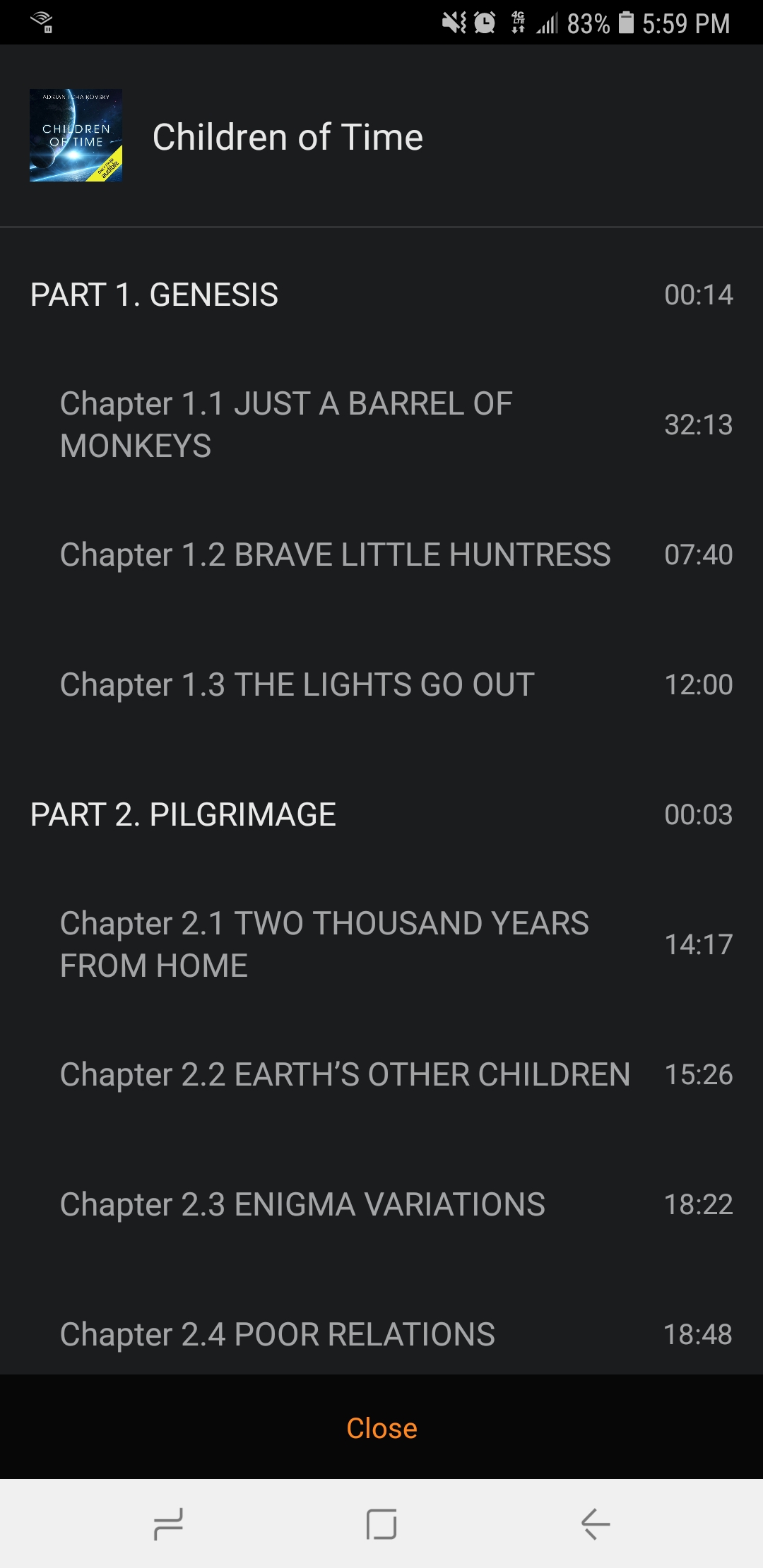
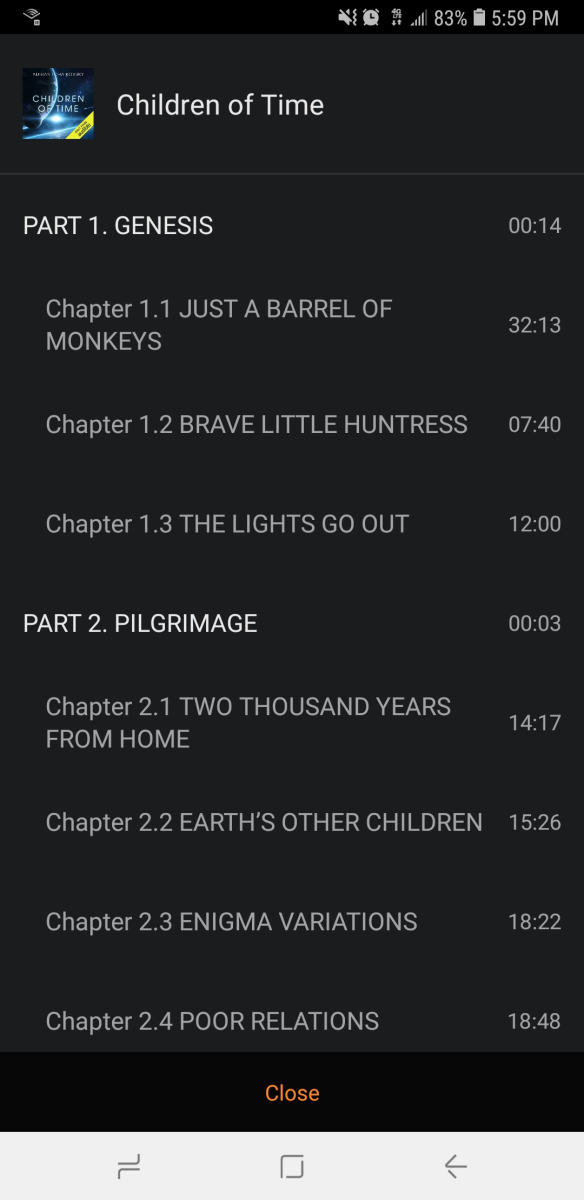
Wouldn't this information be better displayed as a list? Why even have an image for this view? The image takes up a large amount of space without being useful.2 points
-
I’ve been thinking about this while developing Audirium… I did do what you requested and it looks really crap to be honest, so what im gonna do is blur the book cover and put a transparent black overlay and then name the chapters as Chapter 1, chapter 2 etc as those chapter images to display. Link if anyone interested https://emby.media/community/index.php?/topic/109753-audirium-standalone-music-app/#comment-11562212 points
-
Yep it does. Just trying to get it to work with bulky also..2 points
-
IIRC, doesn't VirtualTV already have Min. Critic rating channel rule?2 points
-
@JunglejimI am looking at adding the capability to create playlists and channels for VirtualTV. Sometime when you have time, share your ideas with me. vic2 points
-
Thanks so much! It took me hours to get all the video files organized in a way that allows someone to play through the choices, so I'm glad I can call it complete and uploaded now2 points
-
Thought I'd stick my css up here. Mostly its actually from Happy2play, Penkethboy and others who OK, I admit, I can't remember. Anyway, bear in mind, there's undoubtedly bits that have been done in a weird way (my stuff), bits that don't work any more (my stuff), bits that accidentally get applied twice (ditto), alternative ways to do the same thing, variations in general of similar things. And a few bits at the end not much good for anything, but I left them there anyway. So its not in the same league as The Plex Inspired Look, and others... But it might possibly count as a theme. Hope I haven't posted this somewhere else already... Don't say you weren't warned (full stop) EDIT - mostly tested in Firefox, though hopefully OK for Chrome, and its only really set up for the Dark Theme for both Media and the Dashboard. EDIT 27 Dec 21 - There's a slightly newer version a few posts further down... EDIT 06 Jan 22 - Another (third) version added here (dated 06 Jan 22)... EDIT 06 Jan 22 - fixed (I hope) bug in previous 06 Jan version, well the one I spotted anyway... EDIT 15 Jan 22 - appears the blur effect I added no longer works (temporarily I hope) in Firefox. Chrome and Edge seem to be OK... EDIT 23 Aug 22 - bit of an update, fixes a few bits, adds a few things, can't remember what, hopefully an improvement... Emby css for posting 23 Aug 22.txt Emby css for posting 06 Jan 22 mod.txt Emby css for download.txt1 point
-
Hi all, I've had a project forked from the infamous https://github.com/RickDB/PlexAniSync for my own personal use to sync emby watch status on https://anilist.co/home. for a while now. I have since re-imagined it, and now think it's good enough for a post on the forum. Two Basic Features Simple Flask Server to receive Emby Webhook POST to sync a specific Series' Season's watch status. Scheduler to Sync all watch statuses of a configured library from Emby to AniList. I would say this is still very much a WIP, but I have had great success for the past year syncing my Emby watch status to AniList. I have a fairly detailed README if you want to give it a go. I am willing to help with setup, and hope to be receptive to feedback in order to grow and improve this project. In the future I may consider making a plugin to do this sync instead. Thanks for reading. https://github.com/Beannsss/EmbyAniSync1 point
-
It seems to be fixed now. Took completely deleting the series from emby and rescanning it back in finally cleared the issue.1 point
-
If you indeed changed Emby's local ports, and they no longer match your Docker's configured listening port Assuming you know how to edit text files in linux (using vi, etc) - you may need to manually edit the following lines in: /Emby-Server/programdata/config/system.xml <HttpServerPortNumber>8096</HttpServerPortNumber> <HttpsPortNumber>8920</HttpsPortNumber> Otherwise, just change your Docker ports to match what you changed them to in Emby.1 point
-
Reviving this old topic since it's the first when you search "emby anilist sync" I have written something to help with anime watch status sync. This is not a plugin, and does not support MAL, but MAL Support and a plugin is not out of the question for me.1 point
-
Thank you so much for your help. You guys rock! I'll keep an eye out for the next update.1 point
-
@LukeHere's something that might be of interest (which your team probably already knows). It might actually be possible to use the synology7.spk package to install Emby on a Synology NAS running DSM7.2 (at least on the DS918+). I compared the content of the INFO file in both the synology7 and synology72 packages. The INFO file from the synology7 package included the following lines: os_min_ver="7.0-40000" os_max_ver="7.2-63134" Whereas the INFO file from the synology72 package only included: os_min_ver="7.2-63134" I edited the lines in synology7 INFO file to match what was in the synology72 INFO file. After doing so, I was able to install the synology7 package manually through Package Center under DSM7.2. Prior to doing that Package Center would not install it. Of course, the fact that I was able to install it does not necessarily mean Emby is working. It opened without an issue after this little experiment and has been running for about an hour now. Everything seems okay and I'm not seeing any weird errors in the log file. But I'll keep an eye on it and report back with my findings.1 point
-
Reinstalled Emby and now the subtitles are working on the TV. This appears to be no longer an issue.1 point
-
That sounds good to me. I'll try and only use files that do not have embedded subtitles.1 point
-
Ok, understood - will give this a try tomorrow and report back1 point
-
It didn't work for me when I tried it over the weekend. I updated to DSM 7.2, and Emby would no longer run. I had the latest 7 package for one of the recent betas, and tried to install it (after tweaking the info file in the SPK to make Package Center think it was a more recent version than the one already installed). Package Center said it was not compatible. So I downloaded the 7.2 package and manually installed it. Package Center completed the update without an issue.1 point
-
Just had mine re-reviewed and passed with the below changes.1 point
-
eventually, it solved, I was in the latest stable version but I try to update to the beta version and it is work now.1 point
-
HI, this information comes from embedded metadata within your audio files, so ideally you'd make the changes there and then just run a normal library scan.1 point
-
No issues here1 point
-
For me it works actually, didn't have the issue anymore.1 point
-
yep i'll do that, thx.1 point
-
The Core and Introskip Plugin fingerprints are totally different - you must use either the Core or the Plugin not both. Their files are not compatible with each other. I would raise an issue about the Core mis-detection - it may be caused by the Intro being too deep into the show - the Core uses a very low value of 10 minutes (ie anything after this is ignored) - but this can be changed in a configuration file. ps - Please raise in the Introskip Plugin post - this is for Chapter API questions ...1 point
-
I think the images are just there because it was an easy way to expose chapters using the code from the TV/Movie views. The Audible AP does a good job by displaying chapters as a tab view (similar to the lyrics display toggle in emby): Hopefully emby audiobooks will get more focus/polish in the future. For what it's worth, I feel the same about playlists. Displaying them with smallest picture and text with longer character strings makes much more sense - especially when choosing from "Add this to song to playlist." I should probably submit a feature request for that.
 1 point
 -
Absolutely that would be a better layout and with a duration for the chapter also. nice one Tremas1 point
-
Thanks I got it working, given the short pace of time that you develop this in Kodi, one would wonder why it has taken such a long time to implement on the emby server as this would have been the best place to control client devices instead of using Kodi. Anyway thanks for the efforts and supports1 point
-
172 subnet issue (likely same as you're encountering) should be resolved in 4.8+.1 point
-
At this time Google reversed the flag. Will update if it comes back.1 point
-
I patched to the 4.8 Beta last night and got google to reverse the flag. Ill post if anything changes.1 point
-
Good morning @Junglejim I don't actually filter the "min critic rating" myself. I pass the info to Emby and it returns to me the filtered information and I display it. I will try to test it later today. Vic1 point
-
That is largely dependant on your selected library options, options affecting that the most are Video preview thumbnails (10-second BIFs or 5-minute Chapter markers) and Intro Skip detection - if you have those configured as both When media is added and as a Scheduled task, then yes, it'll have significant impact on your scanning times, especially on large libraries. Configure both of those as Scheduled task only and your scanning times should improve considerably and those will run as a separate tasks on set intervals.1 point
-
You can Multi-select>three-dot menu Group versions or use community-made Auto-version grouping plugin.1 point
-
Another vote for simple watch list. Keep current favorites. That is different from a watch list. I use favorites for movies I know I will watch more than once. A watch list would be used to hold things I wanted to watch and not forget about. It would be removed from list after watching.1 point
-
HI, actually there is a hard-coded limit of 8, primarily just as a sanity check to avoid falsely detecting something as mulit-version. We could expose this as configuration though.1 point
-
Hi, the ones in your first screenshot have all been addressed in the upcoming 4.8 server release. Thanks.1 point
-
Put in asking for a review and updated to 4.8. Will update when I know more. My server is behind a nginx reverse proxy as emby.domain.com1 point
-
It used to be fine which is what really stinks. As far as TS options, I use my emby to manage my HDHR so that is how it choses to record unless I am missing something. A automated script is a good work around. I do not record much TV, in fact about the only thing I watch on TV is the Chiefs during football season LOL.1 point
-
Hi @ arrbee99, My dear fellow, thanks a mil for the response. You helped on many levels. First, I battled this problem for some time. Couldn’t figure it out. Second, you saved my life because I already loaded my gun and left it on dining room table in case things didn’t work out. Furthermore, a while back I was looking to revamp the default emby theme starting from scratch and was looking for a custom CSS template. I came across yours in another thread (https://emby.media/community/index.php?/topic/103605-a-few-css-bits-mostly-from-other-people/). I pasted the code and wrestled with it for a few days, some parts are gone but most stayed, and some are super useful. However, one small piece of code was a real gem (filter: blur(0px) grayscale (80%)). It changes the whole site into a retro feel and look. I know it won’t be for everybody, but for me it’s keeper. I believe it is the only true theme as it colorizes all aspects of the site with a universal color template. I won’t be able to go back to multi colored posters etc. Having one of the default color themes feels like I’m walking into a candy store at a carnival. The site has come a long way and I’m working some odds and ends. Thanks again for the code in this thread. However, one does not need both pieces of code. This will make the whole container completely hidden: /* Hide the cover art container - music playing */ div.card.squareCard.osdRemoteControlImageCard-automargin.card-hoverable {width: 0px !important;} You’re a champ!1 point
-
Don't know if this helps. Bear in mind I have no idea what I'm doing (that 'relative' position for example) or what other things / objects it affects (too lazy to check), but /* Try to shrink music playing invisible box */ div.card.squareCard.osdRemoteControlImageCard-automargin.card-hoverable {width:200px !important;} /* and reposition it */ div.card.squareCard.osdRemoteControlImageCard-automargin.card-hoverable {position: relative; left: 300px; margin-top: 500px; !important} it (hopefully) makes the box smaller and moves it down and over, so you can still find it (you have to know to look of course) and still select the heart and three dots items. Maybe someone will help who actually knows what they're doing later...1 point
-
Yes although the upcoming 4.8 release has a newer build and therefore there will be improvements to this.1 point
-
HI, yes this is planned for future updates. Thanks.1 point
-
Make sure you only have the userwidget folder on the usb, and inside there should be two files: emby.tmg and widget.license. You must have both files1 point
-
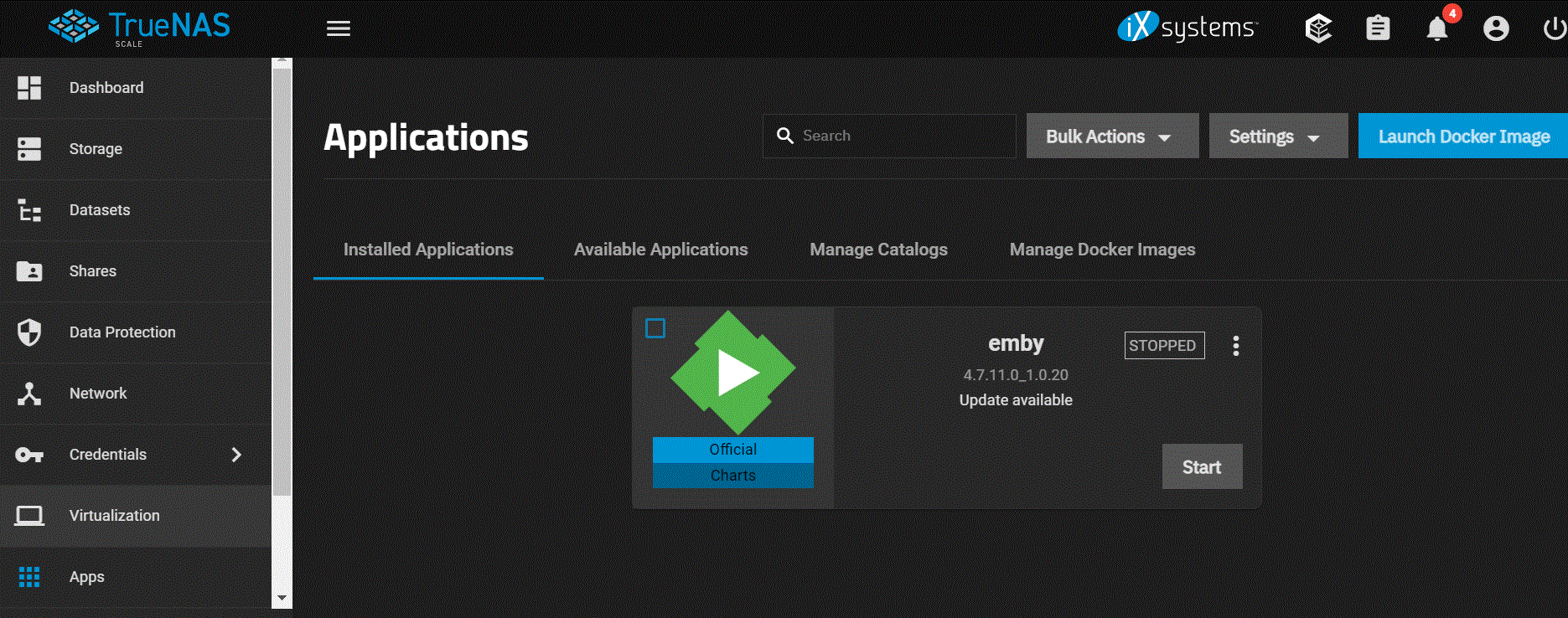
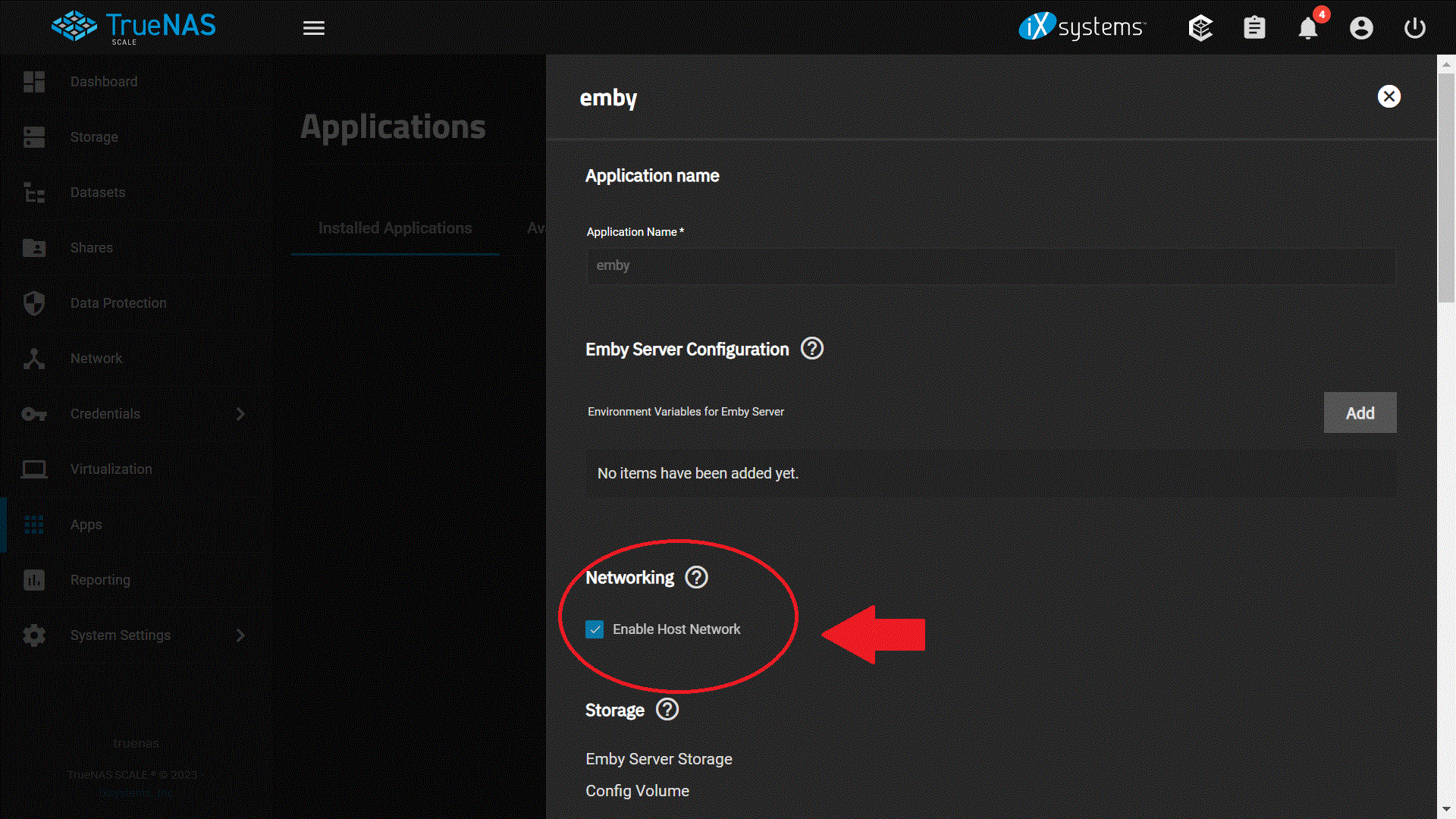
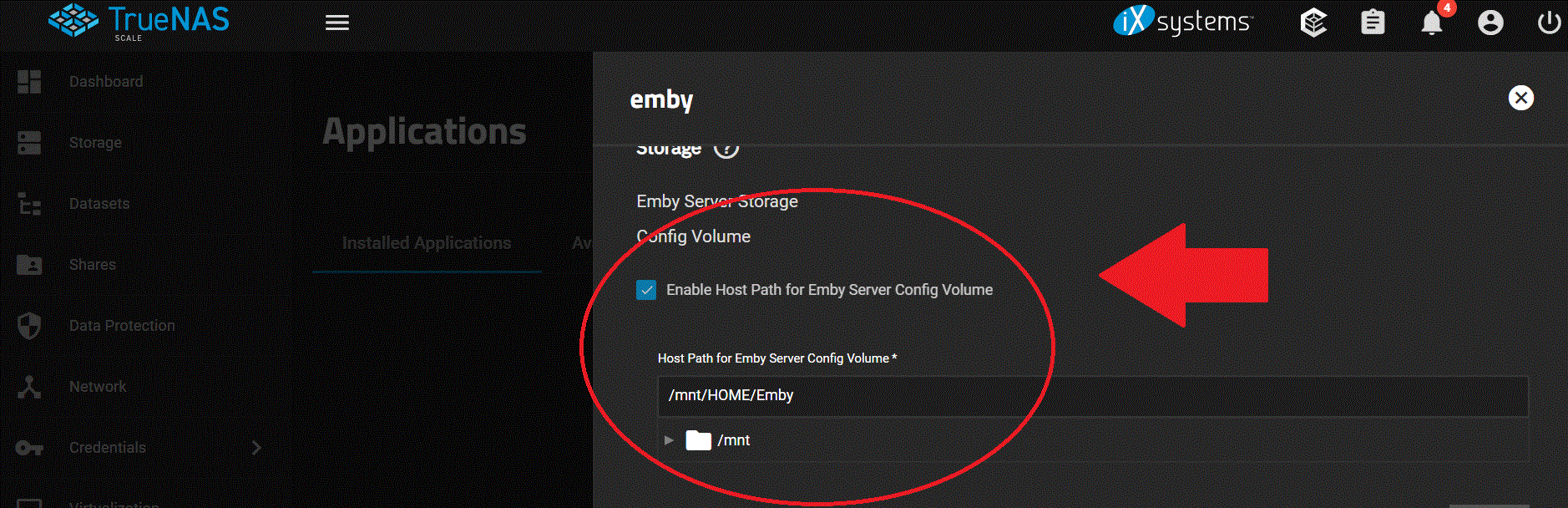
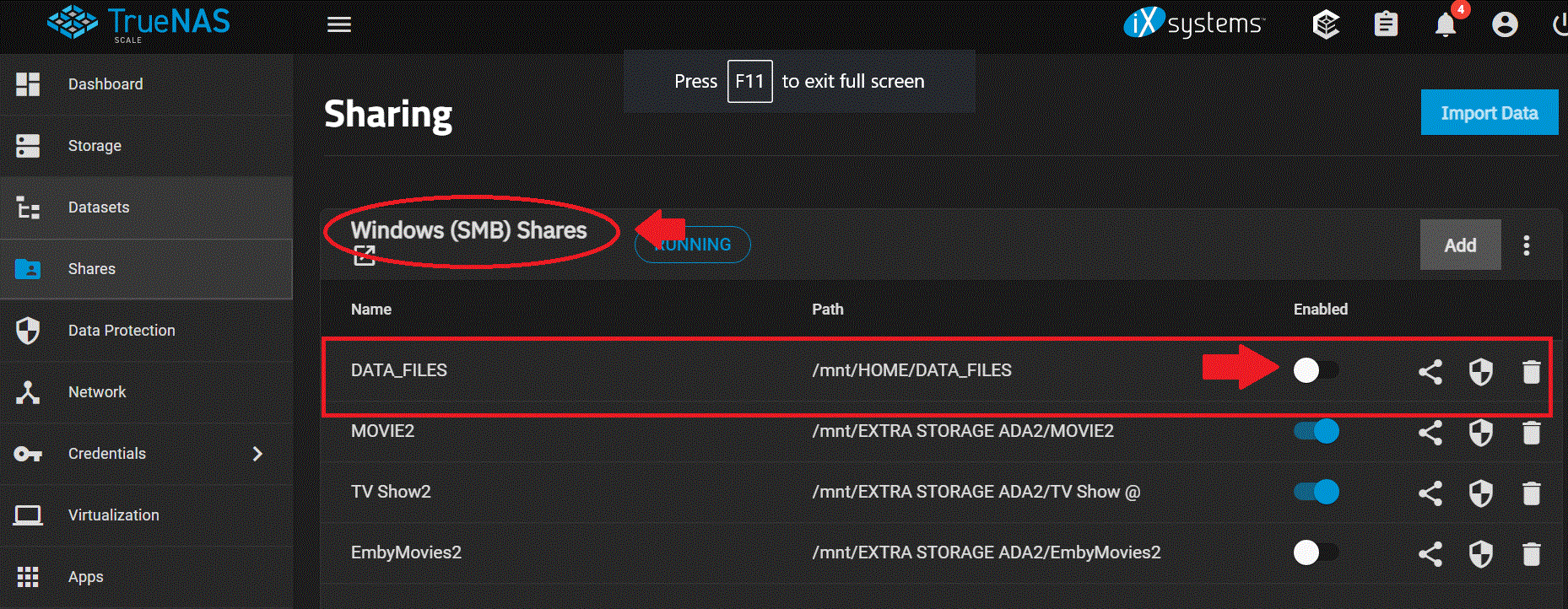
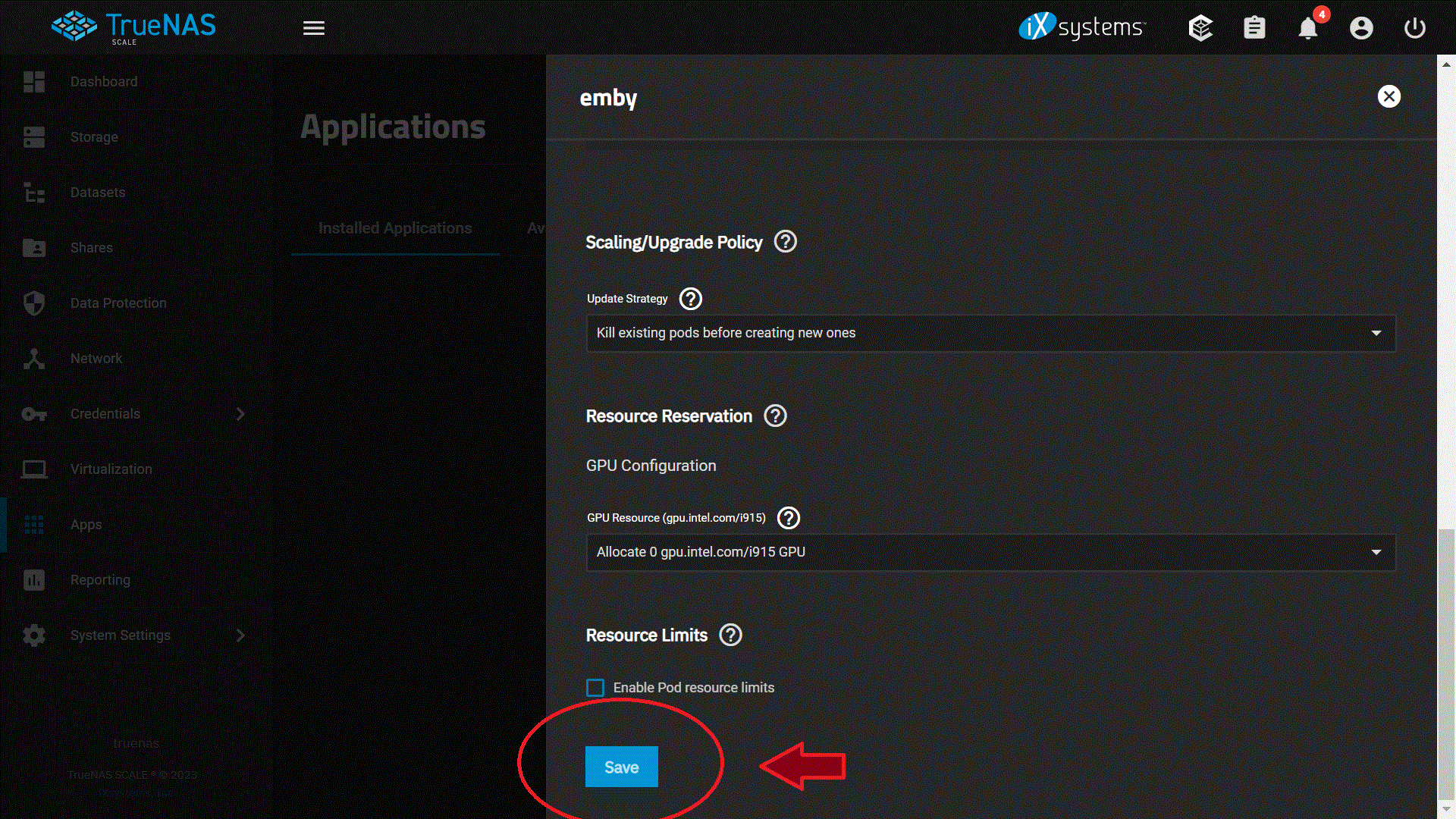
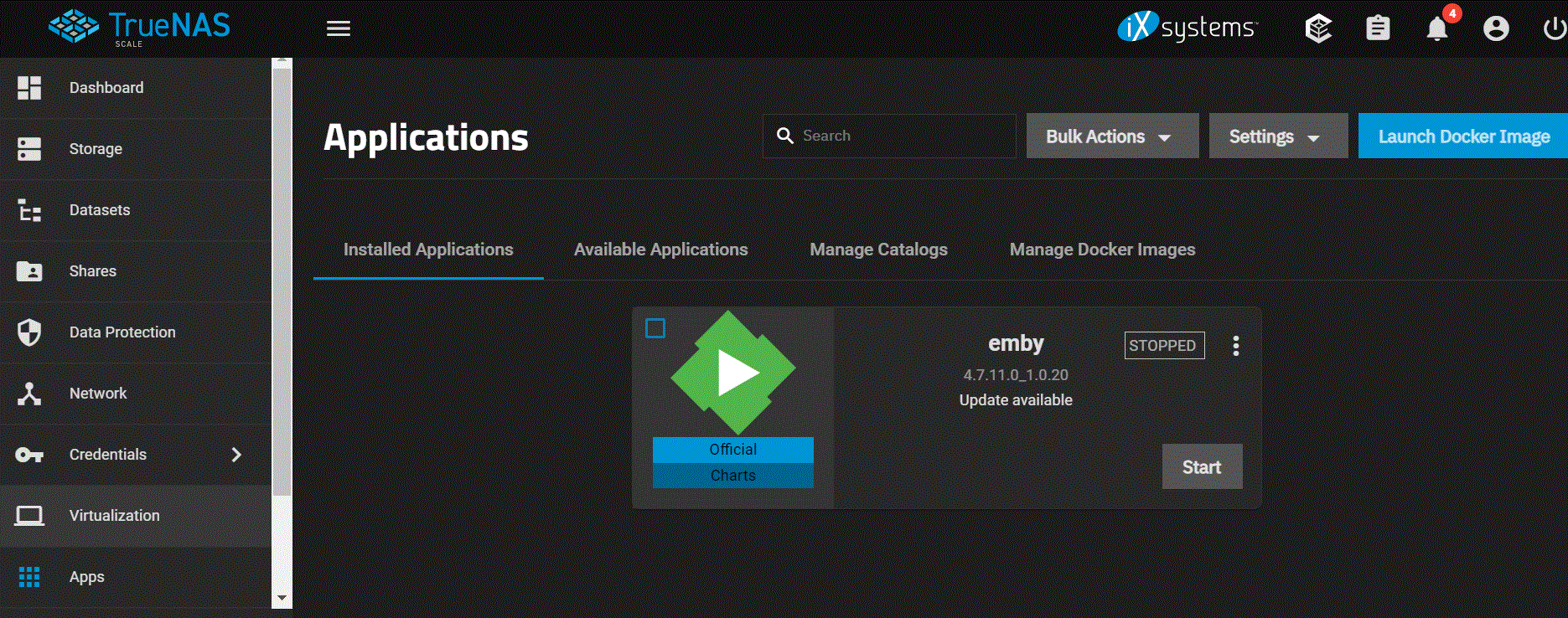
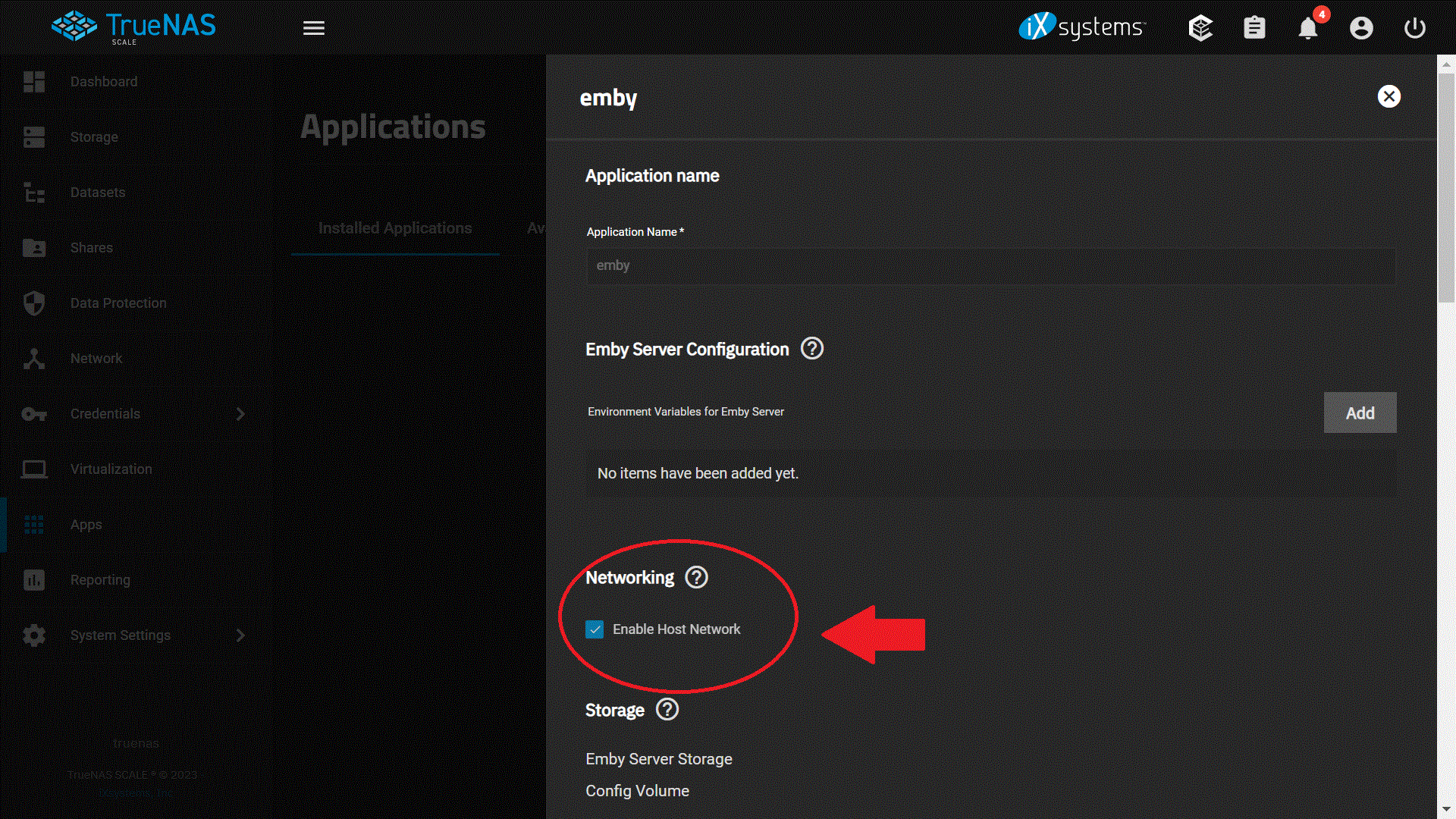
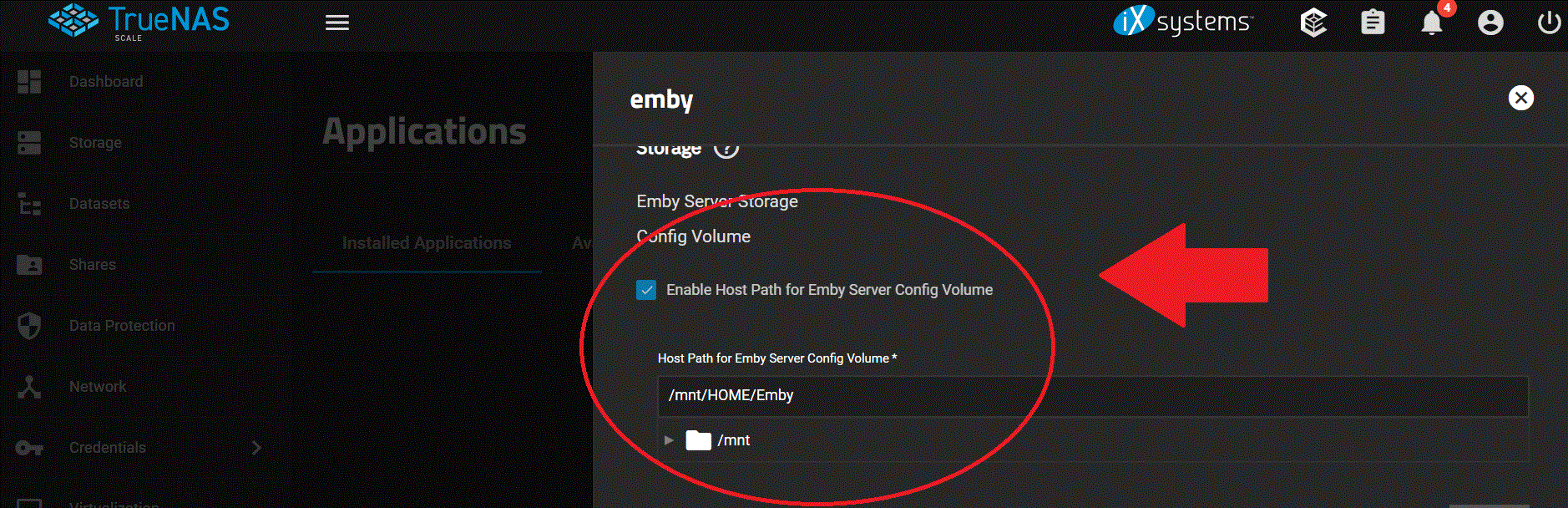
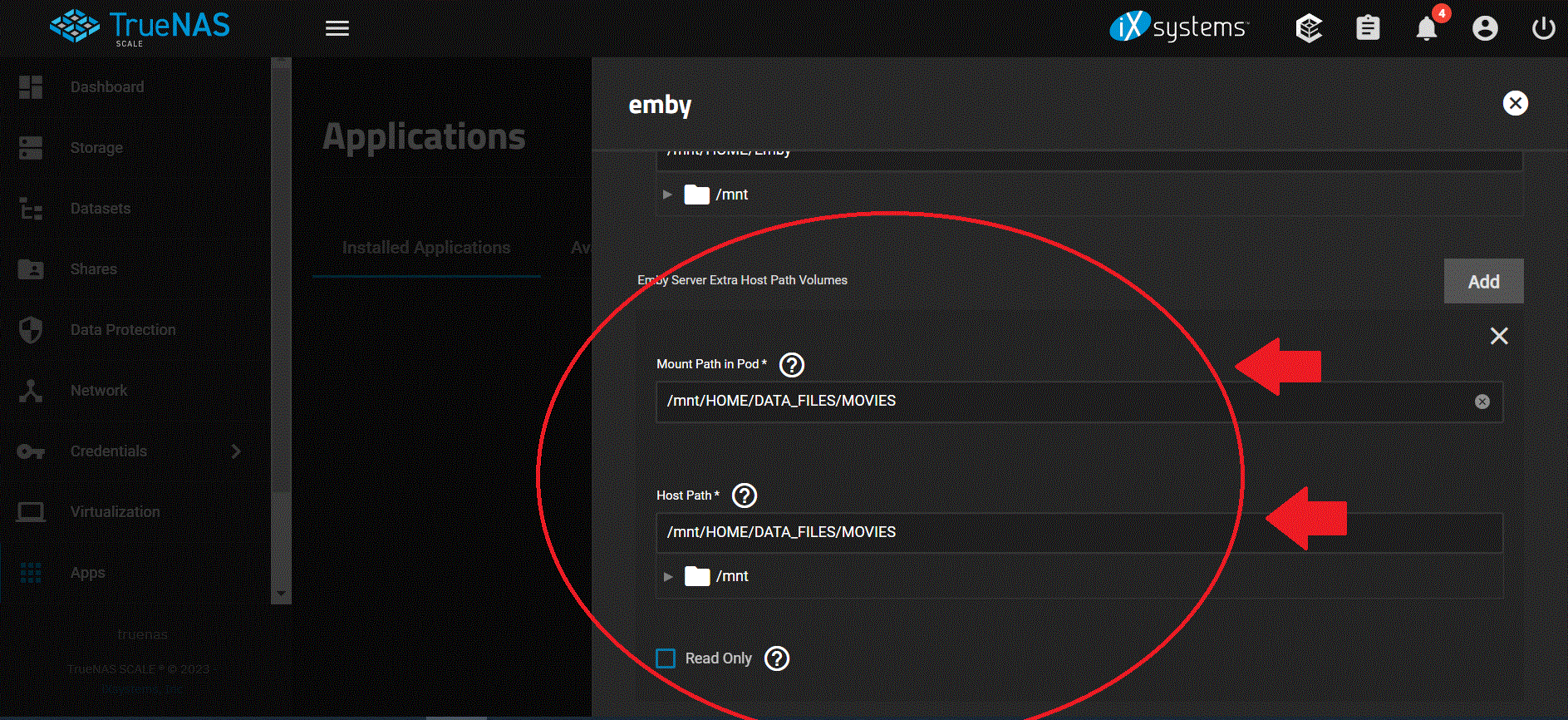
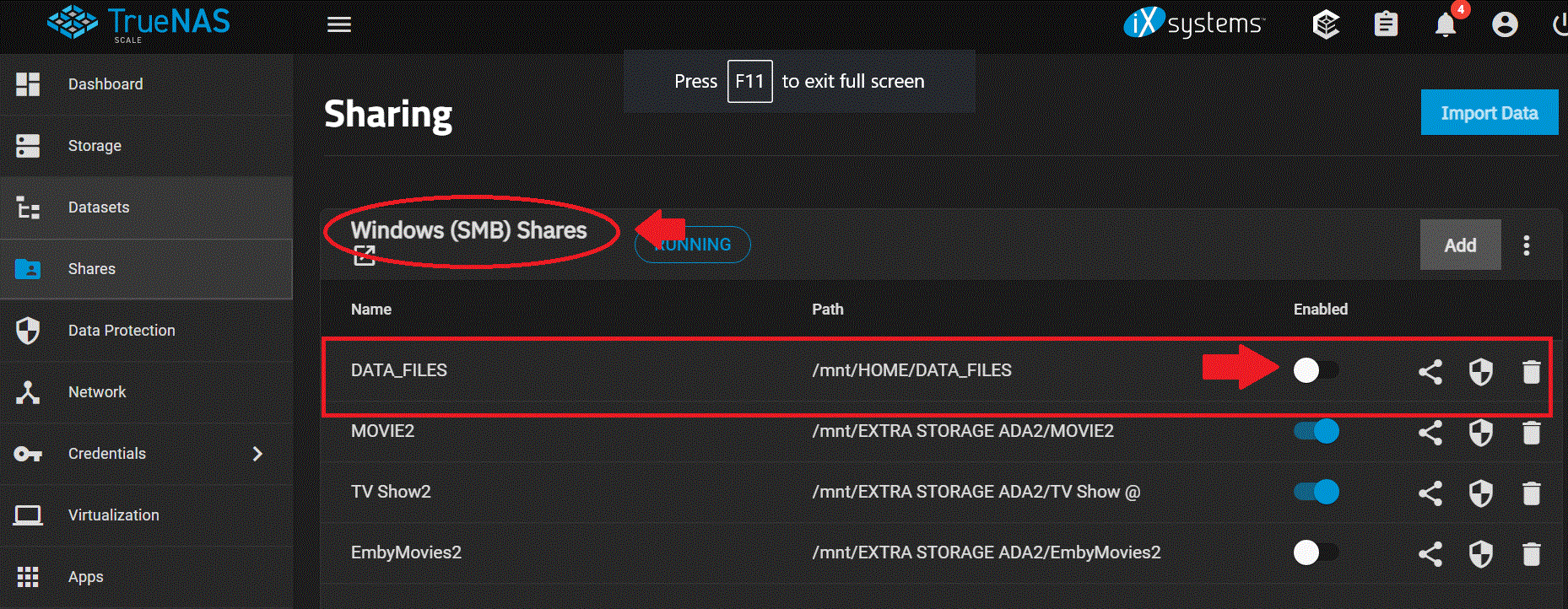
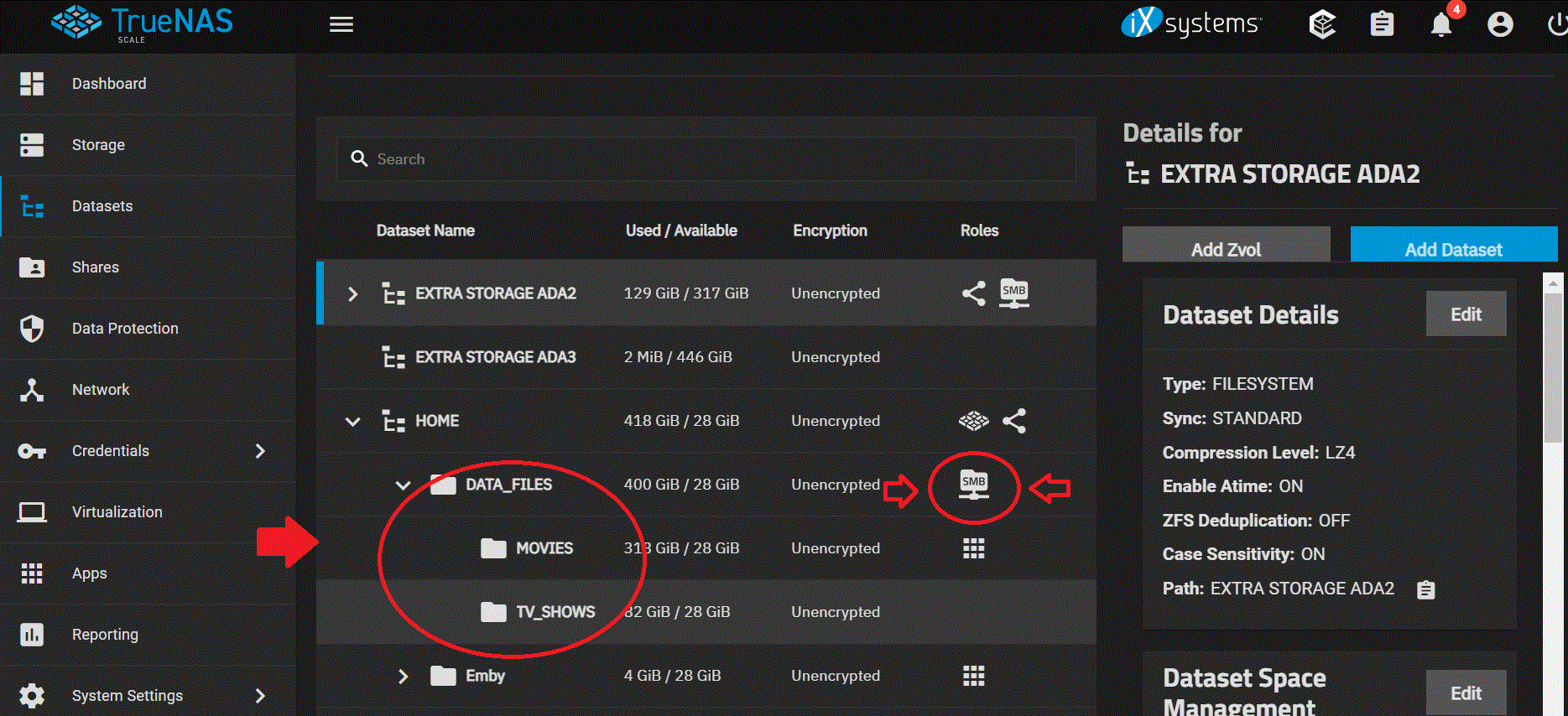
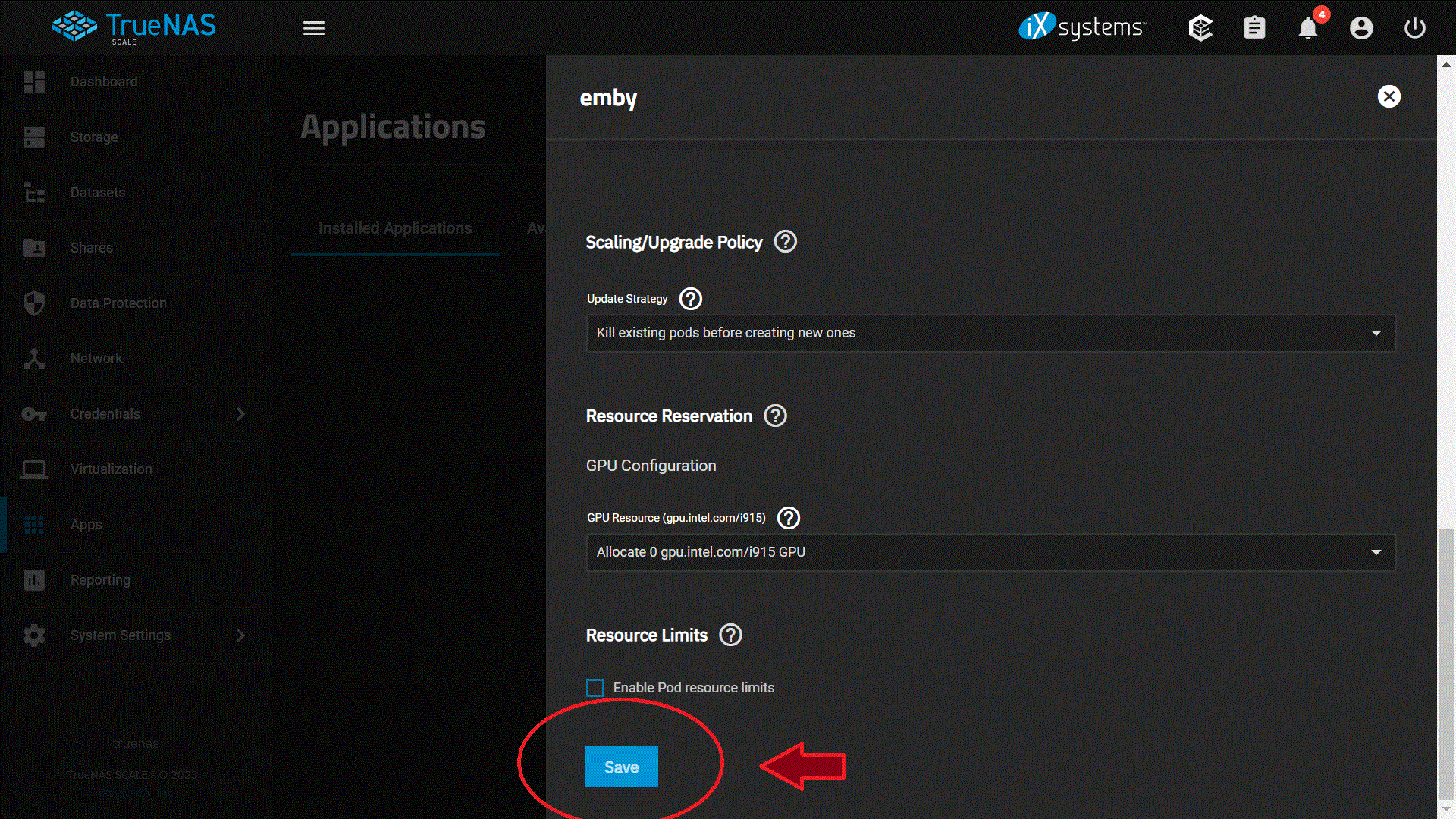
So here is what I did so far so I can get my Movies and Tv shows to come back, I hope this helps out other people but so far this works for me but I have not added my users yet or config everything else in Emby just yet but I made some head way on this issue for me. I took some screenshot of my setting so I hoping this help out someone but I still wanted to config. permission and ACL on Truenas Scale. 1. I had Emby running on Truenas Core with no issue for years until I upgraded my system to Truenas Scale, my mistake was adding the host path that I shared with SMB to Emby from Truenas Core. It looks like Truenas Scale does not like this on Emby so I had to turn off SMB and then added it to Emby host path in order for this work again on Emby, so lets start by adding Emby software to Truenas Scale: Which you see I already installed it but don't have it running at this time so I can config the rest of the stuff. 2. I login into Emby by the 3 dots just in case people don't know and bring up the config window for Emby. and started setting up Emby by enable host Network 3. The next step I did was was setup the path for Emby Config Volume which I already did before I loaded Emby onto Truenas Scale, so I pointed and enable the host path for Emby server config volume on my truenas scale to /mnt/HOME/Emby 4. I then setup the Emby Server Extra Host Path Volumes and here is where I ran into trouble !! The "Mount Path in Pod" is what you are going to see when you add the fold to Emby when you have it running but the most important part is this: "HOST PATH" this is where your Movies or Tv shows are at in SMB or where ever you had it before ! BUT before you do this !!! PLEASE MAKE SURE YOU HAVE SMB SHARES OFF !! OR TURN IT OFF !! BEFORE YOU ADD THIS PATH ONTO EMBY !! SO TURN IT OFF !!! 5. Just in case you dont' know where to turn it OFF, I will show you, its under SHARES and just disenable it so you can added this to the host path, SO TURN IT OFF BEFORE YOU ADDED THIS TO EMBY ! this should be STEP 1 but I am doing this on the FLY right now! again TURN IT OFF !!! 6. Here are some of the Paths I have on Turenas Scale and these are just examples of my setup and again i am trying to setup ownership and permission on my end but will do this on another day, but these are just examples! 7. Once you turn it off we can continue on with the setup on Emby and we are going to SAVE the setting on Emby. The rest of the information I left the same and have not change anything yet. 8. I am going to mess around with the setting to give permission and ACL and added addition information on the "Environment Variables for Emby Server" at a later time but this got my movies and TV show showing up on Emby again so I made some head way on this and happy for now!! I will give it some more time later on this week and setup my user on Emby ! but I hope this help out someone and gets them started on seeing there movies and show again.
 1 point
 -
Hi Luke, Thanks for the reply. Interesting that there isn't much info in the logs as I downloaded them about 10 mins after experiencing the issue. Maybe the issue is with the Emby app on my TV so the server didn't detect any issue which would explain why there isn't much info in the logs. Interestingly, I did another test, this time using my iPhone as well as my Android phone and noticed that the lag was not as noticeable as on the TV which further points to it being a TV issue as I tested both phones over a 5G connection, not WiFi. My next test will be connecting my TV via Ethernet instead of WiFi to see if that makes a difference once I get it off the wall mount. Thanks for your help Luke, I will update you.1 point
-
You don't have to browse the USB contents on your TV. Usually you just insert it into the TV, turn the TV on, and then it installs automatically. @SamES1 point
-
1 point
-
Coming in Emby Server 4.8:1 point
-
Hi, are you running beta server? If so there is a few properties in the code that has depreciated. And doesn’t omit the current playing movies trailer. Once the next server release comes out i will fix these. And add in crushers request also. Cheers1 point














.thumb.jpg.1ea4e6b27fd5921ad22171468034b3f4.jpg)