Leaderboard




Popular Content
Showing content with the highest reputation on 05/02/23 in all areas
-
ok great - let me try again with the new version - thanks Vic ! edit - yep, perfect. If I now click 'save' after selecting the action type (Replace All in the case below) then it saves it to all the items I had selected, not just the 'visible' item (usually Item 1 in the list). Thanks for the quick fix

 3 points
 -
@rbjtechI think I have the problem fixed. I just uploaded plugin 2.5 Let me know if you have any questions. Vic3 points
-
Emby doesn't aim to be a clone of Plex, so differences are to be expected. As for recognition of movies or series, some problems have arisen recently because of changes in how TVDB and TMDB handle searches in their latest apis; searches which used to succeed started to fail, and adjustments have been made to improve this, but are not all there yet. But it is not hard to force recognition by adding the database id to the folder name. Browsers are often used as containers for apps, and those apps can use right-click for their own purposes. This is not strange. Emby are working towards making the apps more uniform, but it's a big job. As for the Roku and subtitles, this can happen if the Roku is asked to play directly - the Roku itself is limited in its built-in handling of ASS subtitles when files are direct-played (which is why there's a setting for you to force transcoding when those subtitles are required). Paul2 points
-
@GrimReaperYou are a prophet for sure... Vic2 points
-
There's a number of changes, although the release notes just generalize and say library scan improvements. But to be more specific: fewer or faster database queries removal of unnecessary operations adjustment of database indexes to make updates and deletes quicker making the realtime monitor a lot lighter on it's feet and others that i'm probably forgetting right now2 points
-
You will be used to using the excellent web based Tool created to Bulk Edit any of your media Items This is now being converted to be run directly from the plugins Section inside Emby Server. An extremely powerful tool that saves time Current Status: Development Testing This is currently under development and is consistently evolving. For this reason the dll files will be posted at the bottom of this thread. Bug Reporting & Issues: Please report bugs and Issues in this thread. corrected the problem with critic rating Feature Requests: While we welcome feature requests, please note that bugs and issues take priority and that feature requests will be subject to review and may or may not make it to the plugin. CURRENT VERSION: DEV 1.0.13.43 INSTALLATION - NOTE: Default Target for installation is Emby-Server/programdata/Plugins - Please download the "dll" file below copy and paste dll to the plugins folder. restart your emby server as this is in Development you will need to clear your browser Cache after each install, or the new changes will not appear Enjoy DOWNLOAD CHANGELOG: Filtering has now been added Bugs and Issues Reporting link - NOW WORKING Added "Image Not Found" image removed backgrounds added a spinner fixed several bugs with save IsFavorite and Played finally fixed saving UserData (IsFavorite and Played) fixed a bug in the custom editor - the edit buttons are now displayed for the results of a search fixed bug in bulk save added managing collections added managing playlists when you edit metata data for an item you can cast the video to a tv or monitor on your network. I added this just for fun added the ability to edit live tv channel meta data changed Shift click to work more in the traditional was - you can select segments you can now change primary images added the ability to remove specific tags simplified the code retained image aspect ratios added show folders button removed "cast to tv" from the edit menu, added it to the Movie and TV screens fixed the "Image Not Fpund" for none video items removed "Folder" button from screens where it didnt belong fixed button problem with custom filter added better file not found images added "emby data" and "channels" fixed bugs enhanced Channels rewrote Explorer Bulky is a collaboration between @Cheesegeezerand @VicMoore Bulky is an Emby plugin and it is in the Emby plugin library.
 1 point
 -
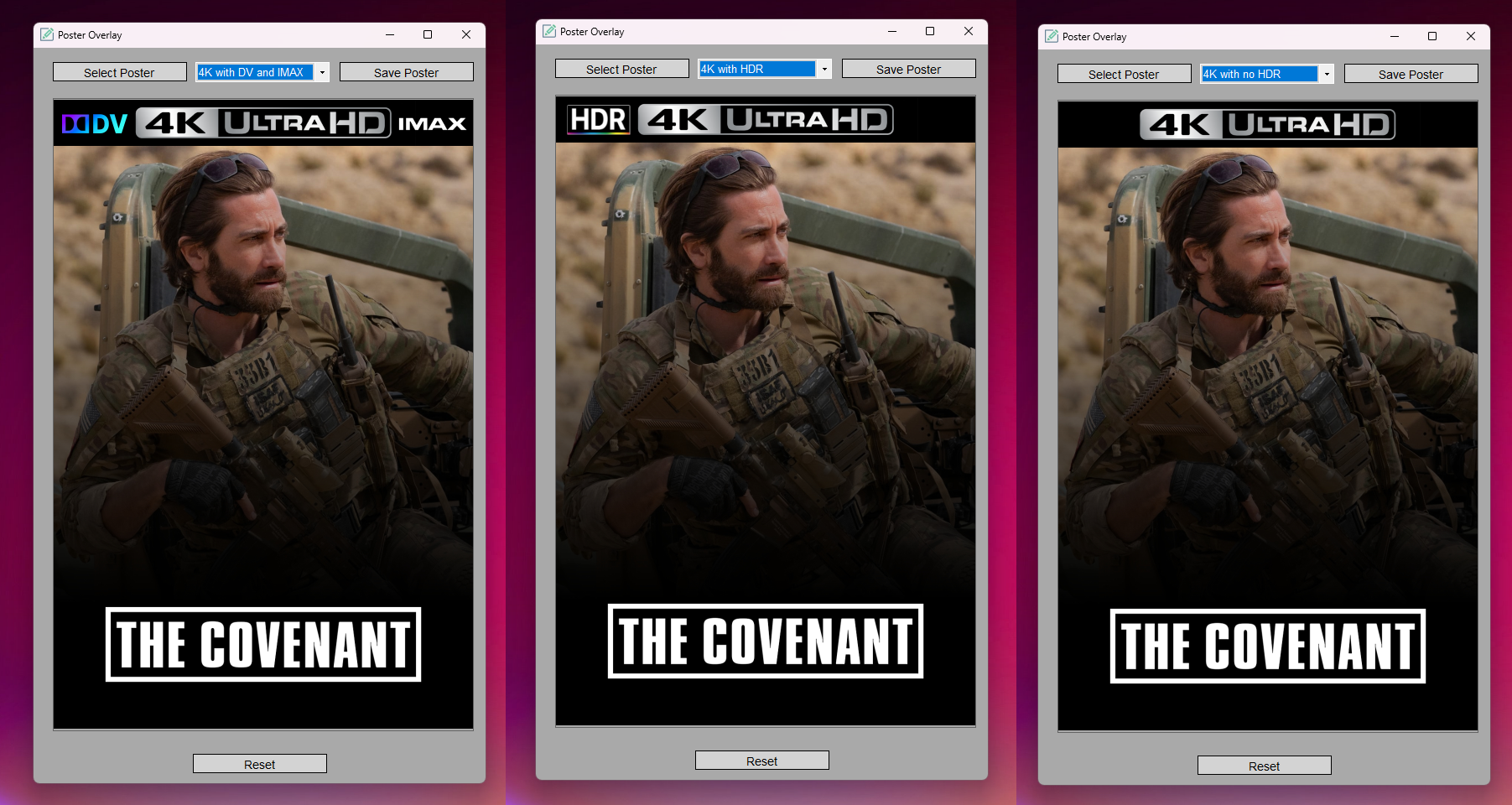
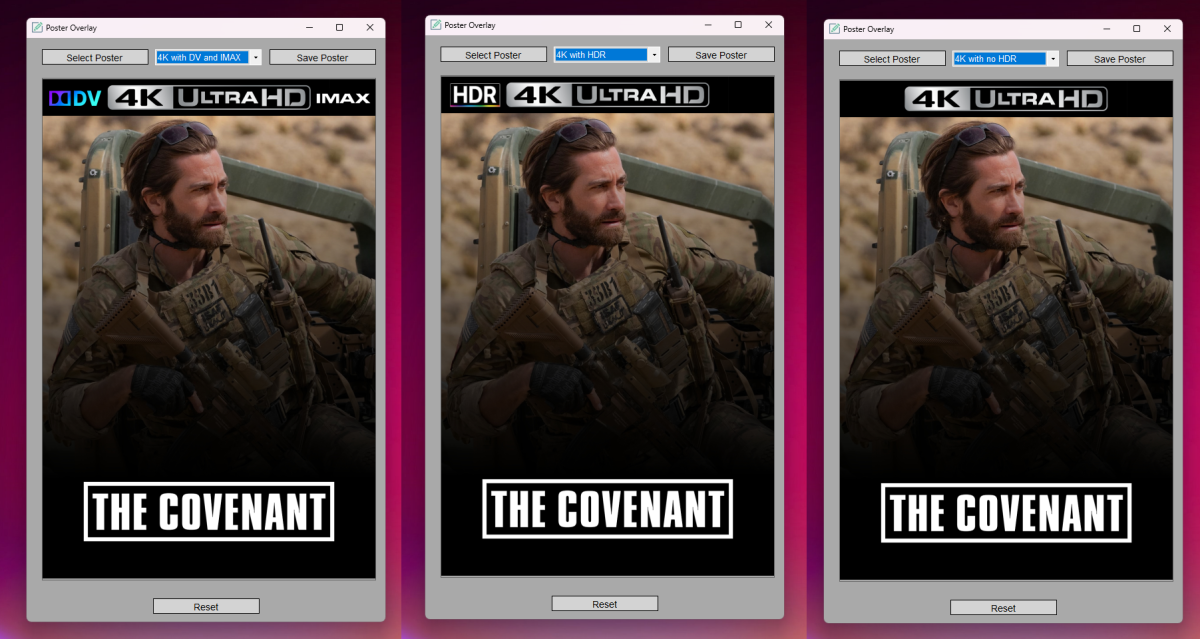
Poster Overlay GUI A simple Windows Forms application that allows users to add 4K Ultra HD Banners to their movie posters. About: Firstly, I know that we have the coverart plugin but I prefer having a cleaner look with multiple options for my 4k library. I started making this app a few weeks ago with absolutely zero knowledge in coding, this entire project was built through using chatgpt to guide me into building, modifying and editing the code through lots of trial and error. I'm more than open to suggestions to improve and or add to the project (such as more banner options etc). Features: Choose from multiple overlay images (4k Ultra HD, with HDR, with DV, With HDR and IMAX and with DV and Imax) Preview the combined result Save the resulting image as a new file How to Use: Download and extract the PosterOverlay_v1.0.0.zip file from github. Run the PosterOverlay.exe file to launch the application. Click on the "Select Poster" button to choose the base image (poster). Use the dropdown box to select an overlay image. Preview the result in the main window. Click "Save Poster" to save the resulting image to your computer. Prerequisites: .NET 6.0 Runtime is required to run the application. Please download and install the appropriate version for your operating system. GitHub Link: https://github.com/pejamas/Poster-Overlay-GUI
 1 point
 -
All the movies in my large collection are h264 or h265 HEVAC mp4 encoded, most with 5.1 or atmos audio. All are served using the latest up to date version of Emby server on my iMac. I use the same encoding methods for tv episodes, also on that server. I have been using my AppleTV 4k to watch with, wired from the same LAN as the server. When watching movies that are under 5gb, or tv episodes (also all under 2gb) I do not observe the following issue, while videos larger than 5gb often misbehave in two distinct ways. These issues happen on my AppleTV, but never when watching from my iPad. I can avoid these issues if I switch over to my Plex server using the Plex client on the AppleTV , which draws from the same directory as does the Emby server - suggesting that this may not be a server issue, but one with the Emby client on the AppleTV. 1. the video gets kind of scrambled, washed out, and totally whacked. If I tap to fast forward some of the sound that was still playing over the whacked out video replays from where I clicked the fast forward (with a tap).. the video will then usually correct itself and the audio will come into sync. This can sometimes happen several times during one film. 2. the sound goes out of sync with the movie. Stopping and then resuming will usually fix this. It may occur more than once during the movie. what would you suggest? thanks for your time - I love Emby and truly appreciate your work. I still host a Plex server as well, for the few that were reluctant to switch, but I gave up on PLEX when they released an update that trashed all my users episode / movie histories. They became too corporate for my tastes; and when I found Emby, an alternative, I came on board with a lifetime membership, and have never looked back.1 point
-
Not sure why this seems worse than ever. Server Version 4.7.11.0. I restarted it yesterday and already it had 3 streams being streamed while nothing is in the dashboard. Restarting the server released all three. Just giving feedback, I know this is an ongoing issue.1 point
-
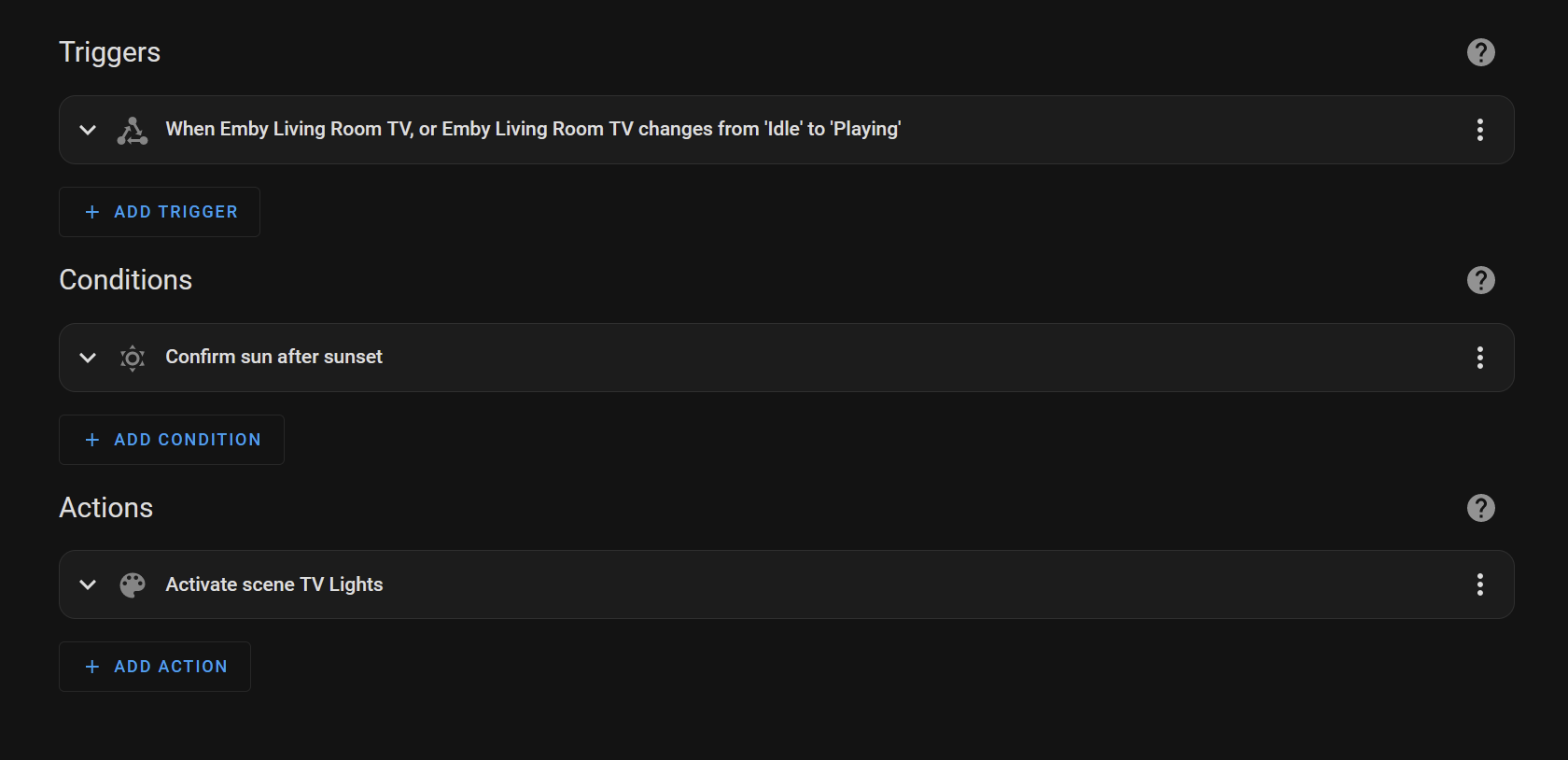
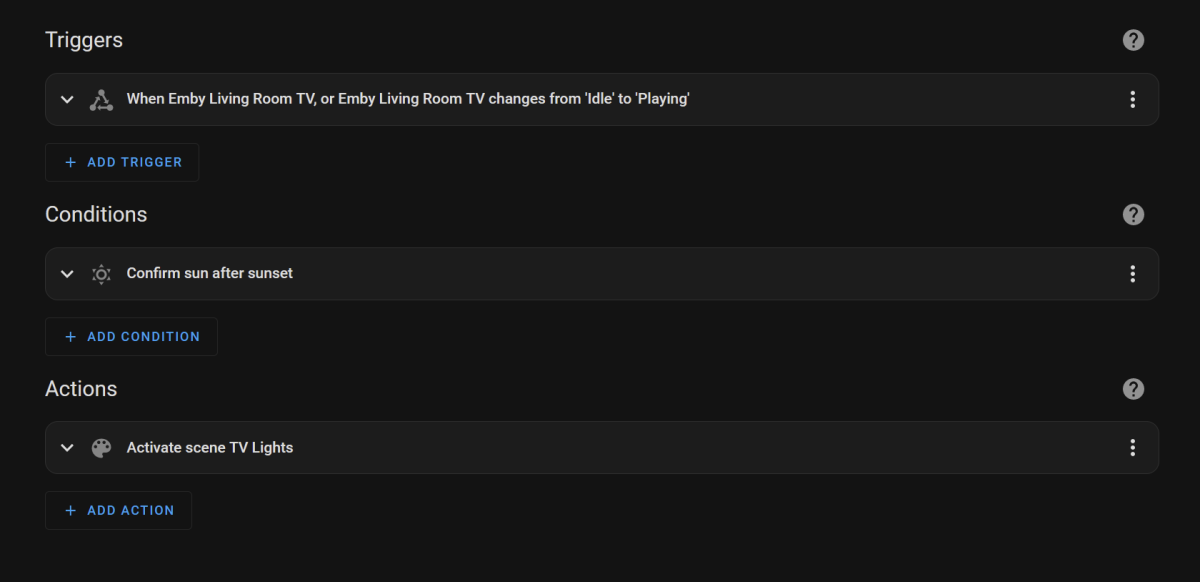
why wouldnt you just do it all in Home Assistant? Automation
 1 point
 -
Hi, you can't, That's hardcoded, but we'll be improving that in future updates. Thanks.1 point
-
Well, I installed the faster network and retested 4K both on the NAS server and the Mac Mini (M1) with HDD. And both worked great !!! No dropouts -- no fail to run. And other APPs are faster. Netflix, etc just pop to life now.1 point
-
Yes...it works1 point
-
Danke Luke.1 point
-
Hi Luke, Will do. I'll do a few fresh attempts from the ios app and android app. Then drop the logs in here.1 point
-
Same issues I'm afraid Luke as I said in the post. I believe it's the FireTV 4K Max that has the issue as the Shield plays them fine (on both Apps - ATV and Android). I'd be interested on what the FTV 4K Max is reporting to Emby on what it can play - I *think* it is possibly mis reporting for a DV7 and HDR10+ combo - it 'should' be dropping to HDR10 but is not. Same for DV8 and HDR10+ (should play as just DV8 - as DV8/HDR10 works just fine). Thanks.1 point
-
Thanks, I'll continue investigation1 point
-
1 point
-
I should note, I would highly recommend setting conversion tasks to default to auto threads and not tick "full speed conversion". Presently it defaults to max threads and full speed conversion. I have a decently beefy box (i9-9900, nvme, 128gb ram) and even with this conversions absolutely hammer the box and make emby nearly unusable until conversions are done. Adjusting to auto and unticking full speed conversions seemed to make things usable in parallel. I can't imagine most would want conversions to have such priority by default. @LukeJust my 2 cents fwiw.1 point
-
I rotated my logs and I was waiting for it to happen again but think I found the culprits on both, which interestingly appear to be different root causes. Emby1 - someone had accidentally queued a large amount of items for transcode and download. Emby2 - one large library unintentionally had almost every metadata providers enabled to include screen grabber. For reasons I'm still unsure of, this ffprobe/ffmpeg function to grab a screen was failing/crashing on a large number of episodes. However, I don't want screen grabber on anyway. Turning off screen grabber and deleting the conversions/transfers scheduled tasks seemed to resolve the issue on both. I'll monitor and if it happens again grab and attach some clean logs. With regards to overlapping Libraries, I do not have overlapping paths or media across libraries nor do I utilize strm files. Thank you both for the prompt replies and apologies for the false alarm.1 point
-
Hello, I will do this test.1 point
-
Yep, one more thing to add to the list of (hopefully) potential improvements. Can't, it'd be in either left or right corner.1 point
-
I was thinking about using custom overlay but I'm not sure if I can reach the same result in term of positioning/size of the 4k "banner". Some sort of Ignore under Specific Covers would have been much better1 point
-
I also have problems with Ac3 or eac3 with a bitrate of 640kbs1 point
-
All users.1 point
-
mh, ok... Server Version is on Version 4.7.11.0 Try to get a log this evening...1 point
-
Ok, I'll try again when 4.8 is out and report here if I still see this.1 point
-
@rbjtech The bulk edit does change every selected item all at once. You don't have to cycle through them. When you add Tags, genres, and studios you must select from the pull down list how you want the tag added. I just tested it and it works as expected. I just uploaded plugin 2.3 - it corrects a bug in the custom filter that kept the edit/bulk buttons hidden. Vic1 point
-
Richy Rich… I think the intension of the original html version was to select all the stuff you know need editing, and have a more granular edit to the mass edit, by doing one and moving to the next. But i think that it would be a great addition tohave a tab that said. Apply to all in the selected items.1 point
-
You might want to visit this thread. Lots of enhancements being requested, compared to the Android TV app. Sixty plus pages, so might take a while.1 point
-
Thanks for the tip. To filter that out in Home Assistant could probably be done with a template condition. Unfortunately, I do not know what I would have to enter there.1 point
-
Which is EXACTLY what it is named If that naming structure throws Emby off, then that's an Emby issue, it's not a file name issue. The extensions are absolutely following standards. Nobody is going to break naming conventions for a piece of software that can't even properly handle itself.1 point
-
I want to clarify something: If the Emby for Android app is going to provide DSD playback support as it should, then it must: - Implement the "Exclusive USB Audio Access Mode" option which is now in the Feature Requests section, this is necessary to output the DSD stream directly to a DAC with DSD playback support, otherwise, if the Android driver is used, then only PCM decoding is possible. - Implement the three audio options for DSD decoding: PCM, DoP (DSD over PCM) and DSD native, otherwise, if the Android driver is used, then only PCM decoding is possible. In my case with the FiiO KA1, PCM and DoP are supported by the DAC, but DoP is only possible with the "Exclusive USB Audio Access Mode" option.1 point
-
I add that the problem does not occur when using an external player, it does not occur on jellyfin or plex using exoplayer, but only on emby with exoplayer1 point
-
Oh, I get it just fine. Emby cannot handle this properly and requires individuals to break standards for their own purposes.0 points