Leaderboard




Popular Content
Showing content with the highest reputation on 04/25/23 in all areas
-
I've been getting a lot more partial recordings lately, not blaming Emby at all but this feature would be kick-ass right now @Luke if you think it's worth a look, I'll send you some logs.3 points
-
Well considering all of the new transcoding settings you'll be getting in 4.8, I would say anything is possible.3 points
-
The last two episodes of this TV show have the same behavior / codec. I've just tested playing on web client instead.... and it is not smooth neither... I have some mosaic effects every few seconds.... maybe it s the encoding of the release... I'll check that2 points
-
I've done post production for film and TV and I do not use Emby encoder. I use AVIDemux instead, because I like the detail control and my gear is not fast enough to handle conversion on the fly. I also prefer to print photographs in a darkroom. So, please keep that in mind. 30fps is perhaps the problem. Older film media is 24fps which is used by most blu-ray content, TV and DVD in the US is usually 29.97 fps interlaced. TV and DVD in the UK is 25 fps. Some newer movies that can show up on Blu-ray HD can be 48 fps, or perhaps 60fps. 30 and 60 fps are often found in Game playback recordings. Copies of TV or DVD video can be converted from 29.97 to 23.976 and look very nice with no jitters. This conversion is rather complex and not always handled perfectly by automatic conversion encoders. Finally, of course, there are all sorts of media online that has some problem already that was created when a copy was made with some format or frame rate errors. You can more easily spot such errors by advancing frame by frame on a side to side movement scene. There are reasons for all these formats, but I won't go into that here. If your encoder grabs a 29.97 fps video and converts to .mkv with a setting of 30fps. That already is either slightly wrong or the encoder is not telling you that it really is keeping the fps at 29.97. Something made for TV can be at 29.97 interlaced. Most any movie has been upconverted from 24 fps to 29.97 using what is called 3:2 pulldown, which adds a non-moving frame copy every 3 frames. This is only with DVD format and older video tapes. There are so many possible playback problems if your encoder doesn't do the exact preferred conversion. When it is set to automatic, it will probably add some blur to the frames to hide any stuttering. But if it is converted correctly, then the result is much better. From 29.97 DVD to online or HD playback, it's preferred to remove any 3:2 pulldown first which drops the frame rate to 23.976 and then encode to whatever format you prefer. Visible 3:2 is now rather rare on DVD's, mostly with older films, so encoders tend to ignore it and just do a general frame blurring. If you keep the original frame rate, you will probably get a cleaner conversion. The best quality DVD can be encoded by checking for 3:2 pulldown, running a filter to remove the extra frame, then change the fps rate to 23.976... Add some low frame change blur, if needed FYI: 29.97 / 5 * 4 = 23.976 Crop any black bars top, bottom, left and right Resize and adjust the height to get the aspect ratio to the correct format which gets rid of the 0.9 pixel size used in DVD. Do any color correction and contrast. A lot of media is too yellow and too red to hide color errors. Pick a encoding bit rate that is good for DVD sized encoding. I tend to use from 1000 to at most 1400 Kbps if the quality settings are all the way up and motion scan pixel size is low and prediction pixel size is 32 Save in .mkv or .mp4 at the correct Aspect ratio that matches the original media. Sorry for some much detail. The point I suppose I making is that if you skip all this and rely on automated encoding process, it's a crap shoot. If you dig into the details and create beautiful encoded media, then that's the kind of work that is done with a post production house. They always require the client brings in master quality copy if possible, which is never what you see online, nor even on a blu-ray disc. Hope that helps.2 points
-
ATV app is superior in pretty much everything... WMV is this -2 points
-
I'll fix it in next version...2 points
-
Since we can now detect end credits, or manually add them in other cases, it would be nice to see this, rather than an automatic percentage/time remaining, trigger the "next episode" popup and decide whether an episode is resumable or not. Even better if it could expand to movies for the latter point.1 point
-
Hi, There seems to be an issue on the Live TV that no channel tags are available? Is it possible to have an intuitive navigation system such as left click to bring up the list of tags on the TV guide or something similar?. Emby Server Version 4.7.11 point
-
Would be cool to add a feature that prevent to have incomplete recording in library could add a option to not keep content below a certain percentage of time. It happen often that m3u fail and i miss 30 minutes and more of a recording1 point
-
The block under "If that works, proceed with enabling nivida for docker, see the link to the post ^ on top of this site, the tl;dr for this is:" needs to be replaced, adding the repo part is missing. the block: sudo apt-get update sudo apt-get install -y nvidia-container-toolkit sudo nvidia-ctk runtime configure --runtime=docker sudo systemctl restart docker1 point
-
Thank you so much Luke! You're amazing.1 point
-
The Roku Express 4K model also has AV1 support. Emby will properly detect AV1 support on any Roku models, present or in the future.1 point
-
@rbjtech Thank you!1 point
-
Correct.1 point
-
As an aside: to my eyes, when AV1 is starved of bits (say by an unexpectedly complex bit of video in a space-sensitive encode), it degrades more gracefully than HEVC. Of course, this may have been a chance artefact in the examples I have noticed. Paul1 point
-
Browsers yes. Edge has a free HEVC Plugin which allows direct play of HEVC, but agree Chrome/Firefox etc don't have this out the box - as you say, licenses are the only obvious reason why. All other hardware in the last 5 years or so that supports 'UHD/4K' will play hevc - it has to as that is the universally accepted codec for 4k video. AV1 hardware support is only in the last 2 years, maybe less. I *think* ultimately, AV1 will gain popularity quickly once mainstream GPU's become affordable and Intel and AMD include hardware ENCODERS in their silicon. h266 is also out there - just to stir things up haha.1 point
-
Hi, thanks for reporting. We’ll take a look.1 point
-
Thank you very much for your answer, I am using a privileged container, so it is not a problem of uid and gid, I tried the latest beta version of emby, and my problem has been solved, it seems to be a problem with the emby hardware driver. Thank you very much1 point
-
Samsung are very unlikely to ever support DV. DV is now the dominant dynamic HDR standard by a significant margin, supported by almost everybody (incl even Apple..) except Samsung... So while it's great to match HDR10+ from the client and TV - my money would be on getting a TV that plays DV - that dominance is not going to diminish anytime soon ... Your Shield plays all available formats of DV anyway - and has done for years. Atmos is a different issue - all hardware appears to support EAC3 (Dolby Digital Plus) with Atmos - HD Audio with Atmos (True-HD) is another issue entirely - but again, the Shield has zero issues playing this to a suitable AVR or soundbar.1 point
-
There are no 'settings' - it all depends on so many variables that it's impossible to even give guidance on this. There is a wealth of info out there - but my honest advice is to try play and see if you are happy with the quality vs filesize vs time taken to do it. Pretty much every file is going to be different - so don't assume what works for one movie, works the same for the next. Tv series / seasons are 'generally' encoded the same, so you can apply those settings to all episodes for example. On AV1, unless the majority of your clients have AV1 decode, then you'll be encoding twice, one for the encode (and even on hardware, this takes a lot longer than even hevc) and again to decode during a transcode (losing the quality you fought so hard to maintain..). The space saving over AV1 is from what I can see 'minimal' vs well encoded hevc - so not worth it imo - not yet anyway.1 point
-
You can either self host - and use hosting providers just for the domain/re-direction to your 'home' server or you can host the entire thing in the cloud - this obviously means all content etc has to be uploaded as well as the emby service needing to run in the cloud. It is worth checking with any hosting provider that 'video/streaming' is allowed - as many will assume it's a website with static content. If this is your first time doing this - I would suggest a self host to start with and then when you are comfortable, move it into the cloud.1 point
-
Adding my voice here. Loving tags on iOS. Please add tag suuport for tvOS.1 point
-
Useless post. Goodby!!!1 point
-
I've been meaning to post the issue/solving a while. Always forgot.. For some reason when upgraded it used the settings of foldersync(was not installed when browsing plugins). I cannot remember clearly, but pretty sure I could not install or find it on the updated server. To solve it I reverted back, installed Foldersync again, removed all settings and lastly updated again. Updating just in case someone some day experience a similar issue.1 point
-
Is it also planned to add some kind of „editable“ „non editable“ options? Iirc currently users can modify all playlists. So I‘d like to create playlists which other users can see, but not edit.1 point
-
HI, yes you could install it onto your server machine and then add libraries via network paths. If you're hoping to migrate, please take a look at this and let us know if it helps: https://support.emby.media/support/solutions/articles/44001159936-backup Thanks.1 point
-
Running 8.1.2, When I run a the MLB baseball kodi addon and watch some baseball, stop it , then watch a tv episode (which is meant to come from emby) - it isn't actually connected to Emby at all. No client is showing up in the dashboard. Perhaps there is a way to ensure that the addon reconnects to emby? Will PM the debug log. Baseball commenced about 2.36pm. Within 10mins I attempted to play some TV.1 point
-
Correct.1 point
-
@visproductionpretty much hit it on the head. It's highly possible that your devices are forcing the playback to be whatever your tv's frame rate is, and your devices are not setup to do automatic refresh rate switching, where as the WDTV is. It's not an emby problem per se, it's refresh rate problem and quite possibly also bad mastering on dvd's where 2:3 pulldown was either done improperly, or is not being respected. This is typically a problem that is unique to dvd's and the "new fangled" HDTV's as most mfg don't give a flying F about SD content and all it's quirks.1 point
-
I will check into your comment about "Critic Rating" tomorrow. Vic1 point
-
Matching resolution is a sub-option of the frame rate switching - you cannot enable it without the frame rate also. Some people want their TV to do any upscaling so they want to only switch the frame rate and not also match the resolution of the video so this sub option allows that.1 point
-
Works a treat with community rating! However, unless I'm going blind, in the custom filter list there is no "critic rating" field appearing.1 point
-
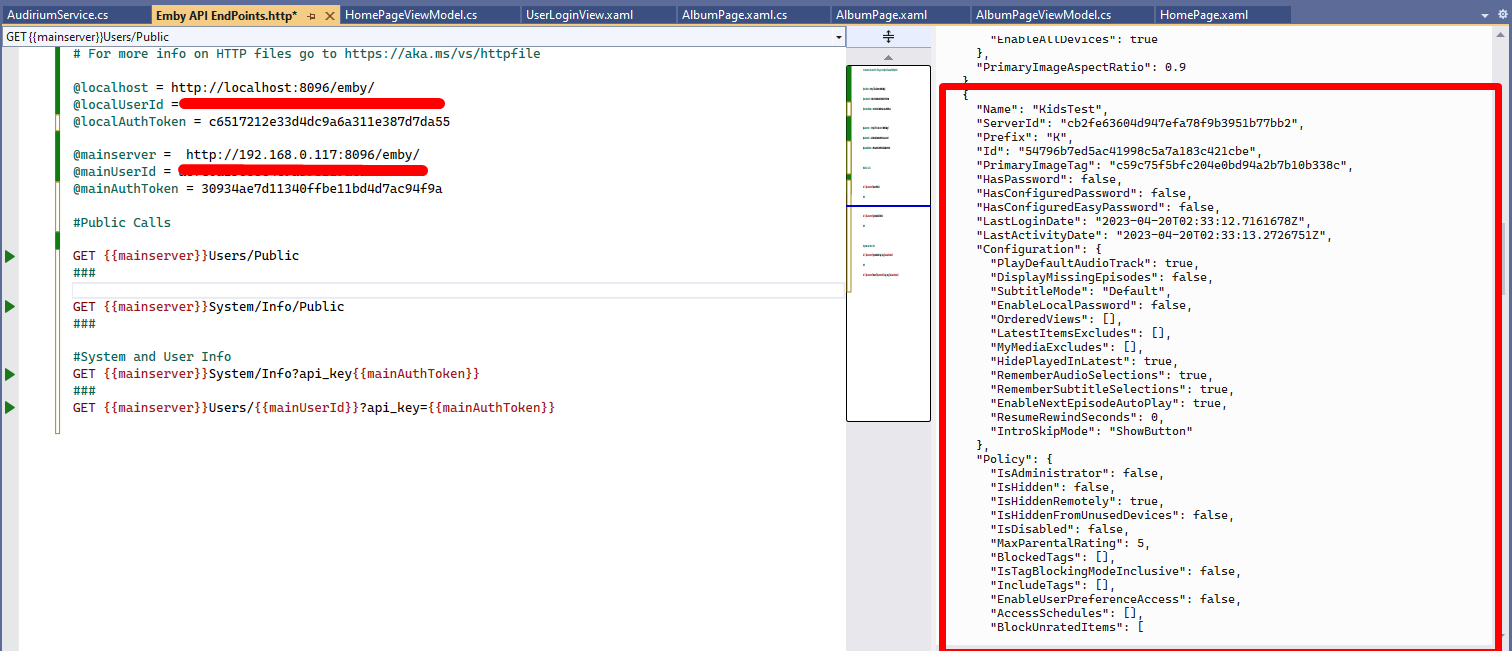
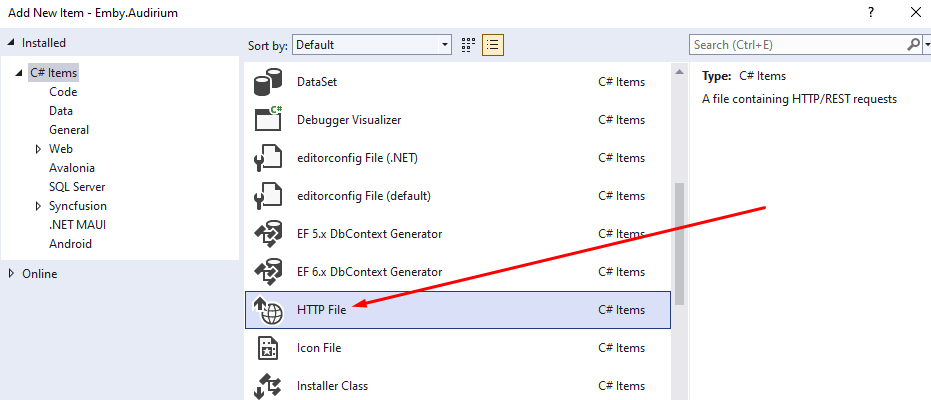
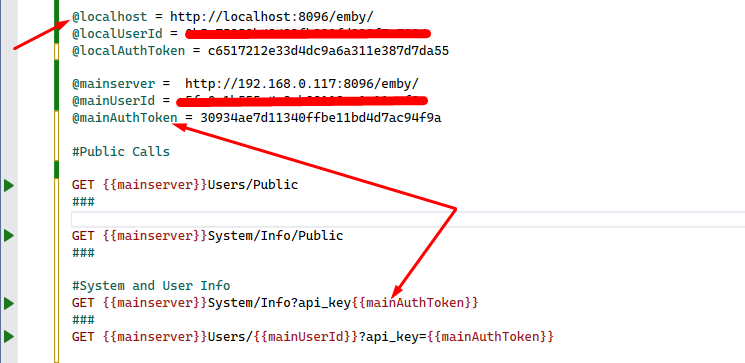
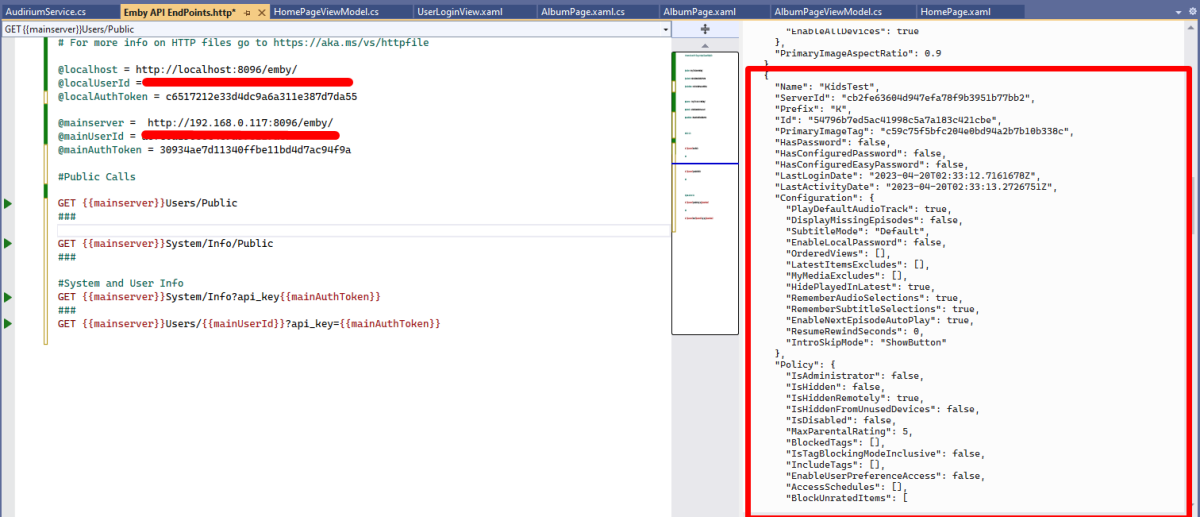
I just stumbled across this excellent "hidden" feature in Visual Studio. Which lets you test api endpoints without having to run code for testing or even use Swagger to return jsons. It's simply a http file extension. Its epic!! Let me show you.... Create a new folder in your project and call it API Playground or something like that Right click folder and add new item and in C# items you should see http file Select HTTP File and give it a name like Emby API Endpoints once created you can use GET POST PUT & DELETE requests to test any endpoint. you can create and use variables. you just need to add the @ symbol before the name of your variable and to use it in your request you need enclose the variable name in DOUBLE curly braces.... {{myVariable}} To add multiple end point tests you need to do a triple hash key under each request ### and to comment you just need a single # prefix Click the little play icon next to the Endpoint you want to test and boom you will get all the info you need in a json right next to it!!! It's so cool, i didn't know about this amazing feature and wow does it speed up work flow. You can also copy the full json and then create new ModelDto's without even leaving VS!!! @chef @VicMoore @TeamB @ginjaninja @mickle026 @BillOatman This is true Wizardry!!! I'm sure you all knew about it, but i just wanted to share this!! Hope it helps someone else out.
 1 point
 -
I was able to get Emby Server running in Docker on my Xpenology box and had a successful restore from the Synology Emby Server app that I had backed up. I'll run this until I can get me a Unraid setup put together. Thanks again for the support!1 point
-
Hi, this will be in the next update to Emby for Android. Thanks !1 point
-
Hi, this will be in the next update to Emby for Android. Thanks !1 point
-
Hi, this is resolved in the upcoming 4.8 server release. Thanks.1 point
-
temp fix: add a mpv.conf in %AppData%\Roaming\mpv\ contains: sub-font = "Source Han Sans CN" to force it using a specific font1 point
-
Yeah, ideally I would replace the Sonaar piece with using the Emby data for when shows are released, but it is a chicken/egg thing - I would like to able to search for shows inside Emby that I don't have files for. I don't think there is any way to do that. Just to be clear, Sonaar in my setup is used only as a convenient API to get air dates.1 point
-
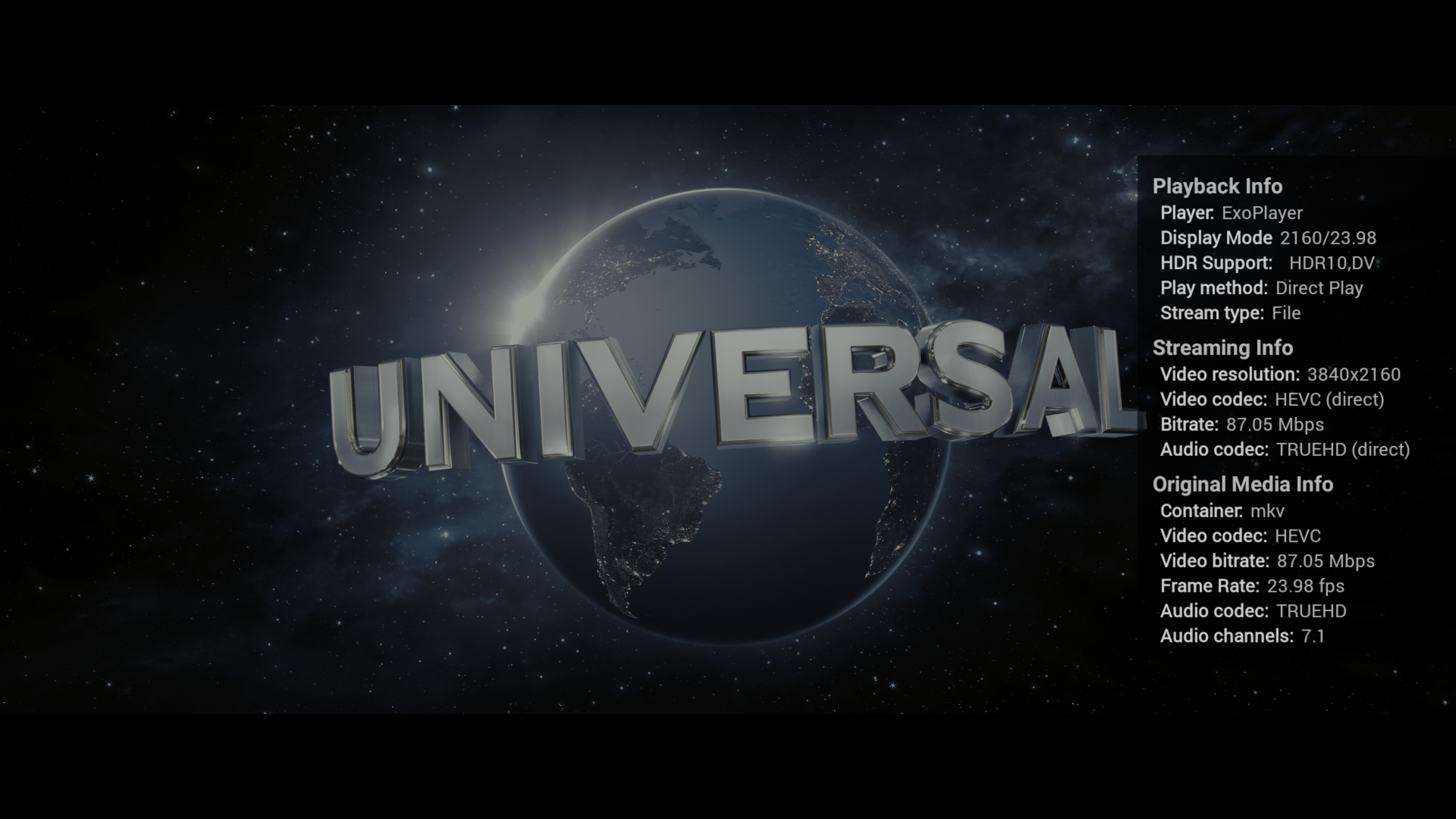
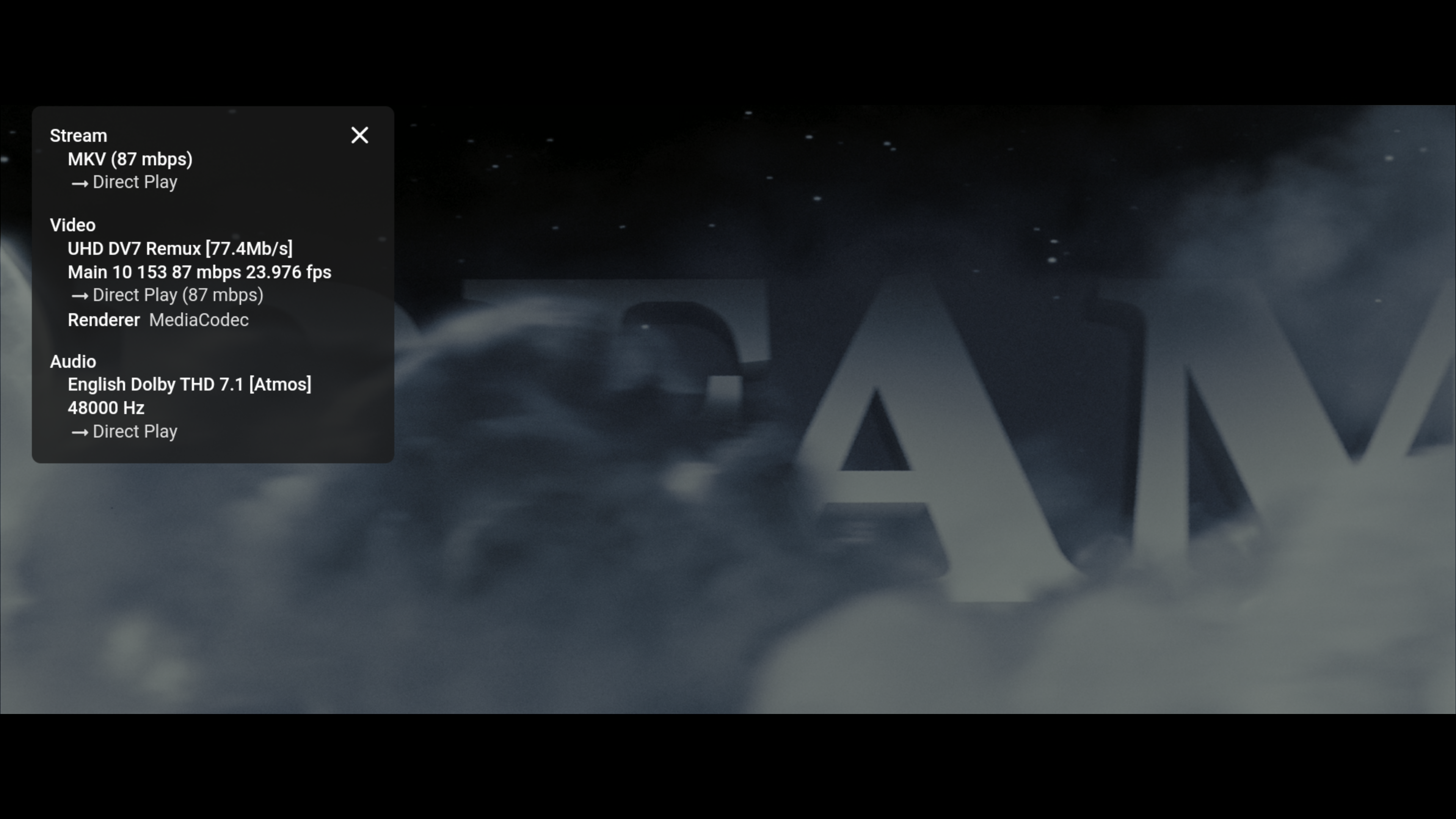
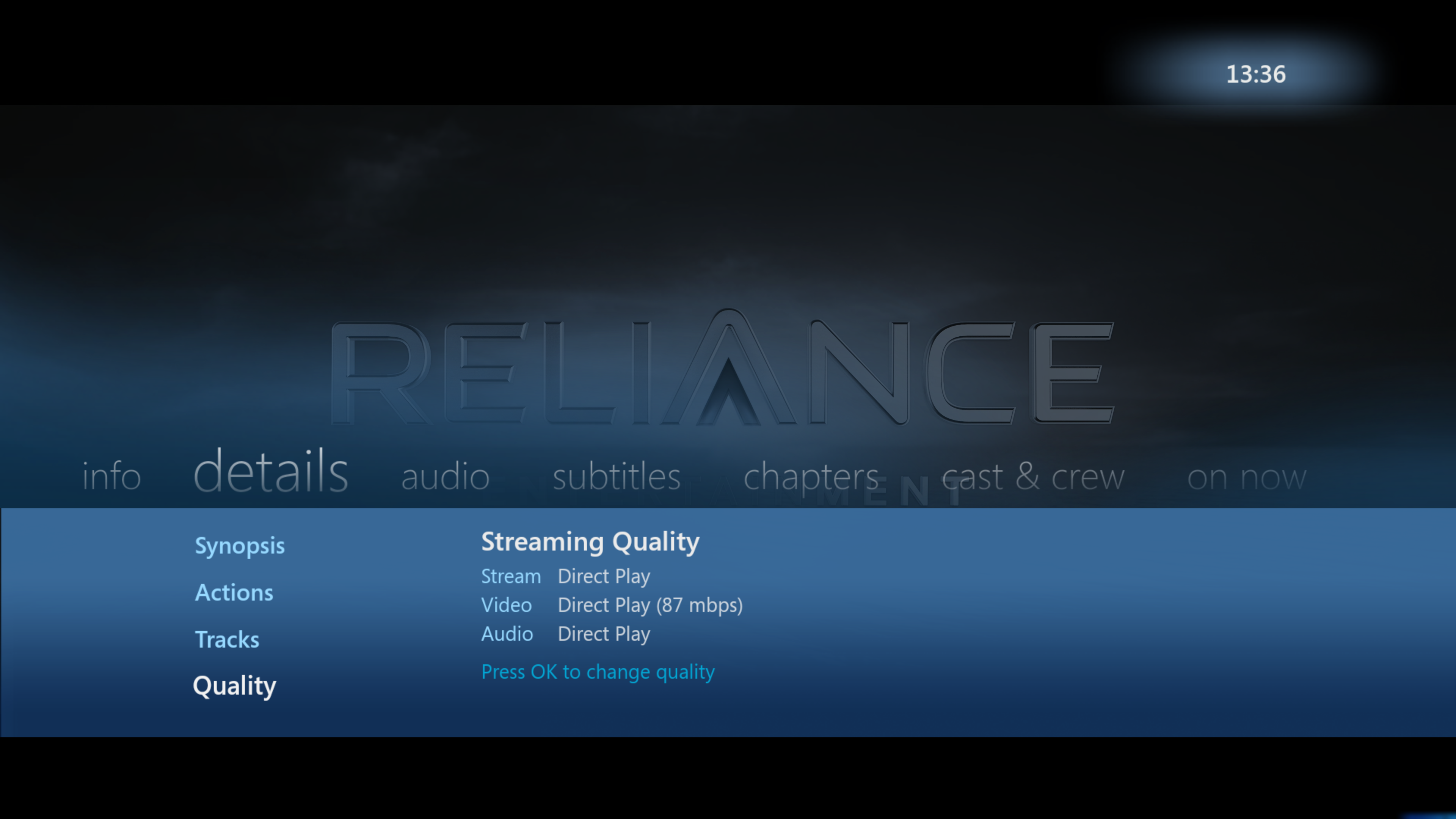
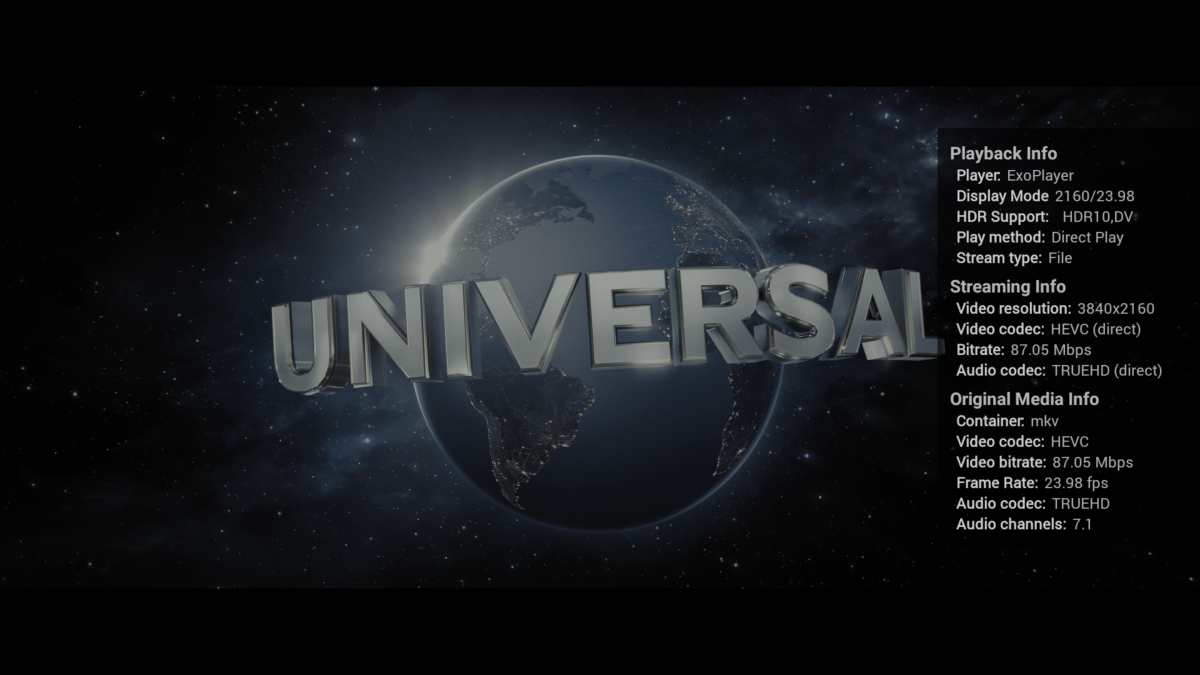
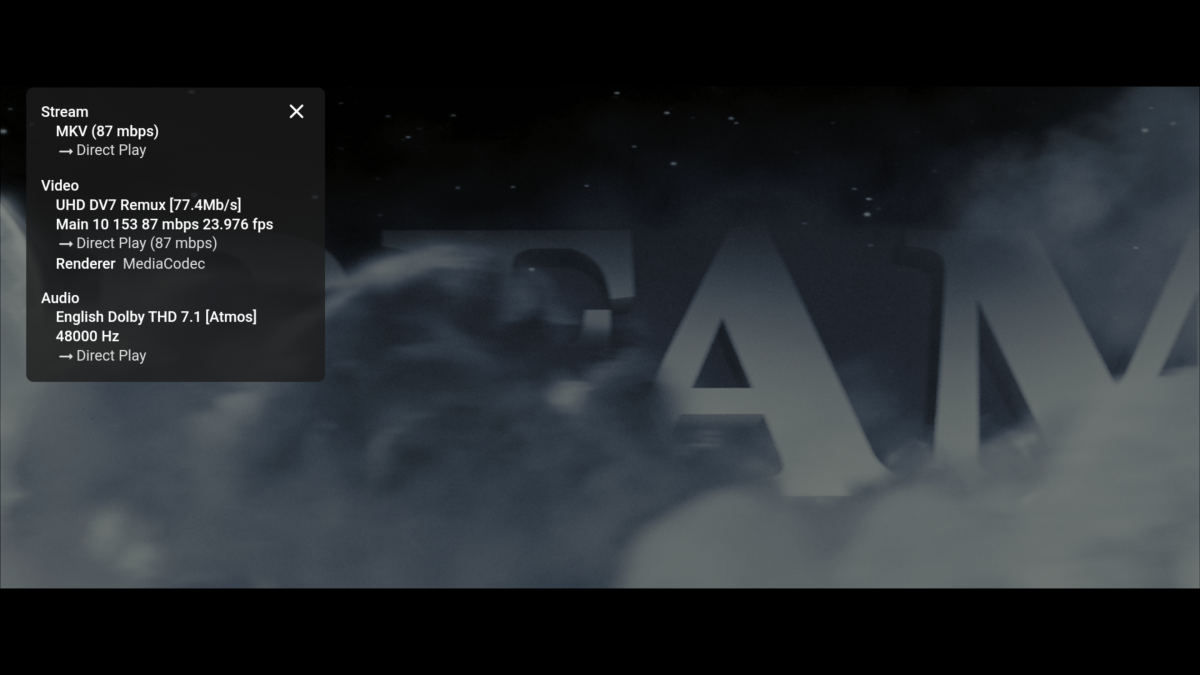
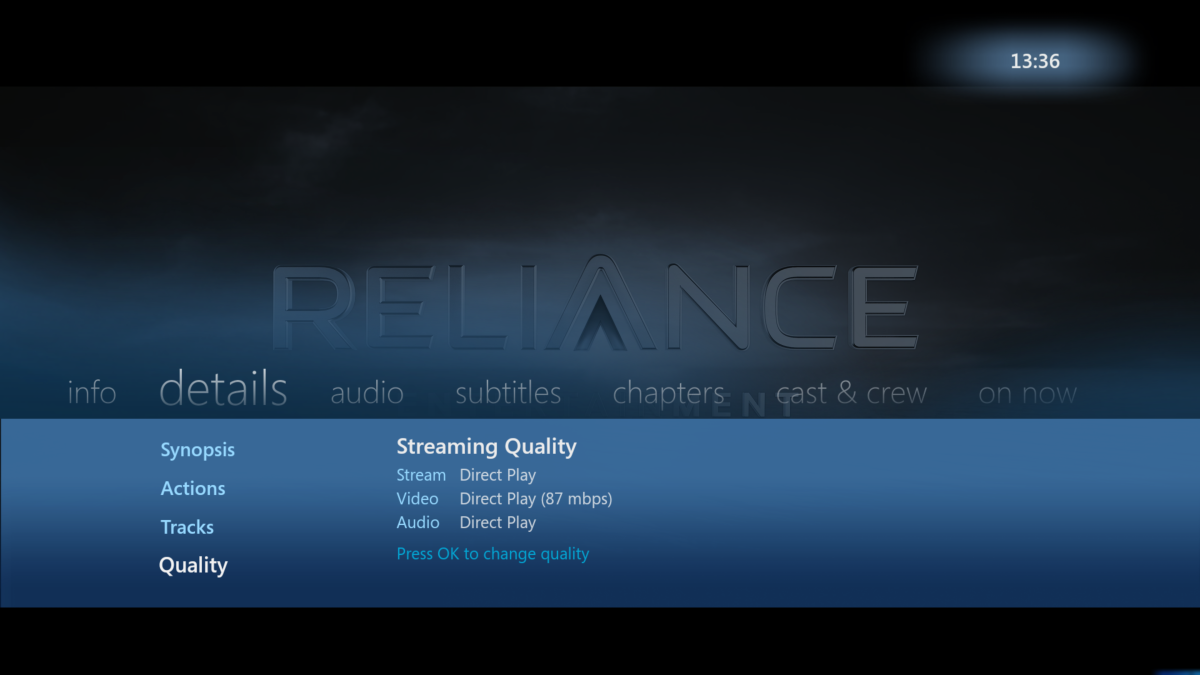
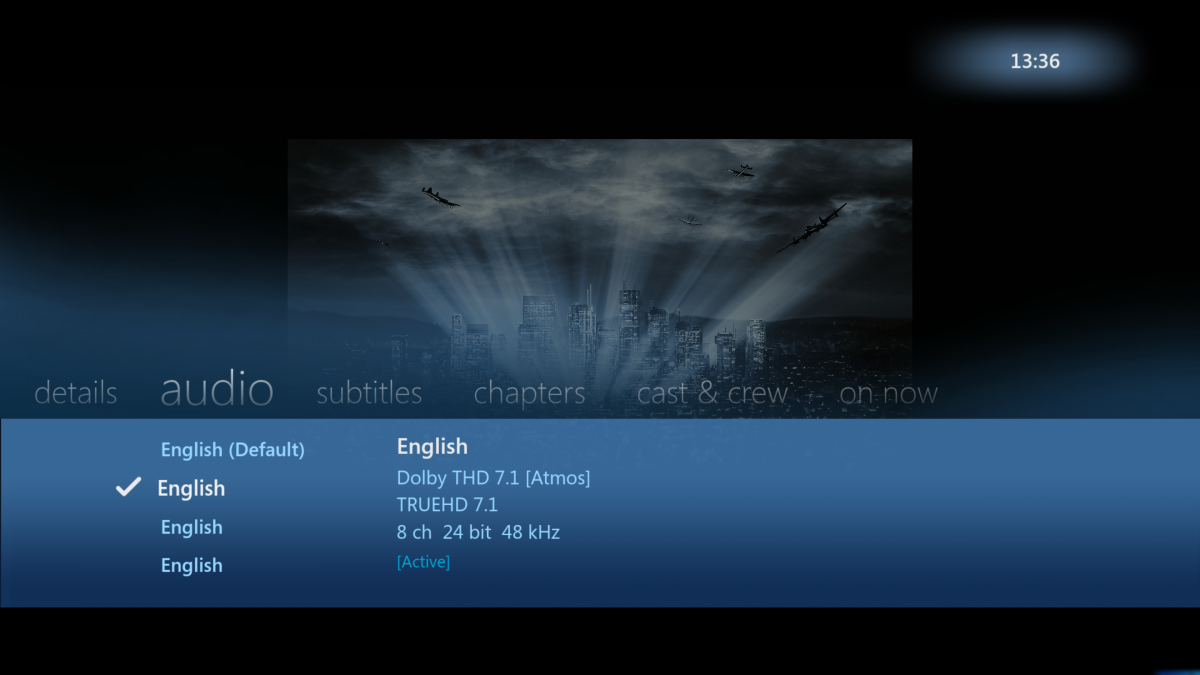
SFN in AndroidTV shows more useful info then SFN on the Standard Android App - especially for TV usage. The Original Media Info is shown (how it appears in MediaInfo), Streaming Info (showing what emby is doing to it - if anything) and importantly, it also shows the Playback Info - including the capabilities of the TV, Display mode incl Refresh Rate being used - and the Stream type. So if you have Refresh rate matching on for example - it should be showing the Display mode as 2160/23.98 for example. Stream Type is also important for me to show 'File' as opposed to 'http'. Everything should say 'Direct' in Streaming Info - if not, then for me there is an issue as the playback is being modified. I think some of this extra info has been requested to be added to the Standard App. Quick comparison below of the 3 Android Clients playing a 4K remux at maximum capability - a) - Android TV (single Press and Hold of the OK Button) b) Android c) WMV for Android imo - AndroidTV still reigns supreme but it is nice that Android shows the track Titles - that is useful if they are present, consistent and correct ..
 1 point
 -
Try updating to the latest build.1 point
-
Yes, next week ideally.1 point
-
It just stopped playing, came up with a message "no playable media found" and went back to the TV show it was playing. I have the Emby for Android TV app and Emby Android (sideloaded) installed on the device, it's a Humax Aura Android TV. The sideloaded app plays with no issues, but the Emby for Android TV app jest keeps doing the same thing; stopping with that message within a few seconds or a minute of starting playing. I also have a Sony Bravia TV with Android and it doesn't happen on that (my daughter uses that all the time with Emby for Android TV and it never gets that).1 point
-
HC, Aha, what about making a script that adds a version number to the name of the file? Emby would then consider it new media and auto update the dateadded to the present date. In a shell script, I think you would use a 'for' command to do all files in a folder and subfolders. If you want to be more selective, then maybe do it in two steps. Collect the file location and titles for all media to update, one media per line and then add the rename command in front and the version add on text at the end of each command line, then just run the file as a script. Once you have the list of media files location you can use grep, to add the extra rename command bits. I like to just do it with Excel and copy the tweaked command lines to a text editor and use Search replace to get rid of unwanted tabs. If you have all the locations, I can tweak 10,000 command lines in a under a minute. If you want to try that and need help, let me know with a private message.1 point
-
In my testing, this is what I've found on my Nvidia Shield client connected to a local Emby server running in a Docker container on Linux Mint 20 with various audio and video formats. Nvidia Shield App from the app store, internal player FF/REV results in a LONG "freeze" (30 seconds to over a minute) One press usually works, but much more results in a freeze that seems like a lock up if you don't wait long enough Playback resumes after the "freeze" Subsequent FF/REV attempts work better but sometimes still result in the long "freeze" It seems that the more complex AV formats (Atmos, 10 bit, TrueHD, etc.) are way more prone to this long pause. Sideloaded Android App FF/REV work fine, no freezing or weird behavior Nvidia Shield App with external players I tried VLC Player, mpv-android, and Nova player, which all work perfectly fine External players suffer from the known issue where viewing progress is not saved On a flyer, I tried Jellyfin - it behaves like #1 above At this point, I need to choose between the less than optimal "generic Android UI stinks on the Shield" experience, the less than optimal "external player but no saved progress" experience, or the less than optimal "use the internal player but don't FF or REV" experience. Honestly, the best experience would be the generic Android player with the NVIDIA Shield UI - is that the one that will eventually be coming to the emby client for the Shield? Is there a way for me to cobble those together on my own? Thanks!1 point
-
Btw it seems to work if you ff a small amount into an already buttered zone.1 point
-
Hi, we haven't yet added this feature to the Emby Apple TV app but it is planned for the future. Thanks.1 point
-
We need alerts of failed recordings ... I am trying to capture full series ... but am disappointed when I go to watch an episode and find only 21 minutes of the hour show recorded. This is a show stopper to record full series for me. no indication at all that the episode failed.1 point
-
Hi Guys, I recently moved from Kodi with MySQL for lack of proper multi user management and server side support, I have to say I'm impressed with Emby. Together with the Kodi Plugin it really takes the solution to a whole new level, count me in among the supporters! One feature I would like to see is the ability to recommend movies or shows to other users: I share my Library with close friends and family but it is a big library so they are always calling me to recommend them a movie to watch. It would be really cool if after watching a movie I can click a Recommend button and choose the users I think would like the movie, then it is displayed on their suggested movies at the top with the name of the user who recommended it... Sorry if there is something like this is already there, I am new to the interface and don't fully know it but could not find such feature... Thanks!1 point
-
Hi. Yes, we should probably have better knowledge of this built in. For now, you should be able to achieve this yourself by shutting down your server and editing the config\system.xml. Look for the section with "SortRemoveWords" and add in entries for the ones you want. Then save and re-start your server.1 point