Leaderboard




Popular Content
Showing content with the highest reputation on 04/20/23 in all areas
-
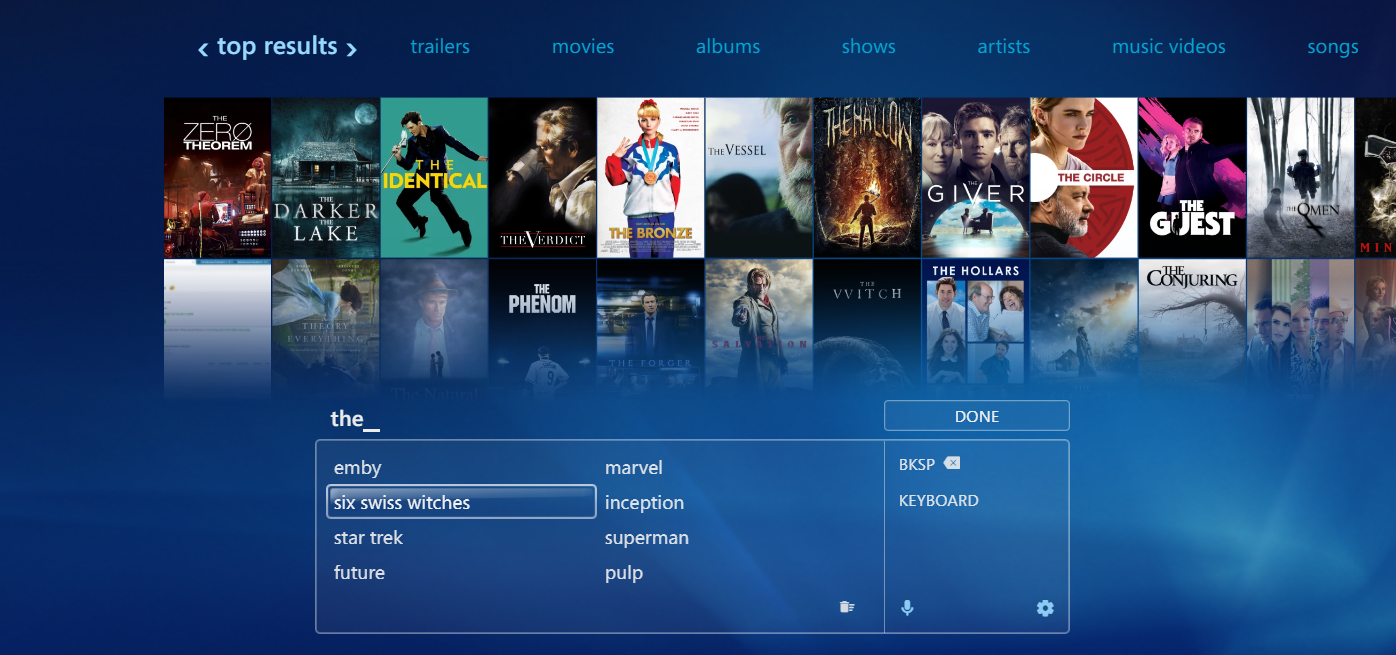
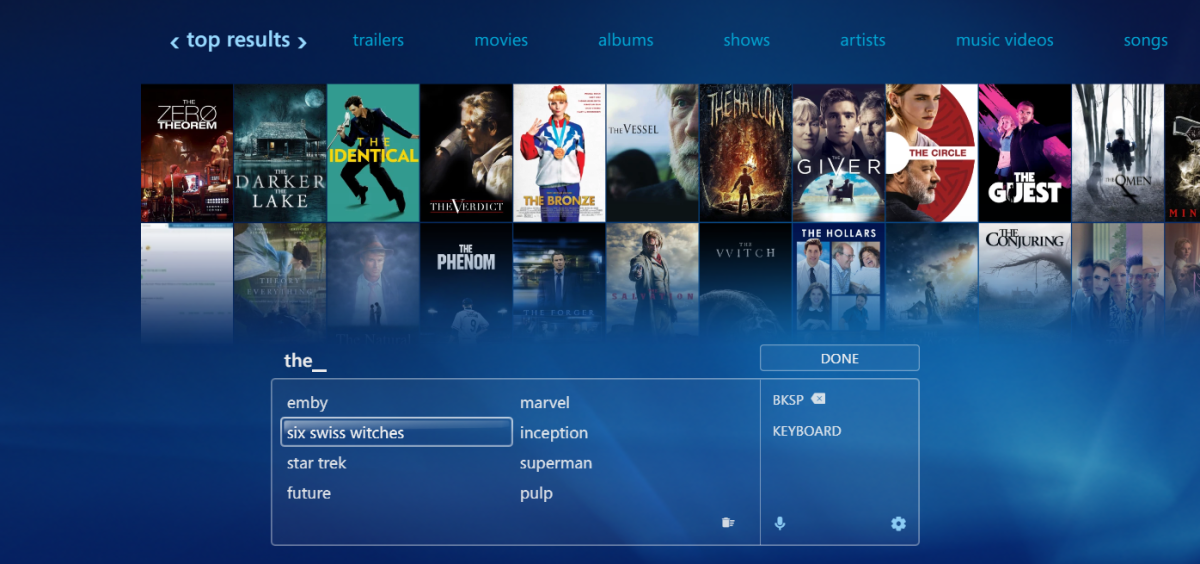
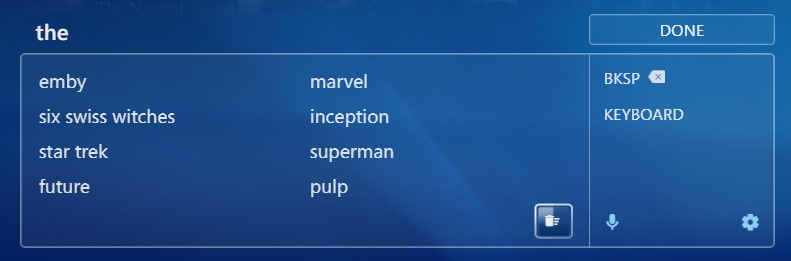
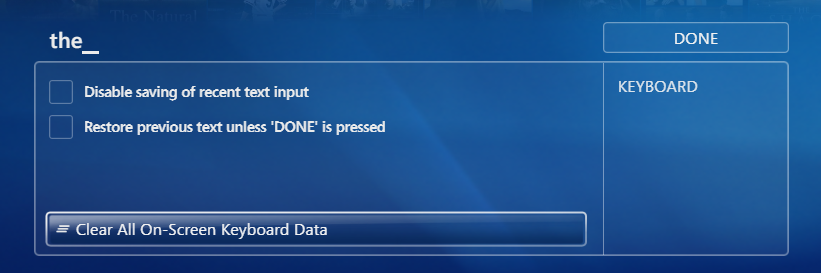
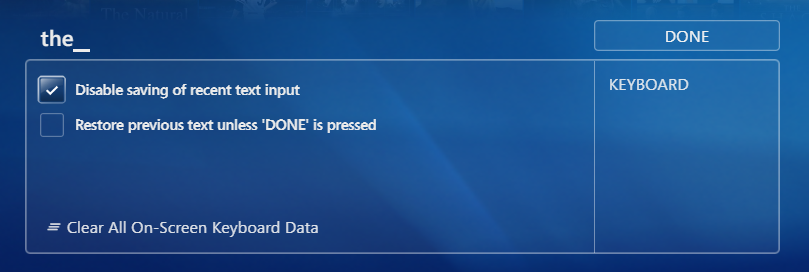
On-Screen Keyboard - MRU Panel We have recently disabled the HTML engines' feature to display a popup with recent text inputs when entering text fields, because it interrupts navigation: the popup gains focus and you can't continue navigating within the Emby page. As a replacement, the new OSK provides an MRU (most recently used) panel where you can choose one of the most recent 8 input terms: The terms are stored specific to the input situation, so when you are in a field to enter the server's host name, you won't see your inputs from search and vice-versa. Privacy Concerns There are always privacy issues with such kinds of features, so we have taken measures and added options to give you full control over the behavior: Of course, the MRU feature is disabled for password fields The MRU terms are stored per Emby user who is logged in. You won't see the inputs from other users on the same machine The MRU terms are stored at the client side only and not propagated to the server It is possible to clear MRU terms for the current input It is possible to clear all MRU terms for the current user The MRU feature can be totally disabled Clearing MRU for the Current Input This can be done with the focused button below Clearing all MRU Terms This can be done from the settings panel with the focused button below. It will clear all OSK data (MRU terms, language selections, settings) Disable Saving of MRU Terms There's an option in the settings panel to disable the feature altogether:
 4 points
 -
So nice to see privacy being taken seriously - per client and per user is perfect imo3 points
-
I disabled it and it looks like the syncing issue went away, I need to test over the next couple days, but I ran raw TS files that were recorded from live tv, I ran the MKV files I was testing with and everything seemed fine.3 points
-
Hello @MBSki. I am glad that you are not experiencing any problems. I need to test a little longer. @Cheesegeezerwill decide when we ask Emby to add this plugin to the library. I keep learning more every day. Vic2 points
-
Cool thanks for sharing. We are looking into the dsd issue.2 points
-
On-Screen Keyboard - Diacritics Input The alpha keyboard supports > 200 different keyboard layouts/languages (not all are enabled currently). For each language, it provides precise and accurate behavior: Modifier Keys It replicates the behavior of modifier keys (CapsLock, Shift, Alt Gr, CTRL) Only shows/allows those combinations of modifier keys which are valid, e.g.: When a modifier key does not produce different characters, it is not shown When you press a certain modifier key, only those remain visible which are a valid combination (which has key mappings) When one or more modifiers are active, only those keys remain visible which have a specific mapping for this modifier combination (allows faster navigation and finding key quickly) Modifier keys are synchronized with a physical keyboard Typing via physical keyboard is still possible when the OSK is active Transforms Transforms - sometimes also called 'composition' - is when you create certain characters by a sequence of keys. Examples: ^ + a => â ´ + e => é other languages have their own transforms, many of them I've never seen before... To make this kind of input easy, when you have pressed one of those keys starting a transform (also called 'dead keys') the OSK hides all keys which would not be a valid completion of the transform, and on those keys which can complete the transform, it shows the resulting char of the completion. It also works in cases, where the completion chars are differing depending on the active modifier key (or key combination). Demo OSK_Diacritics.mp42 points
-
I've been looking at some info about high resolution audio support on Android and all I've seen is complaints about poor support by the Android driver in this regard, where the driver resamples everything to 48Khz instead of playing the audio in its real resolution even on phones with DACs that support up to 192Khz. In a previous release of Emby for Android mobile I saw the release notes saying the app was supporting high res on phones that support it, but given the above situation I wonder what the Emby app actually supports in this regard. One suggestion could be adding the real output the app is giving in the "Stats for nerds" option inside the cog icon in the now playing screen.1 point
-
Hi, on themoviedb website you can set your default language and a fallback language for data not translated, it is possible to set that in metadata setup ? Often, title between FR-CA and FR-FR are not the same, i prefer FR-CA but this database is less populated than FR-FR, on moviedb you can complete unpopulated data with FR-FR.1 point
-
Some of My Artwork I made with the A.I.

.png.603eb7a741cd7bd23699c8e0d2f4ad0f.png)
.png.6a53c5963d83f82a5a49dd21b1996055.png)
.png.cf1ded0d3294f12f0c165d36cb2cebdc.png)
.png.3dda002acf98f3488bfb3807ab84c4ff.png) 1 point
1 point -
Hi guys. There is an issue with controlling the app from the media keys once the app is not the main window. Using Play/Pause, Skip buttons when the app is selected works 100%. As soon as the app is not the selected window, the keys stop functioning. This is not exclsuive to Emby (VLC suffers from the same thing), but other apps do work such as Spotify and Chrome. It is quite frustrating to have to alt+tab to Emby to make use of these keys. Thanks1 point
-
Might also be interested in EPG data but for Germany & Portugal. Thank you!1 point
-
That's the purpose of the trial. I can't control the placement of the theme media, thats dictated by the server. These plugins are simply metadata providers that place them in the location required by emby server so they have done their job as required. Whether manually placed or placed by my plugins, the result would be the same so I can't give you a refund as they have functioned correctly.1 point
-
I could in theory try and detect the user and block them from uploads. I've had this thought before after a flurry of crappy themes being added. I'll look into it. I need to make some updates for the new release it seems so I'll look to see what I can do then1 point
-
Im less worried about harddrive space, then I am transcoding performance. but 500tb?? dang my wife thinks Im crazy at 70tb1 point
-
i can't agree with that. once you have a curated m3u (and iptvboss is great for that) then to me the benefits of having everything in one place far outweigh the minor annoyances with emby/iptv shortcomings1 point
-
Decided not to be churlish and bought a lifetime Premiere license.1 point
-
I just bought an Amazon Echo today and also paid for the Emby subscription.. obviously hoping to be able to use it, and now I just found out that this is not possible! (call me naive) I couldn't care less about German or Spanish or Swajilli or whatever exotic random language, I just want to install the Emby skill IN ENGLISH in an Echo that is linked to the Amazon Germany shop. Why do we need to wait years for this?1 point
-
Yep - aware of that - I'm suggesting it gets combined or dual purposed with this 'setting'..1 point
-
I'm pretty sure and have tested it. When I learned about this from the forums then tested I immediately spun up a reverse proxy. This is a bad one in my opinion.1 point
-
That does seem to have fixed it. Thank you for the help1 point
-
Disregard. I had the libraries as "mix content" not TV Shows1 point
-
Make sure the app supports the three DSD available modes: - DSD converted to PCM. - DoP (DSD over PCM). - DSD native. The "Exclusive USB Audio Access Mode" option for DACs is needed of course for all this to work, which it's already requested here: Thank you.1 point
-
.... It was a browser plugin. I'll be in my hole.1 point
-
I hope I'm wrong and that it was fixed already. If not in stable at least the current beta release.1 point
-
from my experience i agree it is not possible to have an automated profile do this. to be honest i have never found any conversion profile that i was happy with the outcome from, i can always see the difference and its not acceptable to me (but remain open to being convinced). the size of my library and my time available also mean i cannot take a individual analytic approach to conversion either so i just keep throwing hard disk space at it. about half a petabyte and counting1 point
-
I'm on this journey as well. My core requirement is to convert all h264 over a certain bitrate for it's given resolution to hevc using QSVEncC with ICQ. Space savings on original h264 Remux's are huge (sometimes 20% of the original size) - and I cannot visually tell the difference on what I consider to be a reasonable AV setup. But as has been mentioned above, a blanket 'convert it all with setting x' is totally the wrong way to approach this - you must analyse each file and encode accordingly but even then, it may have been encoded that high because it has action scenes from beginning to end, film grain, huge levels of detail or a very dark movie for example - a quick 'ffprobe' can't tell you those sort of details. That being said, I'm trying to use 8Mbit/sec for h264 1080p material as my threshold - if it's less than this, then it stays on h264 - as it does not have the original source quality to be converted again. I looked at AV1, but for my use case, I don't believe it has any significant advantages over hevc - and it has many disadvantages as my client base is only partially able to hardware decode AV1.1 point
-
Thank you all again. I had to revert as it completely buggered access to my clients, particularly those running it through a TV app. Will go back to the drawing board and follow up on your suggestions :).1 point
-
So it does look like version 1.04 works on beta 29, thanks @lorac1 point
-
Fingers crossed1 point
-
Great job, thanks for being persistent with Samsung!1 point
-
No, this is about reviews.1 point
-
Any reference to mb3admin.com and/or associated errors. You can anonymize logs, btw, or sanitize them yourself before posting.1 point
-
billingsupport@emby.media But that sounds like your client cannot validate, if your Premiere key is valid - what does your Settings>Emby Premiere tab state?1 point
-
Just for anyone trying Av1, if you use Windows use the WebM wrapper. Windows has some playback issues if you use other wrappers.1 point
-
It's a pretty visible glitch - I hope y'all can get to it quickly.1 point
-
Side note, its extremely noticeable when you let the DAC do its job, wow.1 point
-
Of course. If every client was a nvidia shield I wouldn't do anything. But most are TVs or web clients. Which have limited decoders. I don't burn in subtitles, just add them as a strean1 point
-
I bought a FiiO KA1 USB-C DAC for my phone and this is what I found out: The DAC has an RGB indicator light that changes depending on the format and audio quality: - Blue: when 44.1Khz and 48Khz is playing. So far so good. - Yellow: When 88.2Khz and higher are playing, the Emby app on my phone was able to output these qualities. So far so good. - Green: When native DSD is playing, the Emby app was unable to play or passthrough this format. - Magenta: This is for FLAC files encoded in MQA, I have a few songs on this format but unfortunately the Emby app passed only the standard quality and I imagine the reason is because the MQA core needs to be implemented in the app in order for this to work, more info here https://www.mqa.co.uk/tag435sdf43te and here https://github.com/purpl3F0x/MQA_identifier/tree/master/gui. Perhaps you can make the app to tell the DAC that the song playing is MQA encoded. An MQA sample is attached here Coldplay - Paradise.flac I was impressed that the app actually passed through all Hi-Res qualities, however, on the Android TV app the situation is very different, this is the current state: I hope all this gets implemented in a not so distant future...
 1 point
 -
No, but it did finally finish after about three months. We bugged them several times during the process and they just kept responding saying that review timer are longer right now because they're short staffed. It's been this way for the last year or so. Anyhow, we've submitted a country expansion request, so we'll see how that goes.1 point
-
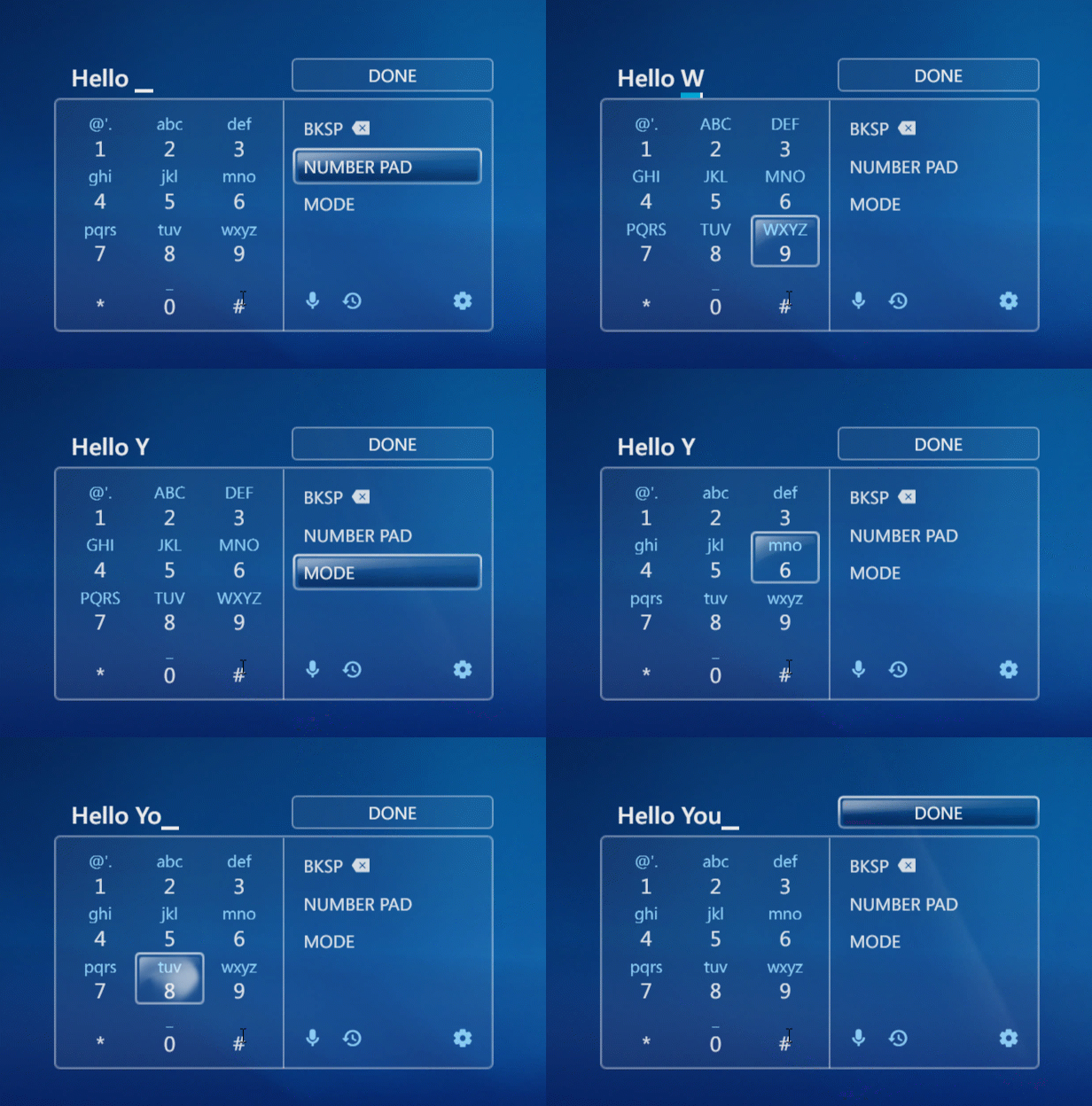
Triple-Tap (T9) Input
 1 point
 -
Love it ! - I so missed the screen candy of WMC. When emby eventually force me from AndroidTV - it looks like this and possibly ET are going to be the only options for my mainstream Theatre player. Hopefully this can do Direct File play as well .. Amazing work @softworkz1 point
-
@Luke I tried the latest (3.2.95) again last night - and performance wise - they are now actually closer than they have ever been. This is great progress. Prior to 3.2.95 - navigation was 'laggy' but it's now on par with the AndroidTV version I would say (on a Shield Pro anyway). So my remaining gripes are - a) aesthetics - especially the use of white highlight - which is horrid on an OLED TV - it's way too bright and highlighting solid white background for text to read is simply ugly. The AndroidTV client uses transparency - which looks so much nicer. b) functional 'quick use' buttons - by simply pressing 'up' on the Shield remote, I get the chapters up (and left/right nav). Holding left/right proportional speeds up ffw/fwd. ie it starts at 10 secs and then jumps to 30 secs etc the longer you hold the button. Press and hold the OK button, I get stats for nerds up. c) design and proportions - The selection of 'audio' or 'subs', cast etc is so much nicer to use on the AndroidTV version. Despite playing with 'size' in the settings - it's either too big or too small. Cast for example is poor - the text is not in proportion to the image size - you don't even get half a name listed and it looks rubbish compared to the Android TV version. In summary, the AndroidTV client is designed for use sitting down to a big screen TV with the remote control - the Android client (and others that use the same 'design') are not and feel 'clunky' with navigation and use 'unnecessary' coverage of the screen to do certain functions. Happy to give more example and screen shots - but this has all been said before - but thanks for listening on the performance - this has improved without doubt.1 point
-
@Lukeplease tell us something concrete is happening.1 point
-
I just want to keep the automatic full screen like version 3.2.92, there's no other meaning1 point
-
yep just found that out, Theater direct-plays with ac3 but Firefox would need aac. I don't mind using Emby Theater, just wish it supported custom fonts & audio compression - but that's for another thread lmao going to mark this one solved, thanks!1 point
-
I know this is an old thread but I just wanted to hop on it real quick to say I, too, wish there was a way to set a default. I have two movies of roughly the same quality, only one of them is colorized and the other is in black and white. Emby is picking the colored one when I wished the B/W version was the default. Surely it couldn't be that hard to code for a tag in the file name to set the default?1 point
-
v.1.11.0 Support .NetStandard 2.0 in addition to .NetCore 6.0 (possibility to run on Android devices) Fix kinopoiskapiunofficial.tech populated only partial information for films/series Add Update Plugin task which will update the DLL of the plugin from GitHub Tune movie/series search - filter API search result with name and year Search for kinopoiskapiunofficial.tech includes a year Change default API Fix incorrect items querying Suit plugin to be used with 4.8.*-beta versions Append facts to movie/series description New created by the plugin collection will have the name of the first video in sequels Fix Create Top250 collections task: fix incorrect item detection Fix Update Kp Id by IMDB/TMDB id task: fix incorrect item detection During metadata update, if found several movies will choose the one with the highest rating Add search by English name of the person Support of the new API version of kinopoisk.dev Added option to create collections based on sequels data from kinopoisk.dev. Configured by the checkbox in the plugin setup page Add translate to the plugin config Added scheduled task to create Kinopoisk Top 250 collection Added scheduled task to update movie/series with Kinopoisk ID based on IMDB or TMDB Fix trailers, and add the latest trailer from API to be the first, suppose it will be on Russian Add trailers and teasers to movie search by name result Update dependency Add movie name detection from the file name Add default token for KinopoiskDev API EmbyKinopoiskRu.dll1 point
-
Reminds me of a certain live tv project I could mention (again)....1 point
-
I see this thread was started 2 1/2 years ago and the standard version is still unusable. So I think i'll leave it Thanks !1 point
-
I haven't tried it though I have looked into it. There are multiple ways allow privileged port access to normal users but each has one or more catches and some would break Emby, so IMO not worth it. For remote access the WAN ports can be different from the LAN ports, forward from the router: 80 -> emby host:port Ubuntu has the ufw firewall that can be used to redirect ports on the host: 80 -> emby port. And a reverse proxy running as a privileged user can also be used for this.1 point