Leaderboard




Popular Content
Showing content with the highest reputation on 04/09/23 in all areas
-
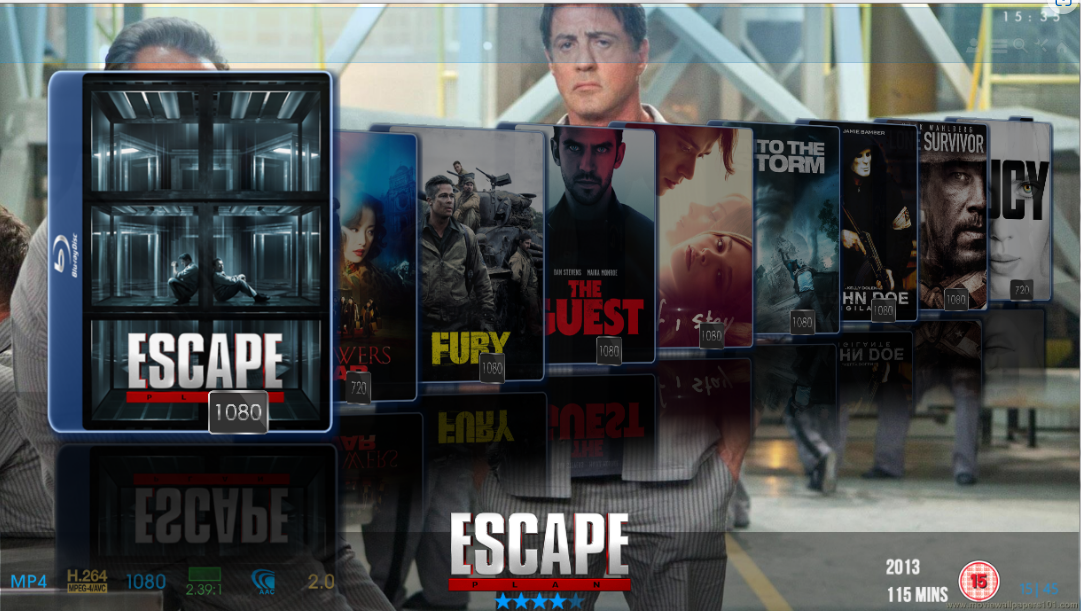
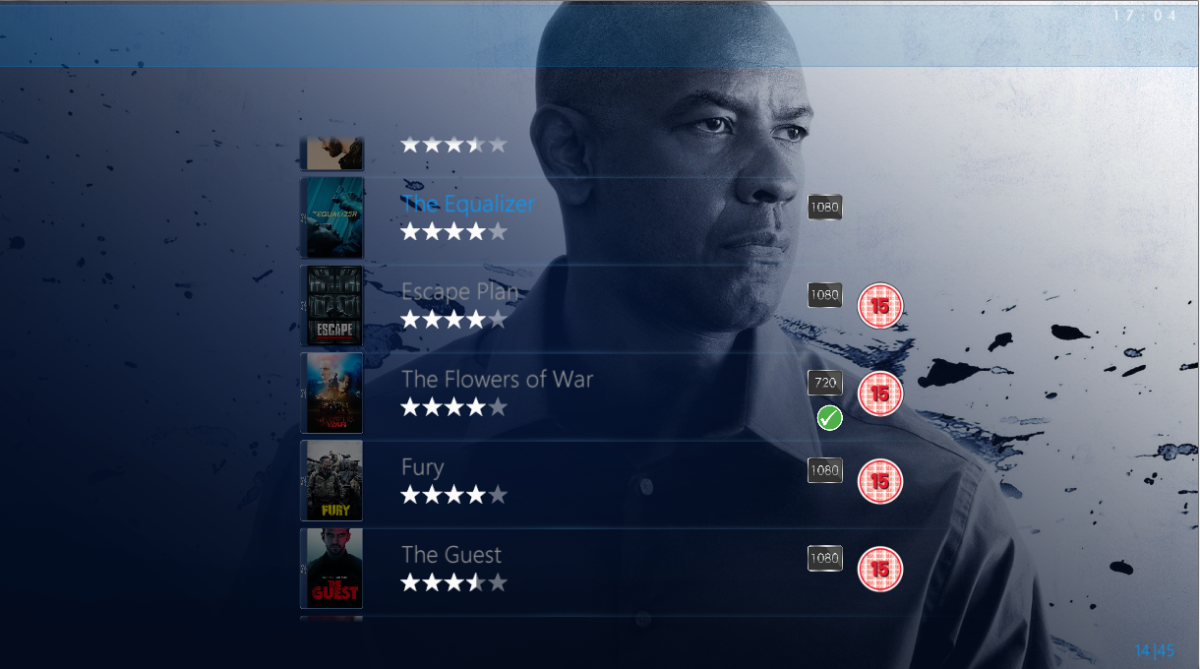
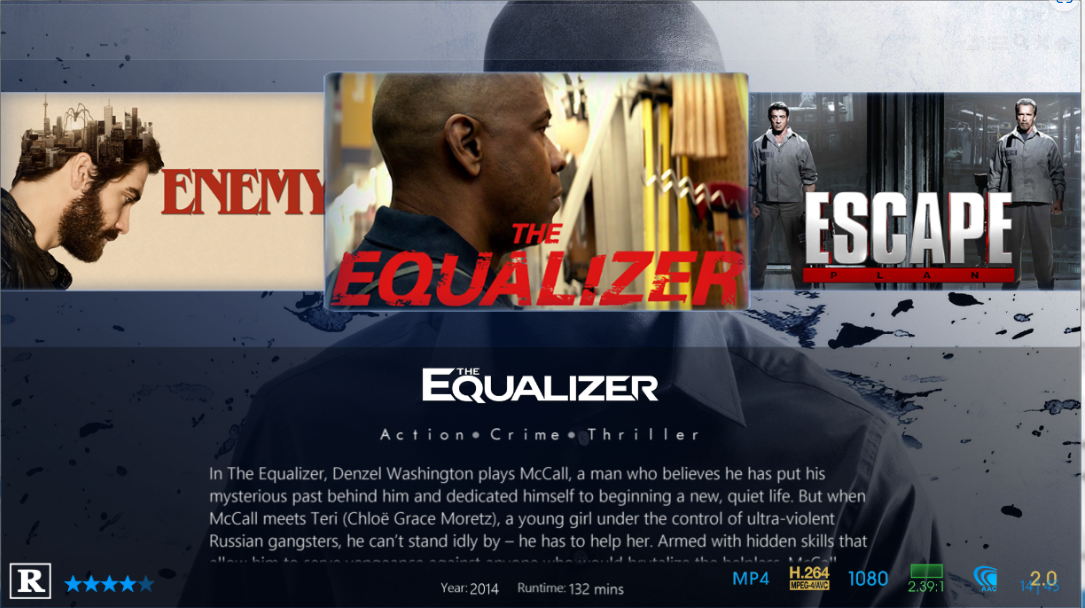
Thanks crazyFace lol It's a long way off any form of a release for testing just yet. If you want a roadmap then here it is. The first release will be Windows only. Finish off Details page and implement the top menu commands Create the Library views.. when entering Movies there will be 4 or 5 layouts to select from... Coverflow, List, Thumb, Poster and Minimal(Logo View) Mockup are completed so it's a case of translating them into XAML and MVVM. Implement Video Player Deal with Collections, Music, books, audiobooks and Channels Implement Audio Player Implement code for XPlatform Idioms. Here is some ideas on the Library Views List Views A variant of List View (Logo List) Coverflow - Flat Coverflow - Cascading QuickList Thumb View Poster View Actor Bio Page - Along these lines

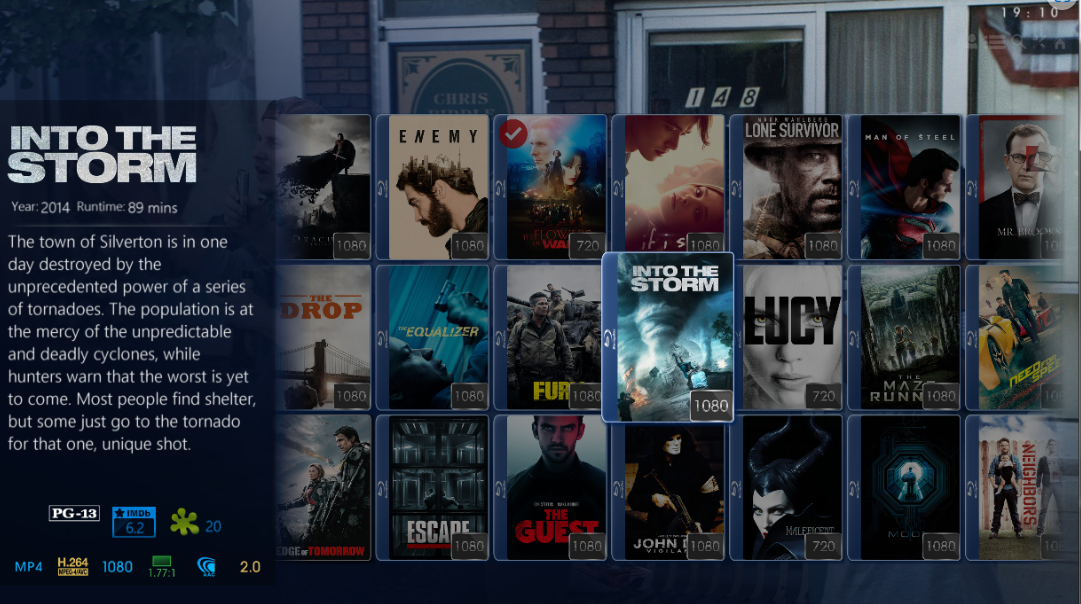
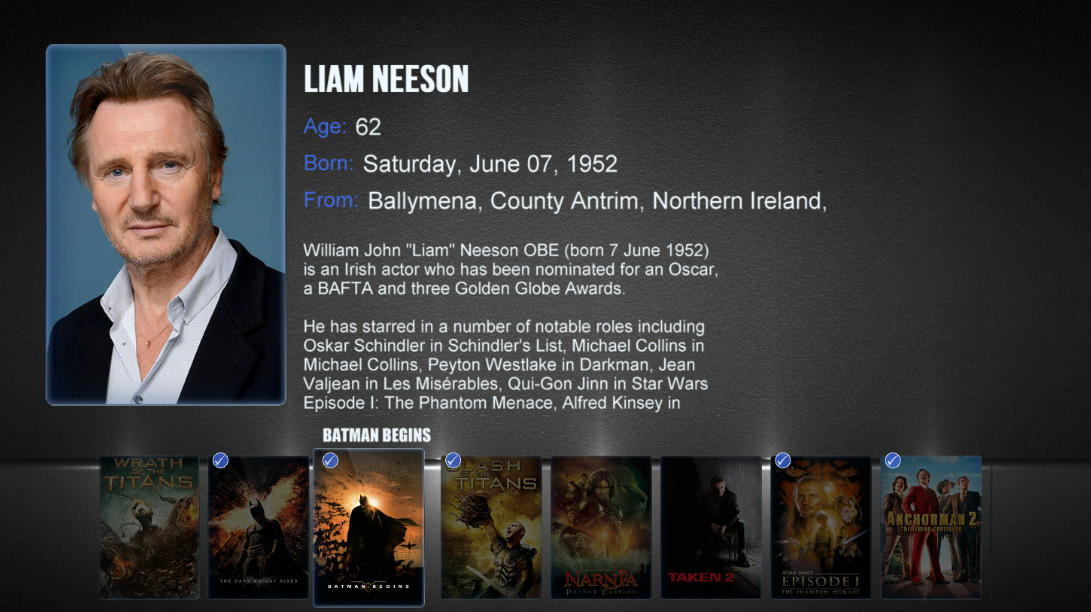
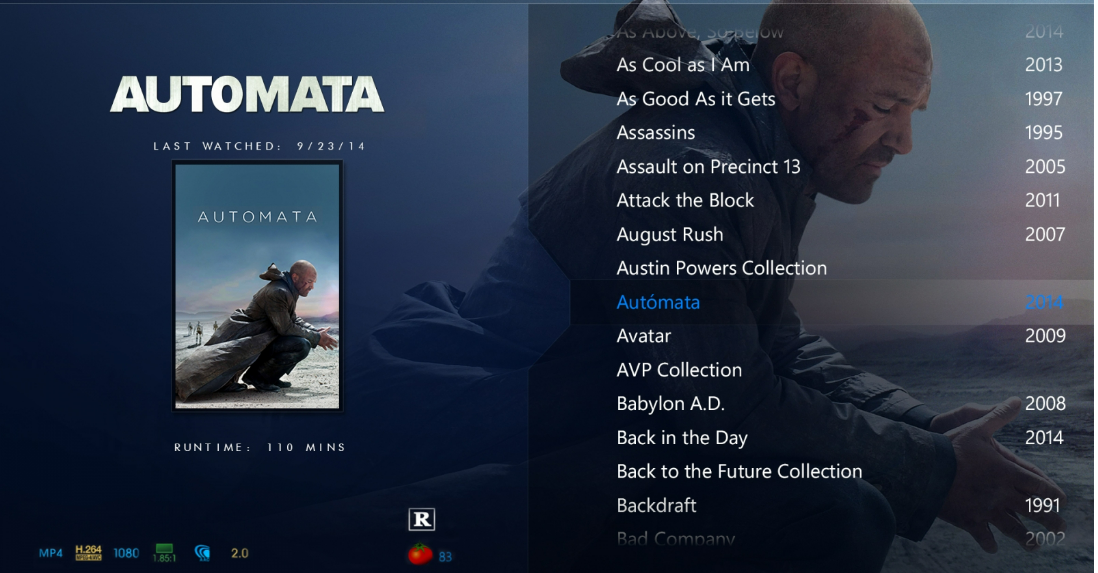
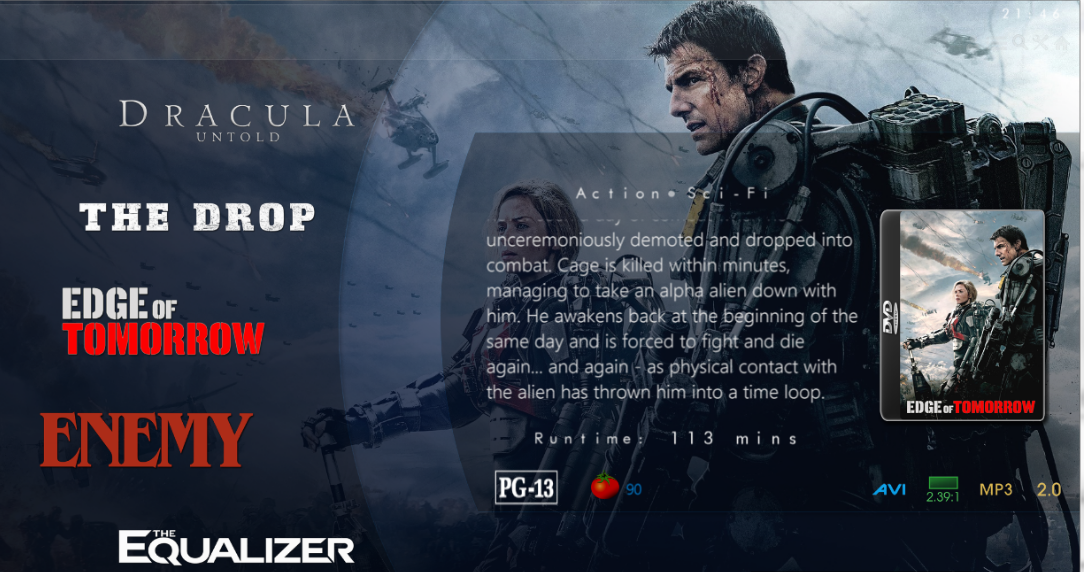 2 points
 -
I've gotten some energy back and started to play again with the project. And that is Thanks to @VicMoorewhile we were having a chat on Teams and it really came about because of the lack of an ebook reader built into emby. I only just added in the Login screens for this new version. There is still soooo much work to be done, but the fundimentals are there and is just a case now of creating layouts Heres a wee video to wet the appetite. Hope you enjoy Iridium_01.webm2 points
-
We would need to see what the 'output' of these detections are to then apply in the format helper for example. So the best way to get new/extra support is to supply the file or sample of the file so we can investigate adding. For rare formats it's likely not worth the time to add, but for new codecs such as the AV1 support - that could be adding.2 points
-
The Mult-Select in the Server web app is super-useful (I'm so grateful to those that introduced me to it!). But given that the Server web app has some excellent filtering functions (eg, in my case I make use of filtering by Tags) it would be very handy to have a "Select All" functionality, so that I can filter down to the results I'm looking for and then easily add them to a Collection (or, when eventually we have Bulk Editing abilities, open a Bulk Edit view on all the Selected items). Thanks! PS - If this is something you might like to see implemented, be sure to "Like" this top/first post (as well as any subsequent posts in this thread that highlight particular aspects of what you are interested in) -- "Liking" the top/first post helps the Devs to know how much interest there is in a given Feature Request.1 point
-
Hello @Super957I found the problem and fixed it. I uploaded a update to the plugin. Vic1 point
-
Yes i had same issue with the Amazon release version. But is okay after this beta version. 2.0.80 (23 Aug) Tweak some Exo settings Exo fix for AAC 7.11 point
-
Cheers Luke! I'll have a look in the morning.1 point
-
OK I just realized that I am completely wrong about how this works. The Timelord plugins don't need write access to the media files because they are only changing the metadata in emby's database. So these plugins are a good solution for me!1 point
-
I rolled back to 7.x and double checked as I wasn't certain anymore, but the problematic files are there (since there are several without artist or even without genre). And I can clearly see the "--NO INFO--" placeholders. I can send the debug log for that one too if you want to compare both.1 point
-
Will do. One thing I notice on the two that disappeared was that if I went into edit images it showed blank grey for the image however it did show a resolution.1 point
-
I found the problem! It wasn't Emby being blocked, it was the entire QNAP Nas having an invalid IP configuration on the primary network adapter. It was sending all outbound requests to a dead end.... The static IP I used previously was a relic from the Verizon router.1 point
-
Hi @quickmic My add-on updated to 8.1.1 today and it seems I can't get a proper complete sync anymore. The sync gets stuck always at the same point on one music-video. I saw in the logs that it mentionned as a warning that this video had no artist, I tried adding one and restarted the sync, now it stops on the next music-video without artist, but I guess that's not an expected behavior, right ? (server is running 4.7.11.0 if that matters) kodi.log1 point
-
Wow man, you have over 4000 movies.. that's crazy , respect! Can't comment on the bug because I only have like just under 400.1 point
-
@MagicDoubleMjust to add to Rich’s comments. Please supply the JSON output from MediaInfo. i may just update my MediaInfo and test but im busy on something else at the moment. thanks1 point
-
No more tweaks on my side. been using the hosted web app but switch to .29 beta recently and the old issue is no more. but like you, I experienced out of sync audio when resuming media. Some playback do not start either (but my drives do go to sleep so maybe emby does not wait as long as before that the first bytes arrives before timing out) did not get the chance to warn @Luke about this since he has other more important bugs to tackle.1 point
-
Sorry worked it out. On my iPad Emby app went to App Settings --- Playback --- Intro Skipping1 point
-
Good look it's doing well this way thanks for the tips appreciate it!1 point
-
The double/nested structure may be an issue also /Fate Stay Night/Fate.Stay.Night.Unlimited.Blade.Works.xxxxxxxxxxxxxx/Fate.Stay.Night.Unlimited.Blade.Works.E01,xxxxxxxxxxxxxx As these would be two different Shows per providers https://thetvdb.com/series/fate-stay-night https://thetvdb.com/series/fate-stay-night-unlimited-blade-works But Emby should be identifying off the second folder. But comes back to currently supported naming schemes as mentioned above.1 point
-
Seems to be working for me too.1 point
-
Let's see, from the changelog I think these points can be of some interest: + DTS: Detection of IMAX Enhanced + MOV/MP4: Add HDR Vivid format support + HEVC: Add HDR Vivid format support + AVC: detection of more profiles + ChannelLayout: difference between M (Mono) and C (Center, part of multichannel content) + AC-3: detection of channel layout also for encrypted content + AC-4 and MPEG-H 3D Audio: Merged channel layout (all sub-streams together) + DTS: Detection of real bit depth e.g. 20 instead of only byte aligned bit depth (16 or 24) + AAC: detection of eSBR (and fix of random wrong PS detection) x AV1: add HDR format line and fix HDR values x AAC and WAV: fix of channel layout display for 5 front channels Nothing elementary groundbreaking, but it looks like a solid update thats worthy to support.1 point
-
These icons are pretty amazing and should become the default for emby. Thank you very much! And yeah, if we could manipulate the ordering of icons and maybe get audio-languages in a future release, this would be lovely. Those are probably the two biggest wishes for this plugin from me.1 point
-
I made a few cosmetic changes. I posted the latest dll. The latest release is 0.0.1.14 I fixed the background color problem in the custom filter. Vic1 point
-
@LukeBy all means, in the year 2023 with all the awareness for data protection, security and privacy rising (which is a good thing) this feature can not stand like this anymore. Please, please, please address this subject urgently. CHEERS1 point
-
Hi, I think I found fix for my problem. Background App Refresh should be enabled in iPhone settings. At lest now it works for me.1 point
-
Playback on Android relies on the media app used for playback (if not using the embedded player in the Emby app). As for the picture being dark, there is a good chance it has to do with the 4K video being HDR (or Dolby Vision - DV, which can have odd colors). If you are re-encoding an HDR video, make sure it is not DV, and the older the HDR format the better -- ie. SMPTE ST 2086, HDR10 compatible, BT.2020. Some devices may not be able to handle HDR at all though, or 10-bit... in which case it would require a different format such as 8-bit 4K, vanilla 8-bit 1080p, or at minimal, transcoding it on the server to something without HDR. (Most devices in the last 3-4 years support 10-bit HDR though in my experience with my devices.1 point
-
Yes! There is one other dev involved, so I want to touch base with him. The project got a little side tracked, but it works quite well, and I personally use it all the time. Let me touch base with the other dev, and see how he feels about getting this out there!1 point
-
wow... this thread is really interesting, and ... honestly: I do have some doubts on the future of emby... I already noticed a big impact on the releases of emby over the past years... @chef anyway: @chef: do you have further information on that side-project? I think, my setup would fit to the criteria...1 point
-
You could create separate strm library for those items only and enable access when the time comes for the duration as you'd like - and it'd be present on Home Screen and very visible while sorting would be preserved.1 point
-
So a different WAN address in emby to your real WAN address indicates an issue (could be cgNAT or VPN issues if used) but I believe your port forwarding rules are wrong - so lets correct them first. You need two port forwards - 1 for http (8096) and (if you use https) 1 for https (8920) So for http WAN Start Port = 8096 WAN End Port = 8096 LAN Host Start Port = 8096 LAN Host End Port = 8096 for https same as above, but use 8920 for all of them -- Use TCP only - emby does not use UDP for WAN connections.1 point
-
No, it can't be done like this. With the LDAP plugin, Emby gets the user name and password of every user who logs on in clear text and the server attempts to log on with these credentials at the LDAP server. Such procedures are totally forbidden with OAuth/OIDC. It is a core feature of those implementations that you must and may never give your password to any 3rd party. You only sign-in at the site where the account is from that you are using to sign-in. There are multiple authentication "flows". The most typical one is browser redirection, which means that a client app needs to redirect you to the web site that has issued your account. Once you have logged in there, you get returned to the app, while in the background of this procedure, tokens are exchanged between the 3 parties: The app with the issuer website, then the app with Emby Server and eventually Emby Server itself with the issuer website. There's also a "flow" for devices which cannot redirect (because they aren't browser-based): With the "device flow", the client tells the user a website to open (separately, e.g. via mobile device), the user logs on to the website and gets a numeric code, which it then enters into the client app. The rest is the same like above. Assuming Emby Server (and all clients!) would support this, there are additional caveats: The Emby Server needs to have a DNS registration of your own domain (no dynamic dns) and must be continuously and reliably available As an owner of an Emby server who wants to set this up, you need to go quite a way to get this working: You need to open a developer account with the sign-in provider through which you want to allow users to sign on to your server And you need to do this for every sign-in provider you want to suppport. For example: you want to allow users to log in with their Google accounts, Facebook accounts, GitHub accounts and Microsoft accounts With all of them, you will need to open a developer account and then, you need to register your "app/service" (=Emby Server) for OAuth/OIDC authentication The procedures are quite different with all of them and the data you get and will need to set up Emby server accordingly looks differently, and it's quite a process to get it all figured out Finally, there's another complication: when you want to allow users to log in with their Google accounts (for example), that doesn't mean that you want to allow everybody with a Google account to log into your server, which means in turn that you need a mechanism for selection. Possible methods are By invite link you actively send invites to users you want to allow Approval Queue Users who authenticate the first time are put into an approval queue where you regularly need to grant or deny access Probably the most simple one is to only allow existing users (who already have a normal account on your Emby server) to also set up a 3rd party login for their account. I have done all this for a (yet unreleased) project, and what I can say is that it's nice when it's working, but it takes a little effort - and I'm talking just about the setup that users need to do.1 point
-
TMDB api does not show percentages like its website "vote_average": 7.093, No info comes from IMDB or RT so we rely on OMDB for this information. "Ratings": [{"Source": "Internet Movie Database","Value": "6.7/10"},{"Source": "Rotten Tomatoes","Value": "67%"},{"Source": "Metacritic","Value": "55/100"}], But currently Community rating shows first provider info so if TMDB is first it is shown, if OMDB were first it would show IMDB value. Implement Metacritic ratings and allow Enable/Disable ratings option in settings - Feature Requests - Emby Community1 point
-
I'd like to request a feature, while browsing the emby server via a browser I'd like to be able to select multi via "ctrl" or "shift," or select all on the videos. The purpose behind this is if I want to mass delete, or mark videos as played/unplayed, etc.1 point