Leaderboard




Popular Content
Showing content with the highest reputation on 03/27/23 in all areas
-
Now that I’ve changed the cache location and discovered the names for the 3D icons, I thought I’d share what I’ve done. Overlays-Craig.zip
 3 points
 -
Thanks to everyone for all the info. I am eager to learn all this. My music collection is very important to me and I love emby....so much so it has become integrated completely into my life so bringing the two together is a must. I have finally started sharing with my new and second server and the two users I added this last week are completely blown away by what emby provides. They tell me it is better than any other platform they've used to stream content. They love all the information available and the ability to look up actors etc. Them being happy makes all the effort worth it for sure.2 points
-
Hi, I would like to transfer my custom TAGs from Roon to Emby Server. In Roon I am using ROONALBUMTAG to store all my custom album TAGs and I would like to import those into the Emby database. Is there any similar TAG that Emby will read automatically and copy the TAGs to its own database? I currently have over 30K albums in my library and most of them have custom TAGs, transferring them manually would be a hell of a job, so I am looking for a way to automate the operation, considering the fact that all required info is already present in my file TAGs... Thanks!1 point
-
My request is to be able to chose to add items to the home screen. Specifically in my case, I am thinking of playlists and collections. Here's some reasons I'd like to see this: The home screen is the first piece of the user interface a person will see when they pull up Emby. I often places movies in bulk into my media library. This sometimes means people never see the new movie I've made available. Happens a lot, actually. While all movies are searchable or can be found by sorting, I believe the interface would benefit from having the customization option. I have created a "Justin Recommends" collection and would LOVE to be able to put that on the home screen. By keeping this optional, no one is forced to use it. If you don't have a use-case, then it's just a feature. If you look at things like Netflix, many movies and shows get "featured" and by doing that, a lot of people end up watching that wouldn't otherwise (imagine if The Tiger King was just another buried documentary you had to hunt for, no one would have heard of it). I appreciate your time. If you've considered this before and decided against for reasons other than difficulty implementing the feature, I'd ask you to reconsider. I believe that being able to customize our servers helps us personalize and tailor them to our audience and our needs, and that helps promote a feeling of ownership. I also truly believe that this small change could lead to some powerful results. In my case, I know that it would be of huge benefit to accomplishing what I would like to do with my Emby server. Thank you.1 point
-
i have thousands of obscure things... lots of shorts, things not on imdb, alternate versions of things etc.. and every time i have to move and redo my setup/re-import everything i have to spend days identifying things in my movie library... but there is no real way to do it... have to manually add an image and name etc... with plex i can just click one button UNMATCH and it removes the usually misidentified match/metadata and replaces it with the thumbnail and filename. just finding the mismatched items that aren't on imdb is a full days work ; ) : ( i'd kill for an unmatch button : )1 point
-
Would it be feasible to have a dialogue box that alerts you when you are about to add an item to a playlist that already exists on that playlist? Thanks.1 point
-
@GrimReaperlooking pretty good for even refurbished laptops right now on fleabay. $200 USD for a i3-1115G4 fully working. It does only have 4 gigs of ram, but bumping it up is no big expense. @MarsovacNewer laptops are quiet as heck. You will not hear it, period. As for what it is the oldest/cheapest intel CPU that can handle 2 4k transcodes, that would be an i3-8130u.1 point
-
Just a note in case anyone was encountering the same issue I was with the nvidia device randomly becoming 'unavailable' inside the docker container; They've gotten to the bottom of it and have posted this: https://github.com/NVIDIA/nvidia-docker/issues/1730 I've employed one of the suggested workarounds and so far it seems solid.1 point
-
This is wonderful! Just a clarification that you need to put the pfx file somewhere on the server before selecting the path, and complete the `External domain` field to match the A-record you created.1 point
-
Because your top preferred provider is TVDB (which includes year as there's original series from 1990). Move TMDB as top preferred Series provider and re-Identify item or remove year from the title yourself.1 point
-
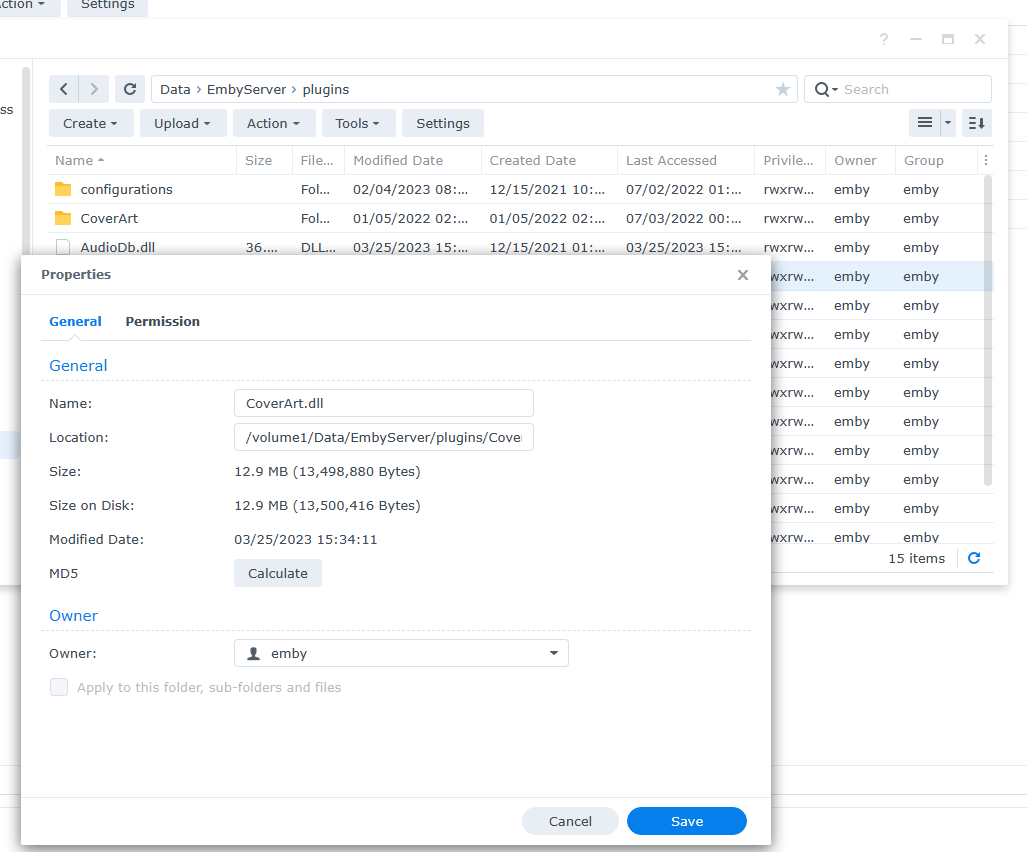
I could provide a script you can setup in Task Scheduler that would move a plugin from a known share/folder to it's proper location setting ownership and permissions. Or maybe I could show how to do this in the GUI: I've been reluctant to show how to do this as Synology hid this for a reason.
 1 point
 -
Those are official titles obtained from providers; Year in title usually denotes there exists an item with the same title (typical for reboots) hence its there for distinction, but sometimes they're just aliases/alternate names. You shouldn't refresh metadata unless you've locked title (or any other metadata field you don't want changed).1 point
-
Okay awesome! Then it works fine for me as it is lol, sorry for the confusion Thanks @GrimReaper1 point
-
Just replied to your previous post. No, not new. And no, it doesn't actually delete files, just removes the item from appropriate collection. Edit: Same goes for Collection itself.1 point
-
To all users. The plugin is currently not compatible with Emby server beta. 26 Only option, downgrade to .21 or you must wait a couple of days for a new version.1 point
-
Hi, yes we are looking into improving this for the next release of the server. Thanks.1 point
-
Number of similar topics existing, search a bit around forums. Examples:1 point
-
Thank you, I think I got it. Can't verify, because I am no longer at that location.1 point
-
Luke, after upgrading to Sonos Plugin 1.0.18.0 everything is fine again. thanks for the good karma to release this update in time Michael1 point
-
Settings>Transcoding tab>Enable hardware transcoding when available: Yes/No/Advanced. Note that HWA is applicable only if you have an active Premiere subscription, else only software transcoding is available.1 point
-
Hey, just to let you know there's this post on running emby using docker and having HW transcoding that could help you out. I wrote it myself so feel free to ask for help either here or through DMs.1 point
-
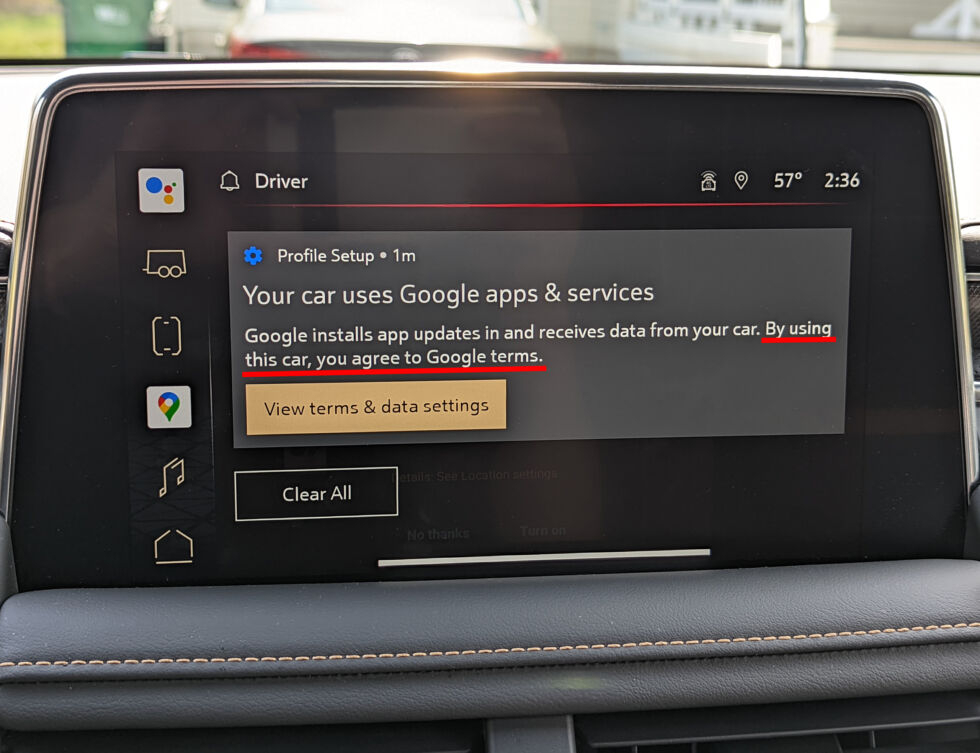
Does anybody else laugh then die inside when they see a ToS notification like this?
 1 point
 -
No need to format drives. The beauty of Stablebit drive pool is it will work on existing drives - as essentially the 'pool' just sits in hidden NTFS folders. However with the drives at 90% full - then you are not going to have a lot of wiggle room. I would run this past Stablebit for best advice but in summary - The official method would be to create a pool on the remaining 10% drive space - and then MOVE files into the pool - as you move the files, the pool will actually remain the same size despite you adding files to it because you are creating 'free' space on the moved file once it has been added to the pool. If you are clever with your setup - then you can actually configure it to just 'move' the files on the same disk. This 'may' be extremely fast - as it's not moving the data at all - it's just re-pointing the data in the pool. Obviously if you COPY the files, then you are going to run out of disk space. With all of this - ensure you have a working backup. With 120TB, this is easier said than done I agree, but I strongly suggest a 'verify' operation before you begin a major file system re-organisation such as this (same with ANY solution, not just Stablebit).1 point
-
@rbjtechI don't have issues with my shield. I think that it is specific to Android TV connected directly to the TV or Android TV built in and using the TV speakers. I can use my shield and not have any issues because it is running through the audio receiver.1 point
-
So I swapped out the ARC to a AMD and the server works perfectly fine. So conclusion is that it fails when it trying to do the hardware detection as far as I can see.1 point
-
Glad you figured it out and thanks for reporting back.1 point
-
Hi. You could delete the cache\images\enhanced-images folder which would cause everything to rebuild. Pretty sure it is the two-letter code.1 point
-
I knew "Tegra", but didn't remember that it's called 'X1'. Thanks!1 point
-
Tegra X1 is Shield's CPU.1 point
-
What is X1? On Android, there's only sw tone mapping, but IIRC it requires a Premiere subscription even on Android. SW tone mapping for ARM is not optimized like our x86 sw tone mapping, so it might(!) work when transcoding to low resolutions (e.g. for watching on mobile), where the image is scaled down before tone mapping, but surely not for 4k (as target resolution). Why? With Emby Premiere you don't need any client unlocks.1 point
-
Hi, Is there still any plan to have ROONALBUMTAG support in Emby? If not, can there be other similar TAG which would provide the same functionality? I have no problem mass copying the contents of ROONALBUMTAG to another TAG if that would allow me to load all those custom albums TAGs into Emby. Thanks!1 point
-
Yes I had reset my router. I think I figured it out. I upgraded to windows 11 and some of the settings got changed somehow. I did a fresh install of windows 11, and reinstalled emby and it seems fine now.1 point
-
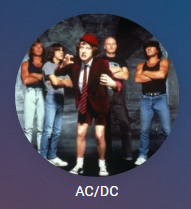
It really comes down to the aspect ratio of the majority of images. When you have mixed the majority usually wins as Emby will not show both. But yes the Round images can be client specific. But overall, any 1:1 resolution will work. None 1:1 will be manipulated to fit. If all (majority) primary were 16:9 it would change placeholders as this applies to almost every area of Emby to my knowledge. Example Genres are square unless you have majority 3:2 poster or 16:9 thumbs. And yes changing View image type will provider different images per the images you have for the Artist. As Thumb will show thumb if available but most likely will be a backdrop for the Artist. For the web client (only not online web client) yes this can be changed by custom css as showing the image in the Square placeholder. button.cardContent-round { -webkit-border-radius: 1em; border-radius: 1em; }
 1 point
 -
@quickmicYep, was able to roll back to 0.21 from 0.26. I know it is not recommended. But upon deleting library.db and rescanning, everything seems to be working okay...including E4K sync. I'll stick with it for now. I have 32TB of data, and the time to sync with E4K paging settings at 1 was only about 20 minutes. So I can't imagine the size of your library that would lead to a month scan time. If I can help troubleshoot things for post .19 builds, let me know.1 point
-
This is an absolute showstopper for me and I think lot's of other people as well. Paging 1 may works for a smaller library, but mine would take a month or more to sync at this pace. Ero, useless. Also I know users performing "manual" rollback to stable or <.20 for the same reason even if that's a hassle (Actually starting from scratch). Frankly, I hope Luke releases are new version soon, addressing this issue. Otherwise I need to install a third test instance (yes, I already have 2 Emby servers running just for testing) and that's something I try to avoid. If there is no fix for this bug (let's say in the next 1 or 2 weeks), I think I install a third one. But surly not in the next days. Can you downgrade to .21? I know not possible from .21 to lower, but what about .26 to .21? btw, The >.19 issue is also the reason why 7.X is not pushed to stable repo. Since January it's tagged as stable, but I don't wanna force people to init a resync. They would be all screwed.1 point
-
It makes no difference as quicksync is superior in every way. This is just NVIDIA grasping at straws. I love the fact my i3-1115g4 laptop can handle more transcodes while using maybe 15 watts, and idling at 3.1 point
-
Many years of networking have taught one thing - plan for wired and hope for wifi.........1 point
-
3 dot menu brings up View options, default is Primary (what you call porthole). With thumb, you get a landscape picture.
 1 point
 -
If you give me some time, I will try to get around to that as soon as I can. I have some things I am working on first.1 point
-
Thank you, i will try it1 point
-
Hi, that should be resolved in the latest server build.1 point
-
Hi, we’re plan to provide more control over channel grouping in upcoming updates. Thanks.1 point
-
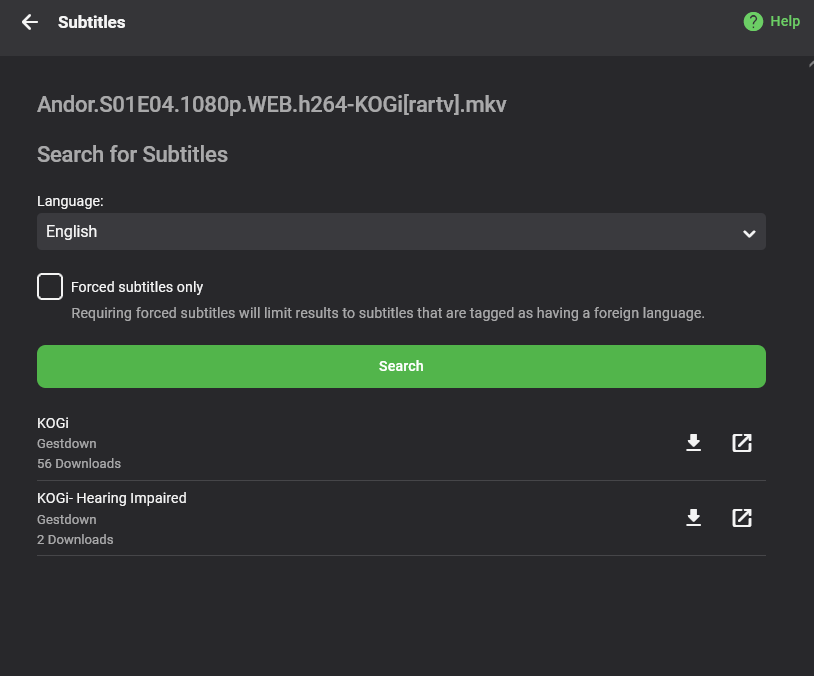
Hello All, I'm here to showcase a new plugin for Emby: Gestdown. The website is: https://www.gestdown.info This plugin provides full support to find and download subtitle from Addic7ed, the advantage from the Addic7ed plugin are multiple: No need for login/account No log Less false positive by using TVDB id matching Unlimited downloading Fair rate limiting Reduce the load on the main Addic7ed website Installation As usual, simply put the dll in your plugin folder and restart emby. https://github.com/Belphemur/Gestdown-Emby-Plugin/releases/download/v2.0.0/Gestdown.dll Usage Either have Emby setup to auto-download subtitle, but when you're using subtitle on demand you'll see Gestdown as part of the list of available subtitle with the Scene version of the subtitle (here KOGI) Source code: https://github.com/Belphemur/Gestdown-Emby-Plugin Releases: https://github.com/Belphemur/Gestdown-Emby-Plugin/releases
 1 point
 -
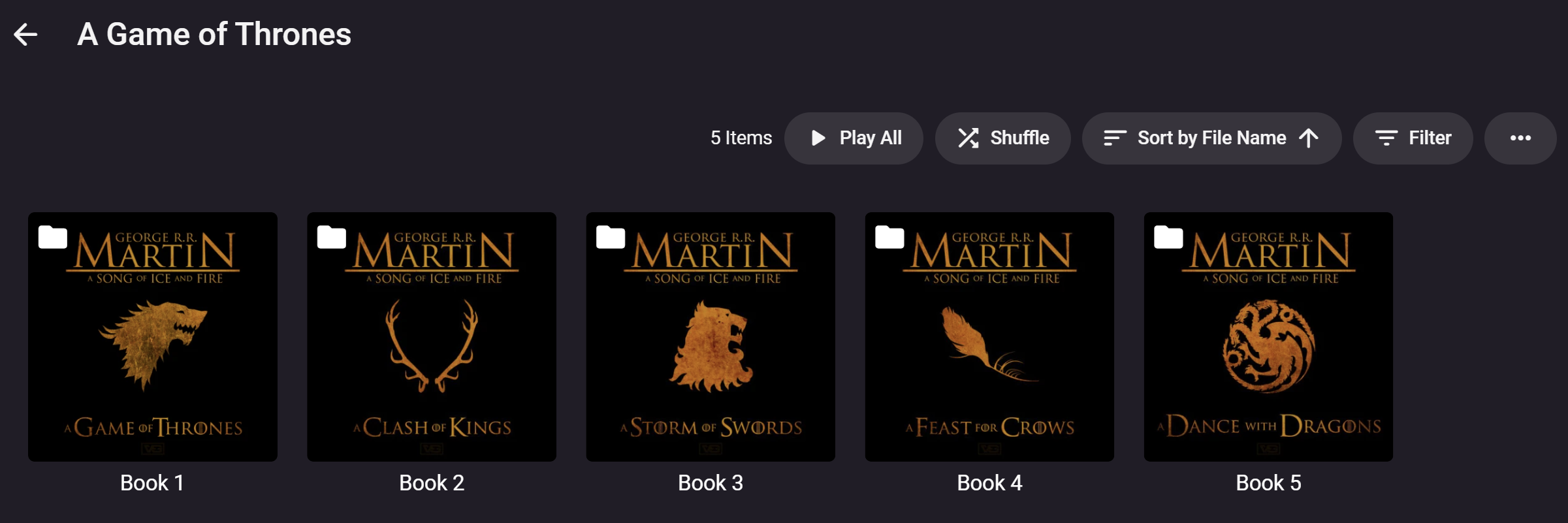
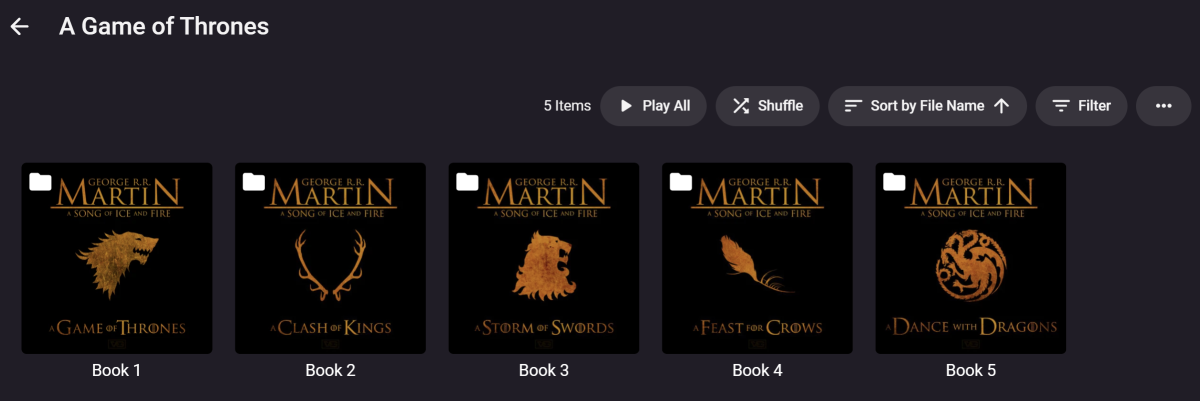
That's far from ideal tbh. I have it working fine, but only via Folder. What I want is to be able to click on a book in book view and it to list all the books in the series in order rather than needing to find the author in the folder view. So, unlike what it does now. Clicking on a game of thrones book will show "more by", but what would be nice is for the game of thrones book series to be displayed matching the book i clicked on (if that makes any sense). Now, this is not enough for a "feature request" as there is far more important things the server needs, but... some day down the line - it would be well received. this is in folder view. and this is how it looks when click one of the books in the book view.
 1 point
 -
Bullocks1 point
-
Rich!! I have to say that you’ve done an absolutely sterling job with the wiki, been a while since i have looked at it and it just is great, and would hold the hand for setup of anyone new to the plugin!! kudos my friend1 point
-
Thanks, Updated to fix this issue Logs them as well as reports them when finished.

 1 point
 -
Assuming that there is memory to spare, placing Emby's data and/or cache to RAM offers significant advantages. Even though opting for the partial route is an improvement by itself, the latter can make Emby even more responsive compared to its stock configuration. Benefits include, among others: - reduced drive read/writes; - heightened responsive feel; - many operations within Emby, such as quick search are nearly instantaneous. To do so we can make use of a tmpfs. Because data placed therein cannot survive a shutdown, a script responsible for syncing back to drive prior to system shutdown is necessary if persistence is desired. On the other hand, only relocating the cache is a quick, less inclusive solution that will slightly speed up user experience with Emby. In this post is provided an example of script to move and sync the "data" folder (where is stored the emby db) to RAM. Be sure that rsync is installed and save the "executable" script to /opt/emby-server/bin/emby-data_sync.sh, for example: #!/bin/sh # The script will first move emby's data to a new static location, # make a sub-directory in /dev/shm, softlink to it and later populate it with the contents of data. # The second time the script runs, it will then preserve the RAM profile by copying (sync) it back to disk. PATH=/usr/local/sbin:/usr/local/bin:/sbin:/bin:/usr/sbin:/usr/bin static=data-static link=data volatile=/dev/shm/emby-data IFS= set -efu cd /var/lib/emby if [ ! -r $volatile ]; then mkdir -m0700 $volatile fi if [ "$(readlink $link)" != "$volatile" ]; then echo "--> Emby: Init RAM Disk" mv $link $static ln -s $volatile $link fi if [ -e $link/.unpacked ]; then echo "--> Emby: Sync Disk" rsync -av --delete --exclude .unpacked ./$link/ ./$static/ else echo "--> Emby: Sync RAM" rsync -av ./$static/ ./$link/ touch $link/.unpacked fi It is best to add a cron job to guarantee the sync between RAM and disk, for example the following entry will run the sync process every 30min. */30 * * * * /opt/emby-server/bin/emby-data_sync.sh Then it is necessary to change the service: /lib/systemd/system/emby-server.service to guarantee the initial and final sync, as follow: [Unit] Description=Emby Server is a personal media server with apps on just about every device. After=network.target [Service] TimeoutSec=5min EnvironmentFile=/etc/emby-server.conf WorkingDirectory=/opt/emby-server ExecStartPre=/opt/emby-server/bin/emby-data_sync.sh ExecStart=/opt/emby-server/bin/emby-server ExecStopPost=/opt/emby-server/bin/emby-data_sync.sh RestartForceExitStatus=3 User=emby [Install] WantedBy=multi-user.target After this change it is necessary reload the service with the command: systemctl daemon-reload Finally it is possible to activate the shared-memory for Emby with the command systemctl restart emby-server It is possible to verify the execution of the script with the command: systemctl status emby-server ● emby-server.service - Emby Server is a personal media server with apps on just about every device. Loaded: loaded (/lib/systemd/system/emby-server.service; enabled; vendor preset: enabled) Active: active (running) since Tue 2019-01-01 09:46:44 CET; 7min ago Process: 8310 ExecStopPost=/opt/emby-server/bin/emby-data_sync.sh (code=exited, status=0/SUCCESS) Process: 8315 ExecStartPre=/opt/emby-server/bin/emby-data_sync.sh (code=exited, status=0/SUCCESS) Main PID: 8320 (EmbyServer) Tasks: 23 (limit: 4915) Memory: 676.5M CGroup: /system.slice/emby-server.service └─8320 /opt/emby-server/system/EmbyServer -programdata /var/lib/emby -ffmpeg /opt/emby-server/bin/ffmpeg More details can be found with the command: journalctl | grep emby-data_sync.sh emby-data_sync.sh[23844]: sending incremental file list emby-data_sync.sh[23844]: activitylog.db-wal emby-data_sync.sh[23844]: authentication.db-wal emby-data_sync.sh[23844]: library.db emby-data_sync.sh[23844]: library.db-wal emby-data_sync.sh[23844]: users.db-wal emby-data_sync.sh[23844]: ScheduledTasks/6330ee8f-b4a9-57f3-3981-f89aa78b030f.js emby-data_sync.sh[23844]: ScheduledTasks/81267bb8-bb49-51de-4b1b-446262cc7365.js emby-data_sync.sh[23844]: ScheduledTasks/d459f39d-7abb-81f5-fcce-03048a7ecf4d.js emby-data_sync.sh[23844]: SyncData/Emby.Kodi.SyncQueue.I.1.40.json emby-data_sync.sh[23844]: sent 255,467,606 bytes received 227 bytes 30,055,039.18 bytes/sec emby-data_sync.sh[23844]: total size is 257,320,410 speedup is 1.01 emby-data_sync.sh[23852]: sending incremental file list emby-data_sync.sh[23852]: sent 4,561 bytes received 44 bytes 9,210.00 bytes/sec emby-data_sync.sh[23852]: total size is 257,320,410 speedup is 55,878.48 The paths used in this post are the default ones for a Debian installation, in the case the distribution used is different could be necessary to change some path. But the main concept remain the same. On my installation I was able to speed up the "quick searches" by 100 times. This improvement is mainly due to the increase of speed obtained by moving the SQLite databases to RAM. In this article: https://www.directionsmag.com/article/3794 is reported an interesting comparison on memory access vs disk access speed and is stated that: "If you have a problem with slow database access, placing the entire database in RAM can instantly provide a factor-of-100-thousand increase in access speed with no other programming or data structure changes required".1 point
-
@@MClements130 i'm using Cloudflare. A few things first. 1. Do you have a static WAN IP or DHCP? 2. Have you changed your Domain registrars Nameservers to Cloudflare? 3. Are you using NGINX or just want to connect to Emby from external? I do have a guide but its on my web server which is having fibre connection issues. The basics are. 1. create an A Record in cloudflare. (something like emby.mydomain.com which points to your WAN IP) make sure it has the orange cloud. 2. on your router port forward 80 and/or 443 - forward external 80 to internal 8096 and external 443 to internal 8920 3. in emby server > Advanced - change your Public HTTPS to 443 and HTTP to 80 4. download cloudflares origin SSL cert. you should get a domain.crt and a domain.key 5. use this site to convert the crt/pem to a pfx (PKCS#12) https://www.sslshopper.com/ssl-converter.html make sure you set a password 6. In emby server > Advanced. point the server to the PFX certificate and enter the password. 7. Restart Emby. i think that's about it.1 point