
Leaderboard




Popular Content
Showing content with the highest reputation on 03/26/23 in all areas
-
I've been using Plex for some time now but still like the visual display that Kodi provides. Would like to know if Emby will ever start to use logos for such things as the audio format/codec (Atmos, DTS X, etc), format (bluray, DVD, 4K bluray, etc)..... Only asking because visually, its appealing and also allows for the user to readily see what the formats are. Thanks2 points
-
You're guessing right. You can lend your support here: Similar duplicate FR:2 points
-
Hii In Plex we can now put multiple editions of movie and they are treated as separate movies, for that we need to put {edition-xxxxx} at the end of the video. When can we expect the same feature in the emby? A link to the Plex page regarding the same is given below https://support.plex.tv/articles/multiple-editions/1 point
-
Hey Everyone, My journey from Plex to Emby has been pretty smooth with the exception of setting up SSL encryption. There are lots of great posts on this forum and elsewhere on how to do this, and I consider myself pretty computer literate. But I'll be honest, this was a bit overwhelming for me as I have no experience at all in hosting web servers, DNS, or encryption certificates. After many hours, I've got it all working, so I thought I'd share what I've learned. I'm going to try to write this for the newbie, so don't be offended if it seems like I'm explaining lots of simple stuff. That's really what I needed a week ago, so maybe it'll help someone else in my shoes. Also, this is for Windows, although most of it applies to any OS. There's lots of text, but it's really very easy. Let me also say, I understand that a reverse proxy gives you lots of benefits and flexibility for securing your server. But that was a step too far for me. If you want a reverse proxy this post is not for you, but there are many posts in this forum to help you. If you want to access your Emby server from outside your home network you will want to require secure connection mode for all remote connections (see "Network" tab in Emby server configuration). To do this you need an SSL certificate. To get an SSL certificate you must have your own registered domain name. Here's a step-by-step. Domain Name Registration A domain name is the readable text part of a web address. So emby.media, or google.com, or media.yourdomain.net. Most home users don't have one, but you need one to get an encryption certificate. While (Edit:)There are many options for purchasing a domain (godaddy.com being very popular), I chose to buy my domain from domains.google. It cost me $12/year, and this is the only cost to getting your Emby server working with encryption. Go to https://domains.google, pick a domain, pay your money, and you're ready to go. For the rest of this discussion let's say you registered the domain name yourdomain.net. Now you need to associate your new domain with your home IP address. Most home users get their IP address assigned to them by their internet provider and it is "dynamic," meaning it can change. So you need to be able to tell your domain provider what your address is and update it when it changes. This can be done automatically, and is called dynamic DNS (DDNS). (Edit:) Before obtaining a domain, ensure the provider supports Dynamic DNS. Google domains supports this easily, here is the help page explaining how to set it up. Fortunately, my ASUS router has this capability built in so it was easy, but it's easy even if your router doesn't (follow google's directions). (Edit:) In case you have a static IP (obtained from your ISP), DDNS support is not mandatory. That's it for domain name registration. Now yourdomain.net points to your home network IP address. SSL Certificate Now you need to get an SSL certificate. This has the encryption keys you need, and must be issued by a recognized certificate authority or it gets blocked by your browser. Lets Encrypt will give you a free SSL certificate but it has to be renewed every 90 days. This was the part I was most confused by, but it's actually really easy. The part to understand is that Lets Encrypt must have some way of proving you own your domain name before they can issue you a certificate. There are two options, 1) they give you a little text file to place on your web server in a certain location. I don't have a web server so this is a no-go. 2) They give you a text string to add to your DNS registration in what is called a "TXT Record." You do this with google domains, it's very easy. To get a certificate you need an ACME client program that knows how to talk to the lets encrypt server. They recommend certbot, but it doesn't work in windows. Dig enough and you'll find ZeroSSL, they have a nice downloadable program that does it all and is really easy. Download here. Make a directory on your computer (I used c:\ZeroSSL). Put the le64 (or 32) exe in this directory. A single command will create your certificate. I think the easiest way to do this is create a text file in the same folder as the program, call it "get_cert.bat" and put the following three lines of text in the file. Edit the second line to have your actual domain name (instead of "yourdomain.net"), and to have your actual password for your PFX file (whatever you want it to be, just replace "yourpasswordhere" in the code below. @[member="Echo"] off le64 --key account.key --csr domain.csr --csr-key domain.key --crt certificate.csr --domains "yourdomain.net" --generate-missing --handle-as dns --export-pfx “yourpasswordhere” --live pause Save the text file as get_cert.BAT and then double click it to run. This runs the le64 program, creates the public/private key pair, asks lets encrypt to generate a certificate, saves that certificate, and converts it to a PFX file format that Emby requires. All in one command! When you run this, a command window will appear and you can see what it's doing. After a few seconds it'll pause and ask you to place the TXT record in your domain. It gives you a name and value, the name will be something like _acme-challenge.yourdomain.net, and the value will be a bunch of random letters and numbers. The program pauses here for you to put this into your domain. So now you just log in to your google domain again, go to "DNS" on the left menu, scroll all the way down and enter a "Custom Resource Record." The type is TXT, the name and value are what le64 gave you. Put them in, wait a few minutes for the change to take effect (took just a couple of minutes for me). Then go back to the command window where le64 is running and press enter to continue. It'll then verify your TXT record is there and issue your certificate. You'll find a file certificate.pfx in the le64 directory, that's it! Emby Setup Now log in to your Emby server setup. Go to "Network," in the field "External Domain" you put your domain name, so yourdomain.net or whatever you chose. For "Custom SSL certificate path," browse to the .pfx file that was created by the le64 program. In the "Certificate Password" field put whatever password you used in the .BAT file above when you created your certificate. Then for "Secure Connection Mode" I recommend you choose "Required for all remote connections." You also have to log in to your home router and forward port 8920 to the computer running your Emby server. I'm not going to give directions on how to do this, it depends on your router, but it's super easy. That's it. You need to restart your Emby Server, and then you're done! You can now access your server remotely and securely at https://yourdomain.net:8920. Certificate Renewal Now, I mentioned before that the Lets Encrypt certificates are only good for 90 days. So every 90 days you have to renew the certificate. Take that "get_cert.bat" file you made earlier and make a copy of it called renew_cert.bat. At the end of the second line, just add the text "--renew 20" (without the double quotes). When you are within 20 days of your expiration date run this file, it'll renew your certificate. I believe it'll ask you to place a new TXT record in your domain, so certificate renewal cannot be made fully automatic. You'll have to run it manually and add this TXT record into your google domain just like when you created the certificate in the first place. But it takes just a few minutes and then your certificate is renewed. You'll have to restart your Emby server for it to take. The file locations all stay the same, so you don't have to update anything in the Emby setup, just restart Emby. That's it! Well, I hope this helps someone. Sorry for the long post. I would have benefited from this level of detail a week ago, so maybe it'll be good for someone. If anyone sees something wrong here, feel free to correct me.1 point
-
... as I was tired of manually grouping all my movie versions into groups after each recreation of the db, I created a plugin to help with that. The use case is having movies, that belong together spread around and not being able to easily match the emby naming conventions, but still having the desire to present them as one item with multiple versions. The plugin works similar to the auto boxsets, but does the "movie versions grouping" - it will group all movies based on their TMDB id into one item, regardless of where they're placed and how they're named. I made that for myself - however, if anybody is interested, attached is a plugin that solves this issue. Attached version is for current 3.6.0.49 beta Server, do NOT use it with stable release! Plugin is alpha state, you should only use it, if you are willing to backup your db (there is no way to revert the changes otherwise!) and manually put the dll in the server plugin directory. Do not use it in your production environment before having tested in a test environment that you're fine with what it does - seriously! ;-). Note: There is a known bug in the web GUI presentation which is described here, which needs to be fixed on emby side. Edit: the mentioned display bug in BoxSets is fixed in Emby now, thanks Luke. AutoCollections-for3-6-0-49-betaServer.zip AutoCollections-for3-6-0-75-betaServer.zip AutoCollections-for-4.1.0.15-betaServer.zip AutoCollections-for-4.2.0.17-betaServer.zip (4.6.0.10 and before) 4.6.4.0 and above (does not require beta server as version number has been surpassed) AutoCollections-for-4.6.0.22-betaServer.zip Note: Original version will cause issue with other new plugins like Top Picks. Updates by community members: v.1.0.0.4 New update thanks to @Cheesegeezer Looks like we've managed to update the plugin, to be current Emby Server 4.7.7 (minimum). Some Changes to be aware of Automatic Library scan and updates are disabled, too many things are triggering library scans at the moment and entering into an endless loop which will crash the server. Moved to a Scheduled task now. Fully Locked item Metadata can be ignored in the Plugin Settings for grouping. (Partial field may have worked before but you need to Lock the item itself now) ".strm" files are ignored from any processing New plugin Graphics with a big nod to MikePlanet This is always Mikes plugin and the work he has done is fantastic. - We only did essential maintenance to keep this alive for you peeps. AutoCollections_1.0.0.4.zip v1.0.0.5 Removed Top Pick Items from the available item list re introduced the auto scanning... this will take place 1 min after an item event is detected re introduced auto run after a library scan tested against top pick plugin and there is no endless looping... but please test fixed the locked items bug. Good luck and let me know how the testing goes. AutoCollections.v1.0.0.5.zip v.1.0.0.9 New update thanks to @Hoptional Added option whether to Merge items across different libraries Compatible with nested folder structures, the "Top Picks", and the "New Releases" plugin Improved logging AutoCollections_1.0.0.9-libraryoption.dll1 point
-
Say I have a custom collection of 56 Christmas movies. During the Holiday Season, I would like to show this on the main page as a Library. Now, I could make a drive folder called "Christmas" and put these movies in that folder. However, now we're getting away from using metadata for organization and moving back to using folders for organization. Something you've spent the last few years trying to get away from. So each collection should have a toggle to show it as a library on the Home Page. Then people can make collections for Christmas, Halloween, Summer Romance, Summer Slasher Films, whatever and show them on the front page where they are easily accessible. Don't want to show it anymore, switch the toggle off.1 point
-
@GinaloganThis the community support forum for Emby servers & apps software to organized and play your own media, no media here to get or anything like that. I hope this clear to you now.1 point
-
Good day, Turn out for this issue, that Apple blocking some email, our server admin working on this. My best1 point
-
Worked for me too. Thanks.1 point
-
Which is competely fine, we were all new once. As said before:1 point
-
*Moving to General Discussion*1 point
-
They're not, but you're in a right topic close enough to what you're after. You can lend your support here as well:1 point
-
Posting topic like that in Feature Requests forum section is not good. It's there a feature you'd like to request or something you need assistance with?1 point
-
Then you should investigate that with whoever owns the server as they are in no way related/affiliated with Emby nor questions like this have place on Emby forums.1 point
-
Shield 2019 Pro does - 100%, I've been using it for years.1 point
-
Deleted folder: C:\Users\<profile>\AppData\Roaming\Kodi Started Kodi fresh, loaded plugin.video.emby-next-gen-8.1.0-build 1.zip The system froze with the "Emby for Kodi Next Gen" displayed in upper right Aborted Kodi and restarted Kodi Kodi asked for all necessary info to connect and Selected All Libraries Navigated to TV Show, episode and started. Worked!1 point
-
No, the cache was (correctly) serving me images generated by plugins in earlier versions of Emby. This made it look like the plugins were working, but only because they hadn't had to generate any new images yet. My only communications with Luke on this are what's in the Iconic thread. I'm in the same position as you at this point.1 point
-
Unfortunately, in further testing, I'm seeing the same error and crash as @chef once I push past the Emby image cache and the image library is actually triggered.1 point
-
Out of curiosity, I’m guessing the answer is no but is it possible to include logos instead of it just saying “Dolby Vision” or “Dolby Atmos”? Similar to how Netflix does it. I’m guessing there’s some copyright involved. But if not it would be a great option in my opinion
 1 point
 -
The software 'mechanism' is Exoplayer. They are going to be hurdled by Exoplayer's lack of development. There is a rule in business, never rely on anyone else to help you achieve your goal. The goal of Emby is to have DTS-HD/X etc. and Exoplayer is slowing them down. Let me know where I'm wrong, and I'll leave you be but you obviously didn't understand the point of my post where it was mostly meant to be informative and not start a flame war1 point
-
Yeah I'm going back for now to HEVC encoding. Didn't look to deep yet but was reviewing VVC and didn't see much out there other than articles about it. Nothing really popped up with tools or lots of forum discussions or anything.1 point
-
I think the point is that the in general what you have said has been said a number of times in this thread. You have also confused the firmware bug described in the kodi thread about those kodi builds with the lack of DTS-HD MA/X support in the Cude which is misleading. The fact that kodi uses a different software mechanism in order to passthrough these lossless audio codecs and the fact that Emby won't do this has also already been discussed.1 point
-
This now appears to be fixed - After a Plugin update to v4.8.0.26 Thanks ! @Luke@softworkz@Happy2Play1 point
-
Also, no need for any change, backlash was too big Thanks Luke! https://www.docker.com/blog/no-longer-sunsetting-the-free-team-plan/1 point
-
That did it. I knew I was getting something basic wrong. Thank you very much. It is very much appreciated.1 point
-
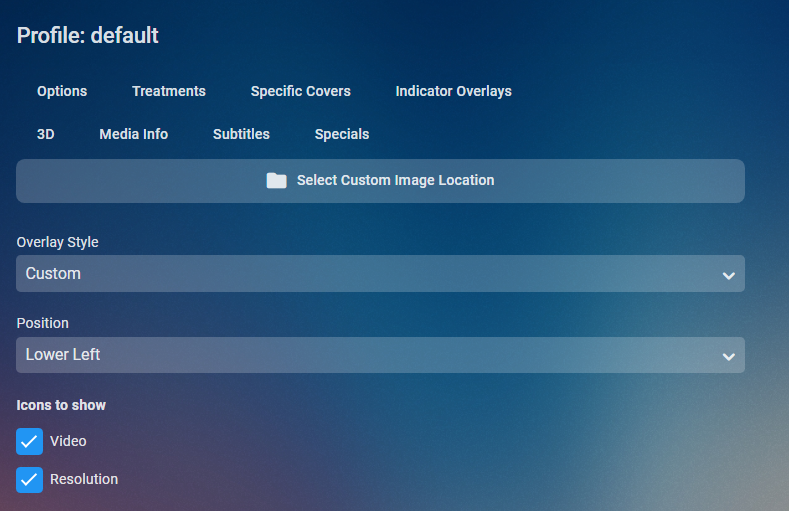
Profiles and custom overlays are two separate things. 1 select your custom image location 2 set overlay style to custom

 1 point
 -
If it's possible please add icon to show password on login screen. Regards.1 point
-
Hi, yes it makes sense. Thanks.1 point
-
Unfortunately, I can confirm, .26 is still slow. I rollback to .191 point
-
Damn! Haven't gotten a good sync since before December last year! Thx (again) for the info @GrimReaper1 point
-
Here are a few mock-ups.1 point
-
This results in the following possible cases: DV (non-compatible) DV (HDR10 compatible) DV (SDR) DV (HLG compatible) HLG HDR10 compatible The last bullet includes HDR10 and HDR10+ - hence the text "HDR10 compatible" As soon as we will be able to detect HDR10+ as well, it can turn into this: DV (non-compatible) DV (HDR10 compatible) DV (SDR) DV (HLG compatible) HLG HDR10 HDR10+1 point
-
I agree with this. Specific profile levels should be shown in the media info section perhaps but as general display most end users won't know which profile means what. I also don't agree as I'm sure most of the people "investing" in a DV TV did so because the sales guy at the store said "You want Dolby Vision. Its better."1 point
-
Thank you for your hard work in development. I love it. json creation succeeds in English title, but if it is a Japanese title name, the json file becomes '-S1E1.json' and is overwritten one after another. Is there any solution?1 point
-
Step 4 - Compare and Discuss Results Now - as I'm sure you will all get similar results, let's take a look what these can tell. Classic Extraction with SW Decoding # Test Duration 3.1 Classic with SW Decoding 1 Thread 257s 3.2 Classic with SW Decoding All Threads 43s Classic extraction means that the whole video is being decoded. Of course this can be accelerated by using more threads. This is what you all know and have in mind when thinking about way to accelerate image extraction. Classic Extraction with HW Accelerated Decoding The HW decoding results are a bit unfair to compare, because they would be faster when scaling down in hardware rather than in software, so I'll skip over them. But what's for sure is that these could never be as fast as quick extraction. Quick Extraction Note for occasional readers: Quick Extraction is an Exclusive Emby Feature. Nobody else has this - at the time of writing. # Test Duration 3.5 Quick Extraction 1 Thread 6.5s 3.6 Quick Extraction All Threads 6.7s Let's look at 3.5 first: 6.5s means that it is 6.6 times faster than 3.2. But not just that - in case of 3.2 your system is under 80-100% load for 43s! In case of 3.5, a single core is under 100% load for 6.5s - so we need to actually compare that to 3.1 - and that means 40 times faster with the same CPU load. How about 3.6? @Happy2Play might be able to confirm this: In case of 3.6 - you'll see a higher CPU load of the ffmpeg process. But it is not able to end up faster. Why so? The reason for that is that enabling more threads will make ffmpeg decode frames in parallel. But what we actually need is a single frame every 10 seconds. And before getting the next frame, it always needs to stop decoding and seek forward in the file, then decode the next frame. By enabling multi-threaded decoding, ffmpeg will decode more frames in parallel - but we don't need any of them. They will just be thrown away at the cost of a multiple of the CPU load. That's why I always said that the quick extraction cannot be accelerated. Not with GPUs and not with CPUs. But the most important bottom line is: Emby's Quick Extraction is multiple times faster than anybody else can do it, no matter how much more hardware you throw at it. So please stop complaining and think you could have image extraction get any faster. This is already the best what's possible. And we do not allow parallel extraction for the reason explained above.1 point
-
Here are my results: # Test Duration 3.1 Classic with SW Decoding 1 Thread 257s 3.2 Classic with SW Decoding All Threads 43s 3.3 Classic with HW Decoding CUVID 91s 3.4 Classic with HW Decoding QSV 285s 3.5 Quick Extraction 1 Thread 6.5s 3.6 Quick Extraction All Threads 6.7s1 point
-
I think the problem is that many do not understand what we are exactly talking about here and how on earth we would come to tell such nonsense that more CPU or GPU power wouldn't be able to make image extraction faster. So, let's make a test that is reproducible and everybody can do on one's own systems. Step 1 - Download Download the test file: http://distribution.bbb3d.renderfarming.net/video/mp4/bbb_sunflower_2160p_30fps_normal.mp4 (to make sure we all get comparable results) Step 2 - Prepare Open a command line Create or go to an empty temporary folder Copy the downloaded video into that folder Determine the ffmpeg path Windows default: C:\Users\admin\AppData\Roaming\Emby-Server\system\ffmpeg.exe Debian/Ubuntu: /opt/emby-server/bin/ffmpeg-emby Or copy from an ffmpeg log Create a sub-folder named out Step 3 - Run Tests 3.1 - Classic Extraction with SW Decoding - 1 Thread ffmpeg -loglevel +timing -threads 1 -i bbb_sunflower_2160p_30fps_normal.mp4 -an -sn -threads 0 -vf "fps=fps=1/10,scale=min(iw\,320):trunc(ow/dar/2)*2" -f image2 out\img_%05d.jpg 3.2 - Classic Extraction with SW Decoding - Use all Threads ffmpeg -loglevel +timing -threads 0 -i bbb_sunflower_2160p_30fps_normal.mp4 -an -sn -threads 0 -vf "fps=fps=1/10,scale=min(iw\,320):trunc(ow/dar/2)*2" -f image2 out\img_%05d.jpg 3.3 - Classic Extraction with HW Decoding - CUVID ffmpeg -loglevel +timing -c:v h264_cuvid -i bbb_sunflower_2160p_30fps_normal.mp4 -an -sn -threads 0 -vf "fps=fps=1/10,scale=min(iw\,320):trunc(ow/dar/2)*2" -f image2 out\img_%05d.jpg (NVDEC is the same, so I'll leave that out) 3.4 - Classic Extraction with HW Decoding - QSV ffmpeg -loglevel +timing -init_hw_device qsv="dev1:hw2,child_device=1,qsv_use_dx11=1" -hwaccel qsv -hwaccel_device dev1 -c:v h264_qsv -i bbb_sunflower_2160p_30fps_normal.mp4 -an -sn -threads 0 -vf "hwdownload,format=nv12,fps=fps=1/10,scale=min(iw\,320):trunc(ow/dar/2)*2" -f image2 out\img_%05d.jpg (this command is for Window; you might need to change hw2 to hw and child_device to 0) 3.5 - Quick Extraction - 1 Thread ffmpeg -loglevel +timing -threads 1 -skip_interval 10 -copyts -i bbb_sunflower_2160p_30fps_normal.mp4 out\img_%05d.jpg 3.6 - Quick Extraction - All Threads ffmpeg -loglevel +timing -threads 0 -skip_interval 10 -copyts -i bbb_sunflower_2160p_30fps_normal.mp4 out\img_%05d.jpg Step 4 - Compare and Discuss Results Let's see which results you will get..1 point
-
A sub-option on the refresh dialog would be extremely helpful: [X] Replace existing images [X] Preserve posters Or perhaps it would be simpler to automatically lock the posters when they are selected manually, much like how metadata values get locked when modified manually.1 point
-
Hey , It is possible to add to each movie with the supported formats for the background view that will show the logos of the relevant formats dolby vision atmos hdr 10 and etc? I think it would be very cool I made an example in Photoshop
.thumb.png.efd3c7d528b0a2738a5a31732a5db1d8.png) 1 point
1 point -
Indicator Overlays In addition to all the various treatment styles, all of them can have graphical indicators for details about the item like if it is 3D, what audio and video codecs there are, the video resolution and subtitles. To configure these indicators, go to the Indicator Overlays config page and select the type of overlay (3D, Media Info, Subtitles or Specials). Then select the location of the indicator (which corner of the image) and either None (for no overlay), Internal (for the internally defined style overlay) or Custom (for a custom image you provide). You can even make CoverArt do nothing but put these overlays on your original covers by selecting the "Plain" treatment style and then setting up the indicators that you want.1 point


















.png.dce1dcf6124f6f28af6036df7ddb11de.png)