Leaderboard




Popular Content
Showing content with the highest reputation on 03/25/23 in all areas
-
To report - I've seen no issues with this Plugin (v1.0.1.23 - In the Catalogue) with the latest Emby Beta (4.8.0.26) The main related change is Emby can now identify 'Dolby Vision' (instead of just HDR10), but unfortunately it still does not expand on this - and simply tags it '4K Dolby Vision' - no mention of it displaying HDR10 as well for backwards compatible files. Missed opportunity - it should say '4K Dolby Vision+HDR10' for DV7 and DV8 files imo. Note, to get this to change - you need to Refresh the metadata for that item (or entire library), it won't do it automatically. It won't impact how it plays, it's just a visual identifier for those that don't use the Plugin. Of course the results from the Plugin are displayed in the Title as well - so you'll get the full DV (and HD Audio) detail info as you did before. @Cheesegeezer @softworkz FYI3 points
-
Thanks for bring this to us, I found the problem and it a bug in our software.2 points
-
Plugin never worked for TV shows, that's Emby core.2 points
-
*Moving to General/Windows as this is not a Feature Request* Genres will show whatever "genres" you have assigned to your media, even completely imaginary ones, either obtained from providers or assigned manually. If you want Anime to show as a genre - assign that genre to item(s) yourself.2 points
-
Would it be possible to add the bitrate and frequency e.g 24bit 192khz and file type. When playing an album. I'm used to this in other music app players. If it is possible can I get pointed in the right direction.2 points
-
Hi all, So my MacBook only plays DV profile 5 (yay Thanks Apple, totally not a huge hassle). Which means that I have some profile 5 files, but (again thanks Apple) cannot stream them without it trigering transcoding. Not that big of an issue, i'll just open them locally. But now that I have the files anyway it would be cool if I could use them for my family. At the moment, when tonemapping begins for Profile 5, it will give the signature green and purple look. Jellyfin looks to have fixed that and I was hoping this could also come to Emby, especially snce your recent update mentioning Emby will now recognise and tag content as DV @Luke. No rush, it's not that big of a deal for me but maybe easy and nice to implement when you have the time! J1 point
-
According to Tom's Hardware and Ars Technica, NVidia has upped the number of simultaneous encoding sessions on Geforce GPUs, going back to the ancient Maxwell chipset! Officially, the upper limits for most models now tops out at 5 sessions. There's no information on what specific driver releases you need to be on, nor is it clear if drivers on all platforms are updated. Nevertheless, you can check out details for your specific GPU(s) here.1 point
-
To add, unless your PC Monitors are HDR - even if you manage to Direct Play in the browser (with Edge etc) then it's going to look very dull and colourless - because you are attempting to display HDR on an SDR screen. Tone mapping 'could' deal with this, but you don't have the hardware to do this. I think maybe you just need to manage your expectations on what is 'technically' possible with 4K - and unless you have either .. a) the end clients to natively (direct) play it or b) powerful enough server hardware to transcode it .. then I'd suggest you probably should stick with 1080p SDR material.1 point
-
Yea I knew it will break. A lot of my plugins are broken now. I'm still waiting for @Luketo apply the GenericUI fixes I have submitted, so I can update all the plugins.1 point
-
OK, few things are more clear now, quick summary: 1. @rbjtechwas right, your server is way underpowered to transcode that content in real time, Atom simply isn't up to the task 2. Your ET is DirectPlaying, do you still see jerky playback? Have you compared it against Theater Store? 3. Your browser needs full transcode (as it's 4K HDR10 item) - no server muscle; Have you compared it against MS Edge with HEVC extension installed? 4. Your Firestick is only remuxing audio - relatively low-cost CPU task hence your server can keep up and you're seeing smooth playback. Do tests as above, see what gives.1 point
-
Hi, my IPTV provider gives me one stream per login so to handle multiple streams they essentially provide multiple M3U files with a second login. If I add these to Emby then I appear to have duplicate channels, and if the kids are watching on one TV I have to test both entries for the other channel to determine which login they are using. Is there any way in Emby to combine these so that I only have one entry per channel but also have Emby register that only one stream per login is allowed and auto-pick the other login if the first is in use? Or should I look at a dedicated TV tuning app and have Emby pull from that? Thanks!1 point
-
Hi, we’re plan to provide more control over channel grouping in upcoming updates. Thanks.1 point
-
Hi, yes it makes sense. Thanks.1 point
-
Thanks for your help guys ! Plugin released:1 point
-
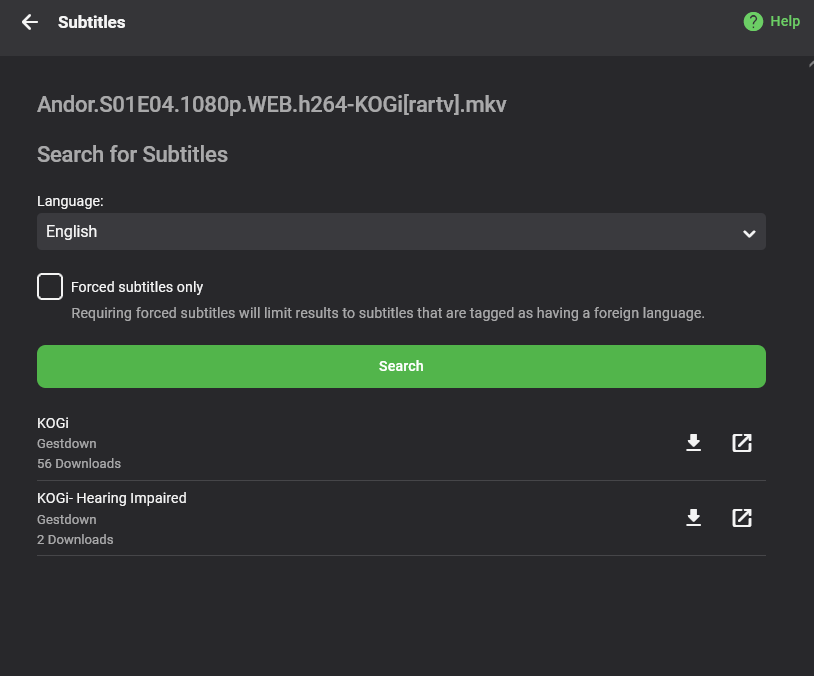
Hello All, I'm here to showcase a new plugin for Emby: Gestdown. The website is: https://www.gestdown.info This plugin provides full support to find and download subtitle from Addic7ed, the advantage from the Addic7ed plugin are multiple: No need for login/account No log Less false positive by using TVDB id matching Unlimited downloading Fair rate limiting Reduce the load on the main Addic7ed website Installation As usual, simply put the dll in your plugin folder and restart emby. https://github.com/Belphemur/Gestdown-Emby-Plugin/releases/download/v2.0.0/Gestdown.dll Usage Either have Emby setup to auto-download subtitle, but when you're using subtitle on demand you'll see Gestdown as part of the list of available subtitle with the Scene version of the subtitle (here KOGI) Source code: https://github.com/Belphemur/Gestdown-Emby-Plugin Releases: https://github.com/Belphemur/Gestdown-Emby-Plugin/releases
 1 point
 -
4.8.0.26 is the culprit for sure. CoverArt is broken too. I lost my overlays.1 point
-
Nope, as I understood it, there are three image processing libraries included (Skia being one of them) - but can't find that exact post or Luke edited one of his previous posts:1 point
-
Happens for other plugins (CoverArt & Iconic) also.1 point
-
Experiencing the same. If update top picks runs crashes entire Docker container on 1.0.0.551 point
-
Thanks for testing and reporting! A must have plugin and daily companion on my server.1 point
-
@marriedmanIn order to hopefully gain some more insight and clarification on above, could you: 1. Run "Rotate log file" scheduled task 2. Play an item in ET 3. Play same item in browser 4. Play same item on Firestick 5. Provide embyserver log and x ffmpeg logs created.1 point
-
Awesome. Thank you for the reply. Just bought the app.1 point
-
Seem like the latest beta broke something : System.TypeInitializationException: System.TypeInitializationException: The type initializer for 'SkiaSharp.SKObject' threw an exception. ---> System.DllNotFoundException: Unable to load shared library 'libSkiaSharp' or one of its dependencies. In order to help diagnose loading problems, consider setting the LD_DEBUG environment variable: liblibSkiaSharp: cannot open shared object file: No such file or directory at SkiaSharp.SkiaApi.sk_version_get_milestone() at SkiaSharp.SkiaSharpVersion.get_Native() at SkiaSharp.SkiaSharpVersion.CheckNativeLibraryCompatible(Boolean throwIfIncompatible) at SkiaSharp.SKObject..cctor() --- End of inner exception stack trace --- happens when I start the toppicks task, takes the whole server down.1 point
-
@Abobadercan you help here?1 point
-
OK yes you're right,there are changes that are going to be needed. The ImageEncoder property will have to become plural.1 point
-
Hi, do you have a question that we can help with?1 point
-
I'm having problems following this thread, and the conclusion you've come to personally doesn't seem right nor like a solution; I might be wrong, though: Topic title: Emby Theater jerky playback 4K video Meaning: ET (on an 8th gen i5) is already DirectPlaying - and having issues. Browser is Transcoding - and having issues Firestick is Transcoding - and not having issues. Ensuring DirectPlay (already happening on ET and being the reason for this whole topic as per OP's statement) will not sort that. Btw, R, not only Edge - Chromium Marmaduke has been direct playing HEVC for quite some time now, Chrome since recently as well.1 point
-
I'm the OP of this topic. I still occationally have the issue, but do not allow Emby to change refresh rate, so at least for me that is not the cause of the problem.1 point
-
Sorry I can't help myself:1 point
-
My plugins are jquery free and I currently load my main js file in the same way as the example (main html loads js with data-controller). That main js file loads additional JS files structured as modules using require: require([Dashboard.getConfigurationResourceUrl('IconicData'),Dashboard.getConfigurationResourceUrl('IconicLibraries'),Dashboard.getConfigurationResourceUrl('IconicBadges'),Dashboard.getConfigurationResourceUrl('IconicRules'),Dashboard.getConfigurationResourceUrl('IconicForms')], (IconicData, IconicLibraries, IconicBadges, IconicRules, IconicForms) => { ... Will this approach to JS remain viable? Is the premise/useage of 'baseView' documented anywhere? I see how to include it from your example, but I haven't seen it before. How big of a risk am I taking the longer I put off a refactor to include it?1 point
-
I think just sticking with the big ones (categories) Best Actor in a Leading Role Best Actor in a Supporting Role Best Actress in a Leading Role Best Actress in a Supporting Role Best Picture Best Documentary1 point
-
Yep Images will vary.

 1 point
 -
Or have an option to display minimised library thumbs there, placeholders seem big enough for distinction. Edit: Magnify on hover would also work.1 point
-
I think what we'll do is just remove those from the built-in web app.1 point
-
That's what the Emby login is for. Adding SSL would prevent (the very unlikely) sniffing of access to your server, which could expose the logins and passwords; easy to add, and so a no-brainer. You can avoid publicising your domain name and use an unusual port for Emby - but that can't prevent random scanning finding it eventually. You can hide login names for external access (Emby setting) to make it harder for anyone who reaches the login page. You could limit external access by client IP address, if you know them, and they are fixed (which is unusual if using mobile devices); Emby can do this by network, and a reverse proxy would offer many more specific options (including geographic ones). You can limit the devices that your users can use to those you know are theirs (an Emby setting). If external access is only by browser, you could use a reverse proxy to impose a basicauth login before showing the Emby login page (the clients don't know about that, so wouldn't be able to operate with it). Using a VPN can hide your identity as an Emby user, but doesn't address the other issues. Using Tailscale or Zero Tier and installing on all your users' devices can make them all appear to be local to your network, and thus enable you to block all "external" access in Emby; that might be the nearest to what you want, I guess. ...just a few thoughts. But anyway, why do you feel the login is insufficient? Paul1 point
-
Yes that is our goal.1 point
-
Based on my own testing, though it may be limited to the latest 1.7.1 beta.1 point
-
MPV does appear to support frame rate switching now, and should also already be sharing the same playback UI as the native player.1 point
-
Yes there are some issues discovered with adding lots of photos to photo library. Don't know the details but should be improved in 4.8.1 point
-
And done. Thanks again!1 point
-
And an hour later... we've made it to 93.2%, so I'll call that a win. It is still cranking through pictures, but memory usage has remained nominal, so I am confident (knock on wood) that it was that file, for whatever reason. Thanks for the speedy support!1 point
-
It worked. thank you!1 point
-
Did you enable importing collections in your library options? I'd probably also set the min collection size to 1 to make this easier to test.1 point
-
Has everyone's questions on this been answered?1 point
-
Hi Luke, no issues from my side after the missing deps were added to the repo, the installation worked with out any issues. I was trying to help hjason7812 My only comment for improvement would be to update https://emby.media/truenas-server.html 1.To make it clearer that this must be run in the System Shell and not within a Jail Shell 2. This is for TureNAS Core1 point
-
Hiya, So I previously used AutoOrganize exclusively to organise my new media but stopped recently because of two reasons: Firstly the amount of false-matches it was encountering meant I was constantly having to micromanage my files and rename files/folders (particularly annoying when it matches the wrong TV Series and renames 50 episodes). Secondly with a new NAS and more storage I started adding 4K versions of my films along with the 1080p copies I already had. I use Emby's naming convention of adding a hyphen into the filename to indicate a different version while being able to keep them organised in the same folder (ie: Prometheus (2012) - 1080p.mkv, Prometheus (2012) - 2160p.mkv) however AutoOrganize doesn't have the ability to write the movie resolution (or version: Director's Cut, Extended Edition etc) into the file name. So... I'm forced to use a 3rd party solution. I use tinyMediaManager which is free (and open source java/swing) and works amazingly, but I'm surprised that Emby doesn't have a more fully-featured media organiser built in. It seems to me that it's an integral part of any media browser to be able to actually organise the media comprehensively. I would love to see AutoOrganize get some love such as a window to confirm the scrape data matches the actual movie, and expand the file naming patterns to include options like resolution and movie version. I'd rather stay inside the Emby ecosystem rather than be forced to use a 3rd party solution for something that is so fundamental to the core functionality.1 point
-
Been away a while and looping back to update some things... I have been using Auto Organize for many years now. I switched from Plex originally because it was mismatching nearly half my catalog of over 1200 movies at the time. For TV Show it is pretty good. What I have found is that if you give the folder the name AND year AND put a "Season 1" folder in it, then it will work 95%+ On occasion I need to help it if I have "Simpsons, The (1989)" or something. I have it save the match and I'm good to go. The only real issues I have had with TV Shows are with shows that they have redone. Amazing Stories for instance. When I got the 2020 version it overwrote the episodes in the 1985 version, even though the file was something like "Amazing.Stories.2020.S01E01.mkv" The other issue I run into is getting a "null" error. It seems like it hasn't fully figured out what the folder is, so when I try to match it manually I get that "null" error. If I wait a while, it will usually pick it up. I have a ton of Anime, and I've had a lot of issues with that, particularly "null" errors that don't resolve. I think I'm in a minority with the anime though, I've given notes on it several times years ago, I'm not holding my breath that it will ever change. For movies, I use Media Center Master and run everything through it. I have a "New Movies" folder, and I'll put stuff there, and once a week I run MCM on it. It detects the movies quite accurately, and if it can't, then it asks for help (doesn't assume). It will also generate a nfo file, and I have it rename the folder and files into the Emby format. I think Emby has mismatched a movie MAYBE 1 in 500 since I started doing this. The two most recent (ie 2 in the past 18 months) where released in another country first, and it pulled in the info for the foreign release which had a different title, cover, etc. One prob 2.5yrs ago was a bad B movie that was picked up as another bad B movie with the same name released from China. I will pay close attention and post logs for anything that it mismatches from now on.1 point
-
Try searching the server's data folder for camerauploads.json and deleting whatever you find.1 point
-
I'll post a log as soon as I get a false match.1 point