Leaderboard




Popular Content
Showing content with the highest reputation on 03/10/23 in all areas
-
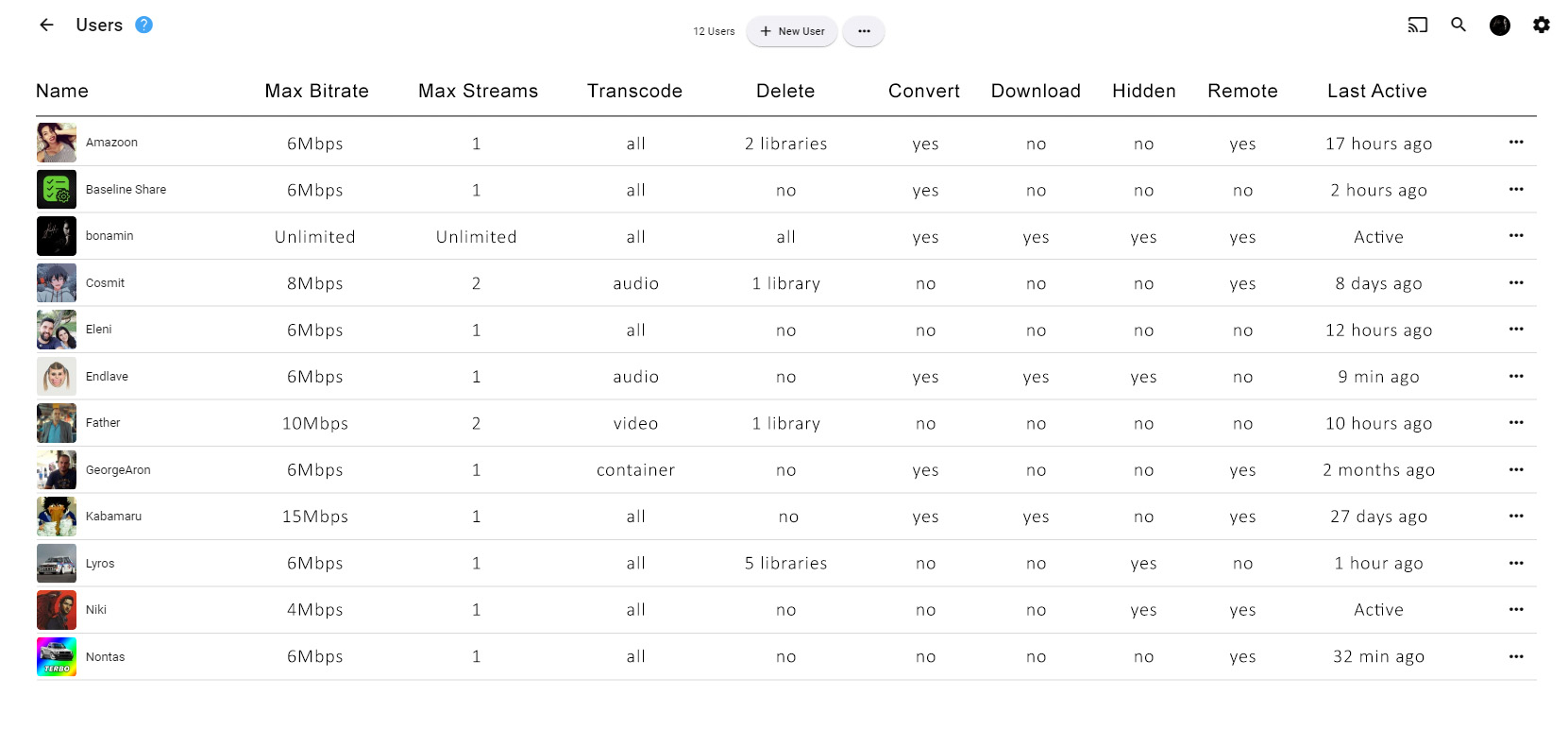
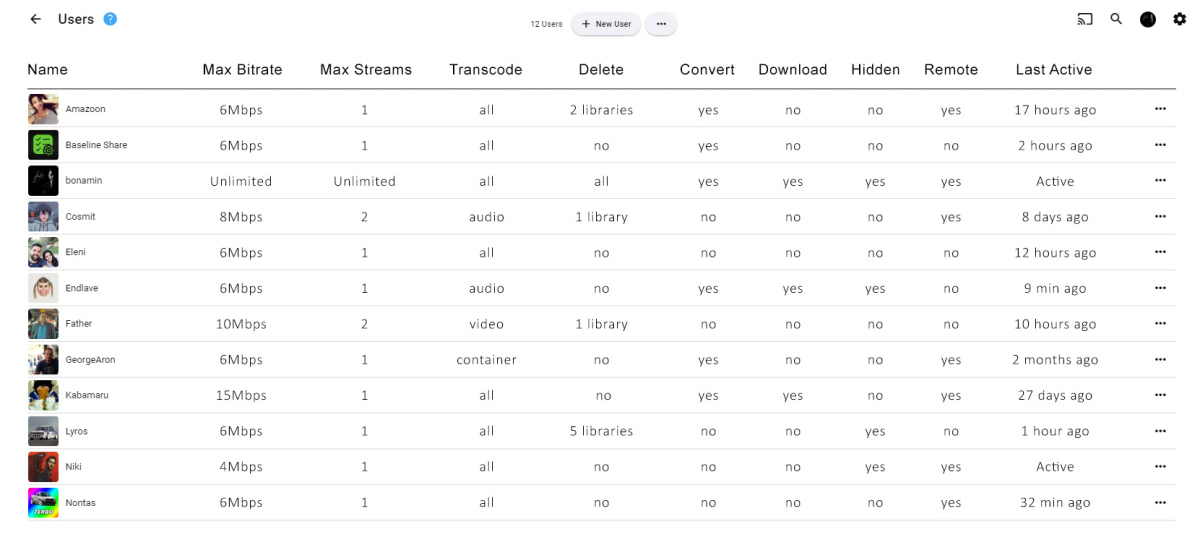
Hello everyone, I hope you're doing well ! I'd like to suggest something, that I would love to see on Emby ! It's not a problem, or a dealbreaker for me, but I'd find it usefull nonetheless !! When an admin/owner is viewing the users, and sets the view as a "List" I'd like to see more fields containing info about the specific user. Exactly the same, as when I view my film collection as a "Table" I can see info such as Bitrate, Year, Runtime, etc. For the users, we could have Bitrate Limit, Max Streams, Downloading, Converting, Transcoding, and even a "last seen online" field. Or whatever, I don't know. The "Bitrate Limit" and "Max Streams" would be particullarly handy for me ! I've also made an image, to explain visually what I mean ! Not a dealbreaker or anything, as I've already said, but still, a rather nice thing to have, and I don't think it would be terribly hard to implement. Thank you for your time !
 4 points
 -
Sure, Caddy has no UI (nor do you need to create a login to use it, run docker etc). But the minimum usable Caddy configuration file for a secure reverse proxy contains just two lines - the text file required to initially set up NPM is more than that. I'm sure NPM is perfect for some people; but it can't sensibly be described as much simpler than Caddy! Paul2 points
-
That is certainly a personal preference, I wouldn't ever want to see something like that. So please:2 points
-
Only if it were optional, and not on by default.2 points
-
Yes, exactly.2 points
-
Caddy simply negotiates with LetsEncrypt - this negotiation requires either port 80 and port 443 to be open to LetsEncrypt. For situations where that is not possible, or when a wildcard certificate is required, Caddy has plugins for the main registrars which use their apis and a key which the user has requested to contact them for the contents of a special TXT record. The methods are described in more detail here: https://caddyserver.com/docs/automatic-https#dns-challenge Paul2 points
-
Is this doable by some sort of plugin ? Maybe add your imdb credentials and then be able to rate movies here and have them on imdb as well (not talking about sorting here, just rating stuff)1 point
-
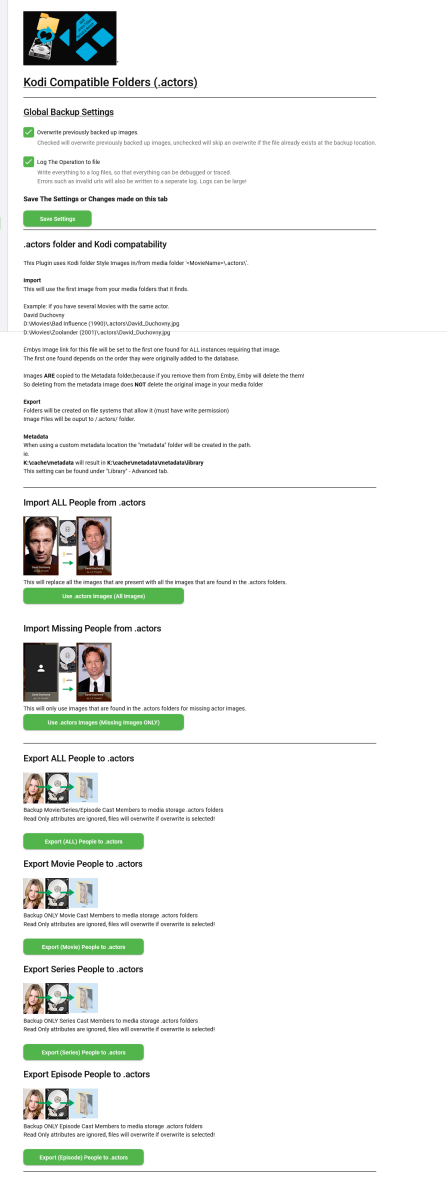
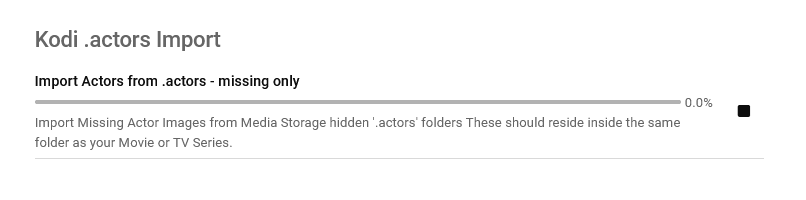
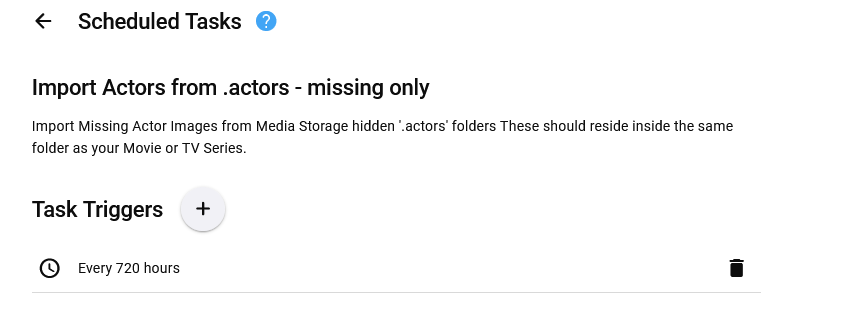
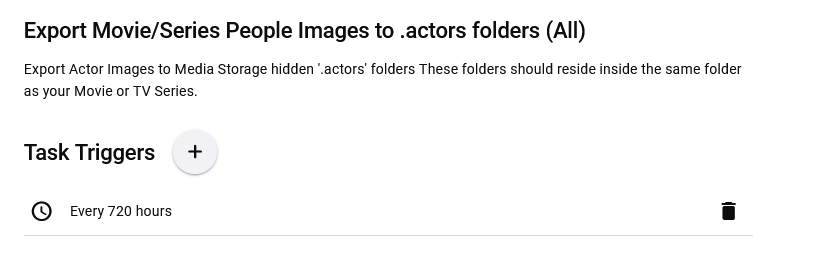
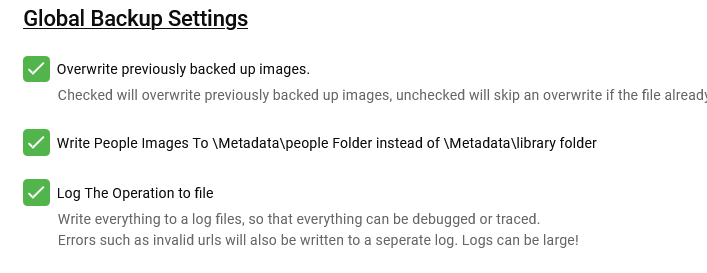
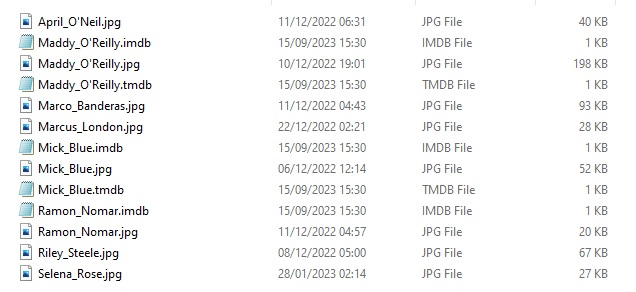
Updated 15 Sept 2023 - description at bottom of this post Updated 06 August 2023 - description at bottom of this post Updated 05 August 2023 - description at bottom of this post As requested, import and export .actors folders people as a seperate plugin. I have done this fairly quickly so have not extensively tested it/checked it all works falwlessly! Everything should log to its own files and keep out of Emby's main logs now If you don't know what it is or does then you don't need it! Use at your own risk, this plugin creates files (export) and changes Emby database (import) Create files writes to media folders and / or writes to metadata cache library Scheduled task * Updated 24/03/23 ===================== I have left the old version here incase the newer one doesn't work properly. I have NOT tested it! There is now an option to select the import metadata directory preference for \Metadata\library or \Metadata\people directories. Code has been added to change the path that the image is put to when the option is selected. Other than this change, both versions are the same (one with this change and one without) - no need to upgrade if you do not want to. Kodi_actors_Folders.zip Kodi_actors_Folders_(MetadataPeopleFolder).zip Updated 20 June 2023 Fixed Null Reference Exception when Actor image path is not null but an empty string - this shouldn't happen but seemingly can happen! When it occures the plugin simply exits, and doesnt finish its task. The Fix Now logs this as a path error and skips over it to continue so the plugin doesn't just quit and exit. Also a code edit for getting Images from http paths [ERROR - Debug Below] messages in your logs. Code to wait for the filesystem to actually save the temporary file to disk before trying to copy it & Exception Trace logging if it still fails. Logging made better for overwrite / do not overwrite destination instead of a error Logs should all go into the log directory on all systems now. If anyone still gets this null reference error, please let me know Kodi_actors_Folders(20-07-2023).zip * Updated & Reuploaded with Import changes to metadata path & option to write to a-z folders Kodi_actors_Folders(21-07-2023).zip Kodi_actors_Folders(21-07-2023) (2nd Release).zip 05 August 2023 * Fix for sporadic null reference error (caused by http.listener) - which stopped export. * Improved Invalid name handling * Added MovieList Export on activation * Added Timeframe option of people to export Kodi_actors_Folders (05-08-2023).zip 06 August 2023 * Added Error Traps for random export errors, recovers fully now,continues and logs (if selected). Kodi_actors_Folders (06-08-2023).zip 15 September 2023 * Added Import / Export of Provider ID stub files * Corrected settings that didn't save properly. This was done primarily for my own use, so it might not be ideal for everyone. Basically it allows you to export imdb,tmdb,tvmaze ids (currently just these three, I will add more provider ids later) with the poster images I have not tested the import yet but the code is there to do it... This is solely to help prevent duplicate people in my database and eventually make my db more and more correct over time, and also to work with my other plugins.... They are just plain text files with the provider id inside. Kodi_actors_Folders.zip

 1 point
 -
Disclaimer: If you decide using the delete option, IT'S YOUR RISK! If you are using fileops on Kodi, LOOK and VERIFY what Kodi is about to delete or modify. The affected folder is clearly shown in a Kodi popup message. BETA VERSION 8.2.15: Download Link: https://github.com/MediaBrowser/plugin.video.emby/archive/refs/tags/8.2.15.zip Release Notes: removed Kodi 18 support: ONLY FOR KODI 19+ use low level API for socket object (performance) use low level API for custom queue object (performance) optimize/fix init sync optimize session commands change epg refresh method fix livetv for Kodi 21 STABLE VERSION 8.2.14: Download Link: https://github.com/MediaBrowser/plugin.video.emby/archive/refs/tags/8.2.14.zip Release Notes: removed Kodi 18 support: ONLY FOR KODI 19+ (realtime) progress progress updates even if Emby server is busy (another) fix dynamic nodes (genre and tags) for mixed content fix webdav issue add recommendations for dynamic nodes fix library updates when "use path substitution" is enabled (plugin) and "extract video information from files" is enabled (Kodi). Actually "extract video information from files" should always be disabled. fix remote client selection when Emby server doesn't report a Username fix sync issue (changed userdata reported for a folder by Emby server) fix minor webservice issue fix live tv epg issues fix boxset/collection issue add option to adjust curl timeouts fix dynamic nodes (genre and tags) for mixed content fix kodi companion query without admin account fix folder view for pictures fix minor issue when disconnecting from Emby server fix hibernate issue when playing content Widget refresh improvement fix progress updates, playing native (Kodi) files in combination of Emby content fix check artwork update add emby sources to sources.xml (fixes Kodi's masterlock issue) (re)add Kodi workaround for episode bookmarks (default on) disable http2 by default fix minor sync issue and improve incremental performance fix IPV6 websocket connection -> https://github.com/MediaBrowser/plugin.video.emby/issues/471 fix media flags (codec infos) fix tvtunes add option to disable websocket communication improve server reconnects minor livetv improvements minor progress sync updates workaround for Emby server issues (http unresponsiveness) even more fixes for livetv streamclose issue (for single tuner devices) improve channel sorting additional fixes for livetv streamclose issue fix livetv streamclose issue fix crash when invalid remotecontent requested to play keep using same connection on Emby server reboot minor changes in livetv stream init fix livetv stream init issue fix local trailers fix hls-streams when using (Kodi's) path substitution faster hls-streams init redefine modi in plugins config menu. Basic and standard mode only shows essential functions (user frendlyness) skip intro default enabled add option to limit artwork size add option to define the artwork compression level fix remote playback photos fix database close issue improve sync pause fix remote playback focus screens improve incremental sync performance add translations fix progress reset issue fix artwork compession issue fix minor artwork query issue improve live tv sync fix BoxSet startup sync issue support livetv channel numbers improve Emby server queries improve playlist nodes several minor fixes fix disable image enhancers some performance improvements several fixes for dynamic/hybrid nodes fix music playlist issue fix local trailers fix themes add relative seek position support (https://emby.media/community/index.php?/topic/118597-new-seekrelative-remote-control-command/) fix settings persistence (https://emby.media/community/index.php?/topic/118572-issue-to-memorize-kodi-video-settings-with-native-path-and-default/) change content queries for better Emby server >.19 support fix live tv via dynamic nodes fix watched status issue fix issue with native Kodi content (or 3rd party plugin content) fix playback progress issue async queries for dynamic nodes and Ids queries (performance) fix invalid people issue fix shutdown/restart issue fix livetv sync compatibility with Emby server beta 4.8.0.29 workarounds for .29 performance issues use async http queries (for init and startup sync) fix rare sync issue compatibility with Emby server beta 4.8.0.27 add HDR flag in Kodi's dynamic listitems add HDR flag in Kodi's database fix audio sync issue fix subtitle issue fix multiversion sync issue fix access restricted issue fix bluray sync fix sync isse after remote mode disabled add option to disable ssl verification fix skip intro fix artwork cache issue improve http communication major changes in player controlls (major changes) new remote control function added watch together/remote mode, could forward control to supported clients (option) -> multi box control add NowPlayingQueue support -> requested here: https://emby.media/community/index.php?/topic/116318-playlist-bei-wiedergabe-auf-anderem-gerät-leer/#comment-1229462 fix sleep mode improve watch together feature (support 3rd party apps) improve livetv sync (cache EPG etc.) Kodi workaround getting proper progress information replace Kodi (python) player API (unreliable) with json rpc commands replace Kodi (python) playerlist API (unreliable) with json rpc commands added sort of "qos" for http queries (prioritize realtime queries, queue async queries) use Kodi 20 improvements for plugin change database index (faster music album artwork loading) fix search by actor (options available in plugin's config menu) keep photos, photoalbums, upcoming always cached ask for transcoding audio streams (option) -> mostly helpful with Emby server transcoding patches -> https://emby.media/community/index.php?/topic/115329-feature-request-transcoding-multiple-audiostreams/ fix special content playback via context menu rewrite logs -> native xbmc.log support chapter bookmarks for all content in addon mode (using Kodi's path substitution, tricking Kodi believing it's local content) (option available in plugin's config menu) shorten filenames change context menu (add specials as seperate item) unify iso, bmdv, plugin detection (maybe side effects, must be reviewed) rewrite transcodec options improve livetv playback cache translations improve startup sync (maybe side effects, must be reviewed) improve EPG sync (based on iptv-simple scheduler) add (basic) livetv recording option (EPG guide -> context menu) add support for Favorite Collection add support for Favorites combined in one node (minor) http session improvements improve remote control support Watch-together E4K implementation -> e123enitan -> https://emby.media/community/index.php?/topic/111030-watch-together-e4k/ (master (user) probably needs admin previlegies)1 point
-
more details will follow
 1 point
 -
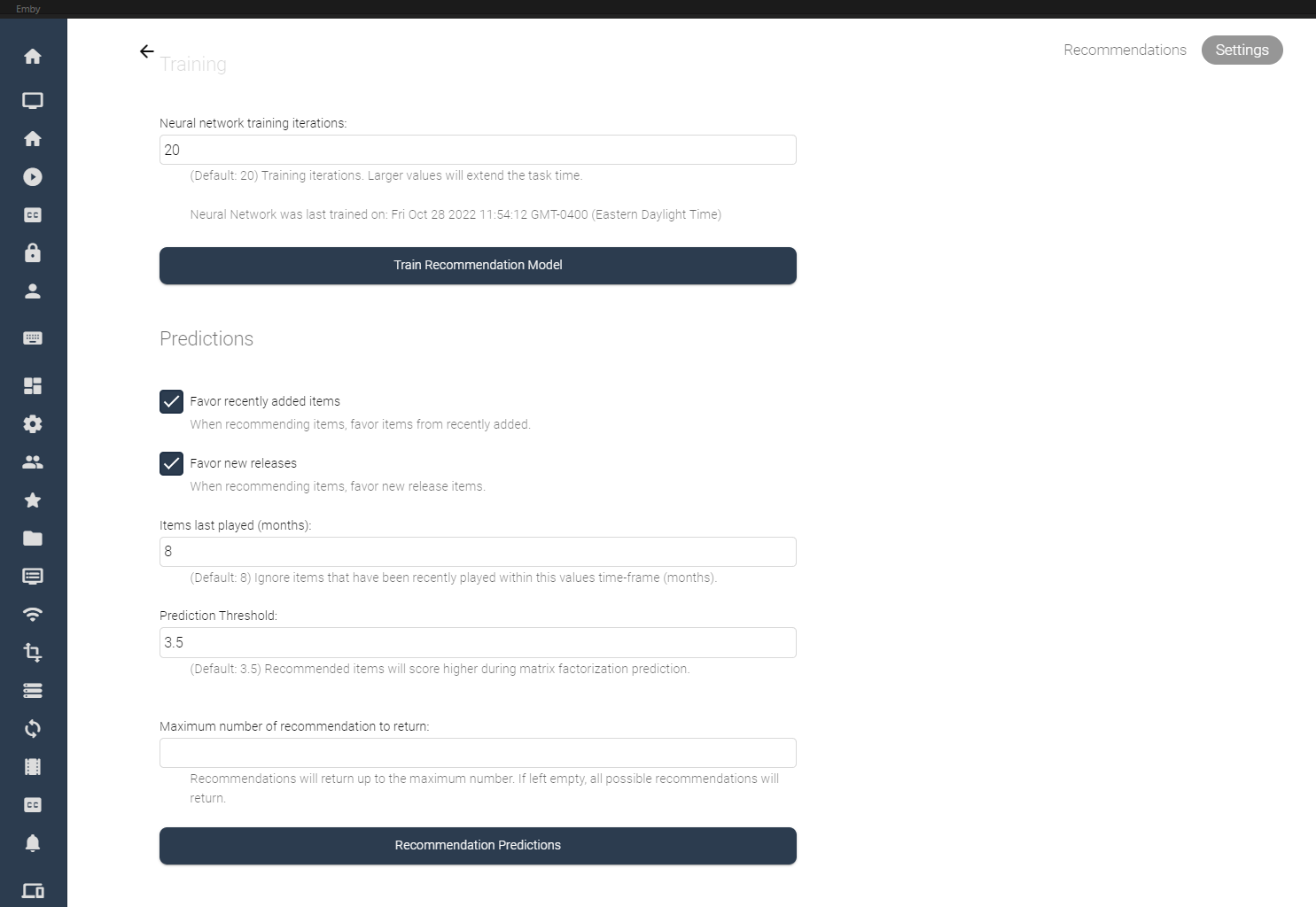
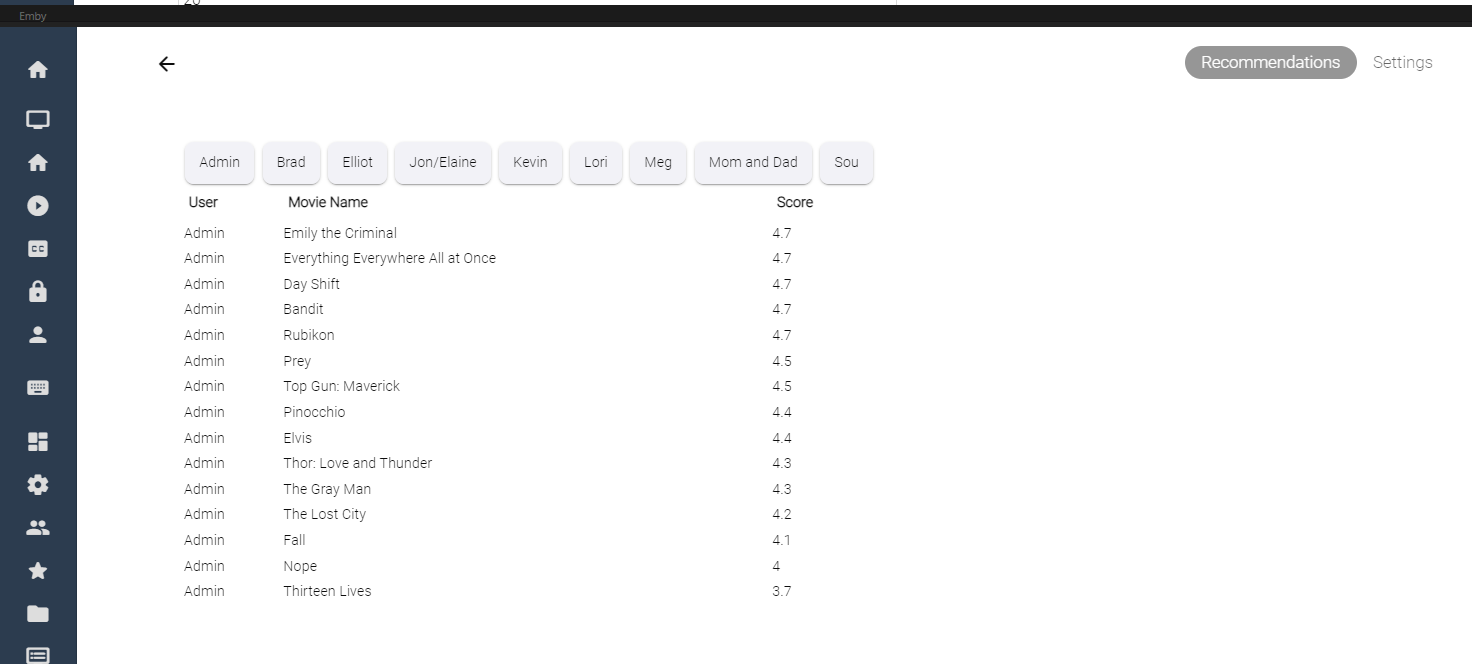
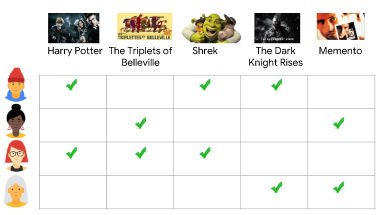
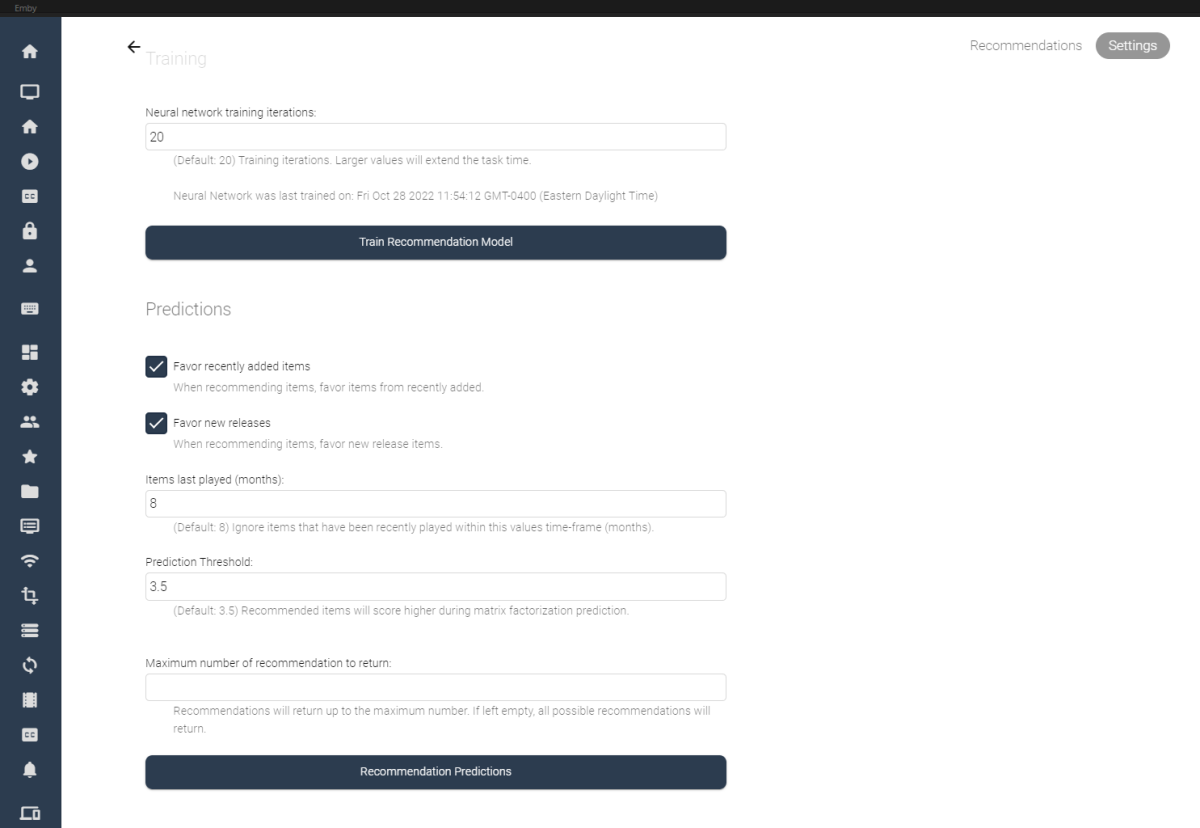
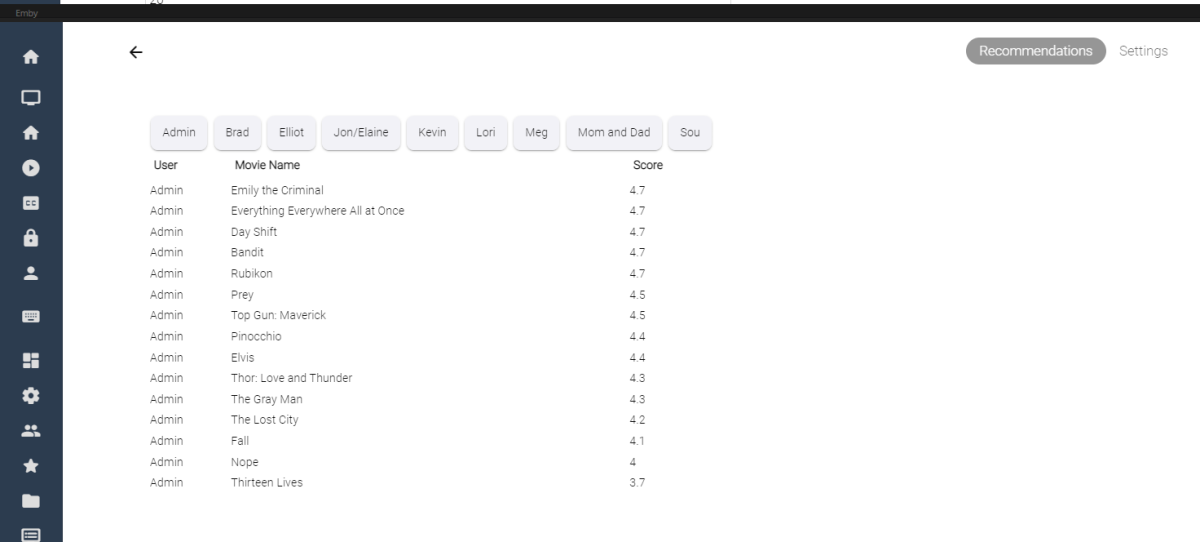
I've spent some of my spare time experimenting with machine learning, and applying what I've learned to some code for Emby. Using the massive dataset supplied by MovieLens (https://movielens.org/), I was able to create a machine learning plugin that loads a large set of data into a matrix factorization neural network, and can spit out recommendations for users in emby. Following this article by Microsoft: https://learn.microsoft.com/en-us/dotnet/machine-learning/tutorials/movie-recommendation and experimenting with their ML.Net libraries things started to get pretty interesting. The project itself is rather large, and I thought I'd share what I've come up with so far, maybe other people are interesting in how the neural network recommendation service is working when testing it against movies inside an Emby library. It's pretty cool. The idea could be to create an in-depth recommendation system for emby, or possibly utilize this as a way to create a new "Top Picks" style plugin that is user based. Which also might be really cool. I'll try and answer some questions up front if I can: What is Matrix Factorization, and How does it work in Machine Learning? In a nut shell, if you have similar tastes in movies as other people in the dataset, and they have rated a movie you haven't seen in a while, or have never seen, then that movie is recommended to you as a possible item to watch. The Neural Network will predict what you, or your users may rate the movie if it was watched. Is this plugin run locally on my machine? Yes, this plugin creates a matrix factorization neural network locally on your machine, which is trained in a scheduled task. Is any of my personal data shared during the training process of the neural network? No, your personal data is completely safe. no user data is shared with any data provider, and stays safely on your server. How does the neural network recommend items? The MovieLens dataset is an accumulation of almost 25 million data point on 27 thousand movies with almost 100 thousand users ratings. The ratings data is altered on your server to include your user data and then the neural network is trained on all the data points, allowing it to predict what movies in your library you and your users may want to watch. Once the "recommender" is trained it then saves a model and uses that to predict recommendations for users. The NN can be retrained when new users are added to your emby server, including them in the recommendation process. Asking your users to "like" or "Favorite" items in the library will certainly help factoring recommendations, however it is not entirely necessary. Does the Matrix Factorization Only look at "Liked/Favorite" Data? No, other columns are also feed into the neural network, like item genre. If one of your users do not "heart" the media on their account, their watched status and item play-states are factored into the recommendation predictions. If they watch more items that fit into a certain category, this is scanned in and calculated. It is best to have several movies marked as "liked/favorite" in the library form each user to get best results. Is it cross platform Yes, I believe it is. ML.Net is a cross-platform library using .netstandard 2.0. With regards to the runtimes associated with the plugin the following are available, and would be included in a dll: Linux64 Linux ARM Linux ARM64 OSX64 OSX ARM64 Win86 Win64 It is all fairly preliminary, definitely keep this in mind On the settings page it is possible to train the NN Model (top), and also run recommendation predictions (bottom). Once the network has created it's model, it is possible to run this model again and again against the library (due to it's 27 000 movie titles included). Selecting the "Recommendation Predictions" begins the second task of calculating what each user might like. Browsing back to the "Recommendations" tab, outlines each users predictions. It shows what the NN predicts your score would be out of 5. The results are definitely interesting. Sure, these are all new movies I should watch, and they are pretty much some of the most famous of the year so far. So the results seem to be pretty close to what I would expect. The training of the model also only use 20 iterations, to be honest I don't know if that is enough, or too much. It's all new. What I can say is that loading the ML.Net Assemblies work, and loading the MovieLens dataset into the NN also works. I have added toggles and inputs to try and test different training scenarios, but it's all kind of unexplored.

 1 point
 -
Hi, I hope you can help me with 2 issues. 1 When i download and put forward a serie/movie, the gui doesnt display the new addition till the next morning or the scan library files is run manually 2 When i try and download subtitles, i don't get any results back Emby server version 4.6.7.0 is run on a synology nas (DSM 7.1-42661 Update 20/DS918+) ===================================================== 1: Reproduction steps: a movie gets downloaded by radarr and is moved into the correct folder. the movie doesn't show up in the dashboard overview "latest movies" No log entry is shown that display any errors When a manual "scan library files" is run, the movie is shown in "latest movies" My conclusion so far is that the authorization is setup correctly, since it does update manually. 2: Reproduction steps: I have setup open subtitles (vip box not ticked) i have checked, my account is working via open subtitles browser page I go in emby into the movie and try to find a subtitle via the ... more edit subtitles no subtitles are returned No (error) msgs are shown in logging can someone please help me?1 point
-
Got it thanks1 point
-
Recently added 54.9 Comet TV, Huntsville, AL 35810 (OTA) missing in the guide. @cayars1 point
-
Yep. A HUGE step......................... backwards.1 point
-
On my screen in a browser add to collection displays 30 items at a time and the new improved version is going to display 5 ? Impressive.1 point
-
AFAIK code 139 would indicate memory access violation, Dev would have to comment. @softworkz You can also post complete server log.1 point
-
I use iptveditor.com.1 point
-
It's all related though.1 point
-
Yup, that will need to be improved. Thanks.1 point
-
Sorry to hijack the thread. The title drew me in as I have noticed a delay in app loading times in recent months. It has been taking longer to display the library items and home screen in all apps (Theatre for Windows, LG app, Web app, Android app). My library DB was 200MB. I ran the 'vacuum' option and restarted. This reduced the DB to 180MB. I then increased the RAM from the default 96MB to 380MB. Restarted the server again. All apps are responding much faster with the initial loading times & generally feel more zippy. Thanks for posting this. @MikeyManI hope you get your issue resolved1 point
-
Hello, I've encountered this and its pretty annoying. If you scroll maybe 20 channels down, and then try to scroll up it will go "out" of the scrolling in channels and go to the top selection after two clicks on the remote. is there anyway this could be fixed? Its a pain to scroll up again.1 point
-
I will try, get back to you1 point
-
thank you. i added fanart and removed TMDB from images and it is working again. thanks.1 point
-
You will have that working in your sleep, your the css king around these parts from what I have read.1 point
-
You can see all the different docker images here emby/embyserver Tags | Docker Hub And then you pull the docker with beta tag.1 point
-
Yes it wouldn't be that hard with custom css in the web client. Will look at it more later. Animated Border Gradient (codepen.io) But is another story across all clients.1 point
-
I turned on the TV & decided to test it out again before switching to WIFI. Worked like a charm.1 point
-
Ok I think I got it thank you so much sir!1 point
-
سنحتاج إلى رؤية سجل الخادم ولكن يبدو أنه يعود إلى الأذونات. We would need to see the server log but sounds like it comes back to permissions.1 point
-
It depends on your device because Samsung reviews them all independently, and for some model years, they no longer accept updates. Suffice to say, that although we have newer versions, that is the latest we have in the store for your model at this time. You can always install the USB version if you want the very latest.1 point
-
@sornaythere are two components to Missing, Library option to get them into the database and per user Display option to actually see them in the UI.1 point
-
I get PMs asking what I have a lot since I didn't specifically mention it here. Besides the WD & Synology NAS boxes and the 8 bay External Encloses (all of these are on my backup server). I'm presently running Debian Linux using ZFS on a Dell R740XD that has 24 drive bays. I'm using 3 SAS cards in this server. 1 12MB SAS card is used for the internal drives. The other 2 SAS cards connect to the following external chasses: 2U 24 bay HP 3PAR M6710 3U 15 bay Dell EMC KTN-STL3 3U 18 bay Promise JX30 Storage Array 4U 24 bay Netapp DS4246 2U 12 bay Dell Compellent SC200 Storage Array That's 117 SAS Enterprise Drives I also have a Dell Fiber SAN and a 4 Node Ceph Cluster but those aren't used by Emby. My Emby disk allocation is about 1/6th of my total storage. I'm planning on changing things around a soon moving the Emby setup to a clustered environment of 3 tiered storage that does replication in real-time over a 100Mb backbone and then retire the current equipment to backup duties.1 point
-
When was the last time you vacuumed your database? Also, if you have ample RAM - you might want to tweak your DB cache size -- see this tutorial:1 point
-
I did read a description of what Kodi is doing. Apparently, this IEC device provides an interface for the audio. The usual device, if the vendor doesn't compile the extended API features, is the Android RAW IEC device. But if the vendor chooses to build in the interface's applications can, more or less, implement the IEC device packing, which Kodi takes advantage of if available. So that's apparently why Kodi can do audio passthrough others can't and also why it can be done of the Shield and Fire TV but can't be done by Kodi on most TVs (since they don't build in that function, they only show the Android RAW IEC device) even though they can passthrough audio from their HDMI ports (if they support eARC) to audio hardware.1 point
-
It's on github, I can port into the new 4.8 system.1 point
-
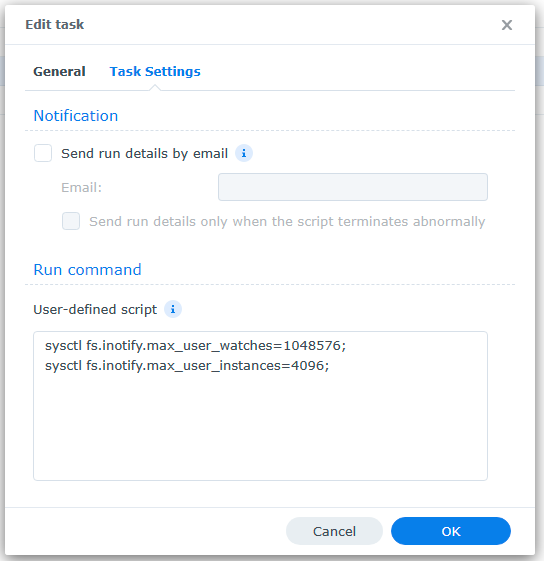
I don't understand why some people suggest using: sh -c '(sleep 90 && echo 204800 > /proc/sys/fs/inotify/max_user_watches)&' sh -c '(sleep 90 && echo 10000 > /proc/sys/fs/inotify/max_user_instances)&' Remove those two lines and replace them in your startup task with these two lines: sysctl fs.inotify.max_user_watches=1048576; sysctl fs.inotify.max_user_instances=4096; You can adjust the values as needed but those are what I'd suggest you start with.1 point
-
No already shown. <title>CD25 - Schumann, Chopin - Concertos</title> <year>2017</year> <sorttitle>111 Years Of Deutsche Grammophon | The Collector's Edition</sorttitle> <runtime>61</runtime> <genre>Classical</genre> <studio>Deutsche Grammophon</studio> <uniqueid type="discogsrelease">2070889</uniqueid> <discogsreleaseid>2070889</discogsreleaseid>
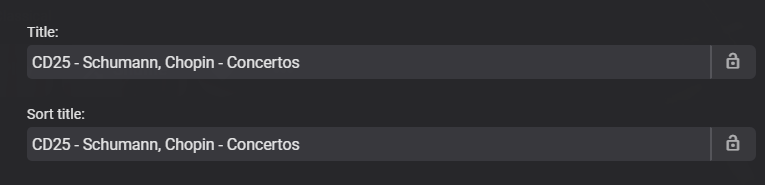 1 point
 -
True but that cause it to be first item instead of 25 creating a sort issue. The UI shows correct but does not sort correct in this example.
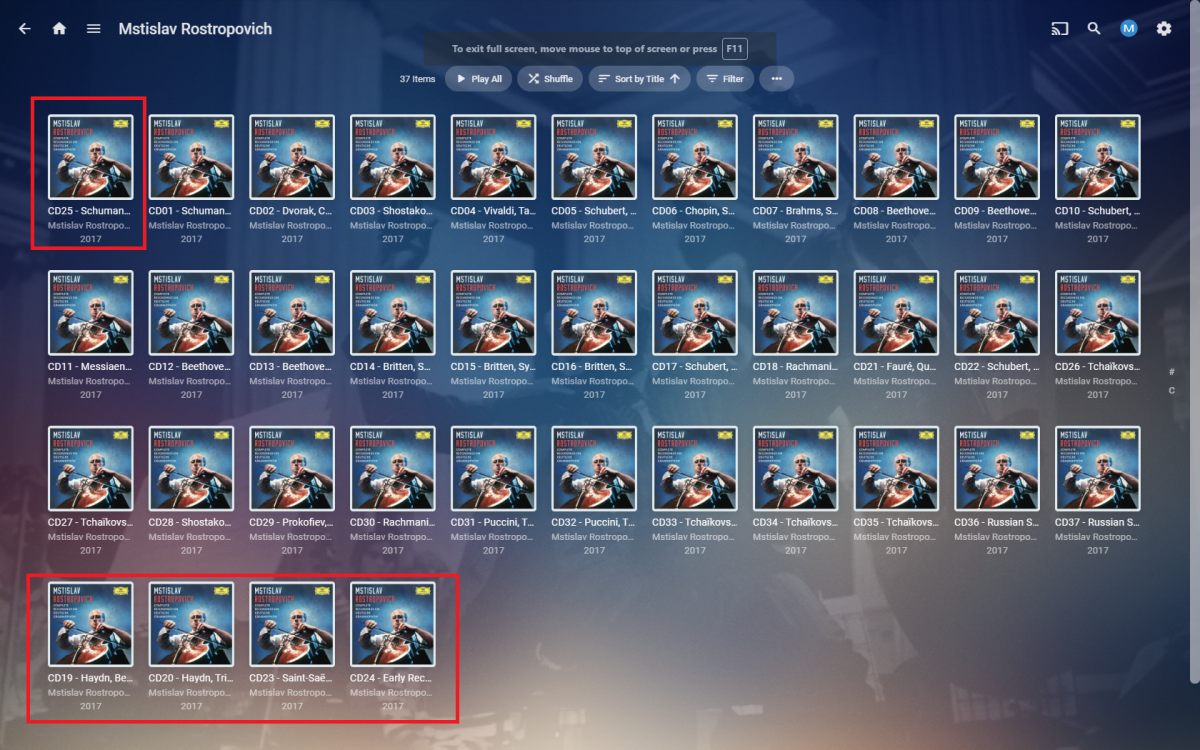 1 point
 -
I need to come back to that. Would a plugin be powerful enough to add some kind of like / dislike prompt at the end of a movie, which results could be stored in an additional database? I am still very sure that the favorite button won't be used as assumed. Best regards1 point
-
Why Paint.NET? You can do this right in the browser in 10 seconds: HueRotate.mp41 point
-
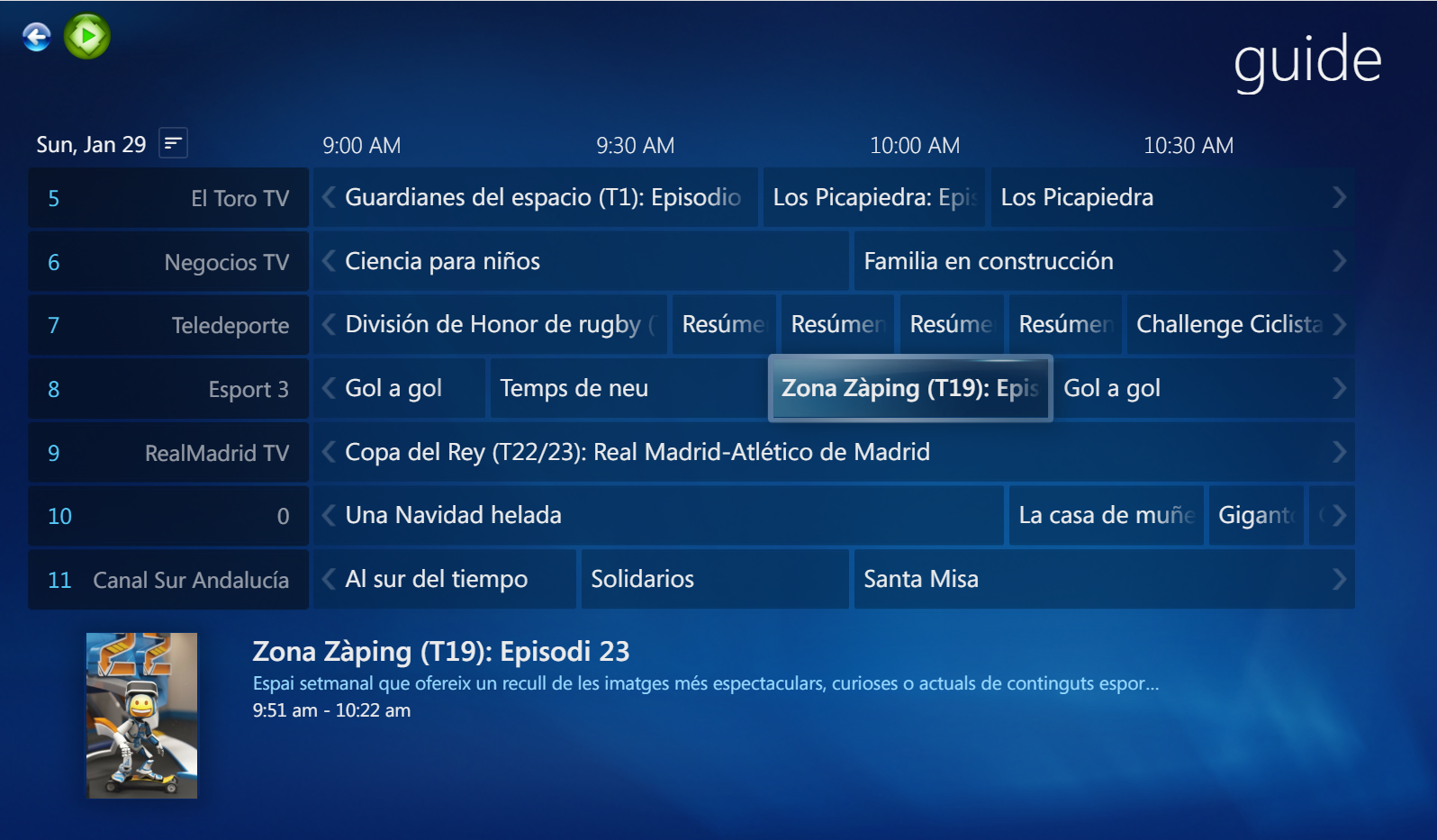
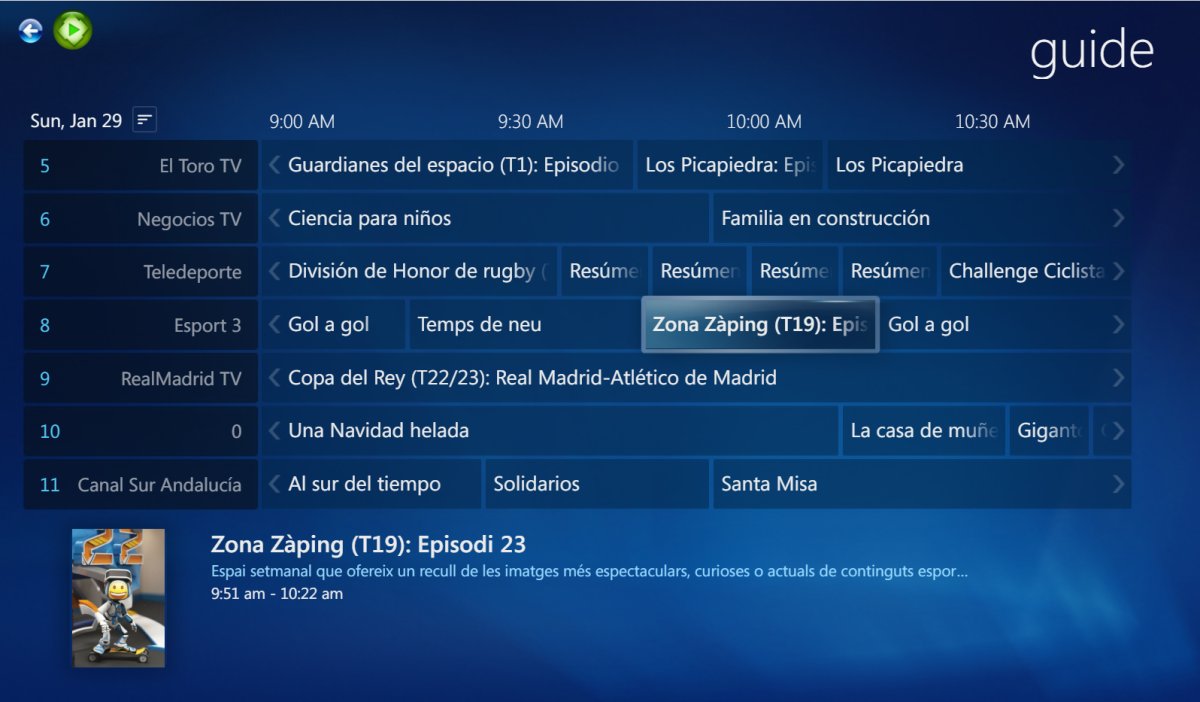
Fast, Fluid and Precise - how much did I miss that... Turn on the sound! WMC_Theme_Fluent_Guide.mp41 point
-
This time, I was able to finalize the guide/EPG view: I will post a video tomorrow.
 1 point
 -
Top one for me hehehehe1 point
-
1 point
-
1 point
-
1 point
-
Imagine my disappointment as a new Emby Premiere customer (who subscribed specifically and exclusively for the Live TV feature) to see that, in 2022, the Live TV guide on Apple TV is still horrible. This is the most useless $5 I've ever spent.1 point
-
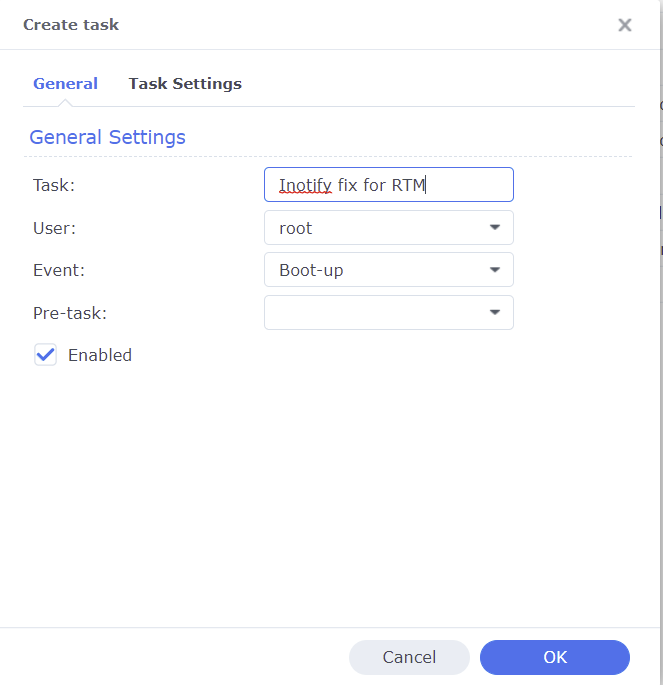
A common reason Emby's Real Time Monitoring (RTM) stops working on Synology NAS is because the Unix set user limit on inotify instances and/or watches has been reached as a result of a large number of changes for instances to process and/or the total amount of folders, files, etc that need to be monitored by watches. When RTM stops working you may start to see errors in your server logs like the following where the default number of user watches (8192) has been reached. A similar error will show up when the default inotify instances (128) is reached. System.IO.IOException: System.IO.IOException: The configured user limit (8192) on the number of inotify watches has been reached, or the operating system failed to allocate a required resource. To increase the number of inotify instances and/or watches create the following task in DSM control panel Task Scheduler logged on with admin privileges. 1. Create a Triggered Task...User-defined script to run at Boot-up 2. Paste the following commands under the Task Settings tab sysctl fs.inotify.max_user_watches=1048576; sysctl fs.inotify.max_user_instances=4096; 3. Click Run to execute the new task (if not logged on as admin then a restart may be necessary) The task will then rerun during every boot to prevent the changes from being reverted back to default from a DSM update. To check that your changes took affect you can optionally run the following commands in Terminal cat /proc/sys/fs/inotify/max_user_instances cat /proc/sys/fs/inotify/max_user_watches If your library gets really big and the limit of user watches is again reached, then just increase the number again. The maximum number of watches allowed in Unix is 524,288 and each used watch takes about 1kb of memory on a 32-bit system (double on 64-bit). However, it will only use what is needed based on the number of items being watched.
 1 point
 -
I'm working on a set of guides to cover multiple ways to work around CGNAT that covers multiple use case to allow the Emby admin to pick the solution best for them or try a couple things to see what works best. The guide will cover everything from these two services to creating/hosting your own tunnel in a cheap cloud instance for roughly $5/month. This gives you a public IP address that any client can use. The public IP in the cloud instance then uses a dedicated tunnel to the Emby Server. Only the Emby Server uses it as all Emby clients and browsers use the public IP address from that point on. You could of course setup ddns or a domain name pointing to that IP address instead of having to know/remember the IP. This would allow you to also cache images in the cloud (depends on storage space) to make it faster for the clients as well. Sounds hard but really isn't especially with step by step directions. Other options include similar tunnel/VPN services you can purchase for $5/month but have limits and require specific software (OpenVPN or SSH) which may be easier than above but not as much features. Might not be as fast either. Then of course, using a typical VPN service like PIA, NordVPN, etc you see advertised all over the net. Trick to this is using a provider that support static IP and/or port forwarding. Lots of downsides to this one IMHO as many sites block VPN addresses, likely worse throughput then having your own tunnel (as above), possibly revolving public IPs requiring DDNS or similar. Then there is the grand daddy solution which does take some time to setup but adds a nice level of security and makes you site faster if done correctly which is setting your server up to run behind Cloudflare using their Argo tunnel service. This requires registering a domain name (all revolves around this), setting up certificates, walking through pages of options to make sure it's set exactly correct, then creating a tunnel using their software which is a 5 part process and making it a service or system startup function so it's always running. I've created step by step directions for the hard part (creating tunnel) and it works great on Windows or Linux but can't run natively on most NAS and I've yet to get it to work in docker. So this is a great solution if things fit but not universal yet. There are 2 other methods as well but the above are the main ones. Some easy and free, some free and complex with a couple easy to do but cost a few bucks a month. Should be something to choose from for everyone with a CGNAT issue. This could also allow for testing multiple options to see what's fastest or best for each person. The cloud instance tunnel is probably the best option of all if a couple bucks a month isn't prohibitive as it can also be setup to proxy all your graphics so the Emby Server doesn't have to send them over and over. Once documented people should be able to follow step by step directions to set this up themselves or get help here in the community. It of course gives a few different options to try to see what's best for specific needs/environments.1 point