Leaderboard




Popular Content
Showing content with the highest reputation on 03/05/23 in all areas
-
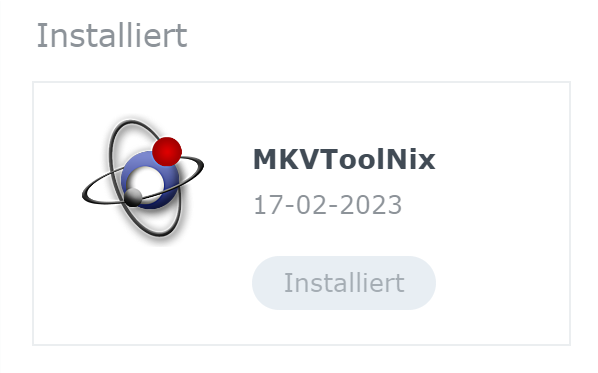
MediaInfoCLI File Path: /volume1/@appstore/mediainfo/bin/mediainfo MKVPropEdit File Path /volume1/@appstore/mkvtoolnix/bin/mkvpropedit Provided that these two parts are also installed:
 3 points
 -
I've added this to the Wiki to help others - thanks for the Info !2 points
-
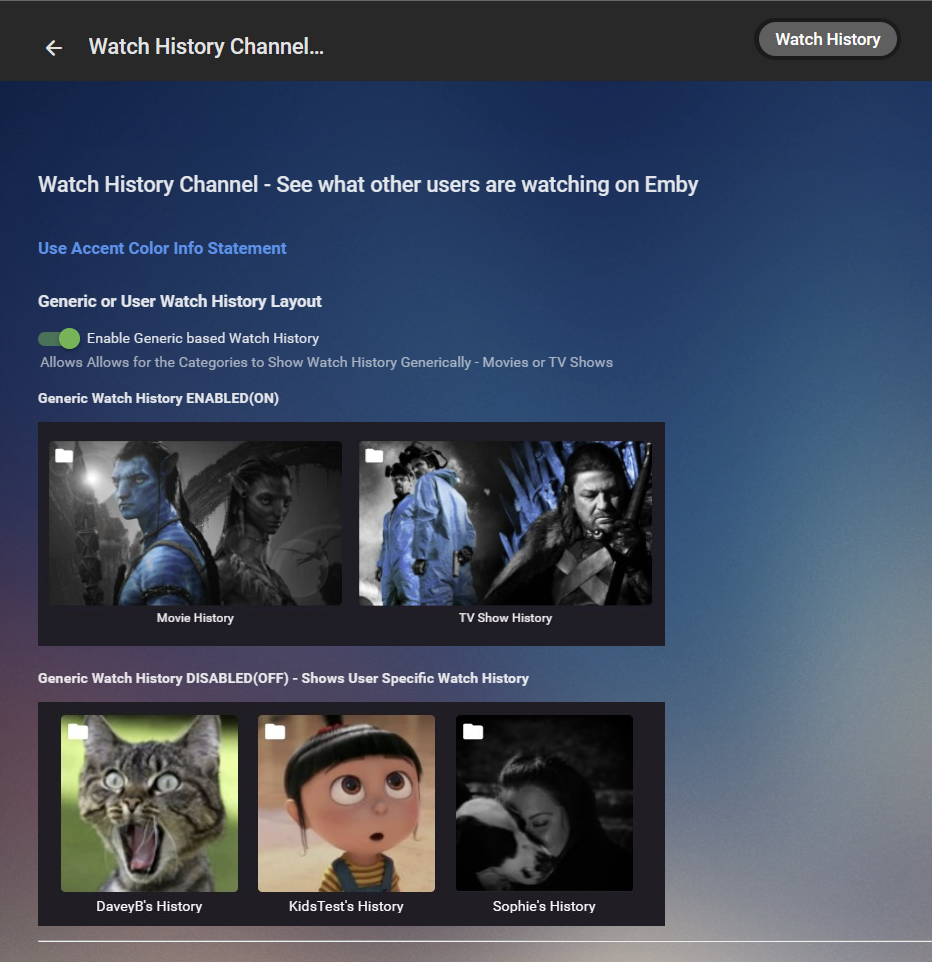
Hi Pog, yes this is in the works, i just haven’t had time to complete and release yet.
 2 points
 -
Release 20230303: ATSC3 models: Detect ATSC 3.0 protected channels. ATSC3 models: Support RTP radio channels. ATSC3 models: Support operation when S-TSID content type is missing. ATSC3 models: Report BSID/TSID in streaminfo if present. ATSC3 models: Reorder audio tracks for apps that use the first track rather than selecting the audio track by language. ATSC3 models: Improvements to MP4 parsing. IPv6 models: Support IPv6 RTP/UDP target. TECH models: Fix problem where target may not be set when specified in the boot script. Fix problem where multicast traffic was sent with a TTL of 1. Improvements to diagnostic logging. Firmware Changelog2 points
-
You have might the app set to TV display mode, in which case the user interface is optimized for a remote control. If your primary input method is a mouse then try changing the display mode to desktop.1 point
-
Now my version is 4.7.11.0. Thanks for take this into account1 point
-
I will make sure that happens. My bet is that it's something I did but, I can't tell what. The only thing I saw in the long that I can correct is that there were several error messages like the following: /mnt/DVR_disk/EmbyMetadata/metadata/people/Lorraine Bracco-tmdb-11478/folder.jpg I went ahead and put those directories in but, I have a hard time believing that's the problem. One thing I didn't mention is that when I originally set up the mount points for my libraries, I was using Plex and MythTV. So the mount points were PMS_Lib and MythTV. No good way to change that in Emby at the moment. Yes, I've looked at that thread. So what I did was use symbolic links to change the names. Here's how my /mnt directory looks. drwxrwxrwx 8 emby emby 4.0K Jan 23 07:35 DVR_disk drwxr-xr-x 14 emby emby 4.0K Aug 21 2022 MS_disk lrwxrwxrwx 1 root root 13 Dec 27 16:07 mythtv -> /mnt/DVR_disk lrwxrwxrwx 1 root root 12 Dec 27 16:08 PMS_Lib -> /mnt/MS_disk If I do the same thing on the destination server, I don't see why it would be a problem but, I need to provide as much info as is reasonable.1 point
-
DV is just another pitiful attempt to stop piracy. But as we already know - new today, already cracked yesterday.1 point
-
I will be yes. Recognising DV in the core will be useful for things such as transcoding - ie don't attempt to tone map a DV5 file for example. A DV7 and DV8 will drop to HDR anyway - so nothing to be gained from recognising that. If you have a DV capable TV - then it may also not accept DV7 playback, but I'm unsure if emby is going to have that layer of detail as I said above. DV is unfortunately a bit of a nightmare full stop for media playback software ...1 point
-
No change - the core is only adding DV, it is not adding any other recognition of the advanced audio codecs - Atmos etc. And I suspect the core will not differentiate between DV5, DV7 and DV8 either..1 point
-
Should be. Have they checked their spam folder? @Abobader1 point
-
They want 2FA because it's a buzz word - but anybody implementing 2FA has built it on existing security fundamentals - and without them 2FA is frankly worthless and probably impossible anyway (2FA over http anyone ?).. The 'detail' behind the attacks/attempts for the majority is going to be irrelevant - the fact that a bot is blocked after 5 attempts at using password 'monkey123' on user 'Admin' is only a good thing - it will simply move onto the next WAN IP in the scan .. I just compiled the binary actually and it still built ok - it hasn't been updated in 3 years though according to Git - so probably needs a quick going over !1 point
-
I believe we can do most of that yes.1 point
-
Ok. A lot has been learned about what emby might be doing under the hood. This is good. It means we are on the right track. I will continue.1 point
-
Under synology you need to connect to it via ssh and the plugins folder is located under: /var/packages/EmbyServer/var/plugins You need to copy the dll to that directory and restart your emby server1 point
-
library wrong order still happens, only small percentage of time it can sort correctly. i got question 1. in auto schedule task, can we limit top picks number to certain amount? like top 7 or top 5 only. i think my raspi hardware unable to handle 9 without crashes. 2. any option to force the order, ourselves, at library level? 3. anyway to limit resource used for Update Top Picks task? i dont mind longer time, but i do mind server crashes. 4. if new media being added while library scans for top picks happen, can we signal either task to wait for other task, to complete first?
 1 point
 -
@chef got error logs for Jinny's Kitchen and How I met your father in the attachment. aside from this, alot of tv series previously error now works! embyserver(5).txt1 point
-
I had expected the library scan to create the NFO files. But, that didn't happen. I guess I misunderstood that part. If that works then an NFO file must be present, and Emby will fill in the blanks... Maybe1 point
-
Hi. You might think about using a drive pooling solution of some kind while you're doing this and then this will never be an issue again.1 point
-
Hi. Is there any task on your server machine that might be happening at 1am? Like a virus scan or something like that?1 point
-
So far so good we will see how it goes1 point
-
Yes, yes I was. And I believe I was duped by the previous PC builder I bought a pre-built from. So glad to hear I don't have to worry about the lanes. The options are endless now!1 point
-
Yep - TM is done in the QSV hardware. Maybe you are getting confused with the # PCI lanes and the number of drives - they are not related. You could have 30 HDD's connected to a PCIe 3.0 1x PCI lane if you wanted to - that would give you a max of ~1GBit/sec (on the PCIe Bus) - about to 112 Mbytes per second. The issues start to arise if MULTIPLE HDD's all want to read/write at the same time - THEN and only then does the PCIe bandwidth become an issue. Your LSI controller is 8x (pcie 3.0) - that is 7.9GBit/sec - so 8 x the raw PCI capacity. 800-900Mbytes per second (if the controller could handle that). All over ONE physical PCIe connection and 8 x PCIe lanes ... You only need a large amount of PCIe lanes if you are talking huge servers with 4+ SAS controllers attached to huge NAS/SAN arrays - all working in parallel. For an emby server, you simply do not need this .. PCIe lane spec for the Z790 below (top end chipset for the 13th Gen CPU's) - lower end boards will have less PCI lanes on their chipsets, but CPU PCI lanes stay the same. https://www.intel.com/content/www/us/en/products/docs/chipsets/desktop-chipsets/z790-chipset-brief.html1 point
-
Some valid points there @chef - but fundamentally, security is all about 'layers' (I sound like 'Shrek' lol for all those that have watched this movie.. ). Have these security layers within Emby itself is a little late - as the threat actor is already 'inside' your network. You also never counter probe an attacker from the same IP - as this confirms your existence. And yes, would agree 100%, an attacker would not be after your media files - they are after making money or extorsion - so use Emby as an entry point to do further damage. Guideline layered security for an internet facing service is as follows - 1. Internet 2. DMZ Network A / DMZ Firewall A 3. IPS A + High level Geo / Black List etc Blocking 4. Inner Network B / Inner Firewall B 5. IPS B + Web/App Firewall 6. App Web Server (only) + Canaries 7. Data Network C / Data Firewall C 8. Data Server + Canaries All layers are probed by a monitoring device sitting in the Data Layer or monitoring/management network. Data 'flow' direction is also important. Is emby going to implement something like the above ? Of course not, not only is is a poor idea to have 'one product' do all the above - but each 'layer' is a specialist area. If they haven't implemented basic password complexity checks and lockout, I really would not want this product sitting in my DMZ ... Another question - is it up to emby to provide security for their product ? This is a tough one - part of me says yes, they have a duty of care to the installer and should provide 'basic' security, but another part of says it's up to the user to ensure they protect themselves and their home network. Currently for emby, a reverse proxy siting on an isolated dmz network,ips,firewalls and then emby sitting on it's own firewalled 'media' network (off any 'user/home/personal network) is about the best we are going to be able to do, as the web and data interfaces in emby are combined. Security is obviously a huge topic - and it's been said a few times now that there should probably be a 'security' section in this forum for those taking this to the next level. Personally, I think that would a good thing to do.1 point
-
Was just typing that. Or Firewall changing local scope.1 point
-
Have you tried forcing only 192.168.1.1/24 subnet as local and then Blacklist filtering subnet 192.168.2.1/24 as remote?1 point
-
1 for each person ok cool1 point
-
SUCCESS! I bought another hdhomerun, and this time, it's working. So, the hdhomerun box was bad, and the cablecard was bad. Replaced both, works fine now. Watching tv with the windows client. Tomorrow I'll start on the emby server addon. Thanks everyone for all the help!1 point
-
thank you1 point
-
sorry delayed in response. was asleep. tested using both schedule task in sequence (manual add Jinny's kitchen after the first sch task) EDIT: what do you think on error at embyserver-63813625661.txt ? this happen when i add new media while top picks still being updated (2nd schedule task with working media ofc). maybe raspi hw limitation? embyserver(3).txt embyserver-63813625661.txt1 point
-
I wrote a plugin for emby which banned ips in the Emby machine fire wall, when too many wrong login attempts happen. It also did a reverse lookup on the IP (which yes can be spoofed). But then I realized, if the bad actor was using something like Kali and poking my network, they're looking at a lot more then my media server sub domain, or endpoint, and I needed a beefy network, not just one pc. That being said, I did utilize some of what fail2ban had done in my blacklist plugin, which can be found on my GitHub chefbennyj1. I've been researching a bunch of hacking techniques lately, and also read several books on the matter. (The book about Stuxnet was amazing.) I am in no way an expert in security. What we could do is add to the functionality of the blacklist plugin to not only ban the IP from the Emby machine, but also send out some kind of alert to another device when the IP is banned. I think you need a decent forward facing network. If I were to do something nefarious, I would first reverse lookup an domain and get the IP. But, I would attempt to poke any endpoints (known open ports). movies and tv would be the last thing I would care about. I'd be interested in personal information , how many machines are on the network. Names, and social media accounts. lastly if I was nefarious, I would maybe encrypt files and ask for Bitcoin. Just make sure to use good passwords on your open ports. if someone is going to hack you, it won't be because of Emby, it will be because known ports are open, and have weak passwords, or use passwords that are available in dumps online... At least from my understanding. Again, I'm not a professional.1 point
-
@Luke Yes, yes. Give the man a cigar. I don't know how I missed that but it solved the problem. Than you.1 point
-
that's weird. The log isn't what i expected. I'm sending you a new version. Thank you for your time sir! Emby.TopPicks_1.0.0.53.zip1 point
-
@Darkseidd please try .52 if you have time Emby.TopPicks_1.0.0.52.zip1 point
-
Don't think these are in the list of items, if not could they be added please (seen on Android TV) 1. The TV Guide should have an option to choose a preferred layout, such as 'Large', 'Medium' 'Compact'. This would change the size of the layout of the TV guide. So 'Compact' would show more info .Could this option be added to the 'Breadcrumb' menu next to the date in the TV guide ? 2. The font size of the channel names is much larger than the channel content listings. Can the channel names font be made smaller and subsequently the box it is in narrower too ? 3. The 'Time Bar' in the guide (which tracks along with the current time), could this be made more visible. e.g if the choose 'Blue Radiance' for a theme, the bar colour is blue. This can reult in it being lost from view at points where programmes join . White would make it more visible in this case.1 point
-
Emby.TopPicks_1.0.0.51.zip @Darkseidd would you mind trying this one. The moment it errors I'll have found the issue. It will be in the log. We'll know exactly what happened. thank you very much for your time.1 point
-
Thanks @ebr all squared up now. I'm watching the thread listed above by the Mod with 79 issues listed. Will post in there if I find anything in addition to that list.1 point
-
ok looks like that fixed it!! Getting new episodes imported now automagically. tysm!!1 point
-
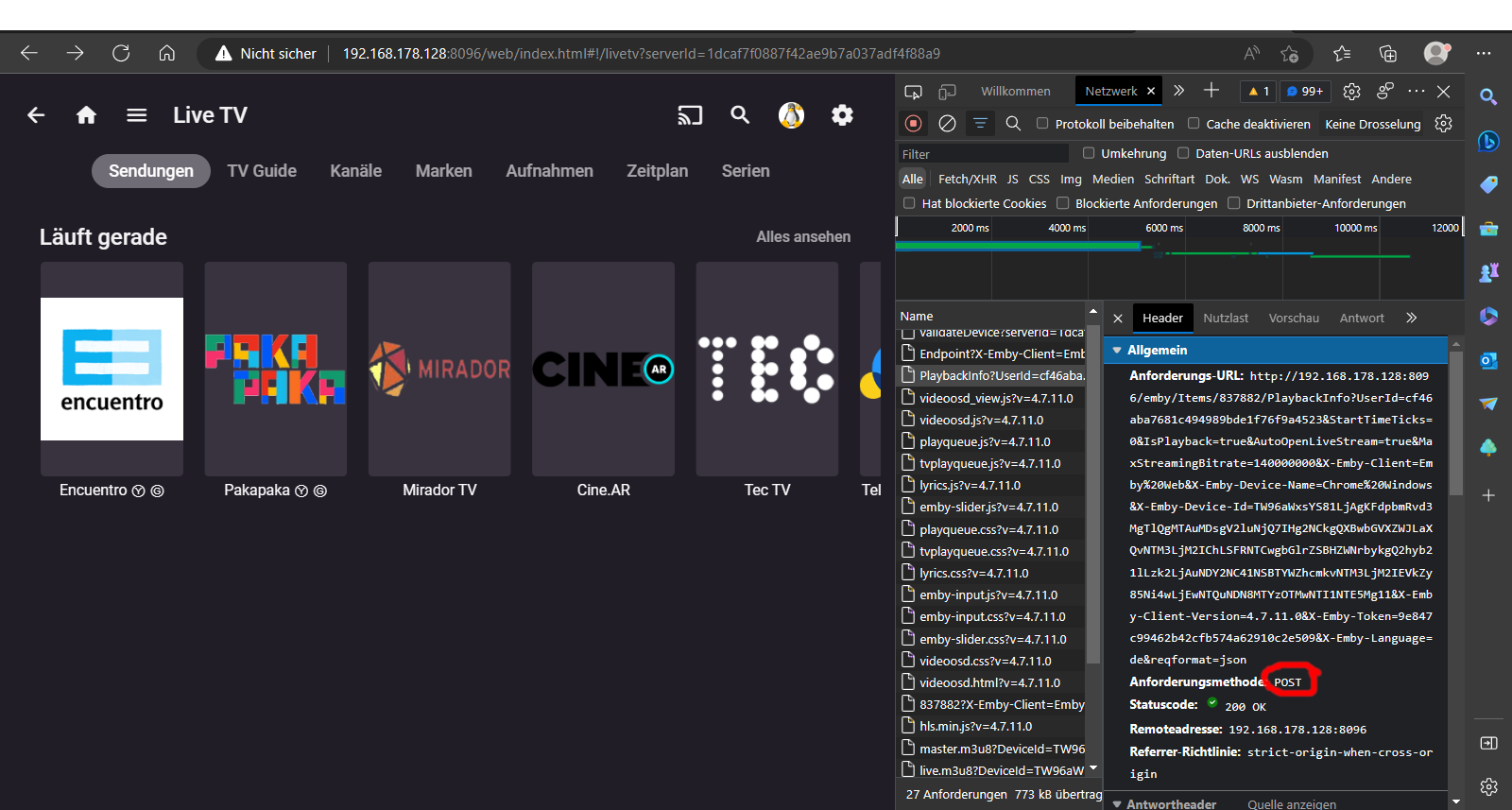
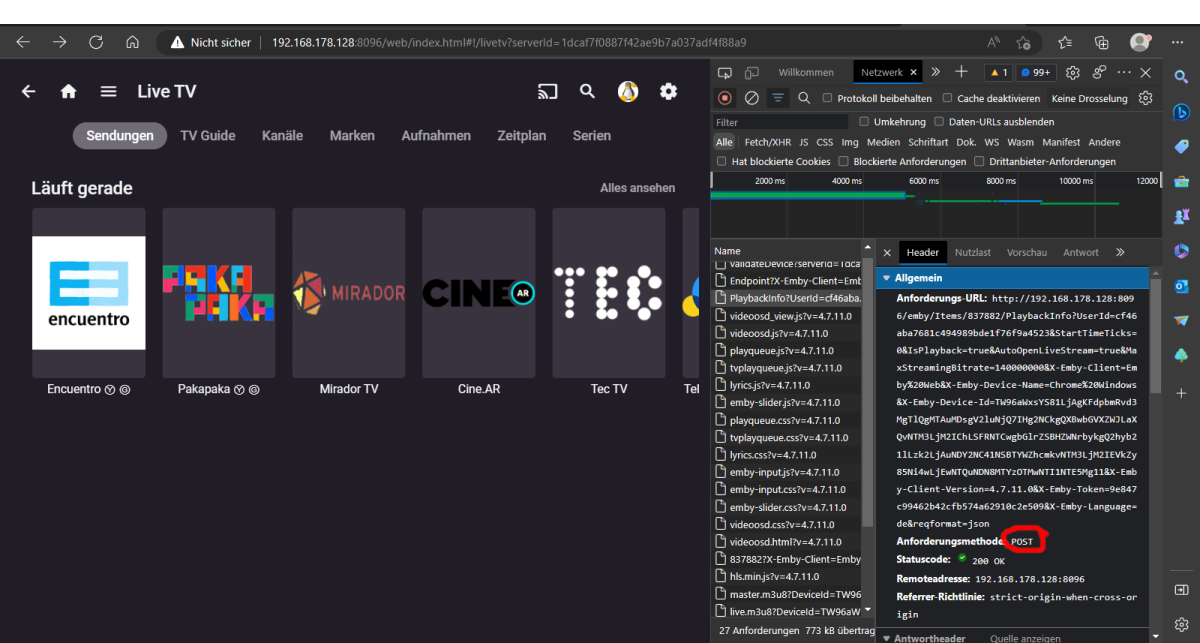
My mistake was that I always looked in the browser request. Here a post request is sent and a profile is transferred. And here only transcoded streams will return. In the plugin I use the get request and then get the desired url. So the fault was mine, because I didn't understand or overwhelmed it. I'm just a hobby programmer and learned the whole thing via google, with request and API queries I still have a hard time. Thanks for your help, now I can expand live TV in the plugin.
 1 point
 -
Nope. Yup! Thanks for the fast replies!1 point
-
Isn't that normal though? Since NGINX is handling SSL on external connections only, your internal connection from NGINX to Emby is still HTTP (as depicted by your use of port 8096) Also discussed previously here for a better explanation: https://emby.media/community/index.php?/topic/84777-caddy-v2-update-and-warning/&do=findComment&comment=12191541 point
-
The more I read this thread, the less I feel like supporting Emby in the future. As a professional software engineer I know well that technical challenges are almost irrelevant when it comes to costumers needs. But instead of trying your hardest to find an acceptable solution that makes your product better and give your product an competitive edge, you have instead spent time and energy trying to explain why you don't want to support it. So years later instead of being a leader you are now behind with others already supporting the feature. And all you needed to eliminate potential support issues, was to give h.265 transcoding the same options as you did with HDR tone mapping.1 point
-
Remapping all channels to the relevant channel in the XMLnet feed seems to have fixed this. As mentioned, after remapping, leave for 24hrs for all channel EPG to return.1 point
-
+1 to this. It's a great idea. I've checked out the Smart List plugin and it seems to work ok but i was hoping for the playlist to be a library heading (instead of a "Collection") where i could feature Netflix, Amazon etc studios and other custom stuff. I couldn't get that to work accurately in the aforementioned plugin.1 point
-
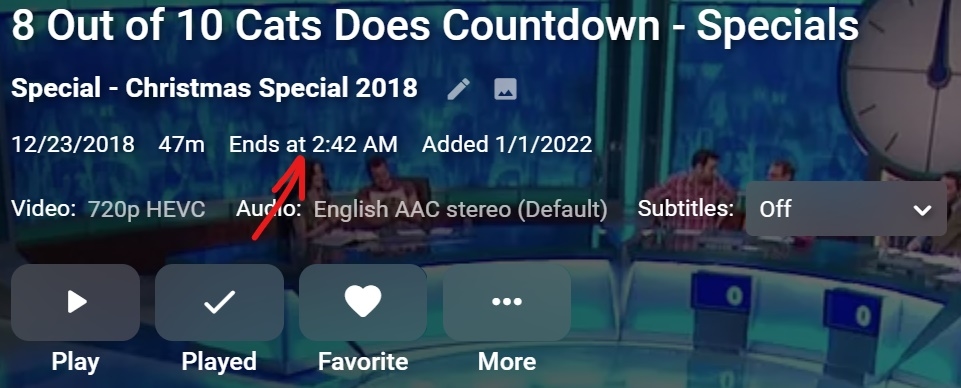
I've lost the 'Ends at' time display that used to show on videos. I'm not sure exactly when it disappeared, it's been weeks, possibly months though. Server still displays it as the attached screenshot shows, you will see it's not there on Theater 3.0.15, this is occurring on three different PC installs, also not showing on Android although I don't know if it ever in that app. This was a really handy feature, when watching TV in bed and wondering if I can fit another episode or a movie in.
 1 point
 -
Yep (doesn't help with ET though)1 point
-
Geez. Where does the time go?! Every few years I think I might get a new receiver, but the tech is always evolving and I can't bring myself to buy one again that will be obsolete in a few years so long as my current setup can be made to work. I also have a RX-V2092 from 1998 that was quickly obsoleted when TV went from s-video to component. That thing has some beastly amplifiers in it and still works great but is probably worth more as scrap metal than trying to sell it now. Someone needs to make an affordable "disposable" pre-amp that you can replace every few years. Maybe I should just get a cheap receiver and use my current receivers as an amp only.1 point
-
Hi All, I run the usual TV & Movie libraries in Emby, but I also have a secondary TV & Movies library that are purely documentaries that are separate from the default TV & Movies. These I call the Doco Series & Doco Features respectively. It all works great, and I have been able to keep the content separate except for one thing .. the Suggestions on the Home Views for Movies. For my Doco Features (Aka Movies Doco list) the suggestions only show those from the default Movies. So for example, it may show 'because you watched Star Wars' under the documentaries section, but does not show any suggestions for other documentaries (may be because I have specified not to include these from the Home Screen options screen?). It would be awesome if these suggestions were based on the library in question rather than showing the same suggestions across both the default Movie library as well as the Doco Features library I have. This relates to the Horizontal view home page particularly as the Vertical view doesn't seem to have this feature (yet?). Thank you, AD1 point
-
Emby already has filters build in to sort through your media but what would be even better would be allowing the user to save filters and have an easy way of selecting that view. For example I might want a view showing all comedies released from 1990-1999, all unwatched movies rated G from 2017, favorite action movies, etc. Let us save these filtered views and have them easily accessible from the landing page. If the filtered views can be shared between users even better.1 point