Leaderboard




Popular Content
Showing content with the highest reputation on 03/04/23 in all areas
-
Reminds me of a certain live tv project I could mention (again)....2 points
-
You don't need to save images with your media, they'd be saved in server's metadata folder. Emby would do that for you if you enable library option Download images in advance (and will be stored locally according above selection, with media or in metadata folder, server default or custom).2 points
-
Emby won't see this in T as The is a RemoveSort word and will always sort to W. <SortRemoveWords> <string>the</string> <string>a</string> <string>an</string> </SortRemoveWords> But you would have to explain "Emby doesn't recognize it" means.2 points
-
You've grown up with watching live tv but on television only runs garbage? You have a big library but don't know what to watch next? Then this for you: "VirtualTV" - my new live tv plugin that allows you to create custom channels based on conditions of your Emby library content. What's missing: Maybe codec conditions Known problems: Needs Emby Premier to work (Playback) Emby's live tv and playback api is very limited, so i've had to make some detours to get things working. The plugin has two general playback modes: "continous" and "playlist" playback. With "continous" mode you can also choose between "live", which bahaves like real live tv or "archive", which plays the videos from the start. In "Continuous" mode multiple videos are queued and concatenated to one big file with the help of ffmpeg. To make this happen every video in the queue has to have some common features (video and audio codec). That's why it often happens that the video also has to be transcoded by ffmpeg. For transcoding the plugin relies on Emby's internal transcoding engine. If there's a problem, not uncommon with hardware acceleration enabled, the plugin also has a problem. Nothing i can do about it. The availability of subtitle tracks is mostly dependant of the Emby user playback settings. In continous playback mode only one (the default) subtitle track can be used and this one has to be burnded into the video (transcoding takes place). In "Playlist" playback mode the videos are pushed as a playlist to the Emby clients. It's like you would play your videos directly from your libraries. This way you get all the features you are used to. Audio and subtitle selection, pause, skipping around and similar things. "Native" playback method was created by the Emby Devs. Similar to Playlist playback it will play the real library videos, but with the big difference that playback is purely initiated by the client app, without any remote command execution. This is why it also works for Roku devices on a WAN network. And although the real videos are played, the whole thing is treated like live TV. This means that channel zapping is possible and no dialogs for playing the next episode are displayed. Unfortunately, the new playback method does not yet support all features. As the name "Archive" suggests, it will currently always start all videos from the beginning. In addition, only very few Emby apps automatically advance to the next video. If you want it to be improved even further, each of you should raise your voice in this thread. To get things started install the plugin via Emby's plugin catalog and restart Emby. Setup your channels with a name and number and choose your playback mode. In the channel conditions you'll have to select an Emby account. This account is used to get library access, respect parental rating, reading watched states and selecting the stream language. At least one textual input field of the conditions has to be filled to get some program data. Fields with an asterisk are either evaluated with an "AND" or "OR" condition among each other. Finally, if you've chosen "Continous Playback" for one of you channels, take a look at the transcoding settings. Save your channel line up and manually trigger a "Guide Refresh". Now have fun! Version History: After a plugin update, always clear your browser cache. If your settings still don't load in the config screen, you have to move the "VirtualTV.xml" out of ...\plugins\configurations and restart Emby. Start from scratch. 2.0.0.0 Unlimited number of channels; New playback method "Native (Archive)"; New security concept for the Export API 2.0.2.0 Performance improvements to Guide Refresh; Preview for Add/Edit Channels; Option to disable Program indicators 2.0.3.0 Fixed missing Playlist sort order for some Content Types; Added support for Seasons with Content Source Collections 2.1.0.0 Selectively enable channels for specific users; Create copies of existing channels; Ordered unwatched episode playback 2.1.5.0 Added option to (auto)enable channels on a specific date range; Bug fixing1 point
-
Request No. 1: Implement Metascore rating for movies, from Metacritic.com, in Emby. OMDb api provides this information. Request No. 2: Also, fix an option in settings to enable or disable a ratings source according to the user's choice.1 point
-
Hi guys, Here a setup for Jellyseerr, with Emby. https://mjanssen.nl/2023/01/25/setting-up-jellyseerr-for-emby/1 point
-
Since I was asked, I'll drop a feature request. Currently when you mark an episode played, or a season played, you have to completely back out of the show and go back in to see the updated info. Aka, see the unwatched count change. I realize this is likely because the info is only pulled from the DB on entry of the series, not when dropping back the the main series screen. Without looking at source code, I'm not sure how the Roku app handles refreshing the show screen, nor why it doesn't trigger a refresh on back navigation. I'd suspect it's for speed and managing DB activity. And once again, without looking at the code, this may be handled on the server end and this may not be an app request. I use Roku 99.99% of the time with Emby, so I can't remember if this behavior is across apps. Something in my brain is nagging me that I see the same behavior on theater as well, as when doing lots of updates I use it to sync shows watched status. (Just tested on Android app and played status on seasons is instantly reflected) It's this a huge thing? No. But it would be something I'd like to see. For example, I'd been watching One Piece on Netflix, but they dropped the show February 11th, so I downloaded the show to finish watching. But I downloaded the entire show. I had already watched the first 10 or so seasons. Marking them watched in Roku is a pain, because it doesn't reflect the changes, I lose track of where I am. Same thing happens when marking watched inside seasons. When you back out the count doesn't update. Just a thought of an improvement.1 point
-
Can we have an option to flatten series if there are XX episodes or less. Just provides the ability to eliminate one frustrating click. I wouldn't want it on my 1,000+ episode Looney Tunes series. However, when you only have one or two seasons in a series, it helps drill down easier.1 point
-
Great, thanks. From my brief experience with the 'Standard' on an NVidia Shield, I have seen: 1.Not being able to rewind a Live TV stream, it just direct plays. Yet the the playback progress bar is there. Pause and rewind works fine in the Beta 2. The 'Standard' is very different and shows some mobile characteristics but on a big screen, such as when you press the back button to exit and a small menu pops up mid screen (Nvidia Shield) and you 'click' down four times or so to select 'Exit'. Very different to the Beta where you press the back button and have one choice, Exit or Cancel. 3. The Live TV guide appears to be shown in a large layout with large gaps between the channel number and channel graphic. There are 3 options to change this display but none of them change the display to be more compact, Anyone else experiencing the above with the standard version ?1 point
-
I see this thread was started 2 1/2 years ago and the standard version is still unusable. So I think i'll leave it Thanks !1 point
-
as in attachment embyserver(3).txt1 point
-
ok merci ,,,, je comprend ... très clair..... merci de votre patience et réponse rapide.... BRAVo et merci1 point
-
task failed, attached log for your perusal embyserver(6).txt1 point
-
Either will work, server defaults to fanart nowdays.1 point
-
for my libraries, I did not turn on image saving locally. not even nfo read nor write..\ @GrimReaperrespect you for having dedicated spirit downloading all those metadata and images locally1 point
-
Thanks @ebr all squared up now. I'm watching the thread listed above by the Mod with 79 issues listed. Will post in there if I find anything in addition to that list.1 point
-
Because very few ppl keep that setup. Personally, I thought noone does. Would've made same assumption without a blink.1 point
-
Hi. I disagree. We are trying to explain why doing exactly what is being asked here doesn't accomplish the goal you indicated. So, we're instead, spending time and effort of achieving that goal as mentioned here many times.1 point
-
Thanks both, my bad1 point
-
Item 66. Item 12.1 point
-
Correct, but that is not the issue here, as it should be displayed nevertheless. It actually is, because if your did not specifically opted-in to block items with unrecognized rating information (which is applicable in your case, as it doesn't follow US MPAA rating guidelines), item should be visible, as stated above. And what is the case with any other value except number 18, as observed.1 point
-
Then yes, you do have some sort of Parental control in force - and yes, I can recreate your issue. But if you remove Parental control altogether (select Blank for Maximum allowed parental rating - first item in the dropdown), you'll get that item with 18 (or any other value) shown as well. @Luke, issue can be recreated by selecting AO/RP/UR/NR/X/XXX (while all items under Block items with... section are unticked) and having <mpaa>18 tag in nfo (while any other number works: 6,12...), item will be blocked. Once max. rating field is blanked (or nfo tag value changed) item is visible.1 point
-
FWIW, I also use Caddy with ZeroSSL (for LG TV issues) and I have multiple remote Apple TVs that can connect without issue.1 point
-
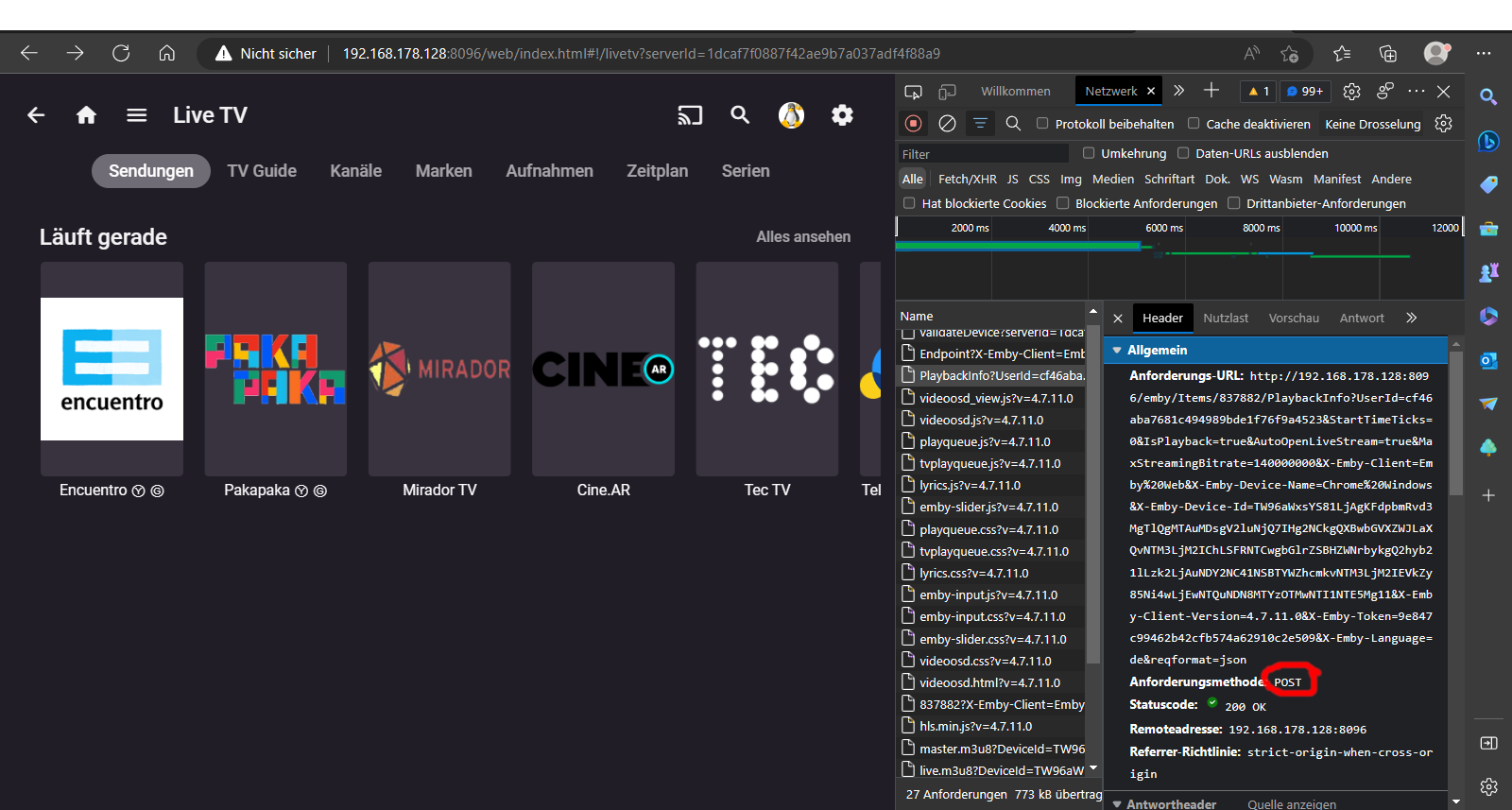
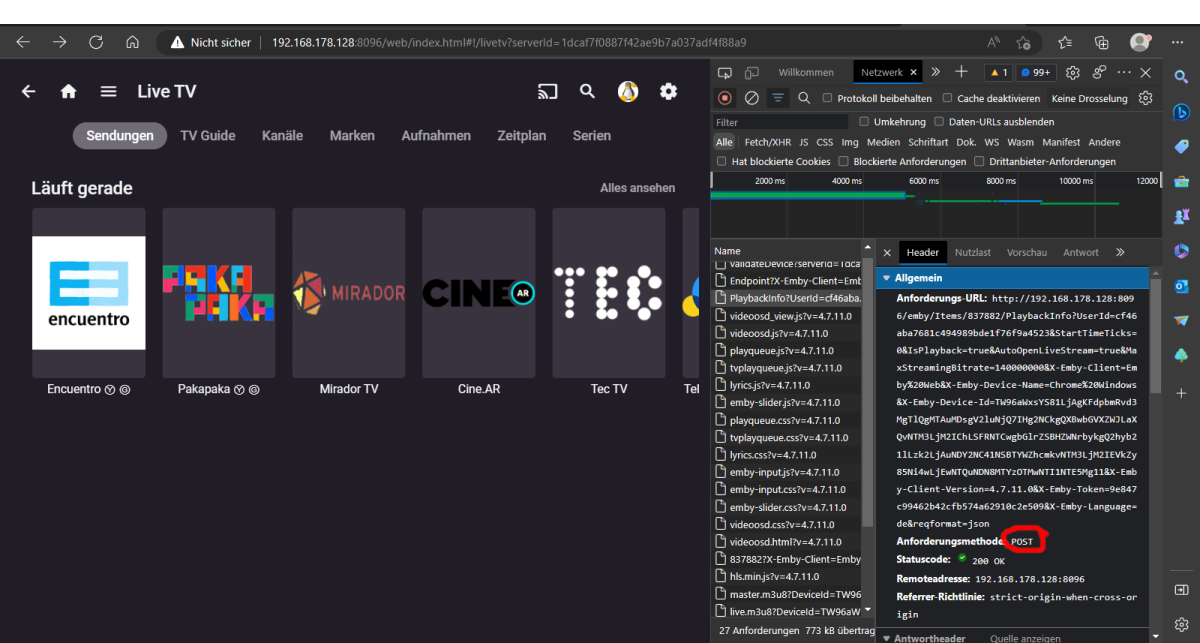
My mistake was that I always looked in the browser request. Here a post request is sent and a profile is transferred. And here only transcoded streams will return. In the plugin I use the get request and then get the desired url. So the fault was mine, because I didn't understand or overwhelmed it. I'm just a hobby programmer and learned the whole thing via google, with request and API queries I still have a hard time. Thanks for your help, now I can expand live TV in the plugin.
 1 point
 -
Trying to do these tasks sequentially just leads to the perception that the library scan is slow - emby needs to change that imo. I personally agree with the view this is a poor way to do the initial / large addition scan - having rebuilt emby MANY times - I do it manually the way suggested above. It makes logical sense to just stack the 'processes' in order of importance, regardless of the options set. Maybe have a simple 'initial scan' flag on each library ? 1. Scan the file with minimal metadata to completion. Files will now 'show' fast giving the user the ability to USE emby or see progress. 2. Scan the library AGAIN - effectively using the 'Missing metadata' option - and it now creates the BIF files. (assuming these options have been set of course) 3. HOLD the core Intro detection option until both the above are complete. Reporting of the progress is also very poor - short of tailing the log file, people just see maybe the % bar on the library (which is usually totally incorrect, jumping to 90+ % and then staying there for hours..) - reporting accurate progress might go some way to alleviating the perception that emby is 'slow' - when infact it is not.1 point
-
Don't bother - your disk I/O will max out well before the 10Gb Ethernet - possibly worth going 2.5Gb as that will match the ~200Mbytes/sec speed of the disks but in all honesty as it's a one off operation - then just be patient lol.1 point
-
It was a permissions issue with the app data folder. Changed those and it’s working now. Tried a bunch…. But that seems to have been the issue.1 point
-
Despite the name, IIS Crypto is used to enable/disable various protocols and re-order TLS cipher suite in your Windows OS. Typically in the past when we've seen 'HandshakeFailure' errors, it's caused by external providers complaining about deprecated TLS cipher suites in older versions of Windows. Not seen it in Windows 11 however.1 point
-
Yes I see the issue with this example. Thanks.1 point
-
Look like a fix would be changing the tag order from Inspectah Deck; GZA/Genius; Masta Killa; RZA; Method Man; Raekwon; Ghostface Killah; Jimi Hendrix to GZA/Genius;Inspectah Deck; Masta Killa; RZA; Method Man; Raekwon; Ghostface Killah; Jimi Hendrix But something for Luke to look at.1 point
-
Cool, Thanks Luke and GrimReaper!1 point
-
I cant say for certain. before the update when i removed the library and re add then it seemed to work. then statistics updated and it still works, i was able to find the files in question causing the error and now everything works. Thanks!1 point
-
Have you monitored network and disk I/O on your Emby server while streaming to the FireTV? Also monitor the same for the NAS. I think the FireTV has a system monitor overlay you can enable to see those stats for the device. Without that info it's hard to pin down the source of the problem or at least know what to exclude.1 point
-
Or you should be able to temporarily disable the library "Automatically merge series that are spread across multiple folders", Scan, then reIdentify the one that is wrongly identified.1 point
-
Rename series folder to: Teen Titans (2003) [tvdbid=71503] and rescan, as it has been merging with your Teen Titans Go! series (TvdbId 266775).1 point
-
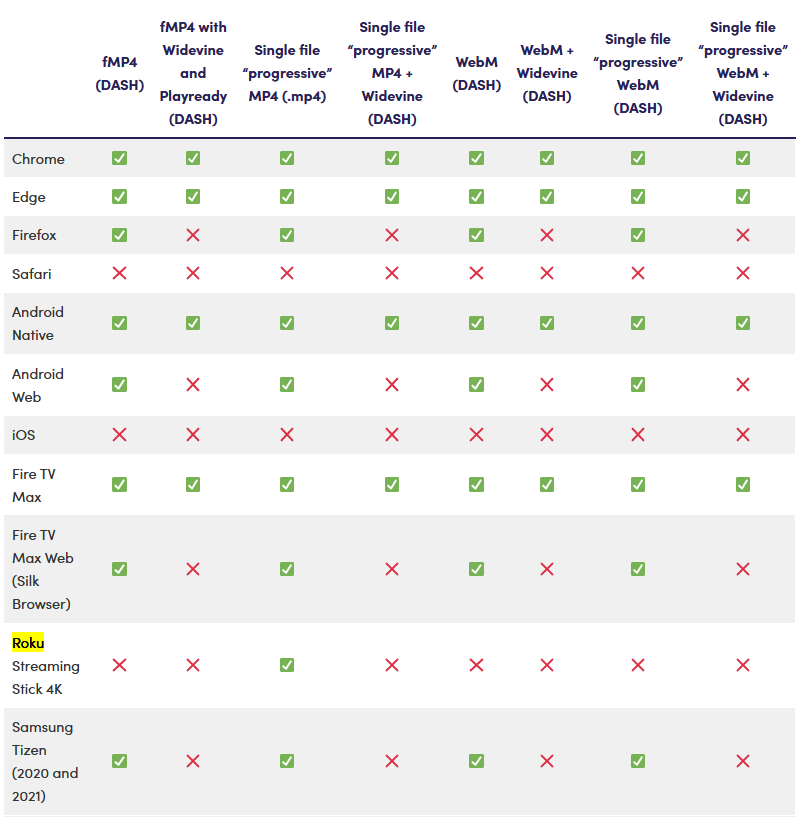
We all would love to have HEVC transcoding, but it comes with it's own set of problems as explained. However, that doesn't mean Emby doesn't support HEVC streaming because the very large majority of streams my server delivers are HEVC encoded. You can pre-process your files offline to getting a much better compression ratio then you could ever get in real-time. If you include an AAC 2 channel stereo audio track as well the media file would never need to transcode because of audio. The same can be done with any subtitles, making sure you have compatible sub formats that won't require transcoding. Short of configured bandwidth restrictions at the server, user or client level the media will play back using HEVC on just about every device including newer browsers from Apple, Microsoft or Google. Pre-encoding the media removes the transcoding complications of HEVC as well as gives you higher quality streams with bitrate savings compared to what you can get doing real-time transcoding (same for AVC). Concerning AV1 support (accurate as of November 1) 100% Support including DRM: Browsers & OS: Chrome, Edge, Android, Android TV, Fire TV Consoles & Streaming Sticks: Amazon Fire TV Stick 4K Max AV1 Suppor: Browsers & OS: Firefox, Windows Consoles & Streaming Sticks: Playstation 4 Pro, Xbox One, Roku Streaming Stick 4K Smart TVs: Android TV, Google TV, Samsung, Sony, LG, Amazon Fire TV No AV1 support: Browsers & OS: Safari, IOS/macOS (AV1 plays in Chrome/Edge and Firefox on macOS) Safari Roku Ultra supports adaptive streaming video via AV1 unofficially (tested with YouTube app) We have AV1 hardware support on some GPUs already such as Nvidia 3000 and 4000 series GPUs. Intel, AMD and Samsung have all commented additional AV1 support is coming at the chip level. Google has already been requiring AV1 support or new Android TV and Google TV devices. Google's newer Chromecasts support AV1 decode support. Industry AV1 support and adoption has been on the rise and gaing momentum quickly. Not that long ago, it took millions of views to offset the higher encoding costs of AV1, but with recent improvements, the break-even point has dropped to as low as 4,000 views!
 1 point
 -
I get your point. I just see this as pretty common issue/question people have. I know why its slow, Im just saying many dont. They dont realize the ramifications of the library setup options in the time spend scanning a library.1 point
-
It's certainly possible for future updates.1 point
-
Oh rookie mistake. I needed to remove one from the count. Apologies! I will fix that right after work.1 point
-
and here is a new error in the log1 point
-
I put up .49. This checks everything for null before attempting creation any library item. It also adds a lot more logging. I have to go to work now, but when I get back I will begin looking into the raspi4 issues. I have one running pinhole, so I'll load emby on it and try to run top picks to better understand the issue.1 point
-
Related to this, immediately after watching an episode, the episode I just watched is not marked as watched in the "More from season X" row. I usually use this row to get to the next episode but it is confusing since the Episode I just finished is not shown as watched.1 point
-
DTS:X is far from dead, yes it's not pushed as hard as Dolby THD Atmos - but a lot of UHD disks only have an object based DTS:X Track. It basically boils down to licensing - as you never see a Dolby THD Atmos AND a DTS:X Track. If you don't have an AVR, then the Cube might be an option, because you don't need bitstream/passthough. Without meaning to offend anyone , an AV Enthusiast with a higher end 'Cinema' type home system will always be using an AVR and subsequently, they NEED passthrough for ALL formats especially object based.1 point
-
Ok, I'm attaching the complete set including: NO QUOTE versions without the text caption below the category. Finally got the automated generation working, so your requests should be more easily done. Enjoy export_20230220_complete.zip
 1 point
 -
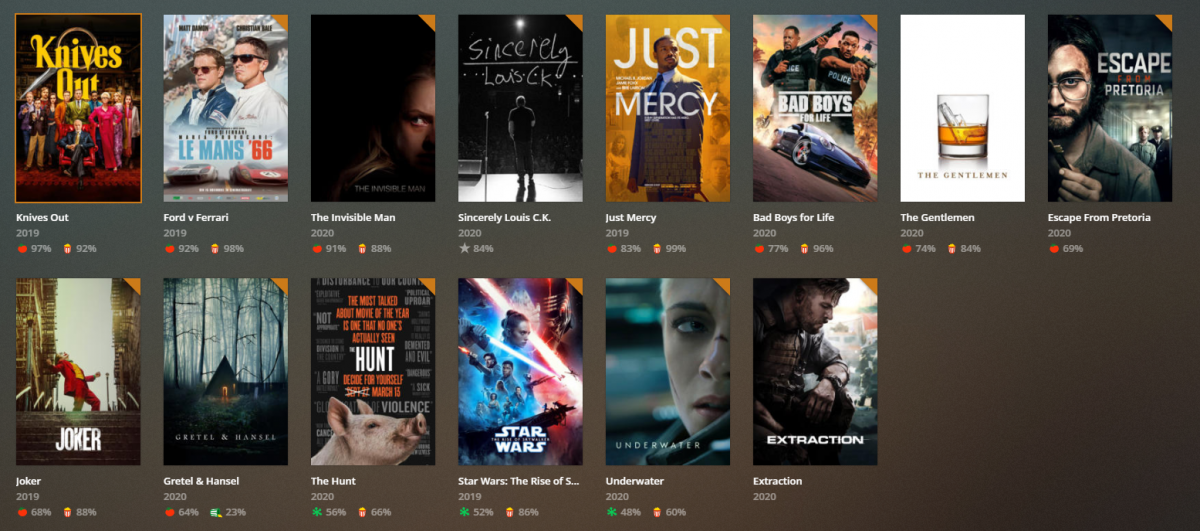
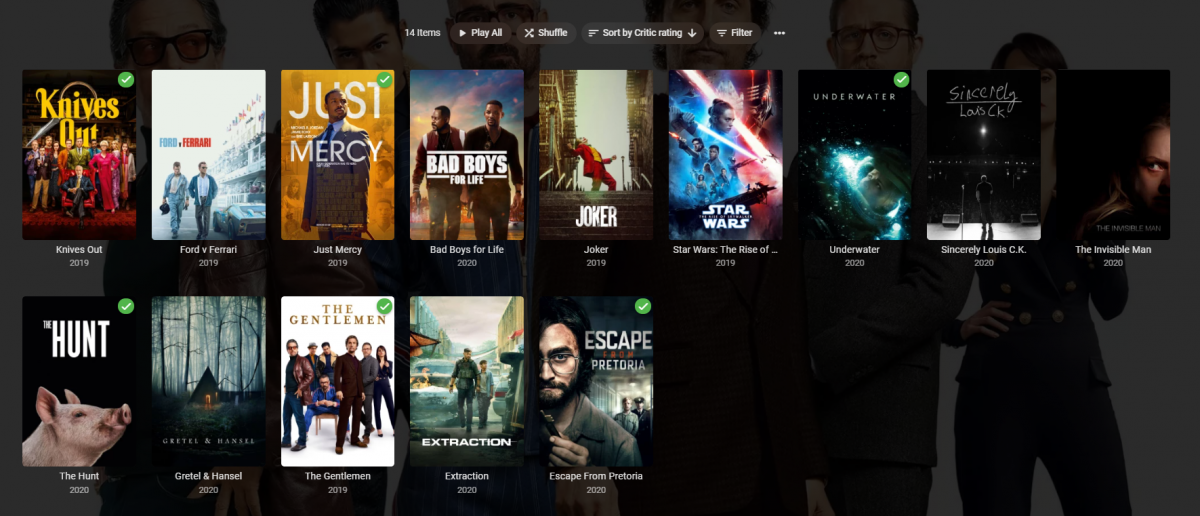
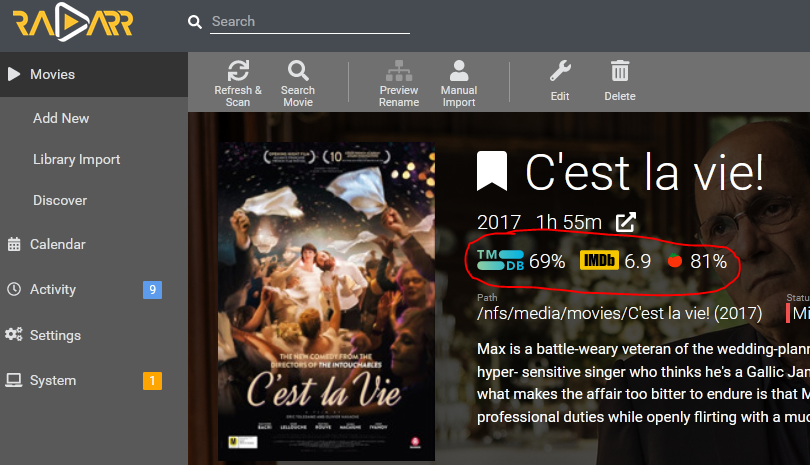
There is a possibility to improve the visibility of the rating and add ratings from more sites Like: imdb, rotten tomatoes and more like in the image i sent also
 1 point
 -
In my opinion, this is the most important feature when choosing a movie. And choosing a movie is an important part in watching a movie. I have just one question. Will rotten tomatoes both critic and audience, will ever be implemented both in the specific movie and in the display view? I hate plex, I hate what it does to my CPU, I hate what they stand for, but the ratings are a killer feature (for me). Thank you.
 1 point
 -
Nope, you don't have to connect through Emby Connect with hosted Web app, you can connect via IP/domain just as well, Connect is an optional feature, both for linking users on your server and connecting through hosted Web app.0 points