Leaderboard




Popular Content
Showing content with the highest reputation on 01/15/23 in all areas
-
This plugin does not replace TvMaze itself, it is a *helper only* Where TvMaze does not find the information, this plugin searches on bing and finds the ID (if it is available on TvMaze), sets the ID in Emby and allows the TvMaze plugin by Emby Dev to download the info using the ID rather than the name. Technically you shouldn't need this but in Tests I have found it will *help* identify people that TvMaze is obviously not telling the Emby Dev's TvMaze plugin it has in its database. How to use: Needs TvMaze Plugin from the Catalogue to work properly. Click on an Empty person image to trigger it. If it finds a link with a valid id (TvMaze id), then data and or image should load shortly. *A Caveat - it is possible that the wrong actor with the same name can be identified as correct* Nothing to configure or enable and it is seemless. It should work on all builds, place the dll in the /programdata/plugins directory and restart Emby. I accept no responsibilty for anything if you choose to use it, its all on you to check legallity in your country! What this does: 1. It looks on bing (not google this time) search engine for tvmaze links that contain the actor you are looking at or refreshing metadata on. 2. It collects links of possibles. 3. It only visits the links that might be valid and checks if the persons name is found in the actor page in order to verify it is valid. 4. It updates the provider Id (if found) 5. It writes a log file. Why does this help? Other metadata plugins if installed will use this id to get data such as tvmaze, themoviedb etc. This plugin might introduce a delay on person loading if *any* metadata is missing for that person. What it doesn't do: 1. It does not fetch any data on people, it only fetches the id code , fills in the field so TvMaze plugin can do the rest. It is technically a webscraper, athough intrusion is minimal - so it probably will not be allowed in the catalogue. 15.Jan.2023 - 03.18.25 Person = John Cleese 15.Jan.2023 - 03.18.25 Url = https://www.bing.com/search?q=john+cleese+tvmaze.com 15.Jan.2023 - 03.18.25 Found link = https://www.tvmaze.com/people/43636/john-cleese 15.Jan.2023 - 03.18.25 Testing Link = https://www.tvmaze.com/people/43636/john-cleese 15.Jan.2023 - 03.18.25 Id Verified, Using Id = 43636 15.Jan.2023 - 03.19.39 Person = Gillian Kearney 15.Jan.2023 - 03.19.39 Url = https://www.bing.com/search?q=gillian+kearney+tvmaze.com 15.Jan.2023 - 03.19.39 Found link = https://www.tvmaze.com/people/50102/gillian-kearney 15.Jan.2023 - 03.19.39 Testing Link = https://www.tvmaze.com/people/50102/gillian-kearney 15.Jan.2023 - 03.19.39 Id Verified, Using Id = 50102 TVMAZE ID Helper.zip Similar plugin for Imdb can be found here:
 2 points
 -
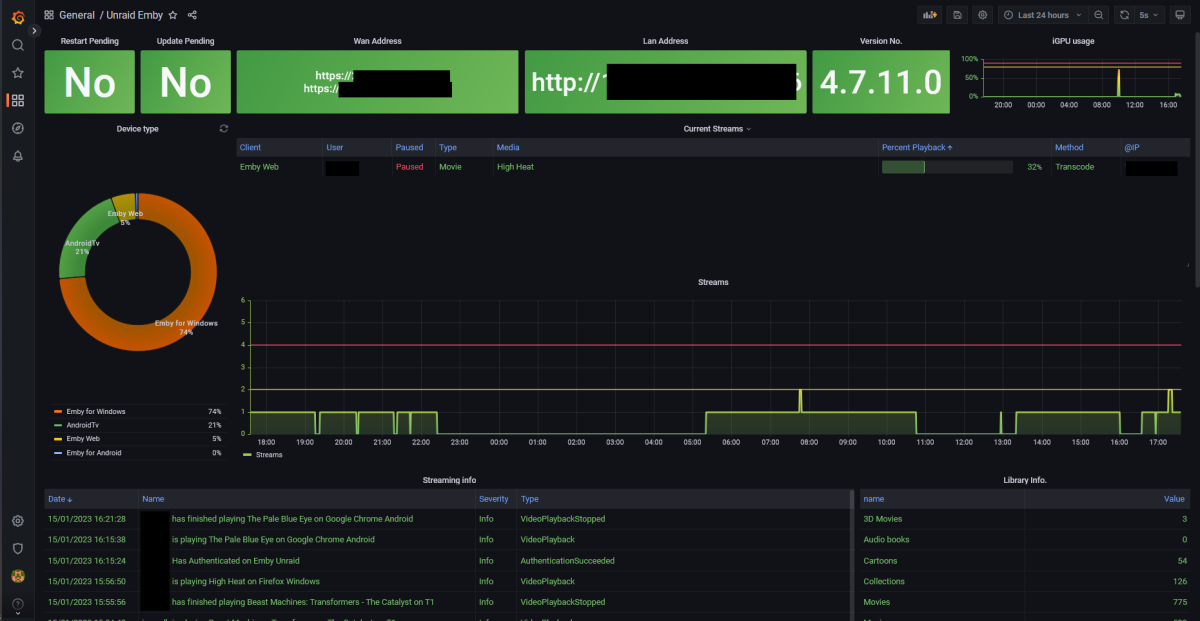
@Bagul Thank you for the help yesterday Your exporter really help me add more metrics to my Grafana dashboard. I have altered some of your panels to fit my needs.
 2 points
 -
Update. I ended up just throwing more ram at the server. So far its been running perfect for a couple months now.2 points
-
Good evening all, I am extremely happy to present to you - Emby Scripter-X version 3.0 (up on the catalog now!) The major change in this version is -- Packages -- ! This gives you the opportunity to develop packages for Scripter X for others to install and use. And very soon, there will be a Packages catalog available that you'll be able to search for, and install community packages, straight from your Emby Administration Console. A package is written in Javascript. A Package requires 3 things - 1) a PackageInfo.json file, 2) a Package.js file, and 3) both these files zipped up together in a .ZIP file. PackageInfo.json provides vital information about your package to ScripterX. It's format is as follows :- { "Id": "scripterx.package.example", "Name": "Example Package", "Description": "An example package for the ScripterX package system.", "Author": "Anthony Musgrove", "Email": "anthony@emby-scripterx.info" } Package.js is the javascript file for your package - where all your code exists. This is the fun bit. Some important things to know about your script: - When your package is initialised by ScripterX (on installation, and on server startup), a function in your Package.js is executed. It is called _package_init(): function _package_init() { //do something here on package startup } - Your script can subscribe to ANY of the ScripterX events, by adding a function with the name _EventName, for example, if you wish to subscribe your package to the onAuthenticationFailed event, you'd simply enter: function _onAuthenticationFailed(context) { //do something here when someone fails to authenticate to emby. } *** Note, the parameter for these functions is context, which is the context of the event call. It contains all the information regarding token values, etc, that you have full access to. For example, to get the username of the attempted failed authentication, you could use :- function _onAuthenticationFailed(context) { var attempted_username = context.Token("%username%").value; } - Same goes for any of the other events, events being: onAuthenticationFailed, onAuthenticationSuccess, onLibraryScanComplete, onMediaItemAdded, onMediaItemRemoved, onMediaItemUpdated, onPlaybackStart, onPlaybackStopped, onScheduledTask, onSessionEnded, onSessionStarted, onCameraImageUploaded, onLiveTVRecordingStart, onLiveTVRecordingEnded, onScheduledTaskStart, onScheduledTaskEnded, onMediaItemAddedComplete, onPlaybackProgress - To log output from your package to the Emby server log, you can utilise the ScripterX.Log functions, they are :- ScripterX.Log.Info("Add an Info log entry to emby server log."); ScripterX.Log.Error("Add an Error log entry to emby server log."); - If you need timers, ScripterX has timers. You can simply create, delete, start, restart or stop a timer by using the following Timers commands : Create a timer that only elapses once, but can be restarted manually after its elapsed, by using .createOnce: ScripterX.Timers.createOnce("myTimer", 5000, "tmrMyTimer_Elapsed", null); or, create a timer that elapses every interval, without having to be restarted, by using .createRepeating: ScripterX.Timers.createRepeating("myRepeatingTimer", 10000, "tmrMyRepeatingTimer_Elapsed", null); - When your timer elapses, it will call the function set in as your callback. For example, when my timer elapses, it will call the following function: function tmrMyTimer_Elapsed(timer_name, timer_interval, objects) { //do something here when my timer elapses, the timer's name is given here too. //timer name is needed to start, stop, restart, delete etc. } - ScripterX supports webhook posts right from your javascript, you can perform a webhook post by using the ScripterX.Web functions, for example, in my _onPlaybackStart function, I want to post to a webhook every time someone starts playing a movie or TV show on my server, I can do this by: function _onPlaybackStart(context) { /* Send a webhook when (someone) plays (something) */ var api_url = "https://myapi.url.com"; var playback_info = {}; playback_info.itemId = context.Token("%item.id%").value; playback_info.itemName = context.Token("%item.name%").value; playback_info.userName = context.Token("%username%").value; playback_info.deviceName = context.Token("%device.name%").value; playback_info.serverName = context.Token("%server.name%").value; playback_info.memo = playback_info.userName + " is playing " + playback_info.itemName + " on device " + playback_info.deviceName + " from server " + playback_info.serverName; ScripterX.Web.Post(api_url, JSON.stringify(playback_info)); } - Once you've created your Package zip file for distribution, you can install it on your Emby server by using the Emby Scripter-X package installer interface, as shown below: - While you're testing your package, you don't have to keep uninstalling and reinstalling your package to test and debug. Simply install your package ONCE, then navigate to your Emby data directory, find ScripterX, then find Packages, then find the folder labelled with your package's assigned installationId. Inside this directory, you'll notice Package.js. Make changes directly to this file, then go back into your Emby administration panel and click the 'Reload' icon next to your package listed in your 'Installed Packages' panel. The reload icon is next to the uninstall/delete icon. If you wish to uninstall a package, simply click the trashbin, then confirm by clicking 'Really Uninstall?' There is MUCH, MUCH more to come, but for now this will get people going. There are other function groups that I am going to implement including Library searching and Item manipulation, User manipulation and searching, among many, many other functionality. Please enjoy, and as always, any comments, feedback, suggestions are MUCH MUCH appreciated. Emby ScripterX (github: https://github.com/AnthonyMusgrove/Emby-ScripterX) Project/Product Website: https://www.emby-scripterx.info/ Version v2.3.4 now up on the Emby Plugin Catalog & GitHub with changes. Events supported: On Authentication Failed, On Authentication Success, On Playback Start, On Playback Stopped, On Session Started, On Session Ended, On Media Item Added, On Media Item Updated, On Media Item Removed, on Scripter-X Scheduled Task, on Library Scan Completed, On Camera Image Uploaded, on Live TV Recording Start, on Live TV Recording Ended, onScheduledTaskStart, onScheduledTaskEnded, onPlaybackProgress, onMediaItemAddedComplete For tokens available, please see GitHub readme, or check out the Actions interface in the plugin - you can find the plugin in the Emby Server Catalog, under 'General'. ChangeLog Changes for 2.3.4: Major core rewrite Added conditions (drag and drop) Rewrote token parser and added contexts Added event onPlaybackProgress (which supports transcoding detection) Added event onMediaItemAddedComplete which is called virtually, after an onMediaItemAdded + Meta Data (or timeout of 40 seconds, whichever comes first) Added IP address tokens for Authentication events Various other modifications and changes Changes for 2.3.1: %item.library.name%, %item.library.type% issue resolved Added confirmation on delete for actions (theme friendly) Remove 'Global Tokens' section in Actions interface (they're listed now for each event) Changes for 2.3.0: Variables are now case-insensitive, refactoring a lot of the interface code (Prototype-to-production), cleaning interface, addressed various GitHub issues. Changes for 2.2.9: Progressively from v2.2.6, functionality to enable or disable events individually, many more tokens (please see GitHub tokens list or the Actions interface), global tokens (server version, uptime, etc), more item tokens (for example, season number, episode number, item meta (imdb id, tmdb id, whatever you wish), season meta, series meta, plus plenty more! Changes for 2.2.5: Aesthetics on Actions Interface (enlarged textboxes for script and interpreter, better alignment of add buttons) Changes for 2.2.4: Progessively from v2.2.0 to v2.2.4, integration with a sortable library, actions user interface customisation and remembering custom order within browser local storage. Changes for 2.2.0: Now theme friendly and compatible, changes with theme selection correctly. Changes for 2.1.9: Redesign Events/Actions interface for less clutter Please ignore the 'Advanced' tab, It won't be there in the next catalog release, its just used for debug at this stage. Changes for 2.1.7, 2.1.6, 2.1.5, 2.1.4: Progressive changes to implement Live TV Recording Events. 'Emby Scripter-X DVR Manager' was implemented in the codebase to handle all Live TV events, tokens and logging. Changes for 2.1.3: Addressed bug with %item.library.*% tokens with respect to onItemRemoved event. (see https://github.com/AnthonyMusgrove/Emby-ScripterX/issues/2 for info!) Changes for 2.1.2: Added new event - onCameraImageUploaded. This event is triggered when a user uploads an image to the Emby Server via the 'Camera Upload' functionality within the various Emby Apps. Tokens supported are as above. Below is an image of the event on the Actions page, along with an image of a sample batch script and output: Changes for 2.1.1: Actions now utilises the entire available interface space; so editing and viewing are much easier. Some input validation added for Interpreter and Script Some cosmetic modifications :- on adding new action, delete/trash button is now changed to 'X' so it indicates 'remove this unsaved action'. Once a new action is saved, the 'X' icon will change to a 'trash/delete' icon, signifying 'delete this action from the server'. Changes for 2.1.0: Bug fix for " in script name, parameters, interpreter. various other bugs, interface bug fixes very stable at this stage. Changes for 2.0.0: Redesign Interfaces, add Actions interface, Community interface (as tabs) Redesign core Allow multiple script actions for each event Changes for 1.0.0.8 - Various updates/changes: Addressed issues with having to supply entire path to interpreter. Implemented better way to detect OS platform (IsWindows() IsLinux() IsOSX()) Powershell.exe, cmd.exe, /bin/bash or a custom executable is now supported Examples now: using powershell.exe as interpreter: -File "D:\embyscripts\ScripterX-test.ps1" -Name %item.name% -ID %item.id% -Type %item.type% -LibName %item.library.name% using cmd.exe as interpreter: /s /c D:\embyscripts\test.bat AuthFail %username% %user.id% %device.id% %device.name% using /bin/bash /home/medius/scripts/test.sh AuthOK %username% Changes for 1.0.0.7: on Library Scan Completed : D:\embyscripts\test.bat Library Scan Complete! Library Scan Complete! Changes for 1.0.0.6: %item.update.reason% : Media Item Updated "1917" "D:\Media\Movies\1917.2019.1080p.BluRay.x264.AAC5.1-[YTS.MX] - Copy.mp4" (Update Reason: MetadataEdit) D:\embyscripts\test.bat Media Item Updated "%item.name%" "%item.path%" (Update Reason: %item.update.reason%) 1.0.0.5 additions: %series.id%, %series.name%, %season.id%, %season.name% : PlaybackStart ItemID: 593 - Name: "Brian: Portrait of a Dog" - Path: "D:\Media\TV\Family Guy\S01\S01E07 - Brian - Portrait Of A Dog.avi" - Username: Anthony - DeviceName: Firefox - ItemType: item type: Episode - LibraryName: TV - LibraryContentType: tvshows (seriesname: Family Guy) (season: Season 1) D:\embyscripts\test.bat PlaybackStart ItemID: %item.id% - Name: "%item.name%" - Path: "%item.path%" - Username: %username% - DeviceName: %device.name% - ItemType: item type: %item.type% - LibraryName: %item.library.name% - LibraryContentType: %item.library.type% (seriesname: %series.name%) (season: %season.name%) README is on Github. Comments/Feedback/Suggestions are GREATLY appreciated. On Scheduled Task: A field now exists to specify a script to run as a scheduled task - you'll now see under 'Scheduled Tasks -> Application' an Emby ScripterX Scheduled Task. No tokens are yet available to this field - need feedback/suggestions/comments on what should be available to specify as parameters/tokens.1 point
-
Hello, is it possible to implement in Emby Quick Connect option like in Jellyfin or other apps for smart tv's? Sometimes it's difficult to put long passwords on some devices. Regards.1 point
-
Sorry Ninko. I got names mixed up. I will look into the tag problem ASAP vic1 point
-
OK, the filter has the info, but its not yet displayed. I will work on it tomorrow. vic1 point
-
This fixed it!! Thank you! This saved me hours of work!1 point
-
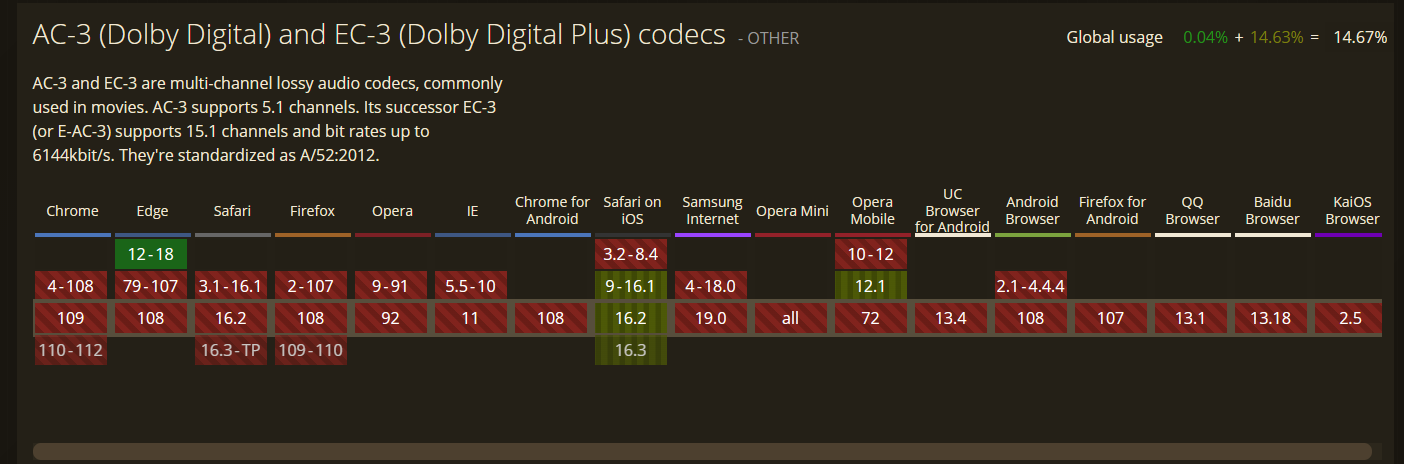
Most do but in the end it is usually about audio. "hevc" | Can I use... Support tables for HTML5, CSS3, etc Not sure about this as I know my Edge browser still supports ac3 HTML5 Browser Support | Dolby Developer If Premiere user, you should use Desktop Emby Theater.
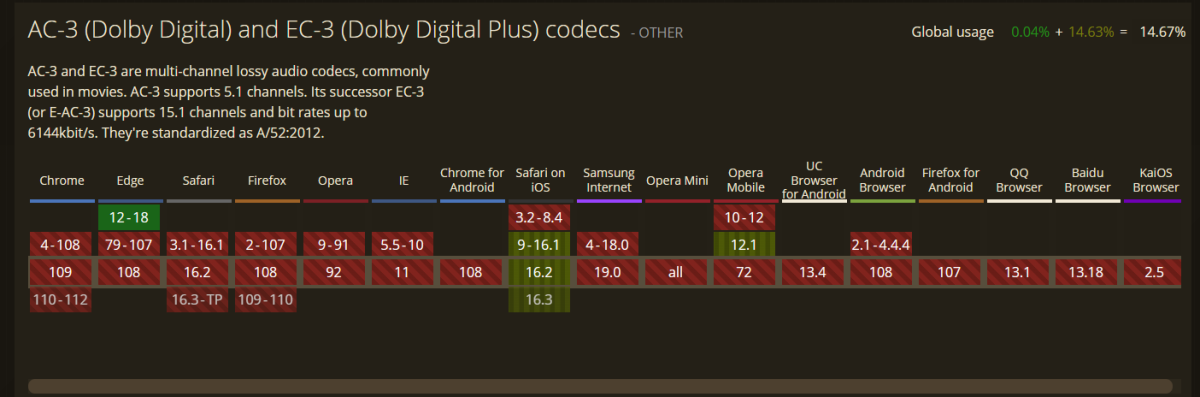 1 point
 -
Ah ok - so that isn't an 'Only include', it's just saying the channel should ALSO always include. Makes sense. I'll use tags then. Thank you!1 point
-
You're not limiting that Channel with "Always include...", what you should do is tag desired movies/TV shows and use Tag channel rule, as that'll restrict Channel to only those items.1 point
-
This is looks great, I still love the WMC interface as it is clean and easy to use and still looks great even now. hope you get this finished and we can all have a play with it1 point
-
Hi, the issue is solved. Perfect thank you very much.1 point
-
Just make sure that the Emby directory (containing "system" and "programdata") will be preserved complete (save it elsewhere if you are reformatting the system disk, of course, and restore it afterwards). So long as the identical drive letters and any shares are in place when you start it again, no re-installation should be necessary; everything that Emby knows is stored somewhere in the "programdata" folder (though some images and info data may be in the media folders if you specified that). Paul1 point
-
Also ich muss schon sagen, dass die Admins hier nicht unbedingt hilfreich sind.....1 point
-
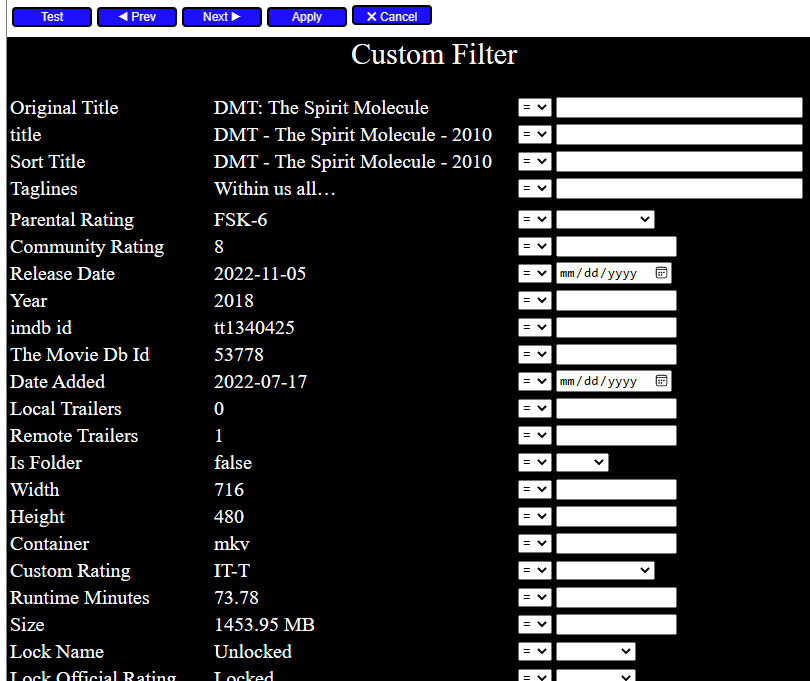
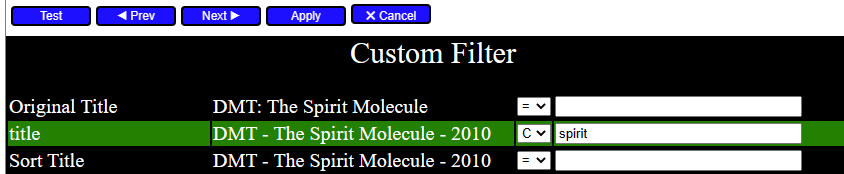
I added a new custom filter. Select a folder, then select one or more files to test the filter against, and click filter then "custom". A new custom filter screen will appear. The "prev" and "next" buttons allow you to switch between the files you selected for testing the filter against. The first filter column gives the names for the items in the selected Emby object. The second column gives the value for the corresponding name. The third column allows you to select the filter test to apply to each item (equal, greater than, less than, starts with, ends with, and contains). In the fourth column you supply the value you want to test against. Press the "test" button and the filter is processed, and each row is evaluated. If the test is "true" the corresponding row turns green. False evaluations turn the row red. When you are satisfied with the filter, you can apply the filter to the entire folder by clicking "Apply". I have not tested this code very much. I need everyone to let me know what doesn't work. Vic tool_2.4a.zip
 1 point
 -
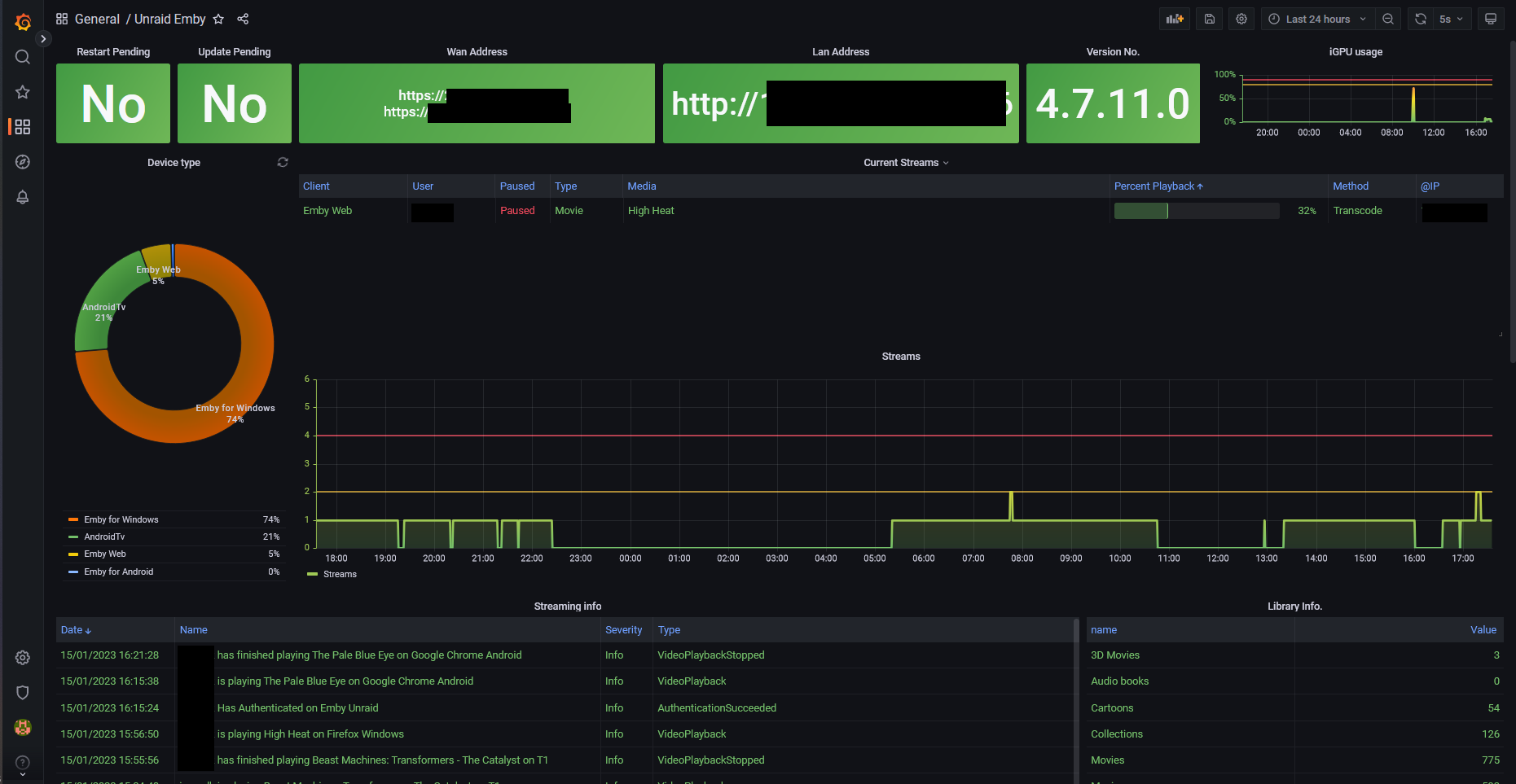
I'm running all this on a Unraid server, I have installed a Intel iGPU metrics exporter that sends data to telegraf, telegraf is then imported into Grafana. Where I have edited the dashboard to show that. To add the lines is to simply edit the panel you want. look under Thresholds and set them to your desired value. Here are some how tos https://www.google.com/search?q=how+to+edit+panel+grafana&client=firefox-b-d&sxsrf=AJOqlzUSUGtC4SuDbsilHT-MNvwVlkGHng%3A1673804397739&ei=bTrEY8LlLIe9xc8PsuCj6AM&ved=0ahUKEwiC0LOkj8r8AhWHXvEDHTLwCD0Q4dUDCA4&uact=5&oq=how+to+edit+panel+grafana&gs_lcp=Cgxnd3Mtd2l6LXNlcnAQAzIECAAQHjIGCAAQCBAeMgYIABAIEB46CggAEEcQ1gQQsAM6BwgjELACECc6CAgAEAcQHhATOgoIABAIEAcQHhATOg0IABAFEB4Q8QQQDRATOgoIABAIEB4QDRATOgYIABAHEB46CAgAEAgQBxAeSgQIQRgASgQIRhgAUKwIWNAVYKcZaAFwAXgAgAFkiAHeBJIBAzYuMZgBAKABAcgBCMABAQ&sclient=gws-wiz-serp1 point
-
after several viewings it works very well. thank you.1 point
-
It is OK now. I did absolutely nothing! Could be a long verification time. Thank you for trying to help me1 point
-
I believe the issue I was having with online trailers crashing the ATV app was related to the crash others were experiencing on in-progress recordings, because it's been fine after the most recent ATV update.1 point
-
I'm working on it.1 point
-
Yes, see it also: 2023-01-15 15:47:38.503 Info Server: http/2 POST https://emby_remote_ip:8920/emby/Users/authenticatebyname?X-Emby-Client=Emby Web&X-Emby-Device-Name=Microsoft Edge Windows&X-Emby-Device-Id=fff157c9-c4ae-4701-ac99-a7b4cb717816&X-Emby-Client-Version=4.7.10.0. Accept=application/json, Host=NOT ANONYMIZED:8920, User-Agent=Mozilla/5.0 (Windows NT 10.0; Win64; x64) AppleWebKit/537.36 (KHTML, like Gecko) Chrome/110.0.0.0 Safari/537.36 Edg/110.0.0.0, :method=POST, Accept-Encoding=gzip, deflate, br, Accept-Language=en-US,en;q=0.9,hr;q=0.8, Content-Type=application/x-www-form-urlencoded; charset=UTF-8, Origin=https://NOT ANONYMIZED:8920, Referer=https://NOT ANONYMIZED:8920/web/index.html, Content-Length=32, sec-ch-ua="Chromium";v="110", "Not A(Brand";v="24", "Microsoft Edge";v="110", sec-ch-ua-mobile=?0, sec-ch-ua-platform="Windows", sec-fetch-site=same-origin, sec-fetch-mode=cors, sec-fetch-dest=empty Though the entry starts correctly, Host, Origin and Referer are not anonymized down the line. @Luke1 point
-
What do you mean by that? 95+% of my HEVC do play directly in Edge & Chromium, those that don't are usually due to audio/sub issues. Use Emby Theatre, that will likely DirectPlay most of those.1 point
-
The domain used to connect to my emby is still there1 point
-
I send you a test version via PM, but there is still work to do in the code.1 point
-
Correct, I just pulled out that snippet from a bigger config and missed that last brace. But I knew you're a clever guy so would have no issues1 point
-
To all users. At least 50% of all reported issues needs additional clarifications. I must make assumption, guessing that's the meaning and coming back with followup questions. I mentioned it a couple of times and I say it again (also put it in FAQ soon). 1. Find a pattern, "sometimes" is no a proper issue description. I need to know, when exactly (what triggers an issue). 2. Repeat the issue at least 3 times on YOUR box. 3. Use the stock Kodi skin to confirm skin-view related issues. 4. In doubt, perform the same test on a new Kodi instance (use a PC/Mac). 5. Sync issues can be a result of a realtime sync or Kodi startup sync. I need detailed information here. 6. Report your addon settings (most important, native or addon mode) thank you1 point
-
Thanks for sharing.1 point
-
I think you are spot on. I think there must have been some bad data being output by EPG123 for a program. After a few days the problem went away.1 point
-
I am working on a new filter. Hopefully I will have a prototype tomorrow. Vic1 point
-
Cool, thanks for clarifying. Thanks. I'll hold onto the known pre-corrupt full backup for awhile longer and see how this goes when it's finished rebuilding. If I mess around too much, I might risk making it worse? And thanks again Will also alter the current db cache after everything has settled down. The current DB size is about 600mb. It's actually been running not too bad on the default settings, maybe a little laggy from time to time. Hopefully I notice an improvement after. I only have about 12 users and they are not super active, often only 2-3 concurrent. Cheers1 point
-
@visproduction True but there is 50 item limits coded into results so you cannot get all results without hacking js file changing limit.1 point
-
You shall have to elaborate but yes there are some areas that still show your info (Host= and Forwarder info) but the majority are replaced with hostx1 point
-
@softworkz Dude... that is fricken awesome mate!! Can't wait to see the libraries. Looks and feels just like WMC!1 point
-
Same problem here on 2 different Macs. What I found out is if I let the Dev Toolbar (with disable cache) open it runs just fine, so it my be a cache bug.1 point
-
Just for fun - here you can watch the Emby settings menu being re-styled to the WMC start/settings menu (the html page is never reloaded): WMC_StarrtMenuTransformRev.mp41 point
-
I solved this Problem by: Updating to the latest beta server version of Synology (i think 4.0.8.21). Then go to your User Settings (On Android,Web,Windows) Go to your User that you want to play on your LG Tv. Look for the Playback Settings and unmark Video Transcoding. Now it will transcode the DTS, DTS-HD, TrueHD etc. And subtitles. But the Video is untouched (direct Play,) WITH HDR. This only works for your Home Network (lan) Otherwise it says no compatible streams etc. If you want to play over (WAN,Internet) you need to check the video transcoding again. Or you create an User only for the LG App Cheers1 point
-
I have a similar issue with my Pixel 7 Pro (Android 13). Every time I play a video through the app (it doesn't matter if it's Live TV or not), I get the weird discolored look. The only solutions I have found so far are either setting the In-App settings for video playback to a lower quality which fixes the color issue but increases buffering since it now needs to be transcoded further, or accessing the videos via a web browser. Please fix this.1 point
-
First of all sorry for my english but I'm not a native speaker. It would be great if there were a playlist do over. For example - if I want to add a movie to a playlist all my playlist are shown. Even the music and the audiobook playlist. It would be great if only the playlist were shown that containing video files. Or that audio and video playlists were separated. It would be great as well if you could import your trakt.tv watchlists to emby playlist. It would be great, if you could directly add movies to your last used couple of playlist without having to choose the specific playlist from the playlist page. In the main overview with all playlist it would be great if there were devided by movies, series, mixed video playlist, music, audio books, etc. Right now it's ok that there is a playlist feature but it's kind of not realy useable because your movieplaylist are mixed up with music and audio books.1 point
-
Welcome to the support forum for our brand new Apple TV app. Install it now from your 4th Gen Apple TV store. Introducing Emby for Apple TV If you encounter issues, please create a post in here and provide very specific information about what you were doing and what happened in the app. Thanks and enjoy Emby on your Apple TV device.1 point