Leaderboard




Popular Content
Showing content with the highest reputation on 01/10/23 in all areas
-
I think it would be nice to have the Audience Rating (icon) / Audience Score for movies along with the Critic Rating (icon) / Critic Score. It looks like the data is available from the Rotten Tomatoes API via the ratings field. 14 "ratings": { 15 "critics_rating": "Certified Fresh", 16 "critics_score": 99, 17 "audience_rating": "Upright", 18 "audience_score": 912 points
-
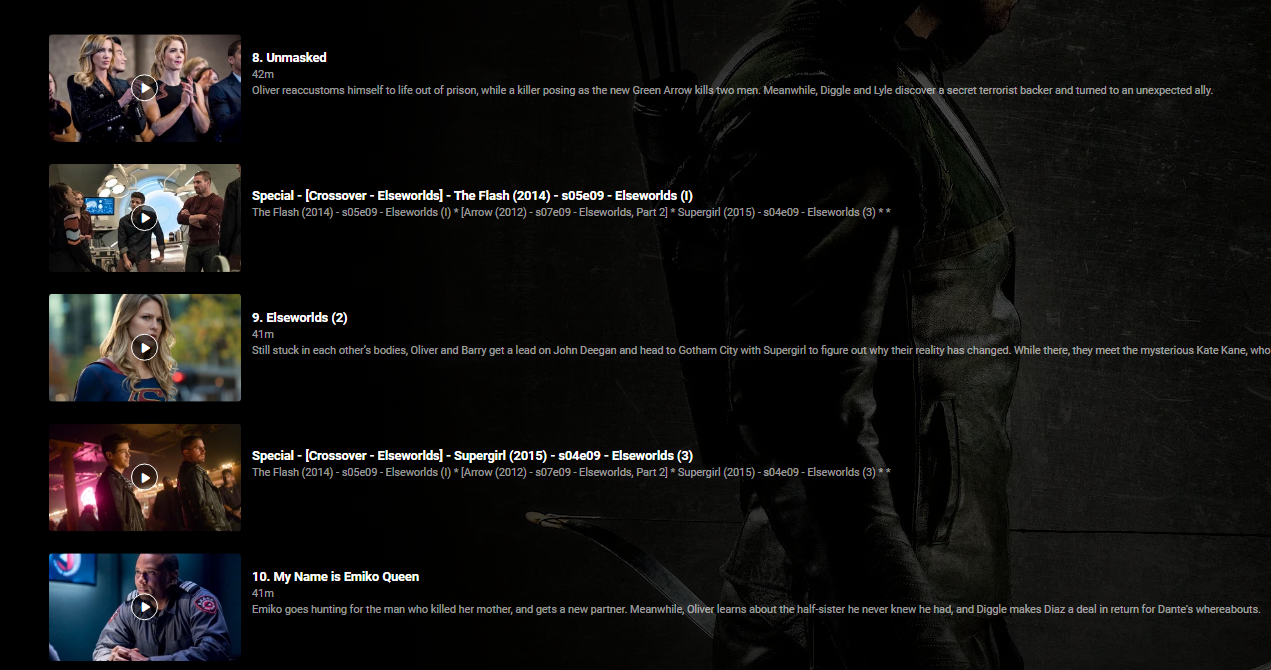
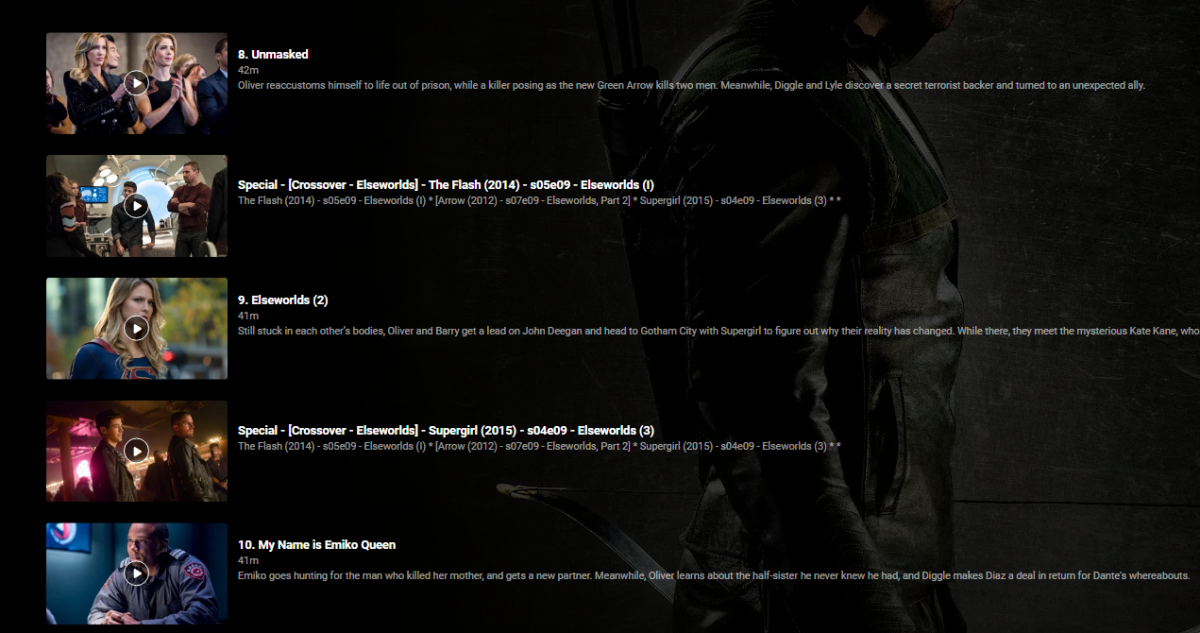
Agreed - I wrote a script to do all the 'Crossover' specials insertions for many shows - but as a one off - just do as Grim has suggested. Copy the episodes as 'specials' in the original show - create fake special numbers - start @ 100 or something to avoid it being picked up as a real 'special' - ie '<showname> s0e100' Then in it's metadata, set the 'Specials' section to show it in the correct place (ie correct season, correct episode 'before' etc) The downside of this is you won;t get real metadata for it - as emby won't recognise it. You can copy the nfo and local poster files - but then you are getting into a more complex solution. As an example - this is a 3 way crossover in Arrow - using episodes from The Flash and Supergirl. (this is using STRM files - actually pointing/playing from the other shows media).
 2 points
 -
Since you're only keeping Hawai'i, make the other two its Specials to be played before/after desired Hawai'i episode.2 points
-
Hi Eigeplackter, I tried and it's working. Thanks very much! regards, Vincent2 points
-
2 ways to interrogate this. is per user basis. you can get the user Config by using the following api call http://localhost:8096/emby/Users/{USERID}?api_key={AUTHToken} In the configuration section of the returned Json you will get the AudioLanguagePreference that you can use "Configuration": { "AudioLanguagePreference": "en", "PlayDefaultAudioTrack": true, "SubtitleLanguagePreference": "", "DisplayMissingEpisodes": false, "SubtitleMode": "Default", "EnableLocalPassword": true, "OrderedViews": [ "21b2dac8e2e09d3f15b0dd69ae72792b", "4ff5fdc9ac2e53dad01716d3f5c53dad", "f137a2dd21bbc1b99aa5c0f6bf02a805", "e957f9042f99d8b3c9c0f7f4d81898b8", "28b5d5b8bef4bd1f1914503b5c11ac91" Alternatively you can interrogate the Server Settings (configuration) which is really what the localized strings are used for http://localhost:8096/emby/System/Configuration?api_key={AuthToken} and it will return the metadata language and CountryCode in amongst the Json { "EnableUPnP": true, "PublicPort": 8096, "PublicHttpsPort": 8920, "HttpServerPortNumber": 8096, "HttpsPortNumber": 8920, "EnableHttps": false, "IsPortAuthorized": true, "AutoRunWebApp": false, "EnableRemoteAccess": true, "LogAllQueryTimes": false, "EnableCaseSensitiveItemIds": true, "MetadataPath": "", "MetadataNetworkPath": "", "PreferredMetadataLanguage": "en", "MetadataCountryCode": "GB", So it's up to you which one to go for. Hope that helps2 points
-
I know you don't want to spend time on something thats going too be replaced soon, but still reckon its a basic playing bug that needs doing, especially considering there's still piles to do on the new app and there's been no updates to that one for a month (though I know other stuff to do, holidays etc...). I mean if the new app has a fix, copy it over to the older version (no idea how easy that is obviously). See Spaceboys comments, top of page.2 points
-
Yup, I like add lots of tags kinda regulary. CBS is „a monster“ but there are more i.e. Walt Disney with nearly 800, Netflix 750, so on and on.1 point
-
Hi, thanks, the website link should be updated shortly.1 point
-
If the first match is not exact, that should trigger a check to see if an exact match is somewhere in the list, I think. Paul1 point
-
Hi there, I just played the file exactly until a freeze happened. Once the freeze was over I stopped and opened the log file. log file + mediainfo of the video file are attached. mediainfo.txt embyserver.txt1 point
-
Not sure whether this is a bug or not… However when I try to identify something, I can not navigate back to the results of my identification. Lets say I search for Spider-Man and I can‘t tell which one is the correct, because the name might be cut off or the picture not loaded yet. So I Click on one of the items and now I see the full title and the image also comes in. If it‘s not the correct one I will use the button in the left corner to go back, but it takes me back to where I have to enter the search details and not to the list of results, so I have to re-enter my search multiple times. It gets really really frustrating when you have many files that require manual identification. The back button should take you back to the list of results and one more press should take you back to the search input.1 point
-
Hi there, yes this is planned for future updates. Thanks.1 point
-
The playback issue isn't actually isolated to the TV app. It is in Exo somewhere and also manifests in the standard app. We are working on trying to find it and deal with it.1 point
-
I have sold my problem. I need to edit the file system.xml. The curious thing is that Embyserver is installed in /volume1 and the file system.xml is in /volume2. Thanks for your help1 point
-
Yes but I ran into a new problem: MovieDb is blocked by my local ISP. So I gave up.1 point
-
Currently it's just taking the top returned result (I believe), how does it know it has 'failed' without applying logic ? And if you are doing that - why not attempt to correct it ? You can apply lean logic on obvious 'fails' - if you have the year for example - for string based comparisons then yes this may be a little more taxing or put those in a 'list'.1 point
-
Check out „Remote Folders“: https://kb.synology.com/en-ph/DSM/help/FileStation/mountremotevolume?version=71 point
-
Do you mean Download from server to Device. As an example, download new movies between 2am - 6am to iPad1 point
-
I think you just need the backdrop and a logo for the thumb image. They can come from you library or through your selected scraper if you don't have them locally (tvdb/tmdb/fanarttv/ect.). If your not using the thumb image it will use your primary image (poster). FanartTV is usually the place to grab logos but I think I've seen some on TMDb to.1 point
-
Random question: When will we see DoVi detection within Emby? The competition apparently has it: I personally am totally OK with Cheese' plugin but for the regular user that probably doesn't really care about the actual DV profile (DV5, DV7, etc) a general information of the layer would already be helpful.1 point
-
Fabian, thank you for confirming. Luke, this is not a matter of which app you're using both of them (ATV and ET for Android) fail to play. For me it's even worse those files don't play at all on my Shield, although I can see the server transcoding it I only get a black screen without audio. Additionally, when stepping out of that black screen the transcode does not get stopped so that the server transcodes the complete file - only solution is to restart the server. All of this is reproducable for me.1 point
-
Luke, I just wanted to update this thread and let you know that as of version 3.2.90 subtitle offset is working in the Android app for me.1 point
-
I had to find an alternative way to watch my movies via Emby since it was 5 months ago that I reported the problem (I know a lot of the waiting time was on LG) so I started using an NVIDIA Shield, but I did go back into the TV and update its Emby app and tried it out. The audio seems to be in sync now and the issues I reported have been repaired. I only tested 3 movies, but they were the ones that were used before when I reported the issue. LG's interface is so slow vs the Shield, so I likely won't go back to the Emby app for LG at this point, but I did want to circle back that it looks like it fixed the issues. Thanks!1 point
-
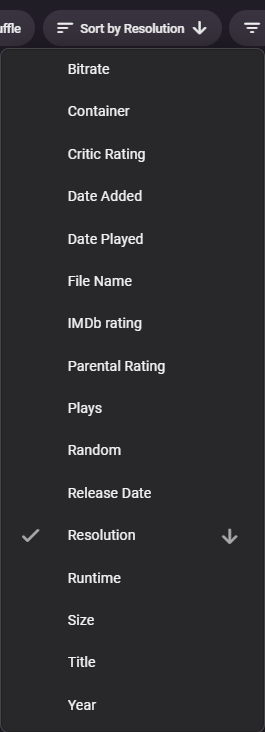
Sort by Resolution is also available as per your FR title
 1 point
 -
Thanks. As part of my troubleshoot, I tried a different file (same season, same episodes, just new file from different source) and it's working with the new files. Not sure why a file would show the subs on desktop but not via Fire Stick, that was the first time I've had the issue, but the new file works, so I'm good to go.1 point
-
Is it actually on another machine or is it on the same machine as the server? If it's on the same machine as the server then I would just setup the library with the local path instead.1 point
-
Hi, we plan to add multi-select features to this screen, so stay tuned.1 point
-
Hi, yes this makes sense. Thanks for the feedback.1 point
-
Hi. Can you try sideloading our standard android app on the same device and see how that compares? https://emby.media/emby-for-android.html Thanks.1 point
-
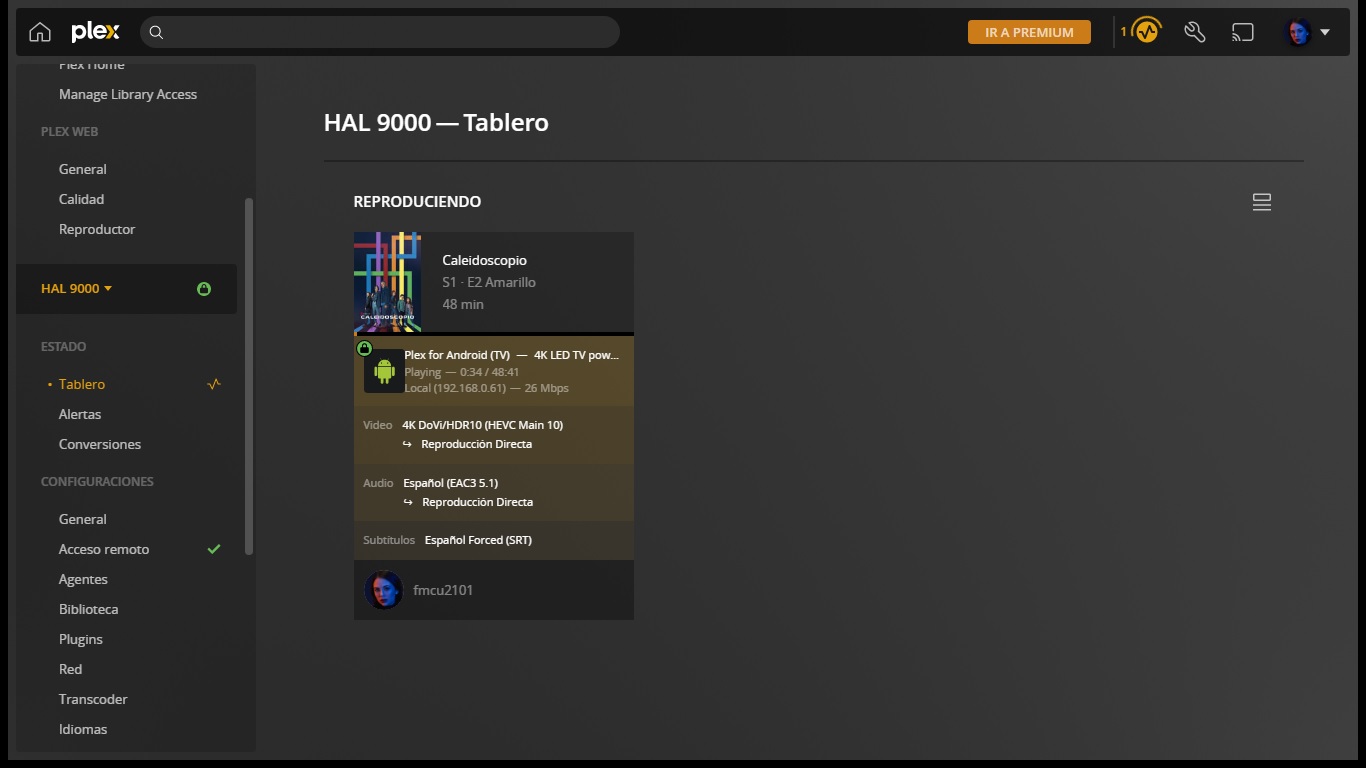
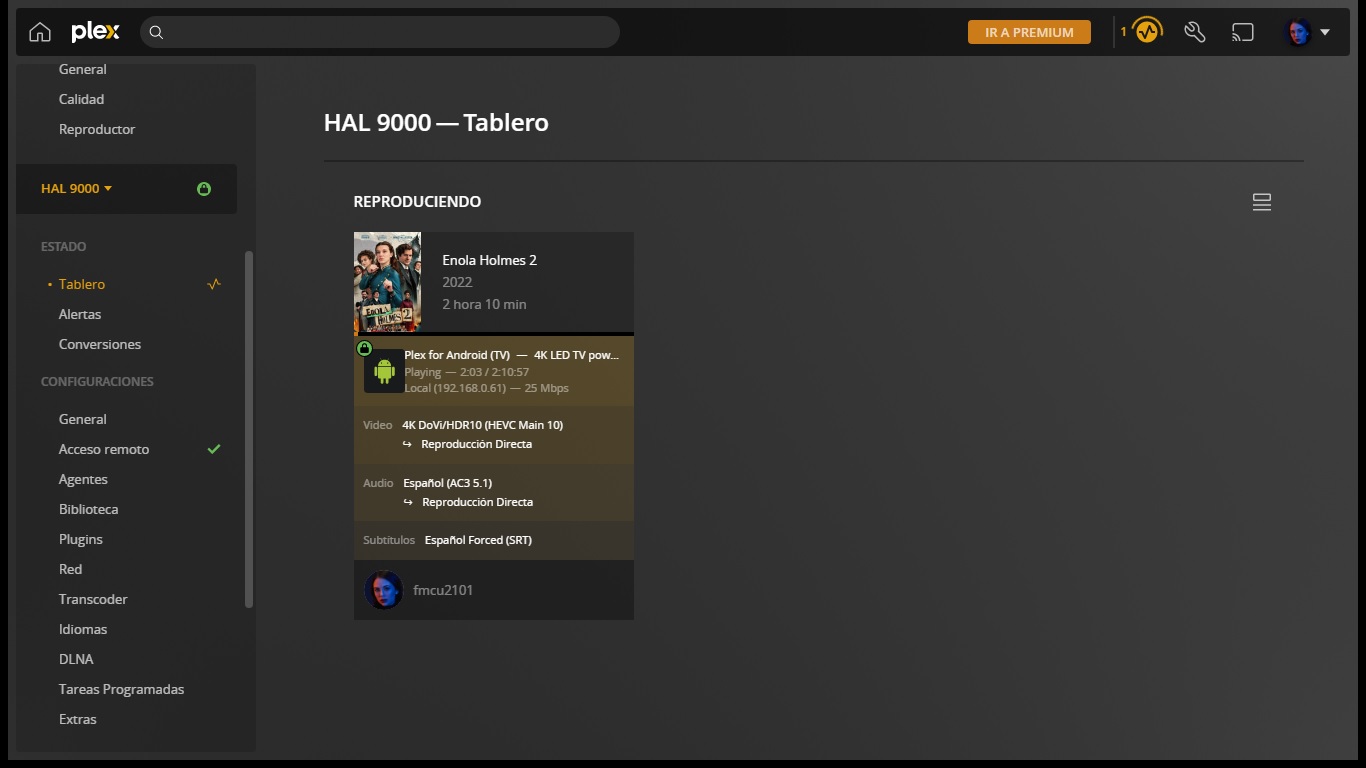
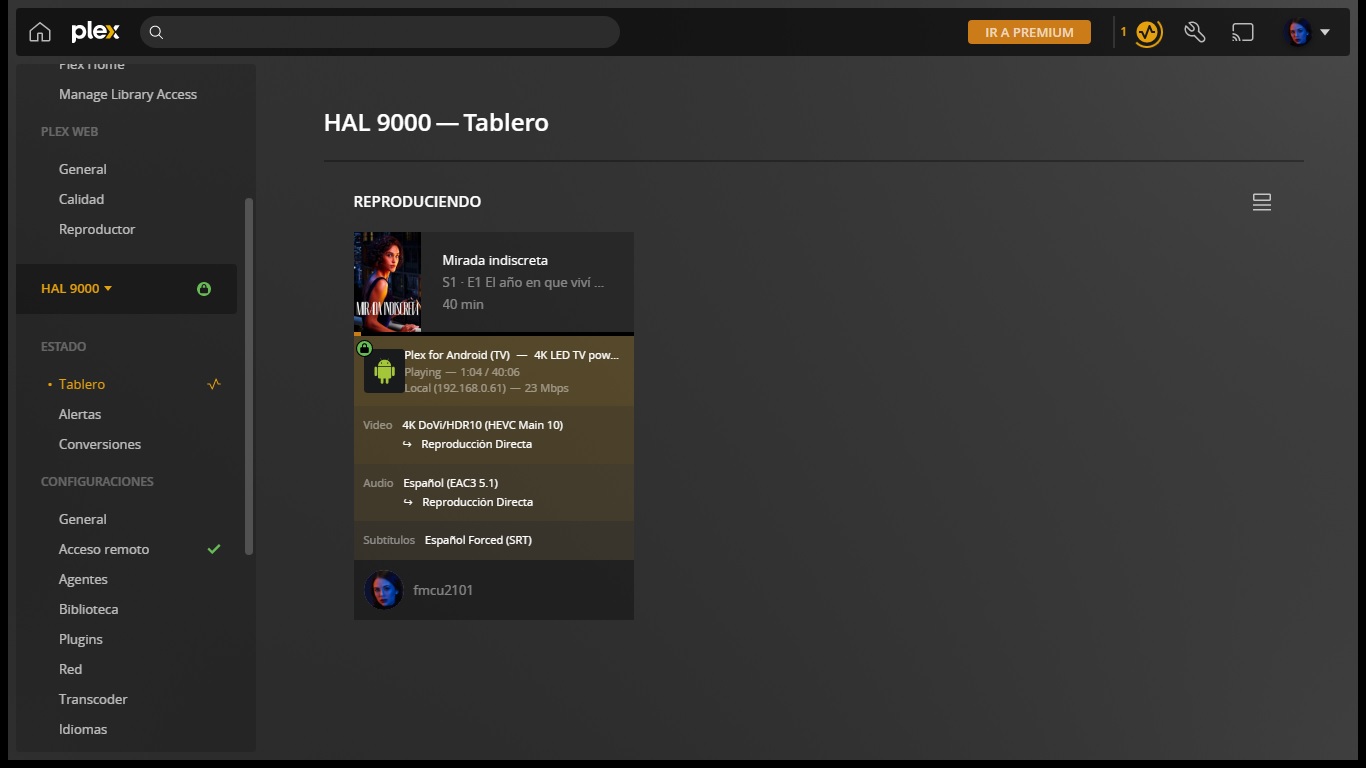
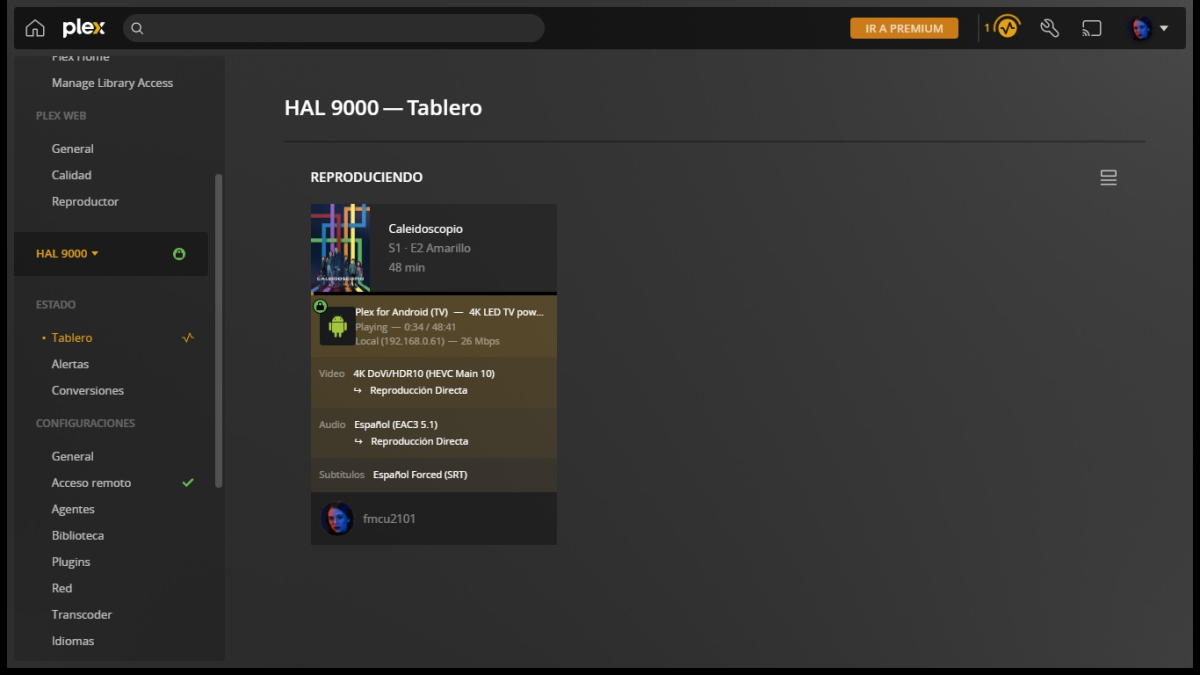
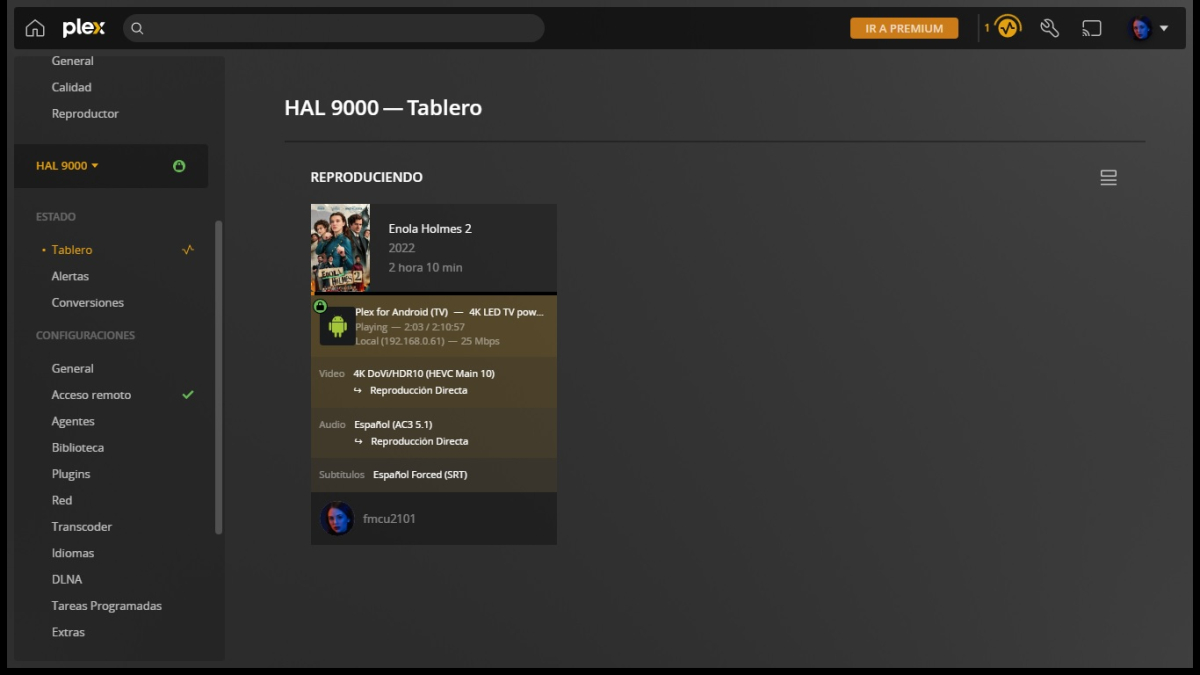
You are right, I turned on my Plex server, which had been turned off for several months, I began to carry out the tests with Plex and I am surprised that with the Plex server and its official client for Android TV all the content that video tracks containing Dolby Vision and HDR10 work and play without any issues or errors, and with full direct playback without any transcode. It is that I, a few months ago, managed to solve the problem of jumps and jerks in the images when playing with Emby on my Philips OLED873 television, forcing my Emby server to always send HLS transmission, instead of direct transmission. I also see that Emby does not inform that the transmissions contain Dolby Vision and HDR10. Plex now does report it on the dashboard. This new issue with my Emby server may force me to return to Plex. I am attaching all the screenshots of the dashboard of my Plex server, where you can observe and check that the playback with Netflix content works on the Plex server:
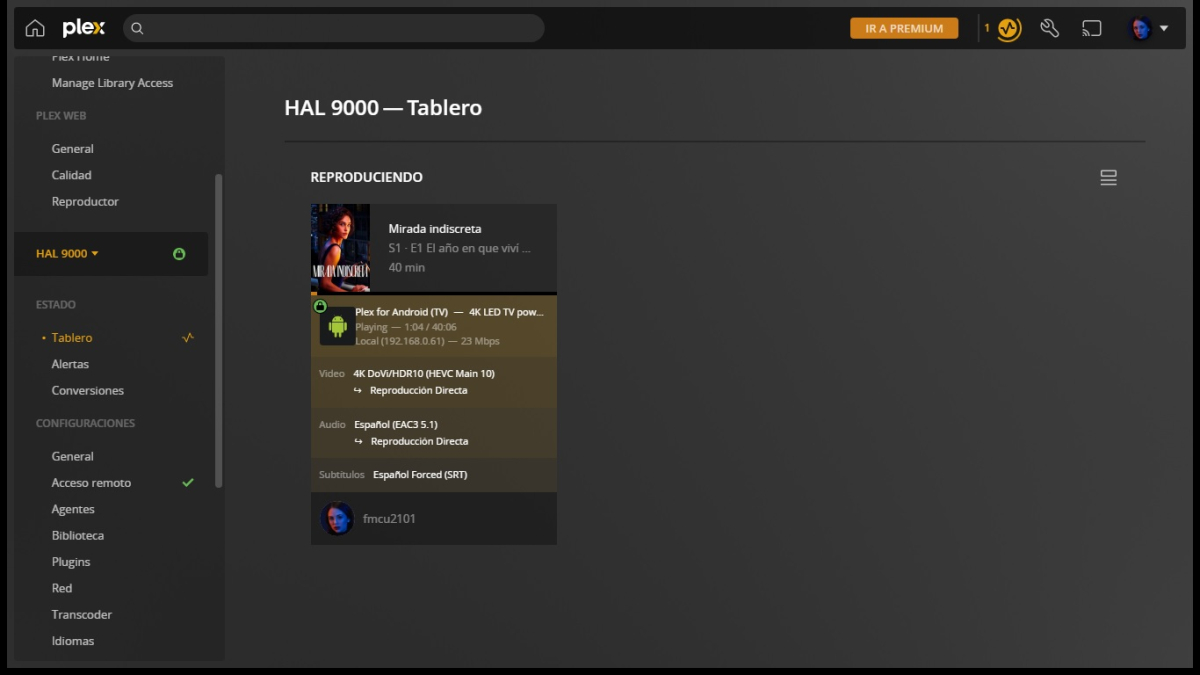 1 point
 -
Hi Luke. I installed the apk on the mi-box and the subtitle is displayed correctly. The problem is only in the AndroidTV version.1 point
-
No worries, happens to us all. Cheers.1 point
-
Wow so i was missing something super easy. Thank you for the quick answer and help. That was it. Now i shall slunk away in shame. lol1 point
-
Hi Luke, Happy2Play I have figured out the issue. The user account that runs Emby had access to the file system OK which was misleading me as I could delete and rename files OK. The issue was with permissions on the Share. As I have Emby configured to access by Share Name I had to give write access to the Share as well. Once I did that Emby could download new posters just fine. Is using the Windows Share the best way to set up Emby? I have been using Emby since Media Browser days so always setup it up that way.1 point
-
If I remember correctly, we had to monitor the pause state inside the progress event. Is that correct @BillOatman? It was a tricky if I recall. Smarthings, Vera, and Phillips all had to do the same type of thing. Watch for the session to progress in a state of play.1 point
-
Hi @Luke thank you for getting back to me. A few days ago I had uninstalled emby from the synology nas and also deleted all the data folder and did a fresh install and so far I have not had that issue again it has been running fine without stopping. If I get the issue again I'll let you know thank you.1 point
-
@Lukeif you need me to test any beta/nightly version, I'll be happy to do it1 point
-
I find some github page with polish epg and so far works OK. Thanks.1 point
-
hello. I am also Korean. I am also suffering from this problem. I hope you can solve this problem even if it is late. thank you.1 point
-
That would make more sense as I tested it by- watching it and closing emby out entirely, or watching it and just backing out to the menu but leaving emby open, locally, remotely, different clients etc and nothing replicated it. It's weird it just started happening to me and I've been using live TV for quite awhile. I was thinking maybe it had something to do with the Xteve buffer settings. Anyway thanks for the update.1 point
-
The details shared in this thread (many over my head) are fascinating. I just want to tip my hat to @softworkz for the prompt, open, and honest responses for this huge improvement to Emby Live Tv implementation. Too often we get silence, or the default "It's possible for future updates" boilerplate responses that only just annoy me more. Is it that hard to share with the community priorities, or some form of helpful informative response to set expecations? It sounds as if this is mostly all up side without much downside. Likely instantly resolve the frequent support posts complaining about tuner change time taking 5+ seconds, etc. let alone many many more. It is also obvious to me softworkz is proud of what he has developed, and seeing it being underutilized has to be crushing. For that, I am truly sorry and appreciate your efforts on this, and other enhancements you have been a part of recently. So........ What exactly does this mean? Any takers? I want to think that given there hasn't been a beta server release in over a month that TvNext is the holdup, however I know that's far too optimistic.1 point
-
@GhostRider Will guess this one but points to a permissions issue. 2023-01-08 21:12:36.649 Info Server: http/1.1 POST http://localhost:8096/emby/Items/72434/RemoteImages/Download?Type=Primary&ImageUrl=https://image.tmdb.org/t/p/original/eSKr5Fl1MEC7zpAXaLWBWSBjgJq.jpg&ProviderName=TheMovieDb&X-Emby-Client=Emby Web&X-Emby-Device-Name=Microsoft Edge Windows&X-Emby-Device-Id=8b4ded66-f984-41a6-a7c1-405d4f667f2c&X-Emby-Client-Version=4.7.11.0&X-Emby-Language=en-gb. UserAgent: Mozilla/5.0 (Windows NT 10.0; Win64; x64) AppleWebKit/537.36 (KHTML, like Gecko) Chrome/108.0.0.0 Safari/537.36 Edg/108.0.1462.76 2023-01-08 21:12:36.654 Info HttpClient: GET https://image.tmdb.org/t/p/original/eSKr5Fl1MEC7zpAXaLWBWSBjgJq.jpg 2023-01-08 21:12:37.008 Debug ProviderManager: Saving image to \\PROMETHEUS\Movies_4$\Gattaca (1997)\poster.jpg 2023-01-08 21:12:37.013 Error ProviderManager: UnauthorizedAccessException: Emby Server is being write access to \\PROMETHEUS\Movies_4$\Gattaca (1997)\poster.jpg. Please check your file permissions. 2023-01-08 21:12:37.015 Debug ProviderManager: Saving image to c:\users\uhura\documents\metadata\library\45\45135ddc5d9b036d0e0da02f1f125d74\poster.jpg 2023-01-08 21:12:37.021 Info ProviderManager: Deleting previous image \\PROMETHEUS\Movies_4$\Gattaca (1997)\Gattaca (1997)-poster.jpg System.UnauthorizedAccessException: Access to the path '\\PROMETHEUS\Movies_4$\Gattaca (1997)\Gattaca (1997)-poster.jpg' is denied.1 point
-
Hi, we are looking into it. Thanks.1 point
-
Audience score is far more valuable to me than critical rating.1 point
-
Hallo. Nur mal ein Hinweis und Idee von mir. Mit der "laut-vorlese-Funktion vom Edge hat man schon eine völlig natürliche Wiedergabefunktion. Wenn die eBooks angezeigt würden, könnte man mit der Funktion schon einen kompletten eBook-Reader bekommen (und das in verschiedenen Sprachen). Die Stimme dieser Funktion ist zwar nicht fehlerfrei, aber ich lasse mir gerne die Bücher von ihr vorlesen. Wenn man den Edge als Standardanwendung für PDF eingetragen hat, dann funktioniert das sehr schön und es wäre für die Emby Entwicklung erstmal eine gratis Möglichkeit und eine Zwischenlösung. Bei mir funktioniert es immer. Txt geht auch, nur epub nicht. Zumindest bei mir nicht. Keine Ahnung ob solche Hinweise akzeptiert werden. Ich habs einfach mal getan. Liebe Grüße!1 point
-
Hey, I'm a recent switcher from Plex to Emby. The main reason for me was the support for the Live TV and DVR. This is just not reliable in Plex. In that regard Emby is miles ahead. Well done! One thing i did like in Plex though, was the different lists it has for live tv. Such as "Upcoming movies" (this is not a list of just movies airing soon, but movies with good ratings that could be worth watching/recording), or "Recommended for you" with a list of tv series or movies that could be interesting based on what i already have in my collection. It also has a section "New episodes tonight", showing tv shows that have new episodes upcoming. I'm not asking you to just copy what plex has, but if you have access to a lot of TV channels, it can be bothersome to find things that could be of interest. These suggestions could help with that. One requirement would probably be to have Schedules Direct linked to your TV, so all meta data is available to generate a list like this.1 point
-
Das war auch kein Vorwurf, sondern nur ne Frage. Hätte ja sein können, dass ich da ne Konfigurationsmöglichkeit übersehen habe. Gruß Eddie1 point
-
For users with Samsung Tizen SmartTVs (2015 - Present) who want to test the latest version of the Emby client app before it's submitted to Samsung for release in their app store. These installs should be considered beta until approved by Samsung, however they are the same ones submitted to Samsung monthly for inclusion in the Samsung store. Samsung's policy is that the only official way to distribute apps is through the Samsung store and that usb installs should be used for testing purposes only. Because of this policy Samsung has mandated that usb distributed apps must expire within 30 days of compiling. To help with testing you will be remined to update to the latest beta release as the app expires to ensure you are using the latest version when reporting issues. This install will also work for those who don't have access to the official client app in the Samsung app store. However, the same rules must be followed as indicated above. Release notes and version number For the latest release notes and version number click on this post https://emby.media/community/index.php?/topic/31461-emby-for-samsung-smarttv-release-notes-tizen-orsay/ Installation instructions Download this zip file: https://github.com/MediaBrowser/Emby.Releases/raw/master/tizen/tizen.zip Format a USB 2.0 stick using FAT16 (some larger USB 3.0 hard drives have been found to not work) (newer models may support other formats, check your users manual) Copy the tizen.zip file to the root of your USB stick Extract the contents of the tizen.zip file to the root. (This should create the folder 'userwidget' in the root of the USB stick and the folder should contain the two files needed) Turn on the TV Make sure your TV is connected to the Internet Plug the USB stick into the TV's USB port. Installation should start automatically. (There will be 3 quick messages in the upper right corner of the TV) Click 'OK' once the installation is complete. Optional, add the Emby app as a shortcut to Home Start the app from the Smart Hub or installed apps section of your TV. Troubleshooting If the installation does not start automatically, then please ensure your TV firmware is up to date and try again. If you get an installation error, try the process again with the USB stick formatted ass FAT32. We've received reports from users that installing from USB 3.0 hard-drive devices does not work, so please make sure to use a USB 2.0 thumb-drive device. Also, make sure the thumb-drive is unlocked/writable before plugging it in. The TV will need to write to your thumb-drive. Users with 2015 Samsung SmartTVs may experience an issue where the USB version of the app deletes itself upon restart of their TV. This is a security measure implemented by Samsung in which we have no control. If this is the case you may have to leave the thumb-drive in the TV and reinstall upon reboot, or install the latest release version of the client found in the Samsung app center. Updating from a previous USB install The app will notify you when an update is available. To update a previous USB install just repeat the instructions above. Notes: Certain Samsung SmartTVs have an issue where the app won't upgrade from USB drive if there is already a USB version installed. If this is the case you'll simply delete the old version before inserting the USB and then repeat the same installation process to install the new version. Also, try power cycling your TV after deleting the previous version if you have problems.1 point
-
True... Personally I prefer RT over IMDB ratings any day. I'd rather see the RT critic/audience ratings to be preferred over IMDB when available. (I totally get that this isn't necessarily everyone's preference.) Maybe an option to display one over the other? The audience ratings tend to be good, and usually better reflect how "good" a movie is over the critics rating, IMO. I've never actually used the Emby heart ratings.1 point