Leaderboard




Popular Content
Showing content with the highest reputation on 01/05/23 in all areas
-
I recently setup a new computer on my network and ran into the browser issue where the server could not be found. I looked into that deeper, and traced down an issue in the `emby-apiclient/connectionmanager.js` code. * The site `http://app.emby.media/#!/startup/selectserver.html` requests the list of servers (`https://connect.emby.media/service/servers?userId=XXXX`), and receives the correct list from the host which includes both the external URL and the local URL. * However when the function "connectToServer" is called, the serverInfo object has the LocalAddress as Undefined. Looking further into this I see the following code in the same file return console.log("Begin getConnectServers"), credentials.ConnectAccessToken && credentials.ConnectUserId ? ajax({ type: "GET", url: "https://connect.emby.media/service/servers?userId=".concat(credentials.ConnectUserId), dataType: "json", headers: { "X-Application": "".concat(instance.appName(), "/").concat(instance.appVersion()), "X-Connect-UserToken": credentials.ConnectAccessToken } }).then(function(servers) { return servers.map(function(i) { return { ExchangeToken: i.AccessKey, ConnectServerId: i.Id, Id: i.SystemId, Name: i.Name, RemoteAddress: i.Url, LocalAddress: i.LocalAddres } }) After the network call to get the servers is made, the response is remapped and the `LocalAddress` is assigned to `i.LocalAddres` Note the missing second `s` in `i.LocalAddres`. This I believe is a bug. This is why on first visit a browser cannot navigate to a server on the local network. After you manually add an IP address, emby stores a cookie so the ip address is mapped properly based on the server IP so from that point forward the problem becomes mute. But initially the setup is awkward.2 points
-
I am switching over from a Win7 box running MBC to Chromecast dongles. With the Win7 box I had a HDMI to Cat6 setup that allowed me to stream to up to 4 displays/TVs simultaneously. It was great while it lasted, but involved stapling cables to the ceiling to run it from room to room - plus it has borked Can there be an option to multi-cast to several receivers at once? i.e. simultaneously play to Chromecast dongles in my office and living room and kitchen simultaneously so i can walk from room to room without stopping and restarting the movie or show all the time? I realize that bandwidth could POTENTIALLY be an issue, but i have a fill gigabit network and a multi-port NAS so that really is the least of my worries... Thank you!1 point
-
Hi, The current implementation of Emby search is very basic. Based on what I can tell, it only matches exact strings in the same exact order. Example: "Mission: Impossible" In this example the following queries will return a positive match Possible Impossible Mission Mission: Impossible And the following queries will not return anything at all (The worst offenders are highlighted) Mission Impossible Missoin: Imposible Imposible Impossible Mission Mission : Impossible Mission Impossible Another example would be "Mr. Robot" where if the dot is missing, nothing is returned or in general terms any variation of any string that is not an exact match will not return anything at all. Let's not even attempt to try a title like "Agents of S.H.I.E.L.D.". This makes the search difficult to use and at times even frustrating. As the examples above show, the major theme is special characters and punctuation and they can probably be bypassed by just ignoring them, which might or might not cause other problems in the process. This problem also affects titles that have letters with diacritical marks or glyphs such as "Amélie" and "Æon Flux", if you can't type them exactly, you can't find them. In my opinion a better attempt would be to use a difference string matching algorithm such as Levenshtein distance, you can then define an acceptable threshold and return the closest matches. I found a couple of C# projects that implement this and might be useful as a starting point. FuzzyWuzzy, a port of Python project in C#. https://github.com/BoomTownRoi/BoomTown.FuzzySharp FuzzyString. Has some additional string comparison algorithms too. https://github.com/kdjones/fuzzystring Thanks.1 point
-
I was searching to see if this was implemented and this comment encapsulated my idea fairly well. I enjoy being able to control during which hours viewing can occur each day. I would now like to take that to the next level by defining how much time can be spent. Ideally, it should track the time videos are playing (difference between when they start/stop) and not simply the length of the video(s). I wonder if this type of control has been considered.1 point
-
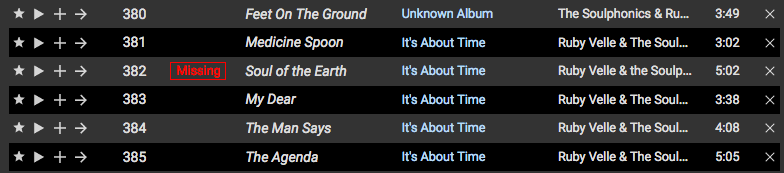
I've recently switched from Subsonic to Emby for music streaming and one nice feature that Subsonic has is that if an item in a playlist is missing—has been removed, renamed, etc.—it is flagged as missing (see attached image). Because Subsonic is not entirely tag based in its organization—it's based of folder hierarchy—it's a bit more forgiving if things are not tagged correctly. Now that I'm in Emby, I'm trying to clean up things using MusicBrainz Picard, but once a song is renamed after being properly tagged, and if it was in a playlist, it is simply removed from that playlist. That said, it would be great if Emby could flag these missing items in playlists instead of removing them. My particular use case is for music, but I imagine this would be useful for other content as well. Thanks for your consideration!
 1 point
 -
Greetings Emby Team, After about 8 years using Emby for Windows Media Center (subdued plugin and MPC Player), I finally paid for a lifetime subscription. For 2 months now have been using the Emby Theater App. I really hesitated for a long time but I’m surprised how I’ve come to enjoy/appreciate it. You’ve done a great job! I really like the resume feature, collections and other benefits that seem to be more elegant with Emby Theater. Worth the money. That being said, I hope it’s okay if I list a few of the features I miss. I use this system for my living room TV and a mouse. I rarely use the keyboard. I did search for each of these topics before writing to you. 1) Would be nice to control volume with the mouse wheel (without impacting gaming, etc). 2) Can the 10sec skip feature be controlled with mouse side keys? 3) I typically don’t like black bars on the sides – is there any way for user to set default aspect ratio? It’s always set for auto and I prefer ‘fill’ or ‘cover’. I realize this sometimes makes Ginger and Mary Anne look a little wider than they should, but that’s okay. 4) The re-sizing is a bit clunky. It’s limited in that the smallest is about ¼ screen and it’s sometimes hard to grab the edges (I have to wait 5 seconds for on-screen-display to turn off). With MPC it was quite simple…I could grab the edges anytime and re-size it as small as I like. For example, I do this to read the news while having ‘Love American Style’ playing in the lower corner. 5) And finally, how do I keep the player ‘always on top’? I’ve tried using task manager settings but that doesn’t do the trick. If I’m scrolling through the news (or FB or whatever) with Emby in the lower corner, I don’t want to keep having to click on the taskbar in order to reenable Jonny Quest. MPC had a simple setting to enable ‘always on top’. Okay, that’s it. None of these are show stoppers; as I said, I’m very happy1 point
-
1 point
-
@Luke please can you: step 1 - add games systems PS5, PS Vita and XBOX Series X/S with supported files types of .iso. At the same time please add .zip as a supported file type for all games systems. up to the playstsation 1 generation of systems are playable from archive files on modern emulators and its very common to zip them for significant space savings. step 2 - consider exposing the games system list and supported file types for users to edit as mentioned above. there is no documentation available to let users know which file types should be used with which systems. .zip is not working for Atari 2600 & 7800 - hence my request above (.zip does work for some games systems)1 point
-
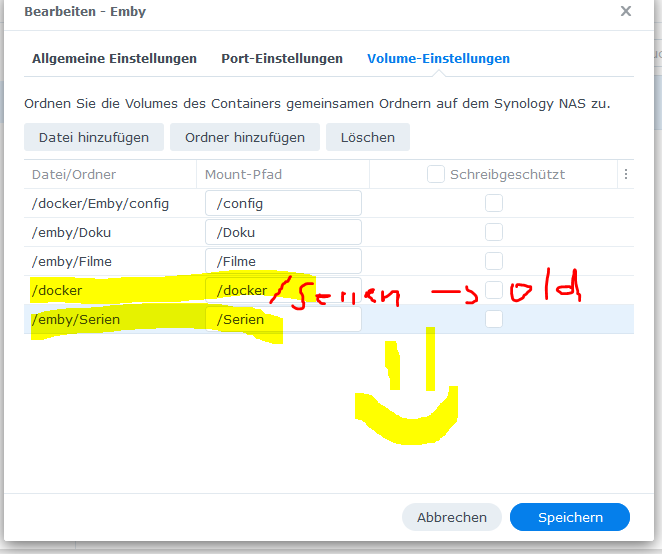
I´m a idiot:D it was a small Typo in the link assignment.
 1 point
 -
über den Synology App Store ging leider nichts. Emby hat es einfach nicht geschafft die Filme zu erkennen und ein Freund hatte das selbe Problem und hat es dann mit Docker gelöst1 point
-
Thanks, Luke! That was it1 point
-
HI, thanks for the feedback. Glad you're enjoying it.1 point
-
Ah a subdued user!! Hehe one of my theme’s so, depending on what mouse you have, you may have an app to set up different controls for the mouse for different apps. I can do this with my Razor mouse. That might be one option. i think there are args you can add to the launch path that can do this, part of the app properties window. Google adding args to path to see what’s available1 point
-
I've figured it out! but i need just a little more time to get it exact. I'll be back!1 point
-
Thanks to Happy2play, you can now filter on audio codecs Vic tool_2.1a.zip1 point
-
Release 20221205: HDHR4 models: IPv6 support. HDFX/HDVR/HHDD models: Faster automatic failover when recording and multiple HDHomeRun devices are available. CableCARD models: Fix problem where device may fail to sync with the guide server if the cable provider is sending the incorrect time on an inband channel. TECH models: Fix crash-reboot when executing a bootscript that sets a target. Firmware Changelog1 point
-
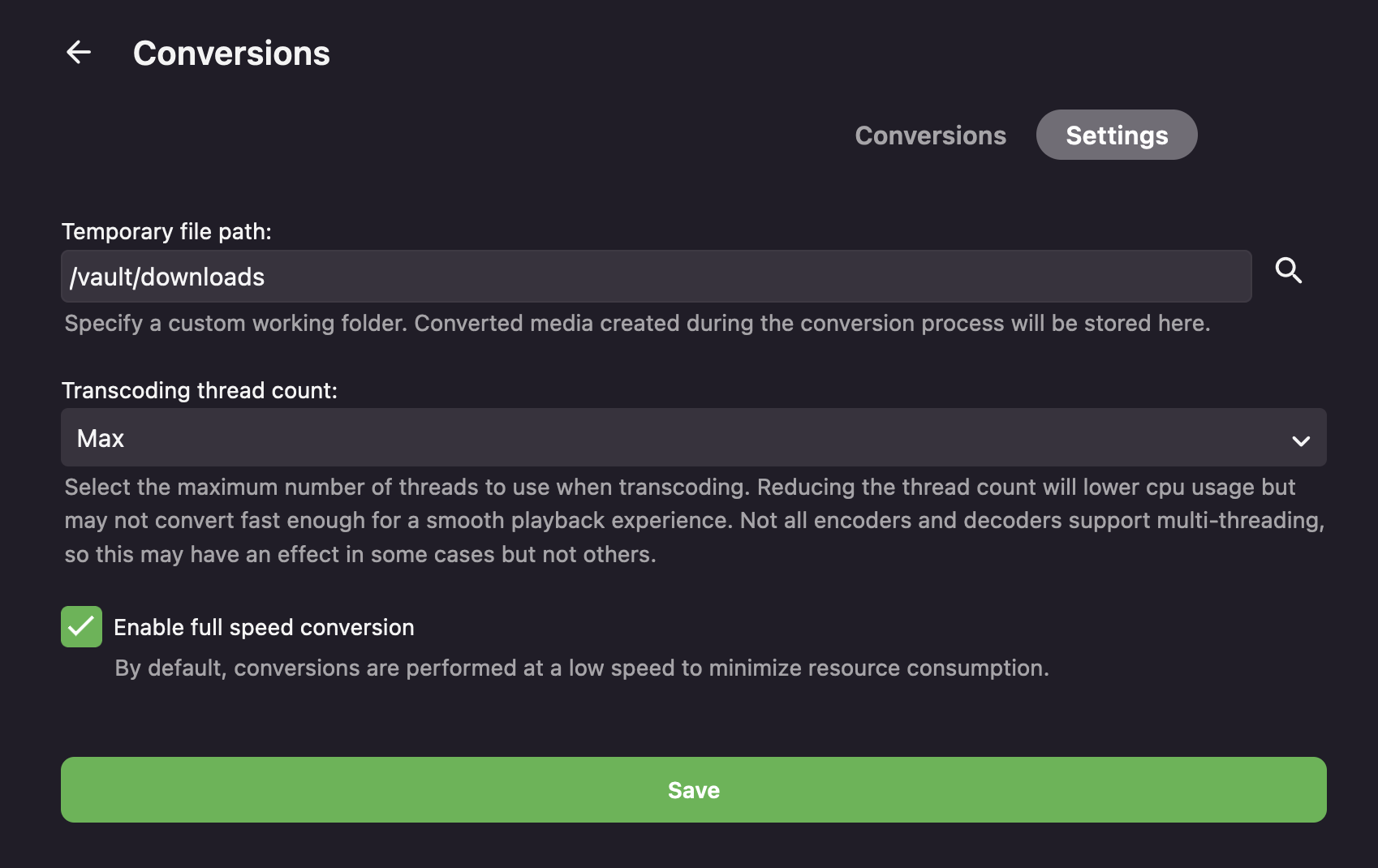
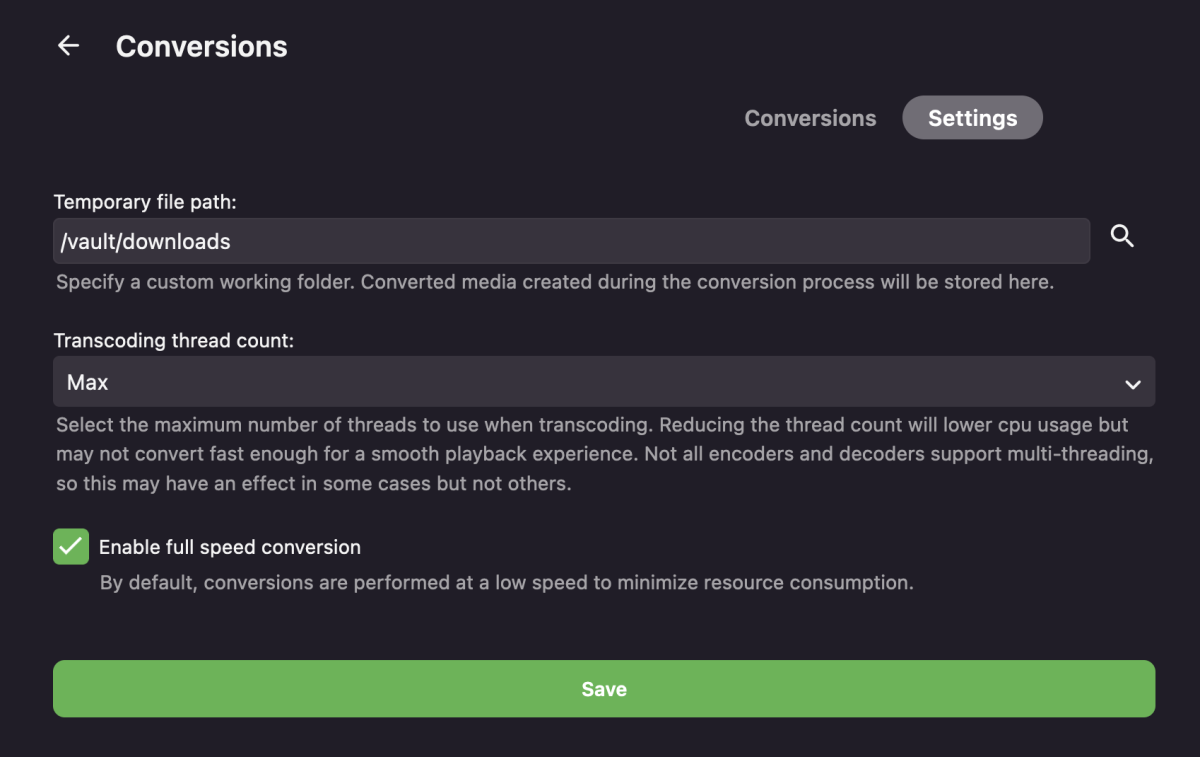
This is definitely a good point. I understand Emby's mission to be user friendly and not introduce features that could easily mess up a less-advanced user's experience. Speaking selfishly though, I would certainly love a checkbox buried in the Conversion settings menu titled "Allow parallel conversion jobs" that defaults to unchecked, with a dropdown number picker titled "Number of allowed parallel conversion jobs:" that defaults to 1. Shown here is the menu I am picturing it as a part of: Btw, I am thinking about trying out Tdarr anyways. The more I think about it, it seems like it might be pretty useful for me. Like you said above though, I'd be curious to see how quickly I hit a disk I/O bottleneck with parallel conversion jobs. Thanks for the suggestion
 1 point
 -
by adding the flag to the last choice "Save images in media folders", the artist.nfo files are always generated. Thank you1 point
-
Thanks. Here's some additional info: So, I installed 4.8.0.21 beta to test issues with my Apple TV as documented in my post. This morning I decided to try the beta server from Android TV Shield Pro (sidenote: all of our clients are (were) Shield Pros which direct play live tv with zero issues. Then on a whim, I added an Apple TV to the mix...silly me, I expected it to just "work" like the Android TVs. Thankfully I didn't pay much for it! Anyway... I changed to the beta server on one of my Shields and it direct played live tv with no errors in the log. I watched for about an hour with no issues and ended playback. Started the Apple TV on beta and, again, as soon as it connected it started throwing errors in the log and transcoding interlaced channels. Playback was ok when it first started, but when I left the room and came back a few minutes later, there was NO sound and when the sound did return it was out of sync with the video. Totally unwatchable! The preferred video player on the apple is set to auto. Logs attached. embyserver.txt ffmpeg-transcode-56d765f4-eda6-4e03-94ae-8d7a6ed09c3b_1.txt1 point
-
Agreed, the original text should just be displayed instead of a list of each individual line, which, in and of itself is also not a great reading experience due to odd styling choices (e.g. text color thats fails WebAIM's Contrast Checker). Im only using unsynced as its the easiest to fit into a workflow and i dont really care for synced. Atleast with the web view i can adjust the css, but not being able to adjust the android apps style is a pain. For reference these are the overrides which make it more palatable for me: .lyricsScroller { -webkit-mask-image: none !important; } .lyricsItem { margin: 0px !important; } .listItemBodyText-secondary, .secondaryText, .fieldDescription, .cardText-secondary { color: inherit !important; }1 point
-
Great, thanx! Everythings works like a charm now. grtz B1 point
-
A fair response. The issue primarily is that by opening up parallel workloads - emby quickly open themselves up to support calls on 'broken' systems when users set unrealistic parameters for their systems without realising where the bottlenecks really are. In your example above - 'cpu' probably isn't the bottleneck for lets say 4 parallel encodes - but could the I/O keep up as an example. What if you were playing a movie at the time - would the heavy I/O interrupt the playback ? btw - I'm not against the request at all - I'm all for it - but I can see why it needs to be restricted.1 point
-
Greetings. I have a couple of suggestions for playlist management which I'd find handy, and maybe others would too. My use case specifically focuses on M3U playlists for music, though maybe they'd be handy more broadly too. Thanks. 1. Playlist integrity If an M3U playlist references a track that for whatever reason cannot be found, currently that track simply disappears from the playlist with no indication of a problem. It would be useful to still show that track, highlighting that it's missing so the issue can be addressed. I have a growing number of playlists in M3U format and should a track drop off the system or be moved so that the path given is no longer valid, I currently have no at-a-glance way of knowing a) that there's an issue at all, and b) where the issue is. In addition to the track listing of the playlist showing the missing track, perhaps there could also be a flag shown on the Playlist screen so that any playlists with issues are easily seen (maybe an exclamation mark icon placed over the playlist image art). My use case here is that I'm restructuring my music into a better, consistent, and more logical organisation, but this breaks some existing playlist references. I use playlists for compilation albums to avoid keeping duplicate tracks, so moving one file can affect a number of different playlists. While I take time to update playlists as I go, it would be very easy to make a mistake here which would not be immediately obvious. But more generally, if a track should drop off be it due to accidental deletion/renaming/corruption/whatever, that is even less likely to be noticed resulting in degrading playlists over time. 2. Additional data in the M3U file In the interest of keeping information in one place, I'd like to be able to add additional data into a playlist's M3U file (e.g., release date, year, overview). I know that this data can be added into Emby after it has read the playlist file, but that separates data into two locations - the M3U file for track listing and title; the Emby database for extra information. There is the #EXTALB M3U directive which could maybe be useful for containing the overview information, though I don't know if there are standard directives for release date and year; I guess these might have to be Emby-specific in that case?1 point
-
Hey Luke, thanks for responding. I almost certainly know they don't unless these are hidden fields. I doubt the database designers or website designers had the forethought to do this. There are more niche sites that do. Toonzone comes to mind. For a lot of series, I tend to go in and manually edit them based upon what the Wikipedia articles outline or if I know from my direct knowledge. I don't know about you, but I find it annoying when you scroll down on a series/movie and it sometimes won't even list the primary protagonist until the 8th+ spot. For instance, I TOTALLY recall editing Star Wars Episode 7 because Rey wasnt even physically on the screen when navigating to the movie. She WAS listed as an actor, but she was just sooooooo far down the list, you had to scroll over to see her. Its also weird when you get a list of actors and have something like "Trash Man #1" as the first person listed. Now, I know I am listing off a few edge cases and its not typically THAT bad; but its usually far from ideal. I don't often bother cleaning the metadata on movies because unless I can narrow it down to like 3-5 characters super fast that I want to be seen. For TV Series, I tend to be super critical at cleaning it. I know this is can only be as good as you can scrape from websites. It kind of goes back to my desire to have an SQL Database hosted someplace with metadata cleaned up in similar fashion.1 point
-
@Lukas hier wäre eine gute Seite: https://kinocheck.de/trailers kann man diese eventuell selbst einbinden?1 point
-
Good day, That correct, here you can use the "Activity" from top menu and select "My Activity Streams" and you can even customize it as custom. It restart from the time you login to the forum. Click on your name "top right" and chose "Manage Followed Content" My best1 point
-
Basically yes, it does take some extra work though it should be a one time thing on setup and when you add more disks. Adding media to the MergerFS pool should distribute the directories and files to drives based on the policies used so it might take some tweaking of the policies for the results you want. But if you don't want the overhead and RTM is less important then scheduled library scans will also find new media just not as quickly. If the user running Emby in the container is the same one that already has permissions to the pooled trees then I don't see why it wouldn't work. I think one restriction is that the container config should not be mapped to the pool but to a regular FS path instead. Also make sure that the Emby runtime user has access to all of the paths on all of the library drives. This means at every directory level not just the final directory.1 point
-
Regarding the first one—flagging missing tracks instead of "disappearing" them—this is something I requested almost two years ago, now: I'm going through the process of properly tagging all of my music, which includes deduplicating, so I'm constantly having to rebuild/tweak playlists, and while I have a process, it is very manual—comparing backups to current versions—and it would be significantly easier if this was handled like the Subsonic example I posted.1 point
-
I'd just like to expand the scope on this a bit since the original request was video specific, but with improvements made to the music side of the shop, it'd be great to include artist and title (or album) in the search as well, as I outline here:1 point
-
Hi @djdevon3 I hadn't thought of this before but it might be a good idea to dim all the screensavers after a certain period of time.1 point
-
Yes, when I want to listen in the car, I have to turn off my wi-fi before I start Emby, and then it works (fairly well). I still like it over Plex, and will probably be purchasing the Premier version.1 point
-
Hi ebr Thanks, I can confirm that the beta works as you suggested, immediately transcoded AVI, so no glitch, marvellous. ...and what an adventure, I learned a lot loading the beta, nice one! Will it be overwritten when the new version comes out or do I need to check it manually? (not that I care an awful lot, as it's working, but in the interests of staying approx mainstream...) Will report back if any oddities, not expecting any. Thanks enormously for sorting this out. Very much appreicated. You've made a happy man very old, or something.1 point
-
http://www.ballingtons.com/products/1 point
-
Even though I'm can do this "from the inside" and we're working internally on integrating it smoothly, this one is my own private side-project. So maybe I should fire-up a license sale, LOL.1 point
-
Thank you Luke.1 point
-
And the reason I am still using plex, I really like Emby better but just cannot understand why they don’t put an easy solution for commercial skip.1 point
-
should entertain you1 point
-
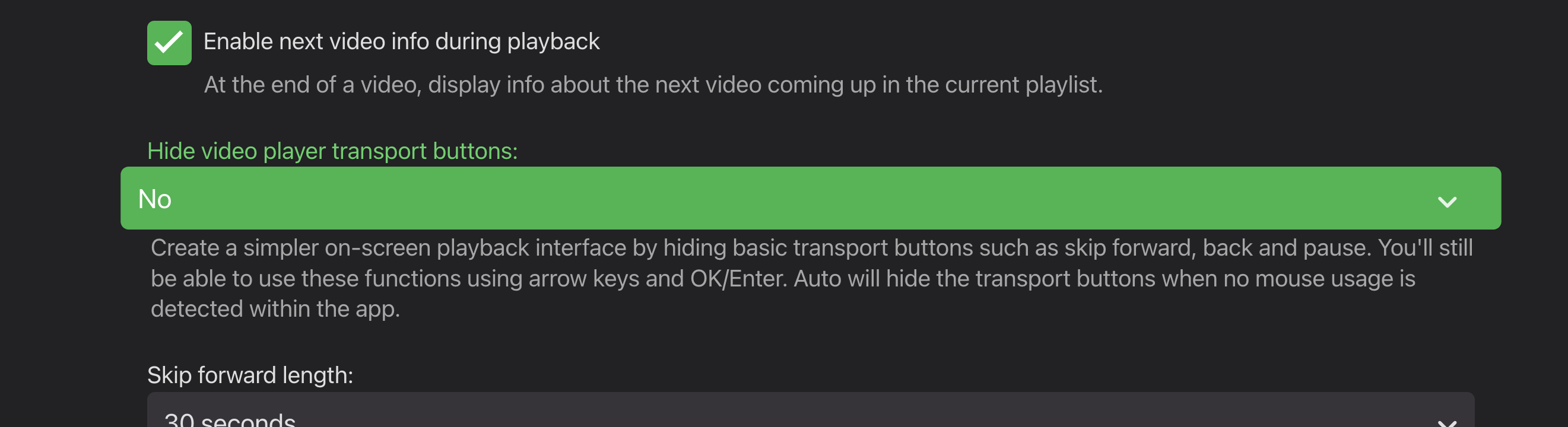
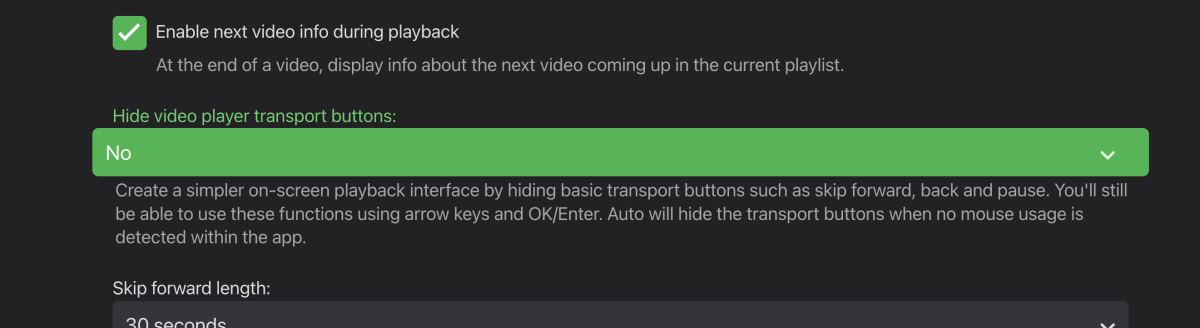
Enter button on the remote will do pause/play. When you press up, the timeline shows and the left/right arrows on the remote advances playback directly from the timeline. Left/right will also work without showing the onscreen display. If you want the old style buttons back, you can enable the option in Playback settings in the app (set it to no)
 1 point
 -
Hi, that's a great find, thanks ! That will be sure to help with connection problems using the hosted web app. For the native apps, it's unlikely to matter because the local address would just end up getting filled in via local network server discovery, but since the web app can't do that, it does matter here. Thanks !1 point
-
Bonjour, Il y avait une procédure détaillée dans la rubrique Synology pour expliquer comment passer sous DSM7, peut être trouveras tu une solution à ton problème. De mémoire les paramètres ne sont pas stockés au même endroit mais peut être est il possible de les transférer à posteriori.1 point
-
Hi dgrigo, Thanks for you info regarding that. It was different settings in my Bluefin setup that was wrong, that's why I couldn't access my existing Emby server (permissions, kubernetes, SMB, etc..). There is a lot of changes in the Bluefin version and it seems there is still issues to be solved, so even I'm running well at the moment, Emby is running very well, with all access, permissions and so on, I think it's still too early to post my Emby setup here and to say "this is how it have to be made". Already next month there will be a new Bluefin update, so let's see. Cheers1 point
-
THANK YOU for this. Just got that ATT router and was having trouble getting connected. So what worked for me is just steps 3 and 4. I had done 3 already and it wasn't working. I had to do 4 to get it to stick. This was huge thank you!1 point
-
Am I meant to be excited by something here? Paul1 point
-
Hello. I am having the same problem on android tv. Looking for a solution I saw that the problem is because of closed captions that the player does not recognize. You can remove these subtitles with the following command: ffmpeg -i input.mkv -codec copy -bsf:v "filter_units=remove_types=6" output.mkv https://www.reddit.com/r/mkvtoolnix/comments/doqew2/subtitles_tracks_hidden_in_mkv_files/ https://www.reddit.com/r/mkvtoolnix/comments/bam066/a_ghost_subtitle_on_an_mkv_file/1 point
-
HI, apologies for the disruption. We are looking into it. Thanks.1 point
-
I like the way it is and it's consistent with the other Emby apps. Thumbnail for "In progress" and "Next Up" and poster for the rest.1 point
-
@Luke Nein, wie schon geschrieben, funktioniert das Anzeigen von Serien Bibliotheken nicht.1 point
-
Is there a way to configure the guide to play the show directly from the guide without a popup screen asking you to hit play? Seems like an unnecessary step, if I see the show i want to play on the guide I should click it and its starts playing, instead an additional screen asking you to hit play. If I want to know more about the show I should hit an info button or something.1 point
-
I think that long pressing should bring up this play/record popup and just clicking should play it immediately. By default it could be as it is now, just please give us a chance to change it in the settings..1 point
-
I used CloudBacko Cloud Storage. It is capable of combining free cloud storages available from Google Drive , OneDrive and Dropbox into a single large storage. By adding multiple free accounts from each of these cloud providers to Free CloudBacko, you can get as much as 100TB of cloud storage free of charge.1 point