Leaderboard




Popular Content
Showing content with the highest reputation on 12/26/22 in all areas
-
That was it. I really should have realized it.2 points
-
After faffing about for a few days, I managed to get the watch data restored. Was moving from Windows to Linux so thought I'd document some of my findings here too in case there are others in the same boat. Follow the OPs post about updating the databases and the options.xml file. Do not try to migrate server configuration by the plugin and then manually transfer the library.db file to restore watch data. The users will not retain the same user IDs, leading to the wrong user getting the wrong watch history. Either go entirely by plugins (the server backup plugin + trakt) or entirely by manual transfer. Refer to here. If moving from Windows to Linux, you will need to update paths in library.db MediaItems and MediaStreams2 table, replacing all backslashes (\) with forward slashes (/). This is not only for the libraries you have created, but also for their subfolders. There are also other configuration file paths you need to update. The ones I found were %AppDataPath%, %RootFolderPath% and %MetadataPath%. If not all your media has been transferred to the new server, do not leave emby running on the new server for too long as it will detect that some media files are not there and update the database accordingly. Haven't really tested this, so can't really confirm how true this is, but coming back to the server after leaving it on for a night, I found all the entries with the broken image posters gone. The MediaItems table stores all the information about the media, but the watch data is store in the UserDatas table. They share a column called "UserDataKeyId" which uniquely identifies each MediaItem to User pair. To check if your database is properly configured, look up a show you know you've watched in MediaItems then check if the UserDatas table reflects this as played. For example to get the UserDataKeyId: SELECT UserDataKeyId FROM MediaItems WHERE path like "%video_name.mp4%"; Then to check UserDatas: SELECT played FROM UserDatas WHERE UserDataKeyId=the_id_you_found_previously; This command will return 1 for a show you've seen, and 0 for a show you haven't seen. You can also get a list of all shows that library.db thinks you've seen with SELECT UserDataKeyId FROM UserDatas WHERE UserId=some_id; Check the LocalUsersV2 table in users.db for the UserId. Finally, I also had the nfo files saved with the media. This is an option you can enable in the server settings. Got a strong feeling that things would have been much more difficult without that. Hope this helps someone.2 points
-
Good day, My best2 points
-
I have searched the Feature Requests thread, and I know similar requests have been made, but only for general karaoke support with people requesting support for old depreciated formats as .mid and .kar. CDG+MP3 is by far the most common file format in Karaoke, and also the format used by most professionals. The sound and music quality is by far superior to the midi based file formats. CDG+MP3 is also directly supported in Ffmpeg, and can be transcoded on the fly using a simple command. The video format is only 300x216 (304x224 buffer dimension) so transcoding it would be very cpu friendly. The Ffmpeg command to convert the file is as follows: ffmpeg -copyts -i "01 - Rihanna - Russian Roulette.cdg" -i "01 - Rihanna - Russian Roulette.mp3" -b:v 1M -y "01 - Rihanna - Russian Roulette.MP4" This will force a 1meg video.. I don't know if that is a necessity, as it will produce a larger file than if you omit the -b:v 1M -y option.. The -copyts is there to ignore timestamps in the files, as sometimes this will induce a sync issue with the lyrics shown. Works flawlessly. Now, cdg+mp3 files are normally stored in .zip files to keep them together and for easy management. If there is a problem unzipping and using the files then deleting them after use, I see no problem unzipping the files and leaving them as pairs on the server.. The zipping is purely for ease of use and does not offer much of a space requirement reduction. Please consider this, as a Karaoke Jockey as a side gig, I know a lot of people enjoy this, and in these covid times, no shows are held, and people need entertaining. I serve my immediate family and friends with content, and to be able to add karaoke singing on the fly with emby would be a valuable addition. Best regards, dexus.1 point
-
Some of My Artwork I made with the A.I.

.png.603eb7a741cd7bd23699c8e0d2f4ad0f.png)
.png.6a53c5963d83f82a5a49dd21b1996055.png)
.png.cf1ded0d3294f12f0c165d36cb2cebdc.png)
.png.3dda002acf98f3488bfb3807ab84c4ff.png) 1 point
1 point -
Yes thanks. I was coming here anyway to note that a new update to the LG Emby client app was pushed to me on both my LG WebOS TVs at home. These client apps no longer present photos and video clips from my random junk folder to guest users as described above. So everything works now. Thanks for the fix.1 point
-
I didn't noticed these problems. It is all ok for me.1 point
-
Thanks! Just updated to 1.0.37. It is working. Now is possible to select gray as subtitles color. I've noticed some visual changes as well.1 point
-
Tried experimenting with task scheduler startup delay times. Emby Theater definitely prefers 30 seconds after logon. Any faster, such as 15 seconds, doesn't give Emby Server enough time to fully startup and Emby Theater ends up sitting there with a spinning blue icon waiting on Emby Server to finish loading. With the 30 second delay, Emby Theater starts and loads into media view instantaneously. 30 second delay for instant load provides a better looking user experience than appearing like it's slow waiting for emby server to finish. I've also noticed with a 15 second delay most times it will ask you to select the server & or user to login which requires a user interaction slowing down the process of loading into the UI a little. However with a 30 second delay it doesn't bring up that screen and loads straight into the last user view which is a much better way to run a family room setup to a TV. 30 second delay is by far the better task scheduler arrangement.1 point
-
Thank you. That's where it was coming from. Missed seeing that option. Now everything is launching perfectly as intended. Voila, thank you Happy2Play.1 point
-
Hi, yes that's an interesting idea and something that could be explored. It would only be possible when the server is transcoding though.1 point
-
Look on the post of answer to you.1 point
-
@djdevon3Did you disable this setting within Emby? App Settings-Settings Launch the Emby web app in my web browser when Emby Server starts This will open the web app in your default web browser when Emby Server initially starts. This will not occur when using the restart server function.1 point
-
KM, I posted that to be helpful for any tech, just in case this error was actually the problem.1 point
-
The problem I described in this post seems to be fixed with emby LG version 1.0.37. thanx for the update1 point
-
Ooh nice gift for christmas , thank you , works like a charm , now it's perfect i didn't find any problem ! Just one thing i missing, that mode inteligent of the subtitles is not working properly or i don't get how it works, so i have prefered audio to spanish and if i don't have audio spanish i want romanian subtitle , now in mode inteligent i get romanian subtitle on spanish audio witch should not if i have my prefered audio available ! For next server updates when you get bored hope you put list of prefered subtitles like : first spanish 2nd romanian 3rd portuguese and if first is not available you get the second , and for audio the same and i don't have more ideas this is just i ever wanted ,Love you man ! Merry Christmas and Happy New Year, genius !1 point
-
Thanks, @Luke. Been watching a TV series through Emby the past week and haven't had any issues. I'm assuming I'm on the latest update. The settings say 1.6.9(2) as the app version.1 point
-
1 point
-
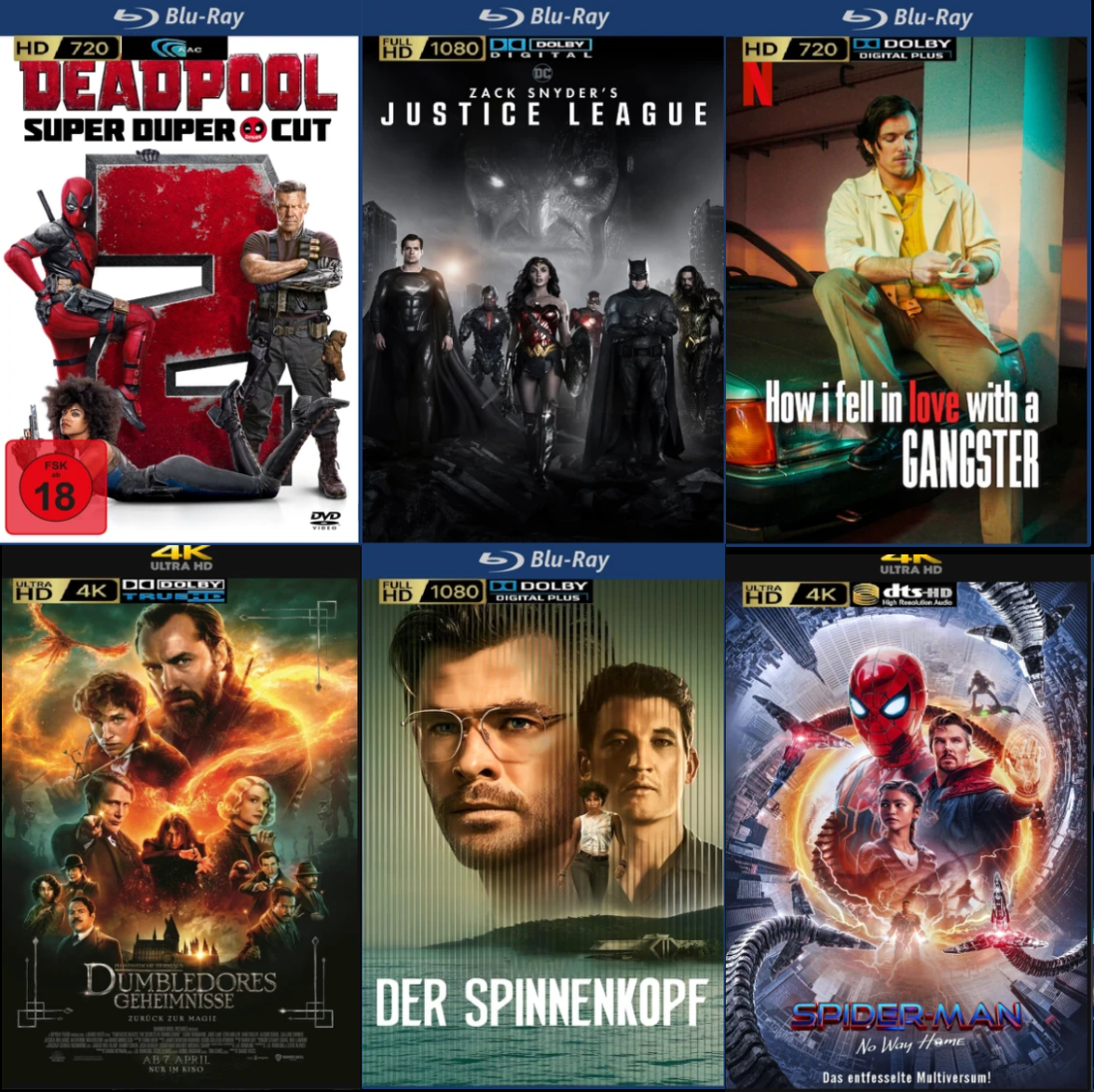
die audio overlays überarbeitet, jetzt ist es komplett Overlays_2.zip
 1 point
 -
Tested on my LG OLED55CX6LA (webOS 5). Problem of slow loading media is solved with this update. Thank you very much.1 point
-
Tested on my LG OLED55CX6LA (webOS 5). Problem of slow loading media is solved with this update. Thank you very much.1 point
-
Thanks very much Luke. Noted.1 point
-
Hi, Summarizing the issue and solution here: 1. This is not an "emby" issue. This is a chrome issue. 2. This is an issue using the chrome browser because of increased security measures implemented in updated versions of the chrome browser. Chrome blocks the following comms: a. https://tv.emby.media <-> http://x.x.x.x:8096 In this example chrome is actually blocking two items although it only reports one in the debug. Chrome will block ssl (secure) <-> 80 (insecure). Chrome will also block public IP <-> private IP comms. Message as seen in the chrome debug: Mixed Content: The page at https://tv.emby.media/#!/startup/manualserver.html' was loaded over HTTPS, but requested an insecure resource 'http://x.x.x.x:8096/emby/system/info/public'. This request has been blocked; the content must be served over HTTPS. b. http://tv.emby.media <-> http://x.x.x.x:8096 In this example chrome will block public IP <-> private IP comms. Message as seen in the chrome debug: Access to fetch at 'http://x.x.x.x:8096/emby/system/info/public' from origin 'http://tv.emby.media' has been blocked by CORS policy: The request client is not a secure context and the resource is in more-private address space `private`. What Chrome wants to see: https://tv.emby.media <-> https://public-ip:8096 This would require setting up SSL on Emby as well as port forwarding on your firewall or telco provided gateway if it supports that funcionality. I have not verified this setup and I have not seen a firewall that likes hairpin traffic but, depending on the gear involved this setup might work. http://tv.emby.media <-> http://public-ip:8096 This setup would require port forwarding on your firewall or telco provided gateway if it supports that funcionality. I have not verified this setup and I have not seen a firewall that likes hairpin traffic but, depending on the gear involved this setup might work. How I got this to work: I'm running my own DNS server so I put in A record for tv.emby.media to on my DNS server to resolve the private IP of my emby server. So now I've got: http://tv.emby.media:8096 (private IP) <-> http://x.x.x.x:8096 This solution could also be achieved adding an entry to the hosts file on your client. Also, as Luke stated above, app.emby.media has been included in Chrome's exclusion list so Chrome is not blocking comms when using this URL. The display settings of your server can be modified to TV mode so you can have the desired view presented when using app.emby.media to connect to your server. Thanks everyone :)!1 point
-
Thanks a lot... In first i believe it didn't work before uderstanding that after pressing the button, you have to wait a little to take effect. Thanks again and i wish you and all the staff all the best for the new year...1 point
-
Hi! It's a bit better now in that the fad()'d effects don't just stop rendering of all subtitles on screen, instead only the text with fade effects isn't rendered. This helps because dialogue text doesn't tend to have fade effects and it's rendered now when something else is trying to fade, but things like translated sound effects (which typically have visual effects too like fade) are not rendered.1 point
-
Installed and tried the new version this morning. Watched 2 movies and TV did not crash at all. Browsing and entering in individual movies worked like a charm without any freezing. Only noticed that the primary movie image was no longer showing when inside a movie but definitely not a deal breaker for such a quick bug fix. The app is working and we are able to enjoy our media during the holiday season! Thank you Emby team for the quick fix and this wonderful app! Merry Christmas and Happy New Year!1 point
-
Yes I was! Sorry forgot to update. I didn’t have a port forward set up on my modem even though I had one on my router. Once I did a port forward on my modem as well it started working1 point
-
Emby for LG TV's 1.0.37 has been released. Stay tuned to the blog for the release announcement. Can you please try out the new update and let us know how it compares? Thanks !1 point
-
Emby for LG TV's 1.0.37 has been released. Stay tuned to the blog for the release announcement. Can you please try out the new update and let us know how it compares? Thanks !1 point
-
VLC is basically just a wrapper for ffmpeg - which can get by a lot of bad media conditions because it has been developed to do just that over many years. Same reason us transcoding will also solve a lot of these. It could be related to the exact location of the media too instead of the media itself. We've seen hardware/disc errors manifest in similar ways sometimes.1 point
-
Please try this version: It disables the Kodi workaround (by default), I hope this solves the problem Also for @tomimc plugin.video.emby-next-gen-7.13.3-build 4.zip1 point
-
Correct. I have downloaded content and am offline from my server, though connected to the internet. I have never gotten the remote connection to work with Emby though it does work with Plex running in the same server. Note, I switched to Emby from Plex though it still runs and points at the same content. +1 for that feature! Thank you for the reply as always!1 point
-
Seems that's the problem. "2022-12-26 14:30:12.538 T:19192 WARNING <general>: Invalid GET request filtered:" It's actually a workaround for a Kodi bug, bu seems it breaks external players. I'll add an option to disable this function in next version.1 point
-
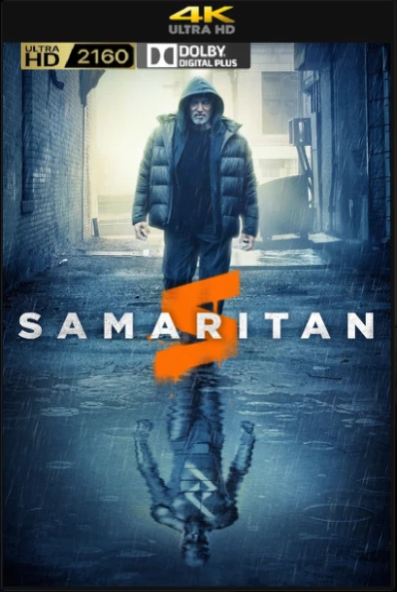
hier auch ein Overlay packet, ich habe die Audio Logos von @benris verwendet und die HD Logos verändert ich hoffe es ist in Ordnung, overlays.zip
 1 point
 -
Hi, I would suggest mounting a share in Synology and then adding that into Emby Server: Please let us know if this helps. Thanks.1 point
-
Yes indeed.1 point
-
Interesting choice of band name.1 point
-
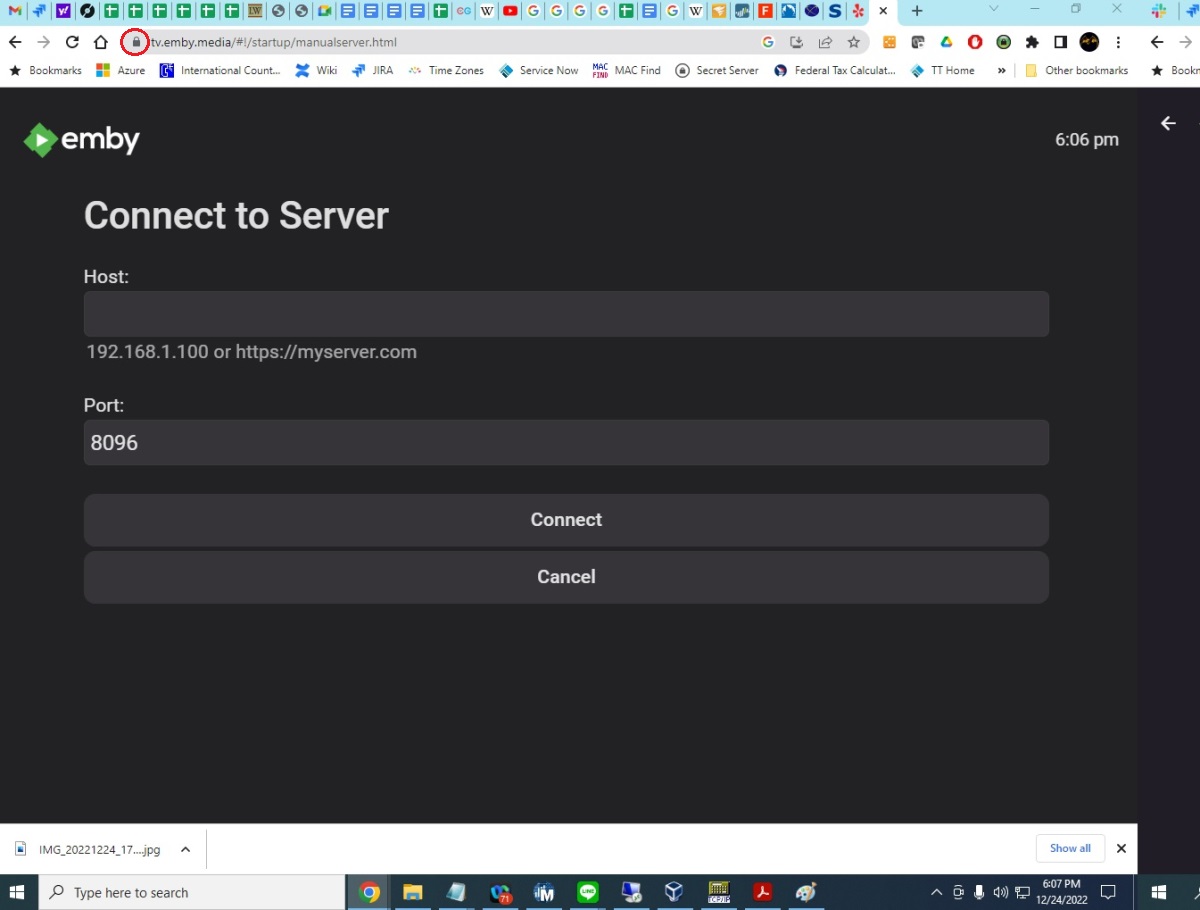
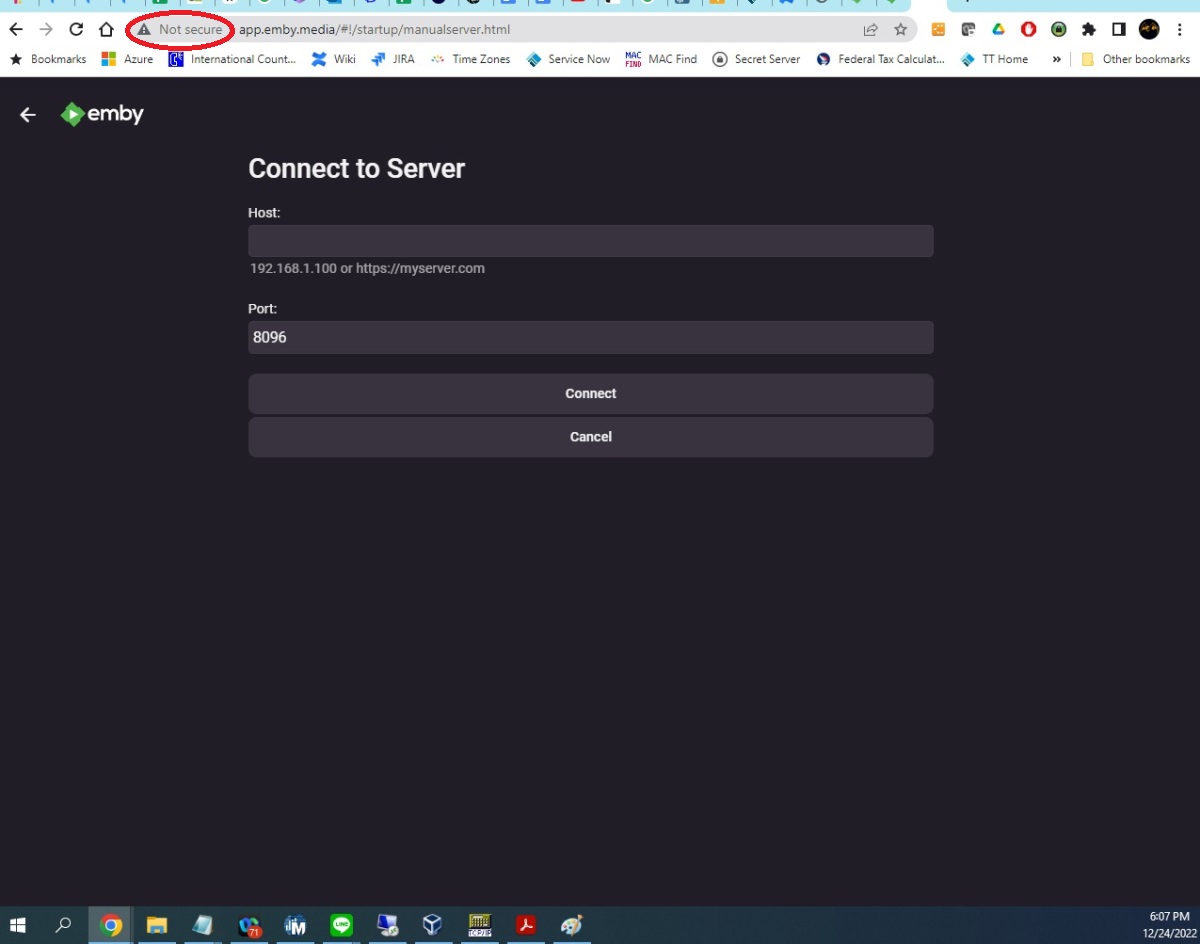
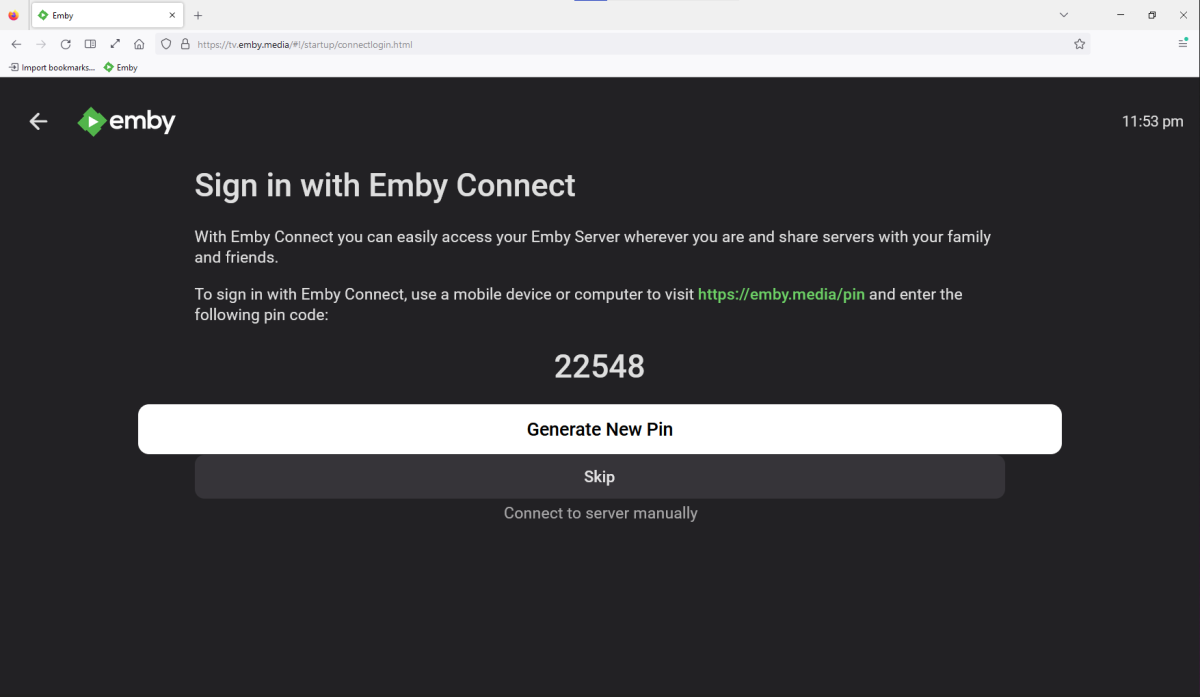
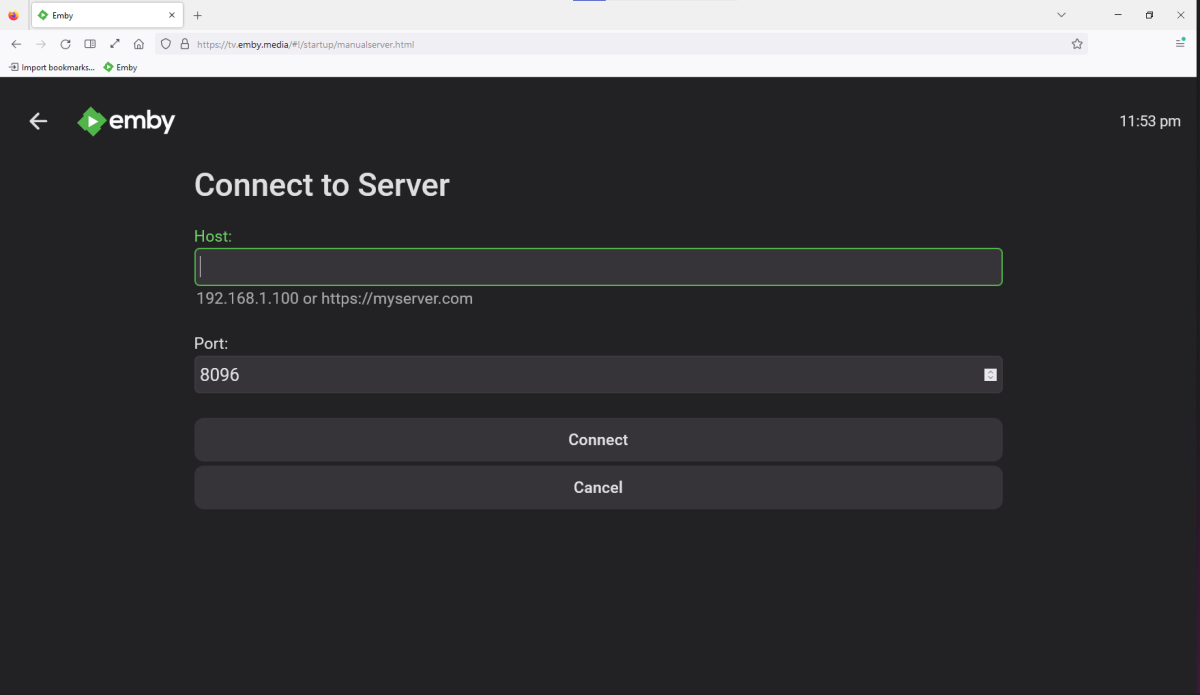
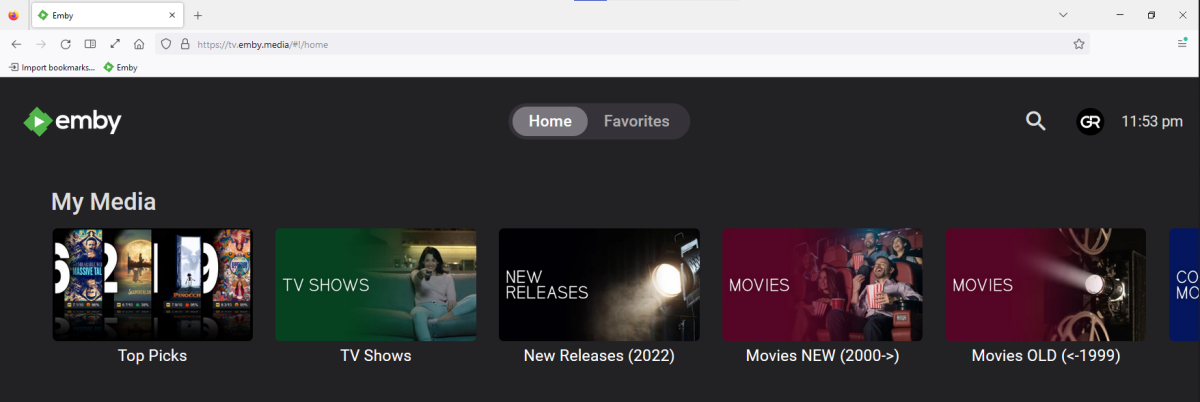
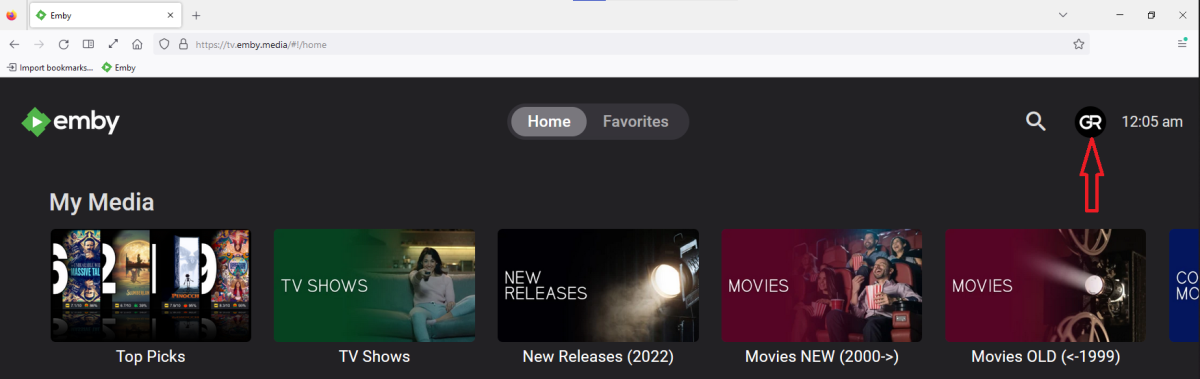
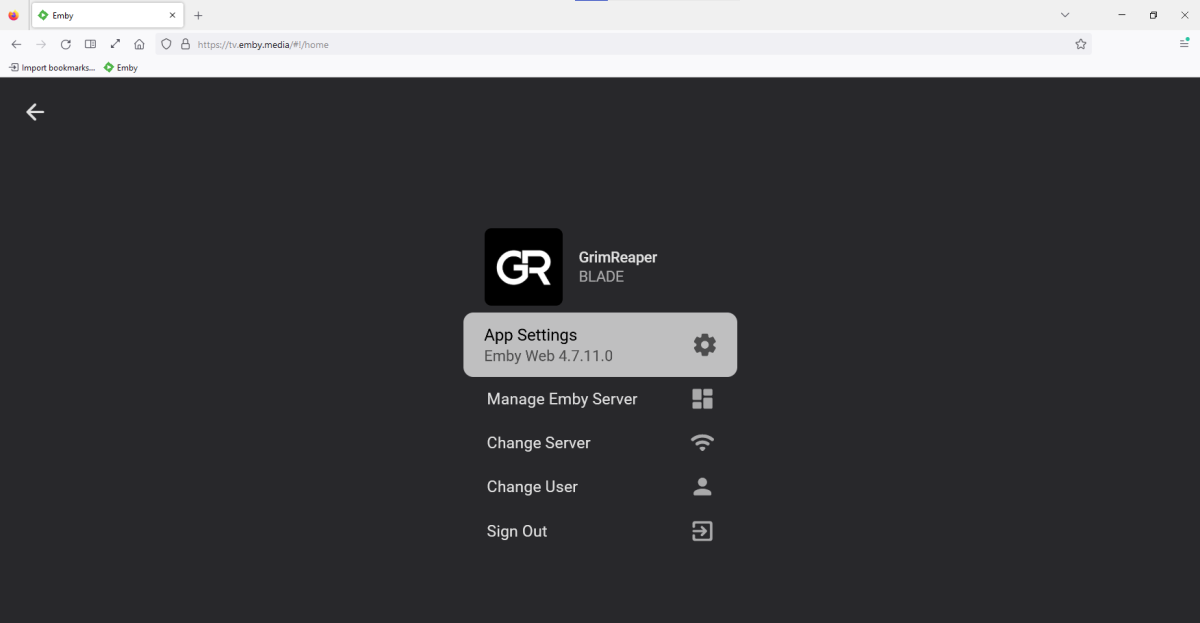
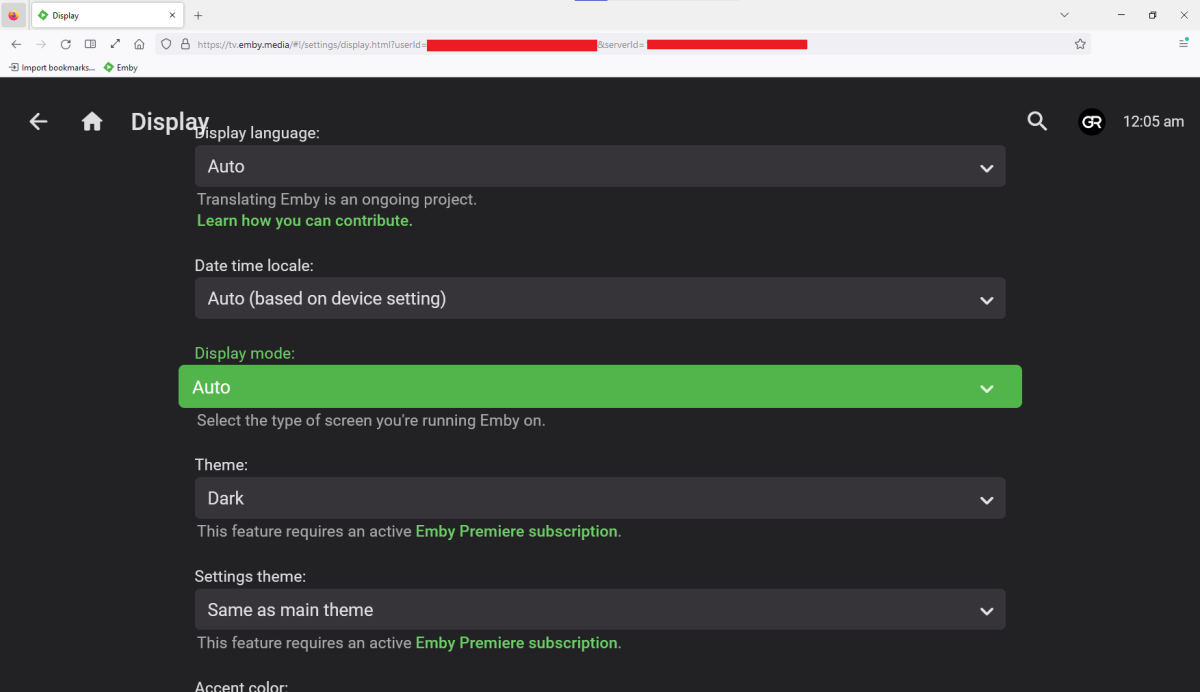
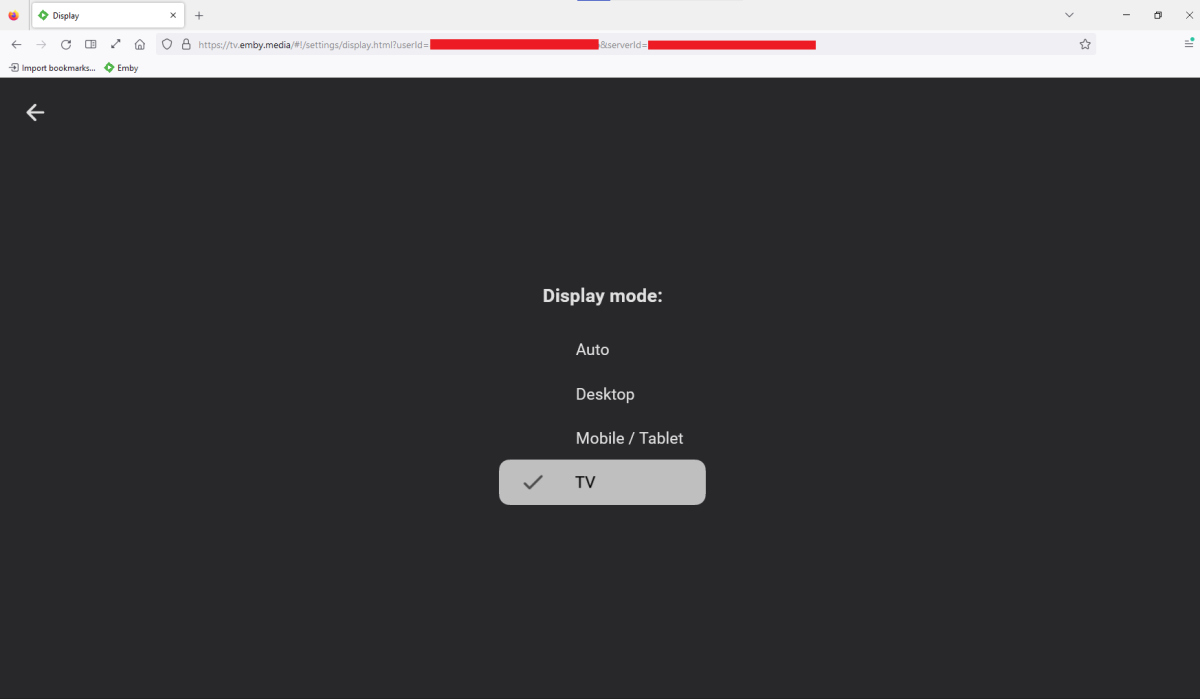
Lots of (mis)information in those several posts there, will try to shed some light: You likely don't have SSL set-up on your server, hence your tv.emby.media is failing as per your screenshots you're trying to connect to https://tv.emby.media : (btw, tv.emby.media works on both http:// and https://, with Connect or with manual connection); connect to http://tv.emby.media, just as you are connecting to http://app.emby.media, not https://app.emby.media (all visible from lock icon in your browser address bar). That is only partially correct, as you don't have to connect through Connect to use app.emby.media (or tv.emby.media, for that matter; that is hosted web app, the one you load from Emby's servers) but you can still make manual connection, press Skip on landing page. Explained above. ALL client-server connections are always direct, you're just loading hosted Web app instead of local Web app (the one that comes with your server). All three client apps: Emby Theater, local Web app (IP:port, domain) or hosted Web app (app.emby.media, tv.emby.media) have same views; you can have "10 foot UI" by selecting appropriate Display mode in your user settings (the one you want is TV mode); Process is same in all client apps, (tv.emby.media just loads you directly into TV mode whereas app.emby.media or local Web app nor Theater do):
 1 point
 -
That depends on several factors: - What are your library subtitles auto-download settings - Are forced subs for particular item available - How often is Download missing subs scheduled task run - Is hash-matching required - What are your user subtitle settings1 point
-
Hi, UPnP using PortMapper tends to be troublesome at times. I would recommend removing the PortMapper plugin from Emby, and setup port forwarding in your router instead. Follow this guide from the 'Setup Port Forwarding' section: https://support.emby.media/support/solutions/articles/44002137137-remote-setup Let us know where you get stuck.1 point
-
The problem is that is a "sort name" for the media item, as opposed to a sort name for the collection per item The same movie might have a sort name in one collection that is different than another collection1 point
-
I reckon you'd wanna lend your support to below FR.1 point
-
Hi there! So yes and no -- was a Truenas issue where coredns for some reason was not working and the whole system would not recognize my nameservers. iXSystems could not replicate the issue and the Discord community - while super responsive and really are an amazing bunch - could not figure out the fix either. As a result, I decided to go down another route by using Proxmox and setting of a VM. As of this evening (finally have it all configured) I have no network/DNS issues and metadata is being collected. While sad truenas didnt pan out because I really did like the UI/community/tools - I am thrilled to have a working system hahah. Thank you to this group for being so responsive - even when the issue was not directly Emby related. /Resolved1 point
-
Hey, sorry forget what I wrote. It seems to be a misconfiguration on my part in the network! Sorry!1 point
-
Thanks @GrimReaper - That seems to have resolved it for me1 point
-
Well ever since my accounts were deduplicated from trakt support 7 days ago and my initial sync task was ran on both of them in emby absolutely none of my new library content has synced to trakt as being collected in emby. So somewhere your perceived function of new library content being added/synced automatically to trakt is not working correctly.1 point
-
Yep ran into the same issues. After going through trakt support to have them unlock one of my trakt accounts in my setup for this duplicate problem as well they pointed me to this thread. https://github.com/MediaBrowser/trakt/issues/20 Between github thread and looking around on here I stumbled upon the fact that my sync scheduled task was set to every 12 hours. Pretty sure that was a old default setting from earlier days of this plugin. So i have removed the scheduled task from running completely like your suggesting here and in the github thread. The problem I'm seeing now is without this sync scheduled tasked being enabled at all over the last couple days none of my new content is being synced to my trakt library/collection as being acquired; only the scrobbles of their watch statuses. So perhaps we need a different scheduled task if this one is only for the initial setup full sync of content and watched states? Leaving scheduled task disabled for now as I dont want to have either of my accounts disabled again on trakt for running this task even if I set it back to once a day.1 point
-
Then I would say you've found an exploit - or a loophole - if it was working (or not, in this particular case) for you with no issues, as AFAIK this: /mnt/Television/Last Night's/Halo (2022) S01E05 Spaced Out.mkv /mnt/Television/Last Night's/Halo (2022) S01E06 Solace.mkv /mnt/Television/Last Night's/Outer Range (2022) S01E05 The Soil.mkv /mnt/Television/Last Night's/Outer Range (2022) S01E06 The Family.mk was never intended to be supported, having episodes from multiple shows inside same folder for a TV show content-type library. What I would suggest is you make each series subfolder in your "Last Night's" parent folder and place those episodes within respectively, upon which you should not have re-occurences/mis-plays.1 point
-
When in root search globally, when in specific library search inside library. Also make 2 different emby apps cause I have never been a member of more stupid and toxic community so make one for normal people and one for idiots who want everything backwards, sounds like a solution.1 point
-
Believe it or not, you aren't the sole user of Emby. Look around the boards and look at the support this community gets and gives. Your original post was barely a week ago. I think the response you've gotten is pretty solid given everything else going on. Relax and cooperate.1 point