Leaderboard




Popular Content
Showing content with the highest reputation on 12/20/22 in all areas
-
Emby Server 4.7.11 - New Intuitive TV Guide Improvements & Other Fixes This is the latest point release of Emby Server. It's a small maintenance release, containing improvements to existing functionality as well as a couple fixes for user identified issues. New Intuitive TV Guide Option Panel for Configuring the Display of Your Guide Data. 4.7.11 features a slick new way to quickly adjust the different options used for the TV Guide grid. Click the icon shown below highlighted by the yellow box. This opens a new panel where you can set over a dozen options including the sort order of channels, the channel groups (tags) you wish to see (or hide) as well as the data used in the far left column representing the channel. The rest of the options configure the information displayed with the program data. Setting the Channel Display to Title gives you this look in the first column. This is how it looks using: This is how it looks using: Right next to the icon we used above is our date picker: Clicking on the date gives us this: The number of days shown will depend on the guide data itself. If using Emby Guide data this can be adjusted here: If your provider supports Groups these will be available as shown below. You can also add tags to any channel you wish to edit which will show up here: Other improvements and fixes included in 4.7.11 include: * Fix intermittent scroll problem with Live TV Guide * Improve intro detection error handling for TV Series View the full article3 points
-
Hi. I think when people are selecting these categories they are likely looking to be inclusive, not exclusive. It is showing only the ones selected. To be 100% complete, I guess we would need an option for "Uncategorized".2 points
-
okay,. If I find out what exactly is going on I will comment. The other option is not to use a CT and do it with a VM2 points
-
Agree, as OP says: If media eventually appears in Latest without any modification, then sounds more like a refresh, and not a date added issue.2 points
-
Hey All, Firstly, excellent work! secondly, I noticed that this has stopped working in Emby 4.6.4.0, I have forked the repo and fixed if anyone is interested. (Have PR out for main repo) https://github.com/ShanePe/Emby.SmartPlaylist.Plugin/ Sorry also, I have made an update, if the playlist has NOT yet been generated, it will generate it, regardless of the playlist schedule trigger. So one no longer need to 'manually' run first to initialize the playlist if it falls outside of playlist generation schedule. (Make sense !?!?!?!) Version 2.4.0.3 Feature Create a copy of a playlist. (Duplicate) Decluttered UI by adding a pop up menu to playlists New Criteria: Added Audio Stream Codec Criteria (Stream: Audio Codec) Added Audio Stream Language Criteria (Stream: Audio Language) Added Audio Stream Display title Criteria (Stream: Audio Display Title) Added Subtitle Stream Language Criteria (Stream: Subtitle Language) Added Video Stream Codec Criteria (Stream: Video Codec) Added Video Stream Display title Criteria (Stream: Video Display Title) Updated Criteria: Parental Rating: Now uses official rating under the hood Resolution Height: Now uses video streams to determine the available video heights rather than the metadata. Resolution Width: Now uses video streams to determine the available video widths rather than the metadata. Added Monitor Mode to shuffle playlist type. Meaning that the playlist will be destroyed and recreated on a schedule, but between scheduled executions, media item changes will be batched and monitored for inclusion/exclusion. (So .... combination of live and shuffle modes but could have a perf hit on larger playlists, experimental) Collapsible sections in the playlist editor that keeps state, for more UI real estate. Added the ability to add notes to a playlist (limited to 256 chars). If there are notes assigned a pop up is displayed when hovering over a playlist (2 second delay). Order all selection lists on criteria with dropdowns alphabetically. ------------------------------------------------------- Releases Here -> (See change logs in this thread .... way down) Plugin for Emby Server 4.8: SmartPlaylist-2.5.0.4810.zip1 point
-
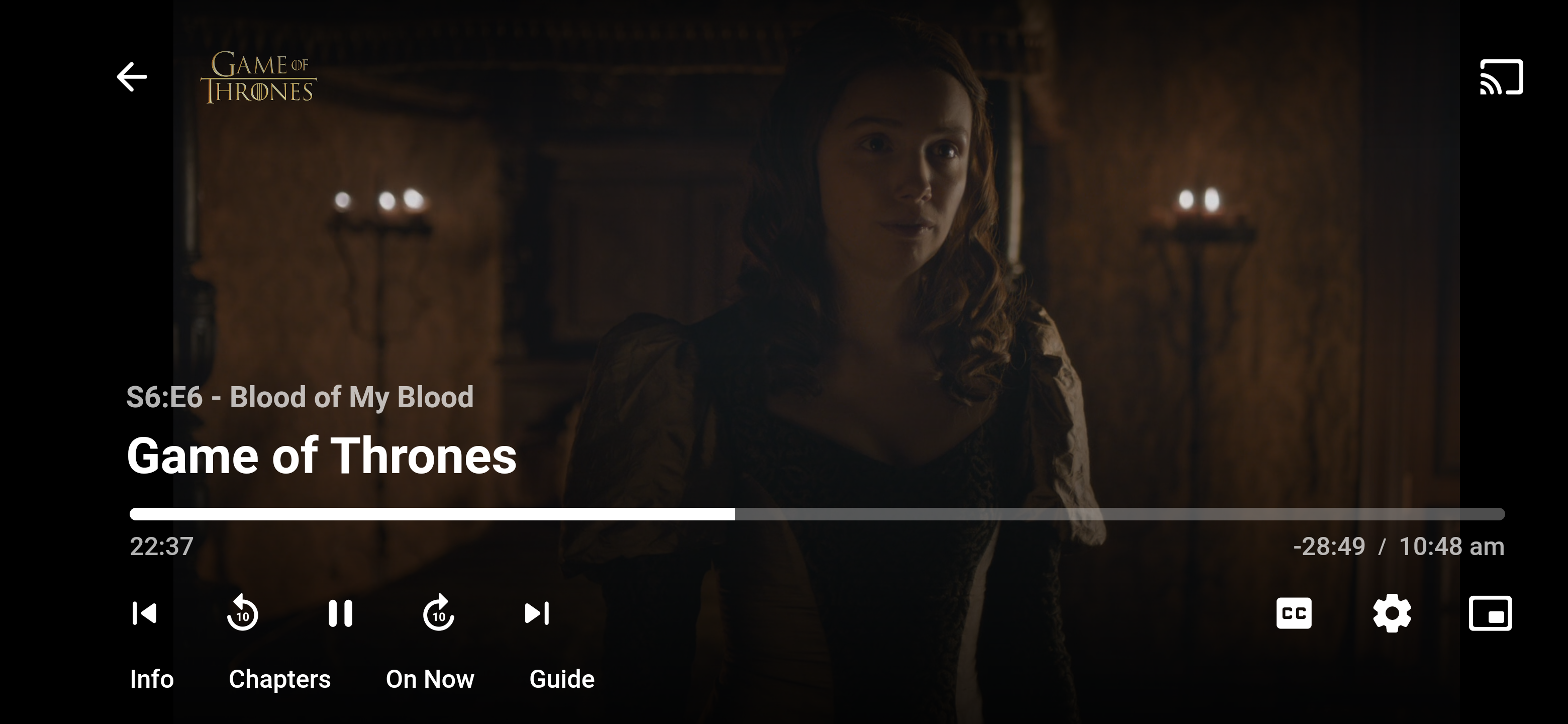
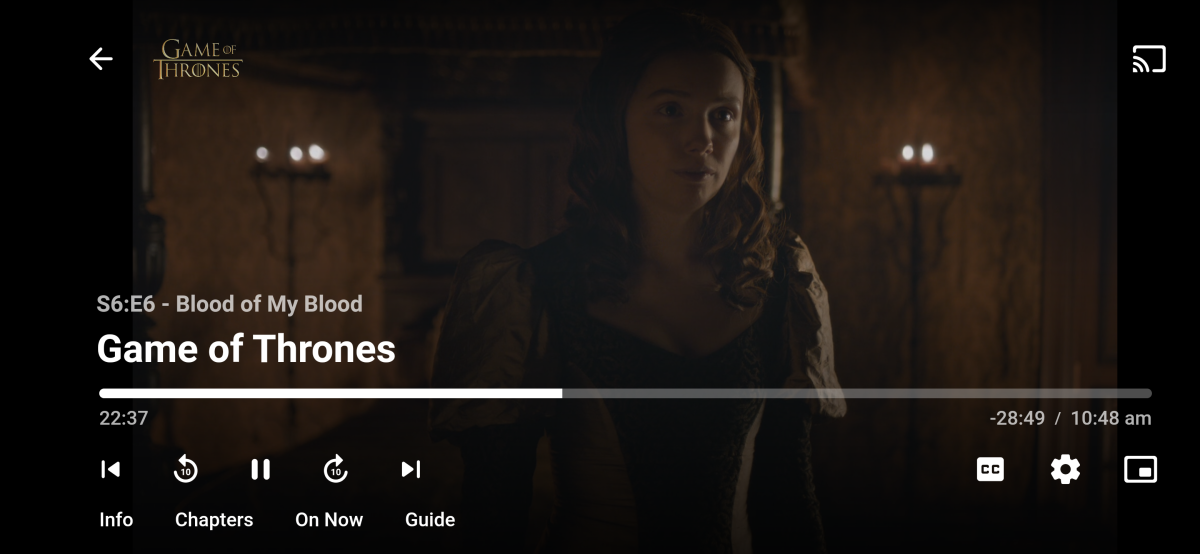
I'm using the Emby Android app on the Pixel 7 Pro and all the controls are out of date. The media control buttons are on the bottom left as opposed to center of the screen and the brightness slider isn't there at all. I had the Pixel 4XL recently and the controls were where I described above. I've checked the Play Store and there are no available updates. I also experienced this issue from @dannyhaitran in his post. It only happened once, but I started playback on Emby and the brightness started to rapidly decrease. I adjusted the brightness slider in the phone's drop-down menu, but it was already maxed out. Sliding it down and back up again did nothing. When I left the playback, it went back to full brightness again. I had to restart the app to resolve the issue.
 1 point
 -
Here are 4 pre-rolls I created using Motion Array templates. (I have a subscription.) Emby-Dark-Tear.mp4 Emby-Explosion.mp4 Emby-Fire-Explosion.mp4 Emby-Space-Trails.mp41 point
-
Emby Server 4.7.11 - New Intuitive TV Guide Improvements & Other Fixes This is the latest point release of Emby Server. It's a small maintenance release, containing improvements to existing functionality as well as a couple fixes for user identified issues. New Intuitive TV Guide Option Panel for Configuring the Display of Your Guide Data. 4.7.11 features a slick new way to quickly adjust the different options used for the TV Guide grid. Click the icon shown below highlighted by the yellow box. This opens a new panel where you can set over a dozen options including the sort order of channels, the channel groups (tags) you wish to see (or hide) as well as the data used in the far left column representing the channel. The rest of the options configure the information displayed with the program data. Setting the Channel Display to Title gives you this look in the first column. This is how it looks using: This is how it looks using: Right next to the icon we used above is our date picker: Clicking on the date gives us this: The number of days shown will depend on the guide data itself. If using Emby Guide data this can be adjusted here: If your provider supports Groups these will be available as shown below. You can also add tags to any channel you wish to edit which will show up here: Other improvements and fixes included in 4.7.11 include: * Fix intermittent scroll problem with Live TV Guide * Improve intro detection error handling for TV Series1 point
-
Hello, is it possible for the next Updates to activate Theme Videos in the Background like in the Browser APP??? best regards Chris1 point
-
Can GENRES be added next to collections onthe horizontal view home screen please? Too many clicks to click 'Movies' then scroll along to top menu option for GENRES (genres at end of list) The FEATURED large image on the home screen (horizontal view like LG app and Emby Theatre) does not need to be THAT big so plenty of room. Also could the FEATURED random movie have a label at the top of the image tile or somewhere saying FEATURED? Its then obvious what that square is for any new users. Thanks...1 point
-
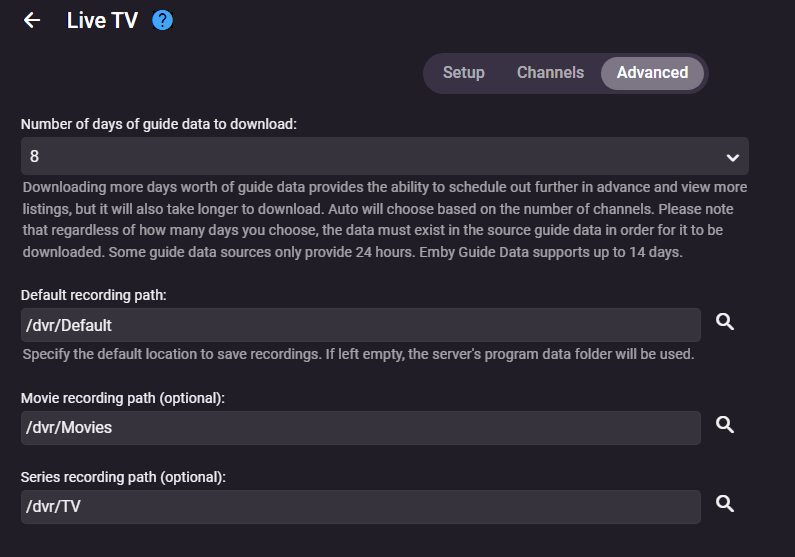
having the option to manually select which category/folder it goes to would solve many issues i have with recordings. Ideally for me I'd like to specify different custom recording paths for News, Talk Shows, Series, Movies, Sports, and Wrestling, so being able to add in custom slots to the Advanced section of Live TV (shown below) would be perfect. I have separate (non-dvr) media libraries for each of those categories I mentioned, and I want to be able add the dvr recordings folder to each of these libraries separately. I don't care that I'd have to manually change the recording category (as in the mockup taker showed previously), 99% of recordings will be set at "Record Series" so I'd only need to set it up once per show. This is the one and only thing I liked better about how Plex handles recordings, and just wish I could do the same here. Please consider adding this?
 1 point
 -
We can add that to the server for the 4.8 release. Thanks.1 point
-
I added it to my list of things to do.1 point
-
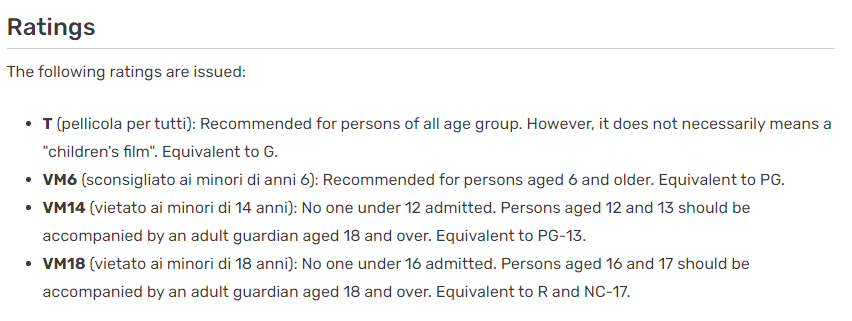
But per the linked wiki what is 0+? Where is 0+ coming from? Unless defined it would be an Unknown rating.
 1 point
 -
I figured it out. while talking to my ISP about disabling CGNAT they told me to try a port forward on the modem they provided and now it is working. so basically I have a port forward on my modem that is forwarding the 8096 port for my router only, and then a port forward on my router forwarding 8096 port to my NAS1 point
-
my comment wasnt really based on the design, it was based on what i would want to use the filters for. and that is 9/10 times wanting to filter to just Sport, or Movies. i can't ever imagine thinking - i can't make up my mind, do i want to watch Sport or the uncategorised shows that make up 90% of my guide, its just not that meaningful IMO1 point
-
I disagree I don't know how the majority understands this UI. But I do understand how software typically works. Typically, when everything is already on and you want to remove something, you deselect it. If the UI is to be understood as additive, then the guide would be blank by default so the user can include as desired. However, in either case, the user can't get what is wanted because there is this black hole of stuff that is 'uncategorized'. So if I want only Sports and 'uncategorized', I can't get it. Interesting how two users can have totally opposite understanding on UI expectations. At least I know what to expect now.1 point
-
Hi @Luke Recently I tried it again when I noticed, that a new update was installed (3.2.90) and suddenly the option was there! Thank you very very much for your help!1 point
-
Thanks! I just set it up with docker in less than 30 minutes.1 point
-
I've seen this too and is annoying and hard to advance just a "little" with the bottom scrollbar as it often scrolls over too far. How about updating the guide display so that it shows a clean 2.5 hours?1 point
-
wow, lets add the code to do it... Vic1 point
-
Hello, the problem bas been fixed. It was because of the version of DSM. After migration DSM 6 to DSM 7, ans update emby server, it works. Thanks !1 point
-
This looks like the same issue we are seeing with 2021 models. I have added a work-around for the next version which will switch audio tracks on the server for 2022 models as well1 point
-
this is the next step:
 1 point
 -
Hi all working fine now. Thanks for the help with this.1 point
-
I tested emby for android on my FireTV4k. There it works! The main difference to my FireCube gen 2 is the FireOS version: FireCube= FireOS7 (Android9) FireTV4K=FireOS6 (Android 7.1) In my local network pihole blocks updates on both devices. On the devices itself updates are blocked, too. Both devices are using alternative launcher. But I already disabled this launcher on the Cube, but this doesnt change anything.1 point
-
Looks like public api will be up some time tomorrow. status.trakt.tv1 point
-
My original reply was intended as a response to Luke's advice to interact with the Trakt api, which can't currently be done.1 point
-
I didn't realize that about the browser and mpeg2. Thanks for that info. It all makes sense now.1 point
-
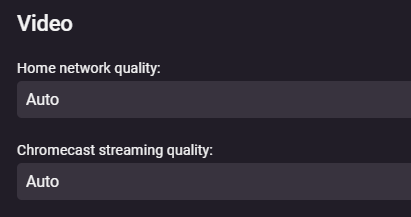
If you don't have any explicit limits set on your users streaming bitrate option, then check your 'User > Playback > Video' settings: (You can check this within Emby Theater itself) If they are set to Auto, sometimes clients can be a little on the conservative side. Depending on if you're remote or local streaming, try setting this dropdown to one of the highest quality settings and try again.
 1 point
 -
Sorry for delay, post script is working in 4.8.0.201 point
-
Just non-standard I guess, but if you're happy, we're happy.1 point
-
I have! I actually heard about twingate from a coworker who highly recommended the service. I haven't tried configuring twingate with t mobile home internet, but I'm not a fan of having open ports which made port forwarding a no go for me. Was simple to set up on my Synology using the Docker deployment option. Let me know if you need any help but felt pretty intuitive if you are familiar with Docker. They also mention a couple of other deployment options in their docs: https://www.twingate.com/docs/connector-deployment/1 point
-
Hi, I found this post whilst searching for a similar option for my LG TV, so I hope it's OK posting here, if not please let me know I'll start a separate thread? If an "Update/Refresh Media" view option could be added to the Apps it would make it so much better, although my library is set to dynamic update it seems to take a while to scan new content, which normally means sighing in to the web GUI and initiating a manual scan. Thanks, Bob1 point
-
Thanks Luke. Hardware scans found no disk failures but installing on top of the existing installation worked. All back up and running. Much appreciated.1 point
-
If you remove the port from the URL it will default to 80 or 443 for thhp/https, so having the port or not is not an issue. The issue is that Emby doesn't put it at the end of the domain, but at the end of the URL - which produces nonsense. You have the choice of waiting until the developers decide to change this (grumbling meanwhile) or simply changing your URL setup to one that works without an issue (presumably being happier when it works). Paul1 point
-
I'm glad you asked cause that was a disappointing outcome. HDR Format: Dolby Vision, Version 1.0, dvhe.07.06, BL+EL+RPU, Blu-Ray Compatible / SMPTE ST 2086, HDR10 compatible TV triggered HDR not Dolby Vision. However, HDR format: Dolby Vision, Version 1.0, dvhe.07.06, BL+EL+RPU, Blu-ray compatible / SMPTE ST 2094 App 4, Version 1, HDR10+ Profile A compatible TV triggered Dolby Vision.1 point
-
It is definitely conflicting because it occupies the same space as the "Enhanced" information. You usually see a display like this OR like our enhanced display - not both.1 point
-
Something like the "Top Picks" settings would be nice.1 point
-
@rbjtech Then it is a matter of what to spotlight (content type) and how many but believe should be a customizable list.1 point
-
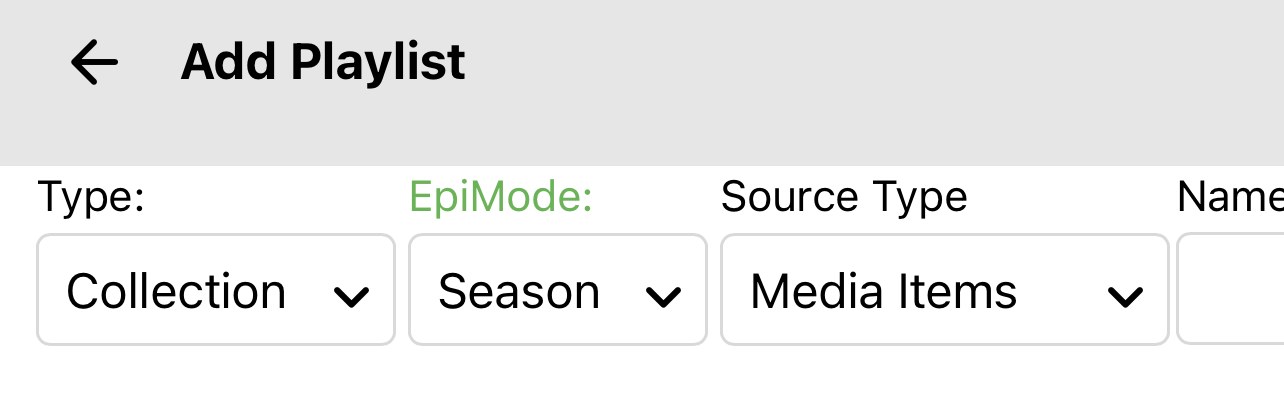
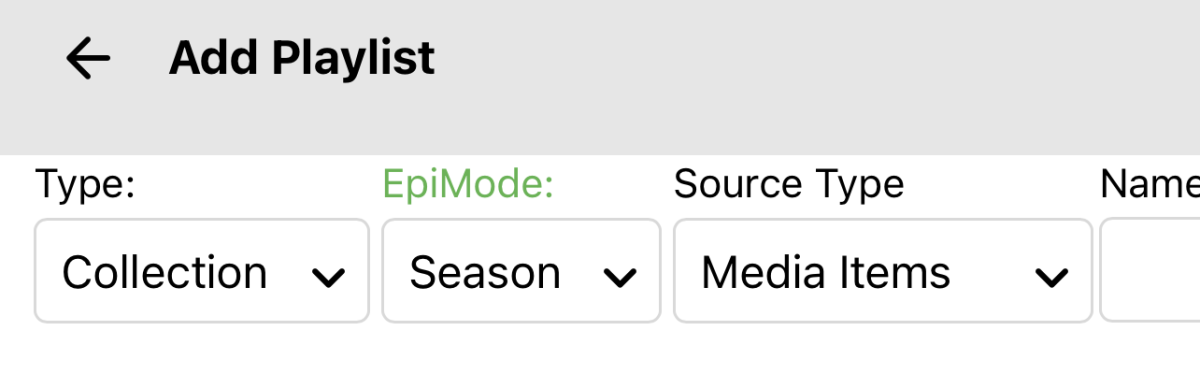
You should see it when you select type as collection.
 1 point
 -
Got a little lost in the thread - but as I'm sure you are aware, a reverse proxy terminates the WAN connection and forwards the request internally on whatever port you specify. Like Paul - I connect using 443 (thus no need for any port to be specified) and then nginx forwards using 8096 (http) - thus like Paul's - my dashboard WAN url says :443 after it - but it has no reason to. Note emby IS listening internally (locally/lan) on port 8920 for https - so the dashboard could be a little clearer on that imo. It's your RP that is listening on (80) 443 not emby.1 point
-
@GoldenSpider Have a look here @cayarscan you do a write in Tutorials/Guides to link to.1 point
-
As long as it can be disabled.1 point
-
Oh please no, thank you. Just address to D. Trump, Trump Towers, District of Trumpia. United Trumps of America.1 point
-
Stealing your css. Hope it isn't trademarked, pat pending or copyright... Invoice for royalties is on its way. It was a pleasure doing business with you!1 point
-
Hello, I am running Emby 4.7.8.0 on Ubuntu Server 22.04.1 LTS. I have been wanting to backup all my metadata on my Emby Server (images, titles, album artists, etc.) recently, and after researching online it would seem the way to do that is to have the metadata be saved in the same directory as the media in a Nfo file. I have been attempting to do just that, but the Nfo files don't appear to be generating. Here's an example of my process: I have a Music library with 'Nfo' checked underneath 'Metadata Savers', and 'Save artwork into media folders' checked as well. I go into Metadata Manager, and navigate to... say 'Music/Alan_Jackson/Let_it_be_Christmas/Have Yourself A Merry Little Christmas'. I save the song 'Have Yourself A Merry Little Christmas' in Metadata Manager. I check the 'Let_it_be_Christmas' directory on my server, and no Nfo file has been been created for that song. These are the common fixes I've found online that didn't appear to work for me: I have been checking my logs and there doesn't appear to be any permission errors in regards to writing the .nfo files. I have tried refreshing the metadata for the song 'Have Yourself A Merry Little Christmas' as well, but that didn't appear to generate it either. I am at a loss as to why these Nfo files aren't generating. Am I looking in the wrong place? Do I not have something configured correctly?1 point
-
I am actually running into this problem with videos! It will auto check the video as watched and act as though the video was watched to the end. I can confirm that it is happening in Safari on my computer and my MIL's computer when she watches on Safari. It is not just when the video is in the background. It does not happen at the same time in the video, but some videos do it and others don't. This is on Safari 16.0 and 16.1. I tested the videos on chrome and they play continuously just fine. Is there something I can do to help send info?1 point
-
Let's Encrypt offers free automated SSL certificates that are valid for 3 months. They can then be automatically renewed without any user interaction. https://letsencrypt.org/ I would like to see this implemented as either a plug in or natively in emby server to solve the issues with using https specifically with the android and Chromecasts but also the media browser. This would allow easy to use signed and valid https connections and would take the hassle out of renewal every 3 months.1 point