Leaderboard




Popular Content
Showing content with the highest reputation on 12/06/22 in all areas
-
Those are PGSSUB subtitles that are graphical, i.e. based on images. Subkiller only extracts text based subtitles that would show up in Emby as SUBRIP. They will be extracted to a .SRT file which can be read with Notepad or any other text editor.2 points
-
This plugin here will create and save messages that get sent when users login. https://github.com/chefbennyj1/Emby.MessageUsers There is a new feature getting released in emby that allows users to access plugin configuration pages. This plugin could be altered when that new functionality is released, to allow users to send messages to admins. As for email, that could also be added fairly easily to this plugin as well. So, yeah probabaly all of the above is possible.2 points
-
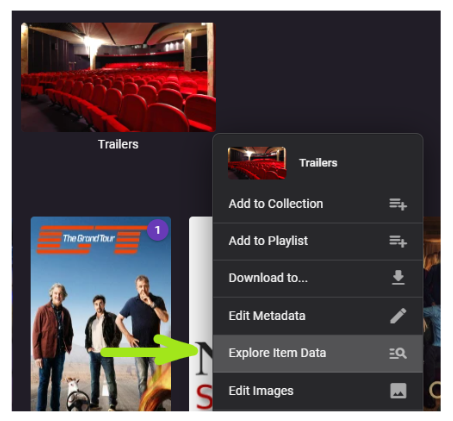
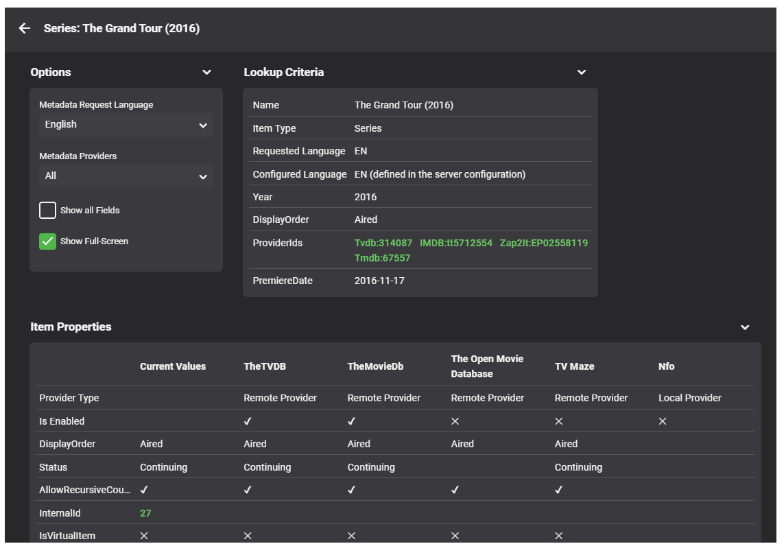
This is another brand-new plugin which is available in the catalog now: Emby Data Explorer Important Note Make sure to clear your browser cache after installation and restarting the server! History In 2016 I was working on Metadata Providers and wanted to see and better understand which metadata is coming from which provider and which information was actually taken by Emby Server. In turn, I had created the MetadataViewer Plugin. Later, it became outdated and I was no longer around to update, so eventually it had to be pulled due to incompatibilities after the server had evolved. Meanwhile, there had also been an idea for a "Backstage View" plugin with the purpose to provide some low-level insights into Emby item data, but it never took off. This month, I came back to some work on metadata providers and I had the same problems again, which ended up in creating this plugin. It's a fusion of the MetadataViewer plugin and the Backstage View concept - with a name that leaves room for more... Beta For now, it's available for the beta server only It's been done in two and a half days, so please report bugs in case you find any How it Works The plugin adds a new entry to the Item Context Menu: This will open a dialog for data display: This dialog is the one and only UI that the plugin provides. Everything is happening there. I will describe individual features in subsequent topics. ENJOY!

 1 point
 -
I personally like the "superman" theme backdrop on my android phone, but it's completely missing on the android TV app. I think that's what he or she might wanted to say or at least that's what I am missing and thinking about.1 point
-
The main use for myself is to reduce the number of embedded subs as Samsung TV's don't play nice with lot's of subs. I'm not sure of the maximum before issues are seen but 3 or 4 definitely don't cause an issue but 30 plus do.1 point
-
Thanks for considering it. I do hope it can be added as it is a pretty important piece of information about the media. And it would make using Emby so much easier (for me at least). it looks like there should be room by the icon. In the mock-up, I actually moved the title and year up a little to make it all fit nicely in the available space without changing fonts or anything else. Thanks again.1 point
-
Yes they are! I mistakenly thought you were with Team Emby! Special kudos to you, sir! Your patience last night was great!1 point
-
ok I ran ffprobe on the second video in the line, transformer. Here is the output. ffprode Transformer 4k HDR.rtf1 point
-
Was that a thanks?1 point
-
Look at the tools.js.1 point
-
That is version 2.0b with the bug The latest is tool_2.0c.zip, posted on the page before this one (page 39/40 for me).1 point
-
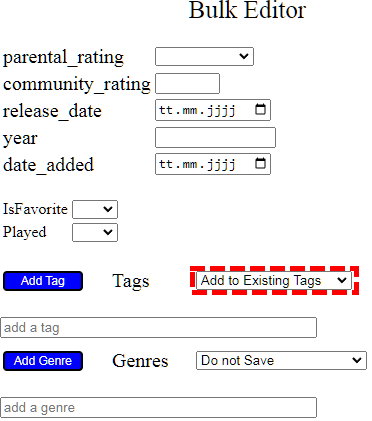
Do you have the latest version? I believe a bug fix went into that version. Also, did you change the little drop down? By default it says "Do not save", which could be your problem.
 1 point
 -
I was too quick. I checked if they were MP4 but it seems like both Safari and Chrome do not like (e)AC3 or DTS audio which means that is the reason it'll transcode and lose HDR. I have tried an AAC audio HDR10 file and that worked well. Problem is that even when it just has to transcode the audio it will also do the video (often going from hevc to h264 for some reason). An easy fix would be to just convert the audio and leave the video alone. Dolby Vision will still not trigger tho1 point
-
Due to the way the OP has setup their folders - it will see them as separate items. You need to name them in a specific way and/or group them to then be shown as a single item - with multiple resolution options in a drop down. See here - https://support.emby.media/support/solutions/articles/44001159102-movie-naming In summary - keep the folder name the same as the first part of the filename and then anything after the '-' will be the 'version'. ie \movie1\movie1-hdr.mkv \movie1\movie1-dv.mkv \movie1\movie1-1080p.mkv Will have a single entry for 'movie1' - but 3 versions will be listed in the dropdown as hdr, dv and 1080p.1 point
-
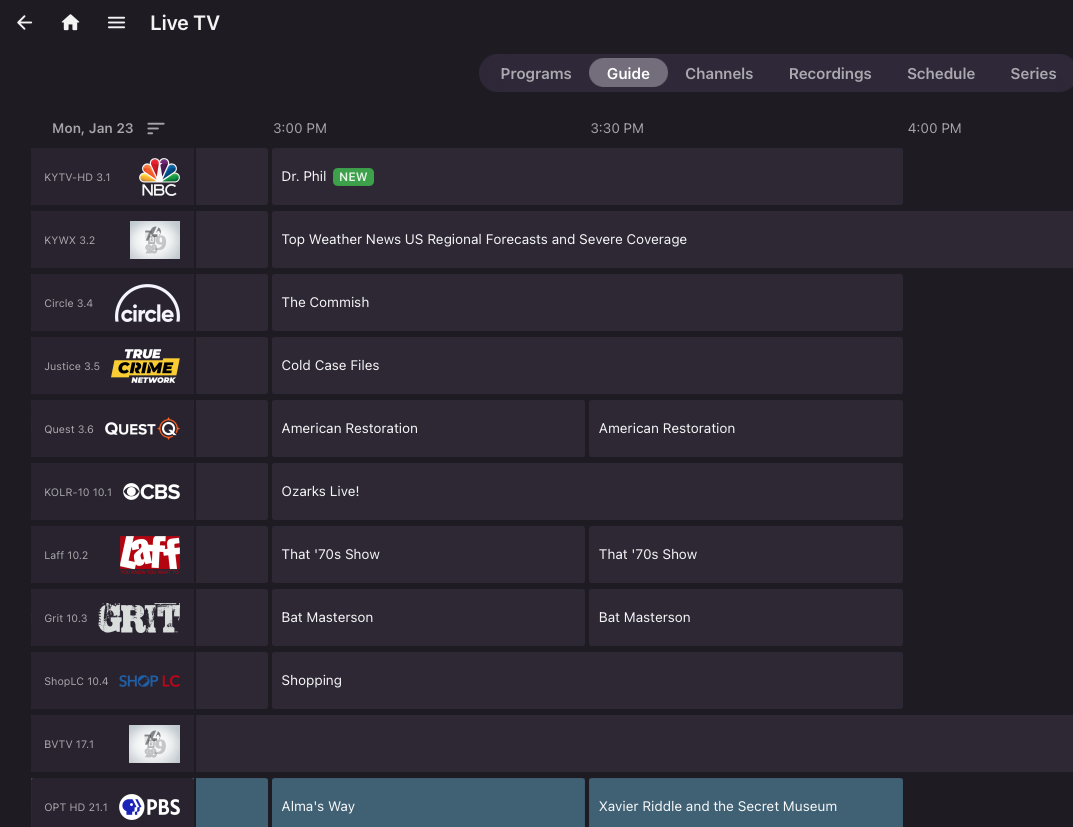
Ha! You did it! The guide is fully populated out to 1.23.23!
 1 point
 -
Please develop this as a premier feature then id purchase1 point
-
Thank you. Ive re-installed those plugins and will see what happens.1 point
-
I actually bought a 4k Max Stick at the same time, just in case. But neither are really giving me anything over the LG App, so I'm thinking I'll stick to it for simplicity sake. I'll revisit when the new Shield comes out, OR Amazon fixes their Cube. I'm half tempted to build another HTPC. I had a HTPC running Kodi YEARS AND YEARS ago. Ran great, but once I got married using a keyboard as a remote wasn't going to cut it. I haven't even looked into costs or remotes or anything. I might try to hook up my laptop to the TV/Soundbar tomorrow for S&G to see what happens.1 point
-
@Junglejim Have you tried filtering the library with a search string? Only other way I can think of is ctrl click item then select add item, individually adding them one at a time to create your list.1 point
-
Thanks a bunch - everything works back as intended!1 point
-
Can you try with the hosted web app http://.emby.media Does the issue reproduce there?1 point
-
Hey Painkiller. I saw this and wanted to make sure I replied. The engagement task does take into consideration watched state of items. We hold a variable and add to it for each user who has watched an item (all the way through) if (item.IsPlayed(user)) entry.Value.TotalPlayedCount++; Which means, increment the total play count every time a user has watched that particular item. We then take that TotalPlayedCount and divide it into the total Users.Count on the server. That gives us a frequency rating (watched frequency) on the item. However, there is room for improvement here. The reason you may not see items change regularly is because of the Critic/Community ratings, which weighs heavily on the outcome. I'm starting to see (over time) that those ratings may weigh to much, and tip the over all outcome of the stat. Perhaps the best way to handle this is to do two things to the statistic calculations. Only give critic/Community a chunk of the over all stat to occupy. Like 50%. For example: if the Critic/Community rating was0.9, it would actually only be 0.45 (it's out of 50% of the whole stat.) Use the Inverse of TotalPlayCount / User.TotalRecordCount, if the percentage is less then 50% For example: 2 out of 5 users watched the item. It would currently rank 0.4. We could invert that and give the item 0.6 which would rank it higher because that is the percentage of users who have not watched the item yet. It would be interesting to hear from any other "stat guys" out there who are probably better then me at understand frequency/engagement ratings ( I've read a couple articles on the subject... enough to write the plugin with simplified stat logic). I would make the engagement task code public for anyone who wants to have a go1 point
-
This has been fixed in the new release. But, if the task still fails, please go into the config page select an options for the TV shows, and for the Movies under user engagement. Run the task, then go back and un-select those options if you don't want them selected. Apparently the configuration got a bit messed up in the last release. I apologize.1 point
-
I can reproduce this now. Why, oh why?1 point
-
@quickmicUpdated to E4K 7.11.2. Episode playback issues resolved. I had previously deleted advancedsettings.xml, and I can report back that the sync/"node update" issues I reported about after updating to 7.11.0 from 7.10.5 are also resolved. So all is good. Thanks!!! Attached a log after playing a few episodes just in case something still jumps out to you as problematic. kodi.log1 point
-
Thanks heaps @cayars and @Luke I'll organise a time to be free for this1 point
-
Lastly, Movie collections are 'type' 9.1 point
-
Don't have missing enabled on this library. When in show\episode structure Top Pick creates its own stuff for episode that are missing vs show\season\episode structure shows the properly just like library. It is like it makes each season have the same number of episodes whether they exist or not. embyserver.txt Only these items exist in folder S04E01, S05E01, S06E01 thru S06E07, but placing these in season folders corrects the issue.1 point
-
Hi, is it still missing?1 point
-
It should theoretically lock all metadata when enabled without manually doing each individual movie. I'm new to coding so I'm probably doing something wrong anyways especially if it's not a .dll, I used OpenAI's tool to help with a few things. I can show the code if you'd like, I'm using C++.1 point
-
I already told you how to fix the update issue, did you try it? The playback issue seems to be new. Is the movie you played a remote content (internet video, probably a strm file etc?). I see in the log, that the "Remote content verification" was triggered. Is no movie able to play, or just this one. EDIT: Please try this version: plugin.video.emby-next-gen-7.11.2-build 1.zip1 point
-
@Brendon A workaround would appear to be modifying the id. example I went to tmdb link for Garage Sale Mystery: The Novel Murders and Hardcastle and McCormick and looked at the url and applied it instead of just id breaking the link. 396390-garage-sale-mystery-the-novel-murders 1271-hardcastle-and-mccormick Does not appear to break anything else in my limited testing.1 point
-
Scenario: You have a TV show with multiple episodes, and all of them contain audio track and subtitle in two different languages. When you watch the first episode, you select an audio track and subtitle which were not the ones Emby had selected initially, by default. Then, when the first episode is over, and the second one starts, Emby resets the language to its default selection instead of preserving the selections from the previous episode. So, the user has to stop playback and reconfigure the language for every episode. Request: Emby should try to preserve the audio track and subtitle selected from one episode to another, assuming the tracks/languages are consistently labeled in all video files.1 point
-
Ok, this definitely needs more testing. Only thing I which comes to mind: Please try that, and report if this solves the problem. EDIT: I checked your log again, and yes, this is the problem: 2022-11-28 19:18:12.217 T:1151 INFO <general>: Loaded settings file from special://profile/advancedsettings.xml 2022-11-28 19:18:12.218 T:1151 INFO <general>: Contents of special://profile/advancedsettings.xml are... <?xml version="1.0" encoding="UTF-8" standalone="yes" ?> <advancedsettings> <network> <curlclienttimeout>120</curlclienttimeout> <curllowspeedtime>120</curllowspeedtime> <disablehttp2>false</disablehttp2> </network> <video> <playcountminimumpercent>101</playcountminimumpercent> <ignorepercentatend>101</ignorepercentatend> </video> </advancedsettings> Those lines disables Kodi's internal progress updates. They must be removed! Delete the file "special://profile/advancedsettings.xml" -> in your user folder, or: as you have 7.10.5 installed, disable the option in plugin menu and then update to 7.11.0. This will fix the issue. Also I see, you use Kodi profiles. This means, you have multiple advancedsettings.xml files (for each profile). All of them needs to be removed/fixed. Background info: I removed the option in 7.11.0 -> too experimental. You experienced what this option actually did. It disabled all Kodi's internal progress updates and the plugin was fully responsible for all updates. In theory, this is a very good thing cause the plugin is fully in charge but on the other side. The plugin must take care of each and every progress/content update for plugins and also third party content. 7.10.5 covered 90% of all cases where an update needs to be triggered but not all of them. Also the code was not that "good" and needs lot of addition work to make it stable. Therefore I removed this function and put it on the 8.X todo list.1 point
-
If I might suggest, you'll probably / hopefully be asked for details / illustrations / suggestions about what you don't like / would like to improve, so might be work adding a few if its possible...1 point
-
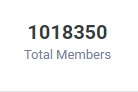
I just noticed that we recently surpassed 1,000,000 members on this forum. Thanks all for the support over the years!
 1 point
 -
We are looking into it. Thanks.1 point
-
If I understand correctly since the media is offline the server does not display images as Emby does not preemptively cache images stored with media. Preemptively cache images - Feature Requests - Emby Community1 point
-
Emby Server 4.7 - Table View Option Emby Server 4.7 and it's point releases provide some very cool new functionality. This is the first or introduction blog post in a new series we're doing to show you in depth the new features in 4.7. We're going to try and publish 1 or 2 blog posts in this series each week but will depend on other releases. Let's kick this off with a cool new feature from the recent 4.7.4 point release. Add new table view option The new Table View Option is available to use in all libraries and tabs. The examples below use a TV Library mainly with show names/series and episodes but applies this new view is available everywhere in the libraries. You could use the table view for movies, music albums, songs or any other part of your library. Let's start by showing how you change the view. The first thing we want to do is click the 3 dot menu circled in yellow in the pic above which will open the following settings: Change the view to Table as shown above. You will then have the following settings screen to select the fields nd you'll have a set of fields you wish to display. For now click the top left back arrow and you'll see a new table view that looks similar to below. Now that we have an idea what the Table view look like, click the 3 dot menu and select other fields to display. The picture below shows additional fields added. Instead of using the 3 dot menu to work your way to select fields to display you can click the icon shown in the yellow square (top left corner). This gives you direct access to the display fields without having to select the view first! Select a few more fields to display (or select them all) to see what it looks like. If the table scrolls off the screen you can use the scroll bar at the bottom of the screen, gestures or two finger trackpad slide to scroll the grid. You can right click on any row and bring up the action menu which should look familiar. Most of the column headers can be clicked to quickly sort by that column. A second click on the header reverses the sort order. The picture below shows the table is using the Community Ratings and it's sorted in a reversed order to find the highest ratings. Tip: Use the Keyboard to Jump to sections closer to your Media. You can type up to 3 characters to jump to the media starting with those characters. This feature ignore common words such as "a", "the", etc If you type BON it jumps to media starting with "bon" which is helpful if you want to watch "Bones". To jump to a show "The Rookie" or "The Big Bang Theory" you could use ROO or BIG to get these results: If you type a single character such as "S" it will jump to the "S" section of the media. Typing "TR" would make it easy to access Training Day or Treadstone. Just like the Primary view you can apply filters (tab up top). I just used this to find the name of a show I watched with my son. I remembered it was a Science Fiction show so I tried this filter knowing the show had been played. This filter produced the following results which had the show name I was looking for "Terra Nova". I could have used a couple different Genres in my search with success. The table view expands the viewing flexibility of Emby a great deal and is already something of an instant hit! Try it in different situations, such as remote when you want the fastest view of media without waiting for graphics to load. Or when you want to see the maximum amount of meta-data. Please share with us your favorite use of the new Table View and any tips or tricks you discover! The next blog post will cover the following bullet point from 4.7.4 that doesn't do the feature justice. Add Episode Intro Detection and Skipping feature If you would like to see an in-depth blog post on any 4.7 feature let us know in the comments.1 point
-
Thanks cayars! Useful! I'll keep an eye on the future in-depth posts. Any option to modify the columns width? As in I can view the details in one page and not scrolling right-left? Thank you.1 point
-
It's possible for the future. Thanks.1 point
-
Okay, thanks. Replied via PM.1 point
-
Movie Theme Songs Downloads Theme Songs for Movies Theme Songs for Movies The Movie Theme Songs Plugin will download Movie Theme Songs where available to your local media library in the correct format and location required by the MediaBrowser 3 Server. Once installed and the theme intro songs downloaded,they will be played whilst browsing your collections. As Theme Songs are supported by the Media Browser server, any client/theme can make use of them if they choose to. Current Supported Clients & Themes Media Browser Theatre Media Browser Classic - All themes (with ThemeVideo Backdrops for MediaBrowser Classic - FREE plugin installed) Roku Client (TBC) Android Client (TBC) Due to the nature of this plugin, a trial is offered which only downloads movies beginning with the letter A. Registering will give complete download of all available Contributors Network This Plugin supports the Contributors Network, for more details, click Here. Support For support, please post here1 point