Leaderboard




Popular Content
Showing content with the highest reputation on 11/26/22 in all areas
-
Hi, Thank you for the great product. It is a pleasure to use it. I have seen some posts but they are years ago regarding my request. Is there a plan to have notification (when adding movies, shows, live tv etc.) from the emby app ? This means to get a push message on my android phone, iphone, windows app, etc. With 3rd party software its not so cool. Thank you.2 points
-
There was a bit more to it to get all the discs to show up separately and then get artwork and descriptions for each disc and the collection as a whole since this isn't a normal collection. It took a little work but the end result looks nice! Thanks for the help everyone.2 points
-
Hello Support Team, First of all, Thank you for a grate product. I have been using emby for the last couple of years after trying all the other competitors apps (Kodi, Jellyfin & Plex) It's clean, simple to use and just works! My main issue now is regarding security, I'm publishing my server using reverse proxy (as most) and I have no way of protecting against unwanted access. I do use signed public certificate on the server & proxy and I'm interested of utilize MTLS so only clients with allowed certificate will gain access to the server through the proxy. As was mentioned previously on this post Most platform supports Client Base Authentication (Mobile, PCs & most TVs) and the missing ingredient is Clients Apps support. I'm sure a lot of emby users will be glad to add protection to there servers in order to defend from unwanted/malicious access.1 point
-
"Only forced subtitles" will probably give you (in anime terminology) the signs & songs subtitle track, not the full dialogue track. But given that I and many others have loads of anime (and other stuff - anime is not fundamentally different) with subtitles of many types, mostly included within the video file, and playing just how I expect, I'm sure you must be misunderstanding something. Emby shows me, and gives me the choice of, all the subtitles in the file (though at one time it didn't recognise VTT subs). On the details screen for a film or episode, are the subtitles listed in the technical details at the bottom? Paul1 point
-
BTW coming from a long time Plex user, I have only had Emby for a week or so but I think it is so much better. Already purchased my lifetime subscription!1 point
-
okay thanks1 point
-
Had no issues deleting a library from each content type in 4.7.10.0. Little confused on the difference in path here. But don't see this behavior as it looks like a permissions issue. 2022-11-26 14:07:10.079 Info App: Removing item from database, Type: CollectionFolder, Name: xxxxxx Machines, Path: C:\Users\looot\AppData\Roaming\Emby-Server\programdata\root\default\xxxxxxx Machines, Id: 6317 Access to the path '\\?\C:\Users\looot\AppData\Roaming\Emby-Server\programdata\root\default\xxxxxxx Machines' is denied.1 point
-
Yeah I'm gonna ask her to try again and get the log after. Will try to attach it today.1 point
-
Well, of course it's not the Roku itself - but something that is happening differently in the server as a result of using that Roku. So perhaps trying to isolate what commands are different in trying to address the Roku compared with others could be helpful. But in my experience (before retirement I spent decades doing troubleshooting for a living, too) this feels most likely to be a h/w fault triggered by some particular instruction sequence; either memory or motherboard as favourite culprits. I can't see a userland process like Emby triggering this directly, at least, not without an event log entry. Paul1 point
-
nothing has changed
 1 point
 -
Agree with rbjtech. Not sure if you can loop back the picture using the LG app. That's something you would have to ask the folks at HDfury. I use it with my Shield and XB1X as input. They aren't cheap either. You could have probably spent the extra $450 US on an LG with DV 4K Vertex2 18Gbps | HDFury.com | Connect and Fix everything in HDMI Yes, it acts like a splitter for 4K video and HD audio. I get TrueHD Atmos and DTS:X to trigger on my soundbar.1 point
-
Would need server and ffmpeg logs for specific example but from what you have provided Grrim is correct.1 point
-
It is not. The real bitrate of example item is 36 Mbps (Mbit/s, not MByte/s) and you have quality in client app set to 30 Mbps.1 point
-
right ok - so HDR should be fine, but to play DV you do need to use the HD Fury to tonemap it to HDR. The problem is, you are trying to use the TV as the 'player/emby client' - and I don't it possible to go TV > HDFury then back to TV again If you use a Shield > HDFury > TV - then you should be able to play HDR and DV (via the HDFury tonemapping to HDR for you) Audio is being extracted by the HDFury - and I presume this supports HD Audio for your soundbar ?1 point
-
ok thanks awesome, will do. most tv shows on hiatus so not much to record and post process at the moment anyway. still have to figure out ffmpeg anyway.1 point
-
Fino ha oggi nessun problema dopo aver disinstallato i plugin Grazie Mille.1 point
-
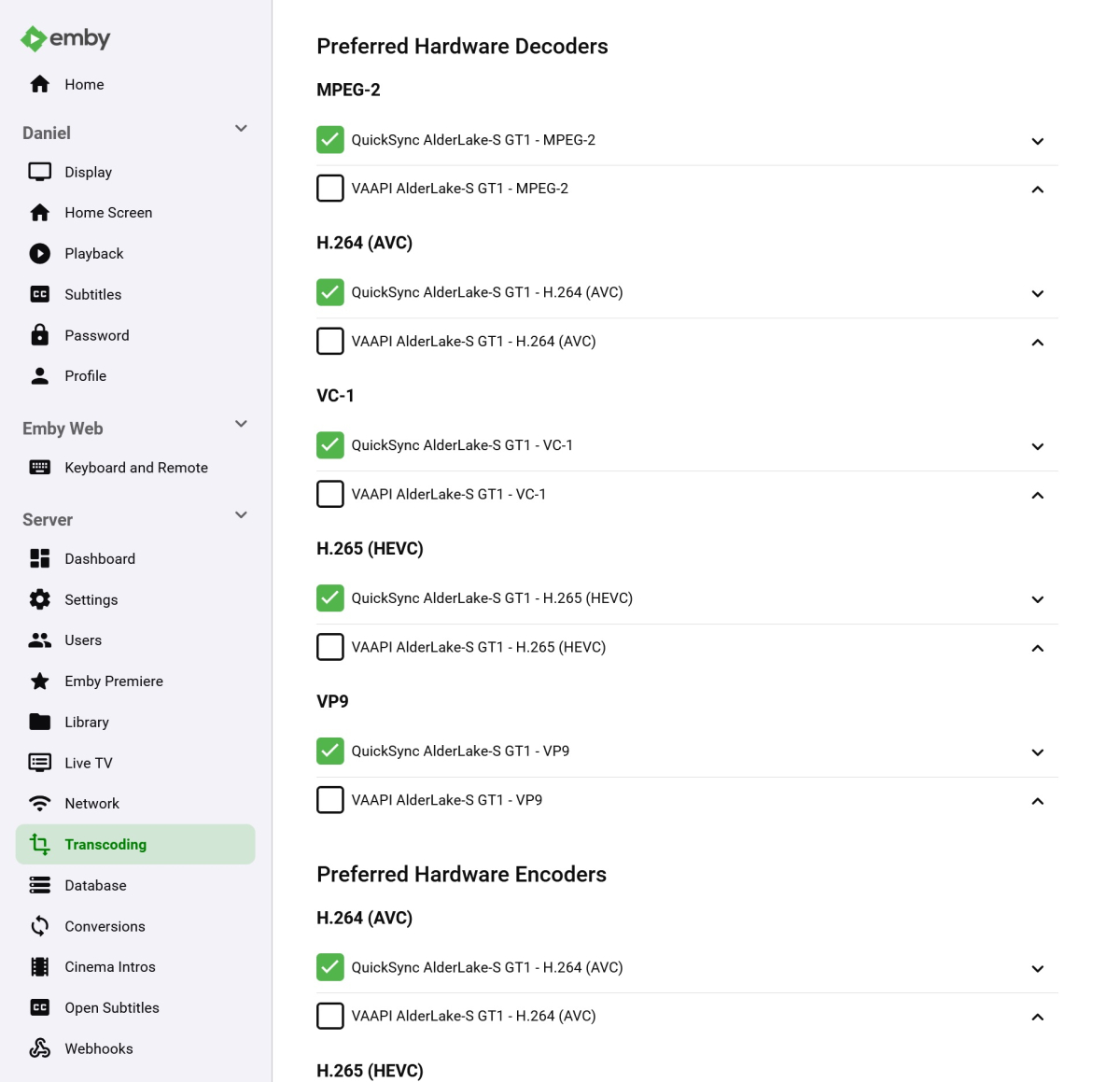
Quick follow-up. I downloaded version 4.8.0.19 beta and I now see QSV as an option. Hopefully 4.8 stable is released before too much longer. Thanks all for your help.
 1 point
 -
Resolved - looks like the pguid was set up wrong, amended and now works as before1 point
-
Ya está, es eso, ya lo tenia olvidado. Muchas gracias.1 point
-
Hopefully you can also fix the multiple episode in each season thingy....I think that is the most annoying one1 point
-
sorry it works! despite that message... thanks1 point
-
I'll check it out1 point
-
I was just about to bring up the same issue - and find this answer . Hope it's added soon.1 point
-
Thanks for letting me know. I am glad to hear that you have seen this before.1 point
-
Access tab per user setup.1 point
-
https://www.igdb.com/api (Required OAuth for personal token authorization) (Parent company Twitch) https://api.rawg.io/docs/ (Required apikey for authorization) https://www.giantbomb.com/api/documentation/ (Required apikey for authorization) (Parent company Gamespot) https://thegamesdb.net/ (Required apikey for authorization, access requires special request) They all have similar requirements. Really the authorization is most likely to avoid abusing creating your own service to simulate their same data set and features. IGDB seems to be the most robust in terms of raw data. GiantBomb seems second most favorable in terms of completeness. Not too concerned about authorization flow. Pretty common these days and could be setup in the plugin settings. There might be other players but with too small of databases. Main reason I was asking about this is more and more home media (including Video Games) has turned into a hub environment. Games can be a big part of that ecosystem and like to see Emby take a crack at the presentation market for these libraries. I could always load up RetroArch that does this all in one presentation but then it is a separate presentation layer inside another app.1 point
-
Hi, I can't put a number to it but I would think quite a few because direct plays don't download at full speed, only at the rate needed to play, or slightly above.1 point
-
W, Hmm. I found this list from Google on what is supported. It looks like .mkv is rather limited to exactly some codec version. h.265 still has royalties payments from industry, so it's reasonable that only some versions might be supported and not all combinations. Have a look to see if your test videos codec versions are listed here. Did you ever try a test video? Videos from anywhere can have all sort of errors that software players smooth over and playback perfectly elsewhere. https://developers.google.com/cast/docs/media1 point
-
Perhaps there will be another update to the firmware on the CC that will also alleviate the issue as these problems all started with their update it appears.1 point
-
So I have seen shows reprocessed on my system before, and it turned out that it was stuck on an episode where a correct ffmpeg/ffprobe was not functioning correctly. I fixed the source file and once re-detected - ie a 100% all episodes detected - then it stopped trying to re-process that show. I have asked Luke the same question on 'how' it knows that it has processed that show/episode, the answer I got is that it uses the presence of the Hidden Marker types to determine that. So if you are literally deleting the hiddden markers (IntroStart and IntroEnd) then that is probably why it is re-processing them - BUT if an Intro simply does not exist - then I'm not 100% sure if the markers should have NULL values - or set to 0:00 etc. I'll have a look later to see on a show with no intro's - what the hidden markers are set to.1 point
-
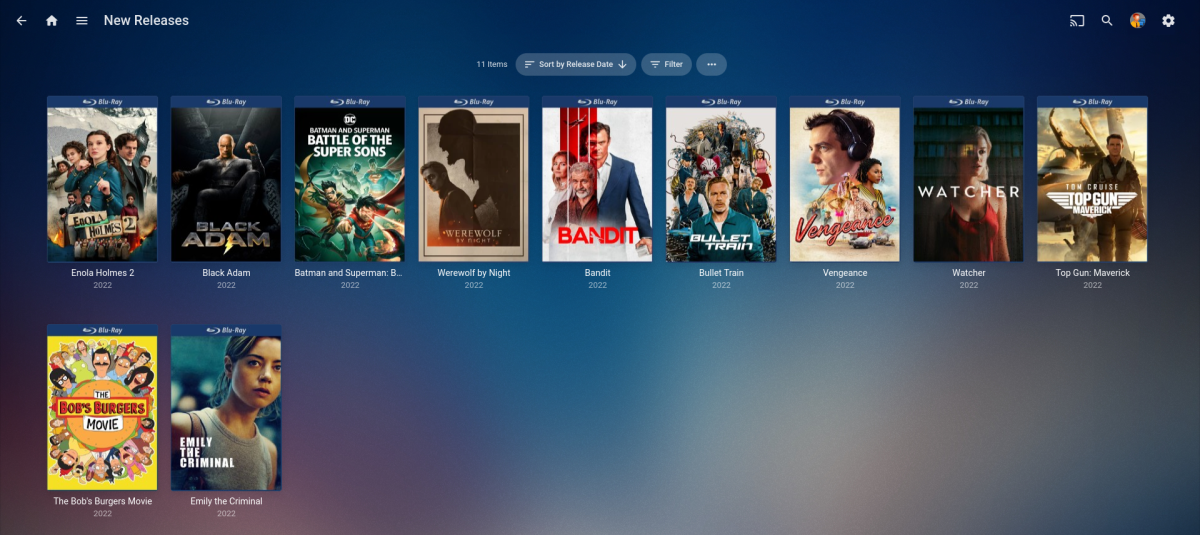
Hi @PuffyToesToo, I just added a new movie after updating Emby to (4.7.10.0). The movie was "Enola Holmes 2 (2022)" and it showed up in New Releases after a "'Refresh Internet Channels". So it seems to be working ok for me.
 1 point
 -
Okay, thanks for letting me know. I'll see what changed.1 point
-
To use HDR and/or DV - you NEED to have it Direct Play both the VIDEO (and in MOST cases) the Audio as well. HD Audio is the usual culprit on tripping up people - so by selecting Dolby Digital (AC3) or Dolby Digital Plus (EAC3) - before playback - then you have a good chance of it working with HDR/DV. Unless you have an external media player, such as the Nvidia Shield and an AVR capable of playing HD Audio (Dolby True-HD, DTS-HD etc) then by using this audio track (which is usually the 'default'.. ) all they do is destroy your ability to Direct Play and thus transcode, meaning you lose the HDR/DV.1 point
-
C'est résolu, c'était un problème de box internet qui n'avait pas encore validé le changement (mensuel) d'IP et donc la redirection en DNS Dynamic était orpheline ! ça ne venait ni d'Emby, ni du Syno, mais juste de ma box !!! grrrrrr Merci Luke, pour t'être soucié de mon problème !!1 point
-
We would likely have to treat them as users but could maybe use the ParentID back to the family "admin" so we know it's a linked account. But at the end of the day I still think adding groups would be the best way as a user could be members of multiple groups and it would fulfil other user requests as well. Granted it's actually a bit more than what's asked for here but would be doable using groups as well. Group in this case would be the family unit.1 point
-
For the most part, no. We'll try to bring them back next year, but we've had to focus on other things.1 point
-
Then I would question why is your media transcoding if it can direct play? As disabling transcoding is only a band aid for an issue which the majority of the time is Auto quality.1 point
-
It was VERY appropriate as far as i am concerned as it suggested a fix that actually works. But you own Emby and what you say goes even if it is close minded. Due to your heavy handed response you are causing me to rethink my involvement with helping Emby. I am not yet quite at the point where I will withdraw from the attempts to help but I am damn close. I know you don't need me but this is excessive. If I had gone on and argued for MediaMonkey over Emby then, maybe, hiding it would be correct but all I did was make a suggestion that would have, in my opinion, fixed the problem by simply making the problem go away. It is, as I said, your board and you can do as you please, but my involvement is optional and that option is becoming less attractive.1 point
-
As much as I like Emby for my media I have decided that Emby is simply unsuited for audiobooks. At least for me. I would kind of like to use Emby for all my media but it just will not work as I need it to. Try MediaMonkey for audiobooks. It is much more versatile and easier to use.1 point
-
Problem is they will never catch up as they are falling more and more behind as time goes on. Emby is like a coding rocket ship while JF is more like Cessna. Even feature they both have can be a world of difference between them such as tone mapping. That's not to say Emby is better in every feature/facet but as whole Emby is far more mature. They do also have a couple of things Emby does not. How useful they are to the general population, I'm not sure.1 point
-
I believe @ebr is referring to the rips .. The best tool to identify DV is MediaInfo - if the 'HDR' section says :- Dolby Vision, Version 1.0, dvhe.07.06, BL+EL+RPU, Blu-ray compatible / SMPTE ST 2086, HDR10 compatible Then it's DV single layer - and should be playable with emby. If it says - SMPTE ST 2086, HDR10 compatible (only) and there is a 2nd Video track (also saying SMPTE ST 2086, HDR10 compatible) then whilst this is a DV 'rip' it is not playable on any software based player - thus you need to convert it to a single layer. You can actually do this by running it back though the latest version of MakeMKV. ie use the dual layer MKV as the source of the rip - and the new version should be a single layer. I hope that helps.1 point
-
What app is giving you this as my Browser says Auto-Direct and so does my IOS app when direct playing media. I still don't understand the context of what you are saying or seeing. Who cares if it says 4k-120Mbps as that is a MAX value and has nothing to do with playing a 1080p 12Mbps items. How is your media being played? Direct Play, Direct Stream, Transcode1 point
-
It's that sort of attitude that makes people want to move to Plex...0 points
-
Bumpers selection has that as a remark during selection0 points




.thumb.png.225edb9636a79b10cd220c27f59990f3.png)