Leaderboard




Popular Content
Showing content with the highest reputation on 11/24/22 in all areas
-
Hey Guys Just want to take a minute to thank everyone in this emby community for all the wisdom and hard work that each and every one of you put in to make emby such a great experience. Also every last one of you have a safe and happy holiday season Mook5 points
-
When I use search I'd rather see my previous search terms rather than Suggestions. What's the algorithm for suggestions? It seems completely random and I don't recall ever using it. Previous search terms would be much more useful.2 points
-
I surprisingly couldn't find anything regarding this, hence this feature request. Sometimes it can take a few seconds per image to be fetched due to network issues and it looks weird for rows full of blank boxes. It's also quite jarring for those blank boxes to suddenly be replaced with posters. Thanks for considering.2 points
-
It's not only about processing power/capacity or age but about the video codecs supported in the encoder/decoder of the GPU, whether integrated or discrete. You've seen the nVidia table and probably noticed that the older GPUs do not support HEVC/h.265. Comp 1 on your list could handle the job by using the discrete GPU for transcoding, though somewhat limited by the low power CPU. Here's why the older Intel CPUs are not cut out for media servers: https://en.wikipedia.org/wiki/Intel_Quick_Sync_Video Kaby Lake (7th gen) is really the oldest you should consider if starting with a "new" media server.2 points
-
However, this version here will work with beta server.2 points
-
The watched history is based on the provider ID (the tvdb, imdb etc) - it is not based on the emby ID - UNLESS there is no provider ID for it (which unless it's home video, 99.99% of the time there will be). You can test this by creating a new test library, copy a few 'watched' files (as new files, don't just point the same files..) - and you should notice that those files are already 'watched' from the same user, because they will be allocated the same provider ID.2 points
-
Just tried ssllabs server test. Got an A. Piles of info underneath, no idea what it means.2 points
-
@hackthis02, Finally got around to attending to this. It turned out to be a movie, correctly named but in a TV Show folder. Thanks for your help and thanks to @Happy2Play for his code. cheers Jordy2 points
-
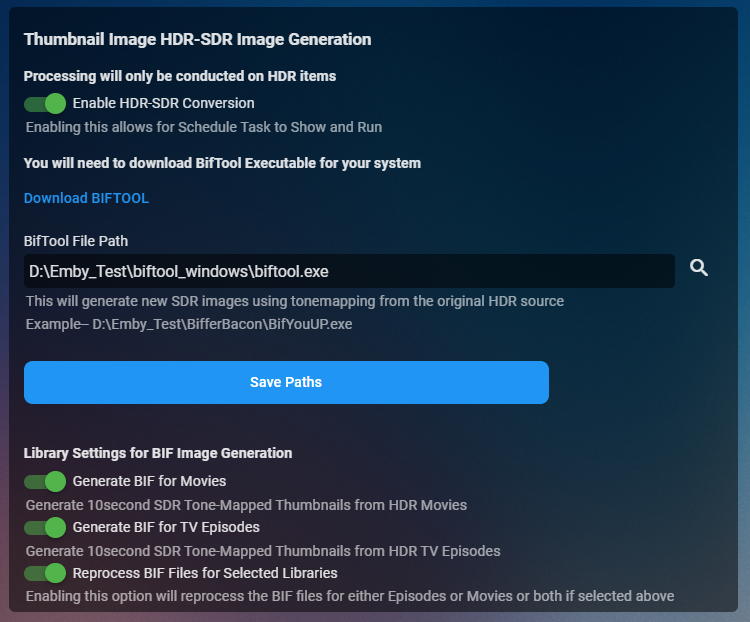
Cheesey Productions brings you MediaInfo for Emby Bringing your Media Info Formats up to Date (including HDR, Vision, Atmos, HLG, DTS:X, DVx, etc) And HDR-SDR Image Extraction using tone mapping for clearer seek images Available from the plugin store A huge shout out to @rbjtech for all his help with this. He was my knowledge base. Thanks Rich Please read the wiki page available that will help you get set up. MEDIAiNFO WIKI PAGE PLEASE NOTE THIS PLUGIN WILL MODIFY YOUR MKV EMBEDDED TRACK TITLES Some examples Also you can add tags to your items Enable the options in the settings and this will only add the tags for the unique formats the emby doesn't already take care of. There are plently of options for you to chose from to get your media looking how you want New Feature Added ---- HDR - SDR BIF File Creation using Mobius Algorithm for ToneMapping This generates larger and crisper images for Chapters and 10Sec ThumbnailSets WE URGE YOU TO READ THE WIKI PAGE 2 SO YOU UNDERSTAND FULLY WHAT'S INVOLVED HDR-SDR IMAGE GENERATOR WIKI Settings can be found at the bottom of the media info page. Feed back is always good. After replacing the dll always remember to clear your browser cache and restart it, to load new changes in the UI.
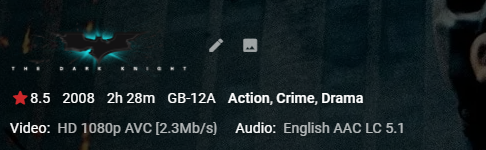
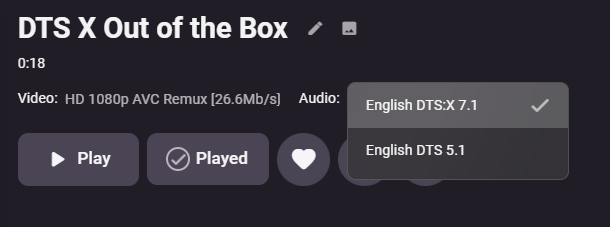
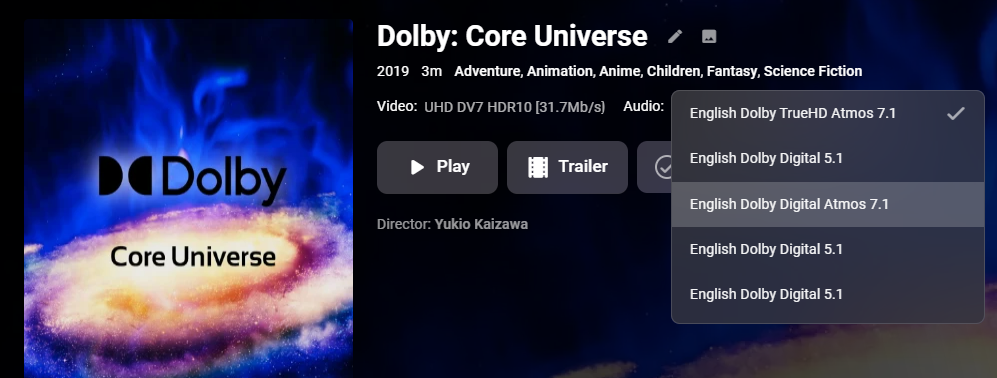
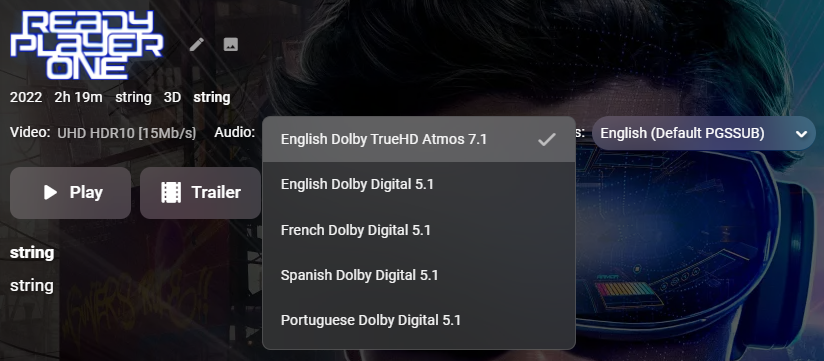
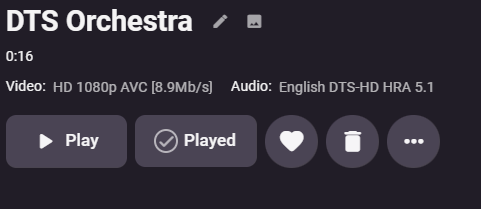

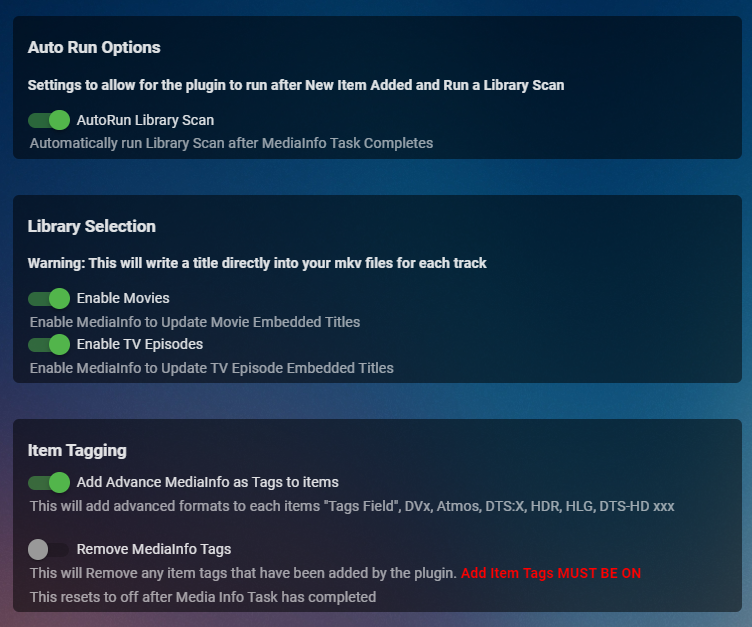
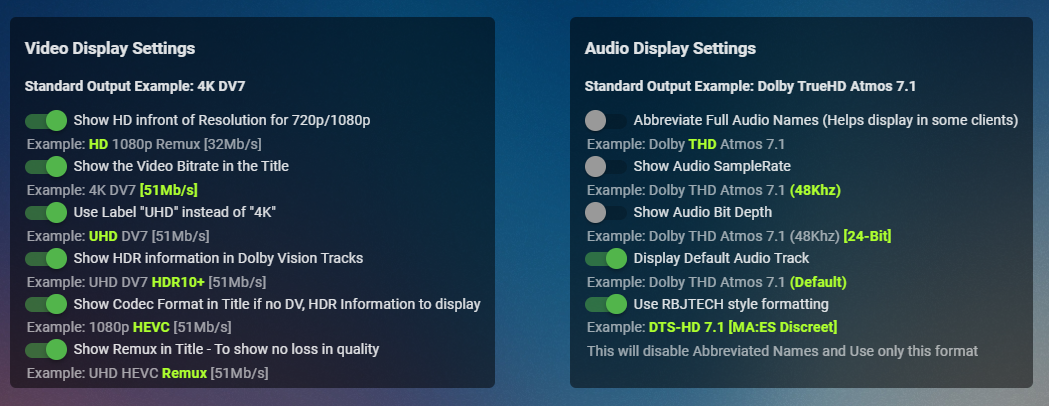
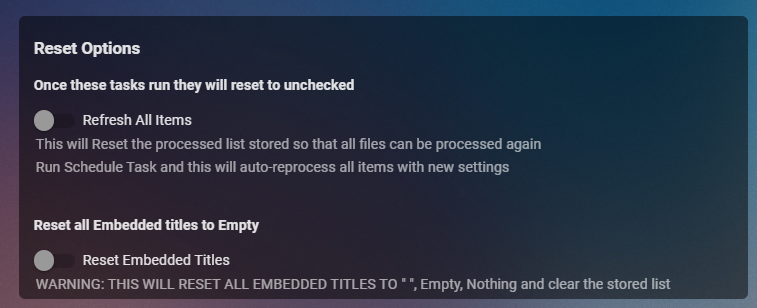
 1 point
 -
Would be nice to have the ability to shift the Live TV Guide forward and back a set number of hours for those who have guide providers that do not sync up with the current time.1 point
-
@mrhonigWith something like WinSCP.1 point
-
Thanks for the good answers! I have now set up an machine: Intel Pentium Gold G7400 Alder Lake ASUS PRIME H610M-K D4 MainBoard Kingston FURY Beast DDR4 3200MHz 8GB WD Blue SN570 250GB NVMe SSD Cooler Master Elite 500 230v V4 PSU SATA 6Gbs male to male kabel rød 0,5m Cooler Master Masterbox NR600P Tot: 590 USD 390 without the Case.... I'll search for and computer that maybe have mainboard that I can change the CPU, or maybe both CPU and mainboard. Maybe I then have the mony. But I don't have 6000,-NOK at the time for this.. And as You mentioned, I should wait for the 13. gen, not possible with the prices here. This G7400 in the list 100 USD and a new i5-13600KF cost 400 USD. Not that deep pocket in this times..... But again, thanks for the help so far. I'll search for som old that can be upgraded1 point
-
Saying that the application is ugly does not provide information. Say what you don't like and what you would change.1 point
-
If I might suggest, you'll probably / hopefully be asked for details / illustrations / suggestions about what you don't like / would like to improve, so might be work adding a few if its possible...1 point
-
Hi, yes it's possible for future updates. Thanks.1 point
-
nope - when i access the movie through the native emby new movie row or in the library both versions are listed. no issues with items out of order other than the situation mentioned in the new releases thread for brand new movies1 point
-
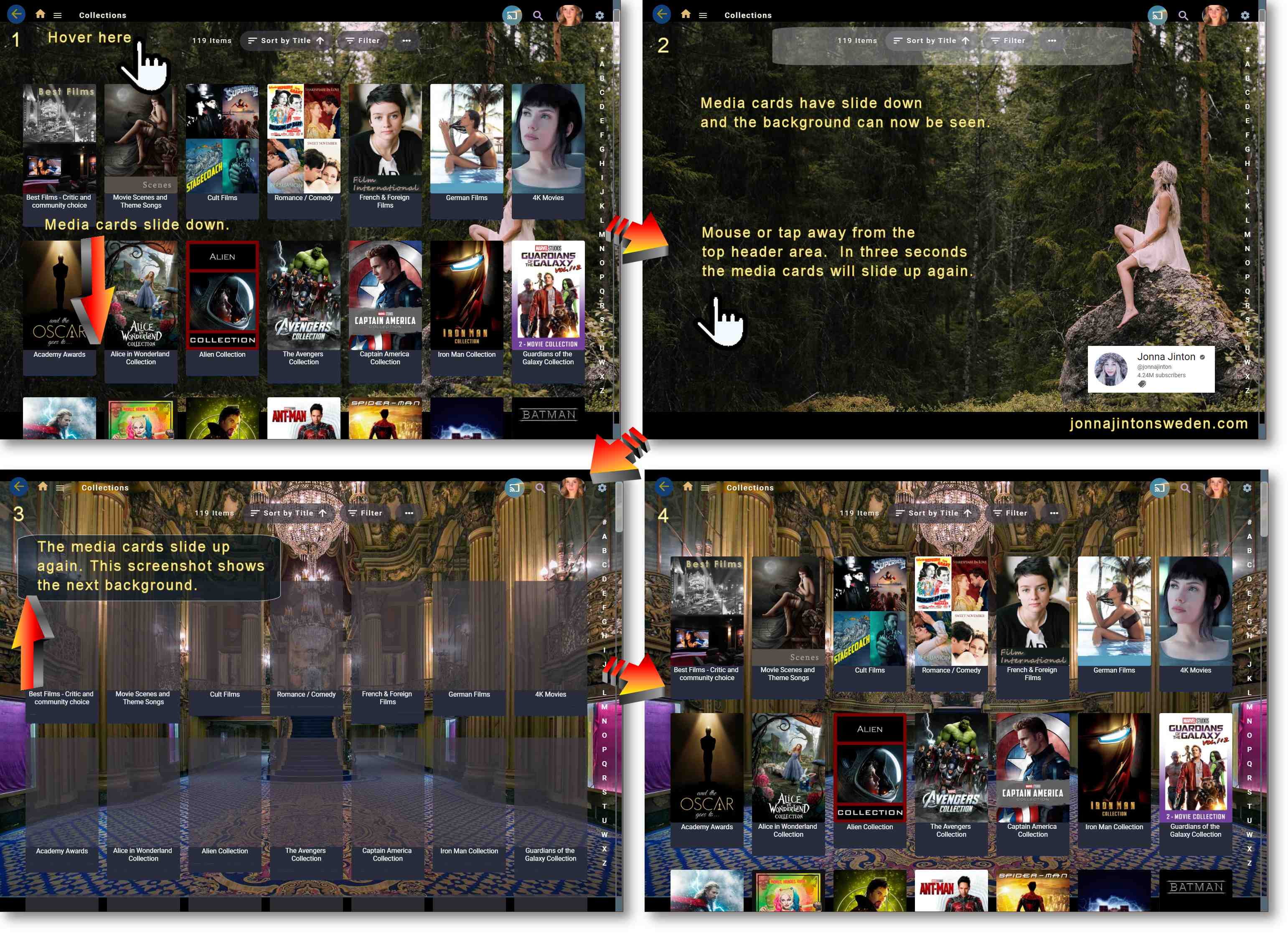
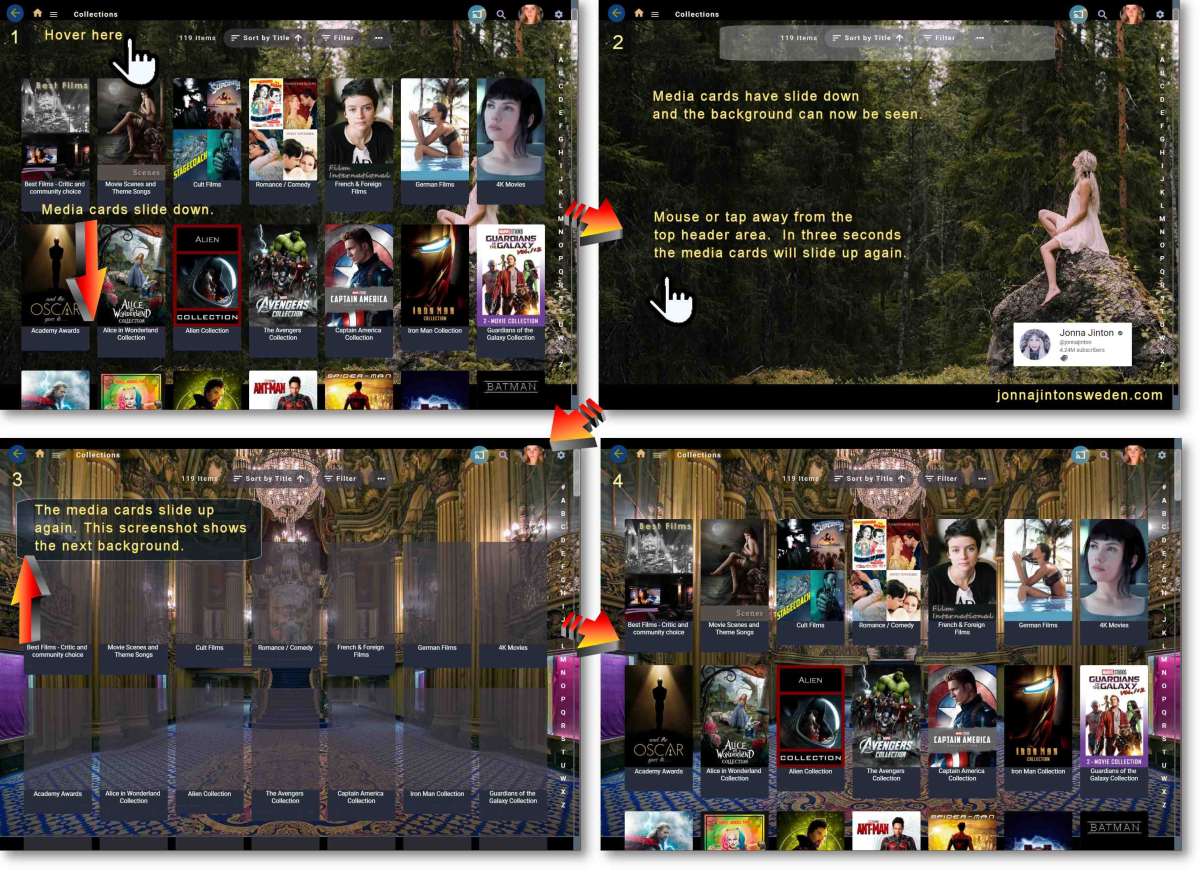
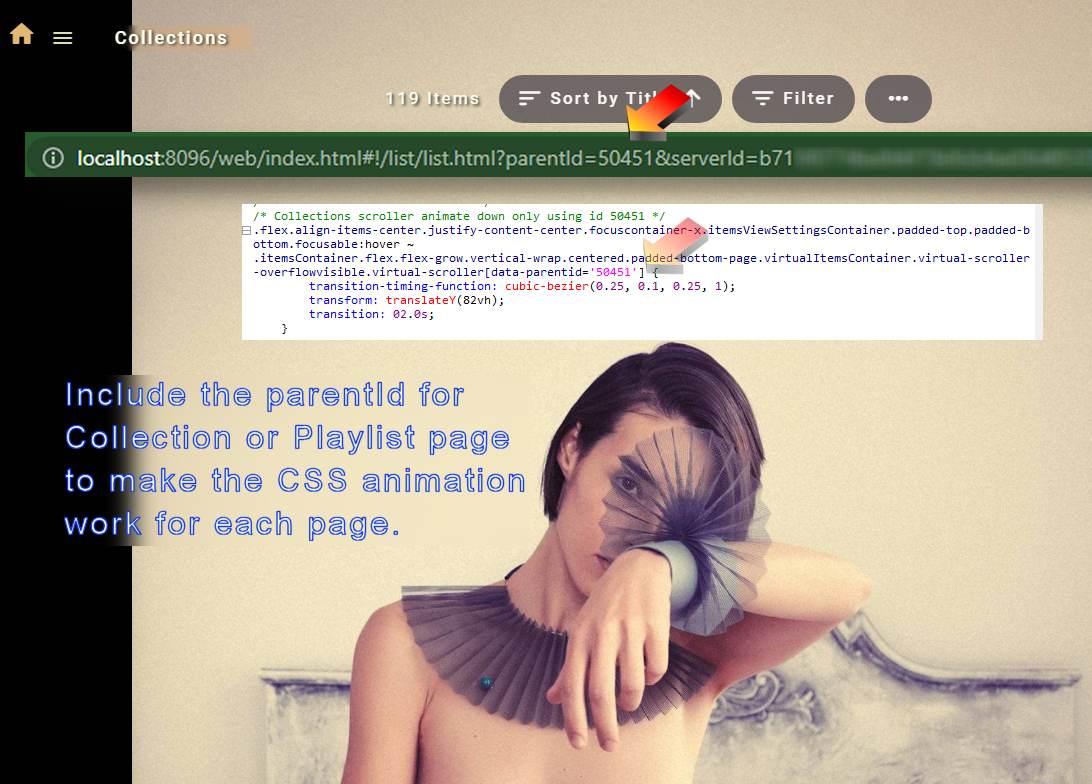
This is like making a DVD Easter egg. I had a lot of nice backgrounds to put behind collections and I've turned off shading for backgrounds in the theme.css, which annoyingly has to be done after ever update. (An optional turn off shading button would be nice.) Anyway, these interesting movie type backgrounds could not easily be seen because all the collection and playlist media cards were in the way. Without dark background shading it looked odd. But I like it. The goal was to find a way to show the backgrounds for visitors. I added extra bottom margin, so if the user scrolled all the way down the background appeared. /* Fix for bottom image viewing padding to show background images. This style works on all pages. */ .padded-bottom-page { padding-bottom: calc(95em + env(safe-area-inset-bottom,0)) !important; margin-top: 22px; } Still, that was not enough. Why have interesting backgrounds if you have to scroll all the way to the bottom to see them? So, I found a CSS trick that can animate the media poster cards to slide down, smoothly for 2 seconds and stay gone with a 3 second delay to slide back up. The triggers are mousing or tapping on the top header area, then mousing or tapping away gets a 3 second delay and the media cards return. You have to find the parent ID number in the url that matches your collection and playlist pages and add those numbers to the css code. The playlist animates by sliding to the right in this code example. I was surprised that this worked in pure CSS. I really didn't think it was possible. I did not want to have to try to add divs, or do some extra js, which is not ideal and probably difficult to keep working after updates. So, there is no button that could come from a div change and javscript. It is a hidden extra. Maybe it's too complex for some people. What do you think? I am happy to post any other Custom CSS shown in the screenshots, if anyone is interested. - Credit: Screen section 2: There are many wonderful videos of Northern Sweden lifestyles - Visit https://jonnajintonsweden.com/ and https://www.youtube.com/@jonnajinton/ Here's the custom css code: /* Custom media card slideaways */ /* ============================ */ /* Collections scroller animate down using id 50451 - Check your URL and use your parentId numbers instead */ .flex.align-items-center.justify-content-center.focuscontainer-x.itemsViewSettingsContainer.padded-top.padded-bottom.focusable:hover ~ .itemsContainer.flex.flex-grow.vertical-wrap.centered.padded-bottom-page.virtualItemsContainer.virtual-scroller-overflowvisible.virtual-scroller[data-parentid='50451'] { transition-timing-function: cubic-bezier(0.25, 0.1, 0.25, 1); transform: translateY(82vh); transition: 02.0s; } .flex.align-items-center.justify-content-center.focuscontainer-x.itemsViewSettingsContainer.padded-top.padded-bottom.focusable:not(hover) ~ .itemsContainer.flex.flex-grow.vertical-wrap.centered.padded-bottom-page.virtualItemsContainer.virtual-scroller-overflowvisible.virtual-scroller[data-parentid='50451'] { transition-timing-function: cubic-bezier(0.25, 0.1, 0.25, 1); transform: translateY(0vh); transition: 02.0s; transition-delay: 3s; } /* Playlist animation slide to the right id 51069*/ .flex.align-items-center.justify-content-center.focuscontainer-x.itemsViewSettingsContainer.padded-top.padded-bottom.focusable:hover ~ .itemsContainer.flex.flex-grow.vertical-wrap.centered.padded-bottom-page.virtualItemsContainer.virtual-scroller-overflowvisible.virtual-scroller[data-parentid='51069'] { transition-timing-function: cubic-bezier(0.25, 0.1, 0.25, 1); transform: translateX(106%); transition: 02.0s; } .flex.align-items-center.justify-content-center.focuscontainer-x.itemsViewSettingsContainer.padded-top.padded-bottom.focusable:not(hover) ~ .itemsContainer.flex.flex-grow.vertical-wrap.centered.padded-bottom-page.virtualItemsContainer.virtual-scroller-overflowvisible.virtual-scroller[data-parentid='51069'] { transition-timing-function: cubic-bezier(0.25, 0.1, 0.25, 1); transform: translateX(0%); transition: 02.0s; transition-delay: 3s; } === Related: Fixing the alpha picker in collections .alphaPickerButton-vertical, .alphaPicker-fixed-right { font-size: 17px !important; left: 5px; } Enjoy and Happy Thanksgiving.
 1 point
 -
There is a setting to share kodi throughout your network. Never tried it though. https://kodi.wiki/view/MySQL1 point
-
I agree with rbjtech. My already watched flags always follow the movies where ever I move them on the hard drive or to different libraries within emby and if you add a duplicate it will show as watched also.1 point
-
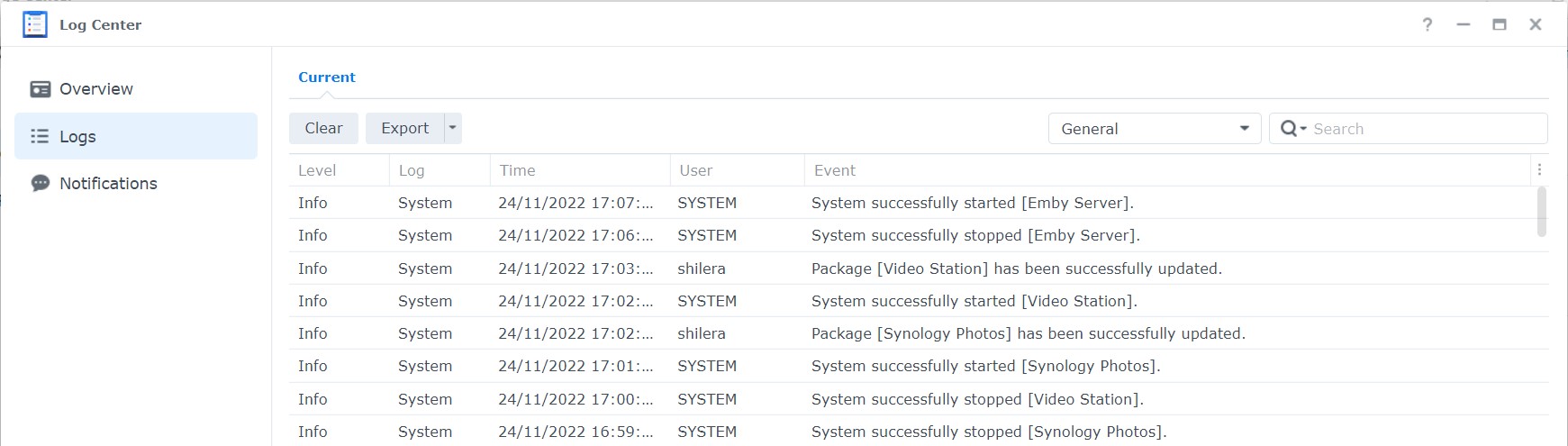
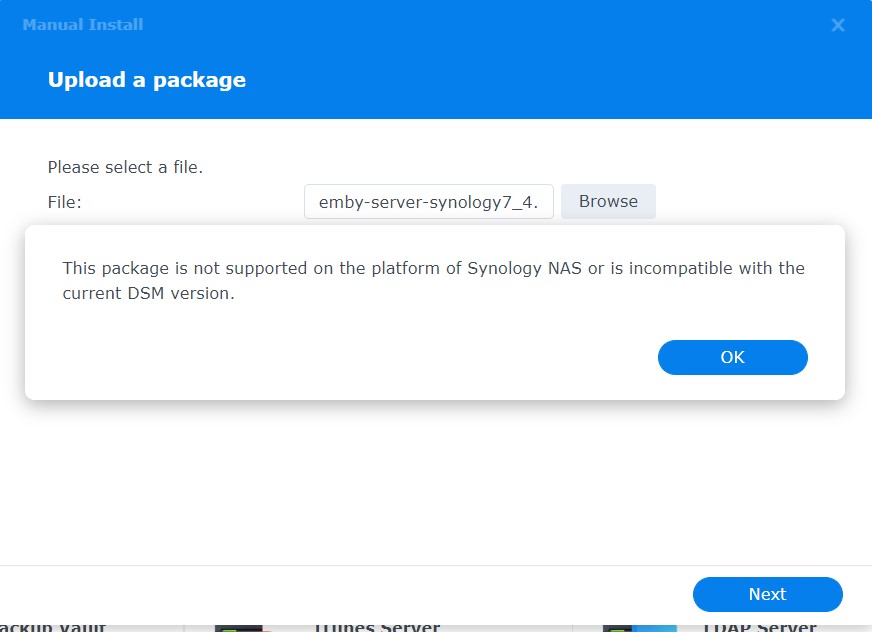
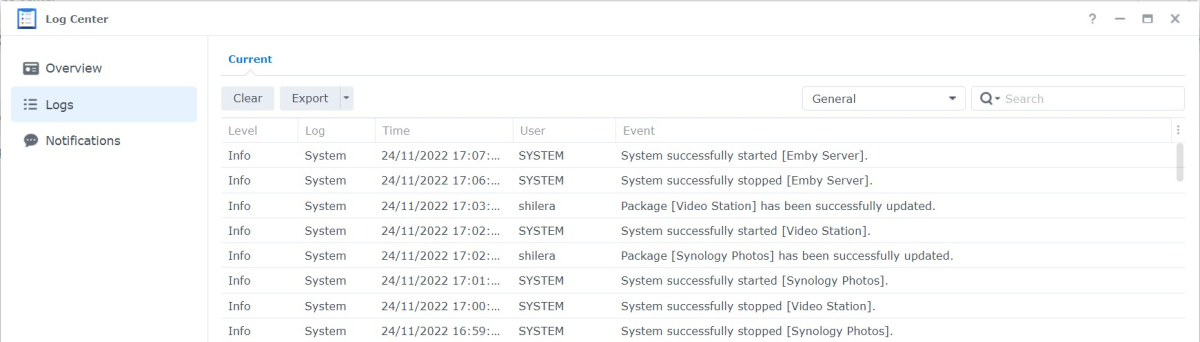
Logs & Alert attached
 1 point
 -
This really needs to be bumped up, as those Suggestions mean absolutely nothing without context and feel out of place there.1 point
-
ok understood. If you are buying new - then I would wait for the i3 13100 to be released (non F version - you want the one with the GPU) - these have 4 cores/8threads and an extremely capable UHD 7xx GPU - capable of transcoding 8-10 x 4K streams ! Use DDR4 memory and it will be a very nice system, with i5 or i7 CPU upgradability down the line should you need it (the same internal GPU through - hence why it's such a good buy for transcoding at the moment..) Enjoy !1 point
-
Nope. That goes for MediaInfo details as item's not probed until first playback, but doesn't apply to Ratings, it was about NFO tags, @chef sorted it now.1 point
-
Thank you for the advice. Problem has been solved. I rebooted my primary computer and the server, Media 3T is back on line. Checked my Emby Dashboard and everything is back. The Dashboard on my primary computer is now Media 3T. I have written down my LAN & WAN addresses from each of my Emby Dashboards (3T & 5T). Lesson learned. Thank you again, And to all, have a happy Thanksgiving and holiday season.1 point
-
I replaced an HDMI cable to the projector. The Shield now registers HDR10 available and Emby now plays HDR10 in that system. (4K HDR upgrade has been complicated and confusing, and I’ve been finding unexpected upgrade hardwares needed.) I think I still have some quirks with Emby on AppleTV that this thread is helping me sort out. I’ll work on that more as time allows.1 point
-
as far as i can see the basics of top picks are now working for me, fully populated, correct artwork and in the right order. i havent looked at any of the more complicated functionality but see others here are. The one issue i still do have is common with what i reported in the new releases support thread. multi-versions of top picks (and new releases) are inconsistently displayed. i see no logic to work out why1 point
-
Thanks you very much. I'll give it a try this weekend.1 point
-
It is a general statistic for the entire server. Certain items will be filtered in some accounts if the users parental ratings don't allow them to see the item. If you have a rated R movie in top picks, users that aren't allowed to watch that movie, won't see it. It does raise an interesting point. Perhaps there is a way to do a user specific list. I'm not sure though. When the options say "user defined", it just means, items you have added to the list, and not the engagement task.1 point
-
I see, thanks. Maybe there could be a brute force option of "just remux everything for Roku" assuming it would not cause more problems than it solves.1 point
-
So you really need a 7th Gen (or better) Intel CPU - not for the CPU but actually for the Quick Sync GPU it has built in - UHD 6xx Gen 6 will still 'work' - but the 7th Gen was a big leap in GPU/transcoding performance - and as you want 4K transcoding, I would suggest you make this your minimum standard. You don't need an i7, go for an i5 if you can afford it, but i3 or even a Pentium Gold will be perfectly sufficient if it's dedicated to emby. You don't need a discreet graphics card at all. (Nvidia GTX etc) 16GB of RAM is more than sufficient. You will need emby Premium to use the GPU transcoding (on either QuickSync or Nvidia GTX if you went that route) I hope that helps. edit - make sure the CPU has the GPU - many do not - its the gpu you want Quick options below - i5 - 7400/7500 or 7600 i3 - 7100/7300 Pentium Gold - G5400 onwards1 point
-
Agree, a HDFury shouldn't be needed in this case if the LG supports DV. What the HDfury does for me is it allows my Samsung to display LLDV and DV metadata. Emby just passes the video to the Shield when direct playing. It's the Shield then that detects my TV doesn't support DV. So I plug the Shield into the HDFury Vertex 2 which converts the video signal. My setup Shield -->> HDFury --> Video out --> TV --> Audio out --> Soundbar This setup works for me for two reasons. First, the whole chain has to support DV (or at least passing DV) which my soundbar doesn't and my TV won't pass HD audio to my soundbar1 point
-
HD Audio will not work via ARC or eARC or via any TV - the only way to process HD Audio is via a Shield (or device capable of HD Audio passthough) into an AVR. Using the LG App will work fine for HDR/DV (I have an LG OLED myself and have the LG App installed, but use the Shield as my player to allow me to play HD Audio) but the LG will not playback or pass HD Audio - by design - you need to use AC3, EAC3 etc as specified above. Not sure why you need an HDFury tbh ?1 point
-
tbh Carlo, I don't have the time to invest in a detailed investigation into this - nor do I frankly see the need to. I believe the OP has an answer to this FR - yes it's possible, but the reasons why it's not a simple answer has been explained to death above ..1 point
-
Salut, comment essaies-tu exactement de te connecter ? Quelle application Emby utilisez-vous ?1 point
-
Hi, no, you do not need to have a forum account for Emby Premiere.1 point
-
The engagement task most likely won't change the top picks once they are calculated. The list isn't random (although I do like the idea of some kind of random chooser... That might be cool). They will probably always calculate that way until a new item has enough of a score to out rank a current item, and take one of the spots. I find that the community scores really weigh heavily on the outcome. Which is cool... I think. I'm going to add some code to try and fix this. The code will extend the conditions for user engagement by saying: if we can't find a path to a primary image (for whatever reason) and the providers are of no help in providing a primary image then grab the next possible top pick item and skip the troublesome one. I'll write that in there tonight, and release something tomorrow.1 point
-
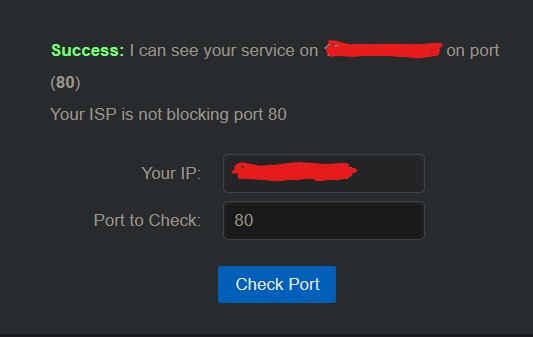
I have this now from CanYouSeeMe which I guess / hope is good ?
 1 point
 -
This was the issue. I went back and noticed that the folder didn't have the year, but the two files did. Added the year to the folder and now I'm seeing the format selection. Thank you1 point
-
1 point
-
yes, i also triggered the task again but it is not changing the top picks for now, so maybe it needs more user data to recommend more/others. The ones i set manually does all use my cover1 point
-
I've re-added a scheduled task to import play status from Trakt.1 point
-
Hi, yes it is.1 point
-
@cayars Thank you very much for putting me on the track ... I actually checked the log, found the movie that was blocking the analysis! Thank you again for helping me.1 point
-
@ITGuy1024 in my experience with MKVs, using mkclean on the file with the --optimize switch after encoding will produce a proper MKV that the Roku (and everything else) will be happy with, and is probably the lowest-effort way to ensure you have a file that adheres to spec. https://www.matroska.org/downloads/mkclean.html1 point
-
Imagine all the other players like normal. Where you can share code. They all use a common core (java, python, c, swift, etc) language and can compile normally and all that other stuff. It is easier because the languages can be anything used to program with. Now on Roku there is a single language called brightscript that is only used on Roku. It has no low level access. Emby is ran inside a sandbox. That sandbox is not combined with the video player. You get memory pointers and some local variables. The main runtime runs outside the Emby instance. There is no easy (read as non-corporate partner) way to add python, or java, or any other kind of runtimes to the Emby side. You must code it all in native brightscript. Roku does not offer an NDK (native development kit) to anyone except corporate partners. This limits any ability to alter player behaviors such as speed controls and etc. The Roku requires you must start from scratch on everything since it has this unique programming language that nothing else uses. The video player logic we built on top has fallback detection, hang detection, and some other stuff. Because of this Emby will have a better "Roku player experience" than all other Roku applications because of what Emby has built on top. But this extra video player logic we built isn't helping in your case because the player is telling us the item has finished. There is no way to program or code around that fact. The Roku player believes it has arrived at the end of playback. This could be because those EIA_608 are set as default. Those subtitles will always try to play being set as default. Maybe that is causing the failure is the subtitles fail to load and this causes the end of playback? Hard to know. The Roku is wonky. Some Roku devices will play items in their player that other Roku devices will not. It is hard to tell rhyme or reason "WHY???!" sometimes. For the most part these failures come down to codec detection, reading support from the devices and such. But for the minor part it is due to quirks in the different chipsets each Roku device is composed of all of which Roku isn't giving us any clues about. This presents the challenge. You must be jedi and it is hard when the Roku player is still padawan. This is where you have to trust. The Roku player is built by Roku. How the Roku player detects the format of your media is built by Roku. The Roku is unlike other players because it loads the header of the file to check format unlike other players which check the bit streams themselves. This can lead the Roku to become confused when the header attributes do not follow standards. Other players can work around this fact because they can tell the header is wrong once they read the bit streams. The Roku doesn't even go that route. To the Roku the header is the trust. So at Emby as far as Roku is concerned we must also trust the header of the file. What is built on the player by Emby is all the features on top. The overlay UI, the trickplay, the skip intro, the stats for nerds, and all the rest. We are trying our best to give you better than what they have presented you with. But we can only work with what we are given. All Roku developers who use the RSGA SDK are in this same boat. Those are honest answers why you are having issues. Apologies we cannot give you a better answer.1 point
-
OK yes that is certainly possible.1 point
-
You need to find the unidentified items in your library. https://emby.media/community/index.php?/topic/65998-new-statistics-plugin/&do=findComment&comment=11800981 point
-
OK we'll take a look at it. Thanks.1 point
-
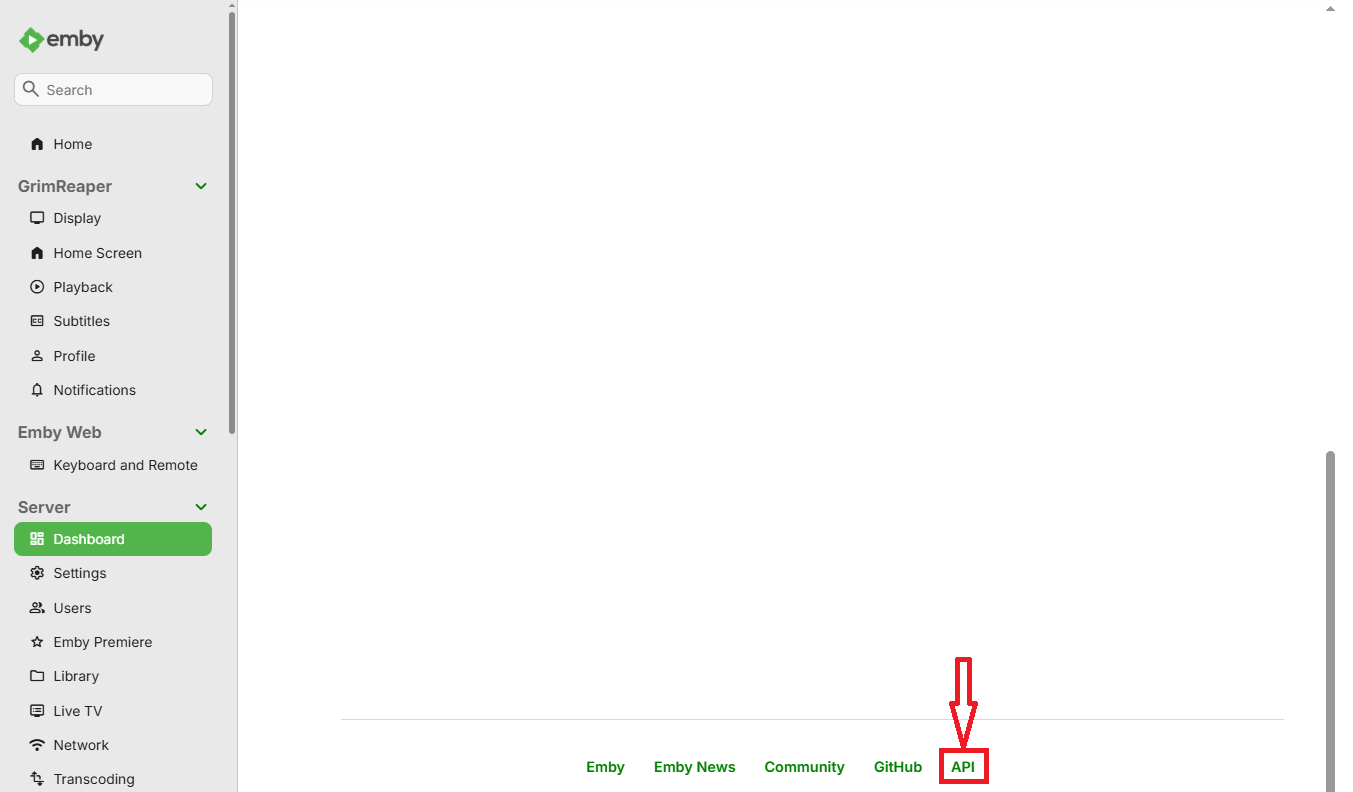
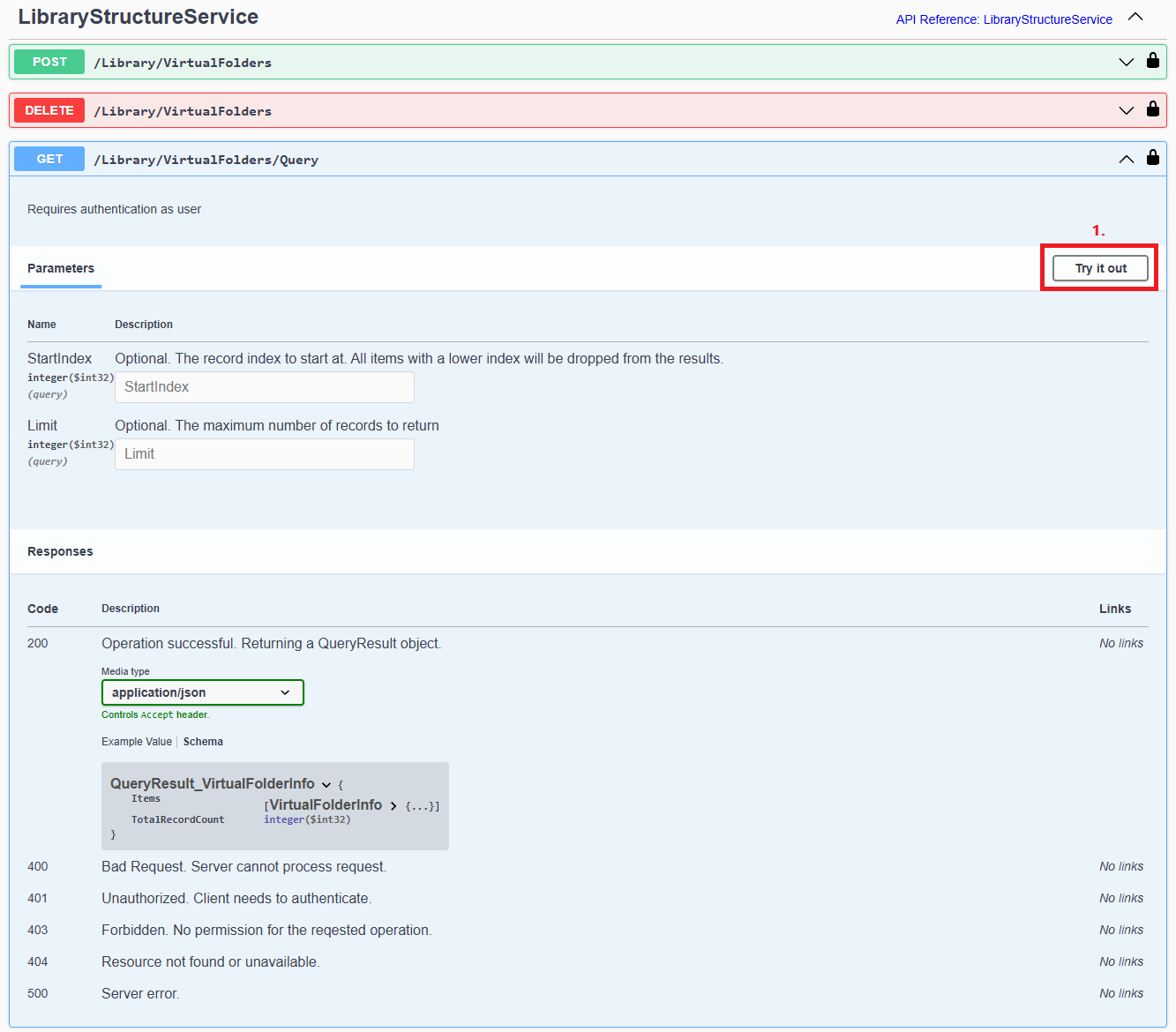
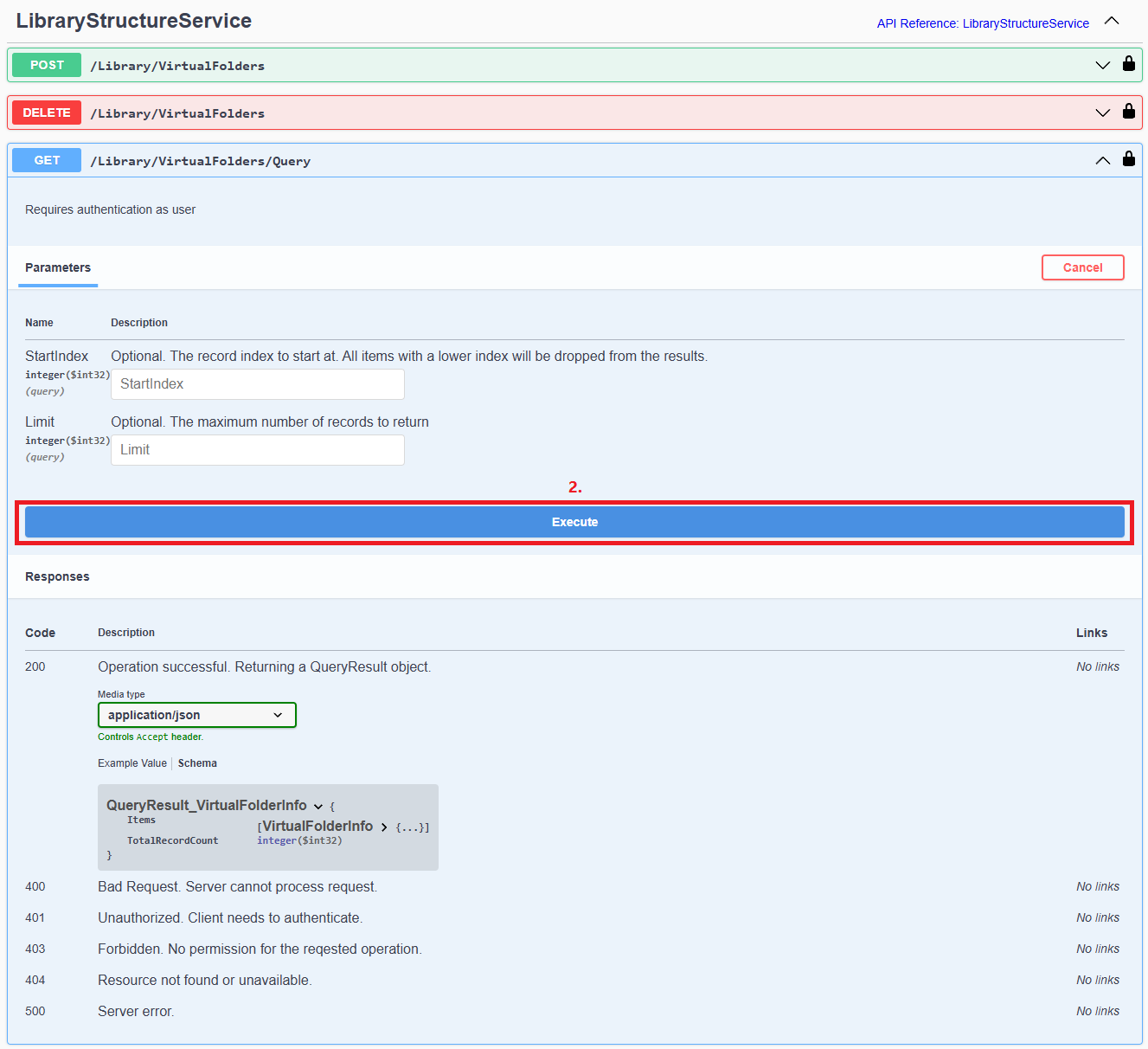
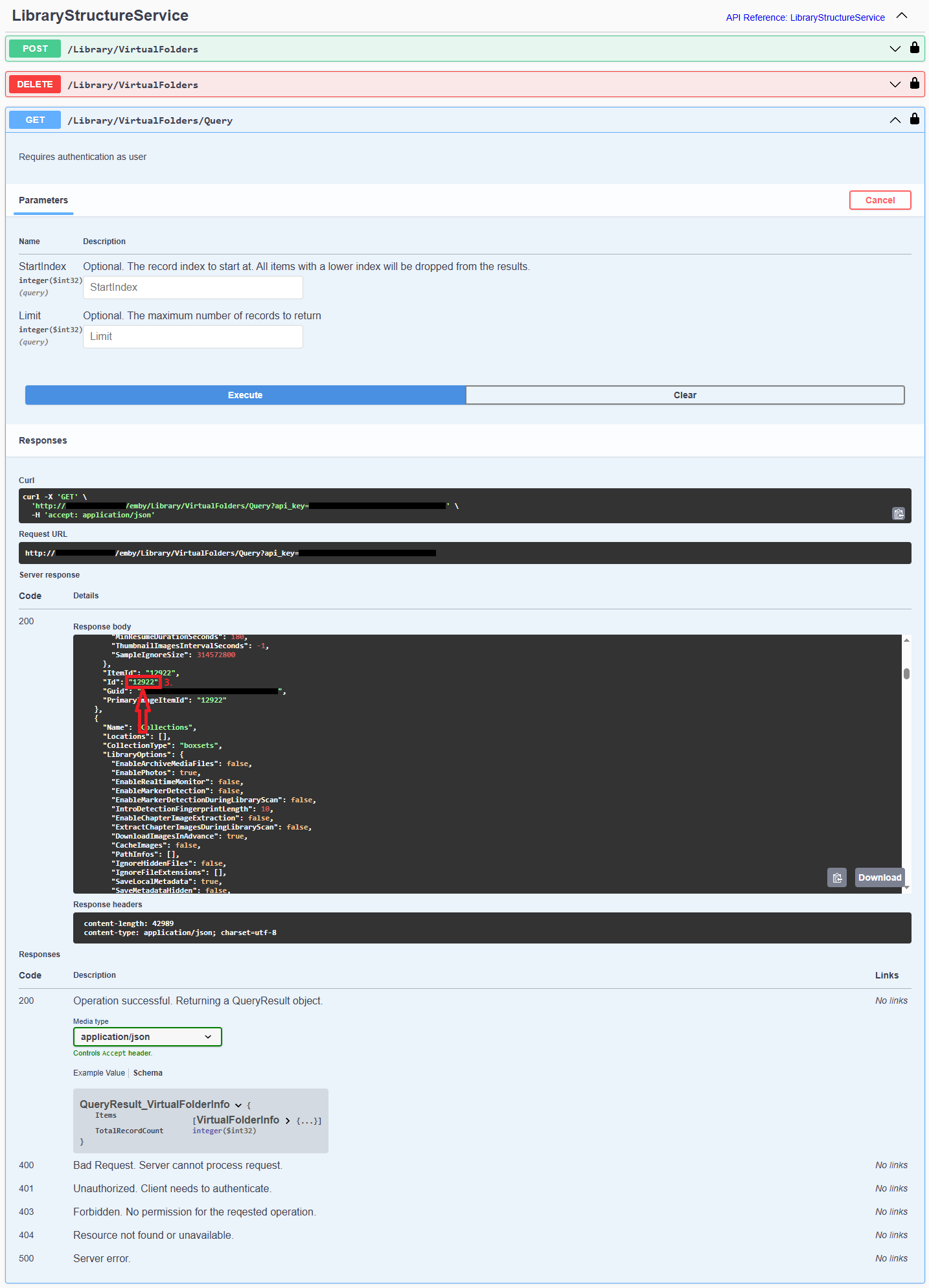
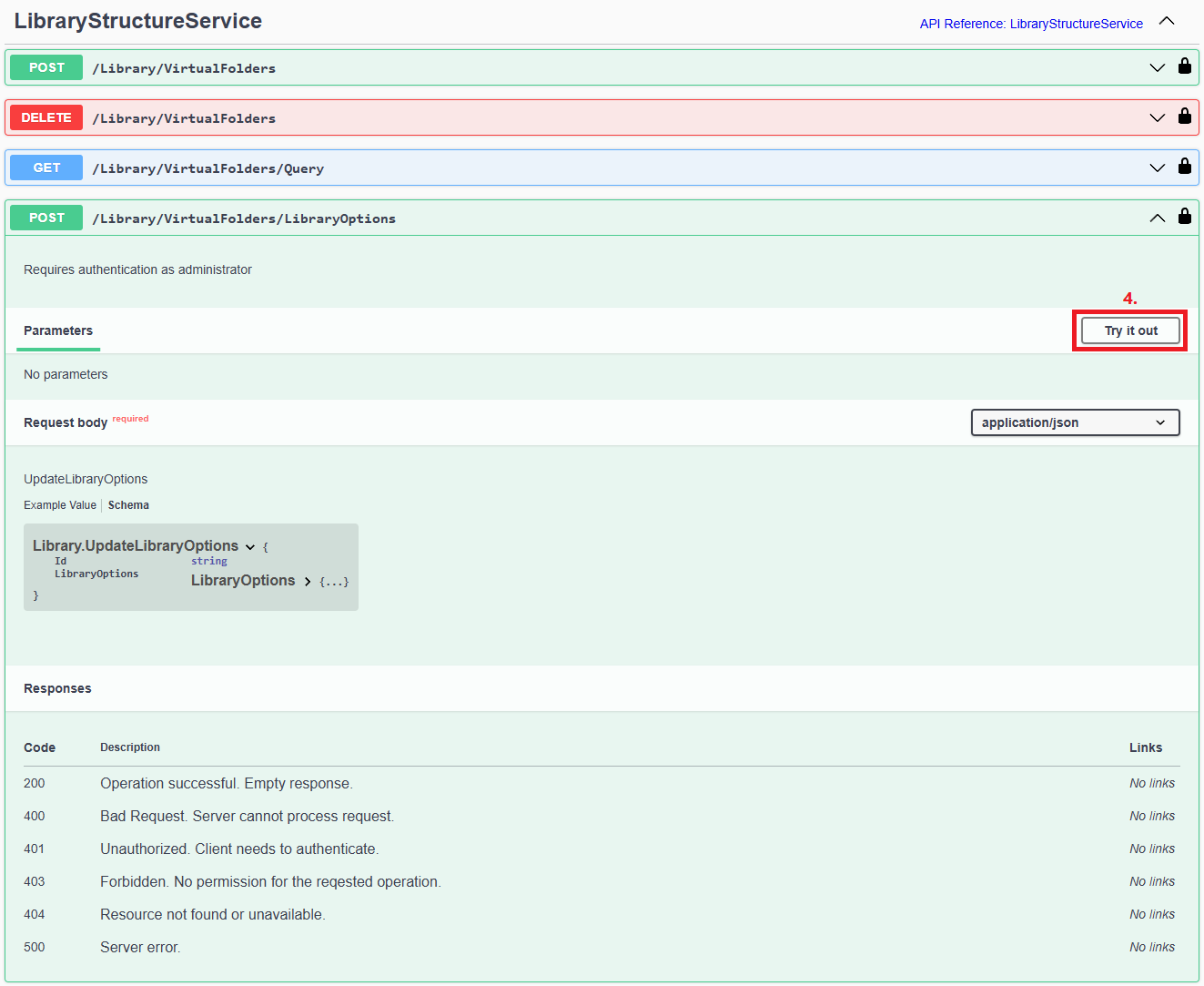
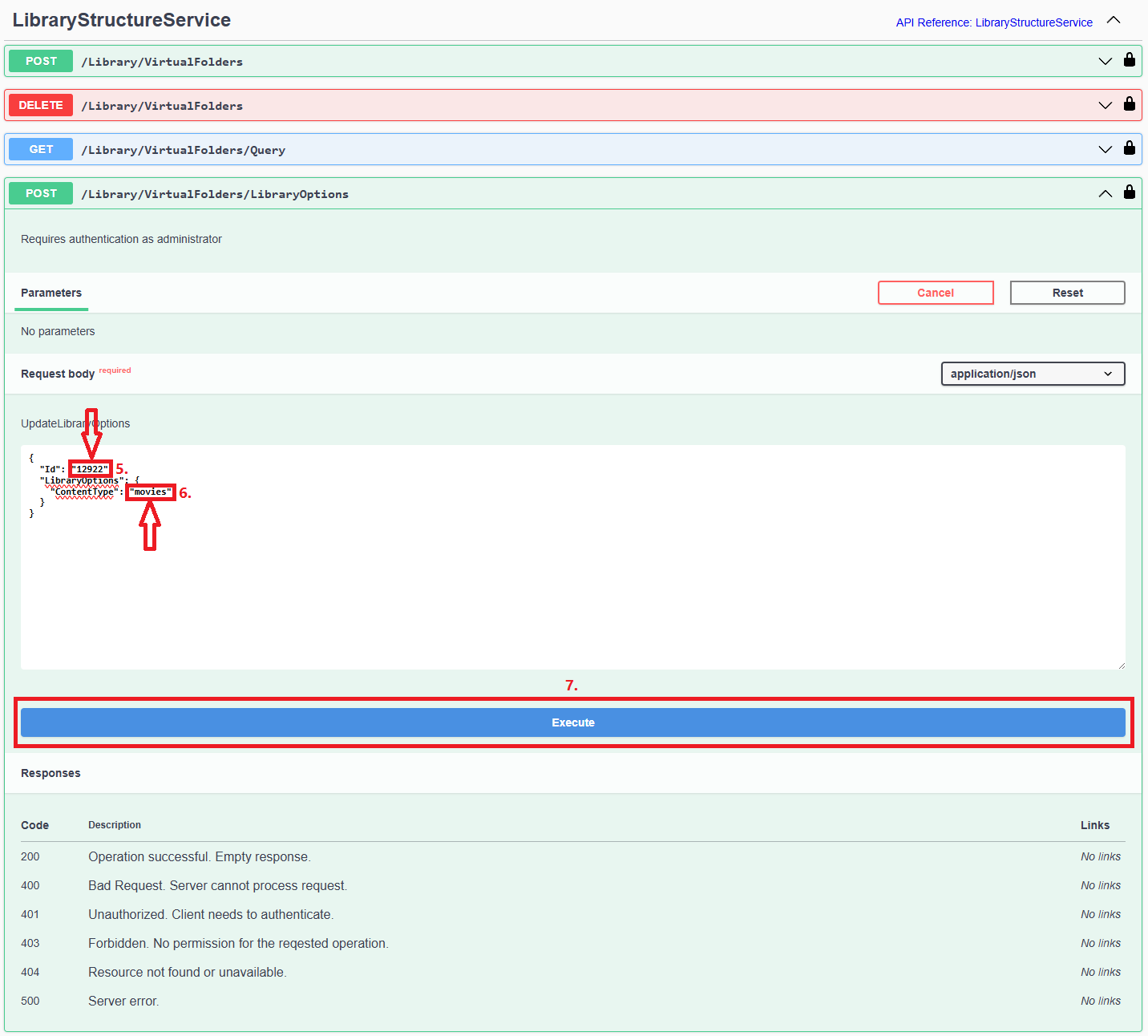
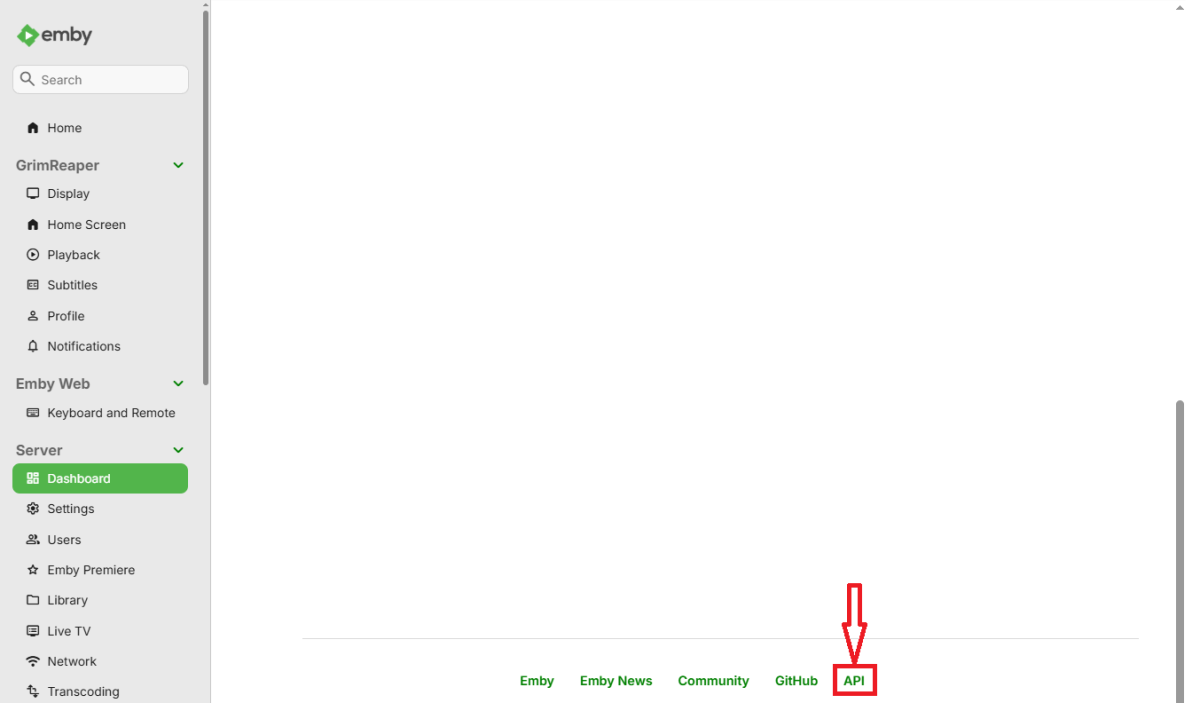
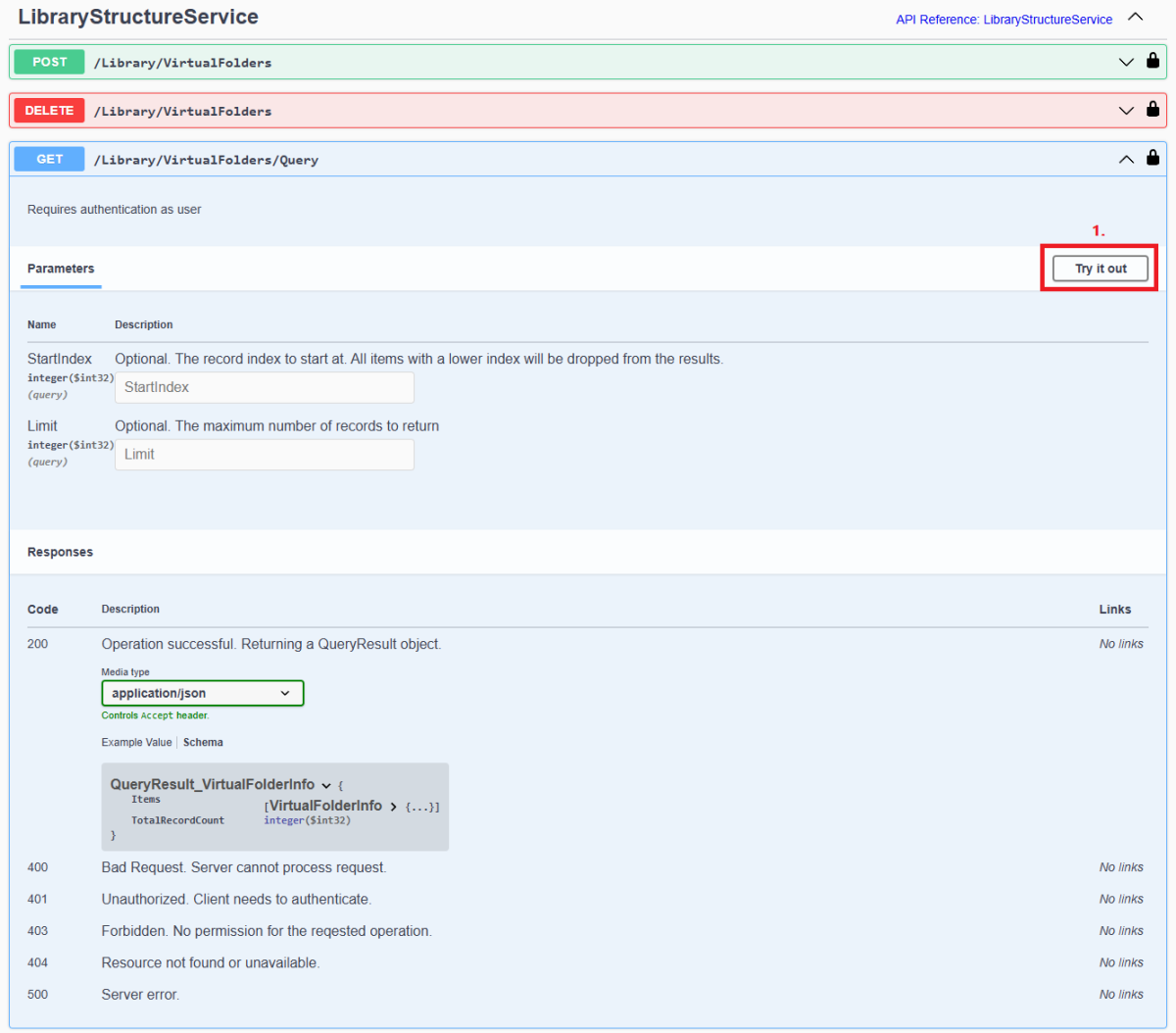
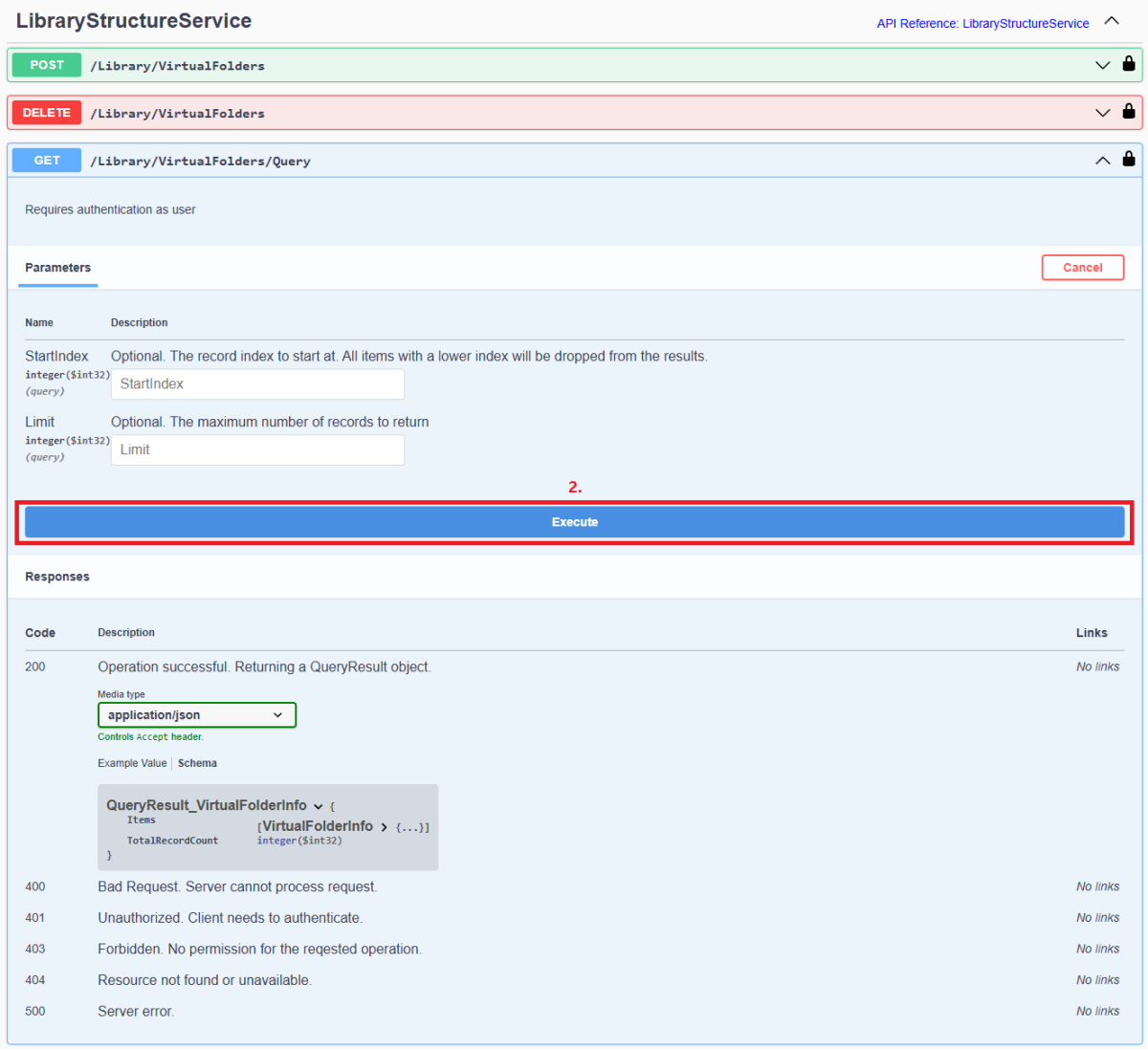
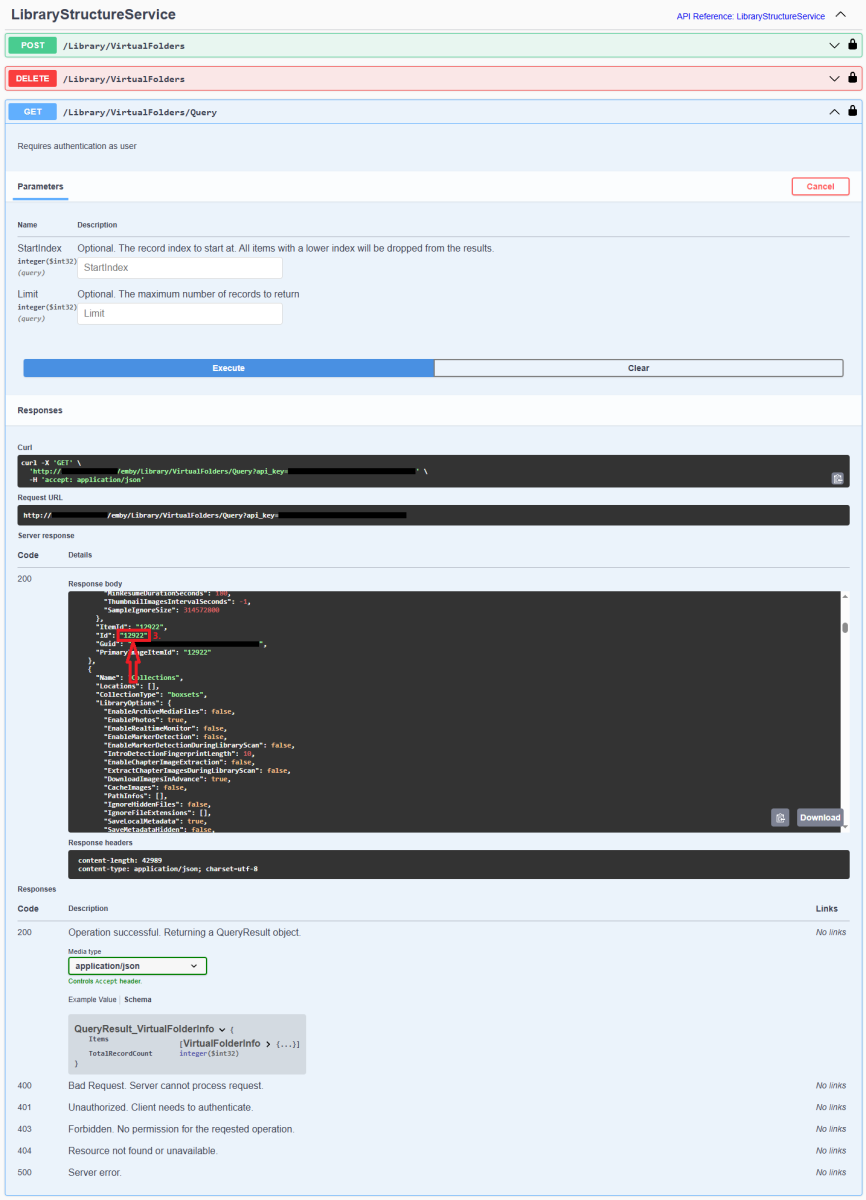
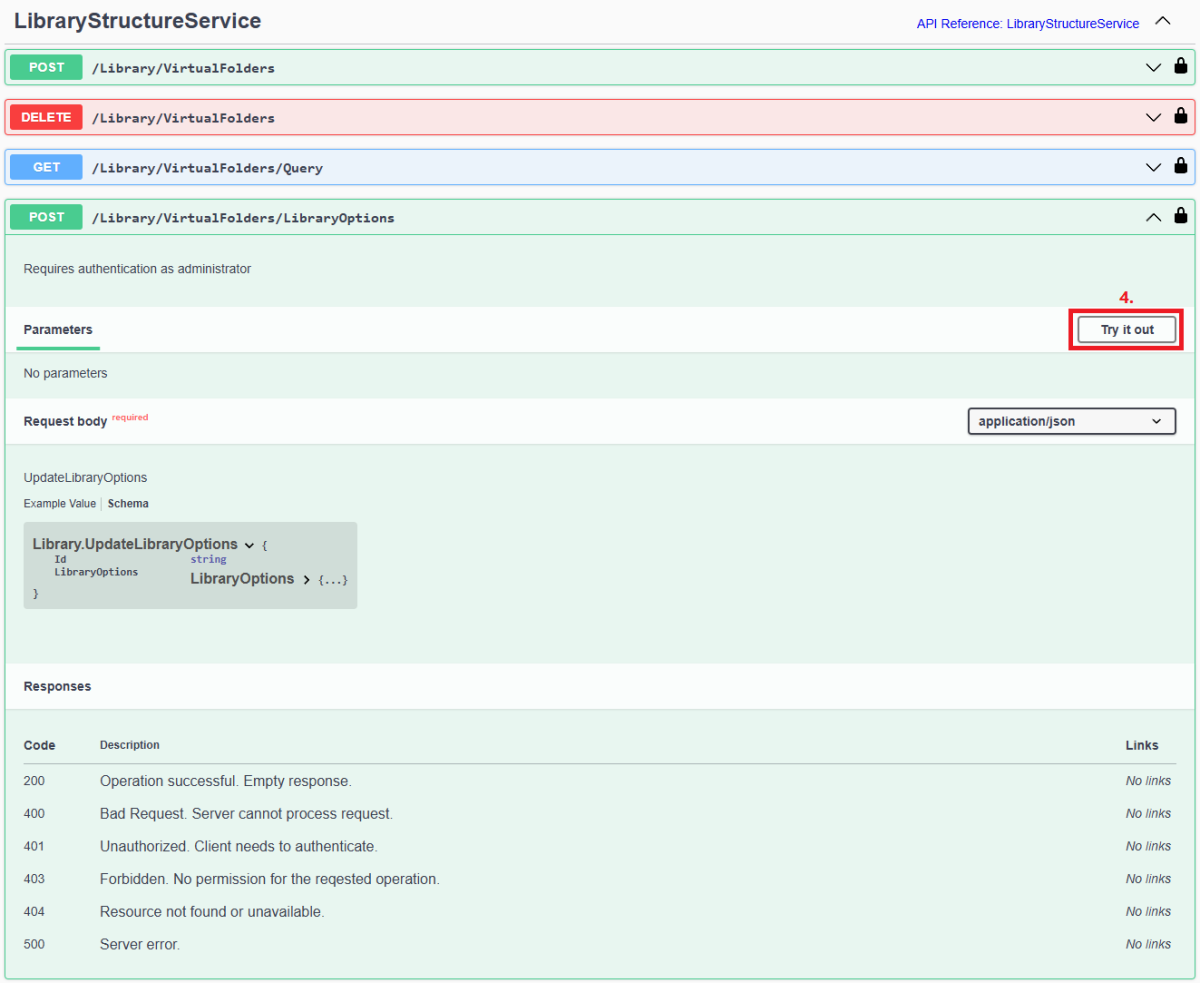
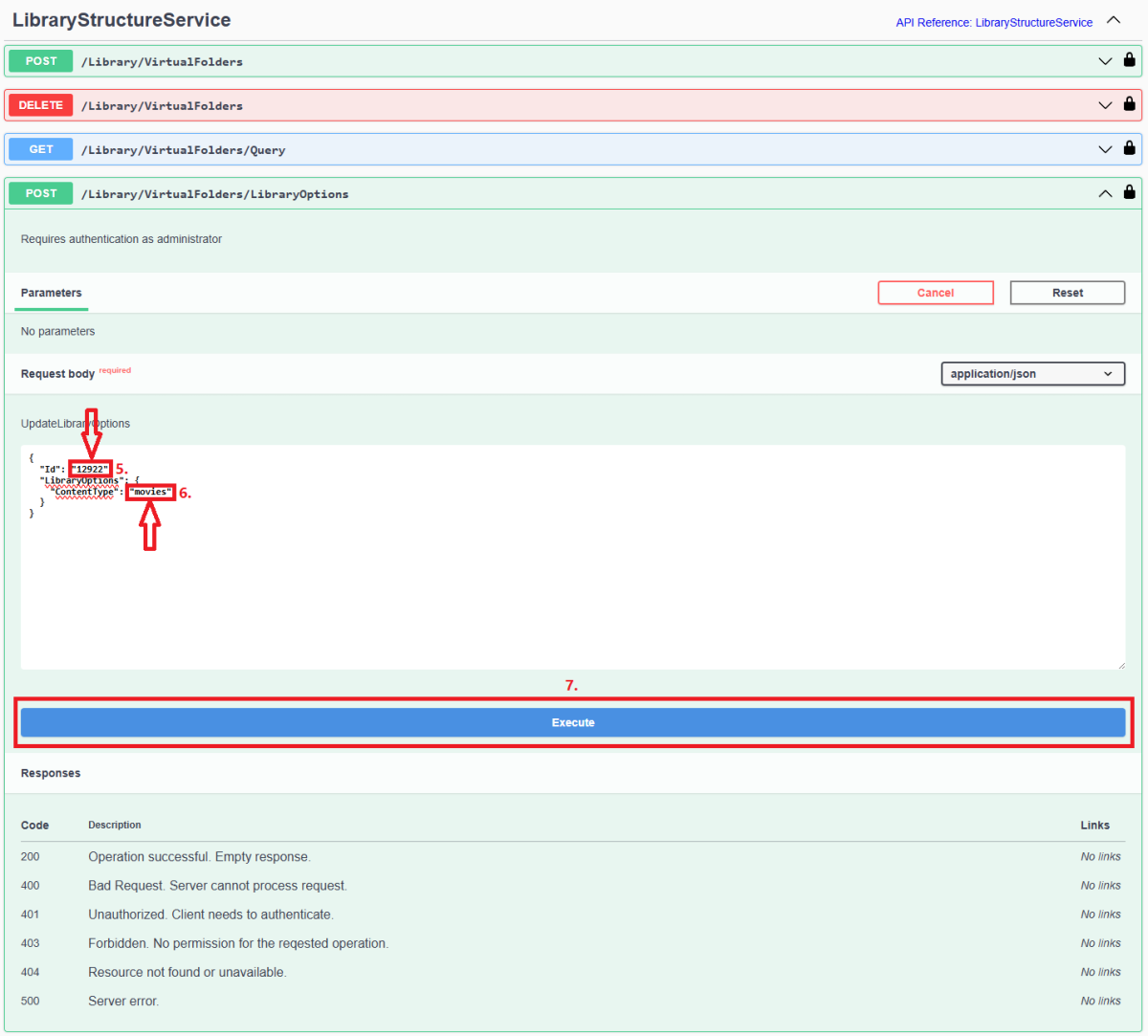
Since server version 4.8+, all library options (including library Content Type) are db-only and any desired changes need to be done via Emby Server REST API service (previous method of changing options via options.xml files is deprecated). Method below describes using Swagger: 1. Access Swagger by navigating to your Dashboard>scroll to the bottom of the page>select "API" hyperlink 2. Obtain library "Id" from /Library/VirtualFolders/Query endpoint: Find relevant library "Id" in the response: 3. In /Library/VirtualFolders/LibraryOptions, change "Id" to the one obtained above and "ContentType" to desired type (valid ContentType strings listed below). Execute. 4. You can check Settings>Library tab or query /Library/VirtualFolders/Query endpoint to confirm Content Type change Valid Content Types Audio books "ContentType": "audiobooks" Camera Uploads "ContentType": "homevideos" Collections "ContentType": "boxsets" Home videos & photos "ContentType": "homevideos" Movies "ContentType": "movies" Music "ContentType": "music" Music Videos "ContentType": "musicvideos" Playlists "ContentType": "playlists" TV shows "ContentType": "tvshows"
 1 point
 -
HI there, this shouldn't happen anymore with the upcoming 4.2 server release. Thanks.1 point