Leaderboard




Popular Content
Showing content with the highest reputation on 11/19/22 in all areas
-
Hi, Thank you for the great product. It is a pleasure to use it. I have seen some posts but they are years ago regarding my request. Is there a plan to have notification (when adding movies, shows, live tv etc.) from the emby app ? This means to get a push message on my android phone, iphone, windows app, etc. With 3rd party software its not so cool. Thank you.1 point
-
It appears that any playlist that any user creates is public--all other users can see it. I can appreciate the benefit of a public playlist. I could create a playlist called "Harv's Favorite Horror Films" for example, in case other users are interested in checking out what I like. However, the way most of my users are using playlists is to keep track of things they want to watch in the future. They are typically things that the user has not watched yet, so it's not meant as a recommendation to others, just as a way of them personally keeping track of what they want to watch. Having that kind of playlist be public is of questionable benefit to other users. Additionally, it is not clear when you create a playlist that other users will be able to see it. That has the potential to cause some embarrassment. He hasn't created one yet, but I wouldn't want to see my nephew's "movies to fap to" playlist, for example. If I could make a suggestion, I would suggest associating each playlist with the user who created it, and giving that user the ability to make the playlist private or public. For example, the following two checkboxes could be shown when creating or editing a playlist: Allow other users to see this playlist Allow other users to edit this playlist Initially, both checkboxes would be unchecked. Since another user cannot edit a playlist they cannot see, the second would be allowed to be checked only if the first were also checked. (You could grey it out to make that clear.) Depending on your UI preference, it could also be a drop-down menu. Playlist visibility: (Only me | all users can view | all users can view and edit) Thanks for considering this.1 point
-
Isn't there already a Terminal app in the Applications folder and then utilities on your Mac? Just start that and then enter: ssh user@IP-Address From there it's just a matter of navigating around just like any command window1 point
-
It depends on a number of things. What other Kaby Lake (7th gen) processors can your motherboard support? Would the best replacement you can get be enough of a jump in processing capacity? Are you running an OS that can easily handle a processor swap? Or did you mean a more comprehensive CPU/MB/RAM upgrade? Same questions plus a few more.1 point
-
Yeah, I'm in a condo and management are toying with getting a Bulk Condo deal from Bell Canada for Fiber TV and Internet. So I was exploring connection options. I'm using the Firestick mainly because the current ISP TV provider doesn't support the LG WebOS. If we go the Bell Fibe route, I may not need the Firestick and can use the LG TV to directly access my Emby library. (Hence my exploring Emby on WebOS) Whatever I do, I also have to consider my wife, who has Macular Degeneration and is basically 85-90% blind. On-screen menus, channel guides etc. are borderline impossible for her, even changing from a Harmony remote to either the LG remote and/or the Bell remote is going to be a learning curve. Let alone the bedroom tv, which is also different (a Samsung and a ChromeCast with Android TV). Sometimes simple things in life become way too complex.1 point
-
Hi, yes that is happening with certain kinds of files and is resolved for the next Emby Apple TV app update.1 point
-
Ah I see. I'm already doing that. Thanks for clarification.1 point
-
Hi, We are working on getting an update out as quickly as we can to resolve this. Thanks.1 point
-
Hi Luke.... I have not been having any issues from the last time we chatted on this. But I do see that Emby auto updated the plugin, so I will see if anything changes. Thanks for thinking about getting back to me as it has been some time. David1 point
-
I wasn't sure what movie isn't encoded, but I'll try to find. here is the same pinocchio movie: https://photos.app.goo.gl/DxQ4c7LUBX32xMQL81 point
-
As a proud 35-year IT developer -- that's horribly lazy.1 point
-
No as I can have 100 browsers and 100 Rokus and have used 0 premiere slots. It is about devices that are active and require premiere. Inactive devices will drop the slot after x days and users have no control over that.1 point
-
Hi, it's mainly just internal changes, cleaning up old indexes.1 point
-
Just went through the list and that appears to correct the issue. I'll work with this for a bit, not a big deal to have users type in their username. majority of the users are family anyway, so I'm use to them texting me all the time anyway1 point
-
Hi, yes it is planned for upcoming updates. Thanks.1 point
-
Well, thanks for the reply. I changed my workflow now for any future additions to the database. First doing my TinyMediaManager scraping, then moving the content to my NAS and then let Emby do the rest. It works that way, that's all that counts1 point
-
Hello, good afternoon Thank you very much for your reply. Several months ago they put out an update and it fixed it. Thanks for that update. It updates automatically, since I don't know how to get it out. This case can be closed. Thank you1 point
-
Isn't x264 in a MP4 container the most universal? That's what I've standardized on when I do convert videos. Otherwise, I let my Shield direct play whatever the file is. I don't get too worried about possible audio transcoding since it does not overload my not-so-powerful server. I think you need to determine your 90% use case (device + app), then that should tell you the codecs to use.1 point
-
@Spaceboy I put a new releases verison 1.0.0.5 up over here: https://emby.media/community/index.php?/topic/113712-new-releases-support-thread/ in the OP. This should ignore top picks in new releases. I meant to do this earlier but it fell off the radar.1 point
-
Sort of but there are other topics on this.1 point
-
Thanks Luke, but that's not really a reply I'm happy with. Up until now there is no true documentation about what client is able to play what codec. Also, why are there two different "Emby Theater for Windows" apps, with different capabilities? This does absolutely make no sense and is very confusing for users. Again, I ask you guys to improve documentation about the capabilities of each client and what the best practices are to have the best home theater experience possible. Thank you.1 point
-
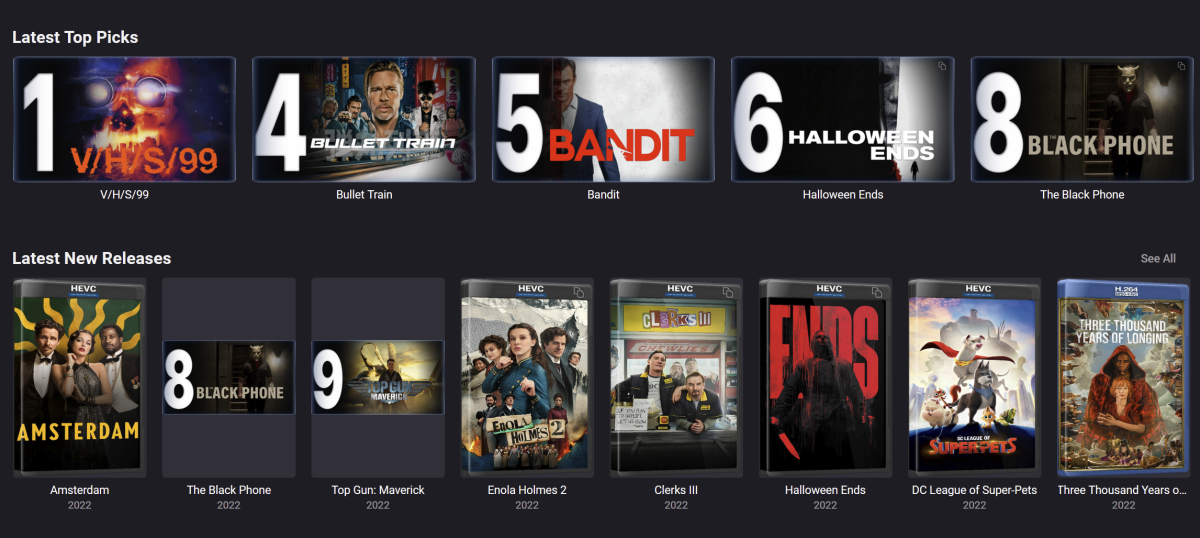
i still have top picks appearing in new releases and out of order and top picks itself is missing items and out of order (item 3 is last on the list off screen)
 1 point
 -
I just built a new server and I think I was seeing the same thing with 4.7.9 on Win11 22H2 (22621.819). For me it seems like it's tied to something with the scanning of the media library, and possibly related to the issue previously reported back in this post regarding Photo Libraries? I removed my Photo Library and the issue went away. TL;DR version I did my initial install / setup of 4.7.9, added in my Premiere key info and then loaded the Server Config Backup plugin. It's the only plug-in I add in these days. I restored my server settings with the plugin. The server has been on 1-2 days which normally should be long enough to process my library after a reload. I noticed earlier today that several libraries were not displaying everything but I didn't have time to look into it & thought it might be a library path that needed to be fixed. Came back to the system this evening and noticed the audio cutting out on my wireless headset while watching some YouTube. Trying to figure out what was going on, I noticed that my main OS SSD was peaking at 100% Active time in Task Manager. Switched over to Processes to see what was pegging the SSD and it was the main System Process (PID:4) , then noticed that my RAM was maxed out at 98%-100% usage and found Emby Server maxing it out. Did a little poking at things and noticed in the Scheduled Tasks that the Scan Media Library was running and seemed to be stuck at 92%. Tried to stop the scan but while it did show it was trying to stop, it never did. So I crashed the server and restarted it. Watched the Scheduled Tasks page and the Task Manager and sure enough as soon as the Scan Media library task started the RAM usage started to rapidly shoot up into over 10G range and the progress halted at 92% so I shut it down again. I repeated this a couple times and then I removed the 12hr Task Trigger and restarted the server and the RAM usage never ramped up again unless I manually started the scan media library again. Took a look at the logs, and after a few library path cleanups and the issue still sticking around, I remembered the previous issue with Photo Libraries mentioned above. I then removed my Photo Library and when I started the Scan, it launched fine and hovers right at 300-400 MB of RAM usage and the progress bar has started to report steady progress past 92%. I came here to report it when I saw this post and figured I would add on here instead of a new post in case it might be Santrex's issue as well. I had been on the beta builds since the old post above and did not have issues with my Photo Library since then, so not sure where this might have crept in and showed up only after my reload unless this is just another bug that looks like the first one. Anywho TL:DR goal reached. embyserverlogs.rar1 point
-
@chef movies still seem to be drawing from new releases. The problem I'm having (and maybe this is something that can be addressed in new releases) is that if the thumb art does not scan into New Releases, then the thumb does not populate for Top Pics. Not all art makes it over into new releases, sometimes taking multiple channel refreshes. this is a problem for when scheduled tasks run and you come back hours later to find missing art. Possibly a fix could be the ability to exclude library's from Top Picks. Thanks, loving the plugins1 point
-
Thanks, we'll take a look at it.1 point
-
@valkhyr Hi, please try the 3.6.3 update to the Emby Trakt plugin and let us know how that compares. Thanks !1 point
-
Will give that a go! I compared settings from both installs and they were all the same from what I could see (screenshots attached). Emby Screenshots.docx1 point
-
Actually using winscp on win 10 using parallels on mac.1 point
-
I would like to endorse having Sonos support on the client side! When I am visiting friends with Sonos systems, it would be great to share some of my collection - some of which can be obscure... Can you name any Azerbaijanian jazz pianists?1 point
-
Yes that is correct. It's something we can add in future updates .Thanks.1 point
-
OK I was able to reproduce. This is due to double clicking the play button. We'll be doing a 4.7.10 maintenance release and we'll include the fix for this as part of that .Thanks.1 point
-
I agree. It makes the Emby application practically unusable. Those who tend to fall asleep while watching something will wake up to find numerous episodes played while they were sleeping, with no idea where they left off. It used to work, so it shouldn't require much to undo what broke it.1 point
-
Don't dude me, son.1 point
-
Maybe a bug, but not a general stability issue => Feature Request => Feature Request => Not an Emby Server stability issue => Feature Request So, you begin by telling that Emby would have substantial and fundamental stability problems which are so severe that we should immediately stop working on new things and improve quality. Then you name a small bug (surely needs to be investigated but it's more 6 minutes than 6 months), followed by a list of your feature requests we should implement. Now, that's a bit funny... How should we work on your features when we must stop working on new features and focus on quality instead? Or should we just stop working on other things and work on your features instead? But wouldn't that mean that a general stability problem doesn't really exist? In that case, maybe, we could just continue our work, provide support for your issue and move this message out of the feature requests forum and follow up. Eventually, you'll be able to create (single and separate) posts for your feature requests just easy and normal...1 point
-
Currently not, no, although we hope to make Chromecast transcoding more like other apps in future updates.1 point
-
As far as I know all transcoding/converting processes use the same location. Settings-Transcoding, Transcoding temporary path1 point
-
Not sure why you are getting scroll on My Media though unless it is resolution. But you could remove it. And it is all trial and error for me as I new nothing about css before playing around with it in Emby.1 point
-
@Olywa123 they are no longer .smallBackdropCard they are .backdropCard and may have to target section if you only want that section affected. As for Gap size the ids don't exist so #HomeTab will not work change to [data-type="home"] or div.homeSectionsContainer. /* My Media Buttons Image Size (can be a percentage 'width: 8%' or pixel count 'width: 85 px' ) */ [data-type="home"] div.section0 .backdropCard {width: 85px;} and /* My Media Buttons Gap Size */ [data-type="home"] div.section0 div.cardBox {margin: 0 .19em;} Or have you tried the new card size option? User Icon-App Settings-Display, Image Size? It is global though.
 1 point
 -
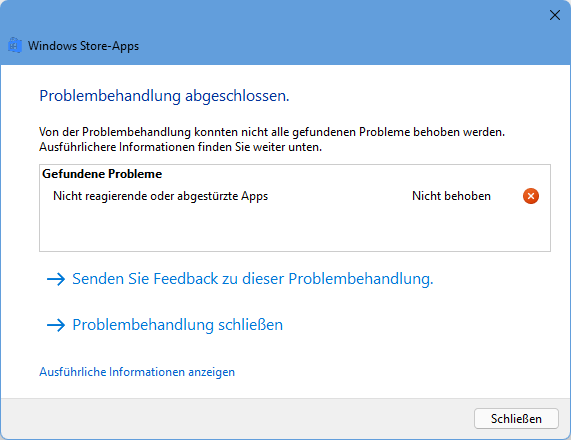
@LukeUnfortunately yes. Also tried to repair UWP apps and run "Windows Store Apps" troubleshooting, but it doesn't help. I have the latest version from Microsoft store. No updates are available. Regarding to the store, Version 1.1.400.0 is installed.
 1 point
 -
Question would maybe also be, where are you trying to copy it from ? I have most subtitles with the media and not in the emby library. Also did a chmod 777 on all the NFS shares for the VM, if there would be an problem it should affect movies as well as series, but it only affects the series. Just updated the plugin to 1.0.0.29 and doing a metadata refresh...will see if that helps after going though a million files Deactivated the realtime scan in the Top Picks Library and also switched the metadata reader form xml (isn't that deprecated ?) to nfo. IMHO something like a shareable playlist or collection should be less troublesome....all that nfo writing, copying and tag setting sounds a bit cumbersome and somehow feels wrong. Shouldn't all ratings be in the db as well as the location of the files ? If one searches for a file it does not scan the whole mediafolders and neither does the sorting do.... If one clicks on a Top Pick series or movie it should simply push you into the series/movies page, IMHO a virtual page beyond the Top Picks is not necessary0 points






.thumb.jpg.1ea4e6b27fd5921ad22171468034b3f4.jpg)