Leaderboard




Popular Content
Showing content with the highest reputation on 11/10/22 in all areas
-
@Luke when are we going to get this stuff, all of it, added properly. I just tried NextPVR on my Shield and Apple TV and the tuning and switching is near instant. On Emby its pathetic. Please stop delaying and fiddling about with other stuff and let us have at it.3 points
-
Plex and Emby aren't technology leaders but they are businesses and they need to make money. Unfortunately IMO Emby decided that focusing on pirate IPTV gave them the best bang for the buck, leaving users who want legal Live TV in the dust. Martin2 points
-
Thanks mate, maybe add a link to the latest dll download so it doesn't get lost in the Feature Requests section. Or maybe add it to the catalog.. I think its good enough to be there.2 points
-
The top pick intros work! Nice! (Sorry for the frame rate switching..)2 points
-
I know that new releases channel plugin is not in the catalog. But if there are any issues regarding it, post here and we'll try to get it fixed. Latest version Emby.NewReleases_v1.0.0.5.zip1 point
-
Emby Server 4.7.9 - Enhancements to Playlists, Webhooks & New Users... This is the latest point release of Emby Server containing new features as well as fixes for identified issues. New User Setup Features: Copy Policy and Configuration Data From Other Users: Emby now includes the ability to copy policy and configuration settings from an existing user on the system during user creation. You can pick a user to copy data from during creation of a new user, simplifying the job of the admin! Coping Policy information allows you to duplicate the settings from another user's access to libraries, Channel Features as well as Parental Filtering. User Configuration items that can be copied include items such as audio and subtitle language choice, ordering as well as default library order on the home screen. These new features make setting up new users quicker than ever. Admin's using specific library access, Rating Systems access as well as complex parental restrictions are sure to love this! TIP: You can create a user set it's properties then use it as a Template User. You could for example have a "Template-PG-13" user that has access to only the libraries and channels you want a 13 year old to have to. You would setup parent restrictions on rating as well as times of the day the user has access. You could restrict 3pm to 5pm viewing on weekdays to encourage doing homework for example. Playlists Now Support Sorting and Reordering Users can now reorder and sort playlists as shown below. This is a new handy feature that's easy to use by clicking the center button between Shuffle and Heart. Webhooks is More Powerful then Ever and Easier to Use Webhooks has been expanded with additional events at your disposal to choose from. The UI is streamlined and straightforward, making it quite simple to use even if you've never used webhooks before. The GUI makes it simple to filter based on the user as well as being able to only apply the webhook to specific libraries (for library events). You can view the webhook payload right from the GUI as well as send test webhooks to a destination of your choosing. The easy to use filtering options: The following Events are support by Emby Server: Server Server Restart Required Emby Server Update Available Library New Media Added Playback Start Pause Unpause Stop Users Add to Favorites Remove from Favorites Mark Played Mark Unplayed User Authenticated User Authentication Failed User Created User Deleted Password Changed Devices Camera Image Uploaded Plugins Plugin Installed Plugin Uninstalled Plugin Updated Live TV Recording Scheduled Recording Cancelled Series Recording Scheduled Series Recording Cancelled Recording Started Recording Ended External External Notification via Emby Server API Other improvements and fixes included in 4.7.9: Improve library scan handling of unavailable folders Fix regressions related to user device restriction management Improved right to left (RTL) support Update default subtitle font1 point
-
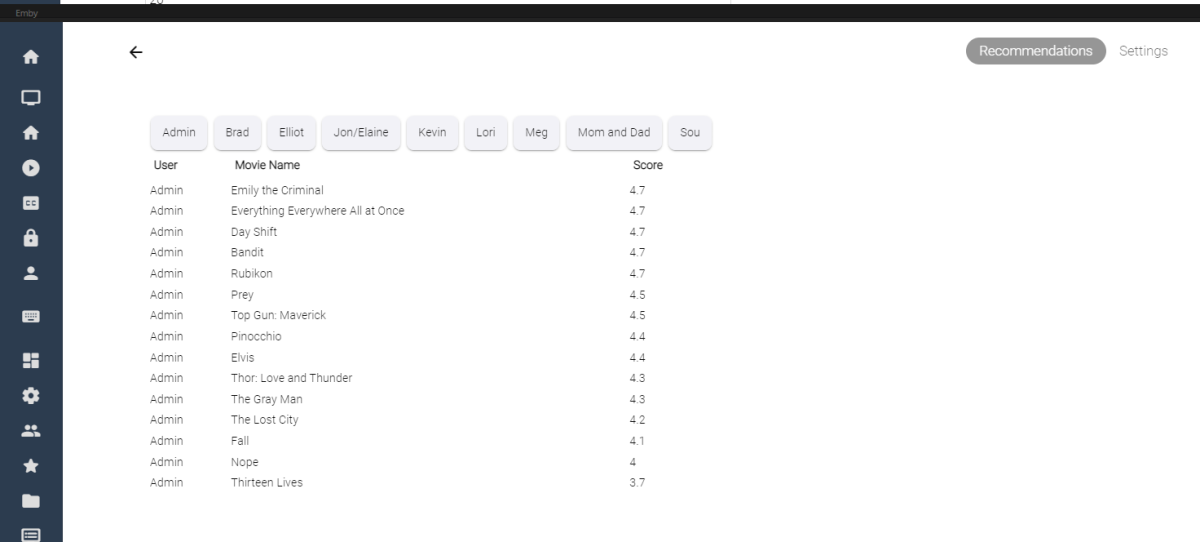
I've spent some of my spare time experimenting with machine learning, and applying what I've learned to some code for Emby. Using the massive dataset supplied by MovieLens (https://movielens.org/), I was able to create a machine learning plugin that loads a large set of data into a matrix factorization neural network, and can spit out recommendations for users in emby. Following this article by Microsoft: https://learn.microsoft.com/en-us/dotnet/machine-learning/tutorials/movie-recommendation and experimenting with their ML.Net libraries things started to get pretty interesting. The project itself is rather large, and I thought I'd share what I've come up with so far, maybe other people are interesting in how the neural network recommendation service is working when testing it against movies inside an Emby library. It's pretty cool. The idea could be to create an in-depth recommendation system for emby, or possibly utilize this as a way to create a new "Top Picks" style plugin that is user based. Which also might be really cool. I'll try and answer some questions up front if I can: What is Matrix Factorization, and How does it work in Machine Learning? In a nut shell, if you have similar tastes in movies as other people in the dataset, and they have rated a movie you haven't seen in a while, or have never seen, then that movie is recommended to you as a possible item to watch. The Neural Network will predict what you, or your users may rate the movie if it was watched. Is this plugin run locally on my machine? Yes, this plugin creates a matrix factorization neural network locally on your machine, which is trained in a scheduled task. Is any of my personal data shared during the training process of the neural network? No, your personal data is completely safe. no user data is shared with any data provider, and stays safely on your server. How does the neural network recommend items? The MovieLens dataset is an accumulation of almost 25 million data point on 27 thousand movies with almost 100 thousand users ratings. The ratings data is altered on your server to include your user data and then the neural network is trained on all the data points, allowing it to predict what movies in your library you and your users may want to watch. Once the "recommender" is trained it then saves a model and uses that to predict recommendations for users. The NN can be retrained when new users are added to your emby server, including them in the recommendation process. Asking your users to "like" or "Favorite" items in the library will certainly help factoring recommendations, however it is not entirely necessary. Does the Matrix Factorization Only look at "Liked/Favorite" Data? No, other columns are also feed into the neural network, like item genre. If one of your users do not "heart" the media on their account, their watched status and item play-states are factored into the recommendation predictions. If they watch more items that fit into a certain category, this is scanned in and calculated. It is best to have several movies marked as "liked/favorite" in the library form each user to get best results. Is it cross platform Yes, I believe it is. ML.Net is a cross-platform library using .netstandard 2.0. With regards to the runtimes associated with the plugin the following are available, and would be included in a dll: Linux64 Linux ARM Linux ARM64 OSX64 OSX ARM64 Win86 Win64 It is all fairly preliminary, definitely keep this in mind On the settings page it is possible to train the NN Model (top), and also run recommendation predictions (bottom). Once the network has created it's model, it is possible to run this model again and again against the library (due to it's 27 000 movie titles included). Selecting the "Recommendation Predictions" begins the second task of calculating what each user might like. Browsing back to the "Recommendations" tab, outlines each users predictions. It shows what the NN predicts your score would be out of 5. The results are definitely interesting. Sure, these are all new movies I should watch, and they are pretty much some of the most famous of the year so far. So the results seem to be pretty close to what I would expect. The training of the model also only use 20 iterations, to be honest I don't know if that is enough, or too much. It's all new. What I can say is that loading the ML.Net Assemblies work, and loading the MovieLens dataset into the NN also works. I have added toggles and inputs to try and test different training scenarios, but it's all kind of unexplored.

 1 point
 -
Thank you. I'll post back after a few days of observation.1 point
-
from the jail shell i have used: 1. pkg install libass fontconfig freetype2 fribidi gnutls iconv opus sqlite3 libtheora libva ocl-icd libvorbis webp libzvbi libraw ImageMagick6 tesseract intel-media-sdk libunwind libinotify openssl icu krb5 libexif libjxl libheif libimagequant openexr openjpeg orc pango tiff 2. pkg add -f https://github.com/MediaBrowser/Emby.Releases/releases/download/4.7.9.0/emby-server-freebsd13_4.7.9.0_amd64.pkg (because this is the last release) And Worked. I don`t know if it`s wrong or not.1 point
-
Ah, thank you, Luke. It's a welcome addition, but not quite Tivo yet.1 point
-
Yes, version 3.2.77 Ok I see the latest version is 3.2.82, I sideloaded that one just now and has not done the 1 time crash yet. will monitor. Thanks1 point
-
Thanks for your quick reply, Found that tv folder is still "scanning" so might be ok when finished, as for the movie ill make a seprate folder Thanks again1 point
-
Thanks Luke. I put the latest beta on the Pixel 6a and it is fine. Currently the only devices I'm having trouble with are the pixel 7 pros.1 point
-
Figured it out! It was because I was running Emby end Jellyfin under the same port, just changed port number to Jellyfin to 4096 while Emby is 80961 point
-
Yes, I've been seeing this as well.1 point
-
Not needed. I'm seeing the issue.1 point
-
@chef now you can probably see why I resorted to adding 'favorites/recommendations' as a user (or global) 'playlist' as you can do this easily in the UI today. Then just scrape the playlist and bingo, you have a list to work with. I *think* in the latest beta, the playlist may now be held in the db as well, rather than having to parse the playlist xml.. With all your top picks work.. this could be really snazzy and post who recommended it on the movie poster (instead of saying top pick, it might say in a heart or something the users name)1 point
-
This has been fixed, thanks. Yes, I have updated the server.1 point
-
What's TVnext? Incoming improvements to the LiveTV part of Emby?1 point
-
TVnext can do EVERYTHING that is requested in this conversation!1 point
-
@Efina Where exactly do you want it? If you don't want it affected then something like this. .mediaInfoItems .mediaInfoItem:last-child { width: 100%; margin-top: .1em; margin-bottom: .1em; margin-left: .2em; } or .mediaInfoItem:last-child:not(.videoOsd-audioInfo .mediaInfoItem) { width: 100%; margin-top: .1em; margin-bottom: .1em; margin-left: .2em; }1 point
-
Already possible in both the ATV and standard Android apps Lend your support over here: https://emby.media/community/index.php?/topic/86765-plex-watch-together/1 point
-
I agree that in principal, an NFO restore should be more straightforward since they ought to be placed in the same path as the media. The JSON files are an entirely different matter. Their naming convention has nothing to do with your file names (nor should it, IMO), while the contents operate logically within the database. Can't use the Emby IDs, since those are ephemeral and you can't assume that the folder structure and file names will match after a restore. To me, this is handy as my naming convention has slightly shifted over time. If I lost a few drives (such that my redundant storage couldn't staunch the loss of data), I'd need to recreate that structure. The new file names may not end up matching the old ones. What I meant largely applies to JSON backup. Let's say that you had both the original Night Court, and the remake that will come out this year. It's entirely possible that you may have disambiguation at the folder level (C:\TV\Night Court (1984) vs C:\TV\Night Court (2022)) but the file names might use an identical convention. This is where matching on IDs would bail you out of such a mess (assuming you properly identified the shows in Emby). Some users are very fastidious about proper naming and structure, but a developer can't assume that about all their users. File name matching is an inferior method to IDs, IMO.1 point
-
Not the first time I've been referred to as a "fringe case" ;-). Thanks for explaining how this feature is intended to work.1 point
-
It is calculating based on the total number of episodes on the server. watched = seenEpisodes / (decimal)collectedEpisodes * 100; I think you might be a fringe case. Since you're the only user and you seem to watch all the shows on your server to completion. In that case play count would need to be taken into account. But if I did that, on servers where there was more than one user, a single user could "put their thumb on the scale" by watching and episode/season/show over and over again. It wouldn't be the most watched show across the whole server, it would just be the show(s) that one user likes. I may add most watched shows in the User-Based statistics page in the future, which would act more akin to how you're expecting it should.1 point
-
Hi, Yep, I am not seeing it at all on my Windows 10 build - as I mentioned, I am relocating internationally, so sadly I cant pull up the Windows 11 box as its already physically left the building so to speak. Cheers1 point
-
It is in the appstore, but only if you are in one of the 2 regions the Emby devs care about.1 point
-
I just tested and the only change that is saved is the manual move. Here are the steps I took to test it out: I moved an item manually to the top of my playlist. I clicked the Album sort. I changed the sort back to Playlist Order and the manual move was saved and all the other items where sorted the same as before the manual move. So, the Album sort had no effect on the "original" or saved sort order. That's how I hoped it would work and I'm really glad it does.1 point
-
Everything seems good with this test build so far. I added Movie, TV, and Music libraries on a database reset (was upgrading from 7.9.3 to 7.10.1 so reset was forced). I'll post back once I've added some episodes to confirm that the syncing between Emby and E4K is working with the Music library added. Thanks!!! kodi.log1 point
-
We are working on it. Thanks.1 point
-
TO ALL : Hopefully this helps with bugs and support tickets... New Releases Plugin: Top Picks Plugin:1 point
-
I'll try another usb pen drive, formatted with Apple MacOs.....the application has installed itself !!! The only thing is that it gave an error (it say : install failed!) but it went ahead and I found it in the menu....bah !!!1 point
-
Emby Server 4.7.9 - Enhancements to Playlists, Webhooks & New Users... This is the latest point release of Emby Server containing new features as well as fixes for identified issues. New User Setup Features: Copy Policy and Configuration Data From Other Users: Emby now includes the ability to copy policy and configuration settings from an existing user on the system during user creation. You can pick a user to copy data from during creation of a new user, simplifying the job of the admin! Coping Policy information allows you to duplicate the settings from another user's access to libraries, Channel Features as well as Parental Filtering. User Configuration items that can be copied include items such as audio and subtitle language choice, ordering as well as default library order on the home screen. These new features make setting up new users quicker than ever. Admin's using specific library access, Rating Systems access as well as complex parental restrictions are sure to love this! TIP: You can create a user set it's properties then use it as a Template User. You could for example have a "Template-PG-13" user that has access to only the libraries and channels you want a 13 year old to have to. You would setup parent restrictions on rating as well as times of the day the user has access. You could restrict 3pm to 5pm viewing on weekdays to encourage doing homework for example. Playlists Now Support Sorting and Reordering Users can now reorder and sort playlists as shown below. This is a new handy feature that's easy to use by clicking the center button between Shuffle and Heart. Webhooks is More Powerful then Ever and Easier to Use Webhooks has been expanded with additional events at your disposal to choose from. The UI is streamlined and straightforward, making it quite simple to use even if you've never used webhooks before. The GUI makes it simple to filter based on the user as well as being able to only apply the webhook to specific libraries (for library events). You can view the webhook payload right from the GUI as well as send test webhooks to a destination of your choosing. The easy to use filtering options: The following Events are support by Emby Server: Server Server Restart Required Emby Server Update Available Library New Media Added Playback Start Pause Unpause Stop Users Add to Favorites Remove from Favorites Mark Played Mark Unplayed User Authenticated User Authentication Failed User Created User Deleted Password Changed Devices Camera Image Uploaded Plugins Plugin Installed Plugin Uninstalled Plugin Updated Live TV Recording Scheduled Recording Cancelled Series Recording Scheduled Series Recording Cancelled Recording Started Recording Ended External External Notification via Emby Server API Other improvements and fixes included in 4.7.9: Improve library scan handling of unavailable folders Fix regressions related to user device restriction management Improved right to left (RTL) support Update default subtitle font View the full article1 point
-
I did not mean for it to come across as asking Luke to test, I was letting gateway786 know that I'd messaged him the correct link.1 point
-
Very correct. The situation changes though, as soon as you are doing something with the audio other than listening - which is obviously not the case here, though. I'm not sure about that in this case, because the DAC would probably be the DAC from the receiver (unless it's an analog connection) @TopperMC - Do you have a digital connection to your receiver? If yes, is your receiver able to show the sampling rate for a certain connection during playback? My suspicion would be that soundcard >> receiver might be connected at 96kHz in a fixed way (rather than dynamically changing the output format). If that would be the case, then it would explain the inferior quality of 44kHz media because the soundcard might not be that good in re-sampling 44 to 96 - which an odd conversion. Again, If that would be the case, you might be able to change your soundcard's output to 44kHz and you wouldn't need any upsampling anymore. The previous paragraph is based on a lot of assumptions, though...1 point
-
We typically don't incorporate work already done by others unless it's really needed for other parts of the system or needed to build on. Yes, if this plugin were to die, I can say the "core" team would take it over if another dev didn't. I would take it over myself if needed as I use it myself and it's a pretty crucial part of my system. Carlo1 point
-
Hi guys! New update in the main post (Emby-Stable-style-v2.6). The last stable update was a big one so took me a while to finish in-between work, but everything should now hopefully work as expected and should support all 3 different navigation modes. The audio player has also gotten some updates. Let me know if something doesn't work or looks funky. I haven't been able to reproduce the volume problem some people have experienced so not sure about that one however as it works without problem for me. Hope you enjoy!1 point
-
We are waiting for many years now and I can not understand, why it is so difficult to make the skill also available in German after the translation is done. It is not possible to make the english skill available for all countries? That way we could at least use the skill in English. In the meantime, Alexa also supports several languages at the same time.1 point
-
Hi, no, we are working on getting ourselves listed in the official qnap app store.1 point
-
What I have done as a work around (I did make a feature request for this as well and it was a dup so merged https://emby.media/community/index.php?/topic/65674-recently-released-on-home-screen/) is create a separate library for New Releases, where I place movies 3-6 months or newer into that folder. That allows me to have it as a separate listing on the homepage. It's a bit cumbersome to go in every month or so and move anything older into their correct folders, but at least it achieves what I want. just an idea that works for me that you may find useful.1 point
-
Would it be possible to add emulators to the Web interface and play them in chrome so you could play your games on a computer that may not let you install emulators it be like playing flash games but it be nes for example1 point