Leaderboard



Popular Content
Showing content with the highest reputation on 11/09/22 in all areas
-
TO ALL : Hopefully this helps with bugs and support tickets... New Releases Plugin: Top Picks Plugin:3 points
-
Found the problem...! I'm mostly using my Android manage the server since I'm running the Raspberry headless. So now when I logged on via my PC to get a good screenshot (still remotely connected) i can see A LOT more addons in the catalog, including the Top Picks. I had no clue there was a difference between the phone or a PC in this way.. I mean, ist still on the same server. So maybe this is something to look into. But thanks anyway for the help and quick replys!3 points
-
Emby Server 4.7.9 - Enhancements to Playlists, Webhooks & New Users... This is the latest point release of Emby Server containing new features as well as fixes for identified issues. New User Setup Features: Copy Policy and Configuration Data From Other Users: Emby now includes the ability to copy policy and configuration settings from an existing user on the system during user creation. You can pick a user to copy data from during creation of a new user, simplifying the job of the admin! Coping Policy information allows you to duplicate the settings from another user's access to libraries, Channel Features as well as Parental Filtering. User Configuration items that can be copied include items such as audio and subtitle language choice, ordering as well as default library order on the home screen. These new features make setting up new users quicker than ever. Admin's using specific library access, Rating Systems access as well as complex parental restrictions are sure to love this! TIP: You can create a user set it's properties then use it as a Template User. You could for example have a "Template-PG-13" user that has access to only the libraries and channels you want a 13 year old to have to. You would setup parent restrictions on rating as well as times of the day the user has access. You could restrict 3pm to 5pm viewing on weekdays to encourage doing homework for example. Playlists Now Support Sorting and Reordering Users can now reorder and sort playlists as shown below. This is a new handy feature that's easy to use by clicking the center button between Shuffle and Heart. Webhooks is More Powerful then Ever and Easier to Use Webhooks has been expanded with additional events at your disposal to choose from. The UI is streamlined and straightforward, making it quite simple to use even if you've never used webhooks before. The GUI makes it simple to filter based on the user as well as being able to only apply the webhook to specific libraries (for library events). You can view the webhook payload right from the GUI as well as send test webhooks to a destination of your choosing. The easy to use filtering options: The following Events are support by Emby Server: Server Server Restart Required Emby Server Update Available Library New Media Added Playback Start Pause Unpause Stop Users Add to Favorites Remove from Favorites Mark Played Mark Unplayed User Authenticated User Authentication Failed User Created User Deleted Password Changed Devices Camera Image Uploaded Plugins Plugin Installed Plugin Uninstalled Plugin Updated Live TV Recording Scheduled Recording Cancelled Series Recording Scheduled Series Recording Cancelled Recording Started Recording Ended External External Notification via Emby Server API Other improvements and fixes included in 4.7.9: Improve library scan handling of unavailable folders Fix regressions related to user device restriction management Improved right to left (RTL) support Update default subtitle font View the full article2 points
-
Updated Docker instructions as new version of mkvtoolnix is out 71, but not support by you yet. So change `apt install mkvtoolnix mkvtoolnix-gui` to `apt install mkvtoolnix=70.0.0-0~ubuntu2204bunkus01 mkvtoolnix-gui=70.0.0-0~ubuntu2204bunkus01`2 points
-
Fantastic - thankyou. I have added into the Wiki via a link to your post and also copied verbatim into Wiki itself - I trust this is ok. Various OS Installation Help · Cheesegeezer/MediaInfoWiki Wiki (github.com)2 points
-
I have now created a shell script to run with "emby" docker container, you can find it here: https://github.com/MrLinford/Docker-MediaInfo-PreReq Here is my quick guide on how to install the dependencies for Media Toolbox when running EMBY in a Docker Container. A few notes: You must be running the https://github.com/linuxserver/docker-emby container You will have to reinstall the dependencies when a new docker image is used. # **MediaInfo For Emby running in Docker** **A few notes:** You must be running the https://github.com/linuxserver/docker-emby container You will have to reinstall the dependencies when a new docker image is used. --- **First you need to connect to the emby container:** `docker exec -it <container> bash` --- **Install mediainfo (https://mediaarea.net/en/MediaInfo/Download/Ubuntu):** `apt update` `apt-get install mediainfo` --- **Install mkvtoolnix (https://mkvtoolnix.download/downloads.html#ubuntu):** `curl -o /usr/share/keyrings/gpg-pub-moritzbunkus.gpg https://mkvtoolnix.download/gpg-pub-moritzbunkus.gpg` `cd /etc/apt/sources.list.d` `touch mkvtoolnix.download.list` `cat > mkvtoolnix.download.list << EOF deb [signed-by=/usr/share/keyrings/gpg-pub-moritzbunkus.gpg] https://mkvtoolnix.download/ubuntu/ jammy main deb-src [signed-by=/usr/share/keyrings/gpg-pub-moritzbunkus.gpg] https://mkvtoolnix.download/ubuntu/ jammy main EOF` Now run `apt update` followed by `apt install mkvtoolnix=70.0.0-0~ubuntu2204bunkus01 mkvtoolnix-gui=70.0.0-0~ubuntu2204bunkus01` --- **Download BifTool Executables:** `curl -Lo /tmp/biftool_linux.zip https://github.com/rokudev/samples/raw/master/utilities/bif%20tool/biftool_linux.zip` **Installed unzip:** `apt-get install unzip` **Extract BifTool zip file to /bin/:** `unzip /tmp/biftool_linux.zip -d /bin` --- Configure the Media Toolbox plugin, applications installed will be located in `/bin/`
 2 points
 -
I'll work on one sure2 points
-
Hello it would be nice to have a Manual Subtitle Offset. So that I can tap the Offset time at myself. Right now, in the Android App I only can press -50ms or +50ms. If I want key in - 2 Minutes, its long way to do it. It would be easier if i can type - 2 Minutes and all is done and not press -50ms till i have reach it. Regards Firefox1 point
-
Emby Server 4.7.9 - Enhancements to Playlists, Webhooks & New Users... This is the latest point release of Emby Server containing new features as well as fixes for identified issues. New User Setup Features: Copy Policy and Configuration Data From Other Users: Emby now includes the ability to copy policy and configuration settings from an existing user on the system during user creation. You can pick a user to copy data from during creation of a new user, simplifying the job of the admin! Coping Policy information allows you to duplicate the settings from another user's access to libraries, Channel Features as well as Parental Filtering. User Configuration items that can be copied include items such as audio and subtitle language choice, ordering as well as default library order on the home screen. These new features make setting up new users quicker than ever. Admin's using specific library access, Rating Systems access as well as complex parental restrictions are sure to love this! TIP: You can create a user set it's properties then use it as a Template User. You could for example have a "Template-PG-13" user that has access to only the libraries and channels you want a 13 year old to have to. You would setup parent restrictions on rating as well as times of the day the user has access. You could restrict 3pm to 5pm viewing on weekdays to encourage doing homework for example. Playlists Now Support Sorting and Reordering Users can now reorder and sort playlists as shown below. This is a new handy feature that's easy to use by clicking the center button between Shuffle and Heart. Webhooks is More Powerful then Ever and Easier to Use Webhooks has been expanded with additional events at your disposal to choose from. The UI is streamlined and straightforward, making it quite simple to use even if you've never used webhooks before. The GUI makes it simple to filter based on the user as well as being able to only apply the webhook to specific libraries (for library events). You can view the webhook payload right from the GUI as well as send test webhooks to a destination of your choosing. The easy to use filtering options: The following Events are support by Emby Server: Server Server Restart Required Emby Server Update Available Library New Media Added Playback Start Pause Unpause Stop Users Add to Favorites Remove from Favorites Mark Played Mark Unplayed User Authenticated User Authentication Failed User Created User Deleted Password Changed Devices Camera Image Uploaded Plugins Plugin Installed Plugin Uninstalled Plugin Updated Live TV Recording Scheduled Recording Cancelled Series Recording Scheduled Series Recording Cancelled Recording Started Recording Ended External External Notification via Emby Server API Other improvements and fixes included in 4.7.9: Improve library scan handling of unavailable folders Fix regressions related to user device restriction management Improved right to left (RTL) support Update default subtitle font1 point
-
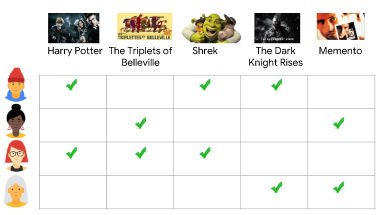
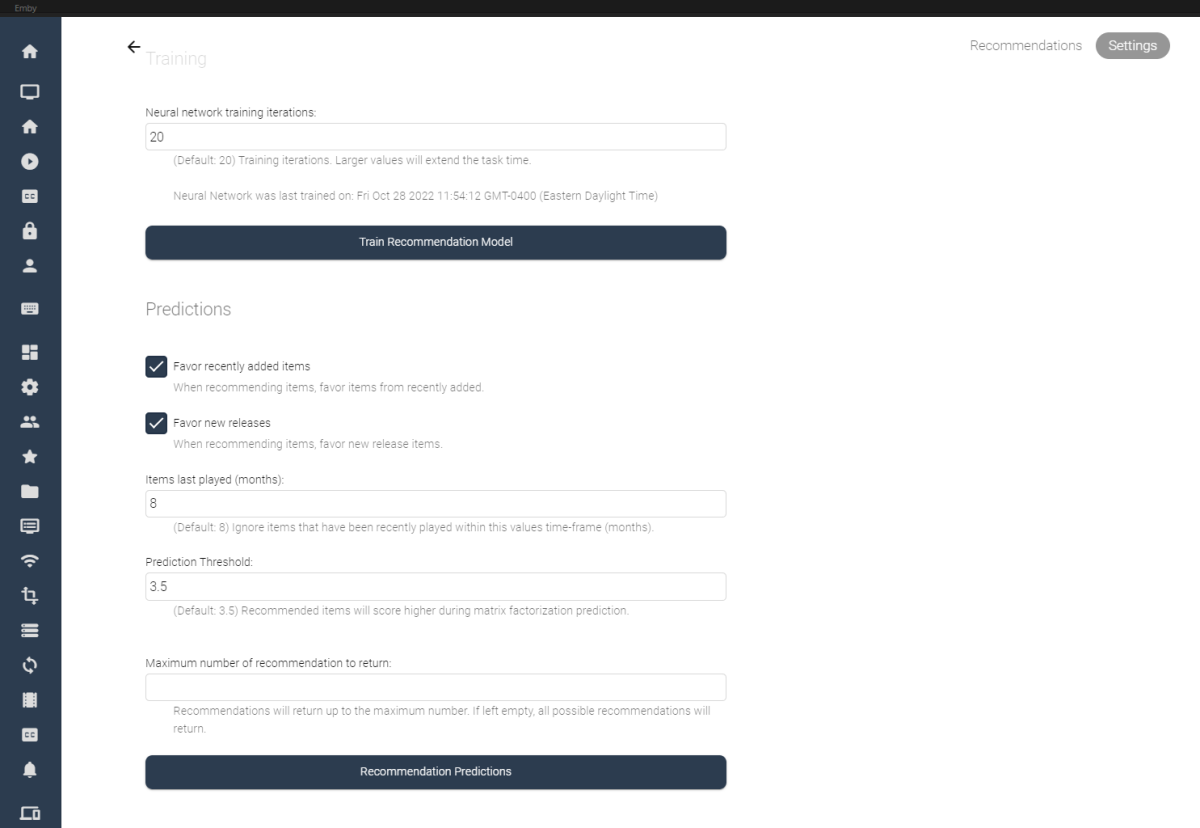
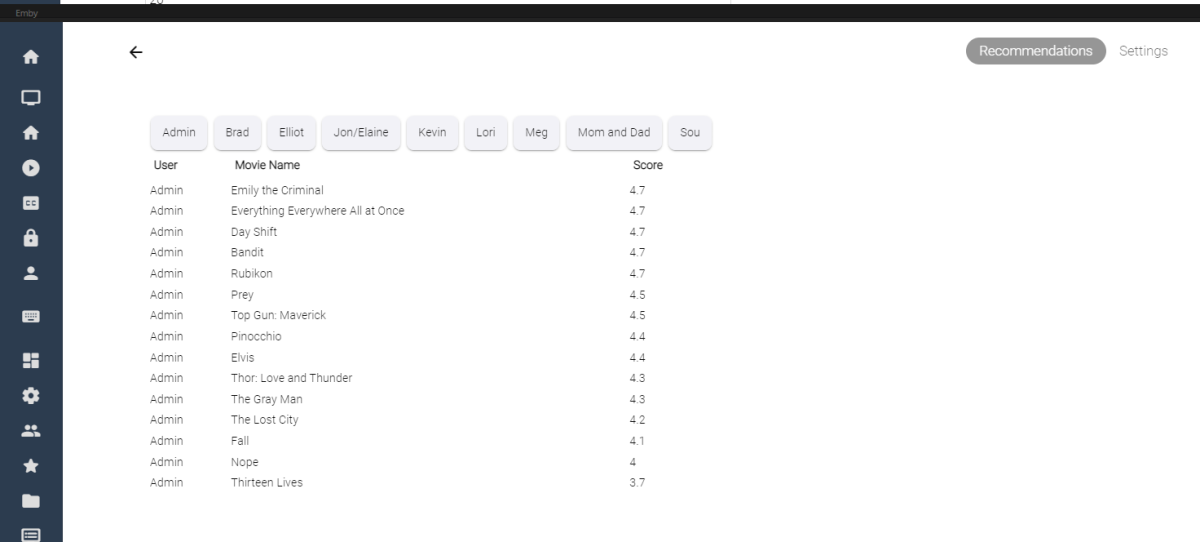
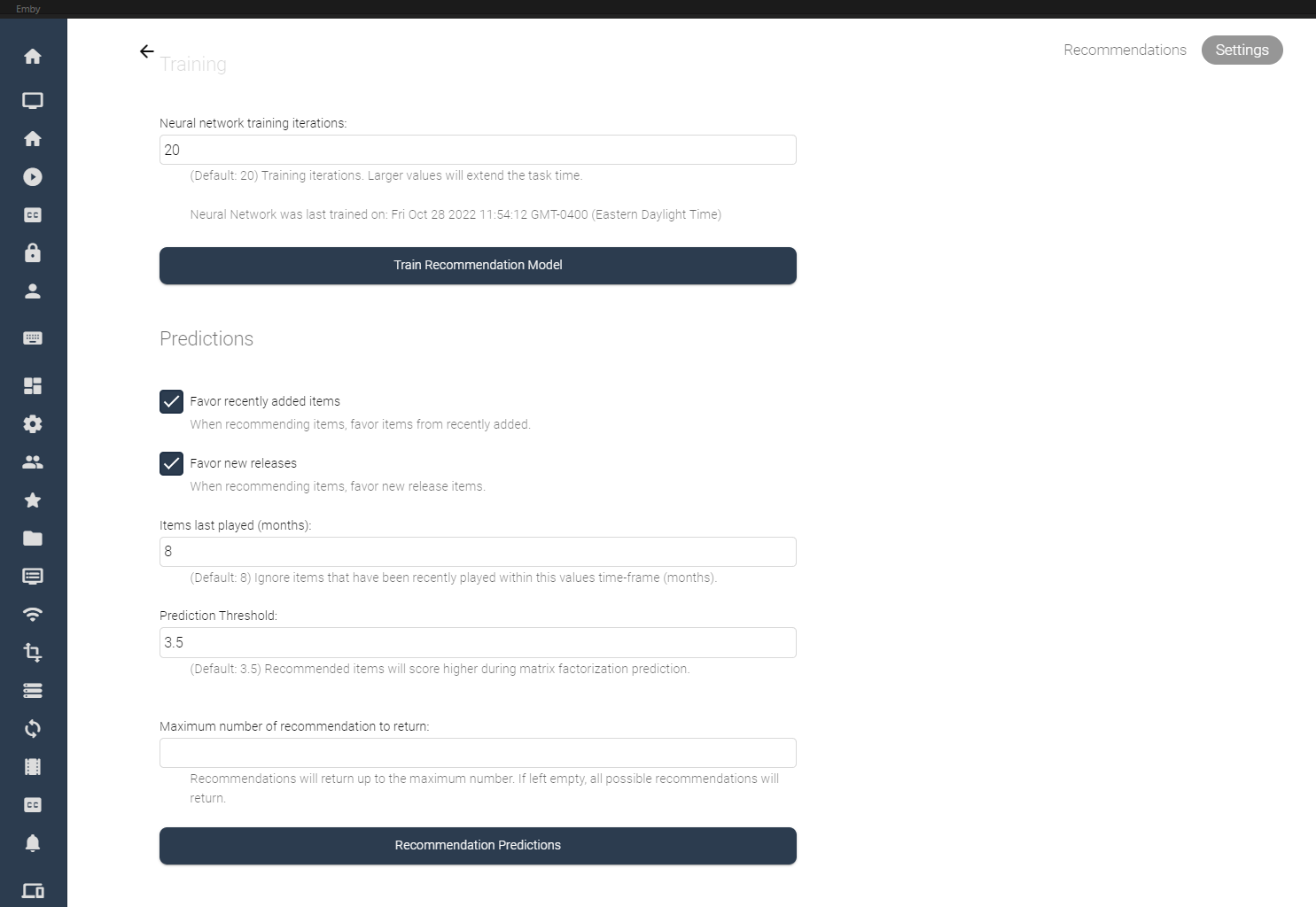
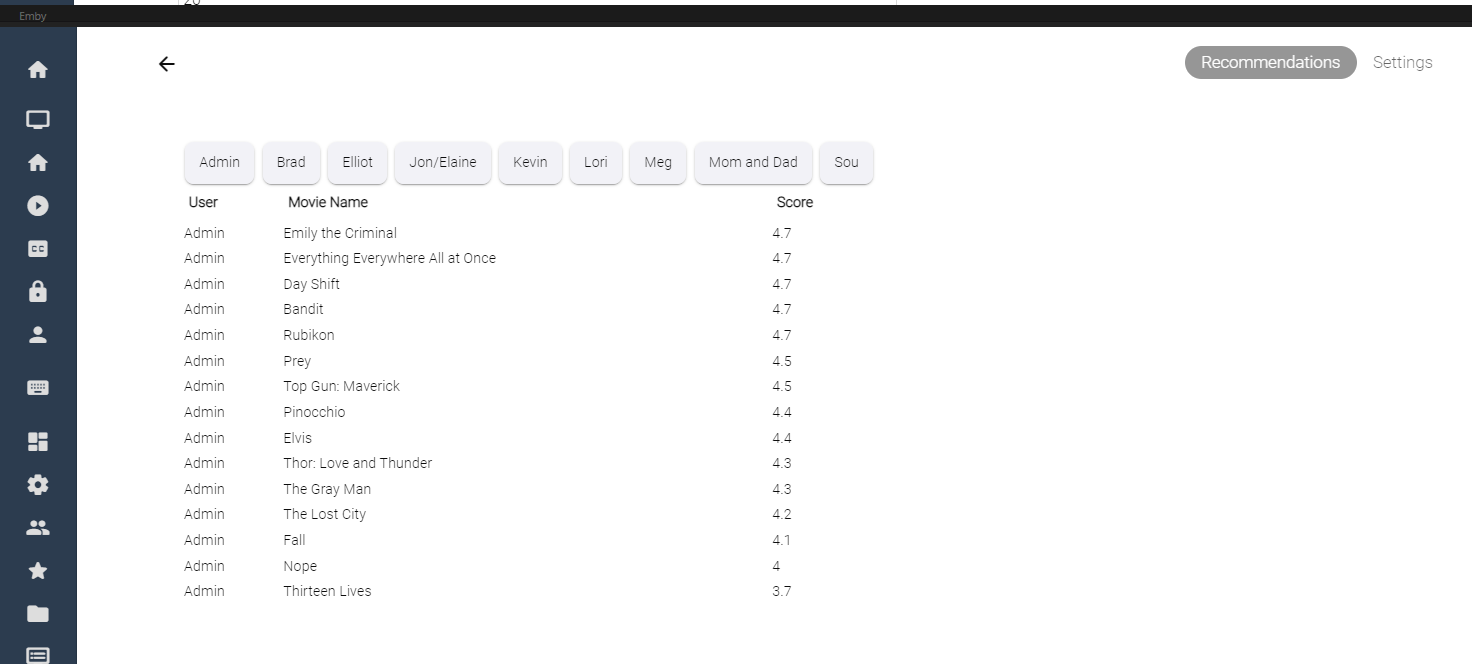
I've spent some of my spare time experimenting with machine learning, and applying what I've learned to some code for Emby. Using the massive dataset supplied by MovieLens (https://movielens.org/), I was able to create a machine learning plugin that loads a large set of data into a matrix factorization neural network, and can spit out recommendations for users in emby. Following this article by Microsoft: https://learn.microsoft.com/en-us/dotnet/machine-learning/tutorials/movie-recommendation and experimenting with their ML.Net libraries things started to get pretty interesting. The project itself is rather large, and I thought I'd share what I've come up with so far, maybe other people are interesting in how the neural network recommendation service is working when testing it against movies inside an Emby library. It's pretty cool. The idea could be to create an in-depth recommendation system for emby, or possibly utilize this as a way to create a new "Top Picks" style plugin that is user based. Which also might be really cool. I'll try and answer some questions up front if I can: What is Matrix Factorization, and How does it work in Machine Learning? In a nut shell, if you have similar tastes in movies as other people in the dataset, and they have rated a movie you haven't seen in a while, or have never seen, then that movie is recommended to you as a possible item to watch. The Neural Network will predict what you, or your users may rate the movie if it was watched. Is this plugin run locally on my machine? Yes, this plugin creates a matrix factorization neural network locally on your machine, which is trained in a scheduled task. Is any of my personal data shared during the training process of the neural network? No, your personal data is completely safe. no user data is shared with any data provider, and stays safely on your server. How does the neural network recommend items? The MovieLens dataset is an accumulation of almost 25 million data point on 27 thousand movies with almost 100 thousand users ratings. The ratings data is altered on your server to include your user data and then the neural network is trained on all the data points, allowing it to predict what movies in your library you and your users may want to watch. Once the "recommender" is trained it then saves a model and uses that to predict recommendations for users. The NN can be retrained when new users are added to your emby server, including them in the recommendation process. Asking your users to "like" or "Favorite" items in the library will certainly help factoring recommendations, however it is not entirely necessary. Does the Matrix Factorization Only look at "Liked/Favorite" Data? No, other columns are also feed into the neural network, like item genre. If one of your users do not "heart" the media on their account, their watched status and item play-states are factored into the recommendation predictions. If they watch more items that fit into a certain category, this is scanned in and calculated. It is best to have several movies marked as "liked/favorite" in the library form each user to get best results. Is it cross platform Yes, I believe it is. ML.Net is a cross-platform library using .netstandard 2.0. With regards to the runtimes associated with the plugin the following are available, and would be included in a dll: Linux64 Linux ARM Linux ARM64 OSX64 OSX ARM64 Win86 Win64 It is all fairly preliminary, definitely keep this in mind On the settings page it is possible to train the NN Model (top), and also run recommendation predictions (bottom). Once the network has created it's model, it is possible to run this model again and again against the library (due to it's 27 000 movie titles included). Selecting the "Recommendation Predictions" begins the second task of calculating what each user might like. Browsing back to the "Recommendations" tab, outlines each users predictions. It shows what the NN predicts your score would be out of 5. The results are definitely interesting. Sure, these are all new movies I should watch, and they are pretty much some of the most famous of the year so far. So the results seem to be pretty close to what I would expect. The training of the model also only use 20 iterations, to be honest I don't know if that is enough, or too much. It's all new. What I can say is that loading the ML.Net Assemblies work, and loading the MovieLens dataset into the NN also works. I have added toggles and inputs to try and test different training scenarios, but it's all kind of unexplored.

 1 point
 -
It seems to me that Emby has progressively removed features over the years. I discovered recently that I can no longer view my movies by Studio (this seems to be a recent change). Viewing by Actor was removed quite some time ago (https://emby.media/community/index.php?/topic/26944-missing-a-menu-option/). Can these features please be re-implemented? And can y'all PLEASE put in the changelog when a feature has been disabled or removed so that the end user can determine if upgrading will remove functionality previously depended on? Thx!1 point
-
Hi @Luke To answer your question, yes it's working since 4.8.0.13 and still working as of 4.8.0.16. Thanks!1 point
-
Oh you don't need to enable the export option when you only have Emby clients. But a missing channel number shouldn't produce an infinite loop. That must be a bug then.1 point
-
Not sure what the official emby container is built on. But you can always switch.1 point
-
Just FYI, this will not work for the official Emby container...still, the LinuxServer container has a great reputation and is widely used. Thanks @MrLinford!1 point
-
Hi, yes this has come up before and is possible for the future. Thanks.1 point
-
Fixed !, it was a permissions issue! excuse me1 point
-
Yep that's normal, Windows does not allow the statvfs (freespace) API query -> HDD space cannot be detected. No need to worry.1 point
-
1 point
-
I'll try another usb pen drive, formatted with Apple MacOs.....the application has installed itself !!! The only thing is that it gave an error (it say : install failed!) but it went ahead and I found it in the menu....bah !!!1 point
-
May I see a log? Is it just the one series, or all of them?1 point
-
@MangoMC temporary fix for .4 is to enable "Ignore if Movie is Locked" or roll back to Original. DoNotChangeLockedMovies = 'True'1 point
-
HI, yes we'll look at improving that. Thanks.1 point
-
4.7.9 has corrected the issue. Thanks!1 point
-
Interesting, Emby reported (when syncing libraries) a "remote" content or a bug in the plugin sync code. I'll review the plugin sync code again. Try this version: Remote content should be fixed, no matter why it's reported. Btw, no need to resync databases. plugin.video.emby-next-gen-7.10.1-build 15.zip1 point
-
Ya, I mentioned this as a potential cause above. The Emby team can't risk putting code they haven't seen and specifically vetted into the app stores, so most 3rd party plugins are disabled in those clients.1 point
-
Most 3rd party plugins only show up in the catalog through the web app. They have to be specially vetted by the Emby devs to be visible when viewing the catalog through the other clients. Might be what's happening here.1 point
-
Hi all, I got 2 quick questions: Is it a real problem to make the existing Alexa Skill available in other countries? I do not mind talking English with Alexa. Mine are set to 2 languages anyway. But I cannot download or enable the skill on amazon.com. All that is needed for this is to make the existing skill available at amazon.(be|de|fr|it|nl|se|??). Is that such a big hurdle? Would it be helping to turn the skill into an open-source-project and everyone can have a stab at it? Just curious. Cheerios, Roodee1 point
-
Good Morning, While not directly addressing what you're asking from an Emby feature set, as long time users of Emby, I thought I would share with you how our family approaches these items. 1. emby app allow you to start with the auto selection of a channel...i mean: when you start the application emby on a tvbox for ex., it opens directly in a channel I believe there is an option, which allows Emby to auto start /resume the last Live TV channel played. We don't use this feature, but it's there & it works. 2. emby app allow you to put password to channels, remember there is adult channel who some1 want BUT there are child on family. We use device profiles & an exclusion approach to solve this. Example: All tv's have an Amazon Fire Stick 4K All Amazon Fire Stick 4K's have an adult profile & a child profile. The adult profile is password protected. Each profile has its own instance of Emby logged in. When the children log into the Fire Stick, they log into a child friendly Eco System via the device profile. When they open Emby, it loads the child profile, rather than the adult profile. This child profile completely excludes Live TV, though as mentioned earlier, you can also use Tags to exclude adult channels from their view. When you log into the adult device profile, a password is required to enter the adult ecosystem. When Emby is launched, it auto logs into the adult profile where there are no content restrictions. Using this methodology, the children only have access to what we push to their devices, via the Emby age rating system & customized tags. We've used this for a couple of years & it works very well for us. * Channel ordering - tvguide We use a 3rd party m3u editor to build channel categories, quickly reassign channel numbers in the order we want them to appear, & affiliate guide data with the corresponding channels. Continuing from the example from above, in our household, the "kids channels" are the first channels you get to by channel numbers. That way, if the children want to watch Live TV under the adult profile, they don't have to pass any channels we don't want them watching to get to the kids channels. Once you've assigned the channel numbers the way you want them, you just default Emby to Sorting Channels by Channel Number. The only feedback I would have on Channel Ordering that may need to be a Feature Request, is that from time to time you will have channels or streams that do not have a channel number assigned in the m3u list. Emby puts these channels at the top of the list, instead of the bottom. It would be great to either default channels with no channel numbers to the bottom, or have the option of moving them to the bottom, so as to keep the TV Guide in the correct order. Best-1 point
-
I really like these custom generated intros. I currently use these.. https://emby.media/community/index.php?/topic/105716-emby-feature-presentation-pre-rolls/ How would this work with the current Cinema Intros plugin? Would that one play first then the custom generated one play after that?1 point
-
Very good, the sync looks perfect. No issues in kodi.log1 point
-
I will try to explain better. good day everybody.1 point
-
I have done further testing and can confirm the issue of Cube not sending DD and DD+ to AVR, when Sound settings is set to "Best Available", is not unique to Emby, other apps like Netflix and Prime have the same bug.1 point
-
Ok i will get all of that to you tomorrow afternoon if that's ok. Thanks1 point
-
cool beans, will do! now I just need to get trakt to unlock my account lol Thanks Luke1 point
-
Hi, try removing the schedule for that scheduled task altogether. You don't need to run that task on a regular basis, just once on initial setup of Trakt.1 point
-
I think I finally got this custom intro looking fine. Less is more in the end. The custom intros would be made for each top pick. These are a bit more of a polished example. Is it worth it?... not entirely sure. But it is kind of cool to see a fully rendered 1080p custom intro for the item your about to watch in Top Picks.1 point
-
Each version gets access to all of the extras, so it doesn't really matter which one it's linked to.1 point
-
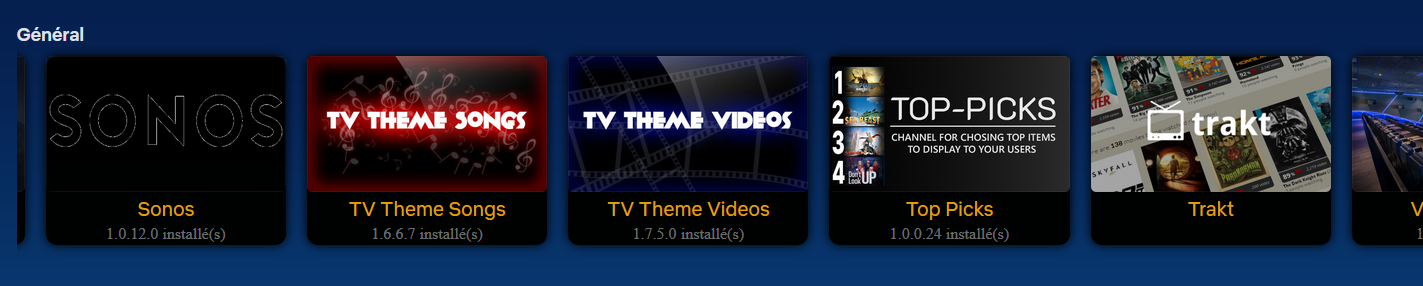
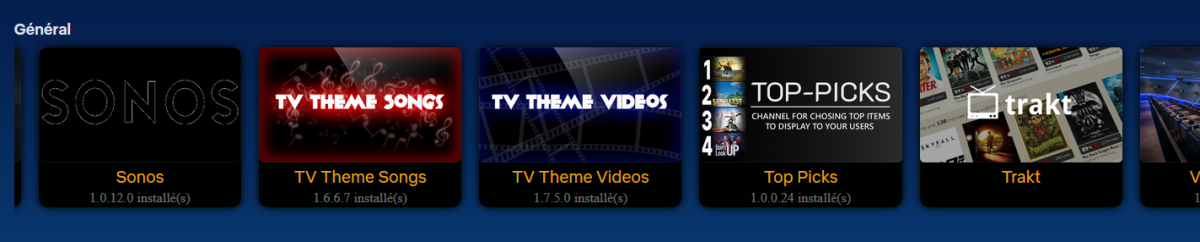
hi @saderlund91 it is present in plugin catalogue in section " general " at the end of the line good evening !
 1 point
 -
I just got the notification for 4.7.9.0 from the dashboard Two things that would be great. 1) A link to the "whats new/readme" document if one exists (if not... why not?) 2) A link to the file to download. You know the OS etc, so providing a link to the proper file should be easy enough. If not, at least a link to https://emby.media/synology-server.html TIA1 point
-
Lets wait for Lukes answer, but i guess the client player (Exoplayer) isn't the problem but that every live tv stream goes through the server for stream sharing.1 point
-
I like the appearance of the next episode button in ET more than in the ATV.1 point
-
When i clone myself for the 4th time. Work is insane and that pays the bills1 point
-
Check this out it It loads binaries that aren't included in emby in an IServerEntryPoint (so on load). I will share here, because I'm kind of proud of the code I call it AssembyLoader. I think it's cool. using System; using System.IO; using System.Linq; using System.Reflection; using System.Runtime.InteropServices; using System.Threading.Tasks; using MediaBrowser.Common.Configuration; using MediaBrowser.Controller.Plugins; using MediaBrowser.Model.Logging; namespace Emby.MovieLens.ML_Net { // ReSharper disable once InconsistentNaming // ReSharper disable once UnusedType.Global public class AssemblyManager : IServerEntryPoint { private static bool IsWindows() => RuntimeInformation.IsOSPlatform(OSPlatform.Windows); private static bool IsMacOS() => RuntimeInformation.IsOSPlatform(OSPlatform.OSX); private static bool IsLinux() => RuntimeInformation.IsOSPlatform(OSPlatform.Linux); private IApplicationPaths ApplicationPaths { get; } private ILogger Log { get; } public static AssemblyManager Instance { get; set; } public AssemblyManager(IApplicationPaths paths, ILogManager logManager) { ApplicationPaths = paths; Log = logManager.GetLogger(Plugin.Instance.Name); Instance = this; } private string GetMaxFactorizationNativeAssemblyName() { if (IsLinux()) return "libMatrixFactorizationNative.so"; if (IsWindows()) return "MatrixFactorizationNative.dll"; if (IsMacOS()) return "libMatrixFactorizationNative.dylib"; throw new Exception("Unable to find MaxFactorization Library."); } //These are the runtimes. The only file we need to copy into Emby root (system folder) //But, it doesn't have to be there when emby loads because we are going to load all the other Link Librarys on command. //It only has to be there when the dynamic librarys are looking for it. Amazing! //The epitome of side loading! private static string MatrixFactorizationNativeEmbeddedResourceAssembly() { var location = string.Empty; var architecture = RuntimeInformation.OSArchitecture; if (IsLinux()) { switch (architecture) { case Architecture.X64 : location += "libMatrixFactorizationNative_Linux64.so"; break; case Architecture.Arm : location += "libMatrixFactorizationNative_LinuxArm.so"; break; case Architecture.Arm64 : location += "libMatrixFactorizationNative_LinuxArm64.so"; break; } } if (IsWindows()) { switch (architecture) { case Architecture.X64 : location += "MatrixFactorizationNative_Win64.dll"; break; case Architecture.X86 : location += "MatrixFactorizationNative_Win86.dll"; break; } } if (IsMacOS()) { switch (architecture) { case Architecture.X64 : location += "libMatrixFactorizationNative_OSX64.dylib"; break; case Architecture.Arm64 : location += "libMatrixFactorizationNative_OSXARM64.dylib"; break; } } return location; } public void Dispose() { } public void Run() { // MaxFactorizationNative is a dependency for the ML.Net library. // It needs to live the Application Root (System folder). // Copy over the appropriate version for the appropriate OS. var maxFactorizationNativeLibraryName = GetMaxFactorizationNativeAssemblyName(); Log.Info($"ML.Net loading dependency {maxFactorizationNativeLibraryName}"); var matrixFactorizationNativeLibraryEmbeddedResourceStream = GetEmbeddedResourceStream(MatrixFactorizationNativeEmbeddedResourceAssembly()); //Copy the resource into the system root. using (var fileStream = new FileStream(Path.Combine(ApplicationPaths.ProgramSystemPath, maxFactorizationNativeLibraryName), FileMode.Create, FileAccess.Write)) { matrixFactorizationNativeLibraryEmbeddedResourceStream?.CopyTo(fileStream); } //This event will take care of loading the rest of the library we we need to run ML.Net at runtime. AppDomain.CurrentDomain.AssemblyResolve += CurrentDomain_AssemblyResolve; } private Assembly CurrentDomain_AssemblyResolve(object sender, ResolveEventArgs args) { //Don't try and load items that are not in the Microsoft.ML namespace if (!args.Name.Contains(".ML") && !args.Name.Contains("Newtonsoft")) return null; //Don't load the assembly twice var assembly = AppDomain.CurrentDomain.GetAssemblies().FirstOrDefault(a => a.FullName == args.Name); if (assembly != null) return assembly; Log.Info($"ML.Net loading assembly {args.Name} {args.RequestingAssembly}"); var r1 = Assembly.GetExecutingAssembly().GetManifestResourceNames().FirstOrDefault(s => s.Contains(args.Name.Split(',')[0])); if (r1 is null) return null; using (var stream = Assembly.GetExecutingAssembly().GetManifestResourceStream(r1)) { byte[] assemblyData = new byte[stream.Length]; stream.Read(assemblyData, 0, assemblyData.Length); return Assembly.Load(assemblyData); } } public Stream GetEmbeddedResourceStream(string resourceName) { var assembly = Assembly.GetExecutingAssembly(); //might not know the extact path, so as long as it ends with the name. What could go wrong???.... var name = assembly.GetManifestResourceNames().FirstOrDefault(s => s.EndsWith(resourceName)); return GetType().Assembly.GetManifestResourceStream(name); } public async Task SaveEmbeddedResourceToFileAsync(Stream embeddedResourceStream, string output) { using (var fileStream = new FileStream(output, FileMode.Create, FileAccess.Write)) { await embeddedResourceStream.CopyToAsync(fileStream); } } } } Isn't it cool?1 point
-
There is no way for the device to determine support for any format with an optical connection. It was just making an assumption and it worked out. Yes, there very well may be a problem in the firmware or Android update but, by manually specifying the audio format, you have probably bypassed some logic and worked around it - maybe.1 point
-
embyserver.txt1 point
-
@mickle026 - you are mixing up two fundamentally different and separate ways of dealing with resources in C# I will show you how to work with your resource in both cases 1. RESX Resources You define RESX resource by adding a RESX file. You can add many different kinds of resources to a RESX files, like strings, images, icons, binary files and text files. Strings are stored directly in the RESX file. Assuming you have MyResources.resx and added a string with the key 'MyString' and the value 'abc', you can access that value at runtime with MyResources.MyString, which will evaluate to 'abc'. But you can also add files from your project to a RESX resource file, and depending on the type of file, it will be available in the same way as a property of the resource class, either of type string or as a byte array (byte[]) in case of binary files. In your case, you have done the latter. You have added the file Search.php to your MyEmbeds.resx file as text file. (I know that from your other snippets which wouldn't have compiled otherwise). And that means, that at runtime, The MyEmbeds.Search property already contains the contents of Search.php as string!. So, the code you are looking for is File.WriteAllText(Path.Combine(config.CreatePersonApiServerString, "Search.php"), MyEmbeds.Search); Note: For this approach you do NOT need to set the Build Action of the file to "Embedded Resource" - you just leave it set to "None". 2. Embedded Resources When you want to go the way of including the file as an Embedded Resource, There is no RESX file involved You set the Build Action of the file to "Embedded Resource" It is important where the file is located within the project folder structure (because this determines the resource name) The resource name of an embedded resource is determined by several components: The project's "Default Namespace" e.g. Softworkz.MyGreatPlugin The filename e.g. MyTextFile.txt The relative folder path, separated by dots assuming the file's relative path in the project is Web\Resources\MyTextFile.txt it would be Web.Resources Now, putting it all together, the resource path would be Softworkz.MyGreatPlugin.Web.Resources.MyTextFile.txt And that's the path you need to use for calling GetManifestResourceStream(). But as developers, we should always avoid hardcoding any strings (as they might stop working when making changes or refactorings). So, a better way would be to use an existing type for reference, ideally a type that resides in the same folder as your resource file (e.g. a class MyClass). Then you would be able to do like this: using (Stream output = File.Create(Path.Combine(config.CreatePersonApiServerString, "Search.php"))) { var type = typeof(MyClass); using (var source = type.Assembly.GetManifestResourceStream(type.Namespace + ".Search.php")) { source.CopyTo(output); } } Please note the Using for the resource stream to make sure it's getting closed after use. Also note the prefix dot for the resource name building.1 point
-
I would also like to point out something quite obvious, that many people seem to overlook. Emby/Plex/Jellyfin have one function that sets them apart from other apps like Kodi. Real time transcoding/streaming. This is essentially the only thing that makes them unique. If I wanted to re-encode multiple versions of the same file, not only am I not benefiting from the space savings of HEVC/AV1, but I'm essentially removing the need for real time transcoding, so why do I even need emby at that point? I could just use Kodi. Kodi supports all these codecs, organizes my library, plays pretty much any media, and looks great. The entire reason people use emby, or the like, is for real time transcoding. So, imho, if transcoding is your niche, you should do it well, and try to be the best at it. Whoever does it best, emby vs jellyfin vs plex, is the one that will dominate the market. I don't pay for mainstream streaming services, but instead pay/donate monthly to jellyfin, since they are the clear winner when it comes to transcoding. If emby wants to start doing it better, I may change my mind. I highly encourage everyone to donate to the free/OSS software they consume, if possible.1 point
-
This does not work for all Samsung TV. For example my 2017 Tizen TV will not install any new version of an USB-installed App unless it is completely deleted. Which of course also deletes all settings.1 point
-
So, it's 2021, when will we get Emby in Europe store? I'm really annoyed that I have to uninstall, reinstall and make all settings every month because af that f*cked up, stupid update message in the USB installation. Really, WHAT is the problem?1 point
















.thumb.jpg.ef7a5c5053bd4685aeb82c5be20b79ad.jpg)