
Leaderboard




Popular Content
Showing content with the highest reputation on 10/31/22 in all areas
-
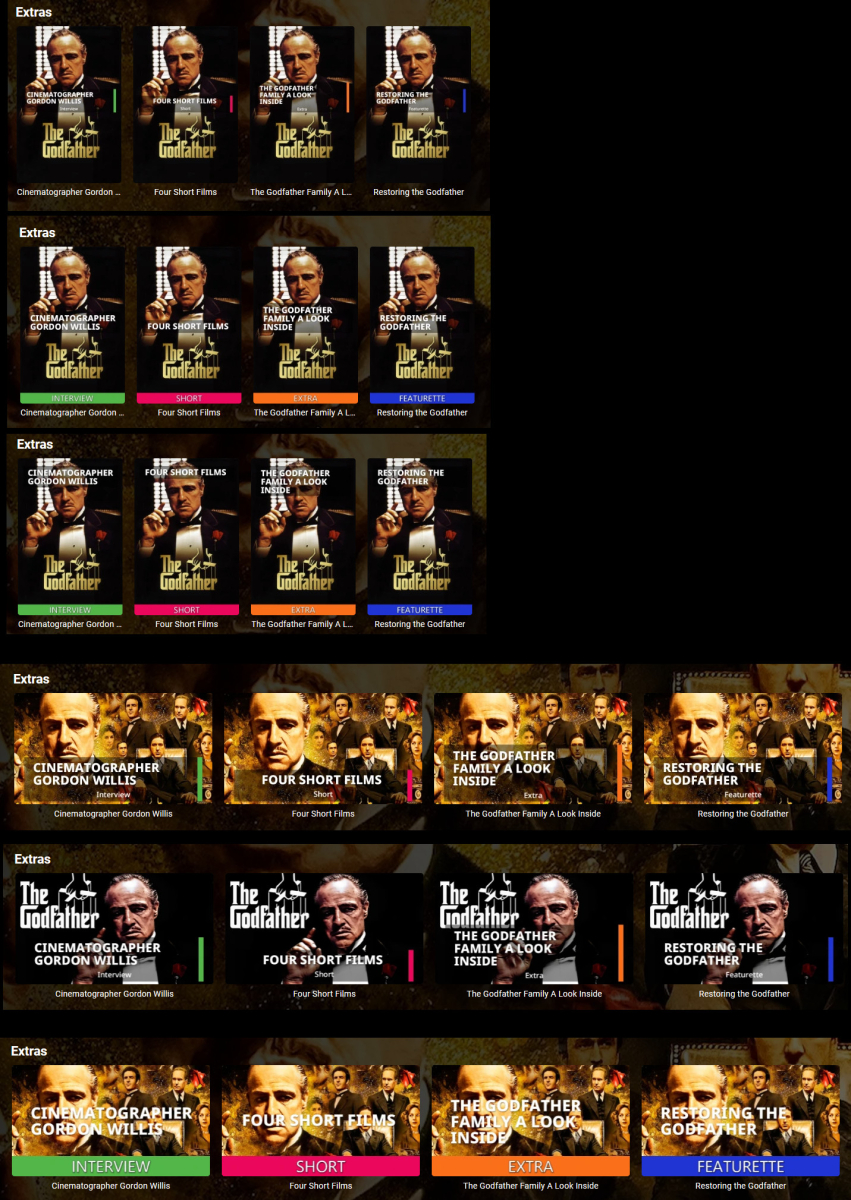
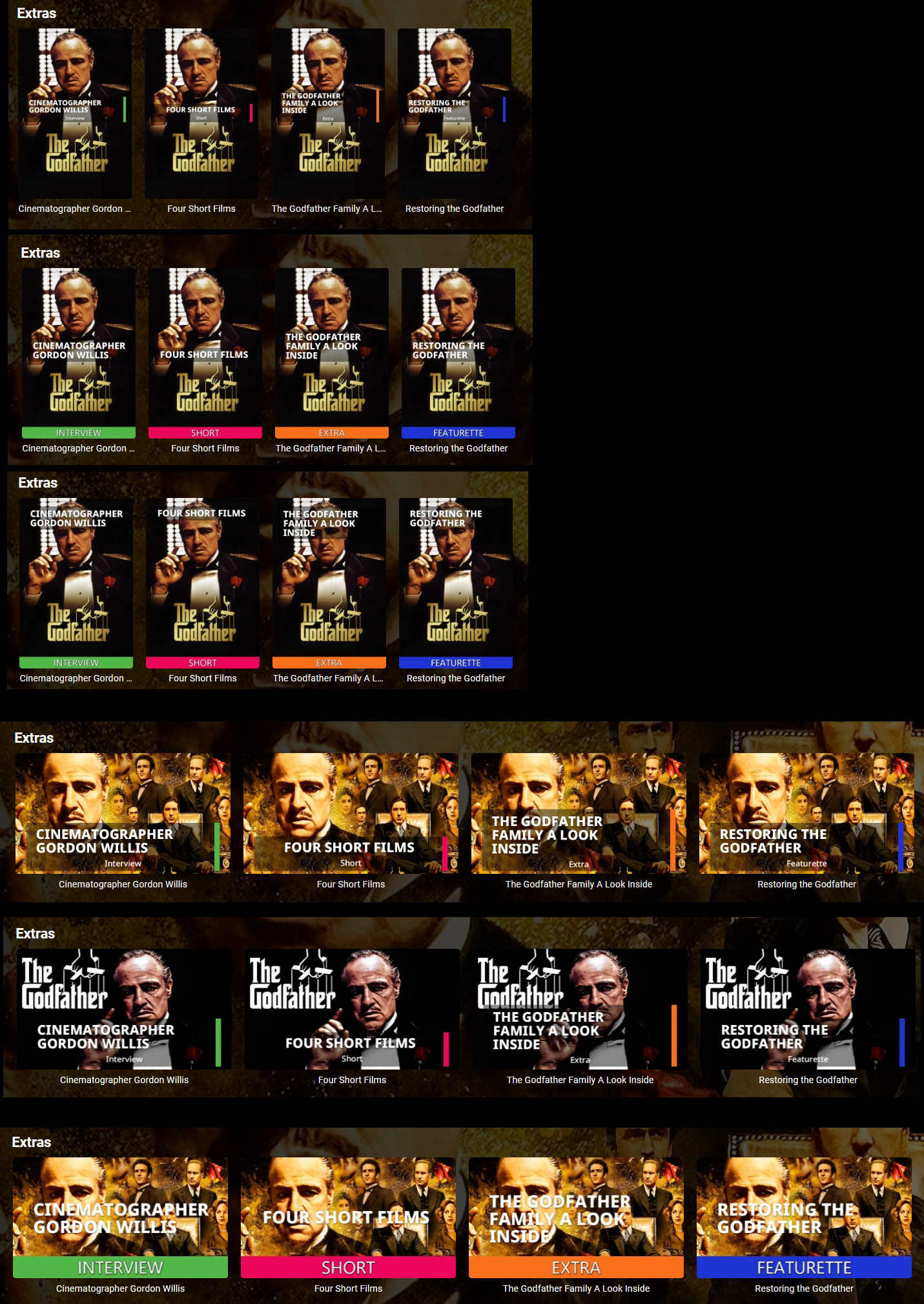
Just a progress update. Lots more image design options, cleaner font, and a functional Configuration UI. I still have UI stuff to do and need to re-implement all the image processing in the other image library some Emby builds use. But it's getting closer. Here are some images generated by the plugin using configuration options:
 2 points
 -
@mbguy It is not totaly random, as i know the corruption depends on certain programs used to make the .mkv. But i dont have any idea how to "filter out" these files. @cheesgeezer As soon as a new version of mkvtoolnix is up, i will do some tests to make sure the new version is bugfree. I will keep you up to date.2 points
-
standby…. It’s in the pipe and almost complete
 2 points
 -
After some more research i found out im not alone with the corruption problem. https://gitlab.com/mbunkus/mkvtoolnix/-/issues/3416 I added my experience to the ticket and provided a test file. For now i can say, using mkvtoolnix / mkvpropedit V71.0 / V71.1 is not safe to use for some files, at least under linux. Not sure about the windows versions. For now i downgraded to mkvtoolnix / mkvpropedit V70.0, processing my testfile was ok with this version. Unfortunaly this does not solved my problems with mediainfo 1.0.1.14 (for movies). Debug log 1.0.1.14: 2022-10-30 22:36:23.166 Info Media Info: New Item Added --- Running Media Info Task for Bekenntnisse.des.Hochstaplers.Felix.Krull 2022-10-30 22:36:23.169 Debug TaskManager: Executing Advanced Media Information 2022-10-30 22:36:23.170 Debug Media Info: MEDIAINFO TASK IS STARTING 2022-10-30 22:36:23.170 Debug Media Info: isEnabled = True 2022-10-30 22:36:23.170 Info Media Info: MediaInfo Individual ID list has been cleared 2022-10-30 22:36:23.170 Info Media Info: Getting Episodes in Library 2022-10-30 22:36:27.143 Info Media Info: Total Episodes in Library = 12024 2022-10-30 22:36:27.143 Info Media Info: Filtering MKV Episodes 2022-10-30 22:36:27.444 Error Media Info: System.NullReferenceException: Object reference not set to an instance of an object. at Emby.MediaInfo.ScheduledTasks.MediaInfoScheduledTask.Execute(CancellationToken cancellationToken, IProgress`1 progress) 2022-10-30 22:36:27.444 Info Media Info: NO MKV EPISODES FOUND 2022-10-30 22:36:29.171 Info Media Info: Total Movies in Library = 3586 2022-10-30 22:36:29.171 Info Media Info: Filtering MKV Movies 2022-10-30 22:36:29.195 Info Media Info: Actual Movies to process = 1 2022-10-30 22:36:29.195 Debug Media Info: Ep items = 0 2022-10-30 22:36:29.195 Debug Media Info: mov items = 1 2022-10-30 22:36:29.195 Info Media Info: Total items to process = 1 2022-10-30 22:36:29.195 Info Media Info: PERFORMING MEDIAINFO EXTRACTION ON MOVIES 2022-10-30 22:36:29.199 Info Media Info: PROCESSING OF Bekenntnisse des Hochstaplers Felix Krull HAS STARTED 2022-10-30 22:36:29.199 Info Media Info: Item FilePath = \\192.168.0.40\video\Filme\Web-DL HD & UHD\Bekenntnisse.des.Hochstaplers.Felix.Krull.2021.German.1080p.BluRay.x264\Bekenntnisse.des.hochstaplers.felix.krull.2021.german.1080p.bluray.x264.mkv 2022-10-30 22:36:29.199 Debug Media Info: Starting MediaInfo.exe process 2022-10-30 22:36:29.233 Debug Media Info: Reset Embedded Titles = False 2022-10-30 22:36:29.235 Debug Media Info: Object reference not set to an instance of an object. 2022-10-30 22:36:29.235 Info Media Info: PROCESSING OF Bekenntnisse des Hochstaplers Felix Krull HAS COMPLETED 2022-10-30 22:36:29.235 Debug Media Info: MediaInfo processing for Bekenntnisse des Hochstaplers Felix Krull and took 35 milliseconds Debug log after downgrade to version 1.0.1.10 (and server restart): 2022-10-30 22:43:12.531 Debug Media Info: MEDIAINFO TASK IS STARTING 2022-10-30 22:43:12.531 Debug Media Info: isEnabled = True 2022-10-30 22:43:12.535 Info Media Info: 597861 ID has been removed from processed list and new MediaInfo Titles will be generated 2022-10-30 22:43:12.535 Info Media Info: MediaInfo Individual ID list has been cleared 2022-10-30 22:43:12.535 Debug Media Info: TESTING: include item types: 2022-10-30 22:43:12.535 Info Media Info: Getting Episodes in Library 2022-10-30 22:43:16.681 Info Media Info: Total Episodes in Library = 12024 2022-10-30 22:43:16.681 Info Media Info: Filtering MKV Episodes 2022-10-30 22:43:16.972 Error Media Info: System.NullReferenceException: Object reference not set to an instance of an object. at Emby.MediaInfo.ScheduledTasks.MediaInfoScheduledTask.Execute(CancellationToken cancellationToken, IProgress`1 progress) 2022-10-30 22:43:16.972 Info Media Info: NO MKV EPISODES FOUND 2022-10-30 22:43:18.826 Info Media Info: Total Movies in Library = 3586 2022-10-30 22:43:18.827 Info Media Info: Filtering MKV Movies 2022-10-30 22:43:18.852 Info Media Info: Actual Movies to process = 1 2022-10-30 22:43:18.852 Debug Media Info: Ep items = 0 2022-10-30 22:43:18.852 Debug Media Info: mov items = 1 2022-10-30 22:43:18.852 Info Media Info: Total items to process = 1 2022-10-30 22:43:18.852 Info Media Info: PERFORMING MEDIAINFO EXTRACTION ON MOVIES 2022-10-30 22:43:18.852 Info Media Info: PROCESSING OF Bekenntnisse des Hochstaplers Felix Krull HAS STARTED 2022-10-30 22:43:18.852 Info Media Info: Item FilePath = /media/video/Filme/Web-DL HD & UHD/Bekenntnisse.des.Hochstaplers.Felix.Krull.2021.German.1080p.BluRay.x264-DETAiLS/bekenntnisse.des.hochstaplers.felix.krull.2021.german.1080p.bluray.x264.mkv 2022-10-30 22:43:18.859 Debug Media Info: Starting MediaInfo.exe process 2022-10-30 22:43:19.086 Debug Media Info: ************** Reset Embedded Titles = False 2022-10-30 22:43:19.282 Debug Media Info: Ref Item = /media/video/Filme/Web-DL HD & UHD/Bekenntnisse.des.Hochstaplers.Felix.Krull.2021.German.1080p.BluRay.x264-DETAiLS/bekenntnisse.des.hochstaplers.felix.krull.2021.german.1080p.bluray.x264.mkv 2022-10-30 22:43:19.283 Debug Media Info: GENERAL INFO 2022-10-30 22:43:19.283 Debug Media Info: Video Tracks = 1 2022-10-30 22:43:19.283 Debug Media Info: Audio Tracks = 1 2022-10-30 22:43:19.283 Debug Media Info: Subtitle Tracks = 2022-10-30 22:43:19.283 Debug Media Info: Overall Bitrate = 5026925 2022-10-30 22:43:19.283 Debug Media Info: ********************* 2022-10-30 22:43:19.283 Debug Media Info: VIDEO INFO 2022-10-30 22:43:19.284 Debug Media Info: Track Format = AVC 2022-10-30 22:43:19.284 Debug Media Info: BitRate = 3417889 2022-10-30 22:43:19.284 Debug Media Info: Height =808 2022-10-30 22:43:19.284 Debug Media Info: Width =1920 2022-10-30 22:43:19.285 Debug Media Info: Aspect Ration =2.376 2022-10-30 22:43:19.285 Debug Media Info: HDR Format = 2022-10-30 22:43:19.285 Debug Media Info: HDR Format Profile = 2022-10-30 22:43:19.285 Debug Media Info: HDR Compatibility = 2022-10-30 22:43:19.285 Debug Media Info: ********************* 2022-10-30 22:43:19.287 Debug Media Info: Adding Video Tags 2022-10-30 22:43:19.714 Info Media Info: Video Track successfully Written & Exited with Code 0 2022-10-30 22:43:19.714 Info Media Info: Video Track Title Set to HD 1080p AVC [3,4Mb/s] 2022-10-30 22:43:19.745 Debug XmlSerializer: Deserializing file /var/lib/emby/config/xbmcmetadata.xml 2022-10-30 22:43:19.752 Debug Media Info: AUDIO INFO 2022-10-30 22:43:19.752 Debug Media Info: Track Format = DTS 2022-10-30 22:43:19.753 Debug Media Info: No of Channels = 6 2022-10-30 22:43:19.753 Debug Media Info: Track Index = 1 2022-10-30 22:43:19.753 Debug Media Info: Track Additional Features = 2022-10-30 22:43:19.753 Debug Media Info: ********************* 2022-10-30 22:43:19.763 Debug Media Info: Adding Audio Tags 2022-10-30 22:43:19.941 Info Media Info: Audio Track successfully Written & Exited with Code 0 2022-10-30 22:43:19.941 Info Media Info: Audio Stream #1 Updated to: DTS 5.1 (48Khz) [24-Bit] (Default) 2022-10-30 22:43:20.125 Info Media Info: Only 1 Audio Stream - Removing *Default* from Title - Updated to: DTS 5.1 (48Khz) [24-Bit] 2022-10-30 22:43:20.126 Info Media Info: Item Tags found = venice, italy - lie - ladykiller - con man 2022-10-30 22:43:20.126 Info Media Info: PROCESSING OF Bekenntnisse des Hochstaplers Felix Krull HAS COMPLETED 2022-10-30 22:43:20.128 Debug Media Info: MediaInfo processing for Bekenntnisse des Hochstaplers Felix Krull and took 1276 milliseconds I hope this will help.2 points
-
Hello, Perhaps I am not the first one to ask this question but it will be very cool if this feature could be implemented. I have 2 servers one at home and the other at work. ( and soon a third one...) So I have a movies library called movies on each server. I would like to see all the movies from a single 'virtual server location' when I use the app (ios or android ) where I will see only one movies library containing movies informations from the movie library at work and the movie library at home. It's an aggregation of movies informations from the movie library at work and the movie library at home. In fact when a user have multiple servers it will be perfect if another choice in the server list called "all servers" for example appears automatically with a merge of media informations from librairies with the same name on different servers.1 point
-
#6 and #74 are basically the same. My bad for not noticing #6 first. "This isn't happening by itself. The button order should not be different from the Live TV tab order. If you want to talk about changing the tab order, we can, or if you want to talk about customizable tab order, we can. These would impact every Emby app. Please use a feature request topic. " I prefer that Guide would be the first tab, as it is in ATV now, or the ability to set the order. I never use "programs" so it's wasted clicking to get past it. Obviously this isn't a priority. I searched to see if anyone made this thread yet, sorry if I missed it. Thanks!1 point
-
Luke, thank you for your help. I will give it a try and report back.1 point
-
We already have options for this so I would just check the options for each of your libraries.1 point
-
Hi, we can add this. Thanks.1 point
-
Hi, we'll add the year. Thanks.1 point
-
I don't have an ETA but we are working on it. Thanks.1 point
-
Oh, the Emby app can cast to Sonos without issue, I would love to have a Emby Music only app though, even though the Emby app does music alright now.1 point
-
The second one gives this: root@DS918:/volume1# ls -ld TV\ Shows drwxr-xr-x 1 root root 7406 Oct 30 20:37 'TV Shows' Which has removed the permission error - however I'm still getting "No compatible streams are currently available. Please try again later or contact your system administrator for details." The only related error in embyserver.txt is: *** Error Report *** Version: 4.7.8.0 Command line: /volume1/@appstore/EmbyServer/system/EmbyServer.dll -programdata /var/packages/EmbyServer/var -ffdetect /var/packages/EmbyServer/target/bin/ffdetect -ffmpeg /var/packages/EmbyServer/target/bin/ffmpeg -ffprobe /var/packages/EmbyServer/target/bin/ffprobe -nolocalportconfig -ignore_vaapi_enabled_flag -pidfile /var/packages/EmbyServer/var/EmbyServer.pid -defaultdirectory /volume1/Public -updatepackage emby-server-synology7_{version}_x86_64.spk -noautorunwebapp Operating system: Linux version 4.4.180+ (root@build3) (gcc version 8.5.0 (GCC) ) #42661 SMP Mon Jun 27 15:05:48 CST 2022 Framework: .NET 6.0.8 OS/Process: x64/x64 Runtime: volume1/@appstore/EmbyServer/system/System.Private.CoreLib.dll Processor count: 4 Data path: /var/packages/EmbyServer/var Application path: /volume1/@appstore/EmbyServer/system System.Exception: System.Exception: Error starting ffmpeg at Emby.Server.MediaEncoding.Api.BaseStreamingService.StartFfMpeg(StreamState state, String outputPath, CancellationToken cancellationToken, Boolean acquireResources) at Emby.Server.MediaEncoding.Api.Hls.DynamicHlsService.GetDynamicSegment(StreamRequest request, String manifestAbsoluteUri, String playlistId, String segmentId, Int32 subtitleStreamIndex, AuthorizationInfo authorizationInfo) at Emby.Server.Implementations.Services.ServiceController.GetTaskResult(Task task) at Emby.Server.Implementations.Services.ServiceHandler.ProcessRequestAsync(HttpListenerHost appHost, IRequest httpReq, IResponse httpRes, RestPath restPath, String responseContentType, CancellationToken cancellationToken) at Emby.Server.Implementations.HttpServer.HttpListenerHost.RequestHandler(IRequest httpReq, ReadOnlyMemory`1 urlString, ReadOnlyMemory`1 localPath, CancellationToken cancellationToken) Source: Emby.Server.MediaEncoding TargetSite: Void MoveNext() I've attached the full ffmpeg log: ffmpeg-remux-5844b121-3e60-4303-904b-89754096fb5f_1.txt1 point
-
Will be looking at making the improvements tomorrow. Any helpers/testers are welcome1 point
-
Would happily purchase or donate, one thing that keeps me on using plex for music is Plexamp can cast to my sonos setup from the app. Clone Plexamp for Emby and I would throw money at you1 point
-
V1.0.1.16 is live in the catalogue!! enjoy people1 point
-
I really hope you get it solved. This 70 check will be in the next release. It's not available just yet. @rbjtech found a bug..... grrrrrrrrrrr1 point
-
with the updated movie collections plugin, top picks is generating the library ok but out of order. but its probably my setup. tiny media manager sets the file added date to the movie release date during the metadata collection process. i then have the following setting in library -> advanced i do this because... reasons. However if the latest media plugin is also working then those reasons disappear. just trying latest media...
 1 point
 -
Maybe worth trying ffmpeg or some of the mature stream tools such as eac3to (-demux) or tsmuxer to demux the streams - and then remux. If the headers really have been fried by mkvpropedit - and the streams are not even identifiable, then I fear recovery may be impossible. If you can share one of the corrupt files via PM link - then I'm happy to spend a few minutes to see if I can recover it and advise my method if successful..1 point
-
but i would need to give the user an override mkv version option. Then… bombard them with about a thousand alerts and messages warning them about this. Then get them to agree to terms and conditions and then give another 20 windows of…. are you sure….. are you really sure… are you really sure you’re sure… are you absolutely sure your really sure that you’re sure hahahahaha Agreed1 point
-
The 'per library' option does indeed give you many more options for testing. But it has been made clear on the plugin config page and should be reasonably self-evident, that if you deploy a 3rd part tool to modify ALL your media files, it would probably be a good idea with ANY utility to test it first .. Short of creating another emby instance (as I did), this would have been 'difficult' to do with the previous verions I agree - as the only options were all of TV or all of Movies. Now you can create a test library - and use that for new releases of mkvtoolnix and/or mediainfo. (if and when you want to upgrade them for some reason). The plugin version .16 is working very well for me (*) - using Windows mkvproedit v61 but will not run if v71 has been downloaded. I don't believe the plugin can do anymore to safeguard the use of a 3rd party utility. (*) Issue with multi-version re-processing reported - but everything else looks fantastic.1 point
-
I am also quite excited about the enhancements. If I understood correctly, the "Library Selector" function can be used for "testing" or "validating" MKVPropEdit working version first instead of letting Mediainfo use it on whole bunch of files that may be "assaulted" and eventually corrupted by a bad version/update. For example, now that I have a whole bunch of files that are known to have been corrupted by MKVPropEdit before, I would group them into a folder and create a new library. Before I would run MediaInfo on the main libraries, I will test Mediainfo on this "corrupt candidate" files first and read the log files or use MKVinfo GUI to open them, whatever is needed to ensure NOTHING is wrong, and only then Mediainfo would be safely deployed to the rest of the library. I was lucky in a way that Mediainfo hangs (for whatever reasons) several times during the scans in the last few days so total files corrupted by MKVPropEdit are "ONLY" limited to 350+ files. But had the process gone on, the effect might have been disastrous. This leads me to think that Mediainfo should have another "safeguard" in place @Cheesegeezer. Maybe as soon as "Error in FFprobe" is detected then the scan would be halted? Of course this safeguard maybe entirely redundant because MKVPropEdit had never failed before and this was just an isolated incidence. But if this type of instability inherently exists for a third-party tool from time to time, I think it's better to at least have an option for users of Mediinfo to turn on or off this safeguard. Just something to think about. Although 350+ corrupted files is not "too late" for me as I have backup copies of most of them, but I wouldn't want the same to happen to others. In fact, as of now, I still don't know how to batch replace these files, because they are not even readable by MKVToolNix GUI or mediainfo GUI. Especially if the MKVPropEdit corruption is random in nature, and does not impact specific files or type of encoding at all, then this "Halt scan if error is detected" is crucial safeguard against some third party tool.1 point
-
Thanks, I could install the 7.x version, now I need to test it again as the database got rebuild as you said. I will give feedback as soon as I have news.1 point
-
This is what I was worried about. It doesn't seem to be reliably reproducible, in file or play location within a file. My logs don't show anything out of the ordinary in transcoding or the server logs. It is happening on my MIL computer which has no safari extensions, even though my safari does (I tried disabling them as well). It seems to happen in some files, and not in others, but not with any sort of real pattern that I can discern. Perhaps if more people started talking about the problem we could have a big enough test group to figure it out.1 point
-
Totally concur about that. Thats why I only open the 8920 port to Emby (I deleted the 8096 port forward once I knew it was working). Probably more secure because its using SSL on that port. But nothing is 100% certain. The less ports open and forwarded the better of course. I have decided for myself that it is worth the risk to provide the functionality to my family members who access Emby externally. I try to mitigate any potential issues by updating firmware on the Qnap nas, and updating Emby as soon as possible assuming no issues have been flagged in forums online etc.1 point
-
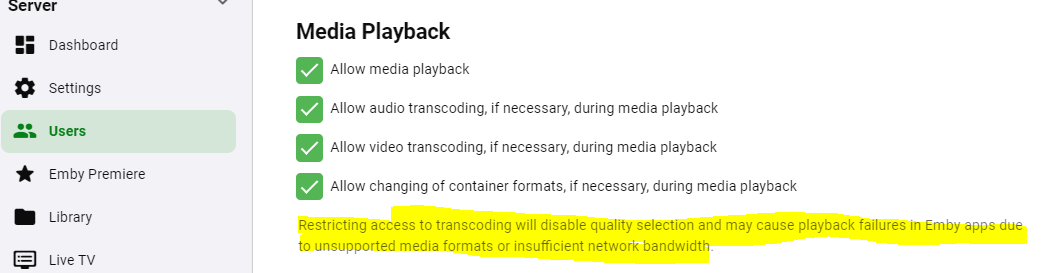
Bring up your user in the server management console. There are options there for whether to allow different types of playback (and a warning if you disable any of them).
 1 point
 -
@raudraido Shutdown Emby and just place this Collection folder in your Emby programdata /root/default/ folder, start Emby and do a library scan. Verify the library settings are to your liking. Collections.zip1 point
-
Yep all sorted thanks @Luke. My router somehow created my server twice on 2 ports by 2 different IP Addresses, bybthe same name, and confused Emby Connect1 point
-
@Cheesegeezer @rbjtech @samuelqwe As a matter of fact... there might be an algorithm that can target end credits. Nothing public yet though.1 point
-
Fantastic tool - thankyou. This worked perfectly. I don't have any Critic Ratings data to erase - just Community Ratings.1 point
-
Only guessing but in some cases images are downloading then processing. As per that setting images are only gotten on demand not when you import the item. With it disable only a url is gotten and store in the database.1 point
-
Also note once a cache is built it should not take as long to present images.1 point
-
Is this a local or remote connection? What client? I have my DB cache size set at 512 and images as fast as I can scroll locally and remotely in a browser. But is on a desktop i7-10700. May need to see server logs for this scenerio.1 point
-
Hi, yes the coverart plugin will cause images up take longer to load.1 point
-
Hi, can you import it into emby server as an m3u?1 point
-
fair enuf. might be useful to be able to declare a connection as reliable/static vs intermittent/dynamic. e.g., my lan kodi client conencting to my lan emby server can reliably be considered 'up' and available from the moment it connects to the moment it disconnects. as would the web UI client AT my emby server ... that one in particular seems a pretty safe bet. yeah, the client would need to be notified -- but, seems to me a passive listener at the client, waiting for a notify from the server is good enuf. no need for an active interrogation/keepalive from client -> server. and, nope, haven't thought this thru much yet.1 point
-
I was able to readjust the behaviour again, but after the restart everything was great again. You can take a look and see if you see anything. Thank you very much. kodi.old.log1 point
-
I think I figured it out. The download client was misbehaving and not setting permissions correctly. Reworked SAB NZB and they are playing now.1 point
-
Try this: git clone https://github.com/erikkaashoek/Comskip (security change) Note this version may crash (seg fault) often, you may be better off installing from distro.1 point
-
Ok! i figured out what kind of plugin i want to make, I trying to make a metadata provider plugin @chef1 point
-
Hi, I know it's been almost a month now, but if anyone happens across this with a similar issue they are facing, I'd suggest creating an account on Trakt.tv. If plex supports scrobbling to it, you can import your playstates into emby.1 point
-
If he needs something special, all he has to do is ask. If I can do it, I will. Vic1 point
-
I use this one. DB Browser for SQLite (sqlitebrowser.org) Or there is the Emby Tagging tool and you can bulk edit Community rating and set to 0. But looks like you will have to ask the dev to add Critic Rating if you need that changed also.1 point
-
Hi I think you are making an assumption there. Transcoding to HEVC on the fly may or may not make a big difference for you but, in that situation, pre-encoding lower bitrate (1-2Mb I would think) versions of your files definitely would make a big difference.1 point
-
Hi, if translations need help, I'll be glad to help out.1 point
-
I think it's great and looks awesome1 point
-
Okay, thanks. Next version hopefully? It worked fine before, but now the playback never stops. Fall asleep, wake up two seasons later. LOL1 point
-
It's been behaving well. I've not used it tons but any transcoding seems to work quite well with the gpu maxed. I have picked up a "new" laptop which has the Intel 520 gpu which seems to be twice as powerful as what I have so I'm not expecting any issues. The amd piece never worked but touch wood I don't need it anyway. I can't transcode 4k but nether do I expect to on this hw it handles 1080 fine!1 point
-
Hold the phone!! I just realized that you can run this with cuda cores on a GPU. This now looks for cuda and if it finds it, you can use it. If we thread the process then technically the AI runs using the gpu, and the processor just mattes the image. We could thread this thing 20 times over... Well... maybe not 20... But one heck of a lot faster rendering on the GPU if there is one. I officially might love python. ..1 point
-
Agree - it's still far too early to take sides, but AV1 has a lot more going for it than HEVC. Just because Apple doesn't support something doesn't mean much now, they haven't innovated for years. It's the 'streamers' that will dictate the next major codec - youtube, prime, google, netflix, disney+ etc - they have already started to use it and it's gaining traction - Primarily because it's royalty free. Most recent hardware seems to have AV1 decode support - so it's just the AV1 encode that needs to catch up. I suspect Nvdia 4000 will have AV1 encode - I think they would be crazy not to have it given Intel do and AMD (RDNA3) appear to be almost confirmed. At the end of the day - it's also ffmpeg that largely dictates the emby codec 'strategy' - so if it supports AV1 well, then emby will have the option to follow. If they don't - and remain using h264 then they will be left behind ..1 point





.thumb.jpg.1ea4e6b27fd5921ad22171468034b3f4.jpg)








.thumb.jpg.6c666f1cd8800f391f1574a4f8c6feef.jpg)




