Leaderboard




Popular Content
Showing content with the highest reputation on 10/19/22 in all areas
-
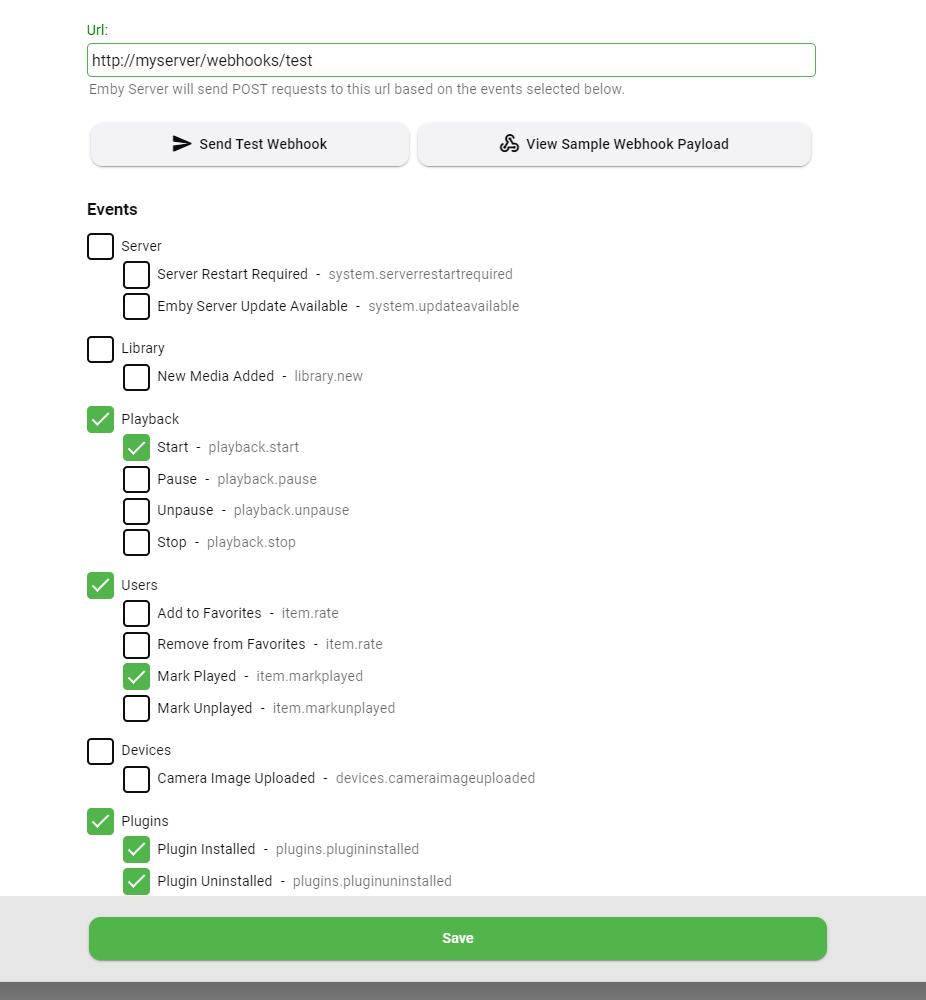
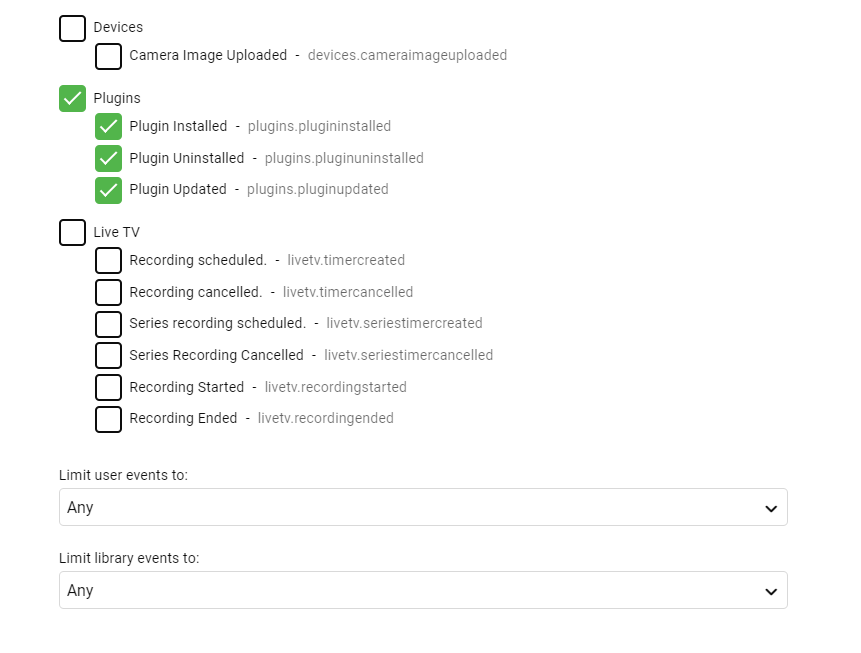
Here's what to look for in the next update to the Webhooks plugin (requires Emby Server 4.7.9+): Easy button to view a sample webhook payload Select individual events, making it easier to send different actions to different urls New events added for new media and camera upload User selection is now a multi-select You can also filter on libraries User selection is now a multi-select You can also filter on libraries
 5 points
 -
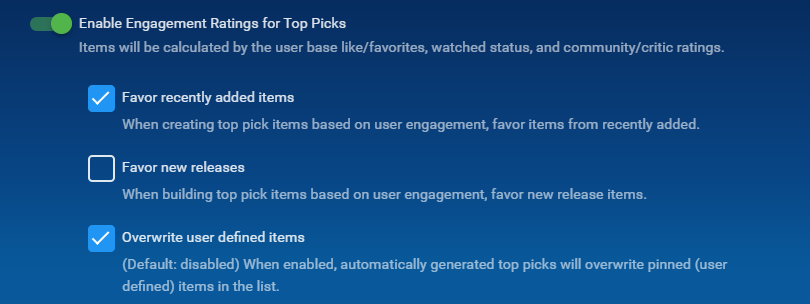
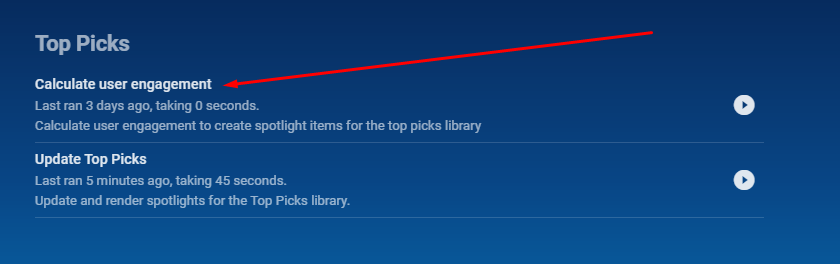
Just want to add. @chef has worked really hard with this and there were a hell of a lot of bugs to weed out and so much dedication from him to get this to Release. He never ceases to amaze me with his ideas and hard work. What's even better is you can set the schedule task for an interval to generate new top picks from the Engagement section, set this up in the UI how you want then set the Schedule task to run weekly, every 4 days or what every you want to generate new top picks that will interest your users That being said.... The plugin is available in the Catalogue under the General Section. Give it a go and you will be super happy.
 4 points
 -
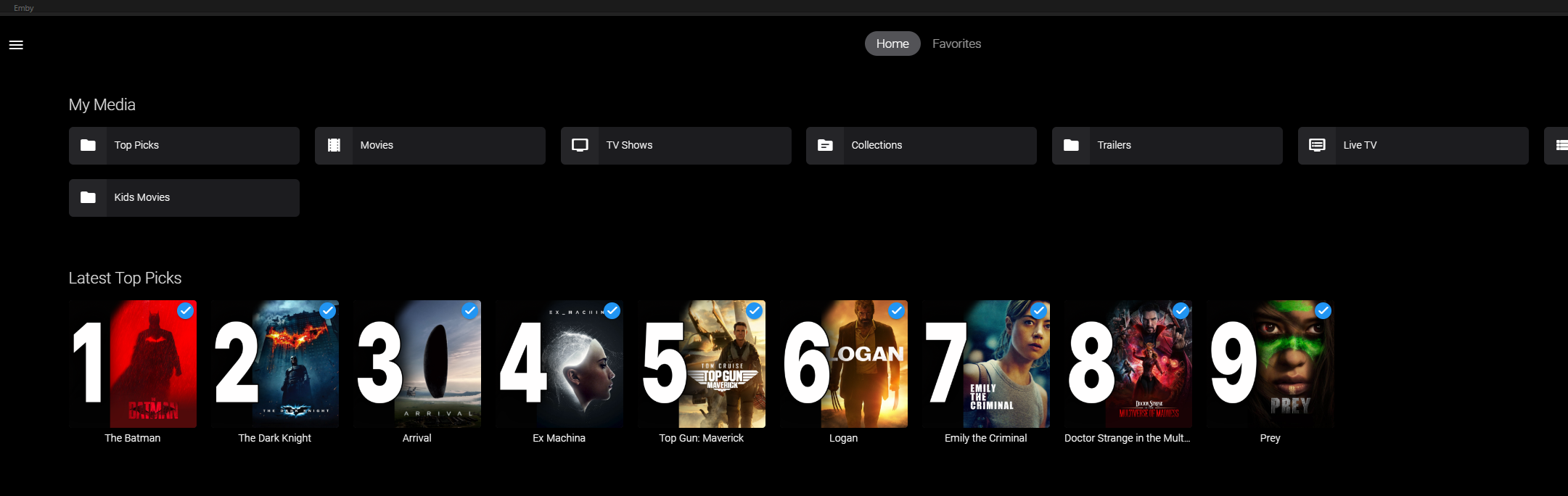
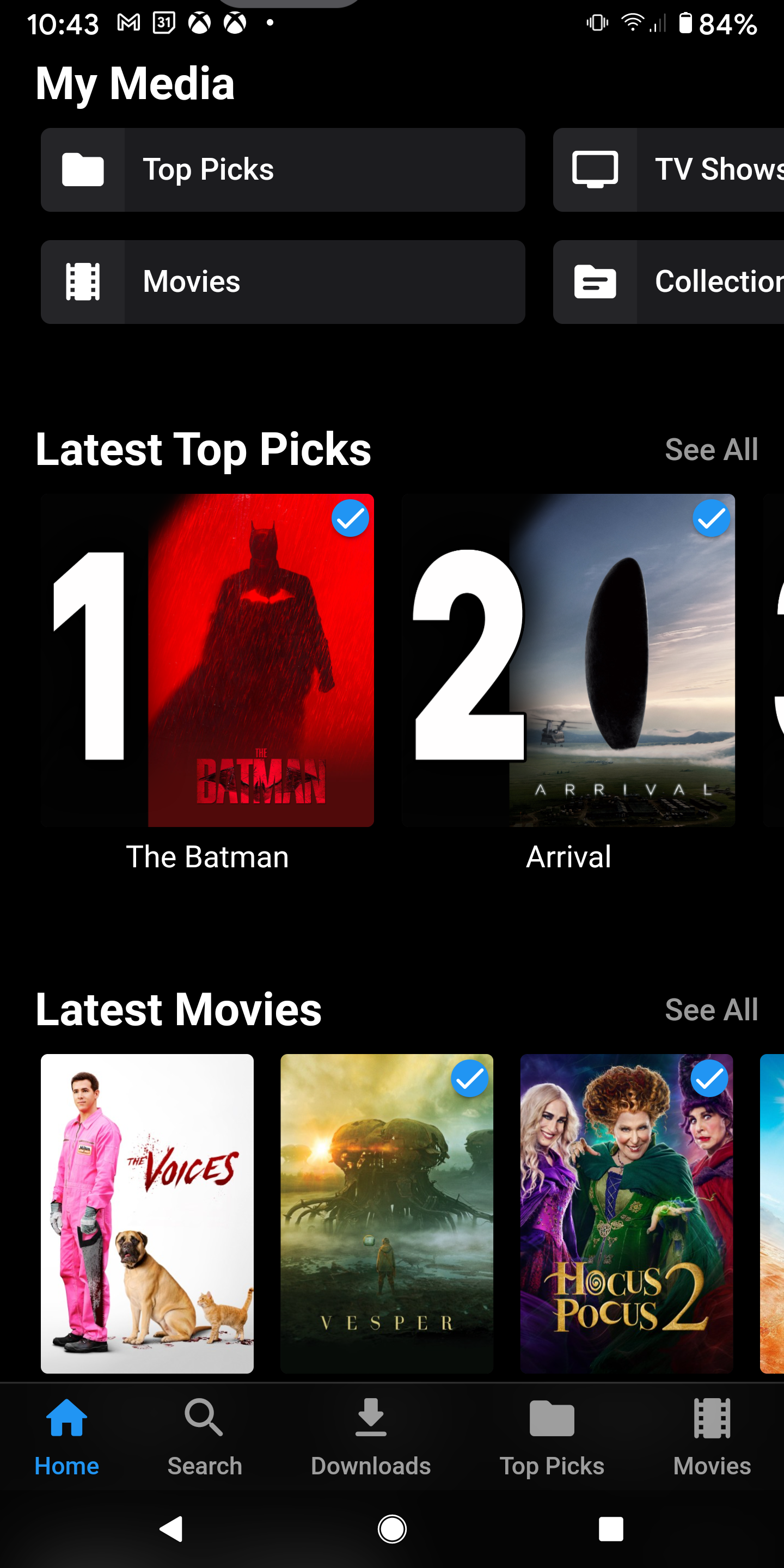
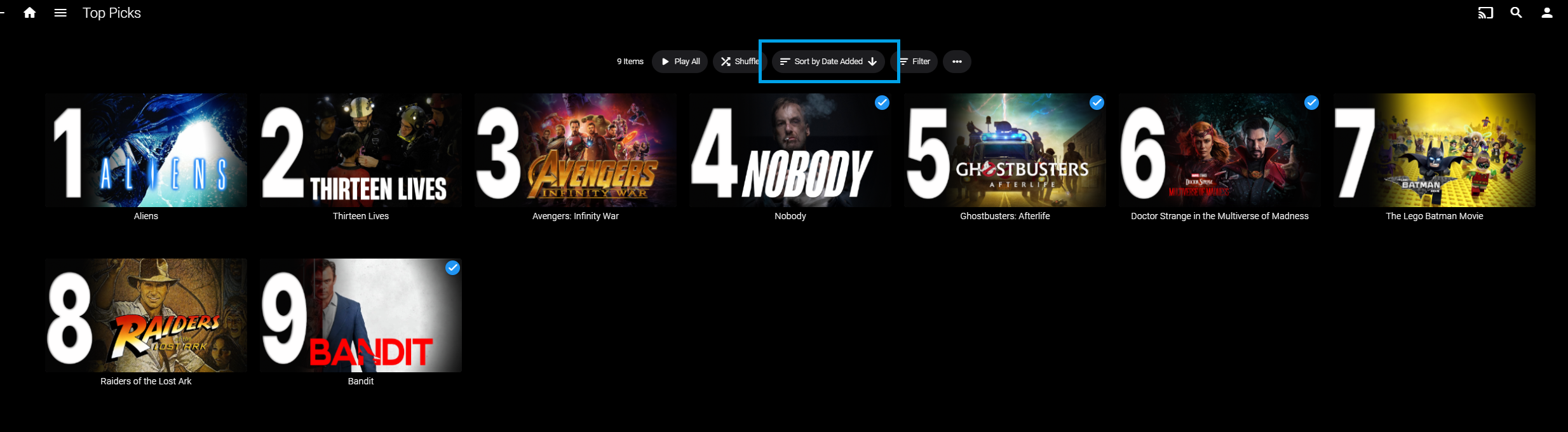
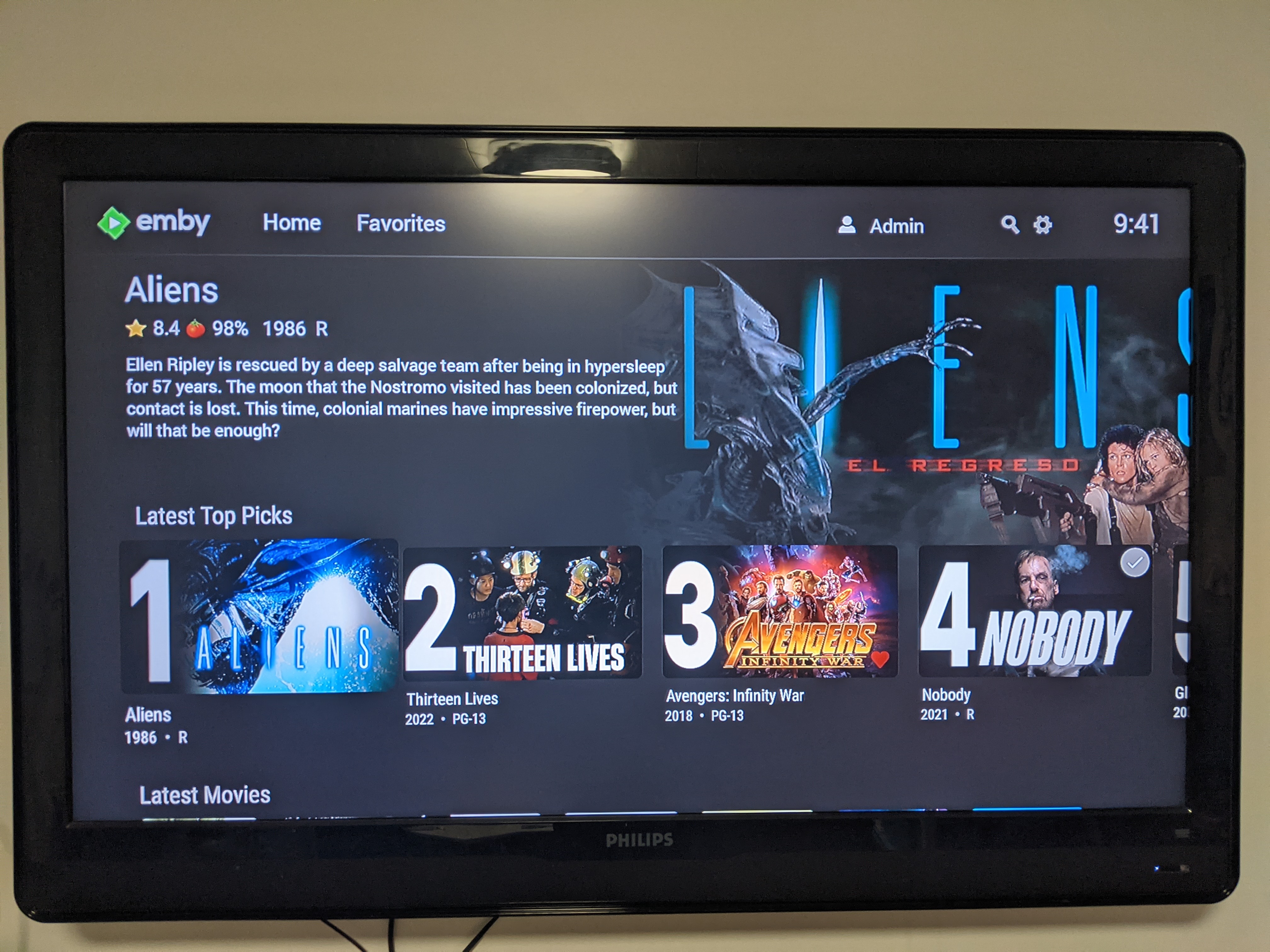
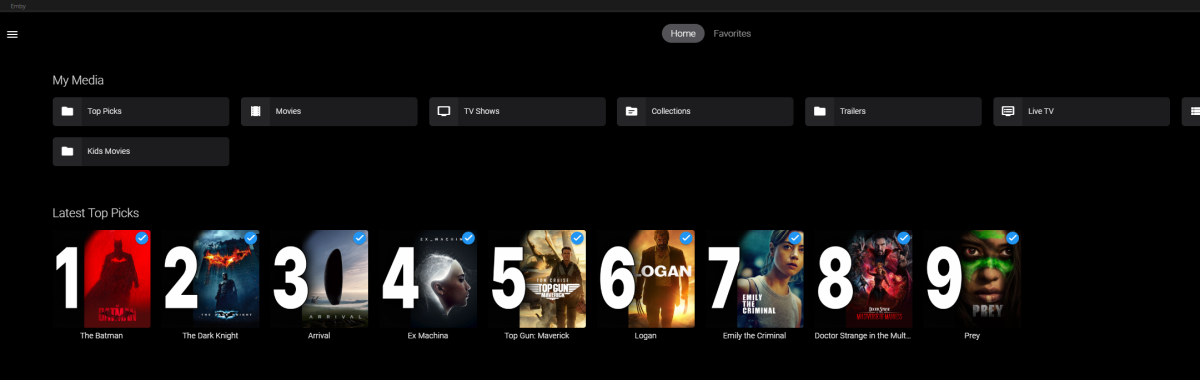
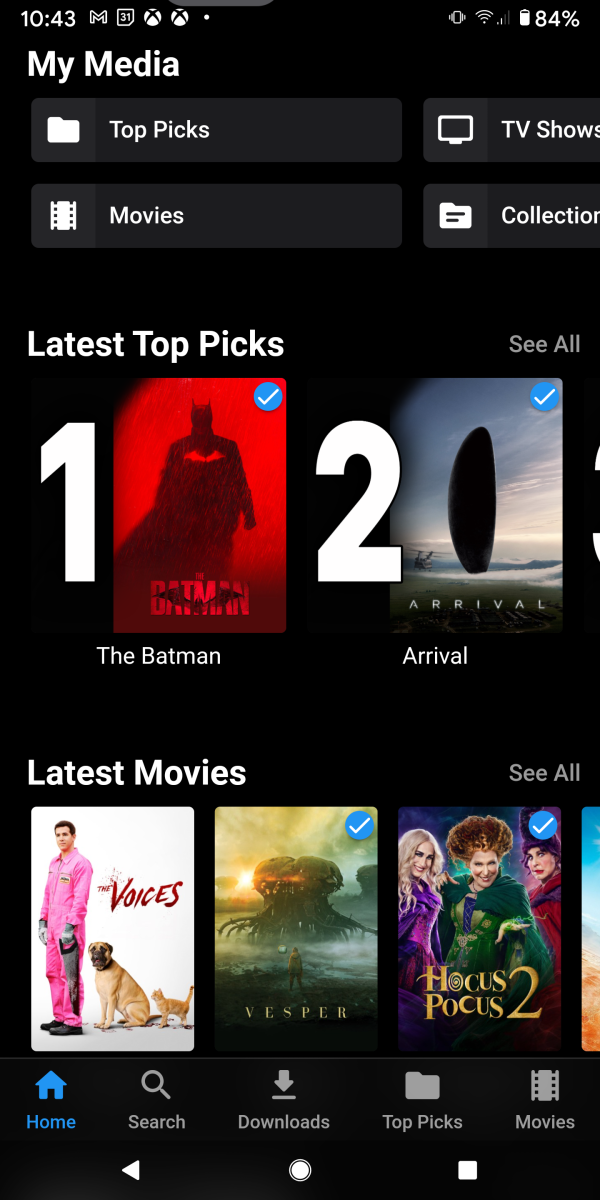
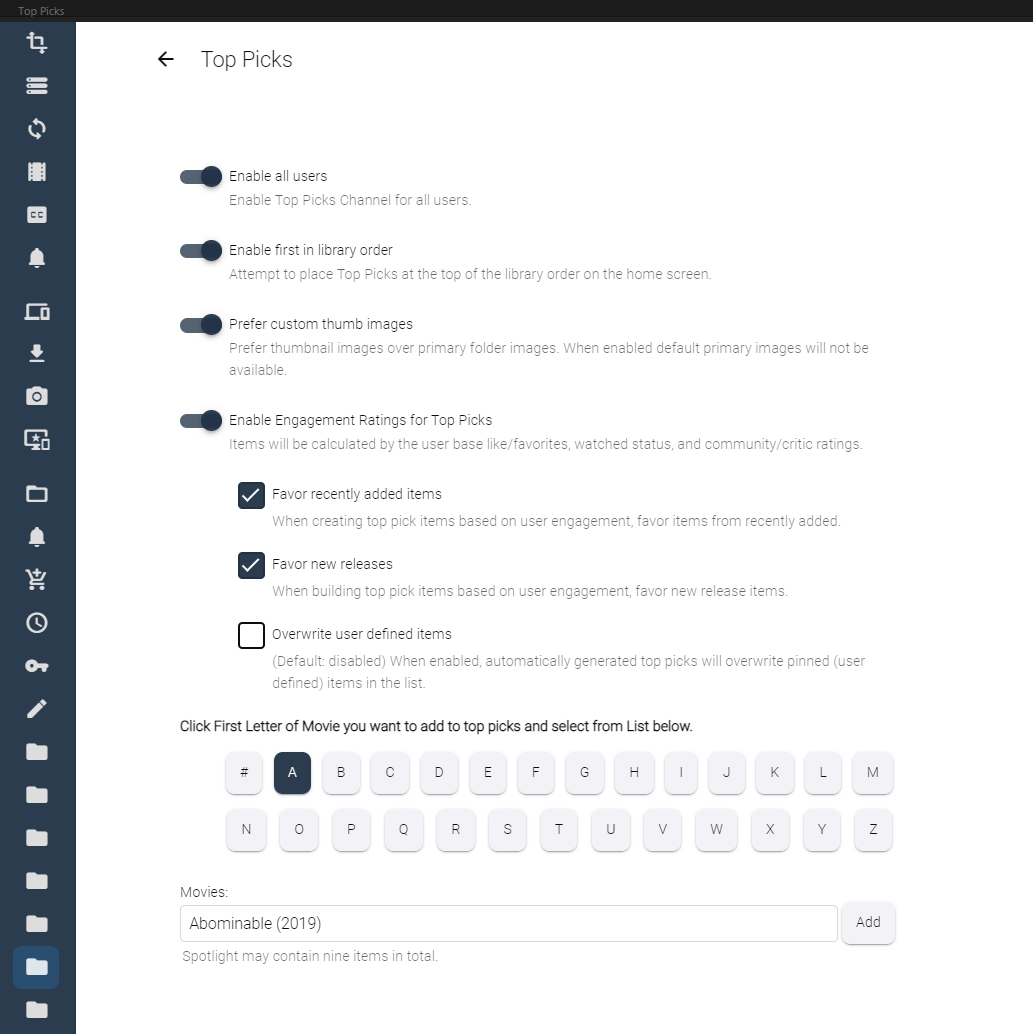
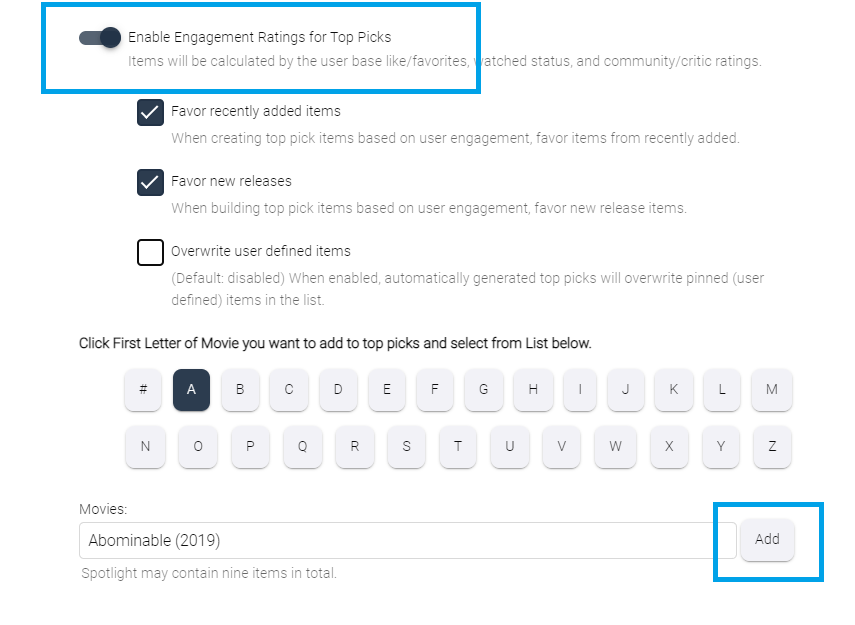
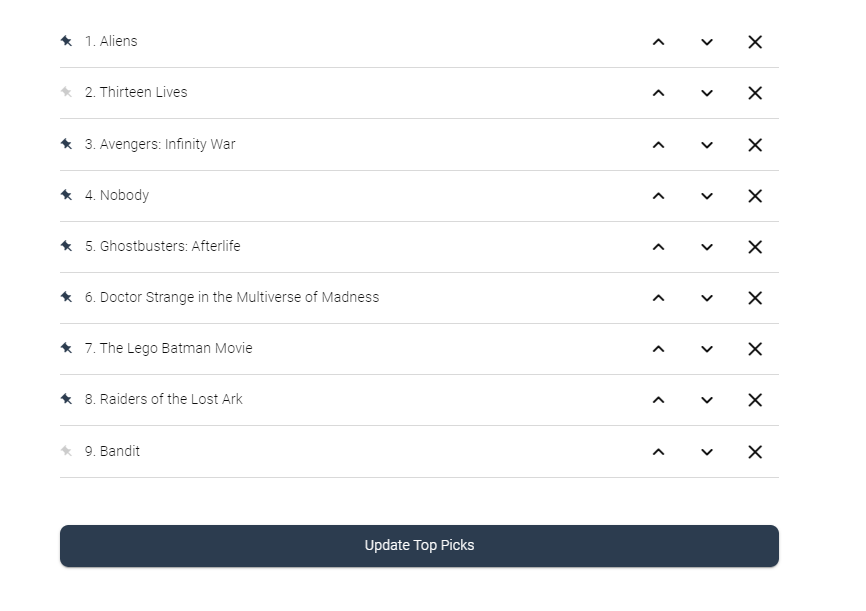
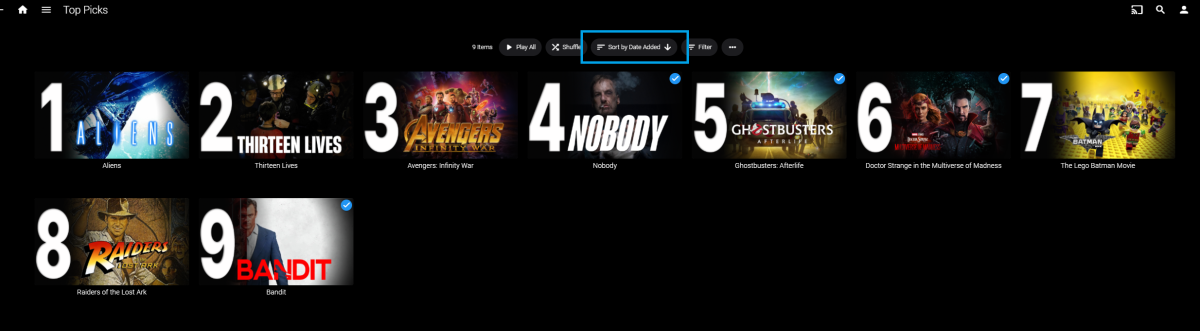
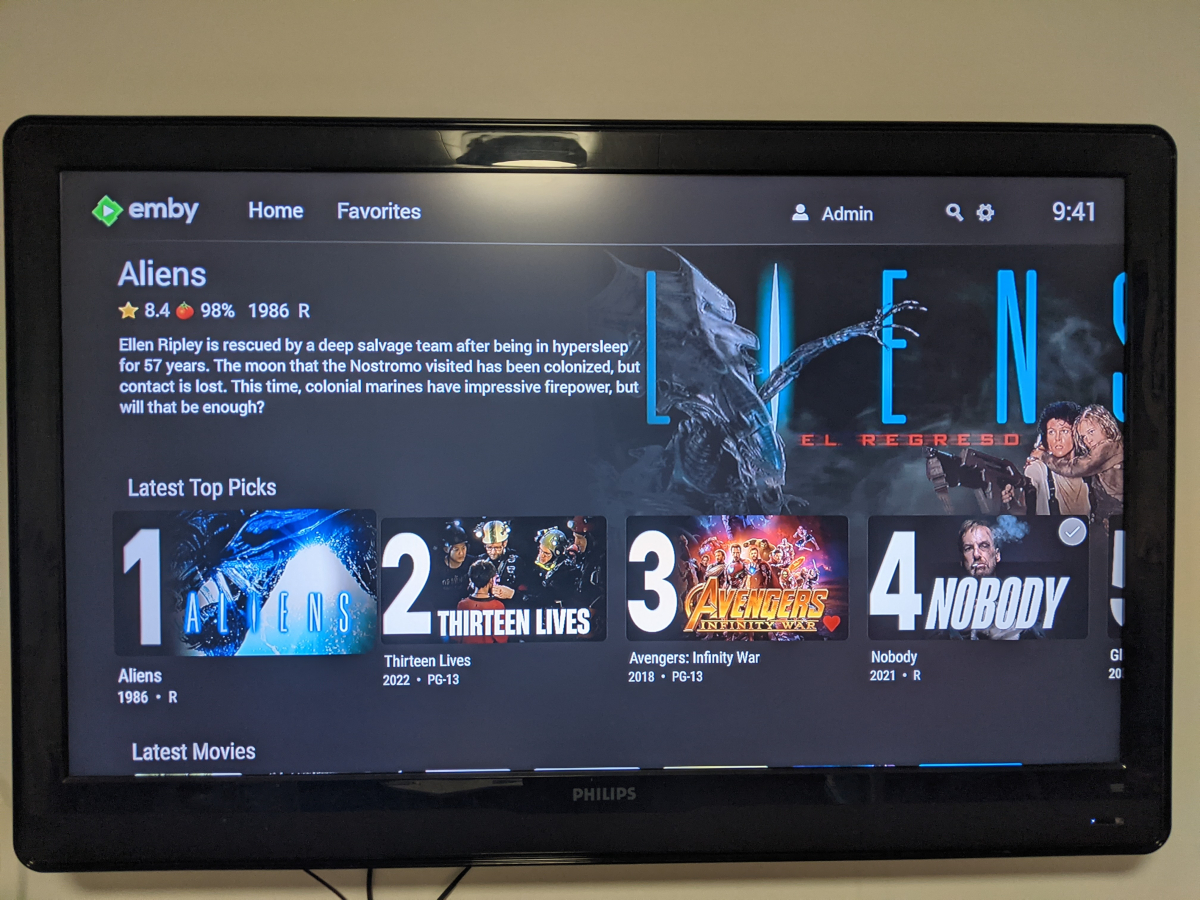
Welcome to Top Picks Top Picks will create a custom movie library with ranked items to share with your user base. Enabling settings in the top pick configuration will allow you to create a library based on your user engagement, and also customize what's being shown in the library. Note: Larger movie libraries will have the best chance at generating user engagement top pick items. Smaller libraries may only generate a couple top picks automatically. Critic rating, and community rating do play a part in choosing top pick items, along with User Likes/Favorited Items, and also Watched States. Creating, and editing the Top Picks List: After enabling, and running the scheduled task for user engagement (which will populate an initial list, but is also completely optional), you can also customize the library by adding movies of your choosing, and add-to/edit the top picks list to a maximum number of 9 items. It is important to note that users of the Top Picks library should not hide watched content from their home screen. This will ensure that all the content added to Top Picks is shown in the home screen layout. Pinning Items to the list: These items remain during the engagement rotation. This means that only auto generated items will be replaced weekly. Note: List item rotation will only happen when items are available in the library which meet the engagement criteria. This may lead to some manual up keep of the list. (In the image above, only the 2nd, and 9th item are allow to change, because they are not pinned to the list. However, the item changes will be based on the engagement results, and may not change based on the current state of the library and user engagement stats.) The more your users engage with the library, the more dynamic top picks will create lists. Favor custom thumb images over primary images: Favor custom primary images: Mobile: Android Enhanced Home Screen Layout Entering the Top Picks library you should choose to "Sort by Date Added" to have the images order themselves. There is a week long trial to test it out, after you install it from the catalog. If there are any questions please post them here in this thread. Please be kind, a lot of time, and work went into this. I'm open to further discussions regarding things that might make Top Picks better in the future as well. - chef Version 1.0.0.20 theme media is now added if it exists for a library item. Version 1.0.0.19 Current NFO files that exist in the library are now successfully used and properly altered for top pick items. This stops Emby from having to try and identify items which are already properly identified in the library. The ability to target a specific library for top pick creation. Version 1.0.0.18 Library items now have the option to show the top pick tag or not. Top picks drawing classes now attempt to draw custom thumb/primary images in memory without saving assets until complete. Version 1.0.0.17 Library is created with servers language for metadata retrieval. Top Picks will now search providers for missing resources to draw custom images for the library

 2 points
 -
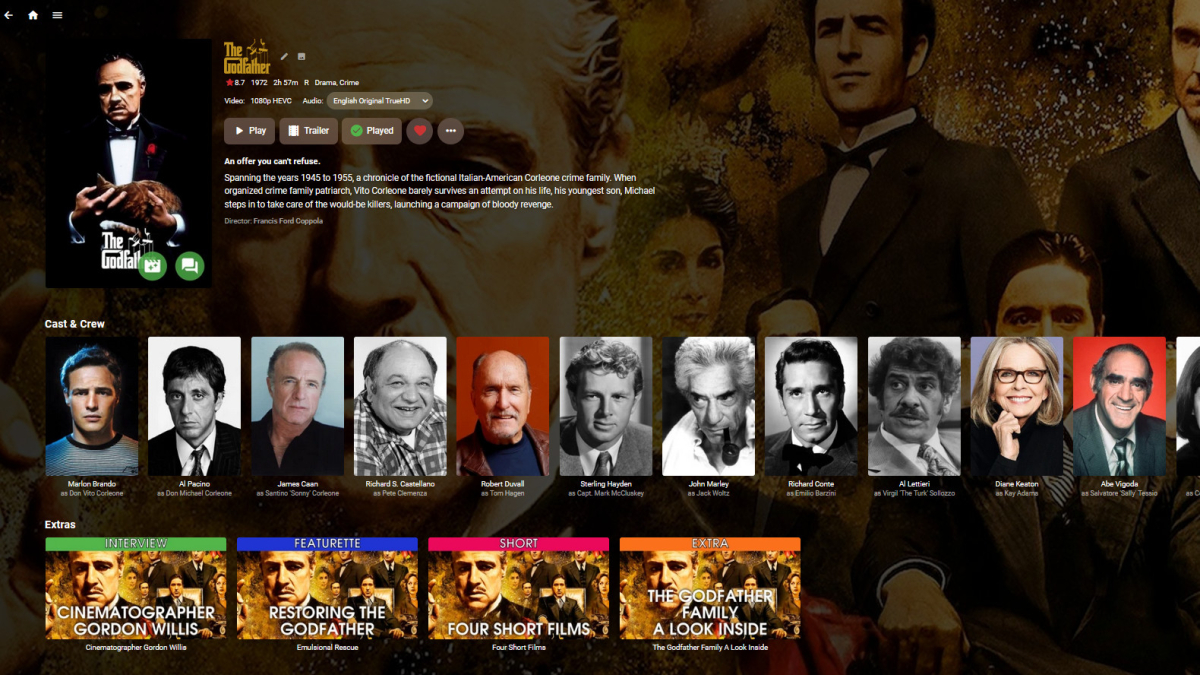
I've started preliminary work on another plugin to solve one of *my* problems, and I'd like to get some feedback from Emby land to see if any one else is interested. I have a lot of movie extras and more every day. I also like all my media to have decent looking art. I'm lazy on top of that. So, to avoid having to manually create art for every Extra I add, I've been playing around with a plugin that would generate Extra art on the fly, using art from the parent movie as a background, while overlaying the type and title. It would be configurable and look something like this: I'm also thinking about a task for sorting the extras by user preferred type. So, would this be useful to anyone else (more work, better plugin) or should I just build it for me (bare minimum, ugly plugin)?
 2 points
 -
In their next releases.2 points
-
IT WORKS!!! Thank you. can i ask you? Why is it taking you so long?? I hope that the show will work in the future... We need to watch emby and functional2 points
-
Thanks for the kind words. If this plugin goes over well, we can use the same registration to create a companion in the future that can handle other media types in emby for sure.2 points
-
Looks cool and more importantly a functionally awesome feature to add that helps with user engagement! Hats off! Perhaps call it Top "Movie" Picks for now...or do you plan multiple types of Picks later on? (TV, Movies, Collections, Music etc.)? Top dev @chef2 points
-
No, it was corrected some time ago. I'm assuming softworkz resolved it in a following release, as he indicated.2 points
-
Fixed on 4.8.0.9 beta.2 points
-
That did it thanks!1 point
-
I think I know now what the problem is. Since last week I got a M3U-Link which I entered in LIVE TV. I got no problems – everything was good. From this week the provider accept only 1 connection at the same time - sharing is no more possible. In a browser like Google Chrome the M3u-Link works. So I need a new IPTV-provider which allows more connections at the same time.1 point
-
Thanks for the update! Let me know if you need any help testing.1 point
-
I think Emby for Android has a much much better user interface as well as functioning better. I am using Emby for Windows server version 4.7.8 with Emby for Android 3.2.81 and have not noticed skipping problems. I am not sure when it was fixed, but I thing it was possibly a server issue.1 point
-
OK I have installed that version. It has been somewhat intermittent behavior, but I will report back if this one has an issue.1 point
-
Great! Looking forward to that!1 point
-
After a couple days of usage.. I must say, "Emby for Android" is much better than "Emby Android TV". ff/rw works perfect every single time. But there's also a ton more options for personalizing and managing not only the client but server also. @Luke is "Emby for Android" going to replace the Android TV and Fire TV apps and be available/updated on from the app stores? IMHO, it works a lot better and has a ton more features. Or will it always be a sideload to use on Android TV devices?1 point
-
That'd be great, at least if TV Shows could be included.1 point
-
The app automatically switches between the two addresses as the network changes, so it shouldn't matter which one you start with.1 point
-
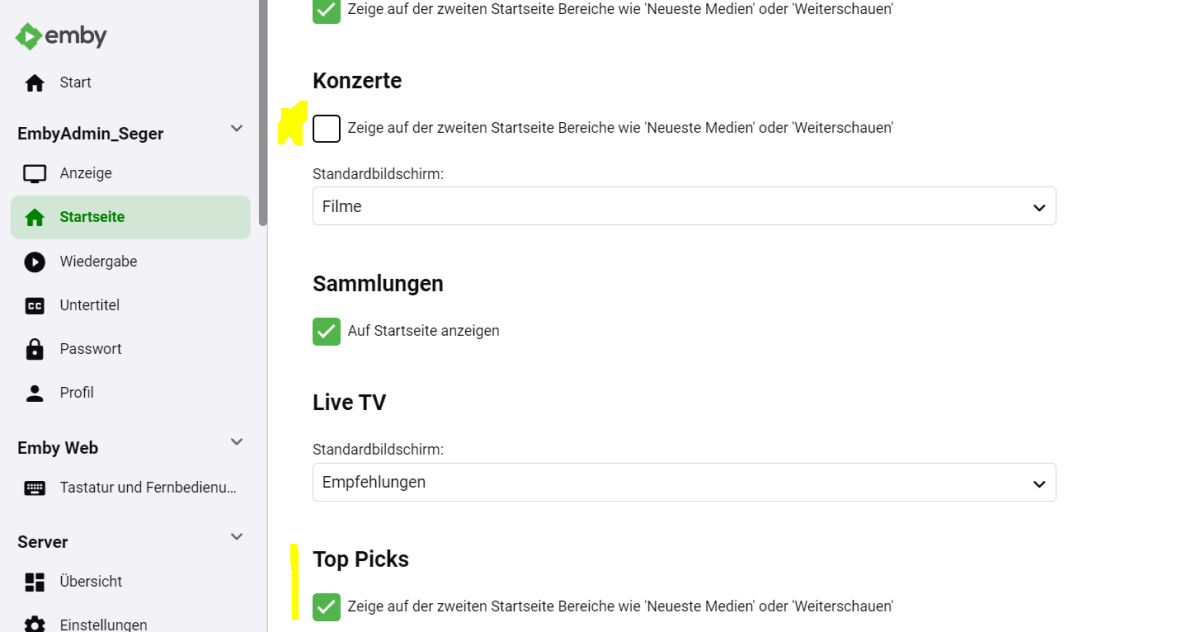
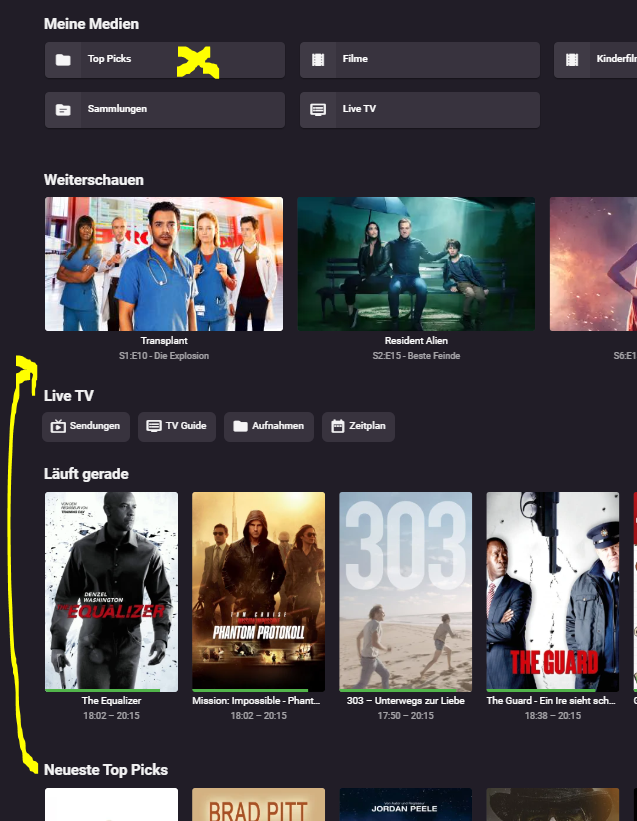
Referring again to the theme of the arrangement: Would like to have the folder in the last place, but the widgets in the first place or even the option not to show the library folder, so you only go in via widgets.
 1 point
 -
Okay, the tab is to be expected on your normal library items which can let you know while browsing that the item is part of the top picks library. Perhaps that can be a configurable option in the future. The good news is that your Linux machine is not having the permission issue I mentioned before. It is possible that you browser has cached the images from your initial top picks scan. I will read through your current log and be right back.1 point
-
The play store update will take over automatically when it has a higher version number so there's nothing you need to do.1 point
-
IT WORKS!!! Thank you. I hope that the show will work in the future... We need to watch emby and functional1 point
-
Hey up. That's the second time today I'm seeing users having issues with those shows. Chek out below topic and suggestions within:1 point
-
good news, The fix to KODI 20 was accepted bad news,they seems not not interested in backing port the fix to KODI 19 :(1 point
-
I was able to to fix it with unchecking Automatically merge series and manually identifying it. Not sure why I couldn't see it in Metadata Manager like I could with hardy boys that i explained above but doesn't matter. Here are the logs if interested when merge was still checked and I couldn't see it in MM or folder view. embyserver.txt1 point
-
I just use strm files (with associated jpg and nfo files to match) to link films and tv series (both ways). Films linking to TV Series is a bit of a fudge as you can only link to s01e01 - not the actual 'TV Show' but at least you then know it's there. TV Show > Film link (in specials using a strm link, then just add details to the special metadata to display in the last Season (in this case) - as previously said above. Film to TV Show link in Extras (again, via strm - linked to s01e01 - you cannot link to the TV 'show' unfortunately.)
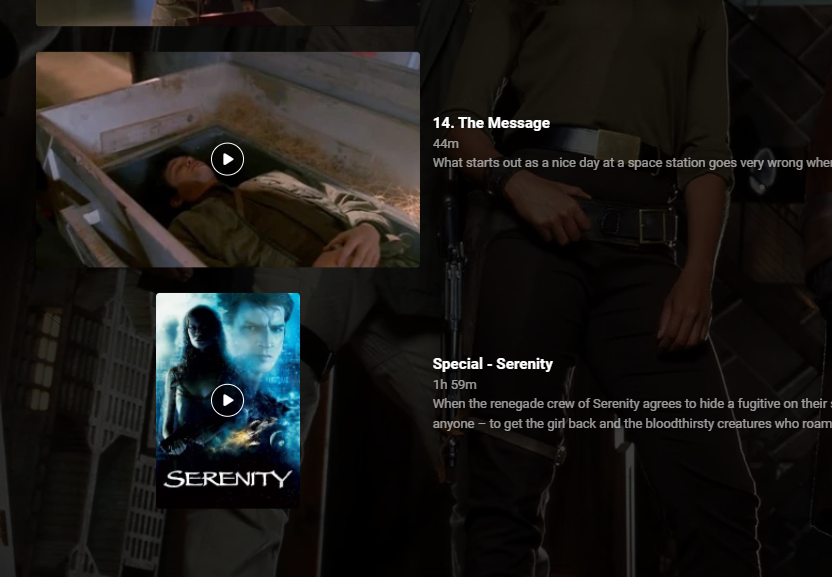
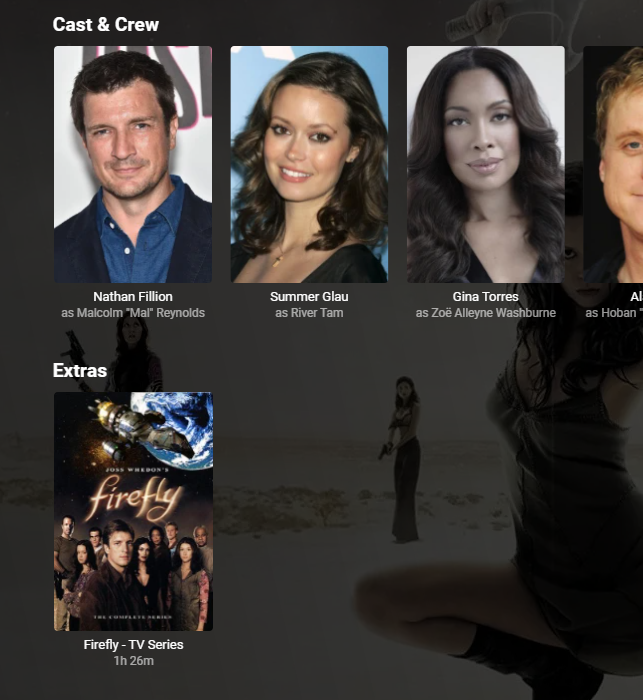 1 point
 -
That (or something else) actually worked! A bit strange, but as long as it works ...1 point
-
Updated to the latest beta and it seems to have fixed the post processing issue.1 point
-
I think i got it fixed i updated audio drivers and it did not activate 192khz audio For DD+1 point
-
1 point
-
Fixed on 4.8.0.9 beta.1 point
-
Thanks for the insights @softworkz Taking your advice, I switched over to IDynamicImageProvider. It took some banging of head against wall to get the Task/stream pipeline all worked out, but I'm now able to generate derivative images on metadata refresh for an Extra by overlaying its Name and Type onto its parent's image(s): Lots more to do now.
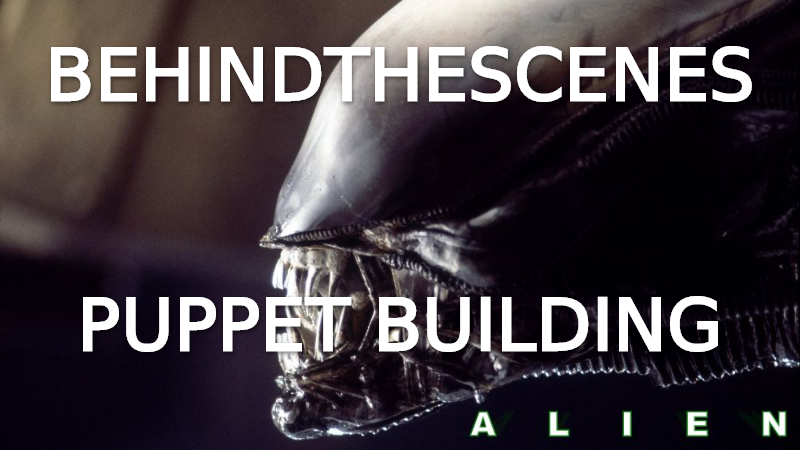 1 point
 -
Love ya Happy! Removing "@media (min-width: 100em)" worked. Thank you so much!1 point
-
No but could be a resolution thing, try removing "@media (min-width: 100em)" or lowering to say 80em. Or a conflict with other code.1 point
-
Please note that in GetImages() you should not do anything else than return a list of images. You should not perform any library operations like loading or saving items there. Generally, a metadata provider must not make changes to any other item than the one it's called for. That means, when you want to make changes to the Extra's owner item, it should be done when the metadata provider is called for that item. The images you return in an image provider might be merged or overwritten by results from other image providers (depending on the configured order). For the provider types: ILocalImageProvider For cases where the images exist on disk already IRemoteImageProvider When images are retrieved from a remote service IDynamicImageProvider When you are building the image in code in some way. You can return the image as stream and Emby will handle the saving. If you want images to be refreshed based on other conditions than a change to the item itself, you can implement IHasItemChangeMonitor on the provider. For maximum control, you can create an ICustomProvider. It's not an image provider and you cannot configure its use in the library options, but you can modify all item properties and it runs after all other providers (and image providers).1 point
-
Yes, I ended up having to remove it as I could not get it sorted.1 point
-
@King Pin Everywhere something like adjust to your needs @media (min-width: 100em) {.portraitCard, .overflowPortraitCard { width: 9vw;} } or limit to Home Screen @media (min-width: 100em) {[data-type="home"] .portraitCard, .overflowPortraitCard { width: 9vw;} }1 point
-
It just controls when the download happens, either ahead of time during the library scan, or not until it is first needed. It still happens via the server first and has no impact on where it gets saved.1 point
-
This is in 3.2.82+ and is in the store beta channel now. Thanks.1 point
-
1 point
-
Put an MKV file with ass subs, including font attachments, into MKVToolnix, and write it out as two files using the splitting facility. Then extract the subs and look at them; the heading sections are all duplicated, so the styles are all available in both fragments. The font attachments are also duplicated into the two resulting files. Of course, the times are shifted as necessary, too. I've done this many times without giving it a thought - but just now I did it again and looked at the files to check that my description is exact. Equally, you can join separate MKV files, and the ass subtitles will be combined into one stream with all the necessary styles and fonts and adjustments to the timing. Paul1 point
-
Hmm - those are all in TVDB; but you've got what you need now, so that's fine. Paul1 point
-
you want me to compile all your work in a plugin for you? The only thing is you'd have to maintain it, so... downloading visual studio community edition is probably a good idea. you seem well versed in web based applications, so I can build up the plugin architecture so you can continue developing in js, and the backend C# will just load it for you... if you want1 point
-
As I have already written, I use MakeMKV to rip the background videos from the Blu-ray menus and use these.1 point
-
Hallo, alles inordnung. Habe es jetzt hinbekommen. Es läuft. Danke1 point
-
Hi, there's already an open request for this or something functionally equivalent. Please join in and contribute to the existing discussion at: In the meantime, you can use @VicMoore's tool:1 point
-
I routinely watch while recording and skip forwards over ads (and back when I overshoot) without any problems - with a Windows 10 server. I can even play subtitles this way (which I can't watching live for some reason). Paul1 point
-
Download & Install: https://emby.media/emby-for-android.html Changelog: 3.5.36 -05/10/2026 Subtitle rendering fixes 3.5.35 -05/05/2026 Add additional options under force transcoding section 3.5.34 -04/10/2026 Fix regression causing ass subtitles to be stretched 3.5.32 -04/10/2026 Support compressed embedded ass/ssa subtitles 3.5.31 -03/24/2026 Fix cases of text subtitles rendering off screen Updates to new home screen features 3.5.30 -02/26/2026 Support new home screen options in 4.10 server 3.5.29 -02/10/2026 Various fixes related to handling of playback stop 3.5.28 -01/21/2026 Various fixes related to handling of playback stop 3.5.27 -01/20/2026 Subtitle sizing fixes 3.5.26 -01/18/2026 Various fixes related to handling of playback stop 3.5.25 -01/18/2026 Resolve sporadic cases of video stuttering 3.5.24 -01/11/2026 Fix sporadic post playback crashes 3.5.23 -01/06/2026 Fixes for SSL certificates with no common name 3.5.21 -12/15/2025 Fixes for picture in picture 3.5.17 -11/21/2025 Fixes for launching books Fixes for live tv guide rendering on older devices 3.5.16 -11/04/2025 flac decoding fixes Update app exit menu 3.5.15 -10/31/2025 Fix youtube playback 3.5.13 -10/25/2025 Change video player up option from Chapters to Chapters / Guide Fix sporadic app crashes with flac playback 3.5.12 -10/07/2025 Fix playback error on older versions of android 3.5.11 -10/04/2025 Fix lyrics display layout in TV mode Fix video remote control layout Update live tv recordings tab layout 3.5.10 -10/01/2025 Restore home screen backdrop 3.5.09 -09/29/2025 Support pinch gesture for fullscreen video 3.5.06 -09/27/2025 Show age of person Fixes for next/previous episode button in video player Add explicit direct stream live tv option 3.5.04 -09/19/2025 Fix new spoiler feature causing movie chapter thumbnails to be hidden 3.5.03 -09/17/2025 Update now playing indicator 3.5.02 -09/11/2025 Fix background video option 3.5.01 -09/09/2025 Updates to new option to hide episode spoilers 3.5.00 -09/07/2025 Add option to hide spoiler information from episodes Support experimental hevc transcoding with 4.9 server 3.4.98 -09/04/2025 Group recordings under live tv recordings tab (with 4.9 server) 3.4.97 -09/04/2025 Allow video playback to extend into the notch Navigation fixes 3.4.94 -09/02/2025 Fixes for horizontal home screen 3.4.92 -08/30/2025 Fixes for horizontal home screen 3.4.91 -08/27/2025 Improve DV to HDR fallback for Zidoo devices 3.4.90 -08/24/2025 Fit detail screen regressions with collections and actors 3.4.89 -08/22/2025 Improve horizontal home screen 3.4.88 -08/20/2025 Improve DV to HDR fallback Fix multi-select list focus color Fix various home screen regressions 3.4.85 -08/18/2025 Fix various home screen regressions Show three items with add to collection/playlist 3.4.84 -08/17/2025 Fix various home screen regressions 3.4.83 -08/14/2025 Updates for server maintenance mode feature 3.4.82 -08/07/2025 Add option to control whether back button exits the app when clicking back on the exit menu 3.4.80 -07/25/2025 Fix metadata editor regression 3.4.79 -07/23/2025 Fixes related to Dolby Vision to HDR fallback General performance improvements 3.4.77 -07/07/2025 Up/down arrow key fixes 3.4.76 -06/26/2025 Up/down arrow key fixes 3.4.75 -06/17/2025 Resolve loss of arrow key input after playing from guide 3.4.74 -06/10/2025 Fix date added missing from list of sort orders 3.4.72 -06/04/2025 Support keyboard input on search screen in tv layouts 3.4.71 -05/28/2025 Various fast-forward/rewind bug fixes 3.4.70 -05/20/2025 Various UI bug fixes 3.4.69 -05/10/2025 Support sleep timer in the audio player 3.4.67 -05/02/2025 Fixes for av1 playback Various download fixes 3.4.66 -05/01/2025 Add folder view option to automatically jump through folders containing a single item Increase timeout length when downloading Various download fixes Various camera upload fixes 3.4.65 -04/29/2025 Fixes for external subtitles over https 3.4.64 -04/25/2025 Fixes related to rapid back button presses 3.4.62 -04/24/2025 Fix regression with light themes in portrait orientation 3.4.60 -04/23/2025 Fix regression with subtitle appearance options 3.4.59 -04/19/2025 Fixes related to video player long press action Add text size setting for TV display mode 3.4.58 -04/17/2025 Fixes related to video player long press action 3.4.57 -04/17/2025 Add option to control video player long press action 3.4.56 -04/11/2025 Update embedded libass for subtitle rendering 3.4.55 -04/07/2025 Fixes related to dialog sizing within the guide 3.4.54 -04/06/2025 Fixes related to superman theme 3.4.53 -04/05/2025 Fixes related to play next option Improve performance 3.4.52 -04/02/2025 Improve performance 3.4.50 -03/27/2025 Add video screen up action option to control up button press behavior 3.4.49 -03/25/2025 Fixes related to autoplay episodes options 3.4.48 -03/19/2025 Fixes for closed caption rendering 3.4.47 -03/12/2025 Add a-z picker to add to collection/playlist 3.4.46 -03/07/2025 Support playback correction 3.4.45 -03/05/2025 Play vtt subtitles directly without conversion from the server 3.4.44 -03/03/2025 Fix some of the quality settings not saving 3.4.43 -02/28/2025 Add convert unsupported audio option 3.4.42 -02/26/2025 Fixes related to login options Fix video rotation on Fire TV devices when direct playing 3.4.40 -02/23/2025 Add option to configure to login as specific user on startup 3.4.39 -02/18/2025 Add playback option to disable direct play of mpegts 3.4.38 -02/11/2025 Fix errant "left" popup 3.4.37 -02/07/2025 Fixes for gamepad input 3.4.36 -01/30/2025 Fixes for playback of downloaded content 3.4.35 -01/27/2025 Fixes for playback of downloaded content 3.4.34 -01/24/2025 Fix crash on older versions of android when returning from PiP 3.4.33 -01/20/2025 Fix theme songs playing in the background after force closing the app 3.4.32 -01/08/2025 Update to exoplayer 1.5.1 3.4.31 -12/30/2024 Fix person content not displaying correctly 3.4.30 -12/19/2024 Fix downloaded books not being displayed 3.4.28 -12/12/2024 Split remote and cellular quality into two values Support passing subtitles to mxplayer 3.4.27 -12/01/2024 Fix regression when clicking manage server 3.4.26 -11/22/2024 Add emby://play/{serverID}/{ItemID} intent 3.4.24 -10/20/2024 Fix tag screen empty for certain media types 3.4.23 -10/07/2024 Updates for newer play store requirements 3.4.21 - 08/26/2024 Fix screen being kept on when video is paused 3.4.19 - 08/07/2024 Shuffle fixes Android Auto fixes 3.4.15 - 07/27/2024 Now playing screen layout fixes 3.4.14 - 07/26/2024 Fixes based on google play crash reports Fix guide category scrolling 3.4.12 - 07/17/2024 Fixes based on google play crash reports 3.4.11 - 07/04/2024 Shuffle play fixes 3.4.10 - 07/02/2024 Fix video osd bottom tabs not refreshing between items 3.4.09 - 06/28/2024 Fix rare PIP crash on Samsung devices Add channel group filters above the live tv guide in mobile and desktop layouts 3.4.08 - 06/24/2024 Fix multi-select regression 3.4.07 - 06/21/2024 Add theme song volume setting Fix downloads failing due to % in file name 3.4.06 - 06/18/2024 Live TV guide scroll fixes 3.4.05 - 06/16/2024 Samsung DEX fixes Improve support for chapters with multi-version videos (with server version 4.9.0.25+). 3.4.04 - 06/12/2024 Fix regression on audio play queue screen 3.4.03 - 06/07/2024 Fixes for horizontal home screen 3.4.01 - 06/05/2024 Improve performance Updates for set shuffle Add a pleasing background to the subtitle preview on the subtitle settings screen 3.4.0 - 06/05/2024 Improve performance Fix repeat handling when holding down ff/rew 3.3.99 - 05/30/2024 Improve performance Add Continue Watching channel to Shield home screen 3.3.97 - 05/25/2024 Support shuffle state in the audio player 3.3.95 - 05/23/2024 Auto-scroll live tv guide based on last played channel Show more guide rows in the video OSD Performance improvements Support launching video from photo slideshow 3.3.94 - 05/18/2024 Prompt user to ask how to play when playing a channel that is actively recording 3.3.93 - 05/16/2024 Adjust base osd seek speed 3.3.92 - 05/16/2024 Support variable fast forward/rewind speed 3.3.91 - 05/13/2024 Mobile layout fixes for video screen 3.3.90 - 05/10/2024 Subtitle offset fixes 3.3.88 - 05/09/2024 Change subtitle offset overlay to use a slider 3.3.87 - 05/04/2024 Add Up Next tab to video OSD to see playback queue 3.3.86 - 04/25/2024 Quicker access to chapters in video osd Support drag and drop library order Support drag and drop order for genres, tags, studios and people in the metadata editor 3.3.83 - 04/22/2024 Fix error message not displayed on user stream limit being reached 3.3.82 - 04/21/2024 Support drag and drop with server transcoding settings Add video OSD tab animation 3.3.80 - 04/09/2024 Add text shadow to clock when focus preview is active 3.3.79- 03/28/2024 Group collection items by media type Support app screensaver for tv devices 3.3.77- 03/19/2024 Android auto fixes 3.3.76- 03/15/2024 Fix add to play queue missing from menu 3.3.74- 03/11/2024 Picture in picture fixes 3.3.73- 03/08/2024 Fix reported album name with camera upload feature 3.3.72- 03/01/2024 Fixes based on google play crash reports 3.3.71- 02/29/2024 Fix screen staying on after video playback Redesign music genre screen 3.3.70- 02/22/2024 Fix reverting refresh rate change after playback 3.3.69- 02/16/2024 Audiobook playback fixes with Android Auto Increase delay after refresh rate display mode change 3.3.68- 02/13/2024 Audio passthrough fixes when refresh rate switching is enabled Add Missing Episodes section to metadata manager 3.3.67- 02/08/2024 Fix layout of program dialog in guide 3.3.66- 02/07/2024 Manifest changes for releasing to the play store on TV devices 3.3.64- 02/01/2024 Resolve back screen on playback on some devices after advancing from one episode to the next 3.3.63- 01/30/2024 Improve home videos display in horizontal home screen 3.3.62- 01/18/2024 Improve live tv seek display Improve display of dialogs from guide 3.3.61- 01/18/2024 Improve live tv seek display 3.3.60- 01/15/2024 Fixes for playback on secondary screens Version 3.3.58- 01/04/2024 Support resume and capturing progress from mx player as an external player, as well as other players that use the same parameters. Version 3.3.57- 12/29/2023 Improvements relating to putting the app in the background with video playing and then returning Version 3.3.56- 12/26/2023 Various user interface bug fixes Version 3.3.54- 12/21/2023 Add in-app access to app log files Support channel up/down to change channels during live tv playback Version 3.3.52- 12/15/2023 Various layout fixes Version 3.3.50- 12/11/2023 Fix camera upload regression on Android 14 Update TV mode select menus Version 3.3.48- 11/29/2023 Update exoplayer to 2.19.1 Version 3.3.46- 11/16/2023 Add series context menu option to view missing episodes Version 3.3.44- 11/09/2023 Fix missing 3D icon Add release date to playlist and collection sort orders Version 3.3.42- 11/01/2023 Show full program details when clicking on a program within the guide Support left and right swipe actions on lists Improve Korean subtitle font Version 3.3.41- 10/24/2023 Add option to control display of posters on detail screens Add option to control the number of genres displayed on detail screens Version 3.3.39- 10/18/2023 Support adaptive launcher icon Version 3.3.38- 10/13/2023 Camera upload compatibility updates for android 14 Fix android chat bubbles showing on top of video playback Version 3.3.37- 10/11/2023 Support subtitle position options Version 3.3.36- 10/06/2023 Fix audio playback regression General performance improvements Version 3.3.35- 10/04/2023 Support multi-user login General performance improvements Version 3.3.34- 10/02/2023 Support new profile pin feature Version 3.3.32- 09/17/2023 Support swipe down to dismiss/cancel any dialog that appeared by sliding up Version 3.3.31- 09/13/2023 Make more fields selectable to display in lists Update to new android requirements regarding notifications Version 3.3.29 - 08/28/2023 Make more fields selectable to display in lists Version 3.3.26 - 08/24/2023 Fix regression with delete function Version 3.3.25 - 08/22/2023 Fix regression with external subtitles Version 3.3.24 - 08/20/2023 Fix regression with add to favorites Version 3.3.21 - 08/17/2023 Right to left fixes Fix directional keys repeating with flirc input Version 3.3.20 - 08/03/2023 Various fixes for settings screens Mobile layout list view fixes Version 3.3.19 - 07/19/2023 Fix startup error on android 6.0 Add display option to control visibility of Media Info section on detail screens Version 3.3.18 - 07/12/2023 Try to fix double back press problem Version 3.3.16 - 07/11/2023 Try to fix double back press problem Version 3.3.15 - 07/07/2023 Android auto search fixes Update exoplayer to 2.18.7 Support dvdsub in mp4 container Version 3.3.14 - 06/29/2023 Downsize downloads section in left nav Various user interface fixes Version 3.3.13 - 06/28/2023 Separate refresh rate and resolution switching into two options Version 3.3.12 - 06/23/2023 Various performance improvements Add option to control screen orientation during video playback Update episode list highlights Ease up on text brightness Make clock larger Show detail screen for extras Version 3.3.11 - 06/16/2023 Various performance improvements Version 3.3.10 - 06/15/2023 Rework app exit menu Support left nav in TV layouts Version 3.3.08 - 05/23/2023 Various fixes related to theme song playback Version 3.3.07 - 05/19/2023 Various fixes related to recording indicators Version 3.3.05 - 05/11/2023 Fix series display regression with older servers Version 3.3.04 - 05/08/2023 Fix hardware back button regression with dialogs on the home screen Version 3.3.02 - 05/02/2023 Support flattening series in TV layouts Version 3.3.01 - 04/28/2023 Various scroll fixes Always show exit menu when clicking back on home screen Version 3.2.99 - 04/26/2023 Various scroll fixes Version 3.2.98 - 04/25/2023 Focus preview fixes Version 3.2.97 - 04/24/2023 Improve orientation handling during video playback Version 3.2.96 - 04/22/2023 Improve cast display during video playback Version 3.2.95 - 04/17/2023 Add series display option Improve user interface performance Version 3.2.94 - 03/30/2023 Fix navigation regression Version 3.2.93 - 03/29/2023 Add View Lyrics context menu option for songs with lyrics Add option to keep playing video in background after pressing back Version 3.2.92 - 01/20/2023 Fix regression with some videos with 2ch eac3 Version 3.2.91 - 01/18/2023 Update ExoPlayer to latest version Various video OSD fixes Version 3.2.90 - 12/15/2022 Various video OSD fixes Version 3.2.89 - 12/072022 Add a guide option to control display of channel numbers Version 3.2.88 - 12/062022 Add a guide option to control display of channel names Version 3.2.87 - 12/2/2022 Version 3.2.86 - 11/18/2022 New: The current chapter is now auto selected during navigation Version 3.2.85 - 11/17/2022 Version 3.2.84 - 11/04/2022 Fixed a display issue with expanded info screens Fixed a navigational issue with My Media Version 3.2.83 - 11/02/2022 Support sorting Playlists and Collections (requires Emby Server 4.8+). Navigational changes in LiveTV Additional items added to queue when shuffling playlist Added the number of items within a collection Version 3.2.82 - 10/18/2022 Update subtitle font Version 3.2.81 - 10/12/2022 Fix scroll regression causing jumpiness Version 3.2.80 - 10/12/2022 Improve seeking of .ts files Support separate image sizes for lists Various user interface bug fixes Version 3.2.79 - 10/06/2022 Fixed an issue when clicking Back while playing music Improved handling of Zidoo devices and TV mode Version 3.2.78 - 10/05/2022 LiveTV changes Version 3.2.77 - 09/28/2022 Added setting to switch between different size posters Added episode details under Next Up legacy posters Version 3.2.76 - 09/23/2022 Add three way toggle nav menu (may require beta server?) Added transparency to buttons and menus Version 3.2.75 - 09/21/2022 Version 3.2.74 - 09/20/2022 Added backdrop to the enhanced My Media ? Version 3.2.72 - 09/15/2022 Added visual to timeline when in focus Added option to turn off rating when video playback begins Updated now playing design for music in the background Version 3.2.71 - 09/14/2022 Version 3.2.70 - 09/07/2022 Fixed some small issues Added brightness control to mobile devices Added a lock screen feature during video playback for mobile devices Version 3.2.69 - 09/03/2022 Version 3.2.68 - 09/01/2022 Added shortcut keys Add filter, sort, settings icons to Live TV Guide and move enhanced image and info to the top Move subtitle timing from cog wheel to the CC menu Add Google voice integration Add more media info to the playback OSD Add more media info to the Info screen Change navigation to OSD so there are less clicks Version 3.2.67 - 08/30/2022 Add view series to 3-dot menu for episodes and seasons Add larger bitrate options Add EHS option for the home screen (it is worded differently to spell out exactly what it does - focus previews) Make play from beginning always visible Update thumbnail bubble animation Update detail screen runtime on version selection Version 3.2.66 - 08/29/2022 Version 3.2.65 - 8/25/2022 Fixed a playback issue with DTS-HD HRA 4.8 kHz sampling rate Version 3.2.64 - 8/20/2022 Version 3.2.63 - 8/17/2022 Version 3.2.62 - 8/5/2022 Various video playback fixes Version 3.2.61 - 7/28/2022 Resolve the issue of certain remotes triggering multiple presses on arrow keys General UI performance improvements Version 3.2.59 - 7/27/2022 Added enhanced details for Suggestions and Favorites within TV Shows and Movies libraries Version 3.2.58 - 7/24/2022 Version 3.2.57 - 7/20/2022 Version 3.2.56 - 7/15/2022 Various video playback fixes Version 3.2.55 - 7/13/2022 Various video playback fixes Initial RTL support Version 3.2.54 - 7/08/2022 Version 3.2.53 - 7/06/2022 Version 3.2.52 - 6/23/2022 Various fixes for new table view Version 3.2.51 - 6/17/2022 Add new field options for display Add new theme options Version 3.2.50 - 6/6/2022 Fixes for wma playback Fix sporadic playback errors when playing downloaded content Updates to audio now playing screen. There's also a new Now Playing tab on the home screen when content is playing Use series backdrop on episode detail screens Version 3.2.48 - 5/4/2022 Updated TV mode detail screen Fix on screen keyboard not showing on some Amazon devices Version 3.2.47 - 4/27/2022 Fix aiff playback Fix now playing item not showing on shield home screen Support play/pause during video playback using OK button (when osd is hidden) Add Cast & Crew to video osd Fix SFN not closing Fix an issue with "On Now" in the video OSD Version 3.2.46 - 4/18/2022 Fixed miscellaneous playback issues Version 3.2.45 - 4/9/2022 New updated video OSD dialogs Version 3.2.44 - 3/22/2022 Fixed an issue where music Artists and Album Artists weren't being displayed Version 3.2.43 - 3/17/2022 Fixed an issue where thumbnails weren't showing while scrolling timeline Version 3.2.42 - 3/17/2022 Fixed issue where DV files wouldn't play correctly Version 3.2.41 - 3/9/2022 Version 3.2.40 - 2/28/2022 Added timeline scrolling to OSD Version 3.2.38 - 2/8/2022 Version 3.2.37 - 1/26/2022 Version 3.2.36 - 1//2022 Version 3.2.35 - 1/13/2022 Various audio playback fixes Version 3.2.34 - 12/30/2021 Now direct plays all audio formats, including DTS-WAV Version 3.2.24 - 10/27/2021 Numerous small TV layout improvements from top tabs to popups to video OSD Support long press context menus with Android TV remotes Version 3.2.17 - 10/6/2021 Various bug fixes and performance improvements Version 3.2.14 - 9/20/2021 Various fixes based on user submitted crash reports Version 3.2.11 - 9/13/2021 Add subtitle background color option Version 3.2.08 - 8/26/2021 Bug Fixes Version 3.2.07 - 8/11/2021 Bug Fixes Version 3.2.06 - 8/9/2021 Add Info, Chapters, On Now and Guide sections to video OSD Minor adjustment of detail screen buttons Improve performance of playlist detail screen Add sort by track number option to folder views Version 3.2.05 - 7/9/2021 Various download fixes Fix aiff music playback Fix direct play/transcoding status display for music playback Version 3.2 - 6/19/2021 Support subtitle offset for downloaded videos Fix camera upload regressions on older versions of android Version 3.1.96 - 5/18/2021 Android auto reconnection fixes Music playback started in android auto is now reported to Emby Server The new live tv channel management UI is now available Version 3.1.94 - 4/30/2021 Fix erroneous error message when playing certain music formats Various subtitle fixes Version 3.1.92 - 4/22/2021 Version 3.1.91 - 4/20/2021 Various fixes for av1 video playback Version 3.1.90 - 4/14/2021 Remember play queue when using Android Auto resume feature Support marking favorites from android auto Fix Chromecast add to play queue Version 3.1.88 - 4/10/2021 Save play queue when using Android Auto resume feature Version 3.1.86 - 4/8/2021 Support marking favorites from android auto now playing screen Support a-z picker with users Add favorites to context menu Add mark played to context menu Version 3.1.85 - 4/1/2021 Improve Android Auto browsing Various av1 video playback improvements Version 3.1.84 - 3/28/2021 Fix crash on Shield TV Version 3.1.83 - 3/26/2021 Support device equalizer with audio file playback Add option to download to public downloads folder Various subtitle fixes Various fixes for playback of anamorphic video Improve single channel program list display Support multi-select in list views Add more field options for display in lists Version 3.1.80 - 3/9/2021 Improve dynamic list refreshing Version 3.1.79 - 3/5/2021 Support sorting by filename Version 3.1.77 - 3/2/2021 Various additional subtitle fixes Various mpegts format improvements Version 3.1.76 - 2/20/2021 Honor Android Auto auto-resume setting Fix media notification duration for remote playback Fix subtitles not displaying on secondary screen Support multi-select filtering Version 3.1.75 - 1/20/2021 Support high-res flac playback Various Dolby Vision improvements and fixes Specific DV/HDR fixes for Sony TV's Fix for direct playback of mpeg4 DX-50 Various fixes for Chromecast volume control Various fixes for downloaded subtitles Display content on Android TV home screen Support clicking individual text items in list items Support add to play queue with drag and drop Support add to playlists and collections with drag and drop Support remove from continue watching and next up (requires Emby Server 4.6+) Add new tabs under libraries (requires Emby Server 4.6+)1 point