Leaderboard




Popular Content
Showing content with the highest reputation on 10/15/22 in all areas
-
Manage Emby Server -> Users -> Edit -> Internet streaming bitrate limit (Mbps)2 points
-
We need to see the folder and file names to determine what's throwing it off. Alternatively the server log covering an attempt to identify. Paul2 points
-
Here are 4 pre-rolls I created using Motion Array templates. (I have a subscription.) Emby-Dark-Tear.mp4 Emby-Explosion.mp4 Emby-Fire-Explosion.mp4 Emby-Space-Trails.mp41 point
-
A couple of months ago, I purchased an inexpensive insignia 4k TV for the bedroom. Originally, I had no audio using the Android ATV version of Emby while playing the ATSC 3.0 channels. This evening I tried it again, and bingo, the ATSC 3.0 channels play perfectly with audio. Great job!!! Emby Devs. Edit: One question. I am making the assumption that Emby is able to use the ATSC 3 channels with the AC4 audio codec, because the TV supports that codec. Is that the case, or is Emby decoding the AC4 codec regardless if the device supports that AC4 codec?? thanks1 point
-
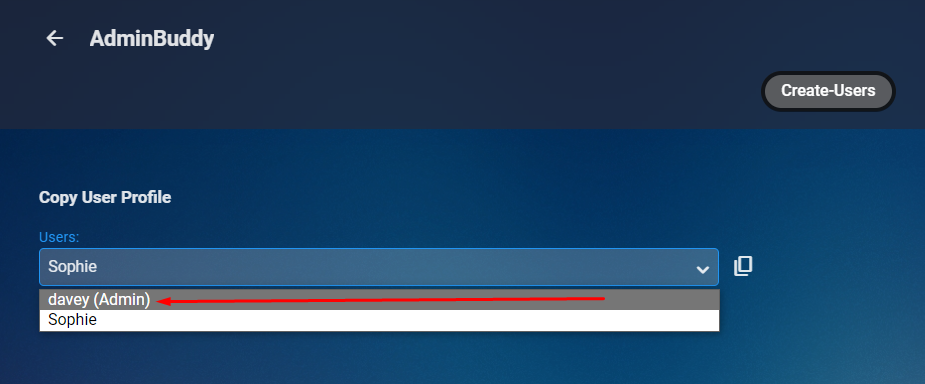
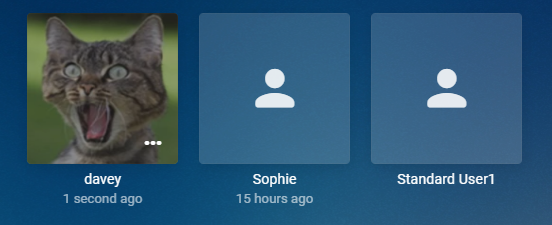
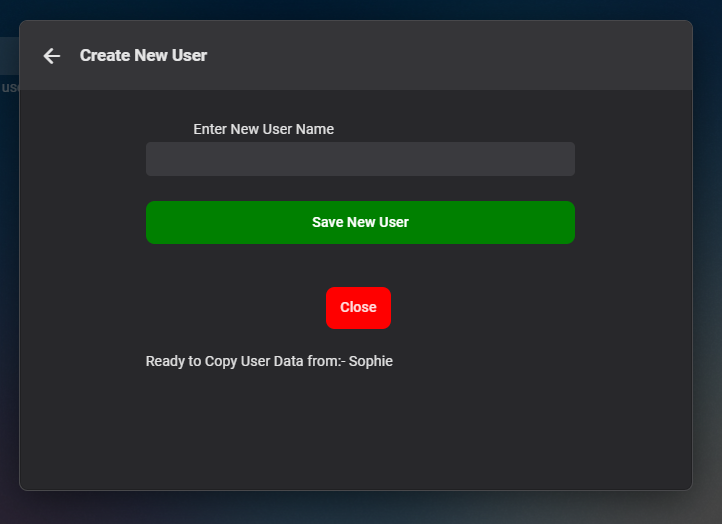
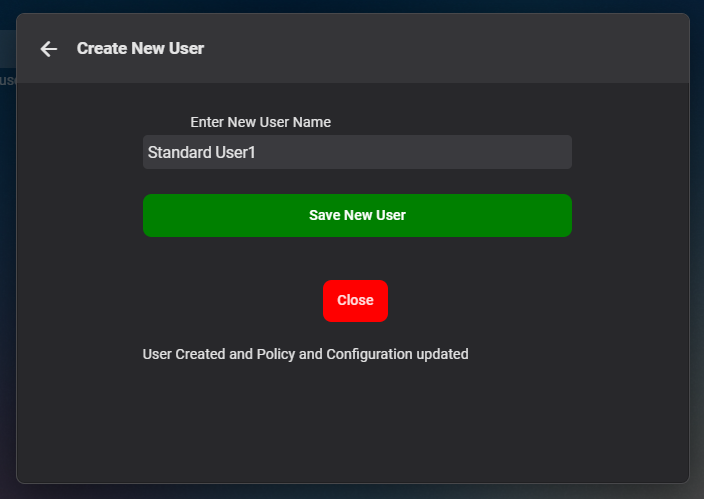
Cheesey Productions brings you ADMIN-BUDDY for Emby Please note this is just an interim plugin until the core server implements this Version 1.0.0.0 is available in the plugin catalogue under General Section Admin accounts are hightlighted Interface with info on which account is being copied After Hitting Save the status lets you know what has happened, but stays open, in case you want to create more users. Click close to exit New user is created and you can edit, delete and do what you need to in the standard User Interface Hope you enjoy
 1 point
 -
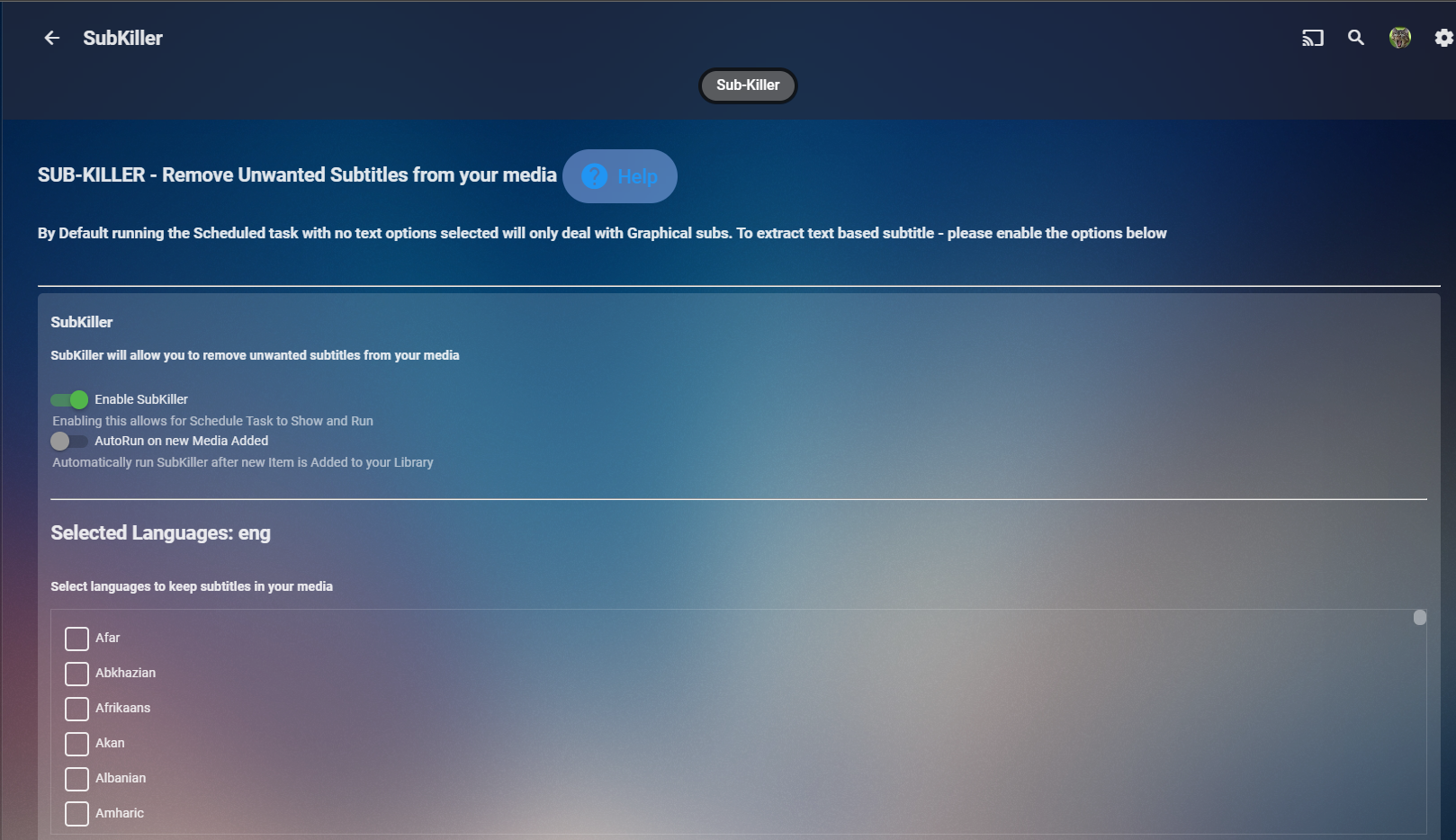
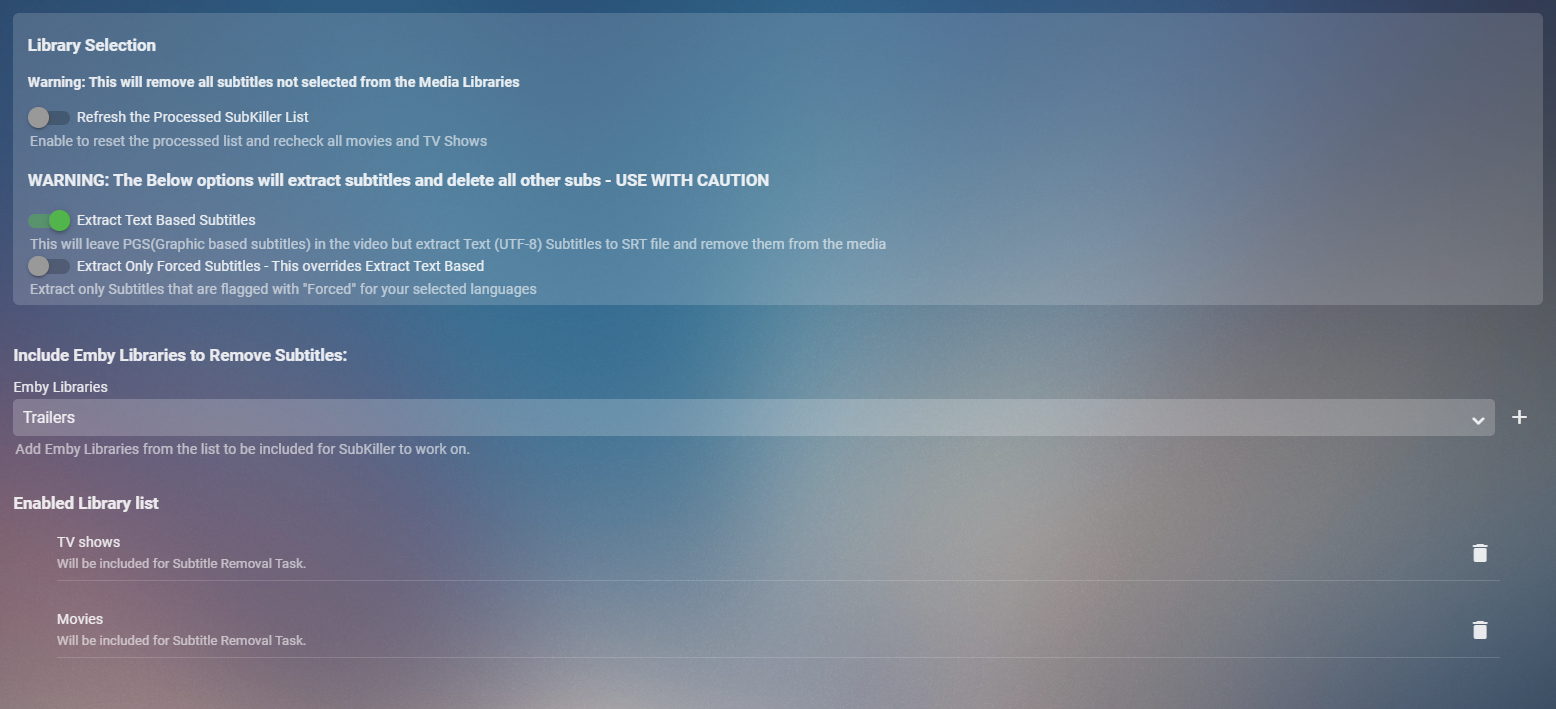
Cheesey Productions brings you SUB-KILLER for Emby Remove those unwanted subtitle languages Removes Graphical subtitles by default & can extract text based subtitles as an option Available from the plugin store A huge shout out to @rbjtech @FrostByte and @Dickydodah!for all their help with this. https://twemoji.maxcdn.com/2/72x72/1f44d.png Please read the wiki page available that will help you get set up. - currently under construction SUB-KILLER WIKI PAGE This plugin is destructive as it removes physical subtitle files from your media containers PLEASE USE A TEST LIBRARY FIRST Config Page

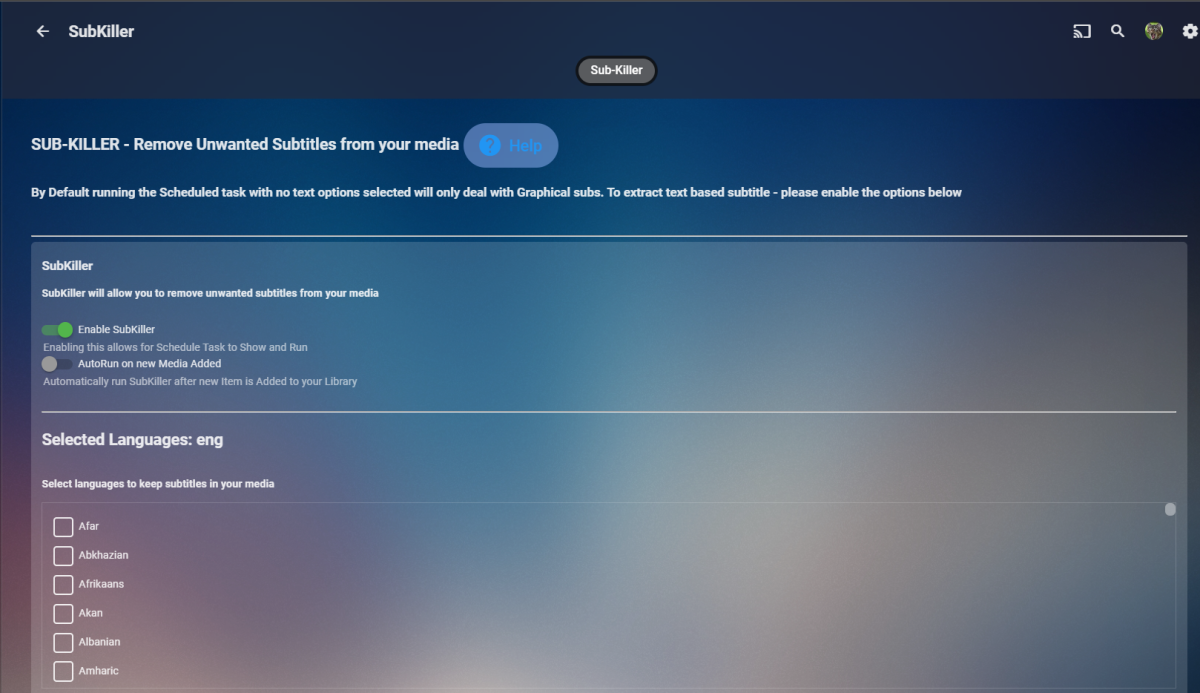
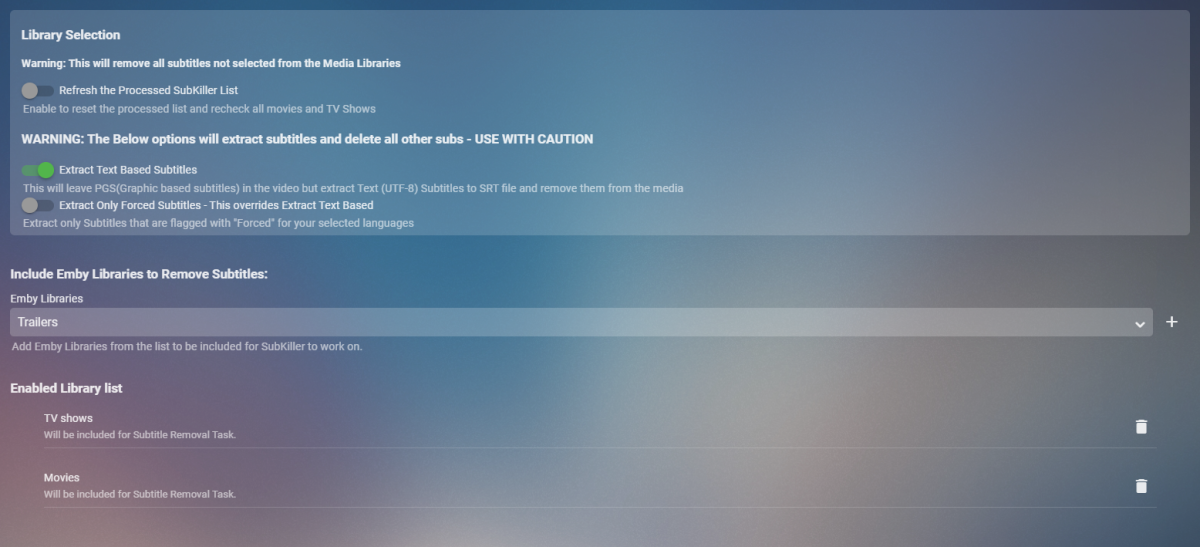 1 point
 -
I'd like to request that the Playlist library have a displayed category and, "widget" on the homescreen in the similar fashion that movies, TV shows, music are shown. I create topical/seasonal playlists that I'd like my family members to see displayed from the homescreen with "recently added" carousel style. Currently, to the best of my knowledge, playlists are only accessible via their shortcut in the, "My Media" section. Thanks for your consideration!1 point
-
Hello, I'm facing a problem on my Apple TV app since yesterday, I have some (many) movies not starting ... The browsing is ok, everything is fine when I enter the movie screen, but whe I hit the play button, the screen turns black and nothing happens. The counter remains blocked on 0:00 ... I have to add the playing works fine for some movies, but fails for other ones. I tryed to move the file to another location to get rid of a disk problem : I still have the issue when playing from this other location I tryed to play the same failing movie from the web interface : OK I tryed playing it with dome other apps : OK too. I ffprobed the movie : h264. I updated the server to last version (I noticed the problem on v4.7.6.0) : v4.7.8.0. On Apple TV, I see I have v1.6.4 (dated Oct 13, 2022) - a few days ago, maybe the update broke something. I see nothing special in the server logs whith the last version : When starting : a5efc768&StartTimeTicks=0&IsPlayback=true&AutoOpenLiveStream=true&MaxStreamingBitrate=140000000&X-Emby-Client=Emby for Apple TV&X-Emby-Device-Name=Apple TV&X-Emby-Device-Id=A80BD1B6-A21F-487E-BDA6-C5FD97C2C3EB&X-Emby-Client-Version=1.6.4 (1)&reqformat=json 2022-10-15 10:47:17.001 Info Server: http/1.1 GET http://<200c><200d><200d>192.168.0.133<200c>:8096/emby/videos/452012/stream.mkv?DeviceId=A80BD1B6-A21F-487E-BDA6-C5FD97C2C3EB&MediaSourceId=ad1371f7c3a70250e00951a4cac43a4f&Static=true&PlaySessionId=23c57f7daa4447098b600c64b0951f36&SubtitleCodec=subrip. Accept=*/*, Connection=close, Host=192.168.0.133:8096, User-Agent=libmpv, Range=bytes=0-, Icy-MetaData=1 2022-10-15 10:47:18.017 Info Server: http/1.1 GET http://<200c><200d><200d>192.168.0.133<200c>:8096/emby/videos/452012/stream.mkv?DeviceId=A80BD1B6-A21F-487E-BDA6-C5FD97C2C3EB&MediaSourceId=ad1371f7c3a70250e00951a4cac43a4f&Static=true&PlaySessionId=23c57f7daa4447098b600c64b0951f36&SubtitleCodec=subrip. Accept=*/*, Connection=close, Host=192.168.0.133:8096, User-Agent=libmpv, Range=bytes=2137266289-, Icy-MetaData=1 2022-10-15 10:47:18.022 Info Server: http/1.1 Response 206 to <200c><200d><200d>192.168.0.172<200c>. Time: 6ms. http://<200c><200d><200d>192.168.0.133<200c>:8096/emby/videos/452012/stream.mkv?DeviceId=A80BD1B6-A21F-487E-BDA6-C5FD97C2C3EB&MediaSourceId=ad1371f7c3a70250e00951a4cac43a4f&Static=true&PlaySessionId=23c57f7daa4447098b600c64b0951f36&SubtitleCodec=subrip 2022-10-15 10:47:18.027 Info Server: http/1.1 Response 206 to <200c><200d><200d>192.168.0.172<200c>. Time: 1026ms. http://<200c><200d><200d>192.168.0.133<200c>:8096/emby/videos/452012/stream.mkv?DeviceId=A80BD1B6-A21F-487E-BDA6-C5FD97C2C3EB&MediaSourceId=ad1371f7c3a70250e00951a4cac43a4f&Static=true&PlaySessionId=23c57f7daa4447098b600c64b0951f36&SubtitleCodec=subrip 2022-10-15 10:47:18.039 Info Server: http/1.1 GET http://<200c><200d><200d>192.168.0.133<200c>:8096/emby/videos/452012/stream.mkv?DeviceId=A80BD1B6-A21F-487E-BDA6-C5FD97C2C3EB&MediaSourceId=ad1371f7c3a70250e00951a4cac43a4f&Static=true&PlaySessionId=23c57f7daa4447098b600c64b0951f36&SubtitleCodec=subrip. Accept=*/*, Connection=close, Host=192.168.0.133:8096, User-Agent=libmpv, Range=bytes=6781-, Icy-MetaData=1 2022-10-15 10:47:18.124 Info Server: http/1.1 POST http://<200c><200d><200d>192.168.0.133<200c>:8096/emby/Sessions/Playing?X-Emby-Client=Emby for Apple TV&X-Emby-Device-Name=Apple TV&X-Emby-Device-Id=A80BD1B6-A21F-487E-BDA6-C5FD97C2C3EB&X-Emby-Client-Version=1.6.4 (1)&reqformat=json. UserAgent: Emby/1 CFNetwork/1391.3 Darwin/22.0.0 2022-10-15 10:47:18.125 Info Server: http/1.1 POST http://<200c><200d><200d>192.168.0.133<200c>:8096/emby/Sessions/Playing/Progress?X-Emby-Client=Emby for Apple TV&X-Emby-Device-Name=Apple TV&X-Emby-Device-Id=A80BD1B6-A21F-487E-BDA6-C5FD97C2C3EB&X-Emby-Client-Version=1.6.4 (1)&reqformat=json. UserAgent: Emby/1 CFNetwork/1391.3 Darwin/22.0.0 2022-10-15 10:47:18.133 Info Server: http/1.1 Response 204 to <200c><200d><200d>192.168.0.172<200c>. Time: 8ms. http://<200c><200d><200d>192.168.0.133<200c>:8096/emby/Sessions/Playing/Progress?X-Emby-Client=Emby for Apple TV&X-Emby-Device-Name=Apple TV&X-Emby-Device-Id=A80BD1B6-A21F-487E-BDA6-C5FD97C2C3EB&X-Emby-Client-Version=1.6.4 (1)&reqformat=json 2022-10-15 10:47:18.135 Info SessionManager: Playback start reported by app Emby for Apple TV 1.6.4 (1) playing ******. Started at 0 ms 2022-10-15 10:47:18.136 Info Server: http/1.1 Response 204 to <200c><200d><200d>192.168.0.172<200c>. Time: 12ms. http://<200c><200d><200d>192.168.0.133<200c>:8096/emby/Sessions/Playing?X-Emby-Client=Emby for Apple TV&X-Emby-Device-Name=Apple TV&X-Emby-Device-Id=A80BD1B6-A21F-487E-BDA6-C5FD97C2C3EB&X-Emby-Client-Version=1.6.4 (1)&reqformat=json 2022-10-15 10:47:18.140 Info PlaybackReporting - EventMonitorEntryPoint: _sessionManager_PlaybackStart : Entered 2022-10-15 10:47:18.140 Info PlaybackReporting - EventMonitorEntryPoint: Adding PlaybackInfo to playback_trackers : A80BD1B6-A21F-487E-BDA6-C5FD97C2C3EB-ae1dde9e986942abb6c97c3ba5efc768-452012 2022-10-15 10:47:18.140 Info PlaybackReporting - EventMonitorEntryPoint: Saving PlaybackInfo to DB The movie won't start, so I stop it : 2022-10-15 10:47:25.325 Info Server: http/1.1 Response 206 to <200c><200d><200d>192.168.0.172<200c>. Time: 7285ms. http://<200c><200d><200d>192.168.0.133<200c>:8096/emby/videos/452012/stream.mkv?DeviceId=A80BD1B6-A21F-487E-BDA6-C5FD97C2C3EB&MediaSourceId=ad1371f7c3a70250e00951a4cac43a4f&Static=true&PlaySessionId=23c57f7daa4447098b600c64b0951f36&SubtitleCodec=subrip 2022-10-15 10:47:25.788 Info Server: http/1.1 POST http://<200c><200d><200d>192.168.0.133<200c>:8096/emby/Sessions/Playing/Stopped?X-Emby-Client=Emby for Apple TV&X-Emby-Device-Name=Apple TV&X-Emby-Device-Id=A80BD1B6-A21F-487E-BDA6-C5FD97C2C3EB&X-Emby-Client-Version=1.6.4 (1)&reqformat=json. UserAgent: Emby/1 CFNetwork/1391.3 Darwin/22.0.0 2022-10-15 10:47:25.792 Info SessionManager: Playback stopped reported by app Emby for Apple TV 1.6.4 (1) playing ******. Stopped at 0 ms 2022-10-15 10:47:25.794 Info Server: http/1.1 Response 204 to <200c><200d><200d>192.168.0.172<200c>. Time: 6ms. http://<200c><200d><200d>192.168.0.133<200c>:8096/emby/Sessions/Playing/Stopped?X-Emby-Client=Emby for Apple TV&X-Emby-Device-Name=Apple TV&X-Emby-Device-Id=A80BD1B6-A21F-487E-BDA6-C5FD97C2C3EB&X-Emby-Client-Version=1.6.4 (1)&reqformat=json 2022-10-15 10:47:25.794 Info PlaybackReporting - EventMonitorEntryPoint: _sessionManager_PlaybackStop : Entered 2022-10-15 10:47:25.794 Info PlaybackReporting - EventMonitorEntryPoint: Saving final duration for Item : A80BD1B6-A21F-487E-BDA6-C5FD97C2C3EB-ae1dde9e986942abb6c97c3ba5efc768-452012 2022-10-15 10:47:25.818 Info PlaybackReporting - EventMonitorEntryPoint: Removing Old Key from playback_trackers : A80BD1B6-A21F-487E-BDA6-C5FD97C2C3EB-ae1dde9e986942abb6c97c3ba5efc768-452012 Anybody else facing the same issue on Apple TV ? Best regards ! Patrick1 point
-
I would like the ability to force themes on apps from the server side. Such as holiday themes, halloween and christmas. OR, I would like to be able to set my own date ranges for holiday themes. I would like to have them run for a week, instead of a single day.1 point
-
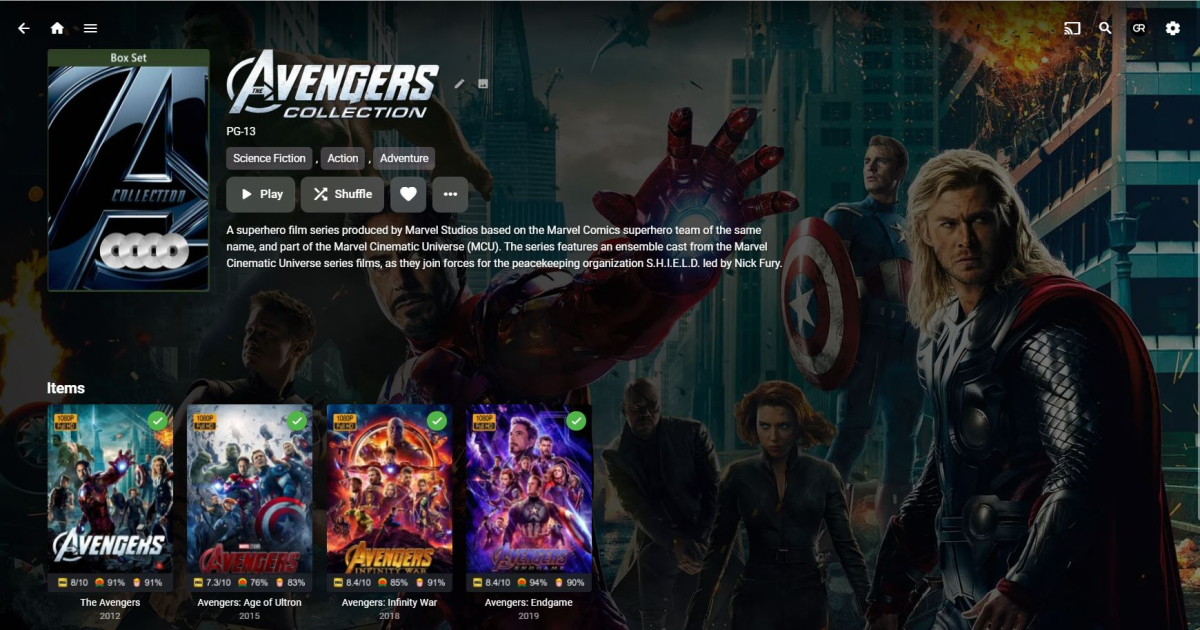
In the meantime, you can make use of CoverArt plugin.
 1 point
 -
But the problem is. If i limit to 10mbs The client can still select a stream llike1080 60mbps and tge stream will lockup etc because it still tries 60mbs. It would be nice if I didnt show any streams over the limited bitrate.1 point
-
Bingo! That was my dumb mistake, it was in a Movie category for content type. Once I added it to the TV Series content directory, it did find it when searching. Thank you! It was driving me nuts what I was doing wrong why it couldn't find it.1 point
-
Hi mate many thanks for your reply. Yes the audio is being passed to the AVR via HDMI and using 'arc', my AVR only supports 'arc'. My AVR does support Atmos, Dolby True HD and DTS-HD-MA. I understand the limitations of the sound being passed to my AVR but its what i have to compromise on right now so that i can play HDR videos without spending more money. Yes the NUC limitations is the reason why i have switched to using the Emby tv app as i have no money to upgrade the NUC right now. The Sheild Pro looks great and it would solve my problem if i dont want to spend a lot of money upgrading my NUC, due to a lack of funds i have to work with what i have right now but a great idea when i have disposable income again1 point
-
Hi, it's possible for future updates. Thanks.1 point
-
Just to close the loop on this, I was never able to find the actual casue for this (either some dodgy file or a setting but cannot identify it) however as of now it is fixed Resolution attempts: 1. update windows 2. try different nvidia drivers for the 1050ti (398.11,516.94,522.25) 3. reinstall live and beta copies of server (normally run Beta with no issues.) 4. created new emby server on same network (difference pc running a 2070) but pointing to the same file store (Works) 5. bought new 1050to to see if the original was failing (wasnt ) 6. So with all those out the way decided to remove the existing install off the server (backup folder first of course) and create new instance, so used the portable installer 4.7.8.0 to move it to a dedicated drive (been meaning to do that anyway). Setup and pointed to a film folder that i knew wasnt transcoding and ran on a tv that would force a trancode, low and behold it works! busy rebuilding my library so may take a while. no help in identifying the route cause but may help someone in the future?1 point
-
@LukeI kind of figured that was the issue. It does Seems strange that a TV does not provide this functionality. But if anyone has the same problem, its a pretty sweet workaround. You just need some kind of backend to host the php script and do the low level magic ;O) A pi is a cheap and easy on the power, and it can do a lot of other smart home services at the same time ;O) If anyone else find this helpful let me know ;O)1 point
-
You can now edit the tags and genres of locally playing Movies or tv shows. Several people have asked for this feature. I will now finish channel tagging. Vic tool.zip1 point
-
thanks Abobader1 point
-
Yep just noticed the majority of Trailers don't have images or metadata again but do have provider links. Refreshing didn't appear to do anything on a item So I refreshed each folder. stable and beta1 point
-
So I’m just having a think about all of this. In the config to add cameras, do we just allow the user to put in the url for the camera and they can include the username and password in that. Otherwise the possibilities are endless as to the format for each cameras URL.1 point
-
Maybe it's this:1 point
-
No they found a problem with nas's running the comcerto2k architecture and unfortunately that failed the entire submission. So we resolved that and resubmitted nearly two weeks ago but keep in mind Synology updates are only once a month anyway.1 point
-
Maybe in the future there could be a feature to enable/disable certain output settings per user. That way a user cant mistakenly select an incompatible stream. I'm really enjoying emby though. Its such and upgrade from smb and vlc lol @hackthis021 point
-
I agree with PWHODGES. I have over 15TB of anime on my server, and have no problems as I dealt with this issue quite some time ago (and stopped being a pain to Luke about it). My stuff goes back to the 50's and 60's.1 point
-
I think Emby would be like any other app the needs file access. As long as the account that Emby runs under has access to the shares, it should work.1 point
-
Or create a bat file to restart Emby with the API call curl -X POST "http://localhost:8096/emby/System/Restart?api_key={YOURAPIKEY}" -d ""1 point
-
I think I have it now, looks like it ran and built a (zero) list when the paths were incorrect, I just had to use the refresh setting after correcting the paths.1 point
-
Ready for Test Flight. I have 4 Onvfi cameras as well. For now I'm using factory app - Reolink. Workign flowless.1 point
-
currently i just have the live feeds from my 4 onvif/rtsp cameras appended to my iptv m3u. the ideal would be to have a single page displaying the live feeds from all 4 cameras where each could be opened and watched live and rewound as desired. However i doubt its possible for 4 live streams to be displayed at once as i think that has already been requested regarding general picture in picture functionality Home Assistant is able to display 4 streams at once in a frame by displaying a static image taken every 10s from the stream. you can then load the live stream by selecting each. something like that would seem achievable to me?1 point
-
Technically yes, and depending on the source, this is actually also true for True-HD (it 'should' have an AC3 Core or be able to 'recreate' an AC3 Core if from a Blu-ray UHD Source) but lots of 'ifs and buts' there and it is highly depended on how it was originally ripped. A separate default/Track 1 non-HD track is imo the best way to get emby (or any other s/w for that matter) to play for the uninitiated without transcoding (and get HDR etc). yes it's a bit of remuxing work for the admin (a few minutes on a capable system) but the result (if AC3/E-AC3) can then be played in a browser (edge) without transcoding or by the user just hitting 'play' on emby without selecting any options.1 point
-
I thought for DTS-HD, it would at least extract the DTS core and deliver that via ARC. I know my Samsung does this. Maybe LG is not as sophisticated.1 point
-
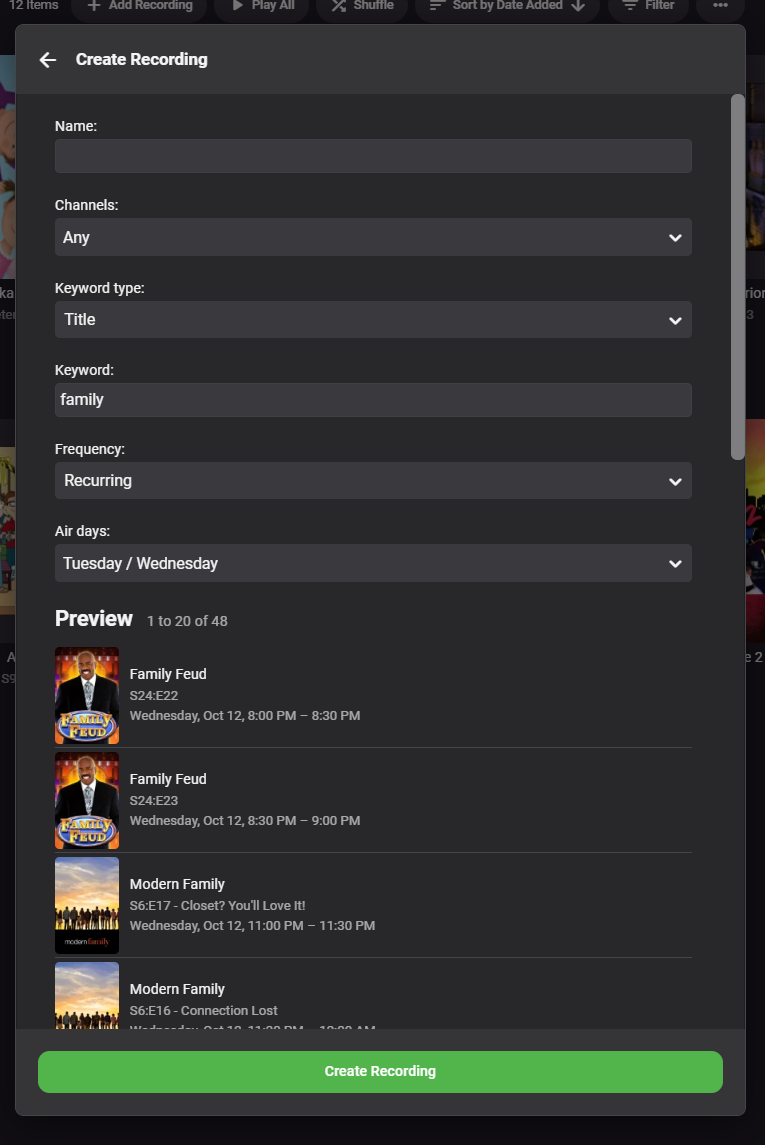
The 4.8 release will have the WMC-like preview I've been wanting to add, so that when you setup the recording you can get an idea of what items will match your keyword:
 1 point
 -
Um, no! Emby already doesn't use IMDB metadata at all because of the huge amount they charge for it. As for other anime people - I have a lot, and find that TVDB answers my needs better than any of the anime-specific providers have done - but that's just my experience, I guess. Paul1 point
-
(supercedes the former post above which was not entirely accurate). I never use separate ASS files, because I have never, ever, come across any with the necessary fonts attached; whenever ASS files for anime get distributed separately from the video they are always accompanied by a folder of fonts (or none if the distributor couldn't be bothered!). Attaching fonts to ASS files is possible, but as they have to be UU-encoded, they are made inefficiently large. Note also that although MKVToolnix can extract these fonts when muxing an ASS file, it is not able to restore them when the ASS file is extracted from the muxed form. Also some subtitle editors don't recognise attached fonts. The sub file you've attached to your post above doesn't have any fonts in it (you asked what the point of looking at the file contents was...). Note: there is no corresponding problem with separate SRT files, as there are no fonts involved. Paul1 point
-
It gets a bit better by the third episode... It's worth the watch, but don't get your hopes up. LOL!1 point
-
OK please try updating to the latest version. Thanks.1 point
-
I can't recall if you said the media was on a local disk on the server, or on another network device like a NAS. Just remember if it is on another device and the server is connected on wifi as well as the TV then you're creating a lot of wifi traffic in both directions which could also be an issue. Testing with a wired connection will help eliminate this possibility1 point
-
Sure, try wifi. If you can also try a lan connection that would be good, but to be honest unless you have files with really high bitrates or a bad wifi connection then you shouldn't have an issue with either I assume you're using 5GHz n or ac bands (not 2.4GHz)1 point
-
Can you get another router to test?1 point
-
The crowding effect typically means that the correct font is not being used. Depending on the source of the anime this may either be because the person who prepared the file didn't attach the fonts, and you don't have them installed, or it can mean (as you are using the web app which requires ASS subs to be burnt in at the server) that you need to use a more recent version of the server, maybe even the beta - as this has been done wrong by the server in the recent past. Paul1 point
-
What are your server specs? What router model?1 point
-
@mystic.bertie are you able to do this?1 point
-
I think you need to start with the simplest configuration and work backwards. For me, that would be something on the local disk of the server which DirectPlays. Assuming your TV is on the same local network, if that is freezing then you have something unusual going on with your setup. I would also consider swapping your TV network connection from wired to wireless 5GHz or vice-versa depending on how it is currently connected.1 point
-
What type of external hard-drive? Is it connected by usb?1 point
-
When the transcoding-temp folder is empty, how much free space does that disk have?1 point
-
Can we please look at a new example? How to Report a Problem Thanks.1 point
-
The Samsung store will always be behind. Once the app is good to go and gets submitted to Samsung then they have to do their own testing. That could be several releases, especially since as of late the devs have been cranking them out.1 point
-
Looks like this, may need additional code .skinHeader.videoOsdHeader { margin-top: calc(1.2em + env(safe-area-inset-top, 0)) !important; padding-top: 0 !important; right: unset; } .videoosd-tab-button { -webkit-box-shadow: 0px 0px 10px 0px rgb(0 0 0 / 50%) !important; -moz-box-shadow: 0px 0px 10px 0px rgb(0 0 0 / 50%) !important; box-shadow: 0px 0px 10px 0px rgb(0 0 0 / 50%) !important; -webkit-backdrop-filter: blur(0.5em) saturate(0.5) !important; backdrop-filter: blur(0.5em) saturate(0.5) !important; background: #ffffff30 !important; font-size: 1.2em !important; text-shadow: 2px 2px 15px #333; padding: 13px 30px !important; transition: background 0.5s !important; border: 2px solid transparent; margin: 10px 7px 10px 7px; } .videoosd-tab-button:hover { background: #ffffff70 !important; color: #fff !important; } .videoosd-tab-button.emby-tab-button-active { background: #ffffff70 !important; color: #fff !important; } .videoosd-bottom-with-opentab .videoosd-tab-button { background: transparent; color: #fff !important; border: 2px solid #ffffff80; } .videoosd-bottom-with-opentab .videoosd-tab-button.emby-tab-button-active { background: #fff; color: #fff !important; border: 2px solid transparent; } .videoOsdBottom-tabs { position: fixed; top: 0; right: 0; } @media (orientation: landscape) and (min-height: 30em) and (min-width: 60em) { .videoOsdBottom-tabs { margin-left: 0 !important; padding-top: 30px !important; padding-bottom: 0.5em !important; } }1 point
-
The ability to adjust the DISPLAY ORDER for PEOPLE in the Metadata editor of Emby Server would be useful. There are times when the lead actors in a series or movie are not listed near the top of the CAST sections of TheMovieDB or TheTVDB when they are grabbed. They can get buried later in the listings or at times you may have to go to the MORE section of ITEM INFORMATION page to find them. The current way to adjust for this is to go into the TVSHOW.nfo or MOVIE.nfo file and edit the SORT ORDER tag of the actors you want higher up in the listing. If possible, it would be useful if in the PEOPLE section of the METADATA EDITOR there were UP / DOWN selectors to adjust the display order. Similar to what is available in the HOME SCREEN SETTINGS section to adjust the LIBRARY ORDER.1 point
-
Good day, I could do Arabic if need for Android and win 8.1 My best1 point