Leaderboard




Popular Content
Showing content with the highest reputation on 09/11/22 in all areas
-
@Luke, I can confirm that I've seen both of those issues today as well This is fixed for the next release2 points
-
I need some advice or something here... Today was the big Wisconsin-WSU game. So, I set emby up to record the game and went off to do my stuff. Got home late and the game was already going. I started watching on a Samsung tv and whenever I tried to fast forward to catch up, it just restarted from the beginning. Then, I tried on roku and it was a little better, but at 7min in, I couldn't skip forward any more. Sooo, what's going on? Do I need a faster drive or something or is something else going on?2 points
-
Sad day for those of you across the pond... She was an icon that will never be replaced.2 points
-
Hi, I would like to have an option to choose H265 instead of H264 in the Transcode option. It will be smaller for all bad bandwidth (2~5Mbit ADSL), but will have a great quality. Mobile phone can benefit of it greatly too with the 4G and the limitation of download.1 point
-
Hello, I would like to address an issue in regard to the Emby Team and communicating about the Apple TV client. It is a client that in your portfolio but yet it's being forgotten, the release notes are not up to date. If there is a new version available there is no update on the forum anymore. Development is also an issue it seems, please don't treat a product in your own portfolio as a forgotten child. As stated by Emby developers, they want all Clients more or less the same, but yet some features are not being pushed to the Apple TV. All i'm trying to say is, treat all of your clients like they are the same, doesn't matter the amount of active users. Keep your buying customers happy it's the whole reason Emby as a company exist <rant/> Besides this issue i'm an avid fan of Emby and their products!1 point
-
Is SKIP INTRO coming soon on LG app? I take its that why it doesn't currently work on this app but does others like web app? thanks1 point
-
From the Plugin Catalogue?
 1 point
 -
Thanks for the help but ffmpeg is not in the docker (or at least I can't find it). I'm not interested in a workaround with manual steps like doing a download of each recording.. My point is that the Emby server should automatically create a file that doesn't cause this issue when recording.1 point
-
If I got it right he is saying that it is happening after you replace Emby's lib by the system lib.1 point
-
These 5G Home Gateways do not have port forwarding capabilities. It is a CGNAT. Did a free trial for about a week and our connection speeds were garage with multiple users so it wasn't worth is here. @cayarsYou have some advice here?1 point
-
Thanks. I don't know why I didn't notice that on the items main page. I guess I just had "settings" on the brain.1 point
-
finally got it working again after manually deleting the files you mentioned..."Factory Reset" did not work....the plug-in kept getting stuck at "Processing Updates"...maybe the connection to Emby server was screwed up, although it seemed to log-in OK have also sent you logs from before issue was resolved1 point
-
I'm also interested in this "feature". I would join if possible, but some items, like sports, the pre/post are part of the episode in thetvdb, so can't be separated in episode #'ing, but are in different formats, i.e pre/post maybe are 1080p/60 while the 'event' is 4k/50 so can't be joined. Remux is possible, but not ideal, real time consuming, and a waste of disk space as one would likely upmix the 1080 to 4k rather than the other way around... or why bother with the 4k source, ya?1 point
-
MasterClass on Emby plugin creation1 point
-
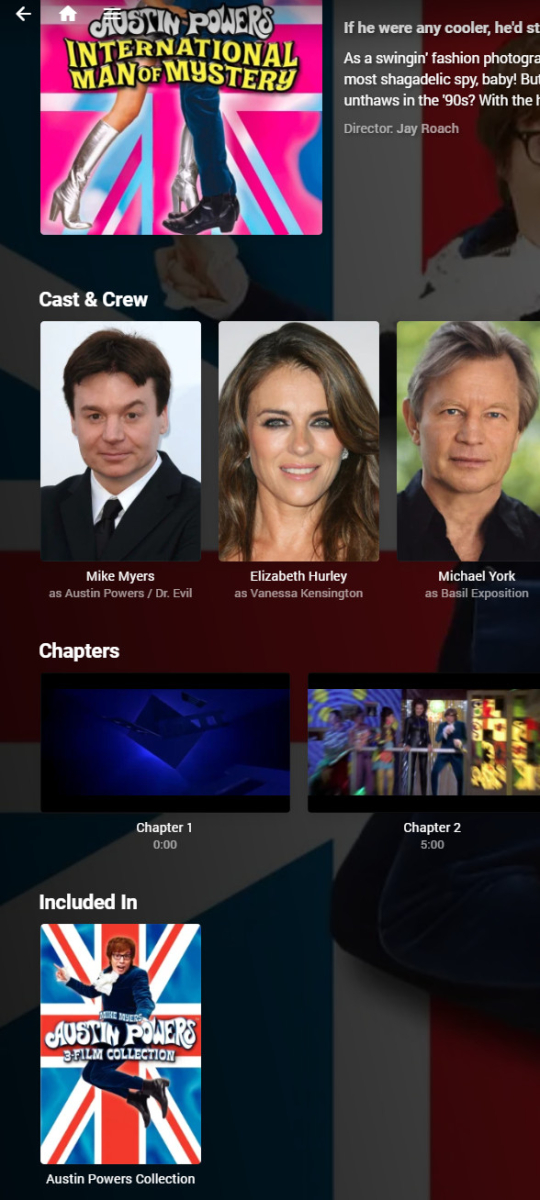
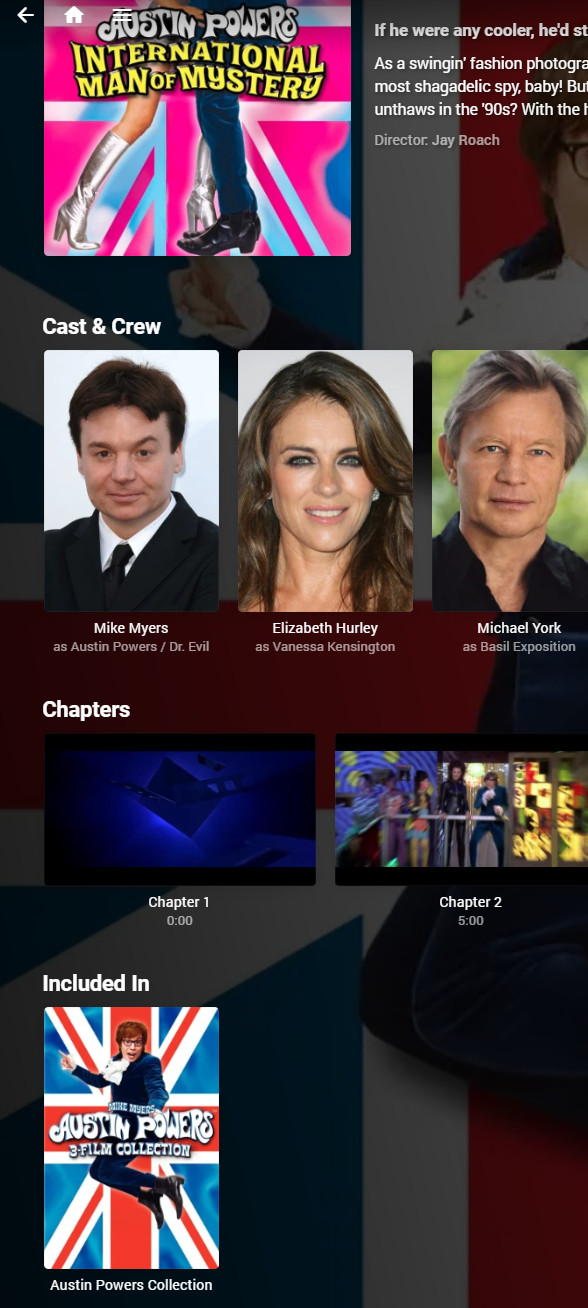
I see it in the movie details page, for instance, under the chapter list (this is in the web client): Paul
 1 point
 -
okay it took a while but it looks similar to yours1 point
-
All of your outbound https connections are failing. Fixing that should get the scanning back on track. Regarding Emby installation and permissions this should help with the Archisms - https://wiki.archlinux.org/title/Emby1 point
-
Hi. The issue will be the optical connection as the app cannot tell from that connection what is supported. In the Android menus, there should be a way for you to indicate that DD is supported. If you enable that, the app should send the bitstream.1 point
-
1 point
-
I haven't used NetLimiter though in theory yes, that's an approach you could try. Another thing you could try if well versed is to define an upstream QoS rule in your router for Emby, at the lowest priority and rules for gaming set to high or highest. This would not limit the bandwidth and could still keep the congestion in check. Do not rely on any form of auto-QoS rules in the router. More often than not they do nothing or make things worse.1 point
-
Yes, the devs have indicated that they would like to get down to one Android app at some point. Developing two apps takes more resources. Comparing the apps can also help when tracking down errors if one works and the other doesn't. Eventually, the standard app will be in the store, but until then you can follow the link below or watch GitHub for updates. Emby.Releases/android at master · MediaBrowser/Emby.Releases (github.com)1 point
-
Devices time out from the count after a period of non-usage, thought to be about a week if I recall aright. Paul1 point
-
A number of additional ordering options such as "streaming" or "director's cut" were added to TVDB comparatively recently. Although Emby developers are aware of them, they have not yet made them accessible to users. It's time they got around to it! Paul1 point
-
Thank you. I thought that I had all of my ducks in a row until your message. Then, I decided that I didn't want to embarrass myself, so I went over everything with a fine-tooth comb and reviewed everything in the 'remote-setup' section. Made a few tweaks and, Voila, everything is good again.1 point
-
This should be taken into consideration when calculating the top items. Luckily, you do have the option to add or remove items from the list. I'll take a look at it and see what we can do about it. On the flip side, I am now realizing that for accounts that can't see higher rates items, I might have to also handle that. For instance if the top three picks are rated PG-13 then the account with the parental control will only see pick four through nine. I think I know how to handle this. But It is now on my radar.1 point
-
@rbjtech Thanks so much for the info, I'll look into that when I start the media population of my second server as I don't have to add all the media at once even if it is physically available and organized....plus even if it takes days or weeks to generate it still is not a big deal as the second server will probably not have much use at first until my family and friends realize how cool it is LOL. My current server is a complete mess with many dupes and such in many folders across a lot of smaller hard drives. I kept learning and changing my encoding strategy and naming schemes and such to reach the point where I am now so my current server is unnavigable except by me as I know what folder to look in for the version I want to check...or watch. When done and caught up I will delete the current server and rebuild it from scratch similar to my other server yet it will only be for in house consumption.1 point
-
Post processing application should be: /volume1/emby_scripts/to-mkv.sh Post processor command line arguments should be: "{path}" also the very first line in your .sh should be: #!/bin/bash if that doesn't work try adding unset LD_LIBRARY_PATH to your script before any ffmpeg commands (only needed once)1 point
-
Yeah I agree with that. But for watching content from streaming platforms, Samsung supports all lossy audio codecs (AC3, EAC3 atmos) and can passthrough them to the soundbar.Even Bluray remuxes with lossy AC3 audio tracks can be watched. For lossless audio formats like TrueHD, it would be necessary to connect the media box directly to the soundbar or via earc although I'm not sure whether Samsung can passthrough multichannel LPCM via earc which would be necessary because there is no support for DTS codecs .1 point
-
There are some Android boxes which pass HDR10+ like you said. Zidoo is one and I've seen people mention Emby works on it. My Shield doesn't pass HDR10+ (or HLG) though. I'm sure what k0Lm was referring to that an external box will get you is better audio codec support when playing UHD movies if you have a soundbar or better. TrueHD Atmos, DTS:X, which the Samsung app can't do.1 point
-
That's not entirely true. Samsung TVs support dynamic HDR10+, and only since 2020 have Samsung TVs started getting hdmi 2.1 ports, which are needed to play HDR10+ content, and I also don't believe that many media boxes have it. Content with HDR10+ is most often from Amazon, and HDR10+ Blurays are appearing more and more. Even though I have an Android Box, I often use the Tizen app because it's very practical to use.1 point
-
My emby server was at 4.7.6.0 and I upgraded my shield app to the latest beta release 2.0.81. I loaded up a 4k HDR Blu ray rip that has DTS-HD-7.1 and it actually was able to skip ahead once. The second skip it hung for 2 minutes like before. Then I loaded the latest beta server version 4.8.0.8 and tried again. Now I can skip forward and backward freely without pause or hanging or crashes!! Amazing!1 point
-
Managed to get this sorted, had to reinstall Emby via CLI rather than Swizzin and all worked ok after that.1 point
-
Hi, i found the mistake. The owner of metada folder at linux estructure was root, and you need that the owner was emby. I changed it, and all is correct. I changed witn this command line "chown -R -c emby /var/lib/emby" Regards.1 point
-
You can close this topic, but still cover problems when shutting down server, see1 point
-
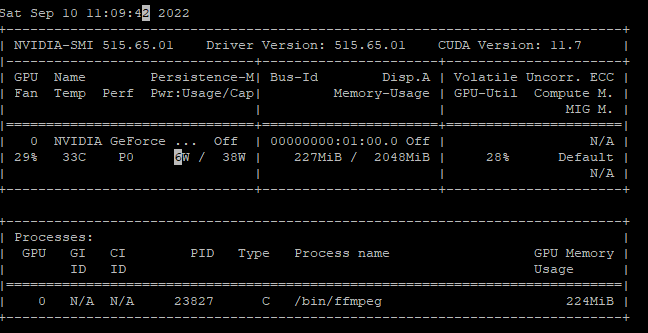
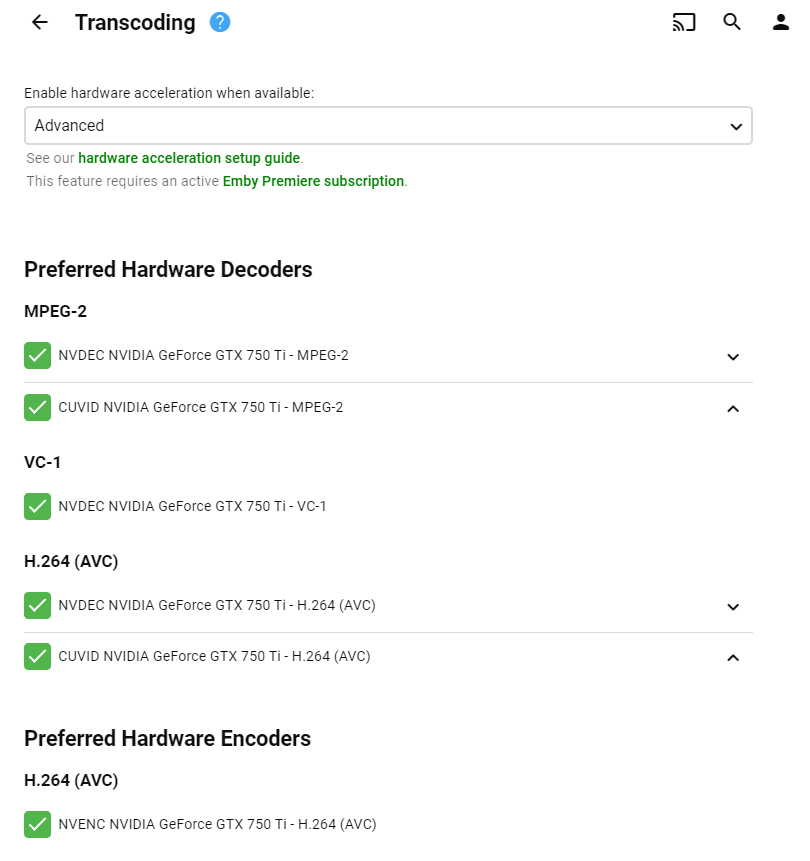
So I managed to get this to work by installing the local/normal install for Emby on Linux. This creates the emby user/groups, permissions and other config. What I originally had was the emby user/groups in OpenMediaVault, this does create UID/GID groups on the linux system but it probably missing other configuration that links to these groups is my guess. Once the emby normal install is completed I just disable the service. Get the ID's of the emby user and group it has generated and reference these values in the docker container Some instructions if anyone interested in future: download emby and install using dpkg get NVIDIA drivers from official NVIDIA site and follow the onscreen prompts: wget https://us.download.nvidia.com/XFree86/Linux-x86_64/515.65.01/NVIDIA-Linux-x86_64-515.65.01.run chmod +x NVIDIA-Linux-x86_64-515.65.01.run if get Noveau error follow this How to remove Nouveau kernel driver (fix Nvidia install error) I had to add the below to /usr/lib/modprobe.d/nvidia-disable-nouveau.config /etc/modprobe.d/nvidia-disable-nouveau.conf blacklist nouveau blacklist lbm-nouveau options nouveau modeset=0 alias nouveau off alias lbm-nouveau off restart after this run nvidia-smi to confirm that the drivers and card are working sudo apt install nvidia-container-toolkit nvidia-container-runtime nvidia-docker2 Change/edit the Daemon configuration file /etc/docker/daemon.json (acquired this info from here) My example: { "runtimes": { "nvidia": { "path": "/usr/bin/nvidia-container-runtime", "runtimeArgs": [] } }, "default-runtime": "nvidia", "data-root": "/srv/docker" } Change/edit this configuration file /etc/nvidia-container-runtime/config.toml (I've removed some of the #comments) disable-require = false #swarm-resource = "DOCKER_RESOURCE_GPU" accept-nvidia-visible-devices-envvar-when-unprivileged = true #accept-nvidia-visible-devices-as-volume-mounts = false [nvidia-container-cli] environment = [] load-kmods = true [nvidia-container-runtime] #debug = "/var/log/nvidia-container-runtime.log" log-level = "info" # Specify the runtimes to consider. This list is processed in order and the PATH # searched for matching executables unless the entry is an absolute path. runtimes = [ "docker-runc", "runc", ] mode = "auto" [nvidia-container-runtime.modes.csv] mount-spec-path = "/etc/nvidia-container-runtime/host-files-for-container.d" sudo systemctl restart docker or reboot (if haven't already from installing NVIDIA Drivers) Might need to do this if it still isn't showing up (acquired this info from here) "Since Docker 5.20.10.2 (I think) there was a change how docker gets access to hardware via cgroups. You need this workaround in the kernel boot parameters:" echo 'GRUB_CMDLINE_LINUX=systemd.unified_cgroup_hierarchy=false' > /etc/default/grub.d/cgroup.cfg update-grub docker environment variables are essentially the same as my first post except for different UID/GID variables Hope that helps
 1 point
 -
Allright! I know you don't do ETA's so i won't be asking for it but nice to see that some changes are going to be made! @Luke Can you see to it that you and your team don't treat Apple TV as a lost child anymore? That release notes are getting updated and also that you give some more attention to Apple TV in terms of compatibility and development (I know that there are limitations). Thanks so much!1 point
-
I completely recognise this request from @macv and would absolutely love emby to handle these better. I prefer to watch most things with subtitles and it is such a pain to remember to have to cut and paste then rename to match the filename in order to get the sub playing properly. It would be one of the best possible updates I could think of if emby was able to scan the folder for subtitles and then load up the subtitle file(s) as options to select when playing the movie/tv show.1 point
-
Okay, there is one other thing I think that needs to be added. This thread is called new releases. So maybe we should have a toggle that adds items that have been released in the current month to the top picks automatically. That way if you don't get around to creating a top picks list, and you haven't enabled the auto picks, then new releases will add themselves. That sound cool?1 point
-
Oh, I also meant to mention that I used the Shield TV device for a few years but love the Apple TV device much better overall.1 point
-
Thanks for following up!1 point
-
Hi, it will be in the next update to the Emby LG app. Thanks.1 point
-
Are there any updates as to when this will be added?1 point
-
Coming soon ...1 point
-
Just added new version in first post. Bit of a tidy up / fix up and a few things added. Nothing major but not too bad. Thanks to Happy2 Play etc etc for the non amateurish bits1 point
-
My TrueNAS Scale Emby Setup I used the TrueCharts version as it has some extra features not found in the IX Systems version. This allows me, for example, to run Emby as it's own IP, and that in turn allows DLNA to work. I will note the sections of installing the chart where I changed things from default. Note this all required setting up a network bridge interface br0 via the TrueNAS Scale gui, that I am not documenting. It's in the Scale docs and forum posts. Application Name: emby Timezone: My timezone, which is America/Chicago, it defaulted to this for me Networking and Services: Port 8096 Click on Show Expert Config Interface Configuration, Host Interface: br0 IPAM Type: Use Static IP Configure Static IP Addresses, Static IP: 192.168.3.22 or whatever local IP you want to dedicate to Emby Configura Static Routes, Destination: 0.0.0.0 Gateway: 192.168.3.1 or whatever your network gateway is dnsPolicy: Default DNS Configuration, Name Servers: 192.168.3.1 or whatever your DNS is Storage and Persistence, I may have gone overboard here but works for me. All 'Type of Storage' are set to Host Path including App Config storage, and automatic permissions I set to not clicked (off). I set hostpaths for: App Config Storage /home/emby/media points to my library of content /backups for Emby backups via the backup plugin /images is for my folder images for Infuse (I use custom images in Infuse), not necessary otherwise /config/data/livetv so I can backup up livetv schedules, timers /recordings for my DVR recordings, I keep these separate from my media library as they come and go and for backup purposes /config/transcoding-temp I point to a directory on my boot pool, i named it /transcoding-temp. My boot pool is on a pair of SSD and TrueNAS Scale wastes the space if the SSD is of any decent size. Since mine is 120GB, 110GB or so is wasted otherwise. Since SSD is much faster, might as well transcode to it and get some use out of it. Note you have to build the directory on each boot, so, under System Settings in TrueNAS, Advanced, I made a Init/Shutdown Scripts to do s. I have as the command: /usr/bin/mkdir /transcoding-temp; /usr/bin/chown emby:sfatula /transcoding-temp; /usr/bin/chmod 775 /transcoding-temp and it's set as When of Post Init. Do set the runASUser, Group, etc. to whatever you want to run Emby as Under Resources and Devices, I do set custom resource limits. The reason is I find transcoding on 4 threads not good enough or barely good enough for some content when using Emby client. So, I set CPU to 8000m, which apparently means 8 hyperthreads. My CPu has 32 so not a big deal. So, within Emby, under network settings. I do allow remote connections, I put public https port number to my reverse proxies port (which I just left at 443), External domain is my domain of the reverse proxy machine, secure connection mode is set to Handled by reverse proxy, and I define the local IP address I assigned in the Emby install above. All of this means by dashboard screen is correct for in home and remote access. Also, with the reverse proxy and when remote, I don't have to worry about SSL access within truenas, the reverse proxy handles SSL. While the traffic between the proxy and my Emby machine might be unencrypted, it's not as I actually use Wireguard for that connection since I have a CGNAT home network. All of this works very well for me now. You may have different requirements or settings needed. I no longer have any issues with Emby on TrueNAS scale. I just wanted to document my settings in case it is of some use to someone else. The TrueCharts version is much more flexible and functional.1 point
-
I am no engeineer but i think this is exactly what i want emby to have too. I use my emby for both videos and photos and i have a massive library of photos (nearly 2 million). Emby is not usable with my library indexed, searching becomes.. yeah you guessed it not possible. Opening the shares that have any of the photo paths setup takes a massive amount of time etc. My guess is that it is the limitations of SQLLite (my database is vacuumed and over 11gb) that gives me this terrible performance while a real dedicated database host would be able to do more complex and smart filter queries making it possible to gain massive amounts of performance for users like me.1 point
-
I'm currently using "moviefilename.English-SDH.srt" for external subtitles and the language displays as "English-SDH" but seems to work and not break the English However, as mentioned above moviefilename.eng.SDH.srt would be preferred. There is already a flag for internal SDH, Emby just doesn't recognize it. As someone with a spouse who suffers from hearing loss this request is very important to me and an option to select SDH as a preferred subtitle option would be great.1 point













.thumb.jpg.6c666f1cd8800f391f1574a4f8c6feef.jpg)