Leaderboard




Popular Content
Showing content with the highest reputation on 08/22/22 in all areas
-
I really like the Cinema Intros feature of Emby Premiere, but one thing that I think should be improved is its handling of movies that are part of a series/collection (Marvel Movies, James Bond, Star Trek, Star Wars,...). Whenever I watch a movie of this kind I get at least four out of five trailers that are part of the same series - when I watch an old Bond Movie I only get trailers for other Bond Movies. Same for the MCU. I guess this is because those movies are good match, but of cause this is incredibly dull. So could you maybe implement an option for more variety? For example by disallowing more than one trailer from the same collection? Or by giving a trailer a lower score if a trailer from the same studio/production company was already selected?2 points
-
Will shoot you a PM once I have that uploaded. Thanks!2 points
-
@SamES Yes waiting 90 secs did fix the problem! Sorry i guess i never paid attention to it2 points
-
ok - but unless you are enforcing for a reason - why have a limit at all ?. 150Mbit/sec is no more of a standard than lets say 300Mbit/sec. The AndroidTV has a sensible limit which is the max Ethernet interface speed - 1000Mbit/sec. I highly doubt emby / Shield could handle this - but at least it's aligned to a 'standard'.2 points
-
This has come up many times - and it's the same answer I'm afraid - the only way to get individual metadata is to have individual files. DVD/Bluray/ISO support is slowly dying - so it will be an uphill struggle to support this. My honest best advice is to just use the likes of makemkv and convert the DVD's 1:1 to MKV files - there will be no quality loss (it's a 1:1 copy) and all apps will fully support these. You will of course lose the functionality of the menu's, but this is obviously replaced with the ability to play, search etc in emby instead.2 points
-
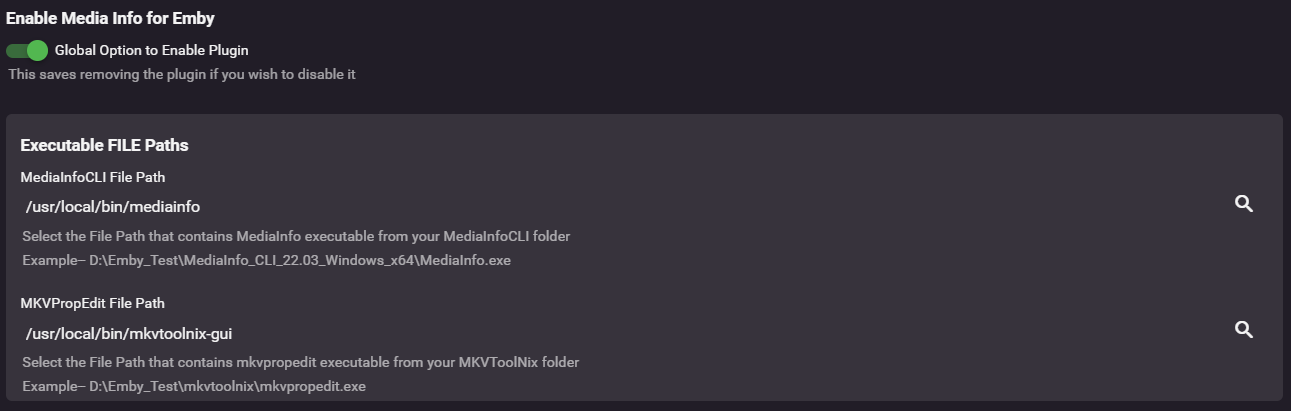
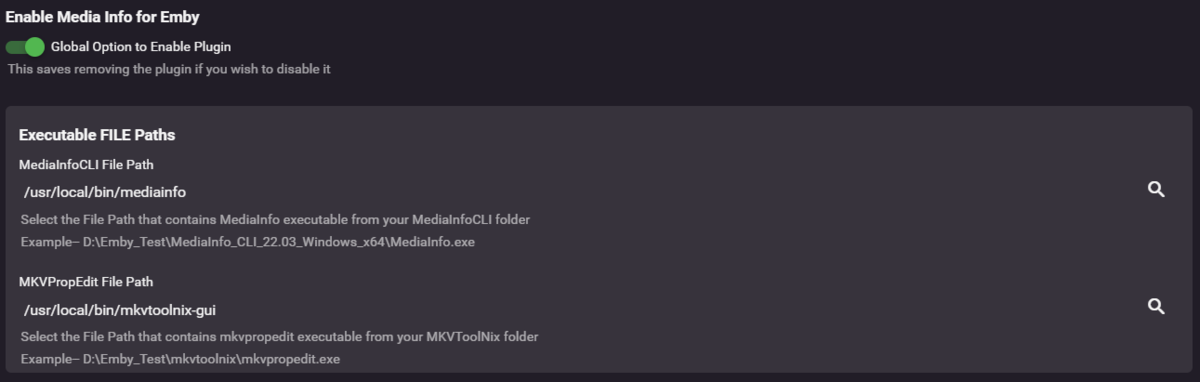
FreeBSD install instructions: 1) add the following packages and their dependences: https://www.freshports.org/multimedia/mediainfo/ https://www.freshports.org/multimedia/mkvtoolnix/ This can be accomplished with the below command that should be entered into the shell of your Emby Jail. pkg install mediainfo mkvtoolnix 2) Place locations into plug-in settings: For MediaInfoCLI File Path: /usr/local/bin/mediainfo And MKVPropEdit File Path: /usr/local/bin/mkvtoolnix-gui 3) Someday we too will have a biftool but for now there is no BSD edition so this feature won't work. 4) configure the settings per the rest of the wiki and enjoy! ------------------------------------------------------------------------------------------------------------------------------------------------------------- As a FYI, although the plug-in is working. Something about how it calls mkvtoolnix will result in a lot of log messages on the host machine: However, it reports in the embyserver log that it is working and succeeding. I suspect it is because the plug in is using the entire path to the program instead of just calling it via the OS PATH by just using the command? I'm not entirely sure as I wasn't able to find the plug-in's or mkvtoolnix's log in the jail. 2022-08-21 23:20:23.884 Info Media Info: Item FilePath = /media/Visual/TV Shows/Wellington Paranormal (2018)/Season 04/Wellington Paranormal - S04E05 - Who The Hell - 1080p.mkv 2022-08-21 23:20:24.082 Info Media Info: Video Track successfully Written & Exited with Code 134 2022-08-21 23:20:24.082 Info Media Info: Video Track Title Set to 1080p 2022-08-21 23:20:24.094 Info Media Info: Item Tags found = 2022-08-21 23:20:24.095 Info Media Info: PROCESSING OF Who the Hell HAS COMPLETED Successfully I tried to set the plug-in settings to just do the video and not audio and from the log that seems to be working but I haven't had time to examine any of the mkv files.
 2 points
 -
I'd really like to have 2 Factor Authentication added to the login screen. It's just this (optional) extra layer of security to help secure the server (which, especially if people use camera uploads) contains pretty private data. There are for every type of programming language quite a few libraries available, so implementation on a server shouldn't be too hard to realise1 point
-
I created a desktop (windows is released, linux works but I havent packaged it up) application where you can setup multiple servers, and have the tool sync the User Data between the servers. The next big push, is to create an Emby Plugin where you only have to setup the secondary servers. The codebase is 100% opensource MIT licensing. Use it to your hearts content, complain all you like I can take it. But seriously any feedback is most welcome. You can download the release here https://github.com/towel42-com/EmbySync/releases , there currently is no "whats the latest version" check, so if I update you will have to manually update. For now, it only synchronizes the user data between the servers. In the long term, I would like to be able to synchronize all user data, as well as server settings. Meaning everything from layout choices for the user to custom collections. It has both a Graphical UI (standard windows double click tool) as well as a command line version to enable scripting. Thanks, and let me know if you have any issues.1 point
-
Hello simonselmer, Yes that was me. The EmbyDelete folder was your old DSM6 Emby folder which we copied over to the new location in DSM 7. So deleting that folder should have nothing to do with this. As Happy2Play mentioned what your logs show appears to be some type of network issue. The leading cause I've seen for this is running a VPN on the Emby Server. By any chance are you running a VPN? Carlo1 point
-
Looks like your server can no longer communicate with external sites. If you search the forum you will see some topic with "Resource temporarily unavailable". System.Net.Sockets.SocketException: Resource temporarily unavailable @FrostByte@cayars any ideas as I don't see how delete a share would break network connectivity.1 point
-
IMO it would help if the Roku GUI made things just a little smaller, so that it would be much more obvious that scrolling down will show more stuff; at present the screen looks so neat that it's easy to miss this before becoming familiar with it. Paul1 point
-
true - not many at the moment. from a streamer hardware - just the 4K FireTV 4K Max but many will follow now that google/you tube uses it. AV1 decode is doable on the shield etc in s/w - so there is a slow take up. I guess where I'm going is you don't want to spend a lot of time, money and effort converting your entire library to an out of date hevc codec1 point
-
Ok, you're perfectly right !!! I started on a fresh install, and with 6.2.20 version, and now everything works fine ! Thank you !!!!1 point
-
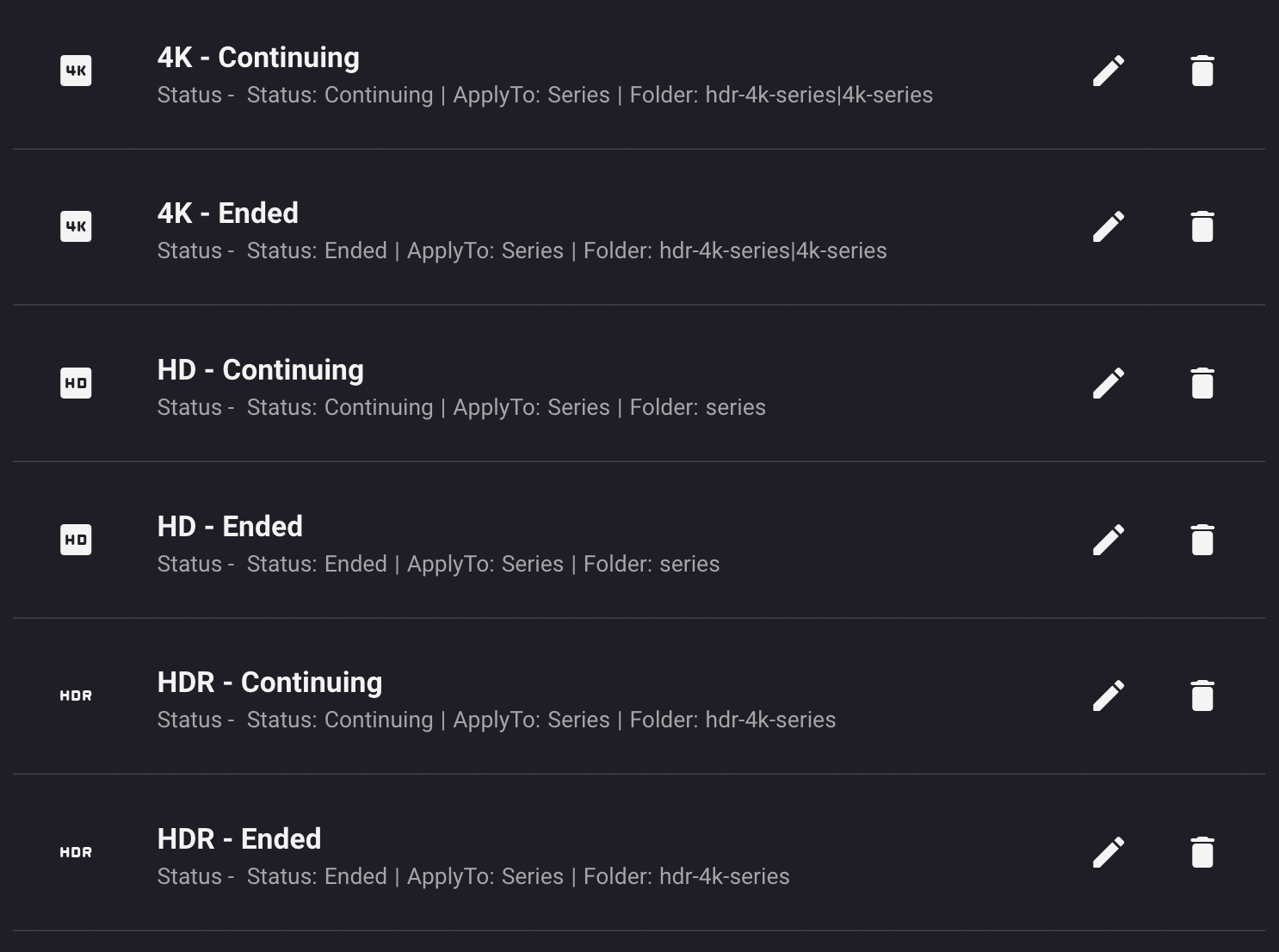
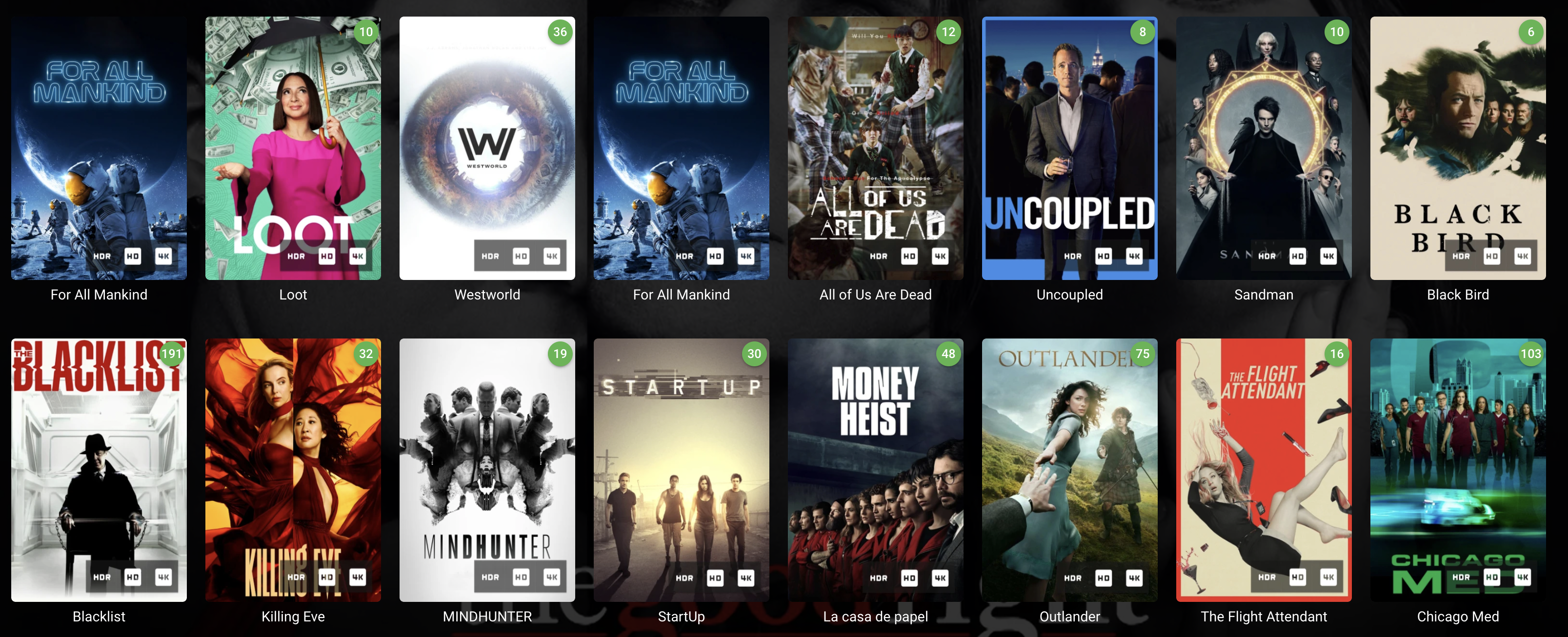
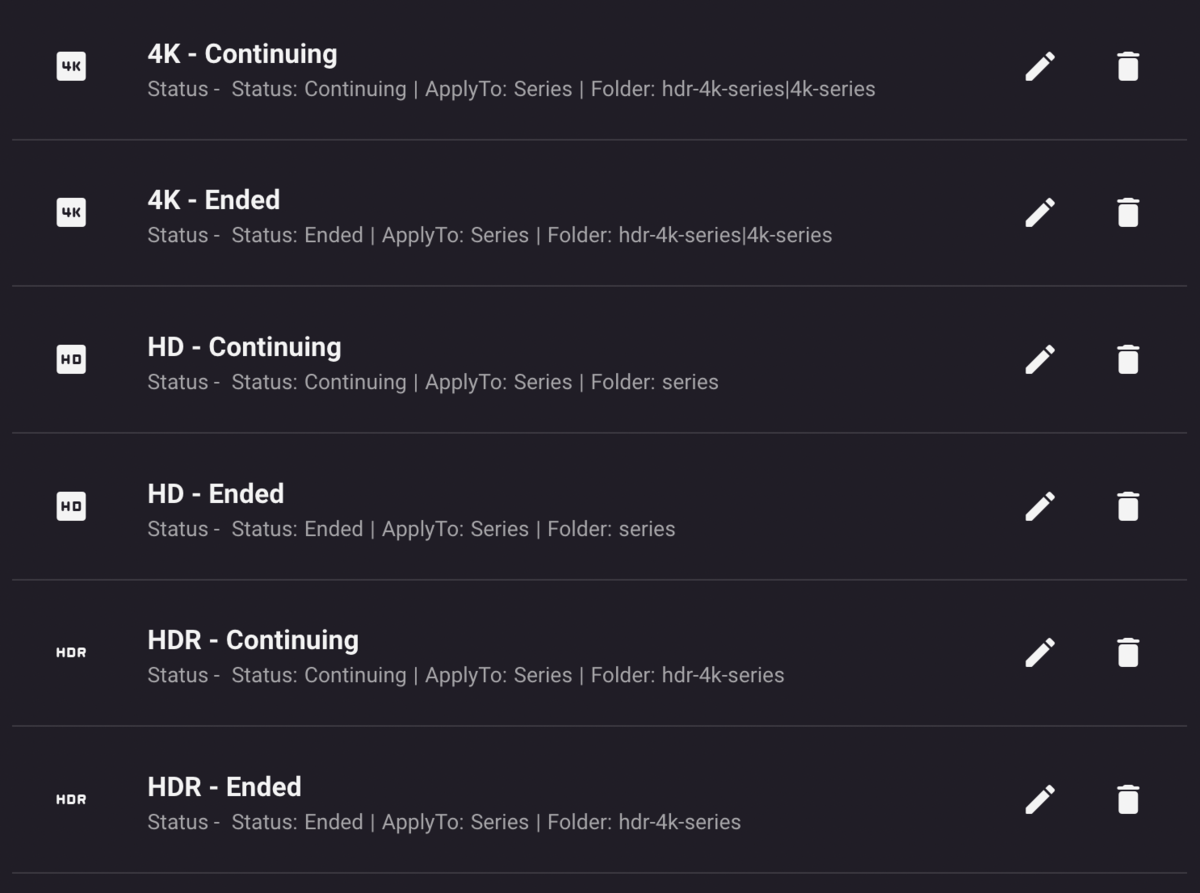
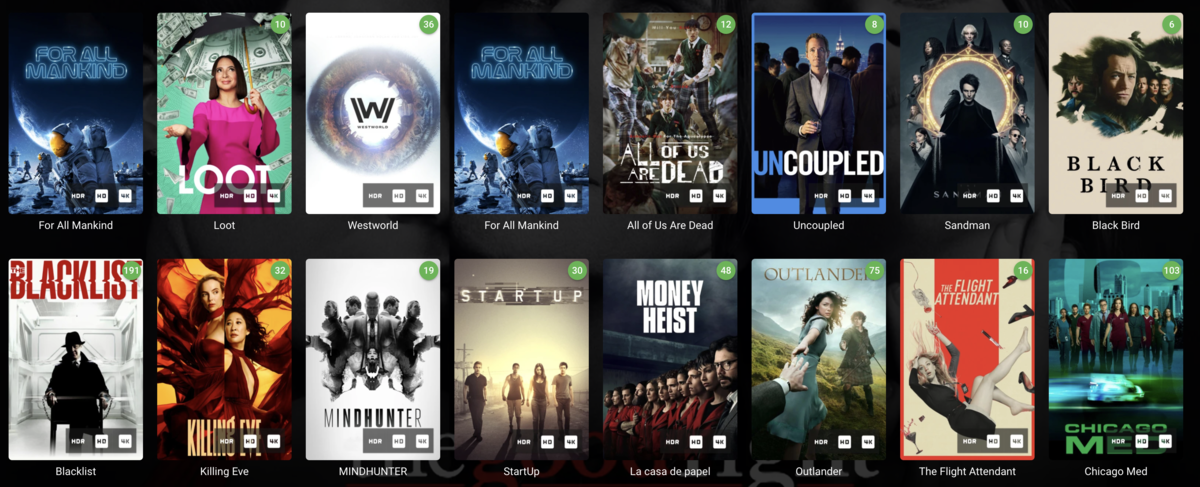
Sorry for the delay, shit happened. I'm running Emby 4.7.6.0 and IIE 2.2.0.7. Here are all my series library rules: Here you can see all icons appear on all the series (same on next up thumbnails): Example path of an episode of the first item in the collection seen above: /home/emby/hdr-4k-series/For All Mankind/Season 3/For.All.Mankind.S03E01.MULTi.2160p.HDR.DV.WEBRip.DDP5.1.x265-R3MiX.mkv Note that everything worked fine on a previous, no longer available (alpha/beta), version of 2.2.
 1 point
 -
Hi. Now that you have started that series, if you enable "Continue Watching" in your home screen sections, then you'll get the next episode presented to you right on the home screen. Welcome!1 point
-
If 4K is your source, then why not just transcode on demand ? The i5 12600K has the excellent UHD770 QSV chip allowing for ~8-10 simultaneous 4K remux h265 dec to h264 enc @ 5-15Mbit/sec with tone mapping. So unless you need more streams than this - then this is my recommendation - and is exactly what I use it for (95% of my sources are still 1080p tbh - in which case it's more like 30-40 potential streams..).1 point
-
The security warning is for the client, not the server. The connection is still encrypted but the cert can't be verified by the client so it warns the user that the connection can't be trusted. It's up to you whether you trust your own server.1 point
-
It actually does in our system. If an item's bitrate is over the setting, then it will not direct play and, currently, some of our apps have 120 as the highest value you can select for the max. So, this request is valid in that that there should be a 150 option as well.1 point
-
Maybe take a look at the Vantage Point plugin from @Cheesegeezer as I believe this gives many more options. https://emby.media/community/index.php?/topic/111310-vantage-point-20-complete-rework/1 point
-
I assume you mean Kodi starts buffering? Could be also the responsiveness of the Emby server? Sounds like a network performance issue. Anyway, you are streaming over the Internet and that means Emby server needs a fast upload link. If network speed is the issue, you can try transcoding for limitation. On the other hand, transcoding need a lot of CPU power on Emby server (as long as you don't have a dedicated GPU assigned for transcoding).1 point
-
Emby for Kodi: Does not support downloading content at the moment. Difference between native and addon mode: Native mode needs direct file access/filesystem access which you obviously don't have. (wrong choice for your setup) Addon mode uses http(s) for playback etc. Artwork can be cached offline but follows Kodi's cache pattern (filename format etc). For artwork caching I recommend latest 7.x. version. It's much faster than in 6.x.1 point
-
OK, yes, nothing to worry about there. We should adjust the log message so that it doesn't look that way. Thanks.1 point
-
They are likely to return in future updates, just presented a little differently.1 point
-
The post tells you but what platform is your server on?1 point
-
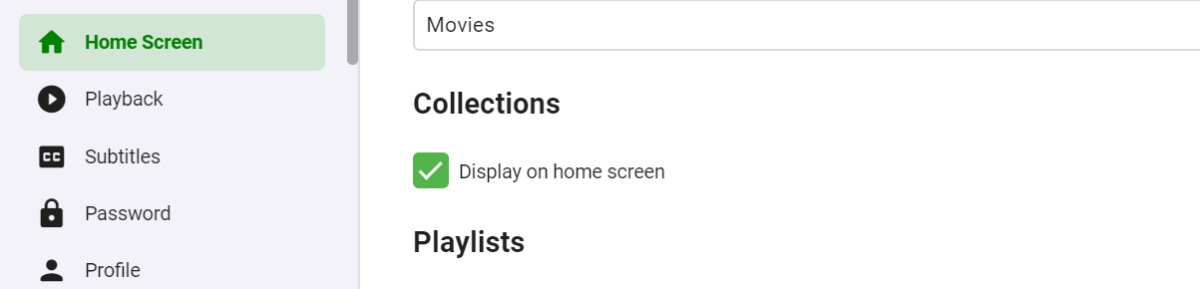
Assuming you have no collections you would have to do a hack changing the library to mixed content which will allow you to delete it. Otherwise all you can do is hide the library per user on Home Screen settings.1 point
-
Not sure what the font is, but is this close?
 1 point
 -
The full output of latest version is: libGL error: MESA-LOADER: failed to open iris: /usr/lib/dri/iris_dri.so: cannot open shared object file: No such file or directory (search paths /usr/lib/x86_64-linux-gnu/dri:\$${ORIGIN}/dri:/usr/lib/dri, suffix _dri) libGL error: failed to load driver: iris libGL error: MESA-LOADER: failed to open swrast: /usr/lib/dri/swrast_dri.so: cannot open shared object file: No such file or directory (search paths /usr/lib/x86_64-linux-gnu/dri:\$${ORIGIN}/dri:/usr/lib/dri, suffix _dri) libGL error: failed to load driver: swrast Initializing cec-client... { cecExePath: 'cec-client', cecEmitter: EventEmitter { _events: [Object: null prototype] {}, _eventsCount: 0, _maxListeners: undefined }, cecHdmiPort: '' } cec-client exited with code 1 UDP Client listening on 0.0.0.0:50764 starting udp receive timer with timeout ms: 1000 timer expired 0 servers received [] fs access result for path: Error: ENOENT: no such file or directory, access '/data/movies/Big Buck Bunny/Big Buck Bunny.mp4' That's it, the video never loads. As for the working version (3.0.14) the output is: (electron) The default value of app.allowRendererProcessReuse is deprecated, it is currently "false". It will change to be "true" in Electron 9. For more information please check https://github.com/electron/electron/issues/18397 Initializing cec-client... { cecExePath: 'cec-client', cecEmitter: EventEmitter { _events: [Object: null prototype] {}, _eventsCount: 0, _maxListeners: undefined }, cecHdmiPort: '' } UDP Client listening on 0.0.0.0:51041 starting udp receive timer with timeout ms: 1000 cec-client exited with code 1 timer expired 0 servers received [] fs access result for path: Error: ENOENT: no such file or directory, access '/data/movies/Big Buck Bunny/Big Buck Bunny.mp4' At this stage the video is showing correctly in this version. Does that help?1 point
-
Why? We waited a year and a half... I don't know why the admin doesn't solve it at all..I think it's better to have a special package for emby because of the languages.Admin could make a special package and it will be much better..I have one problem because of the admin, that they haven't solved it for a year and a half....I don't understand at all The admin kept writing the same thing and phew Look:1 point
-
Mi amigo, it’s in the making. Will probably hit desktop and LG tv first. Then lets see what happens1 point
-
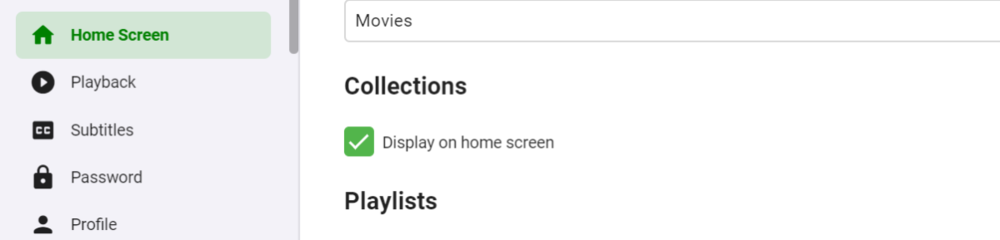
Go to your home screen settings and disable Display on home screen for collections
 1 point