Leaderboard




Popular Content
Showing content with the highest reputation on 08/20/22 in all areas
-
Well for starters I would suggest using the ts url rather than the udp one. I think that is more likely to have success.2 points
-
That's exactly what the problem is, a corrupt file, I have one doing this and I ran one through mkvtoolnix and it fixed the issue. One way I can tell is it doesn't show the length of the movie and when it ends on the dashboard. Once i ran it through that and copied the new file to my folder, scan and it works.2 points
-
The code is already in to do this. Hahha and i have proved it works, i would just need to do some logic that if its not the last intro to be played(to give time to actually create the video with title) then it will not use the magik2 points
-
Only on some platforms. Usually, this "spinner" is some sort of platform component. Biggest problem with this specific request (using something like the spider man one shown) is where would the art come from? Perhaps you could use the disc art. In my personal opinion, I think that would be something that might look interesting once or twice and then just be kind of "gimmicky" after that. Plus, our goal (which is the case in many cases) is to not have much of that thing ever showing anyway.2 points
-
Hi Cheese. finally got round to testing VP playback and i had an issue but pretty sure i have resolved it now. it was user perception but you might want to think about how some of the setup is described. What i wanted - a single intro chosen at random from a folder with X intros in What i chose - single intro option, entered the path as the folder What happened - nothing I worked out from looking at your xml you uploaded that i the single intro option expects to be pointed at a specific media file not a folder and that i need to see the folder tag in the xml for it to work. I'm retrying now with the proper setup and expecting it to work. So either you need an error when a user points a single intro option at a folder and not a single file or some better description of the options IMO Hope this helps - let me know if anything unclear2 points
-
HI, currently it's only in the audio player, although we can try to come up with a way to work it back in for video.2 points
-
I love music visualizations. I was thinking that a unique way to integrate visualizations in Emby would be to encode the audio with the video output of a visualizer like Milkdrop or ProjectM. The mux can then be streamed to clients as video (if the client has enabled music visualizations). Wouldn't that be cool? Sure, you sacrifice a little quality in the transcode but it would still be acceptable and by offloading the visualization to the server, even underpowered clients could potentially support visualizations that would be impossible given their hardware.1 point
-
Can it be made so that tags that are listed in a user's profile as "Restrict Items With Tags" are themselves hidden as well. Currently it does hide the content that is restricted, but if I log on as a user who can't see that content and then go to movies -> tags, then I can see the hidden tag listed and it even shows a preview of the items tagged. So while users can't play any blocked content they do get a glimpse of what is being blocked or even THAT something is being blocked, which isn't desirable. I'd like to have that tag be completely invisible to the user it's being applied to.1 point
-
I've read good things about it from people who have already seen some of it. My fingers are crossed1 point
-
Hi Both, Long delay in replying, sorry, RL getting in the way. OK, so just to confirm, in my test library if I add an artist and some music I have not added previously and it has art work to download then YES it goes in media folders. Apart from the folder image for the album. SO consider this post closed. Many thanks for all the help.1 point
-
Cheese, how is it going?1 point
-
Hi, probably nothing to worry about. Please attach the complete emby server log. Thanks1 point
-
To be honest i think is more to do with something within the setup or swag docker. In Swag docker it highlights these errors and then removes emby from the monitoring process. However this does not occur on F2B on the host server, the -T error does appear for some dockers here but not emby I just banned myself as a test and it worked as expected and here were the results: Swag Docker - No ban as it's version of F2B had removed emby from monitoring due to the parsing errors Host Server - The main version of F2B blocked and banned the Ip as expected Both F2B are running the exact same jails and reviewing the exact same logs. Historically both instances of F2B blocked the IP's so it is definetly nothing todo with Emby Logs or jail setups but something specific happening in Linuxservers Swag Docker. Have not compared F2b Versions between the two however will check that later1 point
-
Hello MrMackey... Are you using the latest version of the code? This bug was reported earlier and I fixed it. It may be that I need to look at it again. My son is in the hospital, so I have very little time. Try the code below. If it doesn't work for you, I will fix it. Thank you for bringing this to my attention. Vic P.S. The Web Client can now read epubs. I added this just to lean how to do it. emby_new_tool_38.html1 point
-
You can specify the library to scan using it's parent id on the standard API http://localhost:8097/emby/Items/39006/Refresh?Recursive=true&ImageRefreshMode=Default&MetadataRefreshMode=Default&ReplaceAllImages=false&ReplaceAllMetadata=false&X-Emby-Client=Emby Web&X-Emby-Device-Name=Microsoft Edge Windows&X-Emby-Device-Id=704173df-a340-41e8-b7fe-7af6ee1830ad&X-Emby-Client-Version=4.8.0.8 As an example - 39006 is the Parent Id of the library. edit - something like this in Curl/API curl -X POST "http://localhost:8097/emby/Items/39006/Refresh?Recursive=true&MetadataRefreshMode=Default&ImageRefreshMode=Default&ReplaceAllMetadata=false&ReplaceAllImages=false&api_key=******" -H "accept: */*" Parent Id is shown in the URL when browsing the libraries http://localhost:8097/web/index.html#!/videos?serverId=****&parentId=390061 point
-
yeah restart fixed it. cheers1 point
-
Just to add my 2 pence worth to this. im pretty sure that the “loading” component is all CSS animation, and a user could create a custom CSS animation. It would require emby to expose a switch or checkbox that would then use that custom animation component instead of the default.1 point
-
Four days of work and I am up and running. NFO files in place. THANK YOU TO EVERYONE WHO HELPED ME SURVIVE THIS DISASTER!!1 point
-
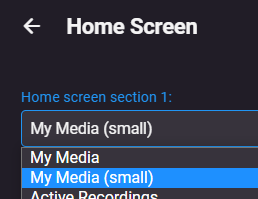
Yes that would be the preferred method but if you want css you would add something like this. div.sections.homeSectionsContainer div.section0 button.cardContent-button, div.sections.homeSectionsContainer div.section0 div.cardOverlayContainer {display: none;} You lose multi-select but have right click for other menu options. Note section number is dependent on Home Screen layout, in this example My Media in Section 1.
 1 point
 -
Try changing your Home Screen settings to just 'My Media (small)'
 1 point
 -
I'm going to side with rjbtech and state you should probably think about moving to hardware transcoding, specifically intel quicksync. My i3-8130u laptop can handle about 20 1080p streams at a mere 15 watts of power (only 3 4k streams though). I've recently bought a replacement 11th gen dual core laptop, so I will be testing that in September. Intel Qucksync is also on par with x264 slow in regards to quality as per MSU tests. You do not need to get an i7 as the quicksync ASICS are the same across a generation, meaning the celerons and the pentiums have the same ASICS as the i3-i9. All you get is more processing power for audio and "other" stuff. There is a decade long thread on doom9 where we discuss the evolution of hardware encoding. Your power bill will thank you.1 point
-
Just read that Netflix has a bonus two-part episode of The Sandman which they are releasing. Episode 11, “A Dream of a Thousand Cats/Calliope,” is supposedly already out there, but I haven't checked yet myself. One part of it may be animated.1 point
-
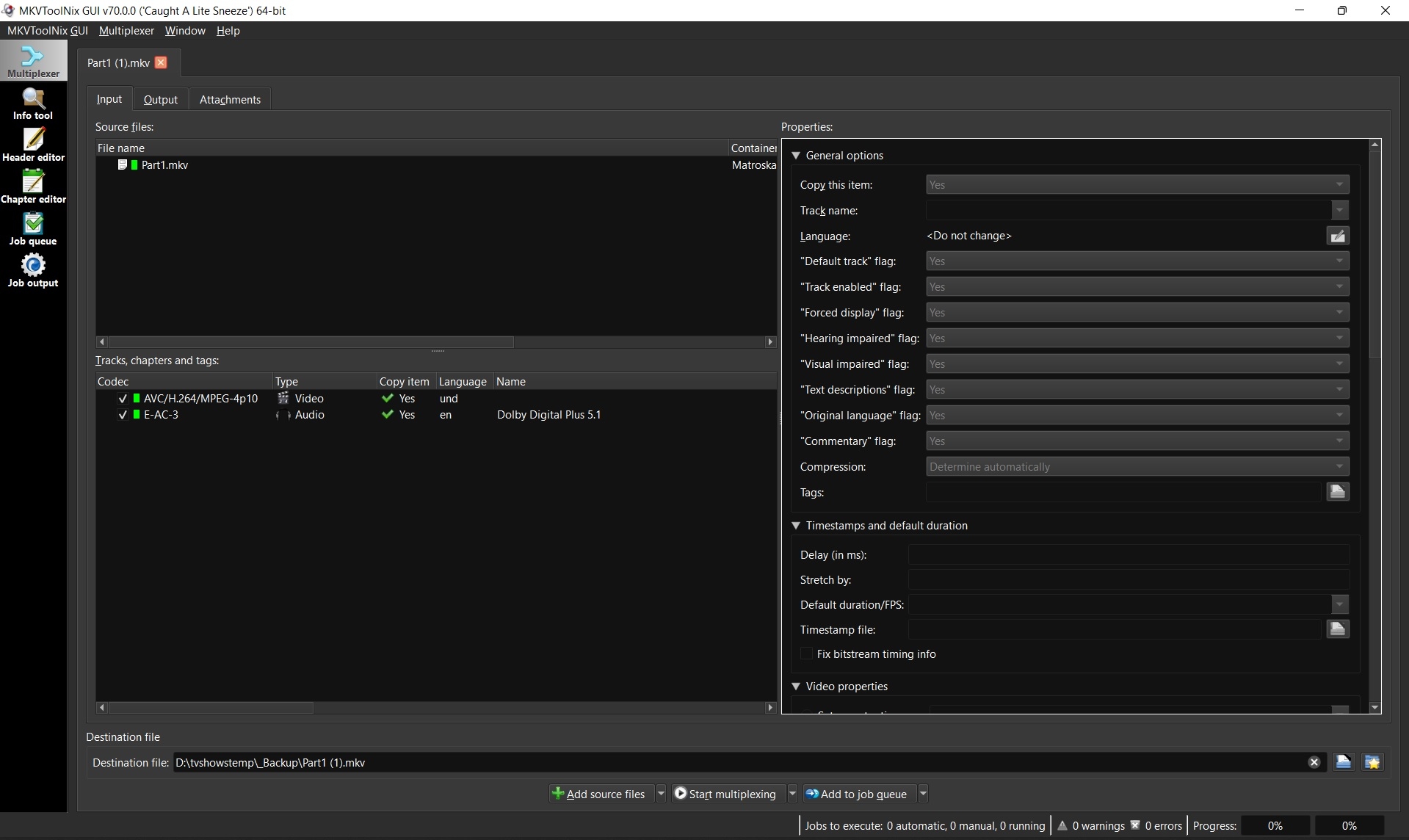
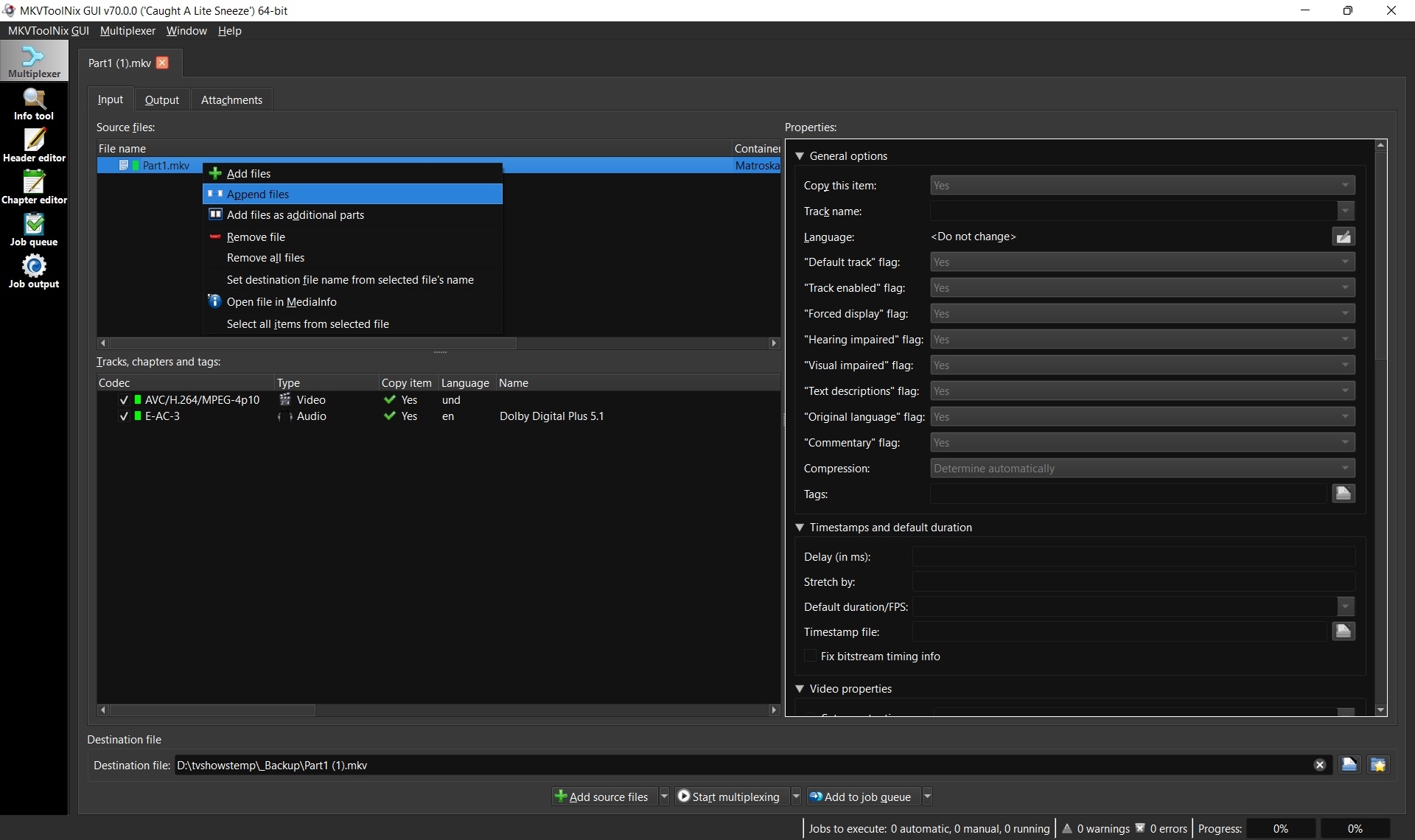
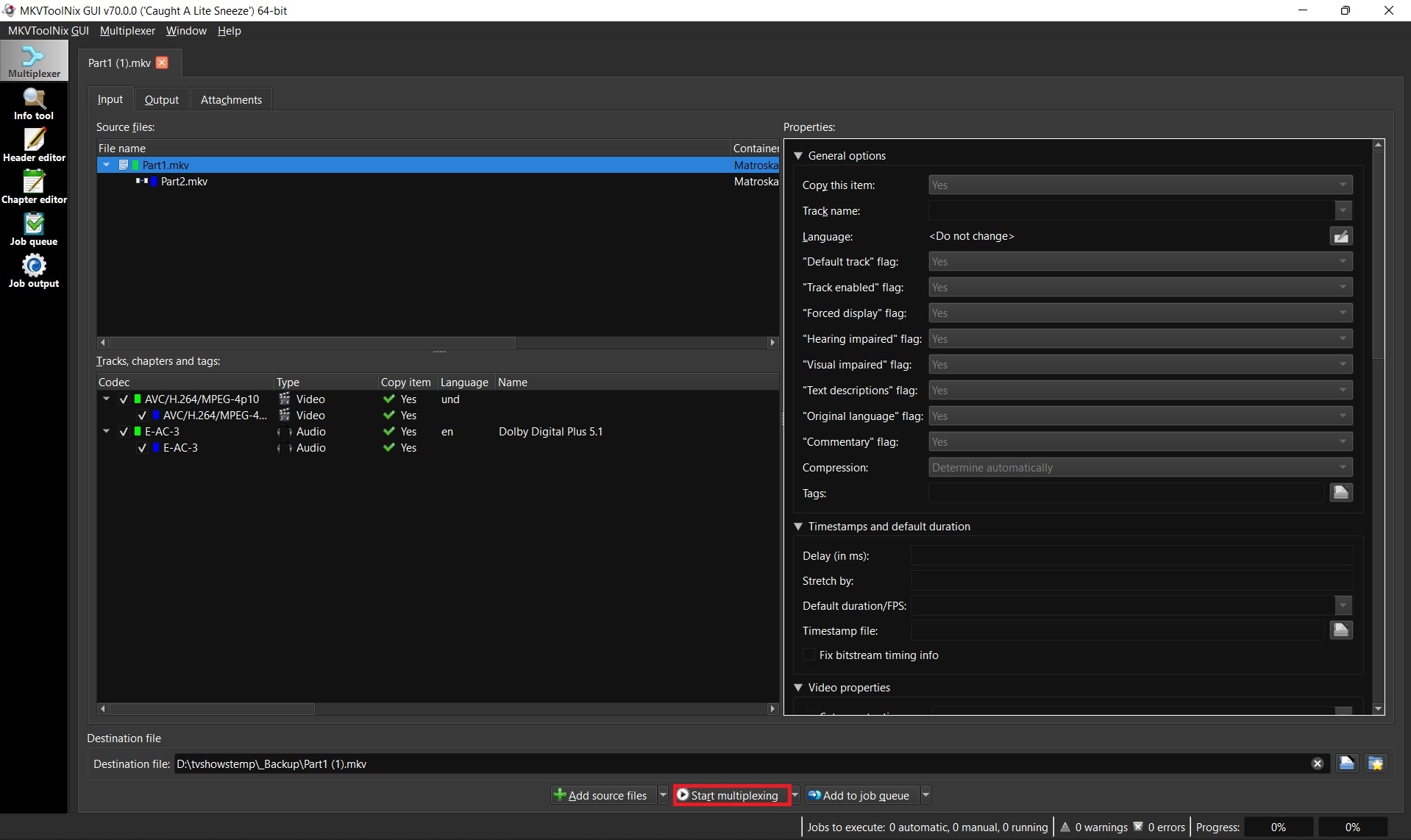
Some movies such as Lawrence of Arabia 4K are too big to fit on one disc and thus when ripped create two separate MKV files. Emby supports these multiple part movies, but merging them into one larger file is always recommended for better playback, resuming, etc. 1. Download and install MKVToolnix Click the link below if you don't already have MKVToolNix MKVToolNix Downloads – Matroska tools for Linux/Unix and Windows 2. Open the first part of your movie Start MKVToolnix Drag-n-drop part 1 of your movie to the "File name" box 3. Append part 2 Select and right-click on part 1 in the file name box Select "Append files" and open part 2 3. Start merging files together Click the "Start multiplexing" button
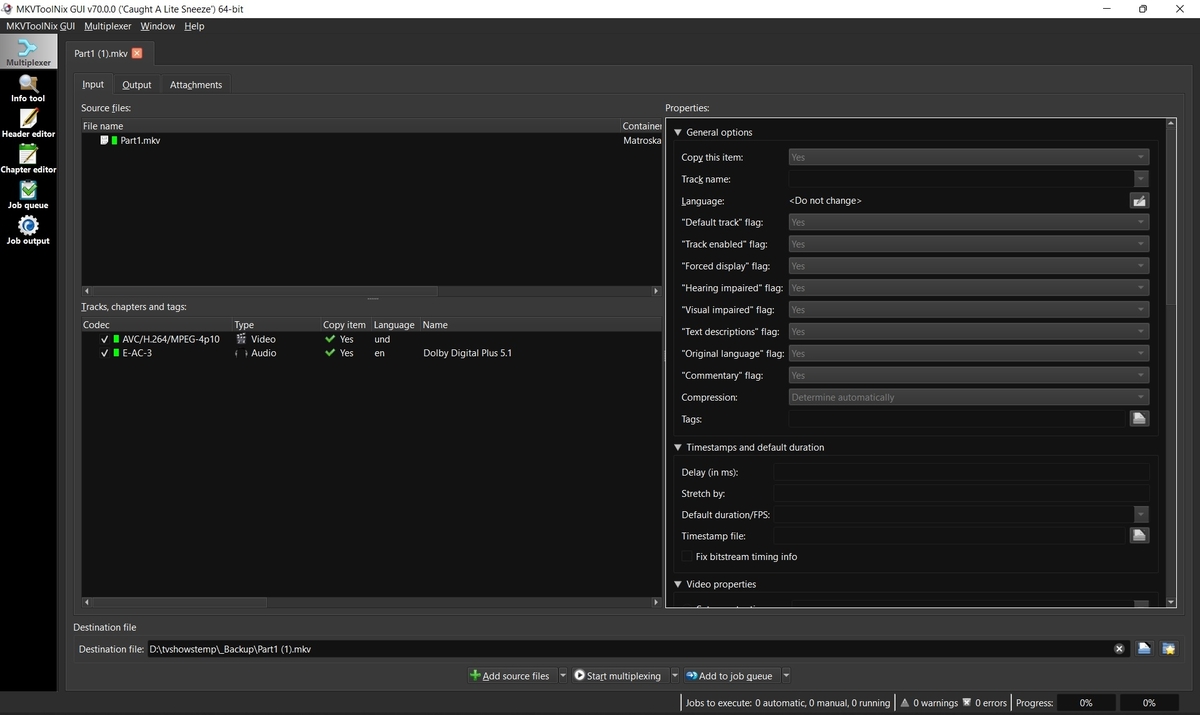
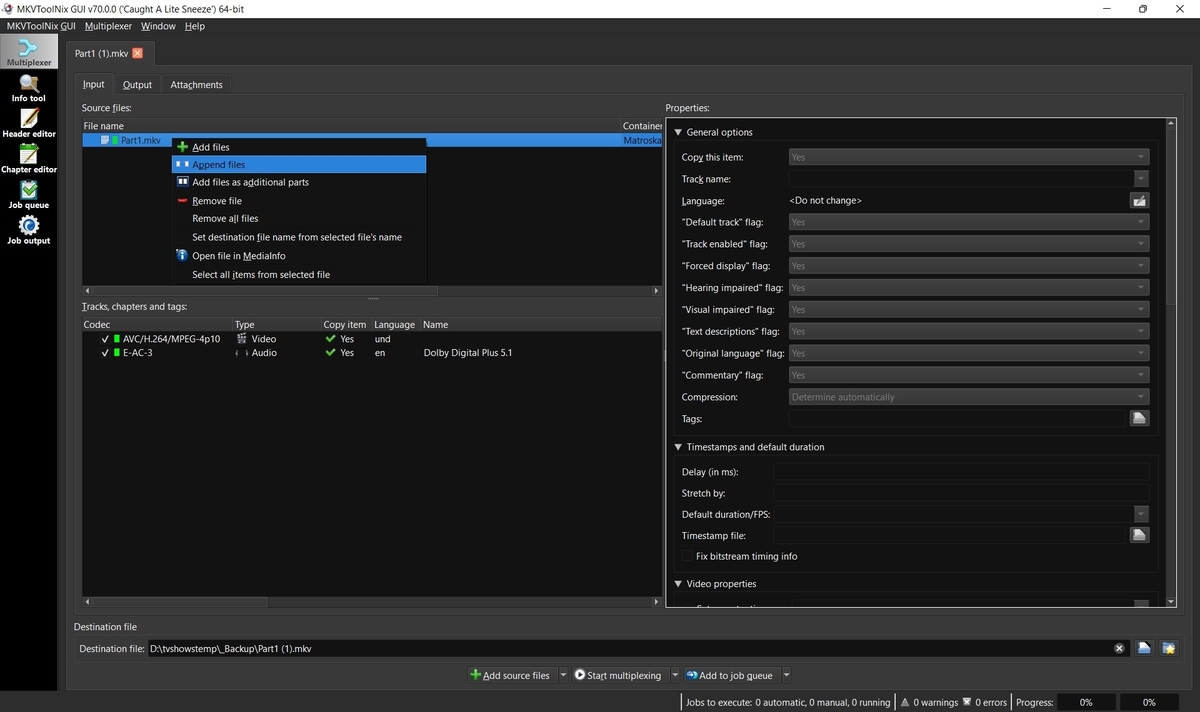
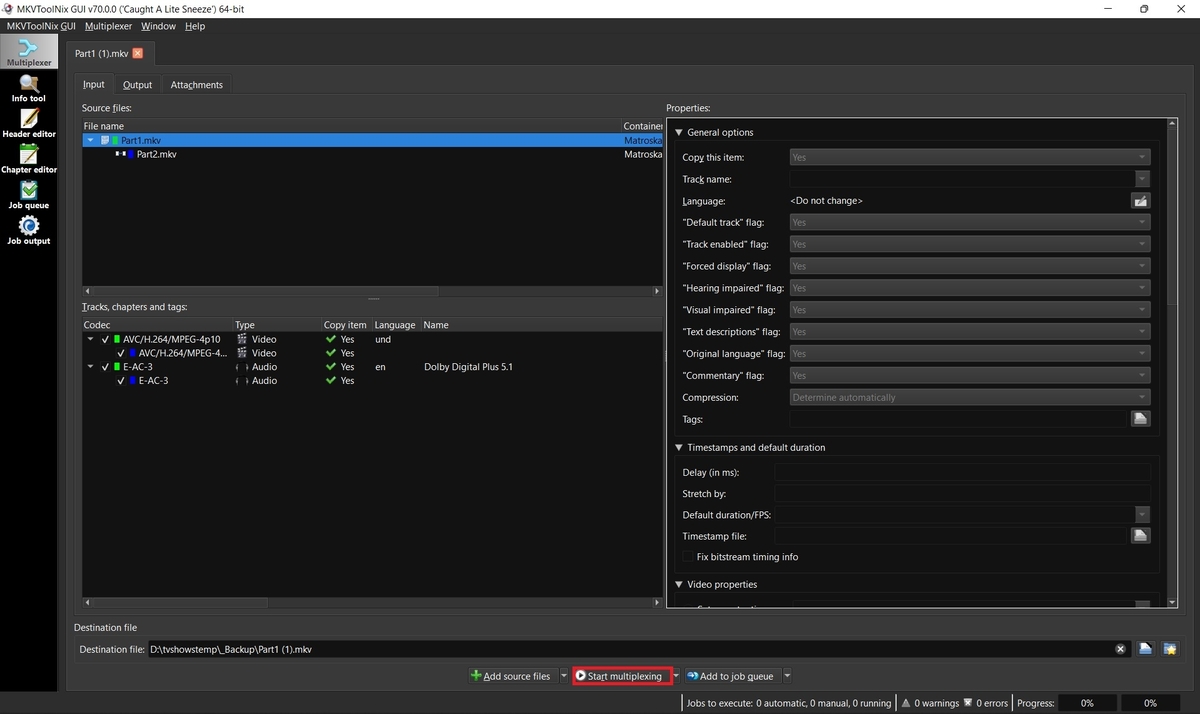 1 point
 -
You can follow my FR for the HDR and audio formats to be added to core in the link below. I believe softworkz has made some progress with ffprobe and has posted screen shots somewhere I'm using the plugin H2P posted for now until it makes it to core and it seems to be working very well.1 point
-
Maybe it would be helpful to have a locked stickied post that has features that are currently being worked on?1 point
-
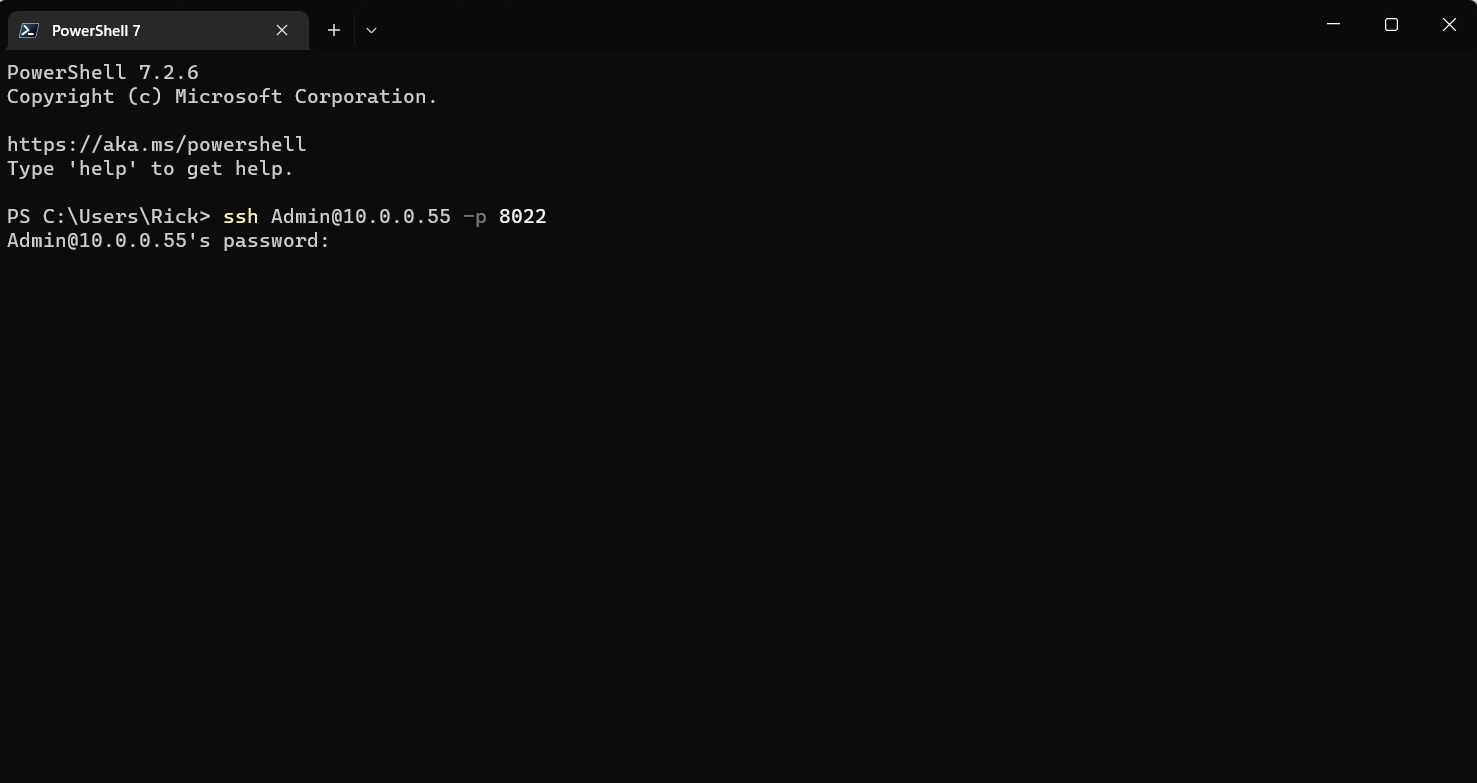
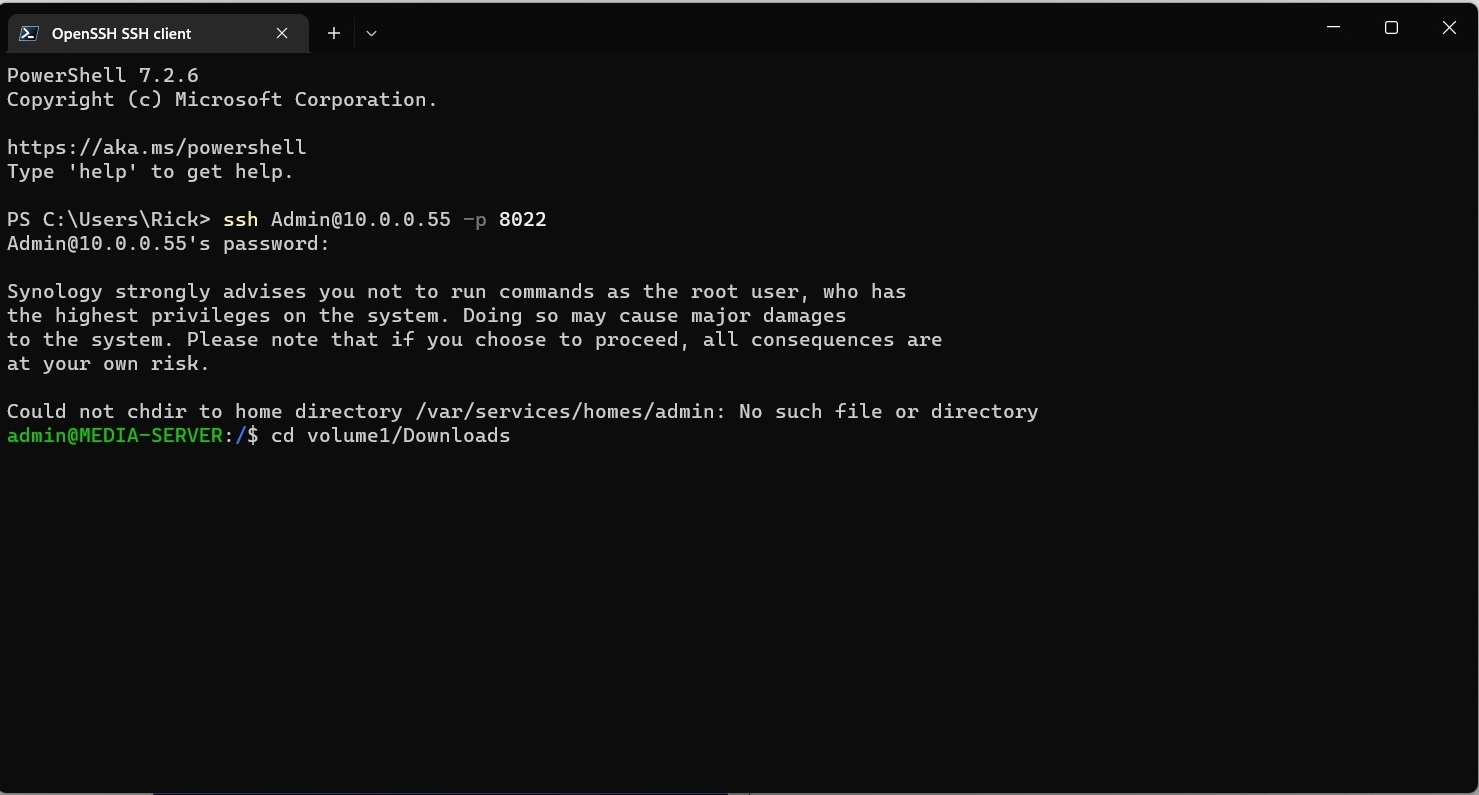
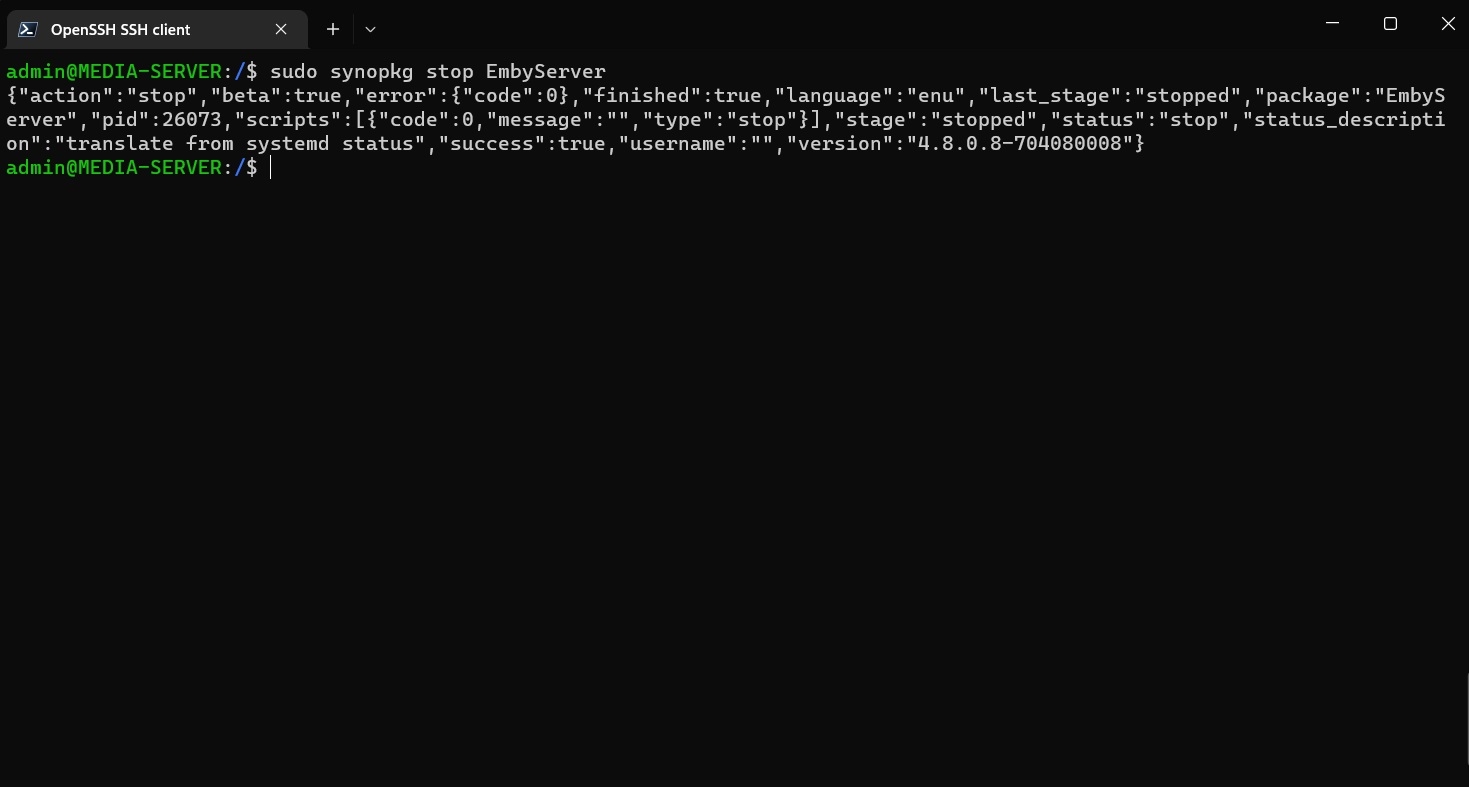
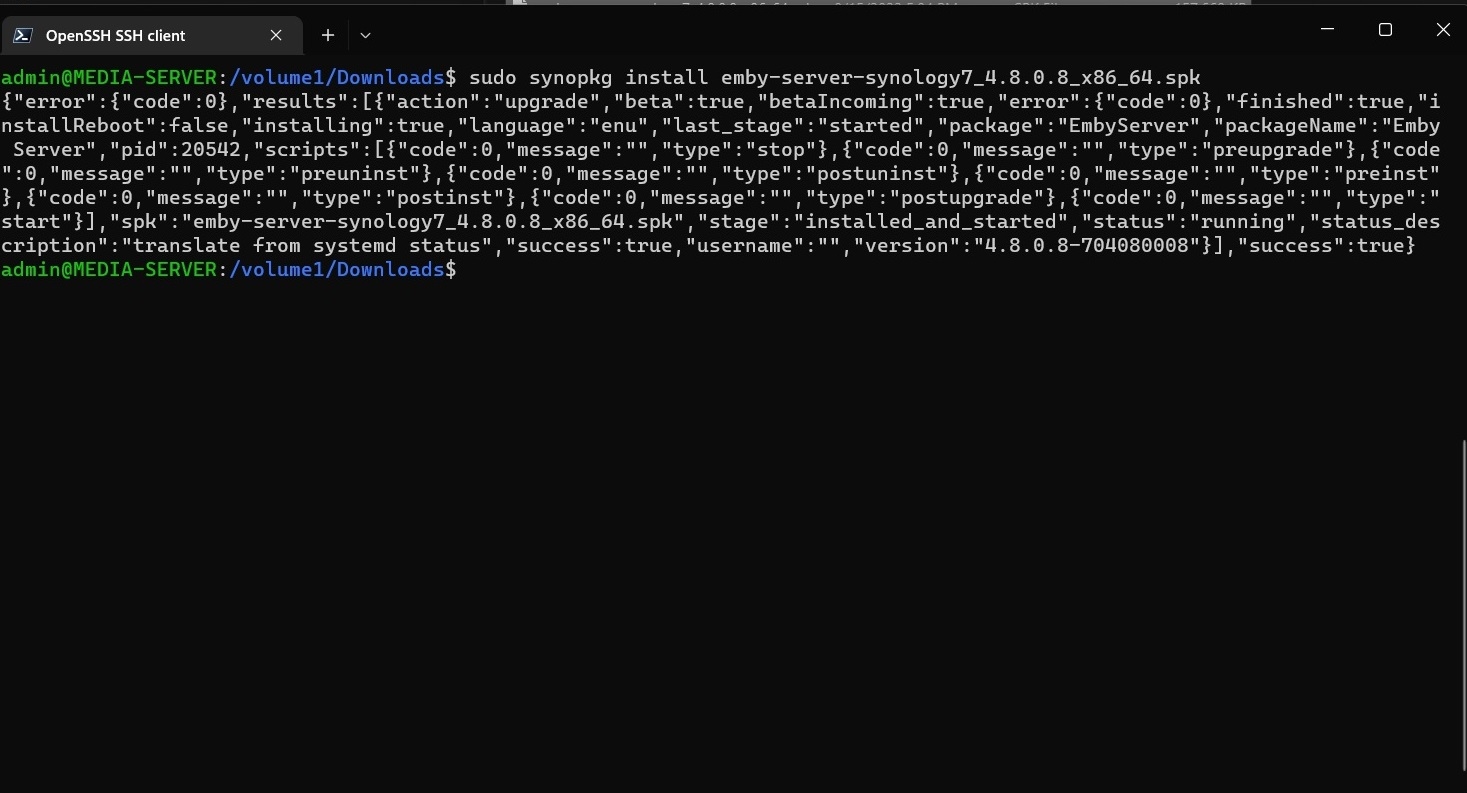
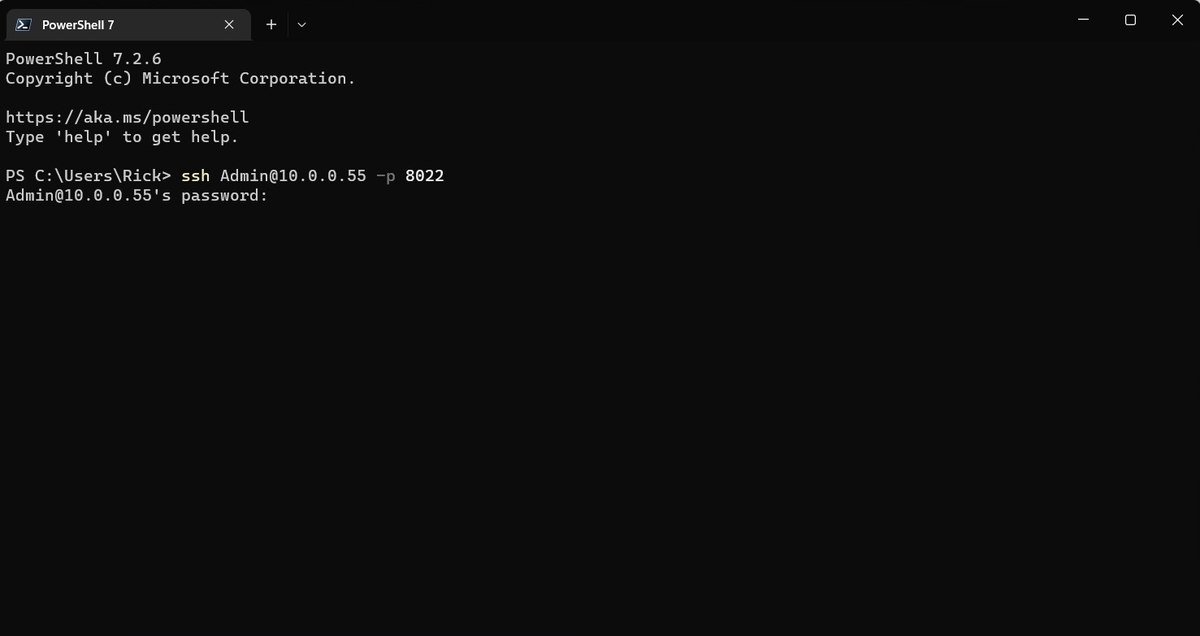
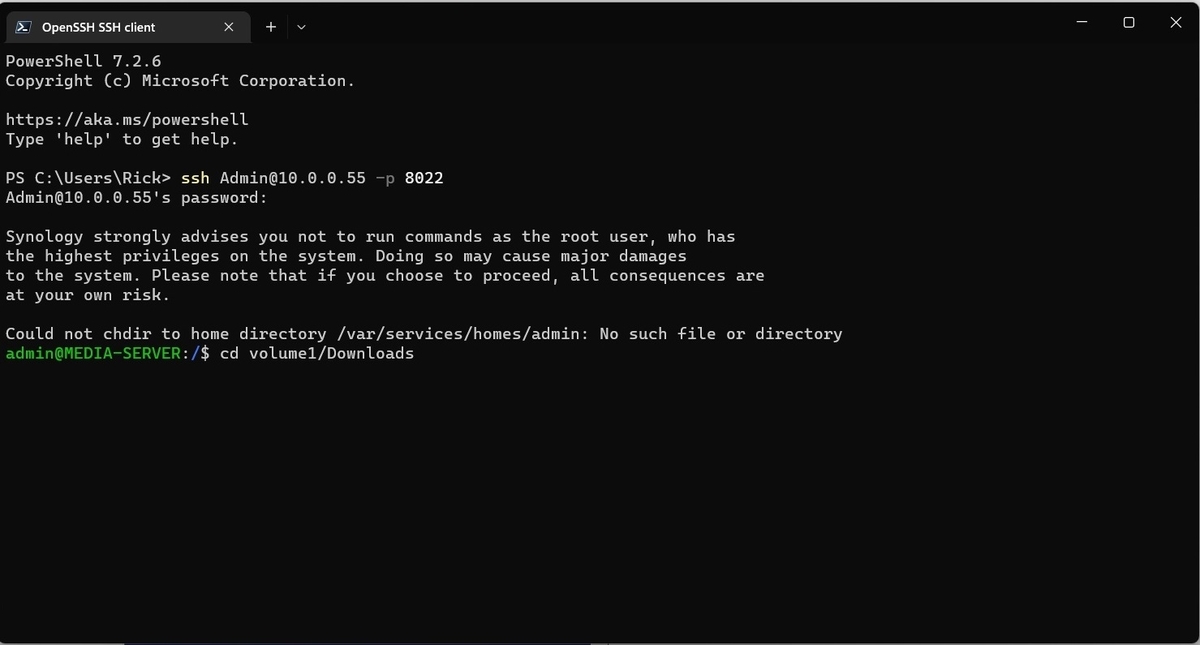
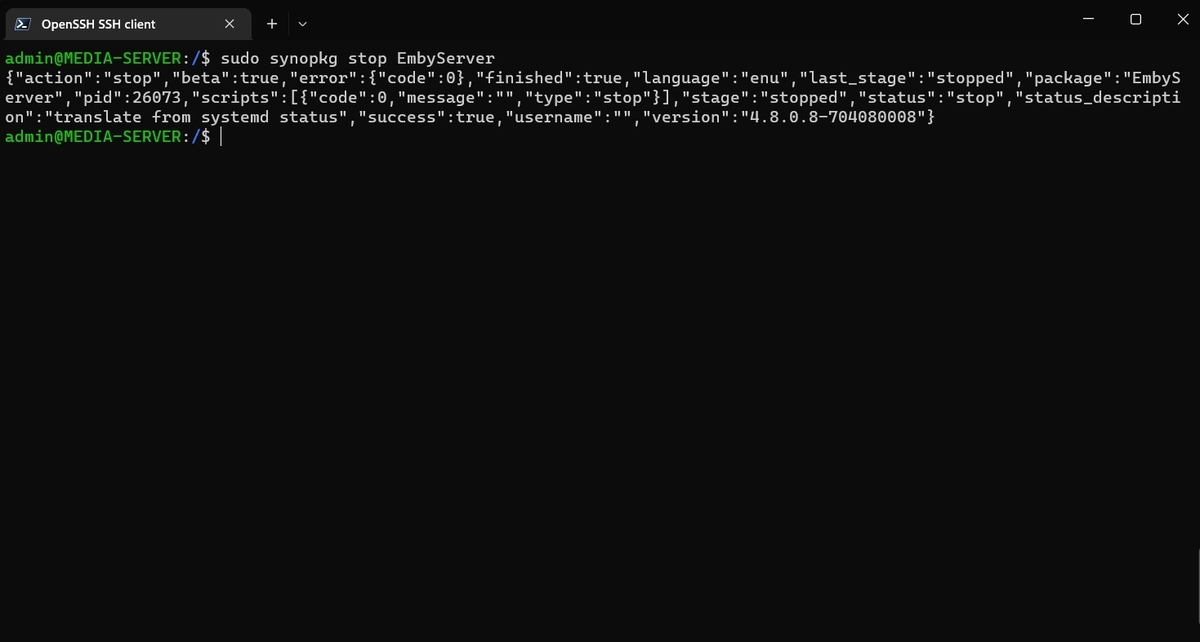
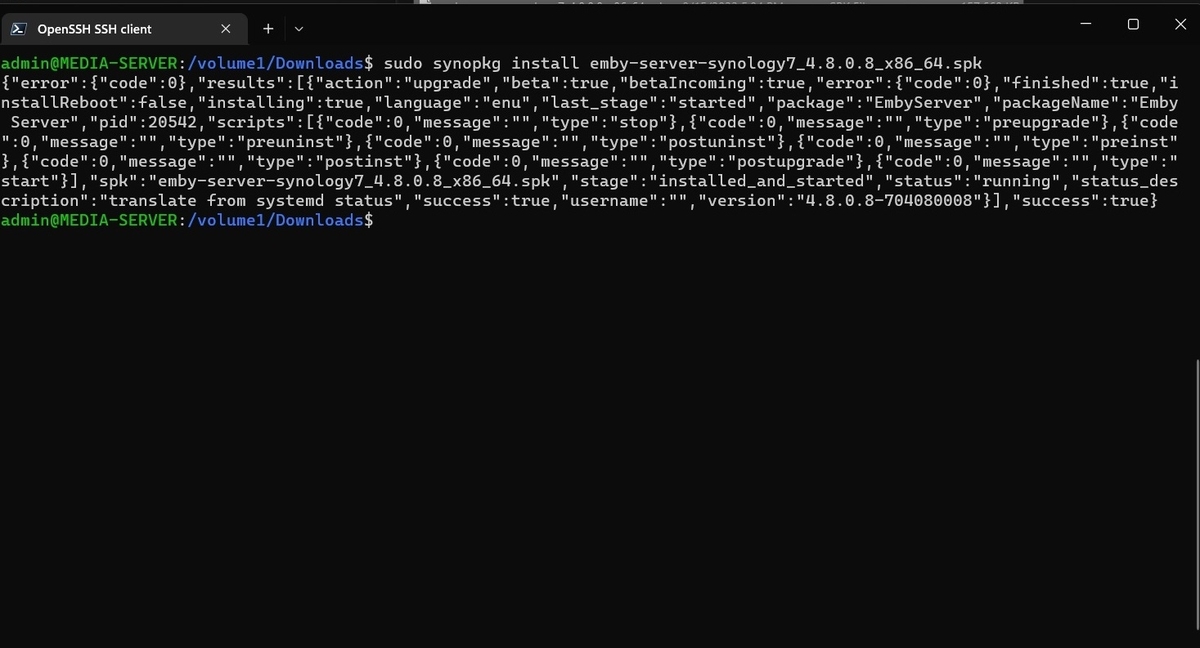
This guide will help in the updating of Emby server from command line remotely from any location. The tools you use may differ, but the procedures will be similar. 1. Download the Emby server package from GitHub Start Synology Download Station Click Create download task via URL Select the destination and Enter the URL for the Emby Server package file Click OK 2. Connect remotely to NAS using SSH Start SSH client such as Windows Terminal/PowerShell Enter SSH command in the format: ssh Admin@NAS IP address -p ssh port number Ex: ssh Admin@10.0.0.55 -p 8022 Enter Admin password 3. Install the Emby Server package Change directory to where you downloaded the Emby Server package file Ex: cd volume1/Downloads Stop the current Emby Server package from running sudo synopkg stop EmbyServer Install the Emby Server package you downloaded earlier Ex: sudo synopkg install emby-server-synology7_4.8.0.8_x86_64.spk Emby Server has now updated and the status should be running.
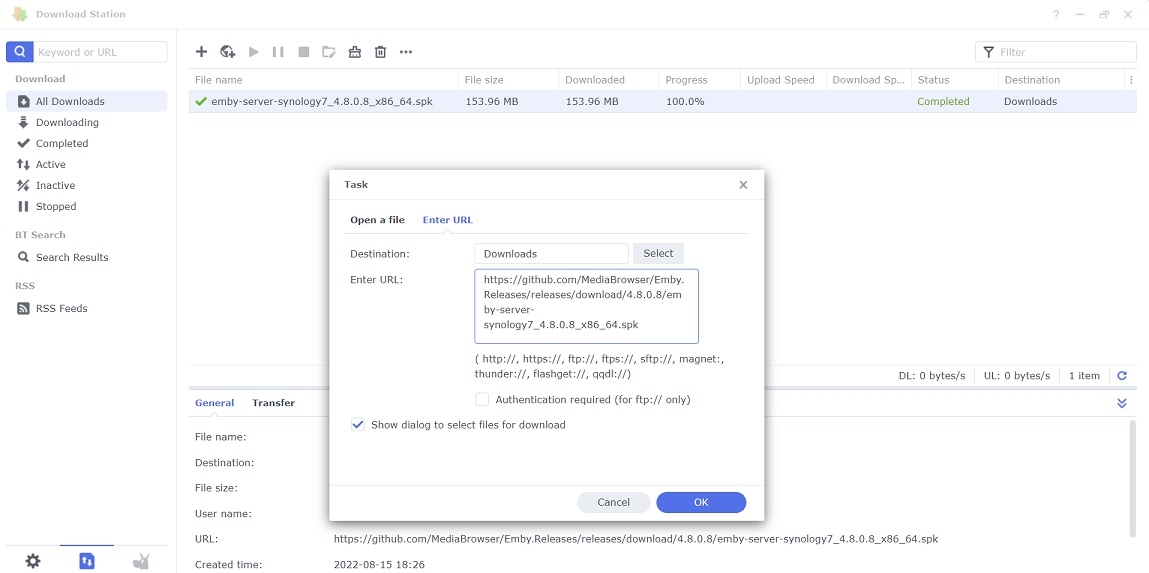
 1 point
 -
@chamith FWIW I tried to render random Sinhala text with the font bundled in the app and both the old and new font seems to render the text correctly, so that might be different issue. Example with the new bundled font: (as a side note, Sinhala characters are very adorable!) @Luke can we please get someone to have a look at the font issue? The font is clearly broken and it should be pretty simple thing to fix. This is seriously broken for half of the Europe. See my previous post for troubleshooting.
 1 point
 -
Emby Server 4.7.6 - Multi-Select & Right to Left Languages This is the latest point release of Emby Server containing fixes for identified issues. Support shift to multi-select Newly added to 4.7.6 is the ability to multi-select. Instead of having to select each and every media item you can now select the first media item as shown below: then holding the shift key on your keyboard, select the top-left circle with your mouse on your end media item. In two quick clicks we now have 18 items selected in this example! Right to Left languages: 4.7.6 adds support for languages that display right to left. Here's an example Nest Hub view using the Hebrew language. Other improvements and fixes include: Improve filter menu indicator Add Select None to multi-select lists Fix regressions related to image extraction Improve the use of internet metadata with recordings Improve photo loading performance Include activity log database file when vacuuming databases Mark all video versions as played when toggling played Change wording of transcoding reasons to be more user friendly Fix sort by sort title being case sensitive in some views Fixes for file names with years at beginning Improve dsd/dsf playback over Dlna Original Blog posts for the 4.7 release: Emby Server 4.7 Release: Many New Features, Improvements and Fixes Emby Server 4.7.1 - Point Release: Round 1 Fixes Emby Server 4.7.2 - Point Release: Round 2 Fixes Emby Server 4.7.4 - Point Release: Round 3 Fixes Emby Server 4.7.5 - Point Release: Round 4 Fixes Please report any issues you may have in the General/Windows section of our Community Forums: Emby Community General/Windows Forum View the full article1 point
-
If the artist is already in the database, then just adding more songs or albums to that artist is not going to change the artist metadata. For that you'd have to refresh the metadata on the artist. That's why adding new audio with a new artist would be the best way to test.1 point
-
As mentioned above only if the exact conditions exist per the option folder structure option. Other will always be /metadata/musicalbums, /metadata/musicartists Album/Track should save Album info in album folder AlbumArtist/Album/Track should save in perspective media folder assuming proper matching can be made. Note folder view will use the images that exist in media folders.1 point
-
Hi, if the server requires a restart, we already have a built-in option to automate this, and it will only do so when the system is idle.1 point