Leaderboard




Popular Content
Showing content with the highest reputation on 08/18/22 in all areas
-
Latest Version :1.2.0.4 Fix a server exit issue with the worker thread Added the ability to submit a zip of multiple intro theme items for detection If multiple intro theme items are submitted detection will now try to match the best intro I also set up a Theme Service web site to host Intro theme chromaprint data. https://themeservice.azurewebsites.net/ This website can host intro detection info for known good themes in shows that people would like to contribute. The idea is if you have a good working detection intro item you can submit it. To submit something you need to log in, the site is using GitHub OAuth so you need a GitHub account to log in to submit. I am still thinking of the best way to add a voting system to the site to allow people to vote or verify items to give users some indication of quality. Ideas?4 points
-
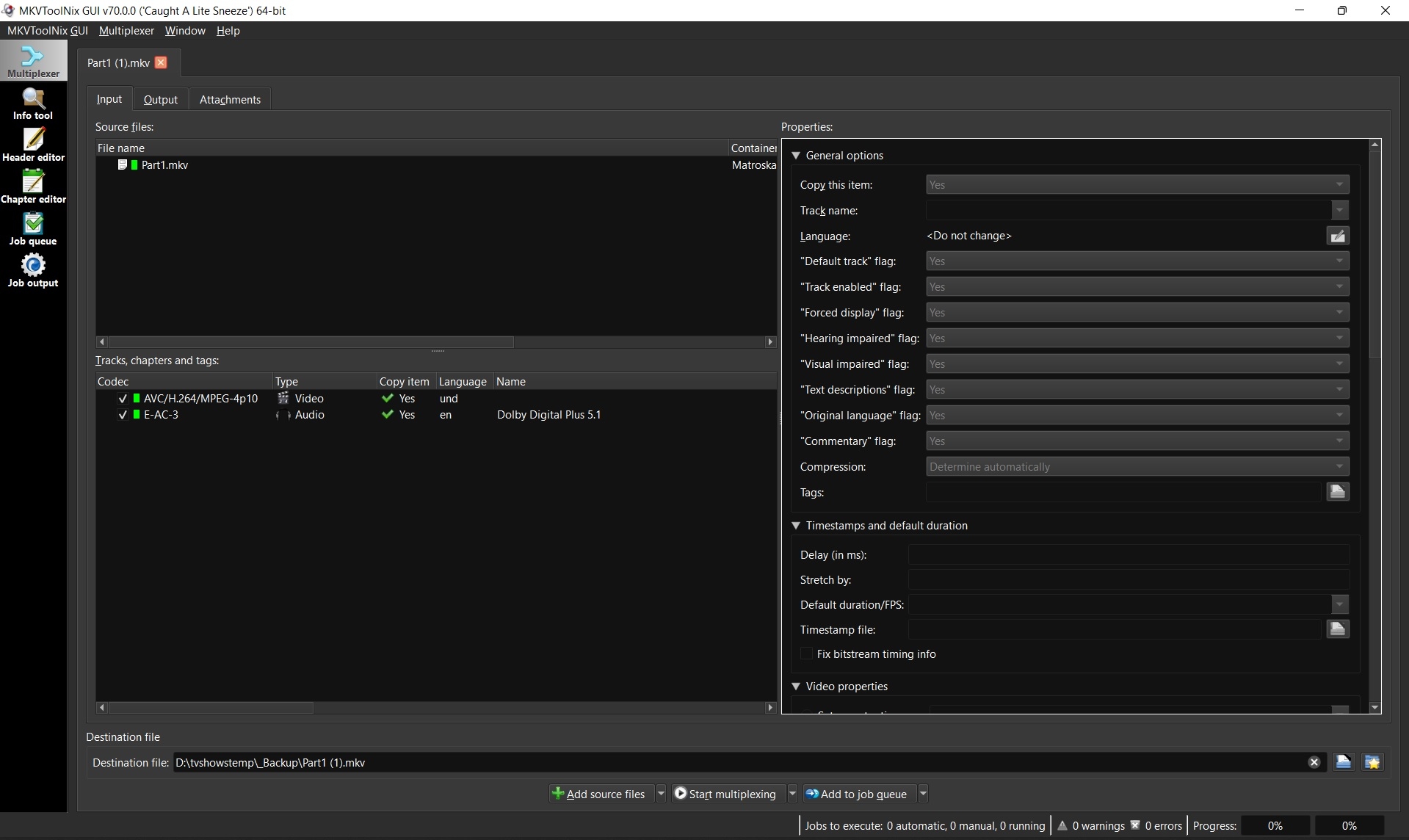
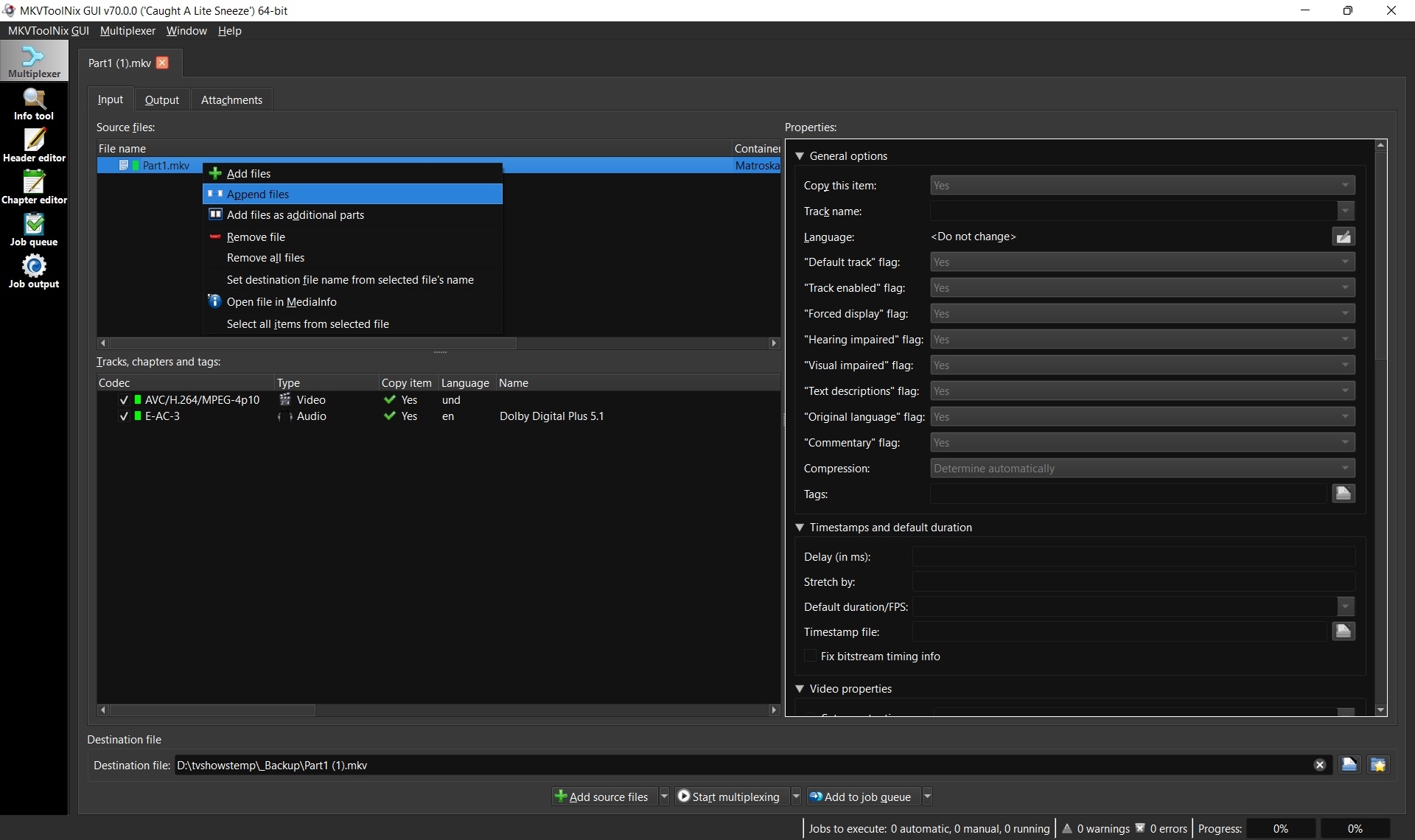
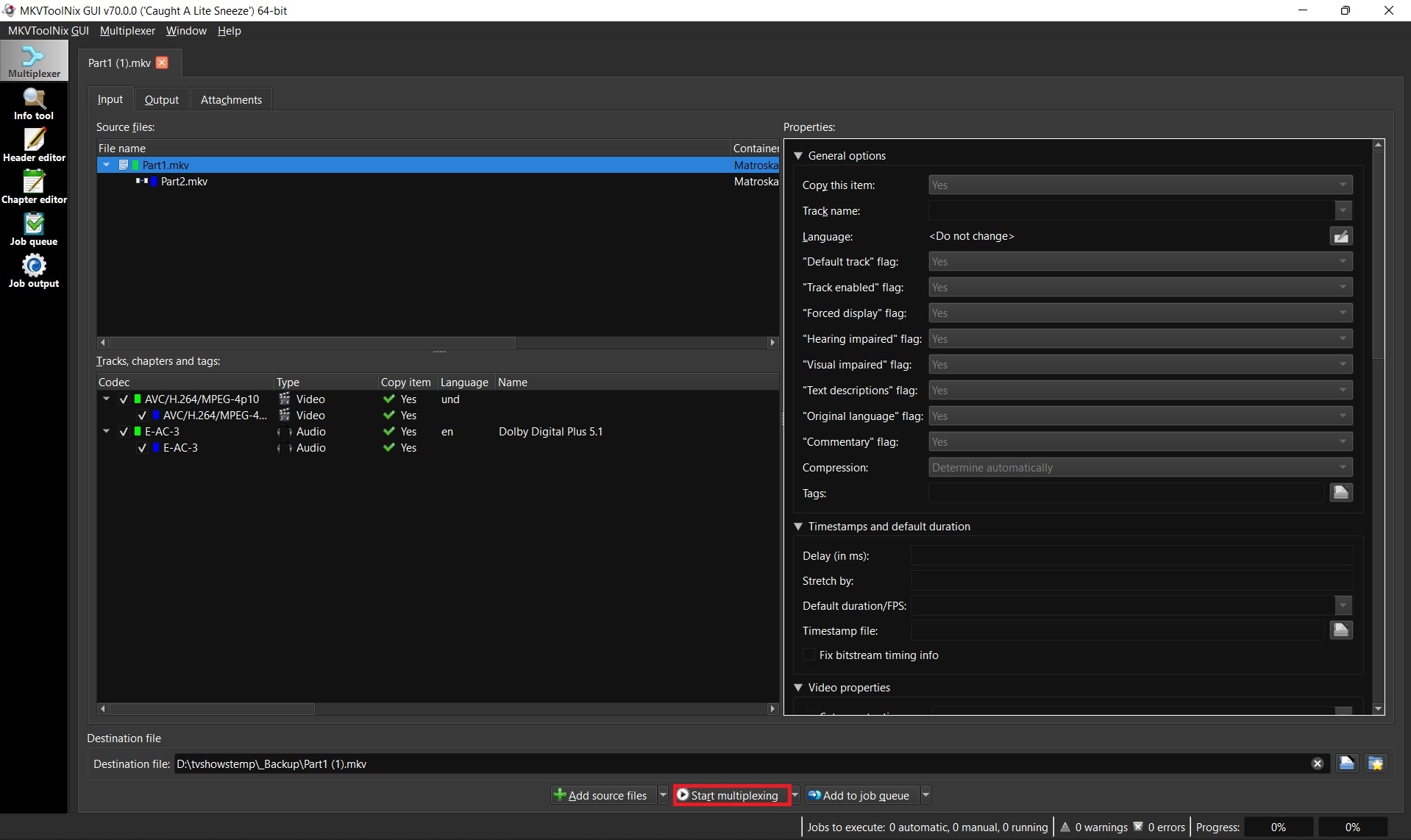
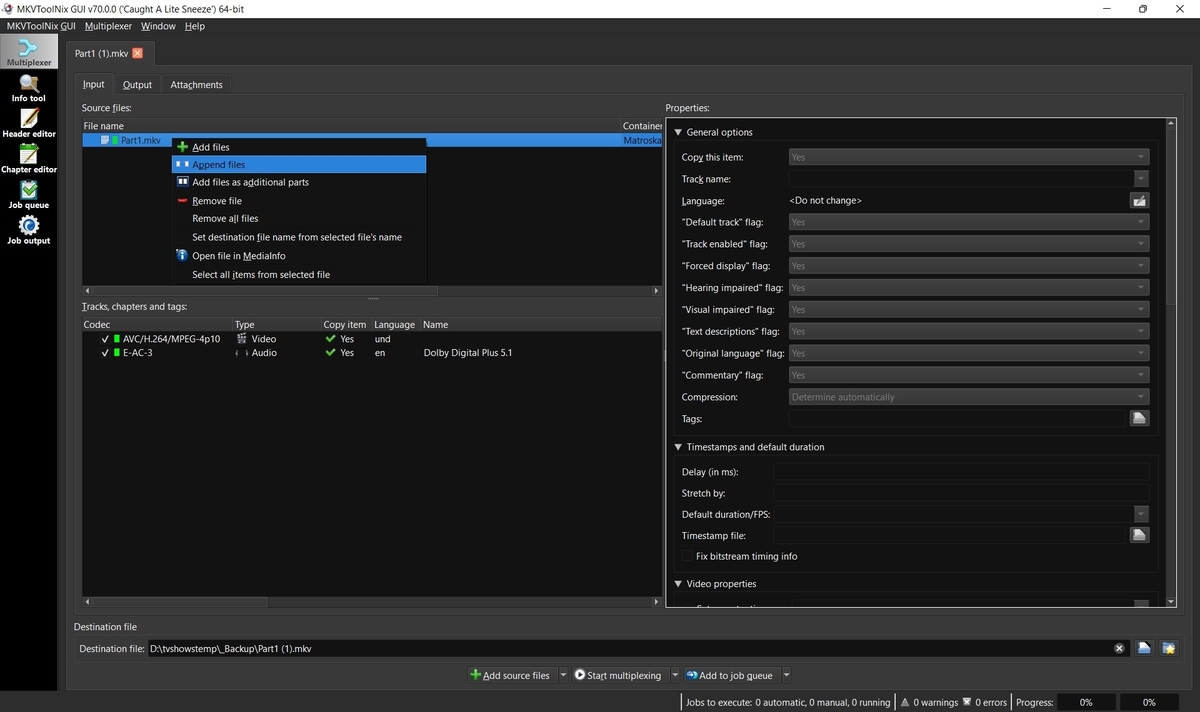
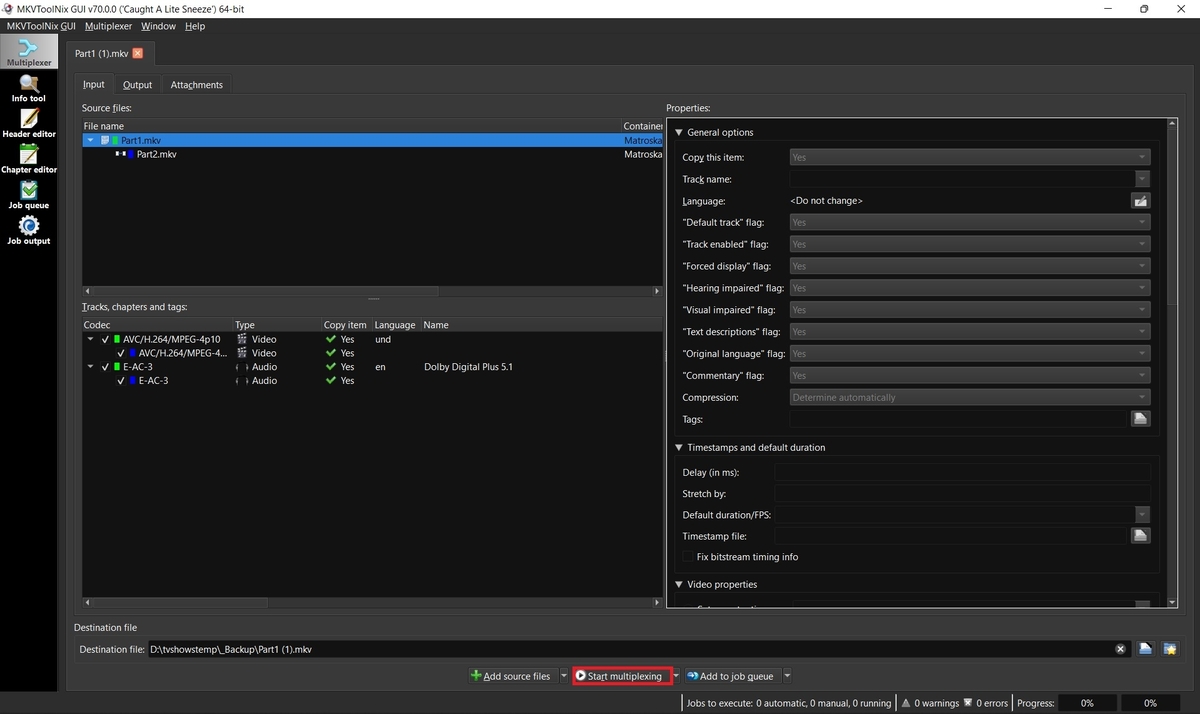
Some movies such as Lawrence of Arabia 4K are too big to fit on one disc and thus when ripped create two separate MKV files. Emby supports these multiple part movies, but merging them into one larger file is always recommended for better playback, resuming, etc. 1. Download and install MKVToolnix Click the link below if you don't already have MKVToolNix MKVToolNix Downloads – Matroska tools for Linux/Unix and Windows 2. Open the first part of your movie Start MKVToolnix Drag-n-drop part 1 of your movie to the "File name" box 3. Append part 2 Select and right-click on part 1 in the file name box Select "Append files" and open part 2 3. Start merging files together Click the "Start multiplexing" button
 4 points
 -
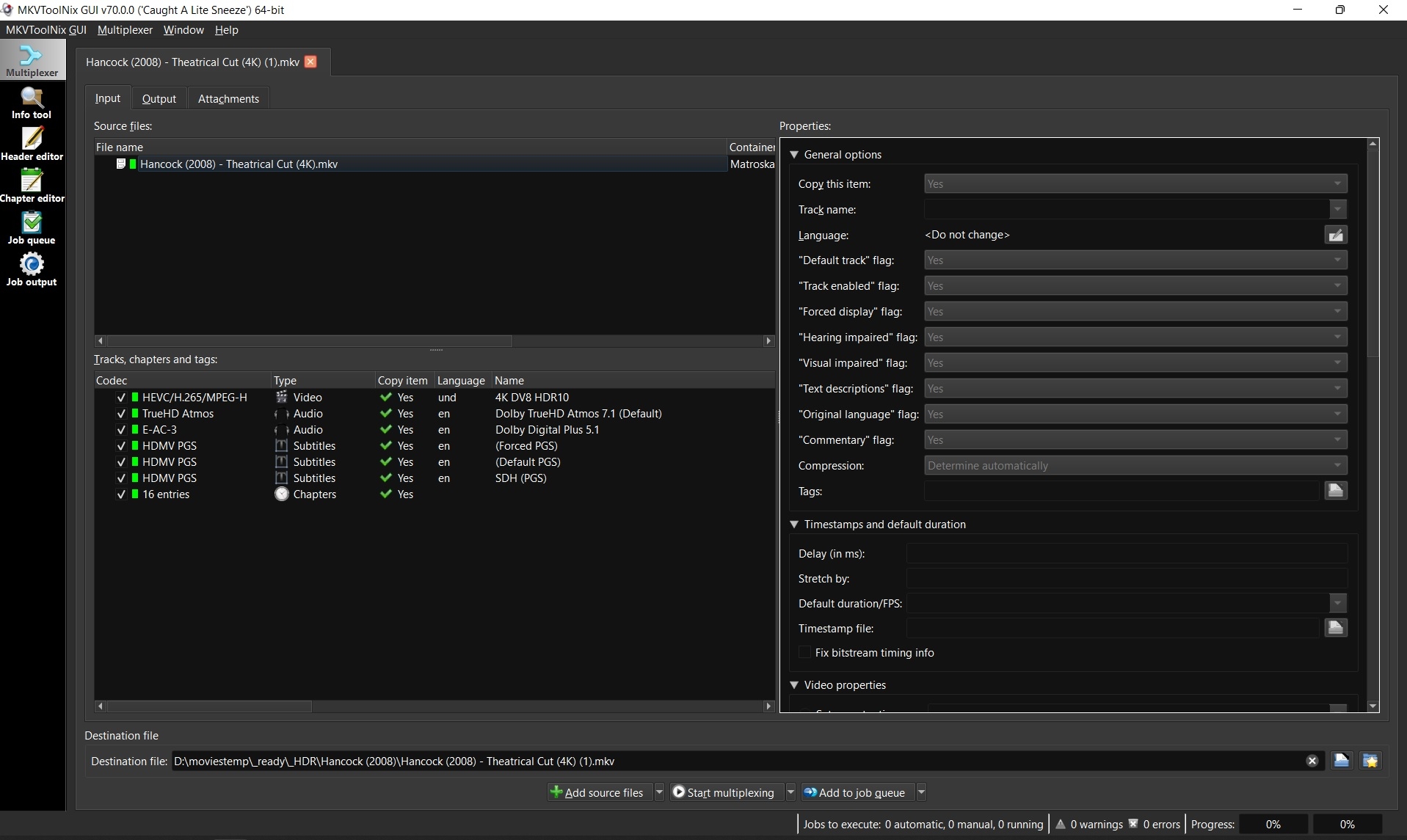
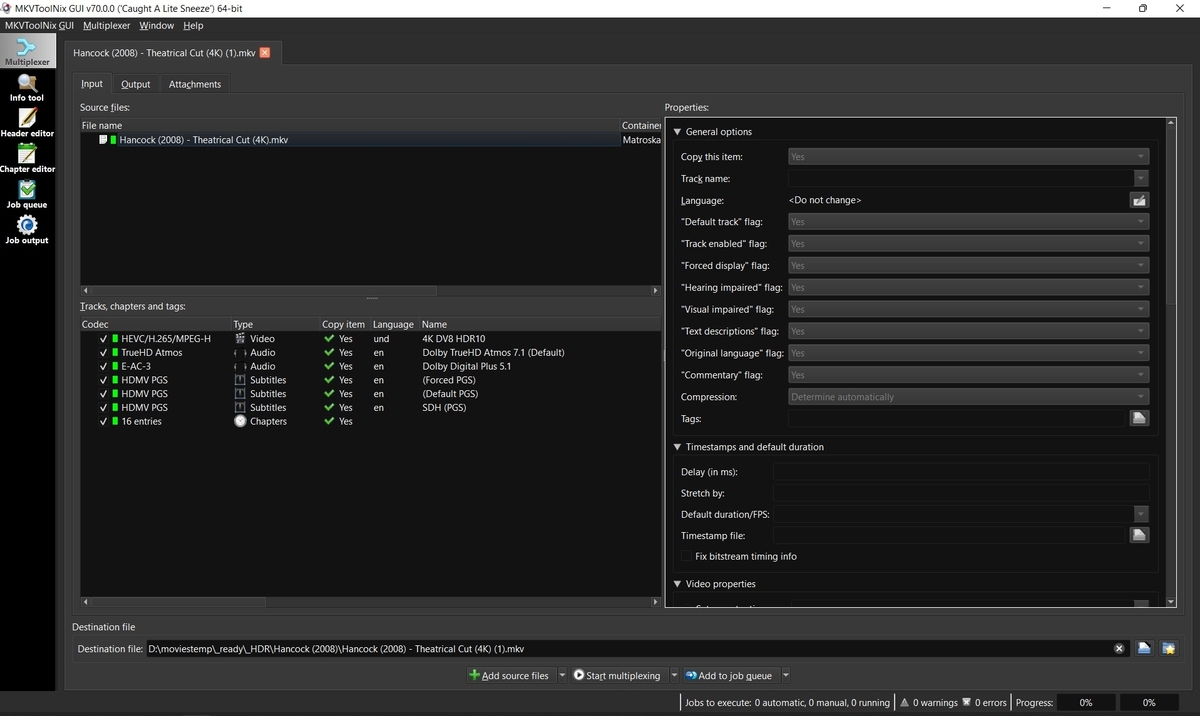
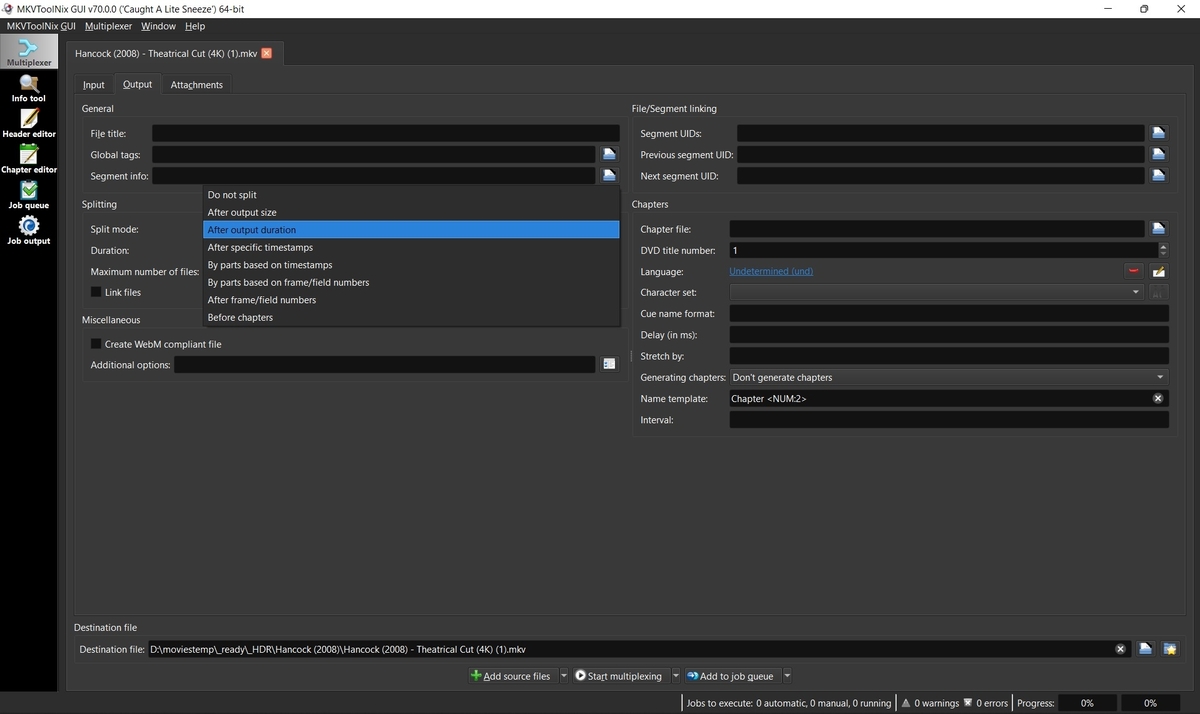
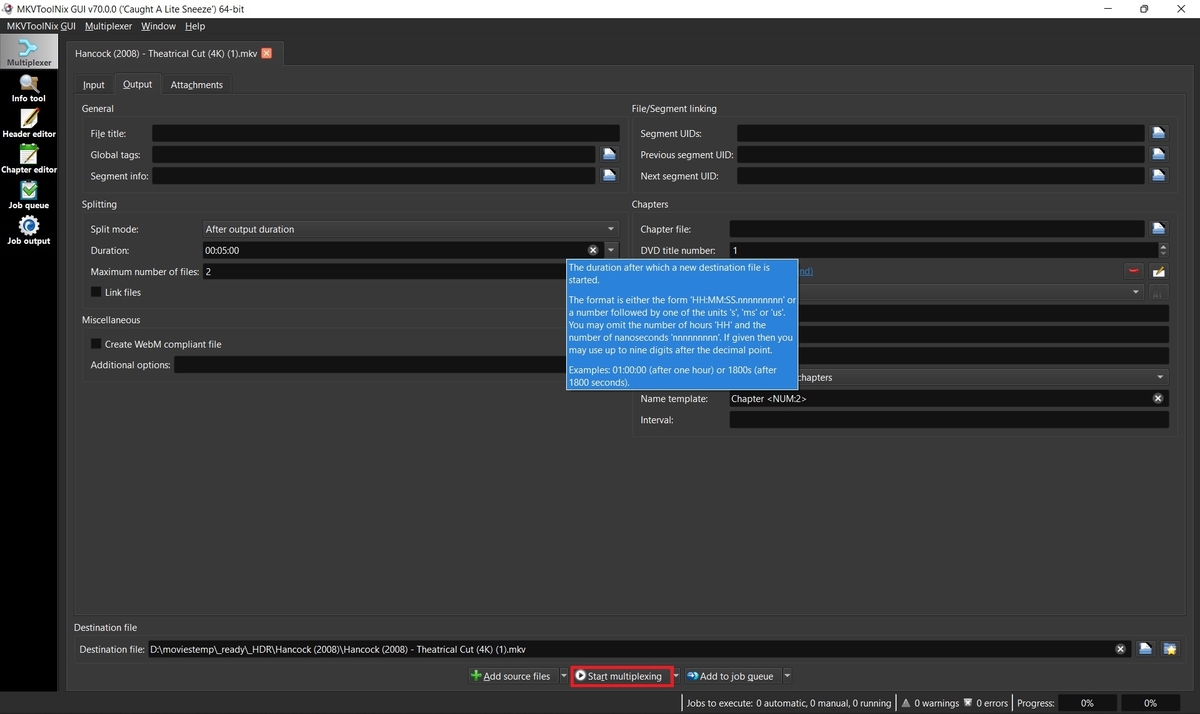
Sometimes the developers will ask for a small sample of your media to test on their end in order to troubleshoot a problem. If the file size is too large to upload somewhere, then you may want to provide a smaller portion of that video which still exhibits the reported error for testing. MKVToolnix can input other extensions than MKV, but output will always be MKV and changing the extension may not produce the same issue. 1. Download and install MKVtoolnix Click the link below if you don't already have MKVToolNix MKVToolNix Downloads – Matroska tools for Linux/Unix and Windows 2. Open video with MKVToolNix Start MKVToolNix Drag-n-drop video file to the "File name" box 3. Choose method to split video Click the "Output" tab Click the dropdown box next to "Splitting" and choose to split by output size or duration depending on what you think will get the developers just enough video to troubleshoot your problem. 4. Enter size or duration and max number of files before starting place mouse over the size or duration box to see a popup for format of options. Ex: 00:05:00 for 5 minutes Set max files to 2. You only need the first file so you can abort after the second file starts to be created if you want. Click "Start multiplexing" 5. Test your sample file Add your sample which you just split to an Emby library and test it before submitting. Ex: Hancock (2008) - Theatrical Cut (4K) (1)-001.mkv It's very possible that remuxing while splitting your file fixed the problem and then sending your sample won't help. If your sample plays good, then try just remuxing the original file and testing that. Remuxing sometimes fixes problems with bad headers, etc. 6. Upload the sample to a cloud server If your sample still exhibits the original problem, then upload your file to a cloud share such as Google Drive or Dropbox. Send a PM to the developers with a shared link to your file and a link to your post in the forum so they know what issue the file is for.
 4 points
 -
Could the way User Settings are handled be changed so that: 1 - Every setting that is changed via the Admin/Server - Users settings page becomes the new default for that particular user (instead of the Emby supplied default). 2 - Any setting that is changed appropriate for an end user to change from within that particular user account being signed in is saved at the local device level, and would be used instead of Server specified defaults. This wouild: A - Allow us to adjust the default behavior when NO local settings exist. B - Still have local device specific settings override what have been set as Server defaults. (Allowing the same User to have different settings per Device - as it is now.) It doesn't seem like the logic would be that much different than it is now. Assuming if no local settings already exist today, the Server has to pass along what it has them as for a starting point. The change wouild just be allowing us to alter what any of those base default settings are.2 points
-
Yes that is what i was thinking. If you log in you can verify/vote for items you have tested/used. A general user could then ask to have only verified items in search results etc2 points
-
At the moment, if I assign artwork to Animation in a MOVIE library, then the TV library also has the same image for Animation. Id like my MOVIES library genre artwork to have different artwork to the TV one.1 point
-
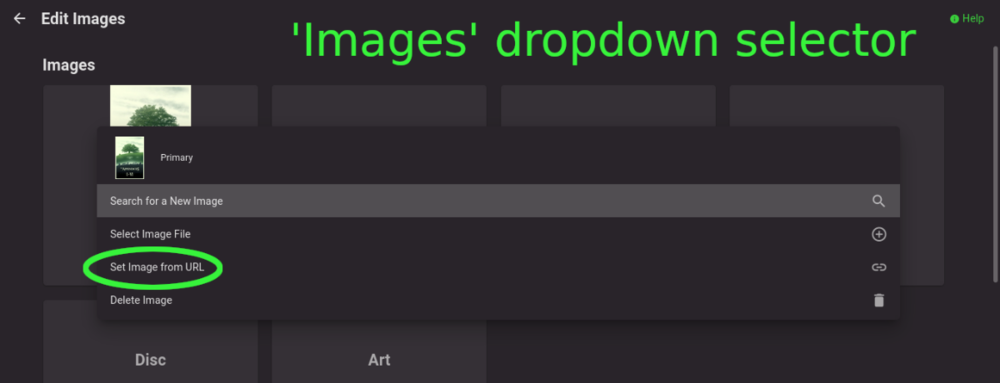
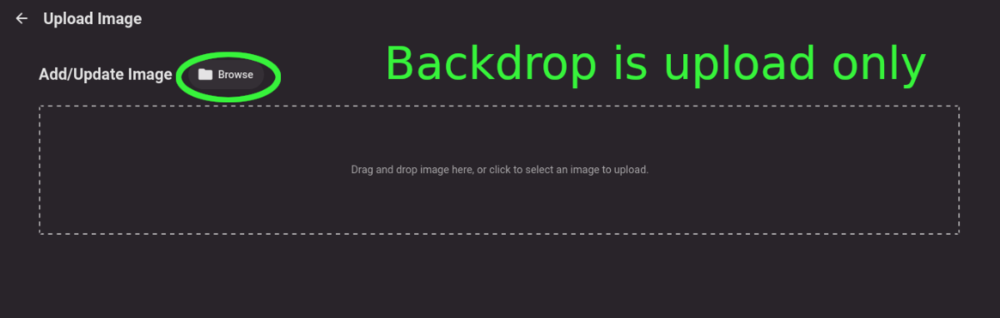
Title describes what I want but also here are some web app screenshots: The Image editor for all the types under 'Images' has a wonderful selector that includes a 'Set Image from URL' option: The Backdrops section only allows for adding images by file upload: I'd like to add Backdrops from URLs please.
 1 point
 -
There is a change in the 4.8 beta that is being backported to 4.7 so that all users can receive the performance benefits. Library folders coming out of the api will have their Id populated with the numeric database id rather than a guid. Fortunately, most plugins or api users won't require any changes, but here are some best practices to follow. These changes will work with server versions 4.6+ and are both backwards and forwards compatible, so they don't require you to target a specific server version. Server-Side Code For your API services - make your request id's a string so that they work with both the numeric and guid id's. Then you don't need to make any calls to get guid, internal id, etc. You can get an item by Id using the string and the core will figure out how to do it. So those two lines become: var item = _libraryManager.GetItemById(request.Id); Or if all you need is the internal Id, and not the full object, you can save the server some work by doing: var internalId = _libraryManager.GetInternalId(request.Id); Additionally, If you're storing library id's in a configuration file, use strings rather than guid or long, and then use the methods I mentioned above. This code will work with 4.6 servers and up, so if you make these changes, they will not be breaking and will not require you to target a higher nuget version. Client-Side JavaScript Most likely you don't' need any changes to adjust for this, but if for some reason you require access to the old guid value, then this is how you can write your code: var libraryId = folder.Guid || folder.Id; @roaku @TeamB @chef @Cheesegeezer @Tolriq @quickmic @pünktchen1 point
-
hi, a small proposal: a Button at the metadata manager to rename the file on HDD with the name and Date from the matadata. (better: with a selection with tag to use for rename) The reason: My movie file name contain the name and the year of the movie but the release og the movie here in germany is mostly one year later. WIth the wrong year at the filename the search at the imdb does not find the movie. I have to remove the year from the search. That means, i find the movie data but the file name contans the wrong year. A few week ago my database was corrupt. With the new installation of Emby I need to edit hundreds of entries manually. Waste time. greetings Taurec1 point
-
Yes, as in that case TMDB and IMDB treats each documentary as a Movie vs TVDB showing it as a Series. So current options are to clear wrong provider ids, disable providers that won't work, Refresh metadata, lock metadata and reenable providers.1 point
-
Gotcha. I'll download and install the updated version once I get home.1 point
-
Thanks for your input @chris0101 I am running my Ram Drive on 60GB and so far haven't had an issue with it filling up. It has only been a few days so far though. I'm sure @Luke will keep an eye on things and adjust emby as needed.1 point
-
HI, we found the reason for the playback stutter in the recent app update and we'll get getting an update out to the store to resolve this as quickly as we can. Thanks.1 point
-
I have found the issue, it was my ISP. thx for the support !1 point
-
That seemed to fix the issue haven’t had any issues after installing the standard android app1 point
-
Agree 100% - having that server option makes total sense. I support that all the way.1 point
-
And your above example is a total valid use case that Emby currently supports. Unfortunately Emby does not support my use case which (I feel) is equally valid. As the server admin's, we should get to decide what the defaults are for our users. To email out instructions (or to go to everyones house to change the settings) defeats the purpose of the server - client model that Emby has built. ~Spritz1 point
-
I've managed to resolve the issue - was nothing related to the emby docker image and as suspected due to my Docker Swarm set-up. The node/worker I was attempting to deploy to was running windows docker-desktop which does not work properly for swarm implementations as it cannot communicate using the ingress network. Installing linux and docker-ce on this node/worker was the solution.1 point
-
Pretty much guarantee they didn't do that. I know there are people that have been working on this for a while. I'm not sure what the state of patents is on DV. I know Dolby held a patent on DD for a long time but it expired a few years ago.1 point
-
The stuff dreams are made of in Australia!!!!! Third world in seems like most of the time. Our PM once said ‘No one needs faster that 25mbps’1 point
-
If you have an HDR-capable display, it won't tone map.1 point
-
Thanks for testing. I also tested this file with VLC Player because maybe the file has a problem but in VLC it works like it should.1 point
-
@stephen_hill merged to existing topic.1 point
-
Why not just...turn tone mapping on in your server settings?1 point
-
Bumping this to give a big thanks to M1tch. 3 years later and this just happened to me on the latest (small) Mac update. This thread saved the day for me. @M1tch1 point
-
I agree, nothing can match CF - but we seem to all be just waiting for the axe to drop - and Murphies Law say it will be at the worse time possible......Like when i am overseas!1 point
-
Thanks for further info @speechles, I understand converting to mkv using MKVToolNix is a solution and the program itself is easy to use but at this time I'd strongly prefer to avoid that. Fortunately the Roku has no issue pausing/resuming playback on the affected files, it is simply the stuttering issue. Solving it with two clicks on the fly is a better outcome for me right now although I'll definitely keep the mkv convert in mind as a longer term solution.1 point
-
Well... I'd argue that the topic is not as much about "deleting" media from playlists but more about "playlist separation for users" and all it entails. I would consider the following features to be required for proper implementation of "private playlists": Option to create public/private playlists Private playlists - hidden visibility Private playlists - public read only, with full permissions for the owner (optional) Public playlists - full visibility Public playlists - ability to hide all public playlists in the UI I might be missing something, but I'd say these are the most important features for "Public and Private playlists".1 point
-
So as a comparison, I have a 12700K/64Gb (UHD 770GPU) and with it's integrated GPU, it can handle 8-9 full 4K Remux transcodes - that's hevc 4k @ 70-80mbps each to 1080p h264 @ 10mbps. Something like this should be able to handle 20 x MPEG2 TS 1080p streams with relative ease. Do you have a MPEG2 Transport Stream example that I can test ? The raw fps will give some indication of MPEG to h264 performance. If you have something available, ping me details via PM if you like.1 point
-
getting this error today: 2022-08-17 21:06:33.101 T:580594 ERROR <general>: KeyError 2022-08-17 21:06:33.101 T:580594 ERROR <general>: : 2022-08-17 21:06:33.101 T:580594 ERROR <general>: 'v' 2022-08-17 21:06:33.101 T:580594 ERROR <general>: ----- CCurlFile::Open failed with code 0 for http://127.0.0.1:57342/v- change: MediaTypeMapping = {"m": "movie", "e": "episode", "M": "musicvideo", "p": "picture", "a": "audio", "t": "tvchannel", "A": "specialaudio", "V": "specialvideo", "i": "movie", "T": "video", "c": "channel"} # T=trailer, i=iso V to lower MediaTypeMapping = {"m": "movie", "e": "episode", "M": "musicvideo", "p": "picture", "a": "audio", "t": "tvchannel", "A": "specialaudio", "v": "specialvideo", "i": "movie", "T": "video", "c": "channel"} # T=trailer, i=iso works. is there an typo with the upper keys?1 point
-
I would suggest investigating GPU transcoding - it's simply a lot more efficient than CPU transcoding. Scaling may be an issue though. NVIDIA or Intel QuickSync will be the only real options - AMD has a relatively poor record for GPU transcoding. What CPU/GPU do you currently have ?1 point
-
Hi, the windows store app is downloading just fine in my testing. Ignore the Transfering % as that is just a display quirk right now. The desktop app does not support this download feature, but it will soon when the two windows apps are finally unified.1 point
-
Ok so then I don't need a sample file. Thanks.1 point
-
Maybe it would be helpful to have a locked stickied post that has features that are currently being worked on?1 point
-
At the moment the logic i am going with is leave it blank. I am currently working on the logic in the ChaperApi plugin, the idea is you will be able to submit a zip with multiple intro info items, the plugin will try to use the best fitting intro for the detection in each episode. There are two approaches for this. Just search for each intro cp and use the best detection, the one with the lowest hamming distance. Or pick the into cp to use in the detection based on the best season/episode index match with the episode. Not sure which is going to be best yet.1 point
-
Not sure what you mean ? My ‘old’ server has an Emby-server folder in the user folder. This contains all config info etc. The new one is a level deeper in ~/.config/Emby-server .config is hidden by default but is usually used for this kind of thing. I noticed the path change on the server dashboard page which shows the path of logs etc. Edit: in the go menu in finder you can type ‘ ~/.config/Emby-server’ and it will take you to that hidden location1 point
-
So this one looks like it's supposed to. I can see HW is definitely off now. So if you try FOX, it still doesn't work?0 points