Leaderboard




Popular Content
Showing content with the highest reputation on 08/17/22 in all areas
-
There is a change in the 4.8 beta that is being backported to 4.7 so that all users can receive the performance benefits. Library folders coming out of the api will have their Id populated with the numeric database id rather than a guid. Fortunately, most plugins or api users won't require any changes, but here are some best practices to follow. These changes will work with server versions 4.6+ and are both backwards and forwards compatible, so they don't require you to target a specific server version. Server-Side Code For your API services - make your request id's a string so that they work with both the numeric and guid id's. Then you don't need to make any calls to get guid, internal id, etc. You can get an item by Id using the string and the core will figure out how to do it. So those two lines become: var item = _libraryManager.GetItemById(request.Id); Or if all you need is the internal Id, and not the full object, you can save the server some work by doing: var internalId = _libraryManager.GetInternalId(request.Id); Additionally, If you're storing library id's in a configuration file, use strings rather than guid or long, and then use the methods I mentioned above. This code will work with 4.6 servers and up, so if you make these changes, they will not be breaking and will not require you to target a higher nuget version. Client-Side JavaScript Most likely you don't' need any changes to adjust for this, but if for some reason you require access to the old guid value, then this is how you can write your code: var libraryId = folder.Guid || folder.Id; @roaku @TeamB @chef @Cheesegeezer @Tolriq @quickmic @pünktchen5 points
-
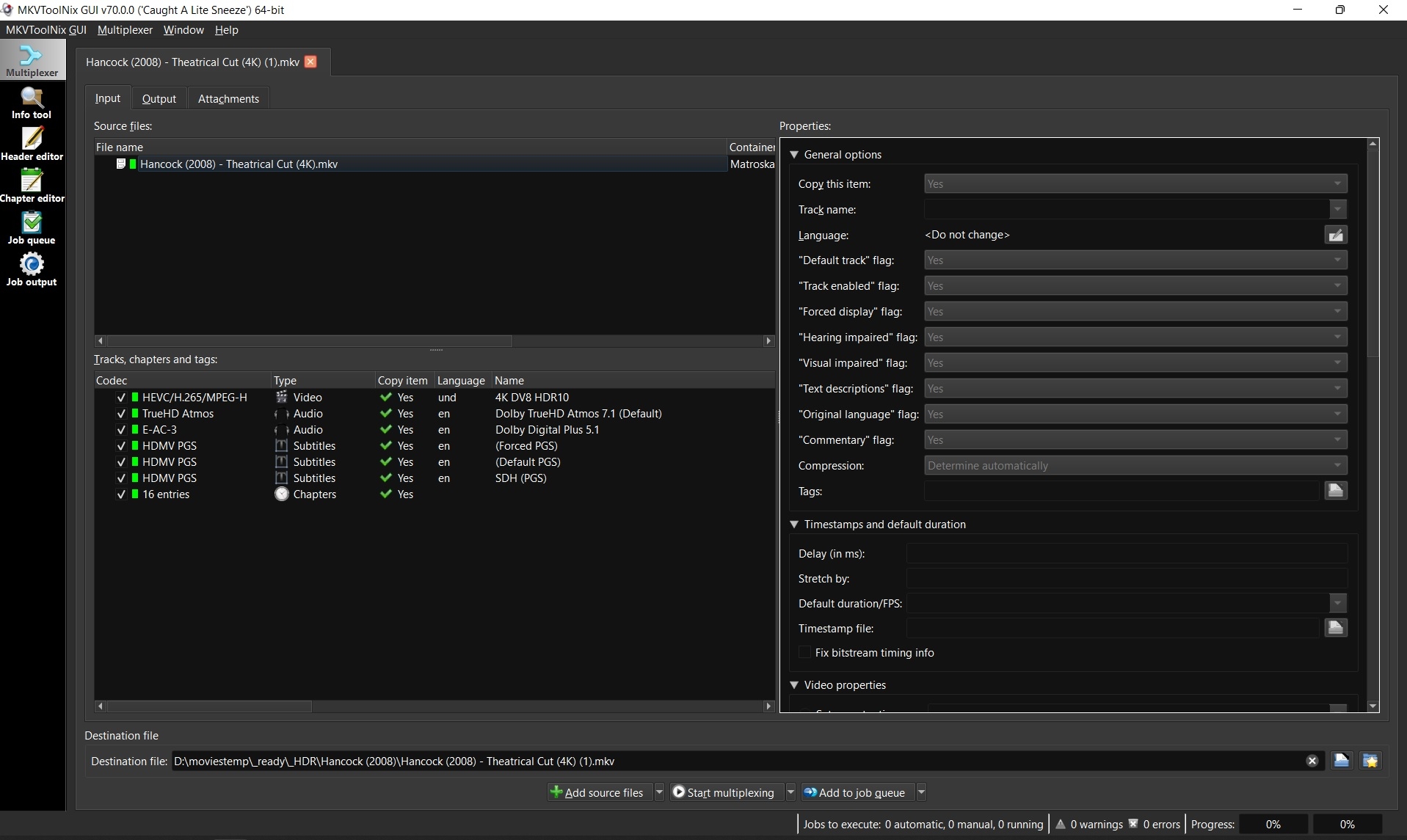
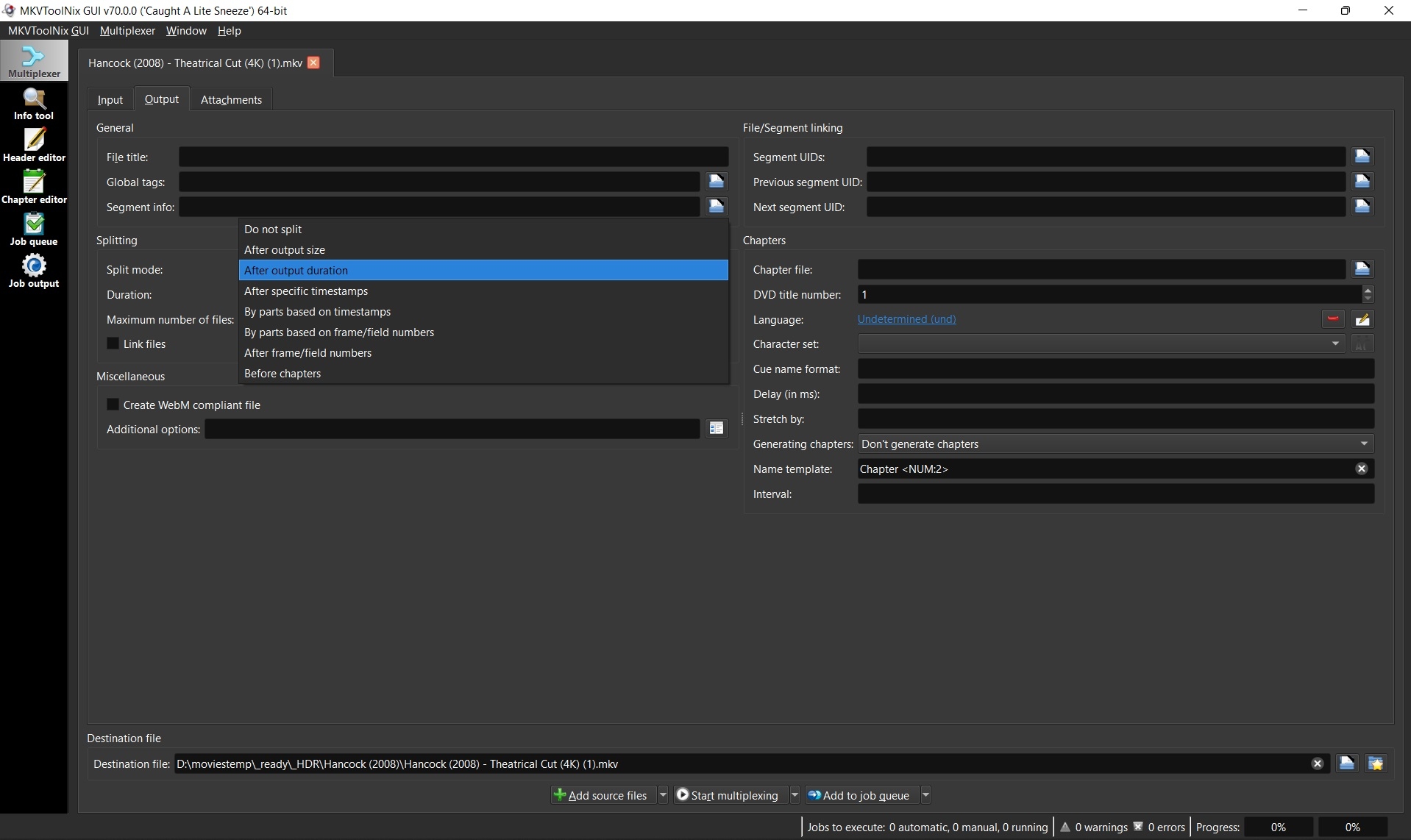
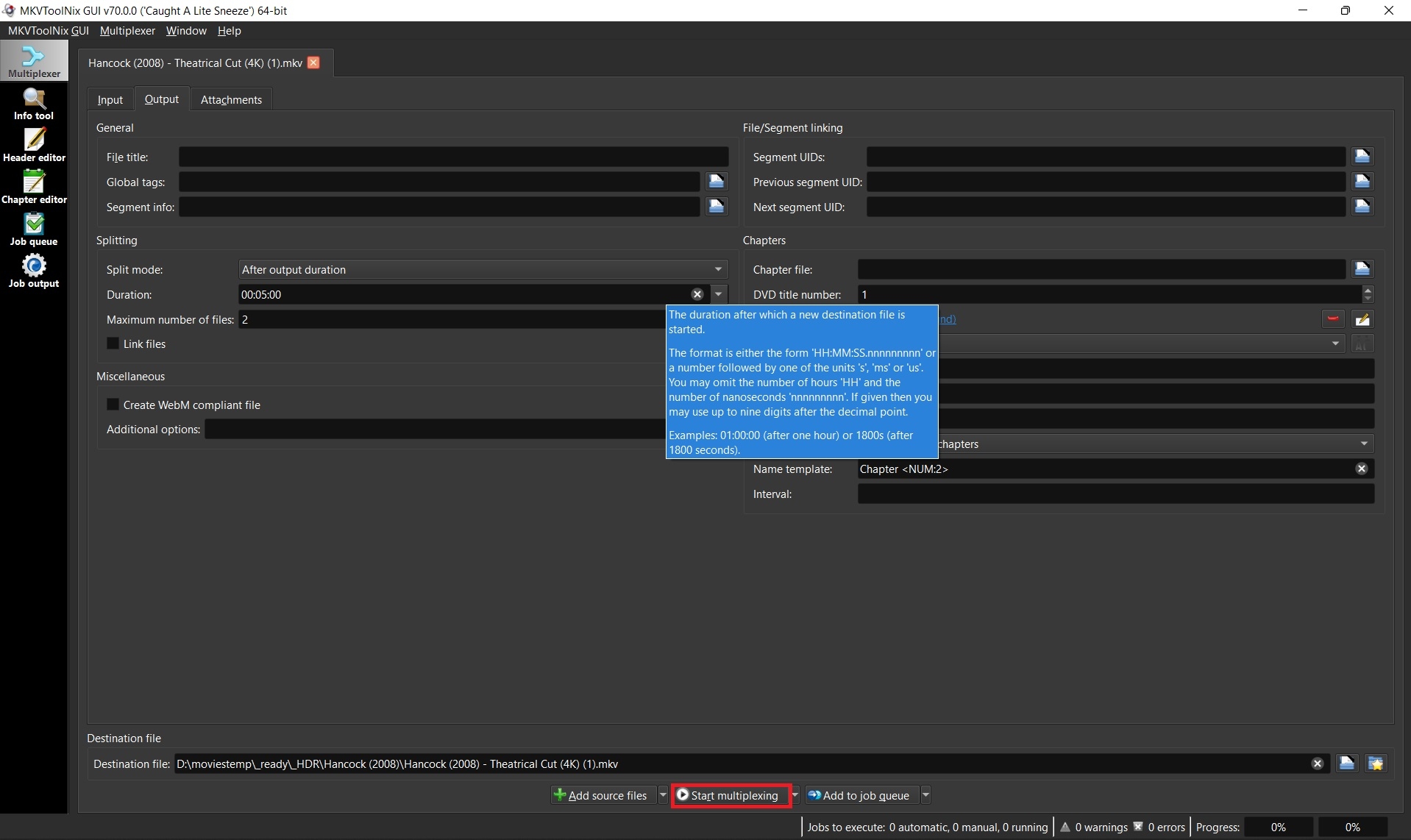
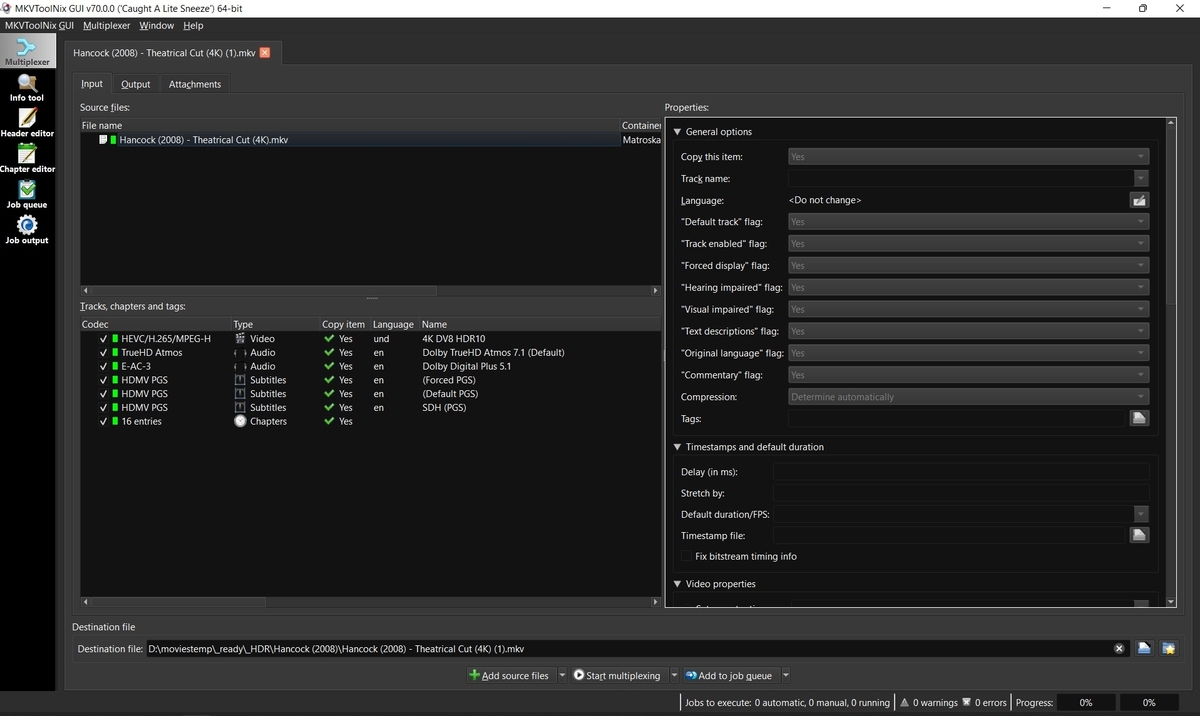
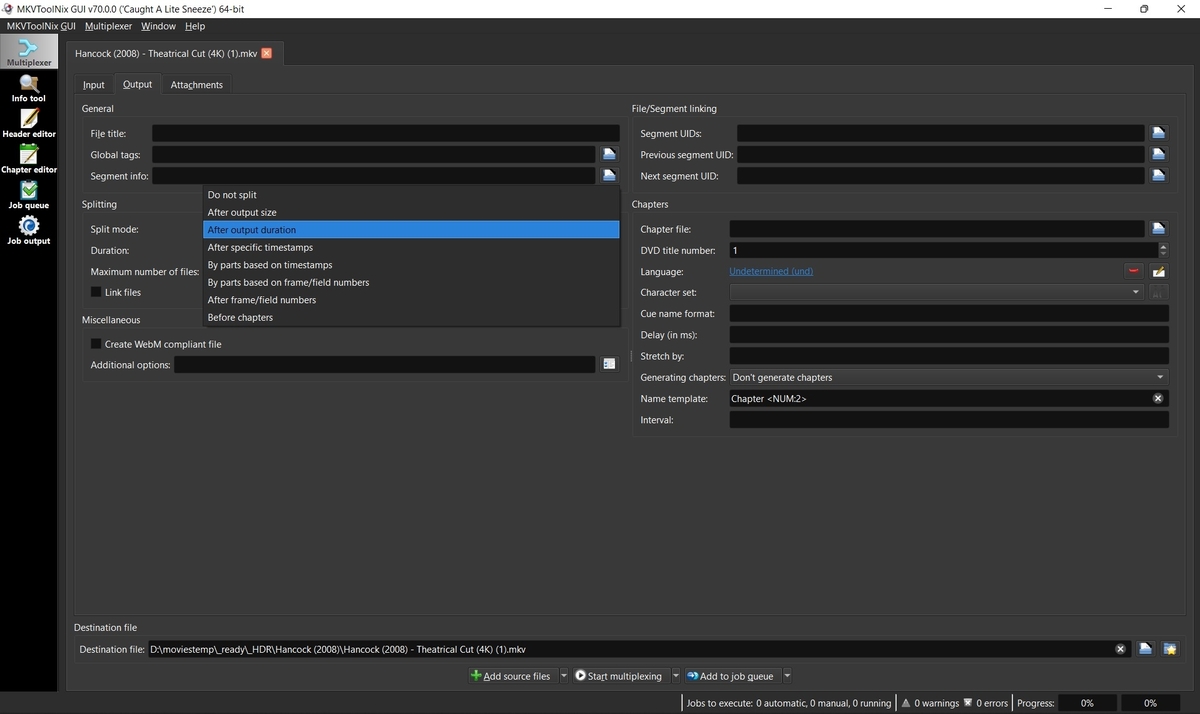
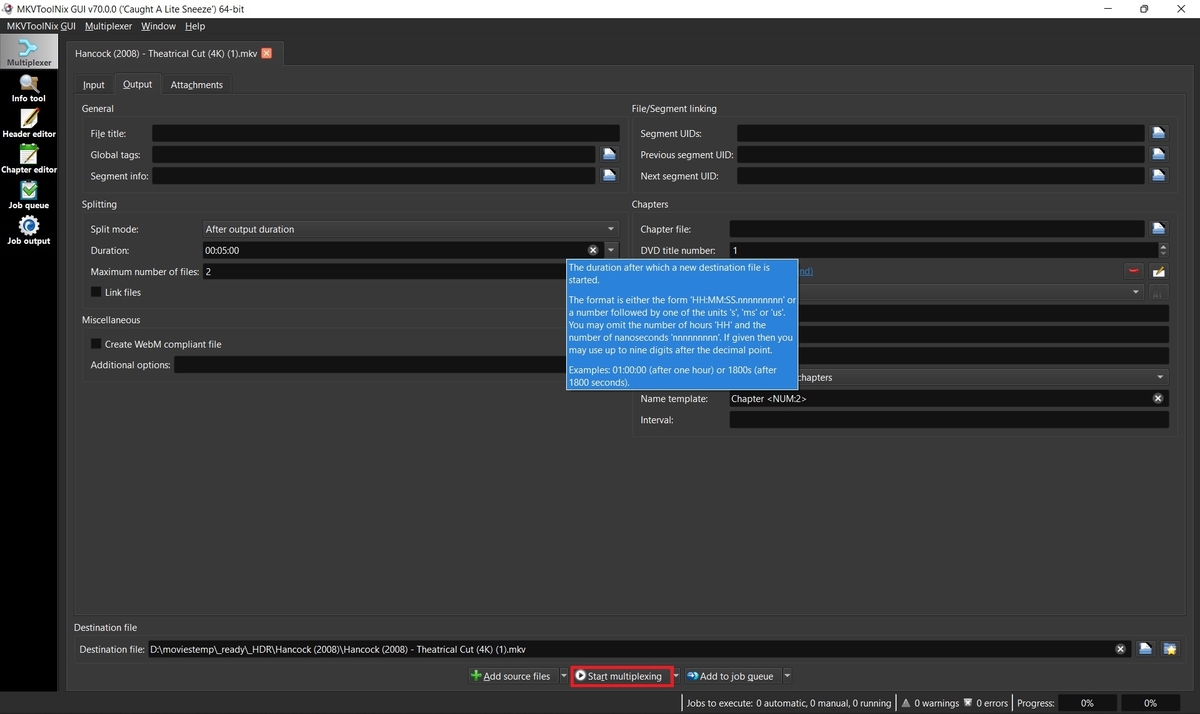
Sometimes the developers will ask for a small sample of your media to test on their end in order to troubleshoot a problem. If the file size is too large to upload somewhere, then you may want to provide a smaller portion of that video which still exhibits the reported error for testing. MKVToolnix can input other extensions than MKV, but output will always be MKV and changing the extension may not produce the same issue. 1. Download and install MKVtoolnix Click the link below if you don't already have MKVToolNix MKVToolNix Downloads – Matroska tools for Linux/Unix and Windows 2. Open video with MKVToolNix Start MKVToolNix Drag-n-drop video file to the "File name" box 3. Choose method to split video Click the "Output" tab Click the dropdown box next to "Splitting" and choose to split by output size or duration depending on what you think will get the developers just enough video to troubleshoot your problem. 4. Enter size or duration and max number of files before starting place mouse over the size or duration box to see a popup for format of options. Ex: 00:05:00 for 5 minutes Set max files to 2. You only need the first file so you can abort after the second file starts to be created if you want. Click "Start multiplexing" 5. Test your sample file Add your sample which you just split to an Emby library and test it before submitting. Ex: Hancock (2008) - Theatrical Cut (4K) (1)-001.mkv It's very possible that remuxing while splitting your file fixed the problem and then sending your sample won't help. If your sample plays good, then try just remuxing the original file and testing that. Remuxing sometimes fixes problems with bad headers, etc. 6. Upload the sample to a cloud server If your sample still exhibits the original problem, then upload your file to a cloud share such as Google Drive or Dropbox. Send a PM to the developers with a shared link to your file and a link to your post in the forum so they know what issue the file is for.
 3 points
 -
Ok, i make it tomorrow...now i dont have time. Thank you2 points
-
We are working on getting the app into the store for more countries. Let us know how you get on with the latest version. Thanks.2 points
-
https://www.dropbox.com/sh/gcti1q1p7mmgzzs/AADwWr8ScfB7v5X82hptIJgfa?dl=0 Fate Winx Saga Episode 32 points
-
It’s ok I’m waiting for crusher to live upto his handle. Crush my spirit2 points
-
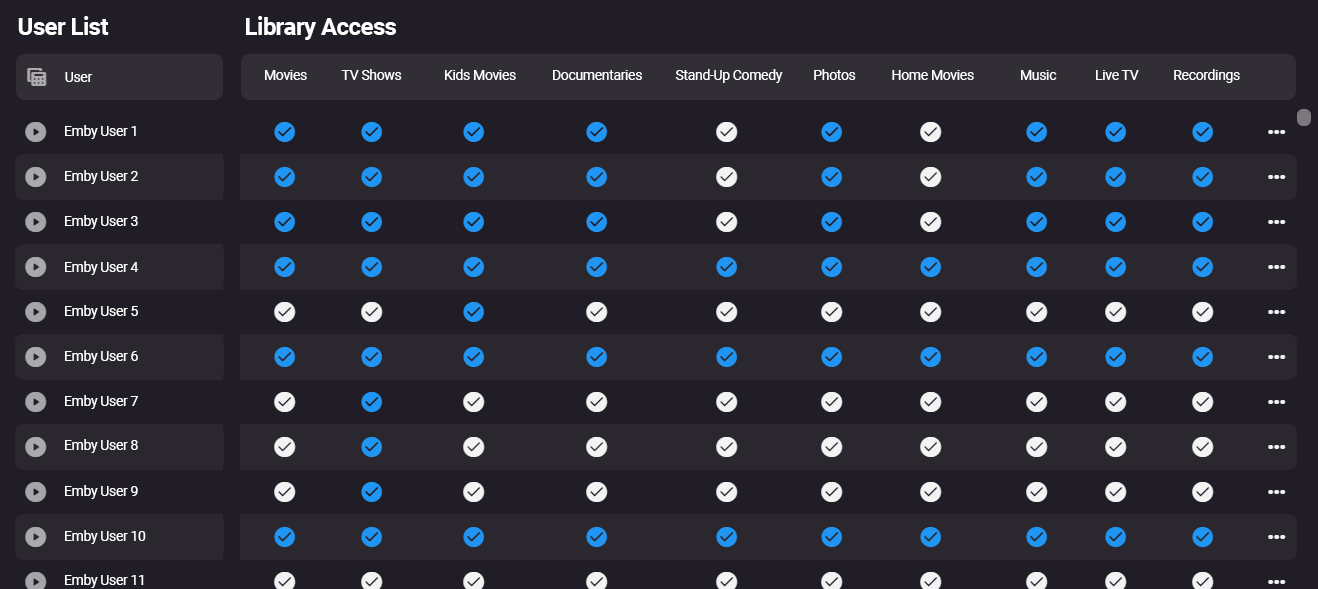
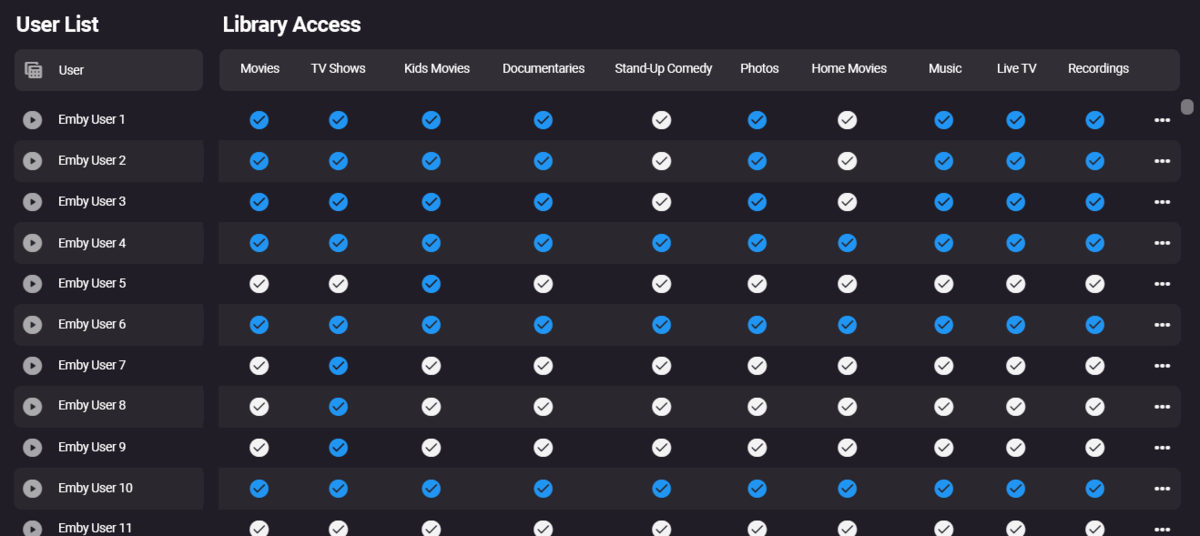
Agreed. We are desperately in need of a table-like view of library access, as @pir8radio says it gets quite cumbersome to manage with more users A flat view like this would be much easier to review at a glance:
 2 points
 -
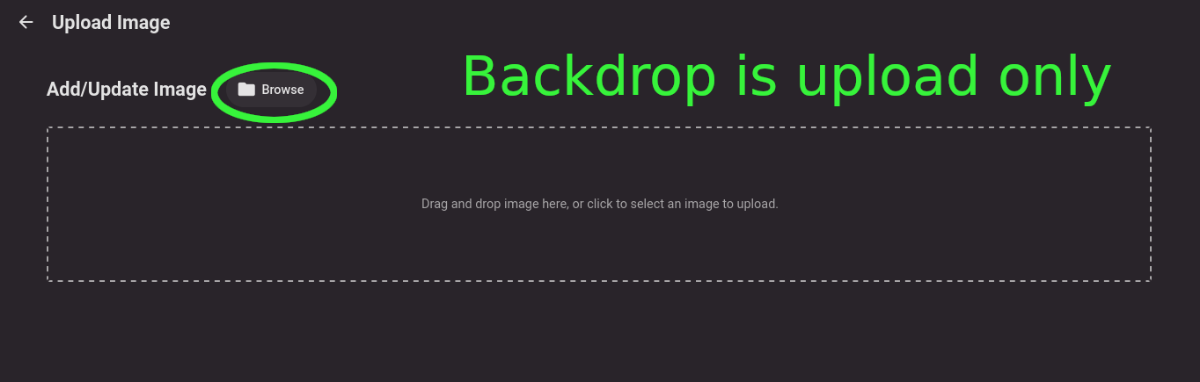
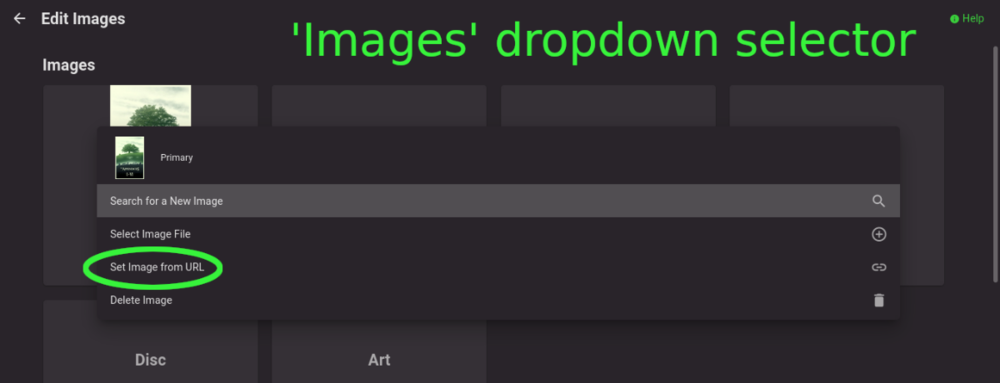
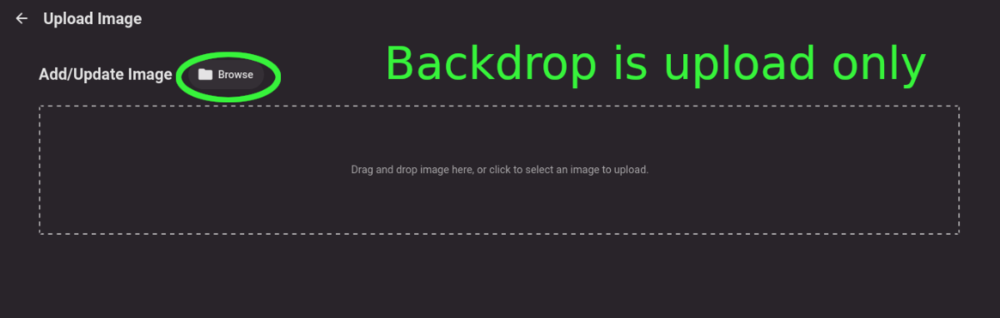
Title describes what I want but also here are some web app screenshots: The Image editor for all the types under 'Images' has a wonderful selector that includes a 'Set Image from URL' option: The Backdrops section only allows for adding images by file upload: I'd like to add Backdrops from URLs please.
 1 point
 -
Request that Emby server store Dolby Vision (including profile), Dolby Atmos, DTS:X, HDR10+ (smpte2094) and HLG for appropriate video in the db and use it for display in the media info and track selection sections of movie/episode details screen. This information once in the db can then also be used in numerous other areas like: Mediainfo Cover Art, Stats for Nerds, Distinguishing different DV profiles for hardware support and tone mapping Example Mediainfo app display of HDR10+ ffmpeg patch for HDR10+ https://patchwork.ffmpeg.org/patch/11491/ Related requested that may require DV profile information in order to prevent unneeded TM1 point
-
There is absolutely no point to it. You can have 130votes and it never gets implemented, you can have 6 votes for something else and it does get implemented, because it’s actually easy or just a bug. the vote system sucks, the answer is always ”possible in future updates” Some of these requests stem back to 2015 and the duplicate sticker just highlights how long these requests have been in the system for. move to a transparent way of communication as to what is being worked on and hopefully reasons behind it. for example… ditching guid calls to improve library performance… required for WMC but not anymore you can maybe take on important stuff from the community that will enhance something that is already in the workflow. 2 pence worth from the idiot on the hill
 1 point
 -
You can follow my FR for the HDR and audio formats to be added to core in the link below. I believe softworkz has made some progress with ffprobe and has posted screen shots somewhere I'm using the plugin H2P posted for now until it makes it to core and it seems to be working very well.1 point
-
What are your Transcode settings? Could it just be an issue with DX11VA decoder? 14:54:15.901 Impossible to convert between the formats supported by the filter 'Parsed_null_0' and the filter 'auto_scale_0' 14:54:15.901 Error reinitializing filters! 14:54:15.901 Failed to inject frame into filter network: Function not implemented 14:54:15.901 Error while processing the decoded data for stream #0:0 14:54:15.904 Conversion failed!1 point
-
Same comment for Samsung1 point
-
We don't currently have the ability to tone-map from DV specifically. However, some DV profiles also contain an HDR layer and we can tone-map those.1 point
-
Well... I'd argue that the topic is not as much about "deleting" media from playlists but more about "playlist separation for users" and all it entails. I would consider the following features to be required for proper implementation of "private playlists": Option to create public/private playlists Private playlists - hidden visibility Private playlists - public read only, with full permissions for the owner (optional) Public playlists - full visibility Public playlists - ability to hide all public playlists in the UI I might be missing something, but I'd say these are the most important features for "Public and Private playlists".1 point
-
I'm seeing the same with my 2018 and this file. It doesn't play the default subtitle shown before clicking play. Instead, it always plays the first subtitle (which is the Arabic one) in the file. Though if after you click play you then choose the German subtitle you want then it plays the correct one. Also, since this file has more than 30 tracks it skipped throughout. I remuxed it and removed everything after French (SDH) which left about 15 subtitles and it played smooth. I then tested this against some of my files. I tend to remux and remove everything but all the English subs. However, it always played the correct subtitle in my files and not just the first one in the file. If English (SDH) was chosen and there was an English forced one above it, then it still played the English (SDH) one. Difference was my files only have one subtitle language which is my default1 point
-
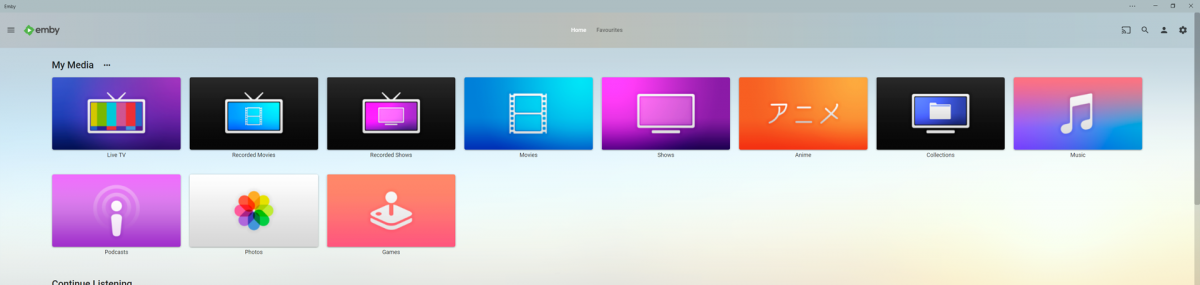
Got bored and wanted to get back into making things in photoshop so i decided to make a few apple tv themed library icons to add a bit of colour to my server, it has been awhile since i worked in photoshop but luckily apples designs for their icons are pretty simple and easy to replicate. I have taken some liberties of course for personal preference but overall i think they turned out okay and i had quite a lot of fun making these and have already decided to maybe make more aha hope you guys like them. --------------------------------------------- Here is an Imgur Album if you only want specific Icons otherwise the zip file includes all the files. https://imgur.com/a/bnVq43H --------------------------------------------- library icons.zip - File Contents Anime.png // 1280px x 720px Collections.png // 1280px x 720px Files.png // 1280px x 720px Games.png // 1280px x 720px Live TV.png // 1280px x 720px Movies.png // 1280px x 720px Music.png // 1280px x 720px Photos.png // 1280px x 720px Podcast.png // 1280px x 720px Recorded Movies.png // 1280px x 720px Recorded TV Shows.png // 1280px x 720px TV Shows.png // 1280px x 720px ---------------------------------------------
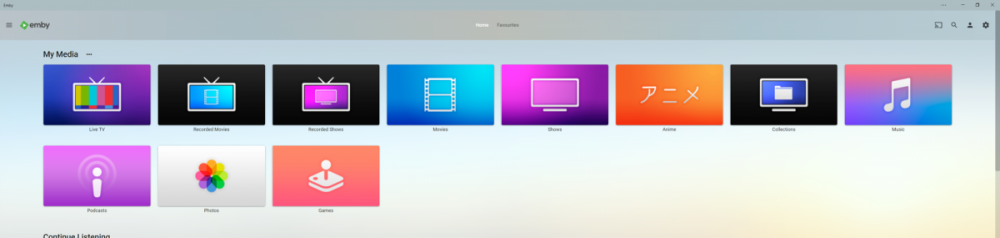 1 point
 -
This is now fixed and I can save the minimum time for TV Episodes. Thanks1 point
-
Yep - I was looking for exactly that first time I tried to use it - I also tried to 'box' the items - but then released you just need to click the last item. It works in reverse as well to de-select - so that's all good.1 point
-
Yea when you're holding shift I need to add a mouseover effect so that you can see what will become selected if you click another one. That will help make it more obvious that the feature is available.1 point
-
Already ported to stable 4.7.6.0.1 point
-
Hi, I also have the same problem with Emby Theater on Ubuntu 22.04 lts. Trying to play any music (or video) has been met with a spinning wheel. This behavior occurs on the two systems that I have been playing around with using Emby for the last 7 months, an x86-64 machine (Intel I7-6700) and a raspberry pi4b arm64 machine. Emby Theater (3.0.15) worked fine on both machines when using Ubuntu 21.10 (arm64 machine) and Ubuntu 20.04 its (x86-64 machine). Attached are 2 files with the terminal output (1 file for each machine, each file has output for v. 3.0.15 and 3.0.16). The two files also contain some system information. Version 3.0.16 does not change the program’s behavior. Since I know enough to be dangerous, don’t go too far down this rabbit hole if you have other ideas. It appears to be some type of GL problem (permissions related?) if I were to hazard a guess. Note the last line in some of the terminal output (‘failed to initialize mpv GL context’). If I, as root, set LIBGL_DRIVERS_PATH to ‘/usr/lib/aarch64-linux-gnu/dri’, the related errors in the terminal output are different (see the arm64 file). No change is seen if I set the path with my user or emby permissions. Emby server is working fine. I can listen to music fine on remote devices. Just nothing from Emby Theater on the host machine. Let me know if I can provide any other information. The pi4 controls my home audio multi-zone system and provides one of the audio inputs (from Emby Theater when it is working). Thanks for looking into this. embyTheaterOut_x64 embyTheaterOut_arm641 point
-
Hi, you can just install the latest USB version that we have posted on our website.1 point
-
Brill - I'll use the official version and report back. Thanks for your help @Luke1 point
-
Any updates on this? It’s a very annoying bug1 point
-
Ok thanks for the info.1 point
-
Ok I will try it1 point
-
I periodically download/remove albums in the Android app. I need a visual indication that I've already downloaded an album to my phone in the grid and single item views to make that process sane.1 point
-
Hi, yes I agree. Thanks for the feedback.1 point
-
I think we are doing some things that are not supported on 12.1 but would work on the latest 12.x and above. We'll have to look at how we can handle that.1 point
-
Hi. Under the "cog" menu during playback, there is an option labeled "Playback Correction". Can you try choosing that and see if that solves the issue? You can choose it multiple times until the player finally gives up.1 point
-
Thanks for updating that! Oh, boy... Did I mention how much I love configuring audio in Arch? I generally use Alsa. After reading your comment I tried Pulse, but was getting errors about not finding a working profile, module failing to load, and segmentation faults. There are some posts with the same issue, but I wasn't able to get it working. Maybe this will help someone. I ended up trying Pipewire as you mentioned, which I've never used before. Downloaded Pipewire, then "systemctl --user enable pipewire.service", and "systemctl --user start pipewire.service." I also downloaded pipewire-{alsa, pulse, and jack}. After rebooting I found I had sound if I plugged headphones directly into my desktop, but now I didn't have sound through my Motu M2. I found in another post that alsa-ucm-conf needed to be downgraded to 1.2.7.1-1 and alsa-lib to 1.2.7.1-1. After a reboot, sound was restored and I'm finally watching Predator in 4k in Emby Theater! Thanks for your help alucryd!1 point
-
Hi. Yes, that would be accurate. DV is a proprietary format owned by Dolby Labs. They are a business to make money and they do that through licensing their technology.1 point
-
Reinstalled linux fresh again. This time round installed emby first, then ran through a minimal emby setup. Stopped emby then moved /var/lib/emby out the way and replaced with my backup of /var/lid/emby, restarted and it worked straight away with nothing else required.1 point
-
Thanks Luke, I'll take a look at this.1 point
-
Try latest catalogue release. It should be bloody brilliant1 point
-
Hi I have quite a few emby users, I also keep my personal phone pictures on my emby server. Its getting tough to manage my users and make sure they have the correct access. Is there an option somewhere I am missing to click a library or something and view the list of users that have access to that library? Right now i have to go into every user, then view their access, meh.. I would love to just be able to see who has access to view my personal pictures (as one example) and view a list of users that have access to that particular library.1 point
-
That communication is from whoever set up the server you have been using ("their" server, presumably, rather than "yours"). You will need to get your new instructions from them. Emby themselves, whose forum this is, provide software, and support for people using their software - but can't help with access to other people's systems. Paul1 point
-
Maybe it would be helpful to have a locked stickied post that has features that are currently being worked on?1 point
-
I installed it over the weekend on a DS918+. I had no issues at all with Emby after the update.1 point
-
A revamp of user management is needed at some point, so this is good feedback to keep in mind.1 point
-
The problem's back so as you suspected "device purging" didn't solve it. And now I'm also seeing it on iOS Safari (on iPad.) I wonder if the problems with my EmbyServer settings. I run stable and beta, two separate installs but similar settings, and it happens with both. Any ideas? EDIT: Bug still present in 4.8.0.8 beta EDIT: Bug still present in 4.8.0.9 beta1 point
-
Thank you so much for the responses. I did find the issue and am embarrassed that it's to me happened before. I had the movies library created and working. A couple weeks ago I threw into that library folder a new film to be watched sometime later. I never checked that the new film showed up in Emby at that time. It was "Fantasia (1941).mkv". h265/7.1DTS. The file played fine in VLC, but appears to crash the Emby scan (not sure if crash is the correct term). When I deleted and then re installed the library this one film kept Emby from creating the library. Removing it and rescanning worked fine. I cannot figure out what might be wrong with the file, but it has happened to me occasionally before. Anyway. Thanks again. Bobby1 point
-
Bleh. So since I had a small number of these to deal with, I thought I know what I'll do, I'll move all the parts to a temporary directory, and move them in one at a time, have Emby generate the bif file, then move it away, repeat until it's done them all for me and move everything back. Brilliant! So I started with a single one, "An Evening With Kevin Smith" and moved part1 out of the way, rescanned the directory, it found the file and helpfully created a bif, moved things back so it would be correct again.. and part2 doesn't have thumbs when scrubbing anyway. So I guess there's some other glue missing in the server to make it work too. Ah well, I'll just be patient until it's fixed and have to refrain from having thumbnails for the like five things in my library this actually affects. Poor me I'll have to watch all of Quadrophenia instead of scrubbing right to Bell Boy...1 point
-
Hi, there is currently no way to do this, but ultimately we plan to support all of the usual view options on that screen, so it's coming.1 point
-
Hopefully soon. Thanks.1 point
-
Are you sure the 65inch worked in your last tests? All 4 of the ffmpeg logs look like failures, including ffmpeg-transcode-5d865ef5-6986-451e-95e0-956dcb7410f3_1.txt which was the 65inch. Can you try disabling hardware transcoding and try again?0 points
-
If you are dead set on continuing with WMC as a part of your Emby experience, we suggest you stay on Emby Server 4.6 as it has now become very difficult for us to maintain EMC and future server versions could very well create compatibility issues. Instead, we advise looking into moving to Emby Theater or one of the now very mature streaming platforms (Android, Amazon, etc.). Thanks. Emby Server 4.6.7.0 points